



If you can’t measure SharePoint,
    you can’t improve SharePoint
              Christian Buckley, Axceler
             Paul Lawbaugh, Webtrends
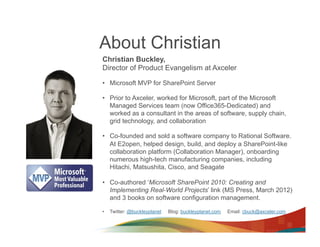
About Christian
Christian Buckley,
Director of Product Evangelism at Axceler

•  Microsoft MVP for SharePoint Server

•  Prior to Axceler, worked for Microsoft, part of the Microsoft
   Managed Services team (now Office365-Dedicated) and
   worked as a consultant in the areas of software, supply chain,
   grid technology, and collaboration

•  Co-founded and sold a software company to Rational Software.
   At E2open, helped design, build, and deploy a SharePoint-like
   collaboration platform (Collaboration Manager), onboarding
   numerous high-tech manufacturing companies, including
   Hitachi, Matsushita, Cisco, and Seagate

•  Co-authored ‘Microsoft SharePoint 2010: Creating and
   Implementing Real-World Projects’ link (MS Press, March 2012)
   and 3 books on software configuration management.

•    Twitter: @buckleyplanet   Blog: buckleyplanet.com   Email: cbuck@axceler.com
About Axceler
Improving Collaboration since 2007
Mission: To enable enterprises to simplify, optimize, and
secure their collaborative platforms
      –  Delivered award-winning administration and migration
           software since 1994, for SharePoint since 2007
      –  Over 2,000 global customers

Dramatically improve the management
of SharePoint
      –    Innovative products that improve security, scalability,
           reliability, “deployability”
      –    Making IT more effective and efficient and lower the total
           cost of ownership

Focus on solving specific SharePoint
problems (Administration & Migration)
      –    Coach enterprises on SharePoint best practices
      –    Give administrators the most innovative tools available
      –    Anticipate customers’ needs
      –    Deliver best of breed offerings
      –    Stay in lock step with SharePoint development and market trends
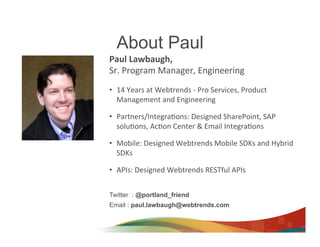
About Paul
Paul	
  Lawbaugh,	
  	
  
Sr.	
  Program	
  Manager,	
  Engineering	


•  14	
  Years	
  at	
  Webtrends	
  -­‐	
  Pro	
  Services,	
  Product	
  
   Management	
  and	
  Engineering	
  

•  Partners/Integra>ons:	
  Designed	
  SharePoint,	
  SAP	
  
   solu>ons,	
  Ac>on	
  Center	
  &	
  Email	
  Integra>ons	
  

•  Mobile:	
  Designed	
  Webtrends	
  Mobile	
  SDKs	
  and	
  Hybrid	
  
   SDKs	
  

•  APIs:	
  Designed	
  Webtrends	
  RESTful	
  APIs	


Twitter : @portland_friend
Email : paul.lawbaugh@webtrends.com
A Complete SharePoint
Measurement Solution
Problems with Enterprise Collaboration

•  Adoption
•  Business process alignment
•  ROI
   Adoption + Alignment + ROI = Productivity
Why focus on Productivity?
•  To simplify the interface into SharePoint
•  To better align end user activities with
   the needs of the business
•  To better streamline business processes
•  To get more out of SharePoint
The result?
•  Faster employee on-boarding
   and training
•  More business output
•  More usage of the platform
•  Faster realization of the financial
   investments you’ve made in SharePoint
Why are We Here Today


Productivity Improvements in
   SharePoint 2013
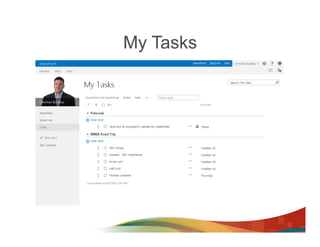
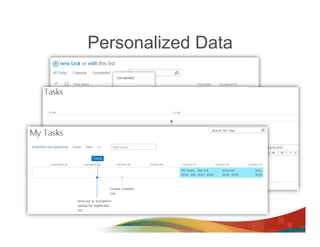
My Tasks
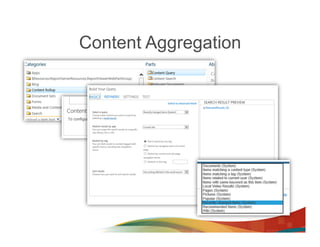
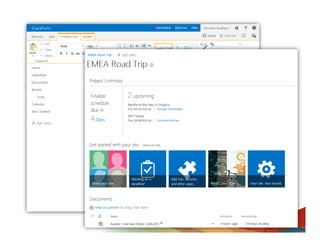
Content Aggregation
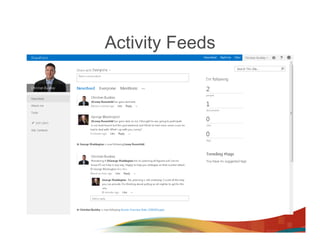
Activity Feeds
Personalized Data
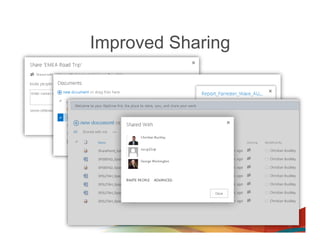
Improved Sharing
Why are We Here Today


Measuring Productivity
  •  SharePoint reporting is broad, with available data spread across
     site, site collection, and farm-level roles and requirements.

  •  For Administrators, timely and accurate reporting can help
     maintain governance rules and compliance policies, and to help
     monitor productivity and scalability of the platform.
Reporting Areas
SharePoint administration reporting can be separated into 5 categories:

    Permissions
        •  Troubleshooting why users cannot see the content they should
        •  Reporting for different types of compliance
        •  Auditing who has access to sensitive content
    Usage/Activity
        •  Finding what content is, or is not, being used
        •  Planning for future growth
        •  Understanding hardware requirements
    Storage
        •  Monitoring growth for performance reasons
        •  Understanding hardware requirements
        •  Reorganizing taxonomy based on Storage needs
    Audit
        •  Needing to show who accessed what and when, to adhere to internal or external
           compliance requirements
    Performance
        •  Monitoring page load times to uncover problems
        •  Planning for increased usage
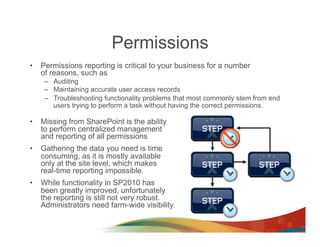
Permissions
•  Permissions reporting is critical to your business for a number
   of reasons, such as
    –  Auditing
    –  Maintaining accurate user access records
    –  Troubleshooting functionality problems that most commonly stem from end
       users trying to perform a task without having the correct permissions.

•  Missing from SharePoint is the ability
   to perform centralized management
   and reporting of all permissions
•  Gathering the data you need is time
   consuming, as it is mostly available
   only at the site level, which makes
   real-time reporting impossible.
•  While functionality in SP2010 has
   been greatly improved, unfortunately
   the reporting is still not very robust.
   Administrators need farm-wide visibility.
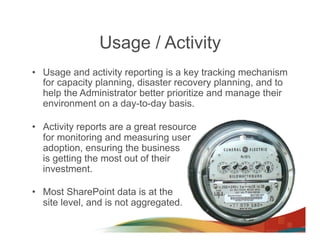
Usage / Activity
•  Usage and activity reporting is a key tracking mechanism
   for capacity planning, disaster recovery planning, and to
   help the Administrator better prioritize and manage their
   environment on a day-to-day basis.

•  Activity reports are a great resource
   for monitoring and measuring user
   adoption, ensuring the business
   is getting the most out of their
   investment.

•  Most SharePoint data is at the
   site level, and is not aggregated.
Storage
•  Analyzing storage is extremely important for capacity planning,
   and for understanding the growth and performance
   requirements of each team within your organization.

•  The best practice of monitoring and setting limits on the size of
   SharePoint sites should be an important part of your
   governance policies.

•  The next step to setting these
   governance policies is tracking
   usage and ensuring end users have
   the storage they require to meet
   their business needs.
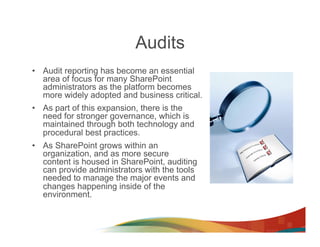
Audits
•  Audit reporting has become an essential
   area of focus for many SharePoint
   administrators as the platform becomes
   more widely adopted and business critical.
•  As part of this expansion, there is the
   need for stronger governance, which is
   maintained through both technology and
   procedural best practices.
•  As SharePoint grows within an
   organization, and as more secure
   content is housed in SharePoint, auditing
   can provide administrators with the tools
   needed to manage the major events and
   changes happening inside of the
   environment.
Performance
•  Most SharePoint performance reporting comes from outside of the
   platform, either through customer scripts and reporting against the
   farm, or through third-party monitoring and performance tools.

•  Most performance reporting is owned by operations, not the
   SharePoint Administrator / End User community, however Microsoft
   and members of the SharePoint partner ecosystem are constantly
   adding toolkits and solutions to help with this gap.

•  Central Administration now has a whole section
   for monitoring, which includes Health
   Analyzer, timer jobs, and detailed reporting.
Measuring Productivity is Hard
•  Everyone	
  focuses	
  on	
  how	
  to	
  help	
  the	
  customer.
•  But	
  at	
  the	
  end	
  of	
  the	
  day,	
  if	
  you	
  don't	
  understand	
  
   what	
  the	
  customers	
  wants/needs	
  (and	
  capture	
  
   the	
  right	
  data	
  to	
  measure	
  their	
  sa>sfac>on)	
  you	
  
   will	
  not	
  be	
  successful.	
  
•  It’s	
  the	
  same	
  for	
  your	
  end	
  users.	


•  The	
  lesson?	
  	
  
    –  Understand	
  what	
  they	
  want	
  and	
  need	
  
    –  Track	
  the	
  metrics,	
  and	
  	
  
    –  Con>nually	
  op8mize	
  the	
  system	
  (thank	
  you	
  Mr.	
  Deming)
Why are We Here Today


 (awkward transition slide)
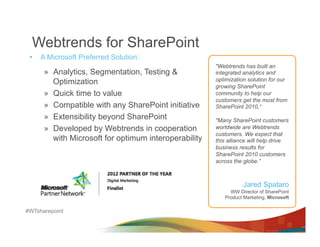
Webtrends for SharePoint
 •    A Microsoft Preferred Solution:
                                                        "Webtrends has built an
       »  Analytics, Segmentation, Testing &            integrated analytics and
          Optimization                                  optimization solution for our
                                                        growing SharePoint
       »  Quick time to value                           community to help our
                                                        customers get the most from
       »  Compatible with any SharePoint initiative     SharePoint 2010,“
       »  Extensibility beyond SharePoint               "Many SharePoint customers
       »  Developed by Webtrends in cooperation         worldwide are Webtrends
                                                        customers. We expect that
          with Microsoft for optimum interoperability   this alliance will help drive
                                                        business results for
                                                        SharePoint 2010 customers
                                                        across the globe.”


                                                                   Jared Spataro
                                                             WW Director of SharePoint
                                                           Product Marketing, Microsoft

#WTsharepoint
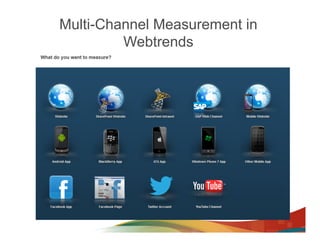
Multi-Channel Measurement in
         Webtrends
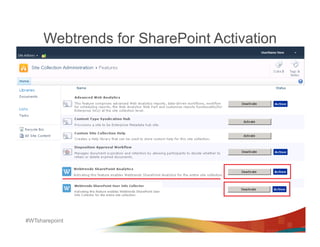
Webtrends for SharePoint Activation


#WTsharepoint
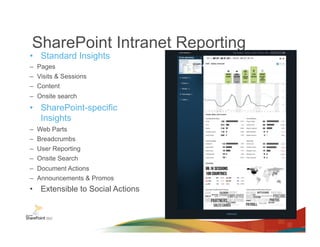
SharePoint Intranet Reporting
•  Standard Insights
–  Pages
–  Visits & Sessions
–  Content
–  Onsite search
•  SharePoint-specific
   Insights
–    Web Parts
–    Breadcrumbs
–    User Reporting
–    Onsite Search
–  Document Actions
–  Announcements & Promos
•  Extensible to Social Actions
What’s New in v3
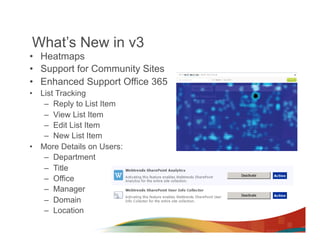
•  Heatmaps
•  Support for Community Sites
•  Enhanced Support Office 365
•  List Tracking
    –  Reply to List Item
    –  View List Item
    –  Edit List Item
    –  New List Item
•  More Details on Users:
    –  Department
    –  Title
    –  Office
    –  Manager
    –  Domain
    –  Location
Top 5 Take-Aways
•  If you don’t measure SharePoint, you can’t
   improve SharePoint
•  Measure SharePoint from the inside-out and
   the outside-in
•  Focus on adoption and engagement – people
   matter
•  Webtrends is a Microsoft-preferred solution
•  Axceler is a great partner – check out their
   kiosk to learn more
Sessions You Must See
•  Today @ 3:10m : Leveraging Mobile to Extend
   the Social Enterprise
  –  Webtrends + Slalom Consulting

•  Wed @ 10:10 am: Driving Adotion of
   Collaboration Initiatives
  –  NewsGator + Webtrends

•  Wed @ 2:50 pm: Designing a Measurement
   Framework for the Social Enterprise
  –  Susan Ettlinger – Altimeter
Rate
 Session
   &
Speakers/
Panelists
Contact Us
*  Christian Buckley            *  Paul Lawbaugh
  cbuck@axceler.com              paul.lawbaugh@webtrends.com
  +1 425-246-2823
  @buckleyPLANET                 @portland_friend
  www.buckleyPLANET.com          www.webtrends.com
  and http://info.axceler.com
Engage 2013 - Measuring SharePoint

Engage 2013 - Measuring SharePoint

  • 1.
    If you can’tmeasure SharePoint, you can’t improve SharePoint Christian Buckley, Axceler Paul Lawbaugh, Webtrends
  • 2.
    About Christian Christian Buckley, Directorof Product Evangelism at Axceler •  Microsoft MVP for SharePoint Server •  Prior to Axceler, worked for Microsoft, part of the Microsoft Managed Services team (now Office365-Dedicated) and worked as a consultant in the areas of software, supply chain, grid technology, and collaboration •  Co-founded and sold a software company to Rational Software. At E2open, helped design, build, and deploy a SharePoint-like collaboration platform (Collaboration Manager), onboarding numerous high-tech manufacturing companies, including Hitachi, Matsushita, Cisco, and Seagate •  Co-authored ‘Microsoft SharePoint 2010: Creating and Implementing Real-World Projects’ link (MS Press, March 2012) and 3 books on software configuration management. •  Twitter: @buckleyplanet Blog: buckleyplanet.com Email: cbuck@axceler.com
  • 3.
    About Axceler Improving Collaborationsince 2007 Mission: To enable enterprises to simplify, optimize, and secure their collaborative platforms –  Delivered award-winning administration and migration software since 1994, for SharePoint since 2007 –  Over 2,000 global customers Dramatically improve the management of SharePoint –  Innovative products that improve security, scalability, reliability, “deployability” –  Making IT more effective and efficient and lower the total cost of ownership Focus on solving specific SharePoint problems (Administration & Migration) –  Coach enterprises on SharePoint best practices –  Give administrators the most innovative tools available –  Anticipate customers’ needs –  Deliver best of breed offerings –  Stay in lock step with SharePoint development and market trends
  • 4.
    About Paul Paul  Lawbaugh,     Sr.  Program  Manager,  Engineering     •  14  Years  at  Webtrends  -­‐  Pro  Services,  Product   Management  and  Engineering   •  Partners/Integra>ons:  Designed  SharePoint,  SAP   solu>ons,  Ac>on  Center  &  Email  Integra>ons   •  Mobile:  Designed  Webtrends  Mobile  SDKs  and  Hybrid   SDKs   •  APIs:  Designed  Webtrends  RESTful  APIs     Twitter : @portland_friend Email : paul.lawbaugh@webtrends.com
  • 5.
  • 6.
    Problems with EnterpriseCollaboration •  Adoption •  Business process alignment •  ROI Adoption + Alignment + ROI = Productivity
  • 7.
    Why focus onProductivity? •  To simplify the interface into SharePoint •  To better align end user activities with the needs of the business •  To better streamline business processes •  To get more out of SharePoint
  • 8.
    The result? •  Fasteremployee on-boarding and training •  More business output •  More usage of the platform •  Faster realization of the financial investments you’ve made in SharePoint
  • 9.
    Why are WeHere Today Productivity Improvements in SharePoint 2013
  • 10.
  • 11.
  • 12.
  • 13.
  • 15.
  • 16.
    Why are WeHere Today Measuring Productivity •  SharePoint reporting is broad, with available data spread across site, site collection, and farm-level roles and requirements. •  For Administrators, timely and accurate reporting can help maintain governance rules and compliance policies, and to help monitor productivity and scalability of the platform.
  • 17.
    Reporting Areas SharePoint administrationreporting can be separated into 5 categories: Permissions •  Troubleshooting why users cannot see the content they should •  Reporting for different types of compliance •  Auditing who has access to sensitive content Usage/Activity •  Finding what content is, or is not, being used •  Planning for future growth •  Understanding hardware requirements Storage •  Monitoring growth for performance reasons •  Understanding hardware requirements •  Reorganizing taxonomy based on Storage needs Audit •  Needing to show who accessed what and when, to adhere to internal or external compliance requirements Performance •  Monitoring page load times to uncover problems •  Planning for increased usage
  • 18.
    Permissions •  Permissions reportingis critical to your business for a number of reasons, such as –  Auditing –  Maintaining accurate user access records –  Troubleshooting functionality problems that most commonly stem from end users trying to perform a task without having the correct permissions. •  Missing from SharePoint is the ability to perform centralized management and reporting of all permissions •  Gathering the data you need is time consuming, as it is mostly available only at the site level, which makes real-time reporting impossible. •  While functionality in SP2010 has been greatly improved, unfortunately the reporting is still not very robust. Administrators need farm-wide visibility.
  • 19.
    Usage / Activity • Usage and activity reporting is a key tracking mechanism for capacity planning, disaster recovery planning, and to help the Administrator better prioritize and manage their environment on a day-to-day basis. •  Activity reports are a great resource for monitoring and measuring user adoption, ensuring the business is getting the most out of their investment. •  Most SharePoint data is at the site level, and is not aggregated.
  • 20.
    Storage •  Analyzing storageis extremely important for capacity planning, and for understanding the growth and performance requirements of each team within your organization. •  The best practice of monitoring and setting limits on the size of SharePoint sites should be an important part of your governance policies. •  The next step to setting these governance policies is tracking usage and ensuring end users have the storage they require to meet their business needs.
  • 21.
    Audits •  Audit reportinghas become an essential area of focus for many SharePoint administrators as the platform becomes more widely adopted and business critical. •  As part of this expansion, there is the need for stronger governance, which is maintained through both technology and procedural best practices. •  As SharePoint grows within an organization, and as more secure content is housed in SharePoint, auditing can provide administrators with the tools needed to manage the major events and changes happening inside of the environment.
  • 22.
    Performance •  Most SharePointperformance reporting comes from outside of the platform, either through customer scripts and reporting against the farm, or through third-party monitoring and performance tools. •  Most performance reporting is owned by operations, not the SharePoint Administrator / End User community, however Microsoft and members of the SharePoint partner ecosystem are constantly adding toolkits and solutions to help with this gap. •  Central Administration now has a whole section for monitoring, which includes Health Analyzer, timer jobs, and detailed reporting.
  • 23.
    Measuring Productivity isHard •  Everyone  focuses  on  how  to  help  the  customer. •  But  at  the  end  of  the  day,  if  you  don't  understand   what  the  customers  wants/needs  (and  capture   the  right  data  to  measure  their  sa>sfac>on)  you   will  not  be  successful.   •  It’s  the  same  for  your  end  users.       •  The  lesson?     –  Understand  what  they  want  and  need   –  Track  the  metrics,  and     –  Con>nually  op8mize  the  system  (thank  you  Mr.  Deming)
  • 24.
    Why are WeHere Today (awkward transition slide)
  • 25.
    Webtrends for SharePoint •  A Microsoft Preferred Solution: "Webtrends has built an »  Analytics, Segmentation, Testing & integrated analytics and Optimization optimization solution for our growing SharePoint »  Quick time to value community to help our customers get the most from »  Compatible with any SharePoint initiative SharePoint 2010,“ »  Extensibility beyond SharePoint "Many SharePoint customers »  Developed by Webtrends in cooperation worldwide are Webtrends customers. We expect that with Microsoft for optimum interoperability this alliance will help drive business results for SharePoint 2010 customers across the globe.” Jared Spataro WW Director of SharePoint Product Marketing, Microsoft #WTsharepoint
  • 26.
  • 27.
    Webtrends for SharePointActivation #WTsharepoint
  • 28.
    SharePoint Intranet Reporting • Standard Insights –  Pages –  Visits & Sessions –  Content –  Onsite search •  SharePoint-specific Insights –  Web Parts –  Breadcrumbs –  User Reporting –  Onsite Search –  Document Actions –  Announcements & Promos •  Extensible to Social Actions
  • 29.
    What’s New inv3 •  Heatmaps •  Support for Community Sites •  Enhanced Support Office 365 •  List Tracking –  Reply to List Item –  View List Item –  Edit List Item –  New List Item •  More Details on Users: –  Department –  Title –  Office –  Manager –  Domain –  Location
  • 30.
    Top 5 Take-Aways • If you don’t measure SharePoint, you can’t improve SharePoint •  Measure SharePoint from the inside-out and the outside-in •  Focus on adoption and engagement – people matter •  Webtrends is a Microsoft-preferred solution •  Axceler is a great partner – check out their kiosk to learn more
  • 31.
    Sessions You MustSee •  Today @ 3:10m : Leveraging Mobile to Extend the Social Enterprise –  Webtrends + Slalom Consulting •  Wed @ 10:10 am: Driving Adotion of Collaboration Initiatives –  NewsGator + Webtrends •  Wed @ 2:50 pm: Designing a Measurement Framework for the Social Enterprise –  Susan Ettlinger – Altimeter
  • 32.
    Rate Session & Speakers/ Panelists
  • 33.
    Contact Us *  ChristianBuckley *  Paul Lawbaugh cbuck@axceler.com paul.lawbaugh@webtrends.com +1 425-246-2823 @buckleyPLANET @portland_friend www.buckleyPLANET.com www.webtrends.com and http://info.axceler.com