An Introduction to
Microsoft SharePoint 2013


         Singapore   |   Karachi   |   Riyadh
Benefits

Welcome to the new way to work together. The next version of SharePoint
introduces new ways to share your work and work with others, organize
your projects and teams and discover people and information.

Share

Organize

Discover

Build

Manage
Benefits


Share
Put social to work
Share ideas, discover answers and keep track of
what your colleagues are working with new social
features throughout SharePoint.


Share your stuff
Publish content to SharePoint from any Office
application and share with people inside and
outside your organization in a few simple clicks.


Take SharePoint on the go
Share documents, update your activity feed and
keep in touch with your colleagues from your mobile
phone or tablet.
Benefits


Organize
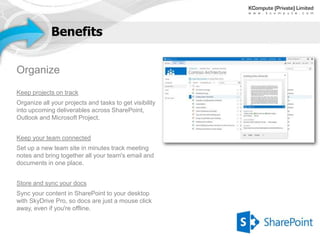
Keep projects on track
Organize all your projects and tasks to get visibility
into upcoming deliverables across SharePoint,
Outlook and Microsoft Project.


Keep your team connected
Set up a new team site in minutes track meeting
notes and bring together all your team's email and
documents in one place.


Store and sync your docs
Sync your content in SharePoint to your desktop
with SkyDrive Pro, so docs are just a mouse click
away, even if you're offline.
Benefits


Discover
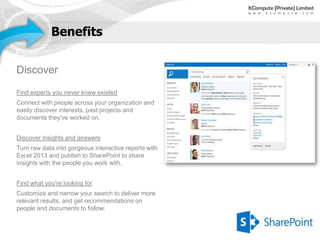
Find experts you never knew existed
Connect with people across your organization and
easily discover interests, past projects and
documents they've worked on.


Discover insights and answers
Turn raw data into gorgeous interactive reports with
Excel 2013 and publish to SharePoint to share
insights with the people you work with.


Find what you're looking for
Customize and narrow your search to deliver more
relevant results, and get recommendations on
people and documents to follow.
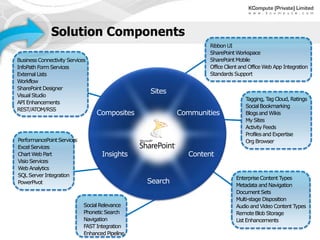
Solution Components
                                                 Ribbon UI
                                                 SharePoint Workspace
Business Connectivity Services                   SharePoint Mobile
InfoPath Form Services                           Office Client and Office Web App Integration
External Lists                                   Standards Support
Workflow
SharePoint Designer
Visual Studio
                                                                Tagging, T Cloud, Ratings
                                                                           ag
API Enhancements
                                                                Social Bookmarking
REST/ATOM/RSS
                                                                Blogs and Wikis
                                                                My Sites
                                                                Activity Feeds
                                                                Profiles and Expertise
PerformancePoint Services                                       Org Browser
Excel Services
Chart Web Part
Visio Services
Web Analytics
SQL Server Integration
                                                            Enterprise Content Types
PowerPivot
                                                            Metadata and Navigation
                                                            Document Sets
                                                            Multi-stage Disposition
                             Social Relevance               Audio and Video Content Types
                             Phonetic Search                Remote Blob Storage
                             Navigation                     List Enhancements
                             FAST Integration
                             Enhanced Pipeline
Capabilities and Features

SharePoint Server 2013 has been optimized for the way people work,
providing people with a familiar, consistent view of information,
collaboration, and process, and IT with a comprehensive, easily-managed
and integrated platform to meet the needs of the business.

Branding

Business Connectivity Services

Business Intelligence

Mobile Devices

Search

Social Computing

Web Content Management
Capabilities and Features


             Branding
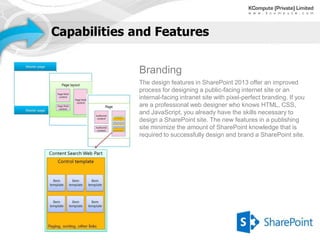
             The design features in SharePoint 2013 offer an improved
             process for designing a public-facing internet site or an
             internal-facing intranet site with pixel-perfect branding. If you
             are a professional web designer who knows HTML, CSS,
             and JavaScript, you already have the skills necessary to
             design a SharePoint site. The new features in a publishing
             site minimize the amount of SharePoint knowledge that is
             required to successfully design and brand a SharePoint site.
Capabilities and Features


PowerPoint Automation Service
Information is at SharePoint’s core and making that information in a variety of formats leads to broader
collaboration and access to improvements in software. SharePoint Server 2013 provides a new
PowerPoint Automation Service, which is similar to the current Word Automation Service. The
PowerPoint Automation Service can automate conversation of Microsoft PowerPoint presentations to
many formats, which promotes a high degree of accessibility, from converting older Office formats to
newer Office formats, or to web pages, or PDFs.


Work Management
The Work Management Service provides task aggregation across work management systems,
including Microsoft SharePoint, Microsoft Exchange Server, and Microsoft Project Server. For
example, users can edit tasks from Exchange Server on a mobile phone, and the Work Management
Service aggregates tasks from Exchange Server in the My tasks SharePoint list.
Capabilities and Features


Business Connectivity
Services
BCS offers improvements to the way that
SharePoint 2013 and Office 2013 clients can
access data that is stored outside of SharePoint.


• OData support
• Automatic generation of BDC models for OData
  data sources
• Event listener
   - Subscriptions enable event receivers on
   external lists
• Support for apps for SharePoint
• External list enhancements
Capabilities and Features


Business Intelligence
SharePoint Server 2013 business intelligence
applications and tools let you organize your vision
of organizational goals, processes, and
performance requirements.


• Create powerful data mash-ups using
  PowerPivot, with the ability to process billions of
  rows, create data models and facilitate sharing
  and collaboration with Excel Services.
• Power View provides intuitive ad-hoc reporting.
  With PerformancePoint Services and Dashboard
  Designer.
• Along with Visio Services, create sophisticated
  dashboards capable of integrating reports and
  metrics from multiple data sources that are
  customizable for your audience.
Capabilities and Features


Mobile Devices
SharePoint Server 2013 offers new, optimized
viewing experiences across different mobile
platforms. Additionally, there are several features
that are available to help improve both worker
productivity and usability on the device.


• Optimized mobile browser experience
• Device channels
• Push notifications
• Location
• Business intelligence content
• Office Web Apps
Capabilities and Features


Social Computing
The social computing and collaboration features in SharePoint 2013 offer an
improved administration and user experience, in addition to new functionality
for enterprise users to share and collaborate with others in their organization.


• Community Sites
• My Sites
Capabilities and Features


Search
Enterprise search in SharePoint Server 2013
includes many of the capabilities of SharePoint
Server 2010 and provides numerous improvements,
such as in query processing and targeting of search
results.


• People Search
• Expertise Search
Capabilities and Features


Web Content Management
The web content management improvements in
SharePoint 2013 simplify how you design
publishing sites, and enhance the authoring and
publishing processes of your organization. It also
contains new features that use enterprise search to
surface dynamic web content on publishing sites.


• Content authoring improvements                      • Content Search Web Part
• Variations for multilingual sites                   • Refiners and faceted navigation
• Cross-site publishing                               • Analytics and recommendations
• Catalog-enabled libraries and lists                 • Branding
• Managed navigation                                  • Device-specific targeting
• Category pages
• Friendly URLs
Capabilities and Features


Workflow
SharePoint Server 2013 brings major advancements to workflows: enterprise features such as fully
declarative authoring, REST and Service Bus messaging, elastic scalability, and managed service
reliability.


SharePoint Server 2013 can use a new workflow service built on the Windows Workflow Foundation
components of the .NET Framework 4.5. This new service is called Workflow Manager and it is
designed to play a central role in the enterprise. Processes are central to any organization and
workflow is the orchestrator of processes.
Capabilities and Features


Identity Management
Authentication enhancements in SharePoint 2013 ease the process of using claims-based
authentication. Additionally, support for server-to-server authentication and app authentication by
utilizing and extending the Open Authorization 2.0 (OAuth 2.0) web authorization protocol enables new
scenarios and functionality for Exchange Server 2013, Lync Server 2013, and apps in the SharePoint
Store or App Catalog.

Introduction to SharePoint 2013

  • 1.
    An Introduction to MicrosoftSharePoint 2013 Singapore | Karachi | Riyadh
  • 2.
    Benefits Welcome to thenew way to work together. The next version of SharePoint introduces new ways to share your work and work with others, organize your projects and teams and discover people and information. Share Organize Discover Build Manage
  • 3.
    Benefits Share Put social towork Share ideas, discover answers and keep track of what your colleagues are working with new social features throughout SharePoint. Share your stuff Publish content to SharePoint from any Office application and share with people inside and outside your organization in a few simple clicks. Take SharePoint on the go Share documents, update your activity feed and keep in touch with your colleagues from your mobile phone or tablet.
  • 4.
    Benefits Organize Keep projects ontrack Organize all your projects and tasks to get visibility into upcoming deliverables across SharePoint, Outlook and Microsoft Project. Keep your team connected Set up a new team site in minutes track meeting notes and bring together all your team's email and documents in one place. Store and sync your docs Sync your content in SharePoint to your desktop with SkyDrive Pro, so docs are just a mouse click away, even if you're offline.
  • 5.
    Benefits Discover Find experts younever knew existed Connect with people across your organization and easily discover interests, past projects and documents they've worked on. Discover insights and answers Turn raw data into gorgeous interactive reports with Excel 2013 and publish to SharePoint to share insights with the people you work with. Find what you're looking for Customize and narrow your search to deliver more relevant results, and get recommendations on people and documents to follow.
  • 6.
    Solution Components Ribbon UI SharePoint Workspace Business Connectivity Services SharePoint Mobile InfoPath Form Services Office Client and Office Web App Integration External Lists Standards Support Workflow SharePoint Designer Visual Studio Tagging, T Cloud, Ratings ag API Enhancements Social Bookmarking REST/ATOM/RSS Blogs and Wikis My Sites Activity Feeds Profiles and Expertise PerformancePoint Services Org Browser Excel Services Chart Web Part Visio Services Web Analytics SQL Server Integration Enterprise Content Types PowerPivot Metadata and Navigation Document Sets Multi-stage Disposition Social Relevance Audio and Video Content Types Phonetic Search Remote Blob Storage Navigation List Enhancements FAST Integration Enhanced Pipeline
  • 7.
    Capabilities and Features SharePointServer 2013 has been optimized for the way people work, providing people with a familiar, consistent view of information, collaboration, and process, and IT with a comprehensive, easily-managed and integrated platform to meet the needs of the business. Branding Business Connectivity Services Business Intelligence Mobile Devices Search Social Computing Web Content Management
  • 8.
    Capabilities and Features Branding The design features in SharePoint 2013 offer an improved process for designing a public-facing internet site or an internal-facing intranet site with pixel-perfect branding. If you are a professional web designer who knows HTML, CSS, and JavaScript, you already have the skills necessary to design a SharePoint site. The new features in a publishing site minimize the amount of SharePoint knowledge that is required to successfully design and brand a SharePoint site.
  • 9.
    Capabilities and Features PowerPointAutomation Service Information is at SharePoint’s core and making that information in a variety of formats leads to broader collaboration and access to improvements in software. SharePoint Server 2013 provides a new PowerPoint Automation Service, which is similar to the current Word Automation Service. The PowerPoint Automation Service can automate conversation of Microsoft PowerPoint presentations to many formats, which promotes a high degree of accessibility, from converting older Office formats to newer Office formats, or to web pages, or PDFs. Work Management The Work Management Service provides task aggregation across work management systems, including Microsoft SharePoint, Microsoft Exchange Server, and Microsoft Project Server. For example, users can edit tasks from Exchange Server on a mobile phone, and the Work Management Service aggregates tasks from Exchange Server in the My tasks SharePoint list.
  • 10.
    Capabilities and Features BusinessConnectivity Services BCS offers improvements to the way that SharePoint 2013 and Office 2013 clients can access data that is stored outside of SharePoint. • OData support • Automatic generation of BDC models for OData data sources • Event listener - Subscriptions enable event receivers on external lists • Support for apps for SharePoint • External list enhancements
  • 11.
    Capabilities and Features BusinessIntelligence SharePoint Server 2013 business intelligence applications and tools let you organize your vision of organizational goals, processes, and performance requirements. • Create powerful data mash-ups using PowerPivot, with the ability to process billions of rows, create data models and facilitate sharing and collaboration with Excel Services. • Power View provides intuitive ad-hoc reporting. With PerformancePoint Services and Dashboard Designer. • Along with Visio Services, create sophisticated dashboards capable of integrating reports and metrics from multiple data sources that are customizable for your audience.
  • 12.
    Capabilities and Features MobileDevices SharePoint Server 2013 offers new, optimized viewing experiences across different mobile platforms. Additionally, there are several features that are available to help improve both worker productivity and usability on the device. • Optimized mobile browser experience • Device channels • Push notifications • Location • Business intelligence content • Office Web Apps
  • 13.
    Capabilities and Features SocialComputing The social computing and collaboration features in SharePoint 2013 offer an improved administration and user experience, in addition to new functionality for enterprise users to share and collaborate with others in their organization. • Community Sites • My Sites
  • 14.
    Capabilities and Features Search Enterprisesearch in SharePoint Server 2013 includes many of the capabilities of SharePoint Server 2010 and provides numerous improvements, such as in query processing and targeting of search results. • People Search • Expertise Search
  • 15.
    Capabilities and Features WebContent Management The web content management improvements in SharePoint 2013 simplify how you design publishing sites, and enhance the authoring and publishing processes of your organization. It also contains new features that use enterprise search to surface dynamic web content on publishing sites. • Content authoring improvements • Content Search Web Part • Variations for multilingual sites • Refiners and faceted navigation • Cross-site publishing • Analytics and recommendations • Catalog-enabled libraries and lists • Branding • Managed navigation • Device-specific targeting • Category pages • Friendly URLs
  • 16.
    Capabilities and Features Workflow SharePointServer 2013 brings major advancements to workflows: enterprise features such as fully declarative authoring, REST and Service Bus messaging, elastic scalability, and managed service reliability. SharePoint Server 2013 can use a new workflow service built on the Windows Workflow Foundation components of the .NET Framework 4.5. This new service is called Workflow Manager and it is designed to play a central role in the enterprise. Processes are central to any organization and workflow is the orchestrator of processes.
  • 17.
    Capabilities and Features IdentityManagement Authentication enhancements in SharePoint 2013 ease the process of using claims-based authentication. Additionally, support for server-to-server authentication and app authentication by utilizing and extending the Open Authorization 2.0 (OAuth 2.0) web authorization protocol enables new scenarios and functionality for Exchange Server 2013, Lync Server 2013, and apps in the SharePoint Store or App Catalog.