








Engage 2013 Mobile Workshop
        Paul Lawbaugh & Dash Lavine
Agenda
•    Mobile SDKs: Intro
•    Advanced Analytics Events & Howto
•    Cross-channel & Hybrid Apps
•    Custom Data with Data Collection API
Mobile Measurement with Analytics 10

INTRODUCTION
Insight Across Your Digital Channels"
"
Reporting and analytics data for all of your channels (standard/mobile web,
mobile apps, social, etc…) should be available within a single tool
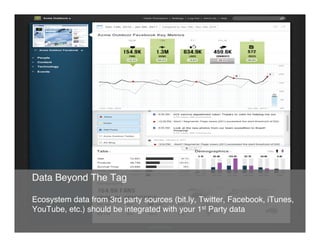
Data Beyond The Tag"
"
Ecosystem data from 3rd party sources (bit.ly, Twitter, Facebook, iTunes,
YouTube, etc.) should be integrated with your 1st Party data"
Flexibility"
"
You should not be forced to make decisions that lead to uncaptured or
unanalyzed data, especially when it comes to key events"
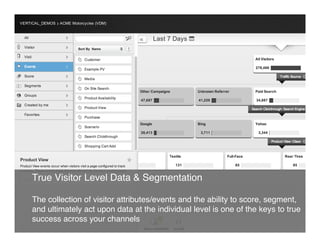
True Visitor Level Data & Segmentation"
"
The collection of visitor attributes/events and the ability to score, segment,
and ultimately act upon data at the individual level is one of the keys to true
success across your channels"
Data Privacy"
"
Protection of your customer data is of extreme importance, especially as
data and devices becomes increasingly personal"
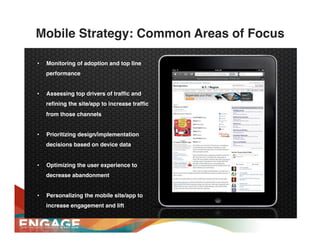
Mobile Strategy: Common Areas of Focus!

•    Monitoring of adoption and top line
     performance!
!
•    Assessing top drivers of traffic and
     refining the site/app to increase traffic
     from those channels!
!
•    Prioritizing design/implementation
     decisions based on device data!
!
•    Optimizing the user experience to
     decrease abandonment!
!
•    Personalizing the mobile site/app to
     increase engagement and lift!
!
"
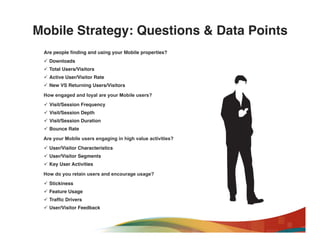
Mobile Strategy: Questions & Data Points!
 Are people finding and using your Mobile properties?"
 ü  Downloads!
 ü  Total Users/Visitors!
 ü  Active User/Visitor Rate!
 ü  New VS Returning Users/Visitors!

 How engaged and loyal are your Mobile users?"
 ü  Visit/Session Frequency!
 ü  Visit/Session Depth!
 ü  Visit/Session Duration!
 ü  Bounce Rate!

 Are your Mobile users engaging in high value activities?"
 ü  User/Visitor Characteristics!
 ü  User/Visitor Segments!
 ü  Key User Activities!

 How do you retain users and encourage usage?"
 ü  Stickiness!
 ü  Feature Usage!
 ü  Traffic Drivers!
 ü  User/Visitor Feedback!
Mobile Measurement with Analytics 10

MOBILE SDKS
developer.webtrends.com >   “Data IN”   >   “Mobile App SDKs”
Platforms
•    iOS (iPad and iPhone)
•    Android (1.6 and up)
•    Blackberry (Java)
•    Windows Phone 8 (and 7)
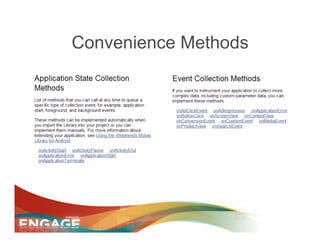
Convenience Methods
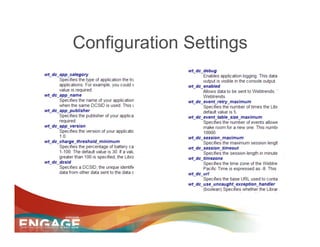
Configuration Settings
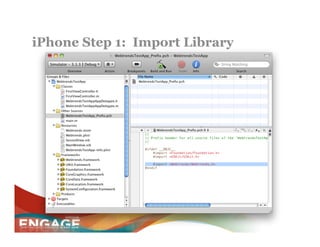
iPhone Step 1: Import Library
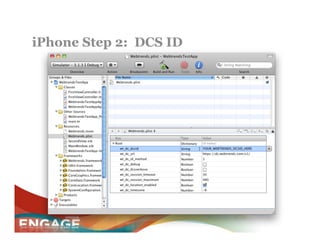
iPhone Step 2: DCS ID
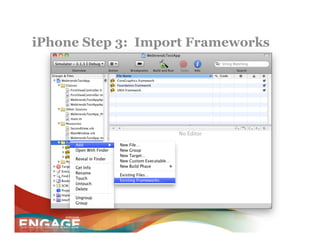
iPhone Step 3: Import Frameworks
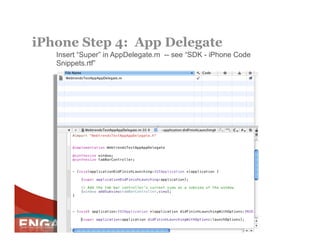
iPhone Step 4: App Delegate
   Insert “Super” in AppDelegate.m -- see “SDK - iPhone Code
   Snippets.rtf”
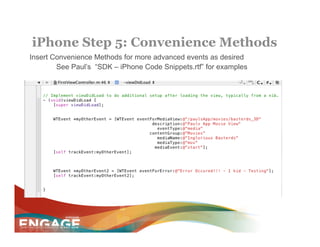
iPhone Step 5: Convenience Methods
Insert Convenience Methods for more advanced events as desired
        See Paul’s “SDK – iPhone Code Snippets.rtf” for examples
Mobile Measurement with Analytics 10

CROSS-CHANNEL &
HYBRID APP MEASUREMENT
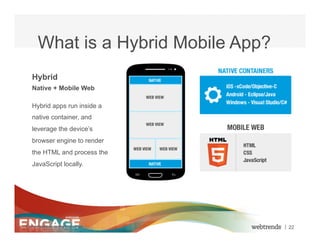
What is a Hybrid Mobile App?
    Hybrid
    Native + Mobile Web

    Hybrid apps run inside a
    native container, and
    leverage the device’s
    browser engine to render
    the HTML and process the
    JavaScript locally.


© 2012 Webtrends, All Rights Reserved.   | 22
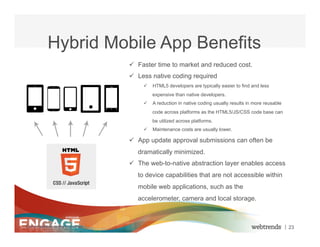
Hybrid Mobile App Benefits
                                         ü  Faster time to market and reduced cost.
                                         ü  Less native coding required
                                              ü  HTML5 developers are typically easier to find and less
                                                  expensive than native developers.
                                              ü  A reduction in native coding usually results in more reusable
                                                  code across platforms as the HTML5/JS/CSS code base can
                                                  be utilized across platforms.
                                              ü  Maintenance costs are usually lower.

                                         ü  App update approval submissions can often be
                                            dramatically minimized.
                                         ü  The web-to-native abstraction layer enables access
                                            to device capabilities that are not accessible within
                                            mobile web applications, such as the
                                            accelerometer, camera and local storage.


© 2012 Webtrends, All Rights Reserved.                                                                            | 23
Measurement Challenges
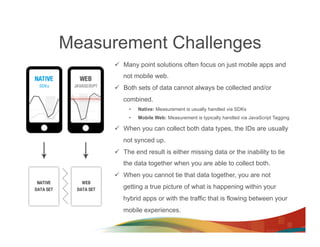
      ü  Many point solutions often focus on just mobile apps and
         not mobile web.
      ü  Both sets of data cannot always be collected and/or
         combined.
           •    Native: Measurement is usually handled via SDKs
           •    Mobile Web: Measurement is typically handled via JavaScript Tagging

      ü  When you can collect both data types, the IDs are usually
         not synced up.
      ü  The end result is either missing data or the inability to tie
         the data together when you are able to collect both.
      ü  When you cannot tie that data together, you are not
         getting a true picture of what is happening within your
         hybrid apps or with the traffic that is flowing between your
         mobile experiences.
Privacy Concerns & Solutions
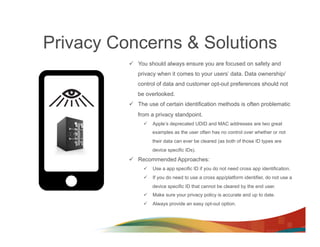
          ü  You should always ensure you are focused on safety and
             privacy when it comes to your users’ data. Data ownership/
             control of data and customer opt-out preferences should not
             be overlooked.
          ü  The use of certain identification methods is often problematic
             from a privacy standpoint.
               ü  Apple’s deprecated UDID and MAC addresses are two great
                   examples as the user often has no control over whether or not
                   their data can ever be cleared (as both of those ID types are
                   device specific IDs).

          ü  Recommended Approaches:
               ü  Use a app specific ID if you do not need cross app identification.
               ü  If you do need to use a cross app/platform identifier, do not use a
                   device specific ID that cannot be cleared by the end user.
               ü  Make sure your privacy policy is accurate and up to date.
               ü  Always provide an easy opt-out option.
Measurement Solution
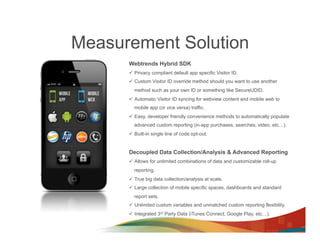
      Webtrends Hybrid SDK
      ü  Privacy compliant default app specific Visitor ID.
      ü  Custom Visitor ID override method should you want to use another
        method such as your own ID or something like SecureUDID.
      ü  Automatic Visitor ID syncing for webview content and mobile web to
        mobile app (or vice versa) traffic.
      ü  Easy, developer friendly convenience methods to automatically populate
        advanced custom reporting (in-app purchases, searches, video, etc…).
      ü  Built-in single line of code opt-out.


      Decoupled Data Collection/Analysis & Advanced Reporting
      ü  Allows for unlimited combinations of data and customizable roll-up
        reporting.
      ü  True big data collection/analysis at scale.
      ü  Large collection of mobile specific spaces, dashboards and standard
        report sets.
      ü  Unlimited custom variables and unmatched custom reporting flexibility.
      ü  Integrated 3rd Party Data (iTunes Connect, Google Play, etc…).
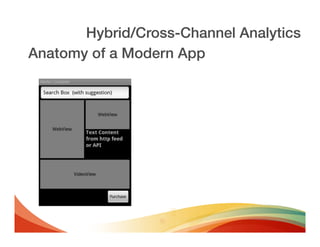
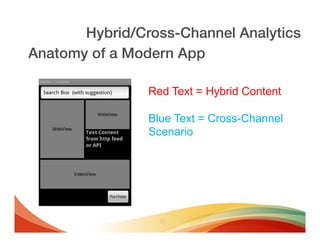
Hybrid/Cross-Channel Analytics!
Anatomy of a Modern App!
Hybrid/Cross-Channel Analytics!
Anatomy of a Modern App!

                Red Text = Hybrid Content

                Blue Text = Cross-Channel
                Scenario
Hybrid/Cross-Channel Analytics!
Anatomy of a Modern App!

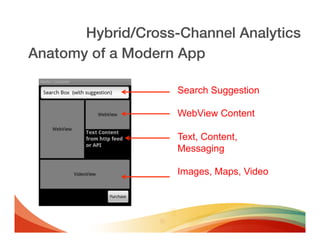
                    Search Suggestion

                    WebView Content

                    Text, Content,
                    Messaging

                    Images, Maps, Video
Hybrid/Cross-Channel Analytics!
Anatomy of a Modern App!

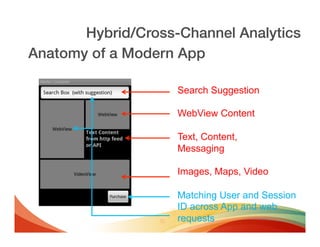
                    Search Suggestion

                    WebView Content

                    Text, Content,
                    Messaging

                    Images, Maps, Video

                    Matching User and Session
                    ID across App and web
                    requests
Hybrid/Cross-Channel Analytics!
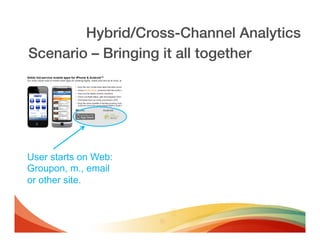
Scenario – Bringing it all together!


User starts on Web:
Groupon, m., email
or other site.
Hybrid/Cross-Channel Analytics!
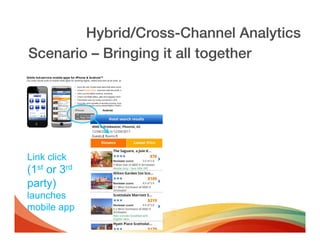
Scenario – Bringing it all together!


Link click
(1st or 3rd
party)
launches
mobile app
Hybrid/Cross-Channel Analytics!
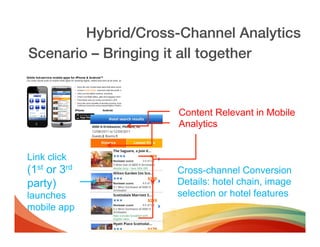
Scenario – Bringing it all together!


                     Content Relevant in Mobile
                     Analytics


Link click
(1st or 3rd          Cross-channel Conversion
party)               Details: hotel chain, image
launches             selection or hotel features
mobile app
Hybrid/Cross-Channel Analytics!
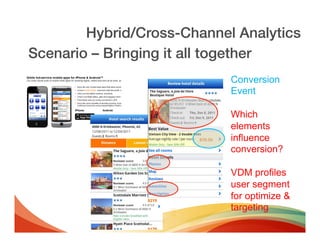
Scenario – Bringing it all together!
                            Conversion
                            Event

                            Which
                            elements
                            influence
                            conversion?

                            VDM profiles
                            user segment
                            for optimize &
                            targeting
Hybrid/Cross-Channel Analytics!
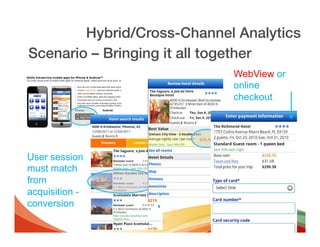
Scenario – Bringing it all together!
                             WebView or
                             online
                             checkout


User session
must match
from
acquisition -
conversion
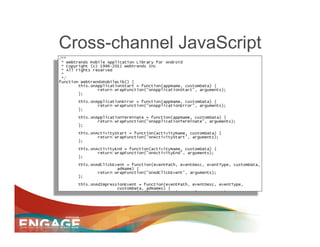
Cross-channel JavaScript
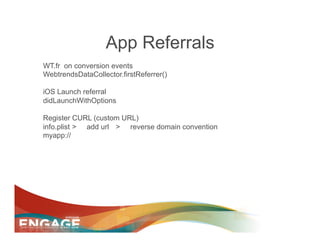
App Referrals
WT.fr on conversion events
WebtrendsDataCollector.firstReferrer()

iOS Launch referral
didLaunchWithOptions

Register CURL (custom URL)
info.plist > add url > reverse domain convention
myapp://
Mobile Measurement with Analytics 10

CUSTOM DATA WITH
DATA COLLECTION API
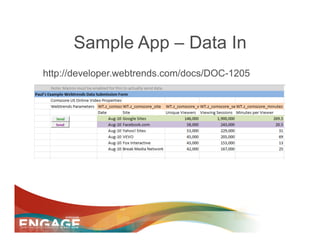
Sample App – Data In
http://developer.webtrends.com/docs/DOC-1205
DC API HowTo
•  An example walkthrough using Fiddler follows the
   step details
•  DC Requests follow our Open Exchange REST
   precedent:
•    http://dc.webtrends.com/v1/[DCS ID]/events.svc?dcsformat=plain
DC API HowTo
•  Address: dc.webtrends.com
•  Version: v1 (when we release new versions, previous
   will remain active)
•  DCS ID: [A valid WebTrends DCS ID] - If you are
   testing/debugging, create a test DCS data source
•  DCSFormat: plain, XML
  “Format” specifies the return request format
  You still need a request header to ID the POST data
•  [optional] DCSVerbose=true
DC API HowTo
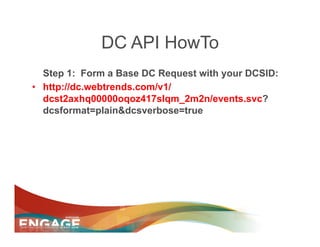
   Step 1: Form a Base DC Request with your DCSID:
•  http://dc.webtrends.com/v1/
   dcst2axhq00000oqoz417slqm_2m2n/events.svc?
   dcsformat=plain&dcsverbose=true
DC API HowTo
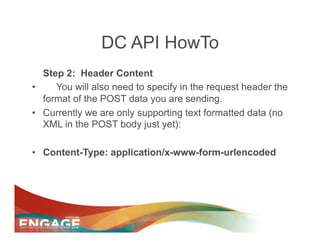
   Step 2: Header Content
•     You will also need to specify in the request header the
   format of the POST data you are sending.
•  Currently we are only supporting text formatted data (no
   XML in the POST body just yet):

•  Content-Type: application/x-www-form-urlencoded
DC API HowTo
     Step 3: Form the content of the POST
•    “Core” Required Params in POST body:
•    •dcsuri= (URI stem)
•    •dcsua= (useragent string)
•    •WT.ti=[pagetitle]
•    •WT.co_f= one of the several visitor ID parameters
     WebTrends supports (see docs for full details)
•    •WT.tz=-8 (time zone) this is optional but a good practice
•    •WT.co=yes this is a fixed value needed to validate the hit

        Put all of these parameters into a single & joined string like:
        dcsuri=apphome.php&wt.ti=Home%20Page&dcsua=android...
        Remember to URL encode special characters you want to include in the
        values like spaces = %20.
DC API HowTo
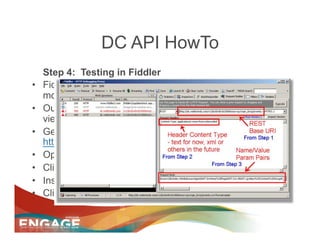
     Step 4: Testing in Fiddler
•    Fiddler is a free open source tool for sending and
     monitoring http and other protocol requests.
•    Our use case is to allow you to send a POST and easily
     view the return response from the WebTrends server
•    Get Fiddler2 @
     http://www.fiddler2.com/fiddler2/version.asp
•    Open Fiddler
•    Click on the "Request Builder" tab
•    Insert the data from Steps 1-3 as created above
•    Click execute
DC API HowTo
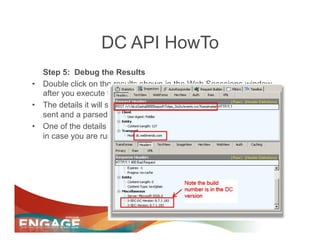
   Step 5: Debug the Results
•  Double click on the results shown in the Web Sesssions window
   after you execute the request.
•  The details it will show include the full POST you made, the header
   sent and a parsed return from the server.
•  One of the details WebTrends returns is a version and build number
   in case you are running into trouble with a beta server
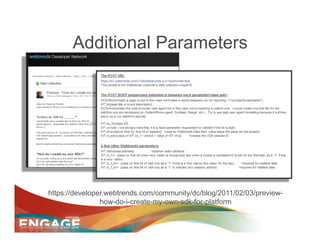
Additional Parameters


https://developer.webtrends.com/community/dc/blog/2011/02/03/preview-
                how-do-i-create-my-own-sdk-for-platform
Digital Measurement with Analytics 10

DASHBOARDS AND REPORTS
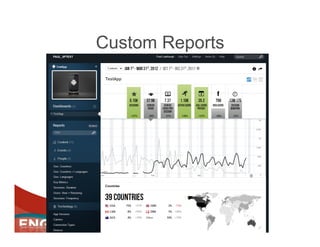
Custom Reports
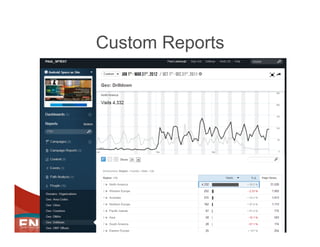
Custom Reports
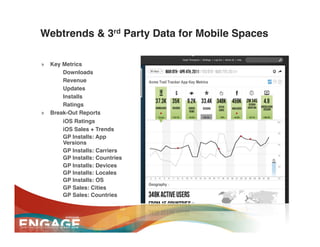
Webtrends & 3rd Party Data for Mobile Spaces
• What’s Included?!
   »  Key Metrics !
        •  Downloads!
        •  Revenue!
        •  Updates!
        •  Installs!
        •  Ratings!
   »  Break-Out Reports!
        •  iOS Ratings!
        •  iOS Sales + Trends!
        •  GP Installs: App
           Versions!
        •  GP Installs: Carriers!
        •  GP Installs: Countries!
        •  GP Installs: Devices!
        •  GP Installs: Locales!
        •  GP Installs: OS!
        •  GP Sales: Cities!
        •  GP Sales: Countries!
Sessions You Must See
•  Tues @ 11am : Webtrends Customer
   Showcase: Success with Analytics On Demand
  –  3M, Orbitz, Thomson Reuters

•  Tues @ 3pm: Mobile Measurement Strategy
  –  Zinio

•  Wed @10am: What to Measure in Social
  –  Susan Ettlinger – Altimeter
  –  John Lovett – Web Analytics Demystified
Thank You


      paul.lawbaugh@webtrends.com
           blogs.webtrends.com
           @portland_friend
Rate
 Session
   &
Speakers/
Panelists
Engage 2013 - Mobile Measurement Workshop

Engage 2013 - Mobile Measurement Workshop

  • 1.
    Engage 2013 MobileWorkshop Paul Lawbaugh & Dash Lavine
  • 2.
    Agenda •  Mobile SDKs: Intro •  Advanced Analytics Events & Howto •  Cross-channel & Hybrid Apps •  Custom Data with Data Collection API
  • 3.
    Mobile Measurement withAnalytics 10 INTRODUCTION
  • 4.
    Insight Across YourDigital Channels" " Reporting and analytics data for all of your channels (standard/mobile web, mobile apps, social, etc…) should be available within a single tool
  • 5.
    Data Beyond TheTag" " Ecosystem data from 3rd party sources (bit.ly, Twitter, Facebook, iTunes, YouTube, etc.) should be integrated with your 1st Party data"
  • 6.
    Flexibility" " You should notbe forced to make decisions that lead to uncaptured or unanalyzed data, especially when it comes to key events"
  • 7.
    True Visitor LevelData & Segmentation" " The collection of visitor attributes/events and the ability to score, segment, and ultimately act upon data at the individual level is one of the keys to true success across your channels"
  • 8.
    Data Privacy" " Protection ofyour customer data is of extreme importance, especially as data and devices becomes increasingly personal"
  • 9.
    Mobile Strategy: CommonAreas of Focus! •  Monitoring of adoption and top line performance! ! •  Assessing top drivers of traffic and refining the site/app to increase traffic from those channels! ! •  Prioritizing design/implementation decisions based on device data! ! •  Optimizing the user experience to decrease abandonment! ! •  Personalizing the mobile site/app to increase engagement and lift! ! "
  • 10.
    Mobile Strategy: Questions& Data Points! Are people finding and using your Mobile properties?" ü  Downloads! ü  Total Users/Visitors! ü  Active User/Visitor Rate! ü  New VS Returning Users/Visitors! How engaged and loyal are your Mobile users?" ü  Visit/Session Frequency! ü  Visit/Session Depth! ü  Visit/Session Duration! ü  Bounce Rate! Are your Mobile users engaging in high value activities?" ü  User/Visitor Characteristics! ü  User/Visitor Segments! ü  Key User Activities! How do you retain users and encourage usage?" ü  Stickiness! ü  Feature Usage! ü  Traffic Drivers! ü  User/Visitor Feedback!
  • 11.
    Mobile Measurement withAnalytics 10 MOBILE SDKS
  • 12.
    developer.webtrends.com > “Data IN” > “Mobile App SDKs”
  • 13.
    Platforms •  iOS (iPad and iPhone) •  Android (1.6 and up) •  Blackberry (Java) •  Windows Phone 8 (and 7)
  • 14.
  • 15.
  • 16.
    iPhone Step 1:Import Library
  • 17.
  • 18.
    iPhone Step 3:Import Frameworks
  • 19.
    iPhone Step 4:App Delegate Insert “Super” in AppDelegate.m -- see “SDK - iPhone Code Snippets.rtf”
  • 20.
    iPhone Step 5:Convenience Methods Insert Convenience Methods for more advanced events as desired See Paul’s “SDK – iPhone Code Snippets.rtf” for examples
  • 21.
    Mobile Measurement withAnalytics 10 CROSS-CHANNEL & HYBRID APP MEASUREMENT
  • 22.
    What is aHybrid Mobile App? Hybrid Native + Mobile Web Hybrid apps run inside a native container, and leverage the device’s browser engine to render the HTML and process the JavaScript locally. © 2012 Webtrends, All Rights Reserved. | 22
  • 23.
    Hybrid Mobile AppBenefits ü  Faster time to market and reduced cost. ü  Less native coding required ü  HTML5 developers are typically easier to find and less expensive than native developers. ü  A reduction in native coding usually results in more reusable code across platforms as the HTML5/JS/CSS code base can be utilized across platforms. ü  Maintenance costs are usually lower. ü  App update approval submissions can often be dramatically minimized. ü  The web-to-native abstraction layer enables access to device capabilities that are not accessible within mobile web applications, such as the accelerometer, camera and local storage. © 2012 Webtrends, All Rights Reserved. | 23
  • 24.
    Measurement Challenges ü  Many point solutions often focus on just mobile apps and not mobile web. ü  Both sets of data cannot always be collected and/or combined. •  Native: Measurement is usually handled via SDKs •  Mobile Web: Measurement is typically handled via JavaScript Tagging ü  When you can collect both data types, the IDs are usually not synced up. ü  The end result is either missing data or the inability to tie the data together when you are able to collect both. ü  When you cannot tie that data together, you are not getting a true picture of what is happening within your hybrid apps or with the traffic that is flowing between your mobile experiences.
  • 25.
    Privacy Concerns &Solutions ü  You should always ensure you are focused on safety and privacy when it comes to your users’ data. Data ownership/ control of data and customer opt-out preferences should not be overlooked. ü  The use of certain identification methods is often problematic from a privacy standpoint. ü  Apple’s deprecated UDID and MAC addresses are two great examples as the user often has no control over whether or not their data can ever be cleared (as both of those ID types are device specific IDs). ü  Recommended Approaches: ü  Use a app specific ID if you do not need cross app identification. ü  If you do need to use a cross app/platform identifier, do not use a device specific ID that cannot be cleared by the end user. ü  Make sure your privacy policy is accurate and up to date. ü  Always provide an easy opt-out option.
  • 26.
    Measurement Solution Webtrends Hybrid SDK ü  Privacy compliant default app specific Visitor ID. ü  Custom Visitor ID override method should you want to use another method such as your own ID or something like SecureUDID. ü  Automatic Visitor ID syncing for webview content and mobile web to mobile app (or vice versa) traffic. ü  Easy, developer friendly convenience methods to automatically populate advanced custom reporting (in-app purchases, searches, video, etc…). ü  Built-in single line of code opt-out. Decoupled Data Collection/Analysis & Advanced Reporting ü  Allows for unlimited combinations of data and customizable roll-up reporting. ü  True big data collection/analysis at scale. ü  Large collection of mobile specific spaces, dashboards and standard report sets. ü  Unlimited custom variables and unmatched custom reporting flexibility. ü  Integrated 3rd Party Data (iTunes Connect, Google Play, etc…).
  • 27.
  • 28.
    Hybrid/Cross-Channel Analytics! Anatomy ofa Modern App! Red Text = Hybrid Content Blue Text = Cross-Channel Scenario
  • 29.
    Hybrid/Cross-Channel Analytics! Anatomy ofa Modern App! Search Suggestion WebView Content Text, Content, Messaging Images, Maps, Video
  • 30.
    Hybrid/Cross-Channel Analytics! Anatomy ofa Modern App! Search Suggestion WebView Content Text, Content, Messaging Images, Maps, Video Matching User and Session ID across App and web requests
  • 31.
    Hybrid/Cross-Channel Analytics! Scenario –Bringing it all together! User starts on Web: Groupon, m., email or other site.
  • 32.
    Hybrid/Cross-Channel Analytics! Scenario –Bringing it all together! Link click (1st or 3rd party) launches mobile app
  • 33.
    Hybrid/Cross-Channel Analytics! Scenario –Bringing it all together! Content Relevant in Mobile Analytics Link click (1st or 3rd Cross-channel Conversion party) Details: hotel chain, image launches selection or hotel features mobile app
  • 34.
    Hybrid/Cross-Channel Analytics! Scenario –Bringing it all together! Conversion Event Which elements influence conversion? VDM profiles user segment for optimize & targeting
  • 35.
    Hybrid/Cross-Channel Analytics! Scenario –Bringing it all together! WebView or online checkout User session must match from acquisition - conversion
  • 36.
  • 37.
    App Referrals WT.fr onconversion events WebtrendsDataCollector.firstReferrer() iOS Launch referral didLaunchWithOptions Register CURL (custom URL) info.plist > add url > reverse domain convention myapp://
  • 38.
    Mobile Measurement withAnalytics 10 CUSTOM DATA WITH DATA COLLECTION API
  • 39.
    Sample App –Data In http://developer.webtrends.com/docs/DOC-1205
  • 40.
    DC API HowTo • An example walkthrough using Fiddler follows the step details •  DC Requests follow our Open Exchange REST precedent: •  http://dc.webtrends.com/v1/[DCS ID]/events.svc?dcsformat=plain
  • 41.
    DC API HowTo • Address: dc.webtrends.com •  Version: v1 (when we release new versions, previous will remain active) •  DCS ID: [A valid WebTrends DCS ID] - If you are testing/debugging, create a test DCS data source •  DCSFormat: plain, XML “Format” specifies the return request format You still need a request header to ID the POST data •  [optional] DCSVerbose=true
  • 42.
    DC API HowTo Step 1: Form a Base DC Request with your DCSID: •  http://dc.webtrends.com/v1/ dcst2axhq00000oqoz417slqm_2m2n/events.svc? dcsformat=plain&dcsverbose=true
  • 43.
    DC API HowTo Step 2: Header Content •  You will also need to specify in the request header the format of the POST data you are sending. •  Currently we are only supporting text formatted data (no XML in the POST body just yet): •  Content-Type: application/x-www-form-urlencoded
  • 44.
    DC API HowTo Step 3: Form the content of the POST •  “Core” Required Params in POST body: •  •dcsuri= (URI stem) •  •dcsua= (useragent string) •  •WT.ti=[pagetitle] •  •WT.co_f= one of the several visitor ID parameters WebTrends supports (see docs for full details) •  •WT.tz=-8 (time zone) this is optional but a good practice •  •WT.co=yes this is a fixed value needed to validate the hit Put all of these parameters into a single & joined string like: dcsuri=apphome.php&wt.ti=Home%20Page&dcsua=android... Remember to URL encode special characters you want to include in the values like spaces = %20.
  • 45.
    DC API HowTo Step 4: Testing in Fiddler •  Fiddler is a free open source tool for sending and monitoring http and other protocol requests. •  Our use case is to allow you to send a POST and easily view the return response from the WebTrends server •  Get Fiddler2 @ http://www.fiddler2.com/fiddler2/version.asp •  Open Fiddler •  Click on the "Request Builder" tab •  Insert the data from Steps 1-3 as created above •  Click execute
  • 46.
    DC API HowTo Step 5: Debug the Results •  Double click on the results shown in the Web Sesssions window after you execute the request. •  The details it will show include the full POST you made, the header sent and a parsed return from the server. •  One of the details WebTrends returns is a version and build number in case you are running into trouble with a beta server
  • 47.
  • 48.
    Digital Measurement withAnalytics 10 DASHBOARDS AND REPORTS
  • 49.
  • 50.
  • 51.
    Webtrends & 3rdParty Data for Mobile Spaces • What’s Included?! »  Key Metrics ! •  Downloads! •  Revenue! •  Updates! •  Installs! •  Ratings! »  Break-Out Reports! •  iOS Ratings! •  iOS Sales + Trends! •  GP Installs: App Versions! •  GP Installs: Carriers! •  GP Installs: Countries! •  GP Installs: Devices! •  GP Installs: Locales! •  GP Installs: OS! •  GP Sales: Cities! •  GP Sales: Countries!
  • 52.
    Sessions You MustSee •  Tues @ 11am : Webtrends Customer Showcase: Success with Analytics On Demand –  3M, Orbitz, Thomson Reuters •  Tues @ 3pm: Mobile Measurement Strategy –  Zinio •  Wed @10am: What to Measure in Social –  Susan Ettlinger – Altimeter –  John Lovett – Web Analytics Demystified
  • 53.
    Thank You paul.lawbaugh@webtrends.com blogs.webtrends.com @portland_friend
  • 54.
    Rate Session & Speakers/ Panelists