Enterprise Mobility Suite
Hybrid Identity
Mobile Device Management
Access & Information Protection
Enterprise Mobility Suite
Agenda
Enterprise Challenges
Enterprise Mobility Suite
EMS Benefit
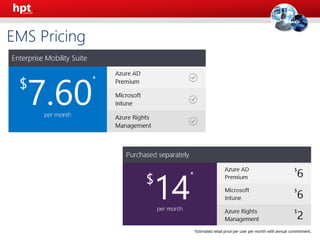
EMS Pricing
Q&A
Enterprise Challenges
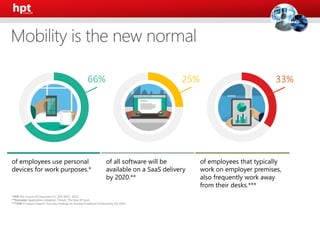
of employees use personal
devices for work purposes.*
of employees that typically
work on employer premises,
also frequently work away
from their desks.***
of all software will be
available on a SaaS delivery
by 2020.**
66% 25% 33%
*CEB The Future of Corporate ITL: 203-2017. 2013.
**Forrester Application Adoption Trends: The Rise Of SaaS
***CEB IT Impact Report: Five Key Findings on Driving Employee Productivity Q1 2014.
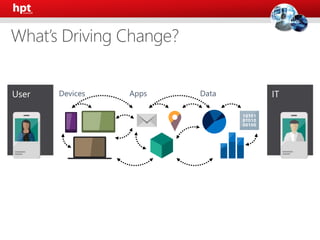
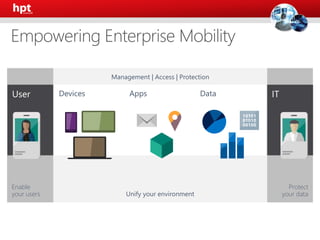
Devices Apps Data
Protect
your data
Enable
your users Unify your environment
Management | Access | Protection
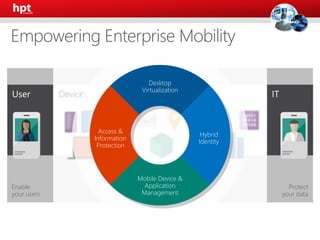
Devices Apps Data
Protect
your data
Enable
your users
Desktop
Virtualization
Access &
Information
Protection
Hybrid
Identity
Mobile Device &
Application
Management
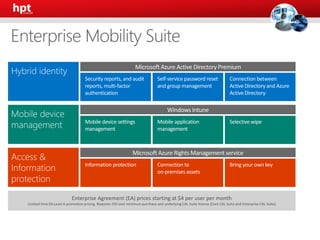
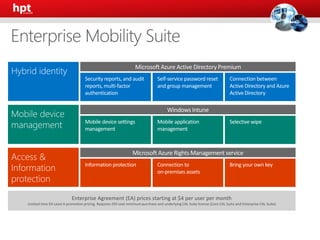
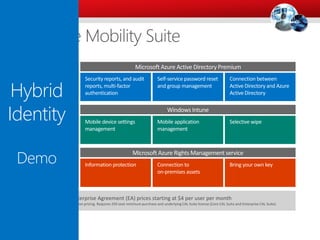
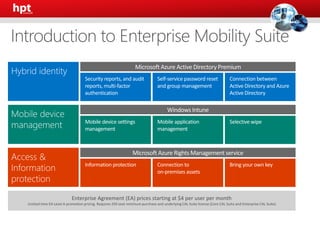
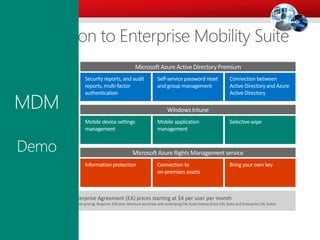
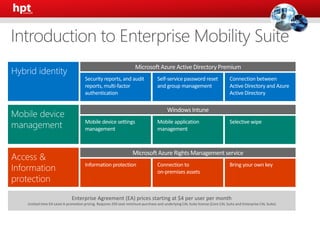
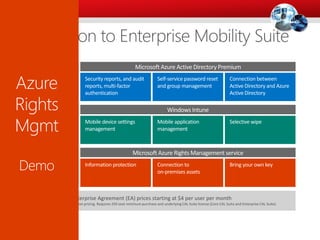
Enterprise Agreement (EA) prices starting at $4 per user per month
Limited time EA Level A promotion pricing. Requires 250 seat minimum purchase and underlying CAL Suite license (Core CAL Suite and Enterprise CAL Suite)
Windows Intune
Mobile device settings
management
Mobile application
management
Selective wipe
Microsoft Azure Active Directory Premium
Security reports, and audit
reports, multi-factor
authentication
Self-service password reset
and group management
Connection between
Active Directory and Azure
Active Directory
Microsoft Azure Rights Management service
Information protection Connection to
on-premises assets
Bring your own key
Hybrid Identity
Connect between Active Directory and Azure Active
Directory
Report & Multi-factor Authentication
Self-Service Password
Enterprise Agreement (EA) prices starting at $4 per user per month
Limited time EA Level A promotion pricing. Requires 250 seat minimum purchase and underlying CAL Suite license (Core CAL Suite and Enterprise CAL Suite)
Windows Intune
Mobile device settings
management
Mobile application
management
Selective wipe
Microsoft Azure Active Directory Premium
Security reports, and audit
reports, multi-factor
authentication
Self-service password reset
and group management
Connection between
Active Directory and Azure
Active Directory
Microsoft Azure Rights Management service
Information protection Connection to
on-premises assets
Bring your own key
Enterprise Agreement (EA) prices starting at $4 per user per month
Limited time EA Level A promotion pricing. Requires 250 seat minimum purchase and underlying CAL Suite license (Core CAL Suite and Enterprise CAL Suite)
Windows Intune
Mobile device settings
management
Mobile application
management
Selective wipe
Microsoft Azure Rights Management service
Information protection Connection to
on-premises assets
Bring your own key
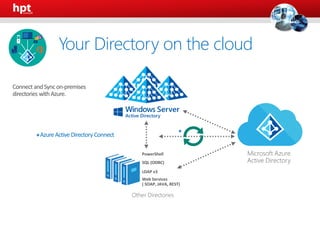
AzureActive Directory Connect*
Microsoft Azure
Active Directory
Other Directories
PowerShell
LDAP v3
SQL (ODBC)
Web Services
( SOAP, JAVA, REST)
*
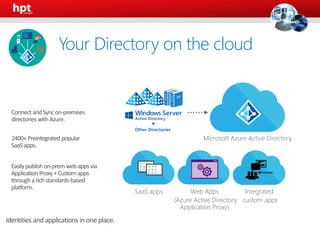
Your Directory on the cloud
Microsoft Azure
Microsoft Azure
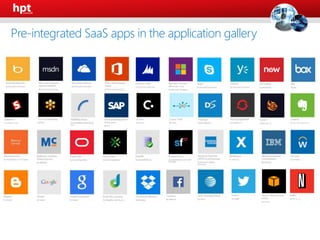
Pre-integrated SaaS apps in the application gallery
Microsoft Azure Active Directory
Identities and applications in one place.
Web Apps
(Azure Active Directory
Application Proxy)
SaaS apps Integrated
custom apps
Other Directories
Your Directory on the cloud
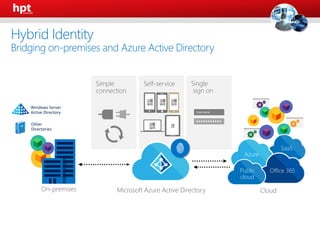
Self-service Single
sign on
•••••••••••
Username
Simple
connection
Cloud
SaaS
Azure
Office 365Public
cloud
Other
Directories
Windows Server
Active Directory
On-premises Microsoft Azure Active Directory
Hybrid Identity
Bridging on-premises and Azure Active Directory
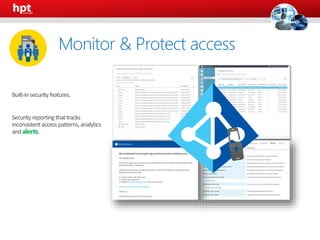
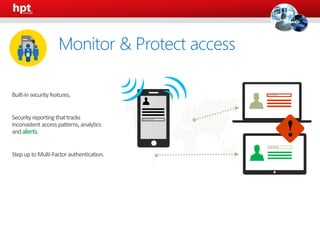
alerts.
Monitor & Protect access
alerts.
Monitor & Protect access
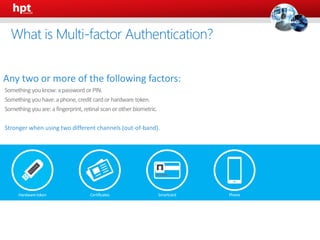
Any two or more of the following factors:
Something youknow:apassword orPIN.
Something youhave:aphone,credit cardorhardwaretoken.
Something youare:afingerprint, retinal scanorother biometric.
Stronger when using two different channels (out-of-band).
What is Multi-factor Authentication?
An Azure Identity and Access management
service that prevents unauthorized access
to both on-premises and cloud applications
by providing an additional level of
authentication
Trusted by thousands of enterprises to
authenticate employee, customer, and
partner access.
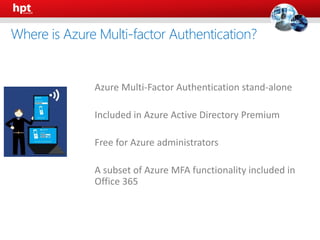
What is Azure Multi-factor Authentication?
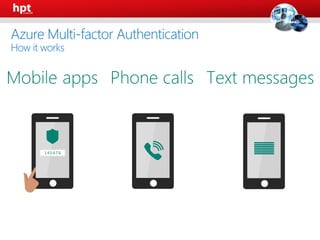
Azure Multi-factor Authentication
How it works
• Azure Multi-Factor Authentication stand-alone
• Included in Azure Active Directory Premium
• Free for Azure administrators
• A subset of Azure MFA functionality included in
Office 365
Where is Azure Multi-factor Authentication?
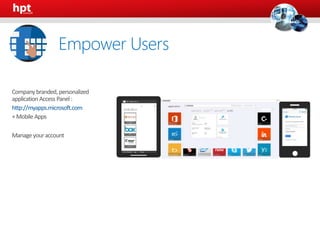
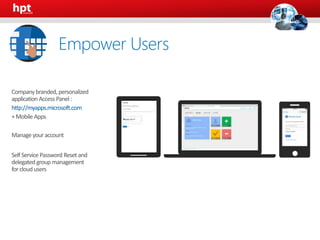
http://myapps.microsoft.com
Empower Users
http://myapps.microsoft.com
Empower Users
Enterprise Agreement (EA) prices starting at $4 per user per month
Limited time EA Level A promotion pricing. Requires 250 seat minimum purchase and underlying CAL Suite license (Core CAL Suite and Enterprise CAL Suite)
Windows Intune
Mobile device settings
management
Mobile application
management
Selective wipe
Microsoft Azure Active Directory Premium
Security reports, and audit
reports, multi-factor
authentication
Self-service password reset
and group management
Connection between
Active Directory and Azure
Active Directory
Microsoft Azure Rights Management service
Information protection Connection to
on-premises assets
Bring your own key
Enterprise Agreement (EA) prices starting at $4 per user per month
Limited time EA Level A promotion pricing. Requires 250 seat minimum purchase and underlying CAL Suite license (Core CAL Suite and Enterprise CAL Suite)
Windows Intune
Mobile device settings
management
Mobile application
management
Selective wipe
Microsoft Azure Rights Management service
Information protection Connection to
on-premises assets
Bring your own key
Hybrid
Identity
Demo
Mobile Device Management
Conditional Access
Mobile Device/Application Management
Selective Wipe
Enterprise Agreement (EA) prices starting at $4 per user per month
Limited time EA Level A promotion pricing. Requires 250 seat minimum purchase and underlying CAL Suite license (Core CAL Suite and Enterprise CAL Suite)
Windows Intune
Mobile device settings
management
Mobile application
management
Selective wipe
Microsoft Azure Active Directory Premium
Security reports, and audit
reports, multi-factor
authentication
Self-service password reset
and group management
Connection between
Active Directory and Azure
Active Directory
Microsoft Azure Rights Management service
Information protection Connection to
on-premises assets
Bring your own key
Enterprise Agreement (EA) prices starting at $4 per user per month
Limited time EA Level A promotion pricing. Requires 250 seat minimum purchase and underlying CAL Suite license (Core CAL Suite and Enterprise CAL Suite)
Microsoft Azure Active Directory Premium
Security reports, and audit
reports, multi-factor
authentication
Self-service password reset
and group management
Connection between
Active Directory and Azure
Active Directory
Microsoft Azure Rights Management service
Information protection Connection to
on-premises assets
Bring your own key
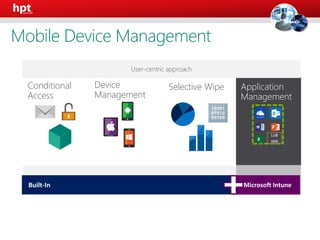
Microsoft IntuneBuilt-In
Device
Management
Conditional
Access
Selective Wipe
Built-In Microsoft Intune
LoB
app
User-centric approach
Mobile Device Management
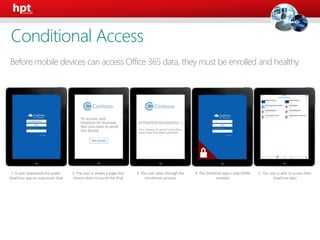
Before mobile devices can access Office 365 data, they must be enrolled and healthy.
1. A user downloads the public
OneDrive app on a personal iPad
2. The user is shown a page that
directs them to enroll the iPad
3. The user steps through the
enrollment process
4. The OneDrive app is now MDM
enabled
5. The user is able to access their
OneDrive data
Conditional Access
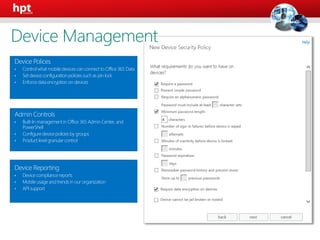
Device Polices
• Controlwhat mobiledevices can connectto Office 365 Data
• Set deviceconfigurationpolicies such as pin lock
• Enforcedata encryptionon devices
Admin Controls
• Built-In managementin Office 365 Admin Center, and
PowerShell
• Configuredevicepolicies by groups
• Product level granular control
Device Reporting
• Device compliancereports
• Mobileusage and trends in our organization
• API support
Device Management
Corporate
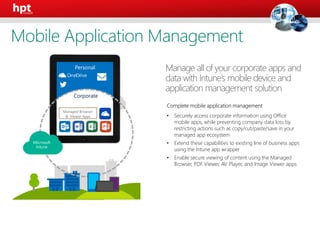
Complete mobile application management
• Securely access corporate information using Office
mobile apps, while preventing company data loss by
restricting actions such as copy/cut/paste/save in your
managed app ecosystem
• Extend these capabilities to existing line of business apps
using the Intune app wrapper
• Enable secure viewing of content using the Managed
Browser, PDF Viewer, AV Player, and Image Viewer apps
Manage all of your corporate apps and
data with Intune’s mobile device and
application management solution
Personal
Managed Browser
& Viewer Apps
Mobile Application Management
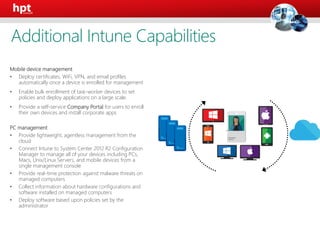
Mobile device management
• Deploy certificates, WiFi, VPN, and email profiles
automatically once a device is enrolled for management
• Enable bulk enrollment of task-worker devices to set
policies and deploy applications on a large scale.
• Provide a self-service Company Portal for users to enroll
their own devices and install corporate apps
PC management
• Provide lightweight, agentless management from the
cloud
• Connect Intune to System Center 2012 R2 Configuration
Manager to manage all of your devices including PCs,
Macs, Unix/Linux Servers, and mobile devices from a
single management console
• Provide real-time protection against malware threats on
managed computers
• Collect information about hardware configurations and
software installed on managed computers
• Deploy software based upon policies set by the
administrator
User
Additional Intune Capabilities
Managed
Browser
Native
E-mail
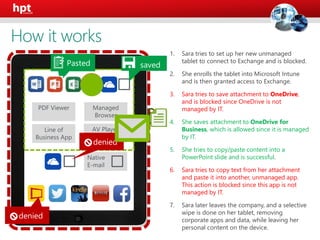
1. Sara tries to set up her new unmanaged
tablet to connect to Exchange and is blocked.
2. She enrolls the tablet into Microsoft Intune
and is then granted access to Exchange.
3. Sara tries to save attachment to OneDrive,
and is blocked since OneDrive is not
managed by IT.
4. She saves attachment to OneDrive for
Business, which is allowed since it is managed
by IT.
5. She tries to copy/paste content into a
PowerPoint slide and is successful.
6. Sara tries to copy text from her attachment
and paste it into another, unmanaged app.
This action is blocked since this app is not
managed by IT.
7. Sara later leaves the company, and a selective
wipe is done on her tablet, removing
corporate apps and data, while leaving her
personal content on the device.
PDF Viewer
Line of
Business App
AV Player
How it works
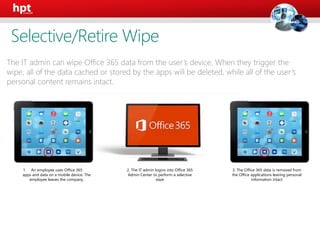
1. An employee uses Office 365
apps and data on a mobile device. The
employee leaves the company.
2. The IT admin logins into Office 365
Admin Center to perform a selective
wipe
3. The Office 365 data is removed from
the Office applications leaving personal
information intact
The IT admin can wipe Office 365 data from the user’s device. When they trigger the
wipe, all of the data cached or stored by the apps will be deleted, while all of the user’s
personal content remains intact.
Selective/Retire Wipe
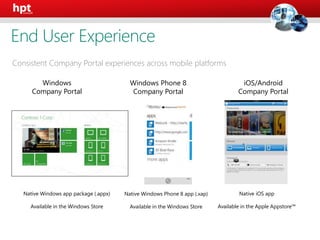
Consistent Company Portal experiences across mobile platforms
Native Windows app package (.appx)
Available in the Windows Store
Windows Phone 8
Company Portal
iOS/Android
Company Portal
Native Windows Phone 8 app (.xap)
Available in the Windows Store
Native iOS app
Available in the Apple Appstore™
Windows
Company Portal
End User Experience
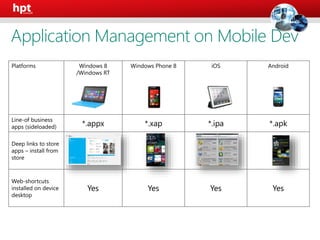
Platforms Windows 8
/Windows RT
Windows Phone 8 iOS Android
Line-of business
apps (sideloaded) *.appx *.xap *.ipa *.apk
Deep links to store
apps – install from
store
Web-shortcuts
installed on device
desktop
Yes Yes Yes Yes
Application Management on Mobile Dev
Enterprise Agreement (EA) prices starting at $4 per user per month
Limited time EA Level A promotion pricing. Requires 250 seat minimum purchase and underlying CAL Suite license (Core CAL Suite and Enterprise CAL Suite)
Windows Intune
Mobile device settings
management
Mobile application
management
Selective wipe
Microsoft Azure Active Directory Premium
Security reports, and audit
reports, multi-factor
authentication
Self-service password reset
and group management
Connection between
Active Directory and Azure
Active Directory
Microsoft Azure Rights Management service
Information protection Connection to
on-premises assets
Bring your own key
Enterprise Agreement (EA) prices starting at $4 per user per month
Limited time EA Level A promotion pricing. Requires 250 seat minimum purchase and underlying CAL Suite license (Core CAL Suite and Enterprise CAL Suite)
Microsoft Azure Active Directory Premium
Security reports, and audit
reports, multi-factor
authentication
Self-service password reset
and group management
Connection between
Active Directory and Azure
Active Directory
Microsoft Azure Rights Management service
Information protection Connection to
on-premises assets
Bring your own key
MDM
Demo
Access & Information Protection
Azure Rights Management Service
Enterprise Agreement (EA) prices starting at $4 per user per month
Limited time EA Level A promotion pricing. Requires 250 seat minimum purchase and underlying CAL Suite license (Core CAL Suite and Enterprise CAL Suite)
Windows Intune
Mobile device settings
management
Mobile application
management
Selective wipe
Microsoft Azure Active Directory Premium
Security reports, and audit
reports, multi-factor
authentication
Self-service password reset
and group management
Connection between
Active Directory and Azure
Active Directory
Microsoft Azure Rights Management service
Information protection Connection to
on-premises assets
Bring your own key
Enterprise Agreement (EA) prices starting at $4 per user per month
Limited time EA Level A promotion pricing. Requires 250 seat minimum purchase and underlying CAL Suite license (Core CAL Suite and Enterprise CAL Suite)
Windows Intune
Mobile device settings
management
Mobile application
management
Selective wipe
Microsoft Azure Active Directory Premium
Security reports, and audit
reports, multi-factor
authentication
Self-service password reset
and group management
Connection between
Active Directory and Azure
Active Directory
Server
Files Services
Server
Rights Management
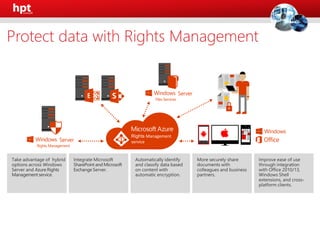
Protect data with Rights Management
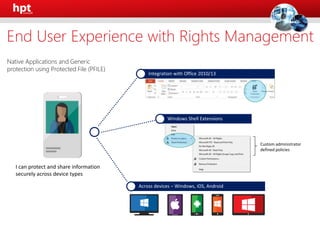
Native Applications and Generic
protection using Protected File (PFILE)
Custom administrator
defined policies
I can protect and share information
securely across device types
End User Experience with Rights Management
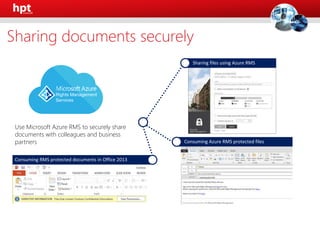
Use Microsoft Azure RMS to securely share
documents with colleagues and business
partners
Sharing documents securely
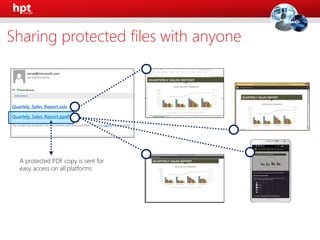
Email Receiver
Quartely_Sales_Report.xslx
Quartely_Sales_Report.ppdf
A protected PDF copy is sent for
easy access on all platforms
Sharing protected files with anyone
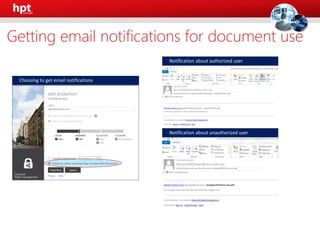
alice@contoso.com;
alice@contoso.com opened RMS blog post – Aug2014.docx.pdf
alice@contoso.com was denied access to BudgetWithCharts.xlsx.pdf
alice@contoso.com was denied access to BudgetwithCharts.xlsx.pdf
Getting email notifications for document use
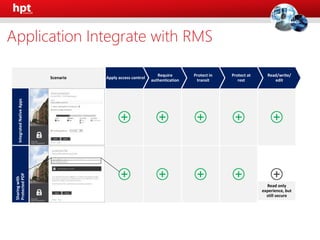
Scenario
Read only
experience, but
still secure
Application Integrate with RMS
Enterprise Agreement (EA) prices starting at $4 per user per month
Limited time EA Level A promotion pricing. Requires 250 seat minimum purchase and underlying CAL Suite license (Core CAL Suite and Enterprise CAL Suite)
Windows Intune
Mobile device settings
management
Mobile application
management
Selective wipe
Microsoft Azure Active Directory Premium
Security reports, and audit
reports, multi-factor
authentication
Self-service password reset
and group management
Connection between
Active Directory and Azure
Active Directory
Microsoft Azure Rights Management service
Information protection Connection to
on-premises assets
Bring your own key
Enterprise Agreement (EA) prices starting at $4 per user per month
Limited time EA Level A promotion pricing. Requires 250 seat minimum purchase and underlying CAL Suite license (Core CAL Suite and Enterprise CAL Suite)
Windows Intune
Mobile device settings
management
Mobile application
management
Selective wipe
Microsoft Azure Active Directory Premium
Security reports, and audit
reports, multi-factor
authentication
Self-service password reset
and group management
Connection between
Active Directory and Azure
Active Directory
Azure
Rights
Mgmt
Demo
EMS Benefits
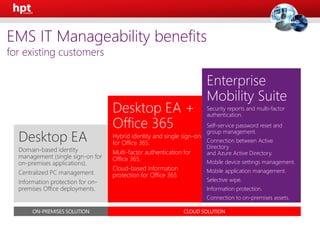
Hybrid identity and single sign-on
for Office 365.
Multi-factor authentication for
Office 365.
Cloud-based information
protection for Office 365.
Security reports and multi-factor
authentication.
Self-service password reset and
group management.
Connection between Active
Directory
and Azure Active Directory.
Mobile device settings management.
Mobile application management.
Selective wipe.
Information protection.
Connection to on-premises assets.
ON-PREMISES SOLUTION CLOUD SOLUTION
EMS IT Manageability benefits
for existing customers
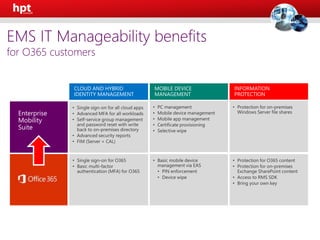
CLOUD AND HYBRID
IDENTITY MANAGEMENT
MOBILE DEVICE
MANAGEMENT
INFORMATION
PROTECTION
Enterprise
Mobility
Suite
EMS IT Manageability benefits
for O365 customers
EMS Pricing
EMS Pricing
Enterprise Agreement (EA) prices starting at $4 per user per month
Limited time EA Level A promotion pricing. Requires 250 seat minimum purchase and underlying CAL Suite license (Core CAL Suite and Enterprise CAL Suite)
Windows Intune
Mobile device settings
management
Mobile application
management
Selective wipe
Microsoft Azure Active Directory Premium
Security reports, and audit
reports, multi-factor
authentication
Self-service password reset
and group management
Connection between
Active Directory and Azure
Active Directory
Microsoft Azure Rights Management service
Information protection Connection to
on-premises assets
Bring your own key
Enterprise Agreement (EA) prices starting at $4 per user per month
Limited time EA Level A promotion pricing. Requires 250 seat minimum purchase and underlying CAL Suite license (Core CAL Suite and Enterprise CAL Suite)
Windows Intune
Mobile device settings
management
Mobile application
management
Selective wipe
Microsoft Azure Active Directory Premium
Security reports, and audit
reports, multi-factor
authentication
Self-service password reset
and group management
Connection between
Active Directory and Azure
Active Directory
Microsoft Azure Rights Management service
Information protection Connection to
on-premises assets
Bring your own key
Question?

EMS-HPT Template-v.1.0

  • 1.
    Enterprise Mobility Suite HybridIdentity Mobile Device Management Access & Information Protection
  • 2.
    Enterprise Mobility Suite Agenda EnterpriseChallenges Enterprise Mobility Suite EMS Benefit EMS Pricing Q&A
  • 3.
  • 4.
    of employees usepersonal devices for work purposes.* of employees that typically work on employer premises, also frequently work away from their desks.*** of all software will be available on a SaaS delivery by 2020.** 66% 25% 33% *CEB The Future of Corporate ITL: 203-2017. 2013. **Forrester Application Adoption Trends: The Rise Of SaaS ***CEB IT Impact Report: Five Key Findings on Driving Employee Productivity Q1 2014.
  • 5.
  • 6.
    Protect your data Enable your usersUnify your environment Management | Access | Protection Devices Apps Data
  • 7.
    Protect your data Enable your users Desktop Virtualization Access& Information Protection Hybrid Identity Mobile Device & Application Management
  • 8.
    Enterprise Agreement (EA)prices starting at $4 per user per month Limited time EA Level A promotion pricing. Requires 250 seat minimum purchase and underlying CAL Suite license (Core CAL Suite and Enterprise CAL Suite) Windows Intune Mobile device settings management Mobile application management Selective wipe Microsoft Azure Active Directory Premium Security reports, and audit reports, multi-factor authentication Self-service password reset and group management Connection between Active Directory and Azure Active Directory Microsoft Azure Rights Management service Information protection Connection to on-premises assets Bring your own key
  • 9.
    Hybrid Identity Connect betweenActive Directory and Azure Active Directory Report & Multi-factor Authentication Self-Service Password
  • 10.
    Enterprise Agreement (EA)prices starting at $4 per user per month Limited time EA Level A promotion pricing. Requires 250 seat minimum purchase and underlying CAL Suite license (Core CAL Suite and Enterprise CAL Suite) Windows Intune Mobile device settings management Mobile application management Selective wipe Microsoft Azure Active Directory Premium Security reports, and audit reports, multi-factor authentication Self-service password reset and group management Connection between Active Directory and Azure Active Directory Microsoft Azure Rights Management service Information protection Connection to on-premises assets Bring your own key Enterprise Agreement (EA) prices starting at $4 per user per month Limited time EA Level A promotion pricing. Requires 250 seat minimum purchase and underlying CAL Suite license (Core CAL Suite and Enterprise CAL Suite) Windows Intune Mobile device settings management Mobile application management Selective wipe Microsoft Azure Rights Management service Information protection Connection to on-premises assets Bring your own key
  • 11.
    AzureActive Directory Connect* MicrosoftAzure Active Directory Other Directories PowerShell LDAP v3 SQL (ODBC) Web Services ( SOAP, JAVA, REST) * Your Directory on the cloud
  • 12.
  • 13.
    Pre-integrated SaaS appsin the application gallery
  • 14.
    Microsoft Azure ActiveDirectory Identities and applications in one place. Web Apps (Azure Active Directory Application Proxy) SaaS apps Integrated custom apps Other Directories Your Directory on the cloud
  • 15.
    Self-service Single sign on ••••••••••• Username Simple connection Cloud SaaS Azure Office365Public cloud Other Directories Windows Server Active Directory On-premises Microsoft Azure Active Directory Hybrid Identity Bridging on-premises and Azure Active Directory
  • 16.
  • 17.
  • 18.
    Any two ormore of the following factors: Something youknow:apassword orPIN. Something youhave:aphone,credit cardorhardwaretoken. Something youare:afingerprint, retinal scanorother biometric. Stronger when using two different channels (out-of-band). What is Multi-factor Authentication?
  • 19.
    An Azure Identityand Access management service that prevents unauthorized access to both on-premises and cloud applications by providing an additional level of authentication Trusted by thousands of enterprises to authenticate employee, customer, and partner access. What is Azure Multi-factor Authentication?
  • 20.
  • 21.
    • Azure Multi-FactorAuthentication stand-alone • Included in Azure Active Directory Premium • Free for Azure administrators • A subset of Azure MFA functionality included in Office 365 Where is Azure Multi-factor Authentication?
  • 22.
  • 23.
  • 24.
    Enterprise Agreement (EA)prices starting at $4 per user per month Limited time EA Level A promotion pricing. Requires 250 seat minimum purchase and underlying CAL Suite license (Core CAL Suite and Enterprise CAL Suite) Windows Intune Mobile device settings management Mobile application management Selective wipe Microsoft Azure Active Directory Premium Security reports, and audit reports, multi-factor authentication Self-service password reset and group management Connection between Active Directory and Azure Active Directory Microsoft Azure Rights Management service Information protection Connection to on-premises assets Bring your own key Enterprise Agreement (EA) prices starting at $4 per user per month Limited time EA Level A promotion pricing. Requires 250 seat minimum purchase and underlying CAL Suite license (Core CAL Suite and Enterprise CAL Suite) Windows Intune Mobile device settings management Mobile application management Selective wipe Microsoft Azure Rights Management service Information protection Connection to on-premises assets Bring your own key Hybrid Identity Demo
  • 25.
    Mobile Device Management ConditionalAccess Mobile Device/Application Management Selective Wipe
  • 26.
    Enterprise Agreement (EA)prices starting at $4 per user per month Limited time EA Level A promotion pricing. Requires 250 seat minimum purchase and underlying CAL Suite license (Core CAL Suite and Enterprise CAL Suite) Windows Intune Mobile device settings management Mobile application management Selective wipe Microsoft Azure Active Directory Premium Security reports, and audit reports, multi-factor authentication Self-service password reset and group management Connection between Active Directory and Azure Active Directory Microsoft Azure Rights Management service Information protection Connection to on-premises assets Bring your own key Enterprise Agreement (EA) prices starting at $4 per user per month Limited time EA Level A promotion pricing. Requires 250 seat minimum purchase and underlying CAL Suite license (Core CAL Suite and Enterprise CAL Suite) Microsoft Azure Active Directory Premium Security reports, and audit reports, multi-factor authentication Self-service password reset and group management Connection between Active Directory and Azure Active Directory Microsoft Azure Rights Management service Information protection Connection to on-premises assets Bring your own key
  • 27.
    Microsoft IntuneBuilt-In Device Management Conditional Access Selective Wipe Built-InMicrosoft Intune LoB app User-centric approach Mobile Device Management
  • 28.
    Before mobile devicescan access Office 365 data, they must be enrolled and healthy. 1. A user downloads the public OneDrive app on a personal iPad 2. The user is shown a page that directs them to enroll the iPad 3. The user steps through the enrollment process 4. The OneDrive app is now MDM enabled 5. The user is able to access their OneDrive data Conditional Access
  • 29.
    Device Polices • Controlwhatmobiledevices can connectto Office 365 Data • Set deviceconfigurationpolicies such as pin lock • Enforcedata encryptionon devices Admin Controls • Built-In managementin Office 365 Admin Center, and PowerShell • Configuredevicepolicies by groups • Product level granular control Device Reporting • Device compliancereports • Mobileusage and trends in our organization • API support Device Management
  • 30.
    Corporate Complete mobile applicationmanagement • Securely access corporate information using Office mobile apps, while preventing company data loss by restricting actions such as copy/cut/paste/save in your managed app ecosystem • Extend these capabilities to existing line of business apps using the Intune app wrapper • Enable secure viewing of content using the Managed Browser, PDF Viewer, AV Player, and Image Viewer apps Manage all of your corporate apps and data with Intune’s mobile device and application management solution Personal Managed Browser & Viewer Apps Mobile Application Management
  • 31.
    Mobile device management •Deploy certificates, WiFi, VPN, and email profiles automatically once a device is enrolled for management • Enable bulk enrollment of task-worker devices to set policies and deploy applications on a large scale. • Provide a self-service Company Portal for users to enroll their own devices and install corporate apps PC management • Provide lightweight, agentless management from the cloud • Connect Intune to System Center 2012 R2 Configuration Manager to manage all of your devices including PCs, Macs, Unix/Linux Servers, and mobile devices from a single management console • Provide real-time protection against malware threats on managed computers • Collect information about hardware configurations and software installed on managed computers • Deploy software based upon policies set by the administrator User Additional Intune Capabilities
  • 32.
    Managed Browser Native E-mail 1. Sara triesto set up her new unmanaged tablet to connect to Exchange and is blocked. 2. She enrolls the tablet into Microsoft Intune and is then granted access to Exchange. 3. Sara tries to save attachment to OneDrive, and is blocked since OneDrive is not managed by IT. 4. She saves attachment to OneDrive for Business, which is allowed since it is managed by IT. 5. She tries to copy/paste content into a PowerPoint slide and is successful. 6. Sara tries to copy text from her attachment and paste it into another, unmanaged app. This action is blocked since this app is not managed by IT. 7. Sara later leaves the company, and a selective wipe is done on her tablet, removing corporate apps and data, while leaving her personal content on the device. PDF Viewer Line of Business App AV Player How it works
  • 33.
    1. An employeeuses Office 365 apps and data on a mobile device. The employee leaves the company. 2. The IT admin logins into Office 365 Admin Center to perform a selective wipe 3. The Office 365 data is removed from the Office applications leaving personal information intact The IT admin can wipe Office 365 data from the user’s device. When they trigger the wipe, all of the data cached or stored by the apps will be deleted, while all of the user’s personal content remains intact. Selective/Retire Wipe
  • 34.
    Consistent Company Portalexperiences across mobile platforms Native Windows app package (.appx) Available in the Windows Store Windows Phone 8 Company Portal iOS/Android Company Portal Native Windows Phone 8 app (.xap) Available in the Windows Store Native iOS app Available in the Apple Appstore™ Windows Company Portal End User Experience
  • 35.
    Platforms Windows 8 /WindowsRT Windows Phone 8 iOS Android Line-of business apps (sideloaded) *.appx *.xap *.ipa *.apk Deep links to store apps – install from store Web-shortcuts installed on device desktop Yes Yes Yes Yes Application Management on Mobile Dev
  • 36.
    Enterprise Agreement (EA)prices starting at $4 per user per month Limited time EA Level A promotion pricing. Requires 250 seat minimum purchase and underlying CAL Suite license (Core CAL Suite and Enterprise CAL Suite) Windows Intune Mobile device settings management Mobile application management Selective wipe Microsoft Azure Active Directory Premium Security reports, and audit reports, multi-factor authentication Self-service password reset and group management Connection between Active Directory and Azure Active Directory Microsoft Azure Rights Management service Information protection Connection to on-premises assets Bring your own key Enterprise Agreement (EA) prices starting at $4 per user per month Limited time EA Level A promotion pricing. Requires 250 seat minimum purchase and underlying CAL Suite license (Core CAL Suite and Enterprise CAL Suite) Microsoft Azure Active Directory Premium Security reports, and audit reports, multi-factor authentication Self-service password reset and group management Connection between Active Directory and Azure Active Directory Microsoft Azure Rights Management service Information protection Connection to on-premises assets Bring your own key MDM Demo
  • 37.
    Access & InformationProtection Azure Rights Management Service
  • 38.
    Enterprise Agreement (EA)prices starting at $4 per user per month Limited time EA Level A promotion pricing. Requires 250 seat minimum purchase and underlying CAL Suite license (Core CAL Suite and Enterprise CAL Suite) Windows Intune Mobile device settings management Mobile application management Selective wipe Microsoft Azure Active Directory Premium Security reports, and audit reports, multi-factor authentication Self-service password reset and group management Connection between Active Directory and Azure Active Directory Microsoft Azure Rights Management service Information protection Connection to on-premises assets Bring your own key Enterprise Agreement (EA) prices starting at $4 per user per month Limited time EA Level A promotion pricing. Requires 250 seat minimum purchase and underlying CAL Suite license (Core CAL Suite and Enterprise CAL Suite) Windows Intune Mobile device settings management Mobile application management Selective wipe Microsoft Azure Active Directory Premium Security reports, and audit reports, multi-factor authentication Self-service password reset and group management Connection between Active Directory and Azure Active Directory
  • 39.
  • 40.
    Native Applications andGeneric protection using Protected File (PFILE) Custom administrator defined policies I can protect and share information securely across device types End User Experience with Rights Management
  • 41.
    Use Microsoft AzureRMS to securely share documents with colleagues and business partners Sharing documents securely
  • 42.
    Email Receiver Quartely_Sales_Report.xslx Quartely_Sales_Report.ppdf A protectedPDF copy is sent for easy access on all platforms Sharing protected files with anyone
  • 43.
    alice@contoso.com; alice@contoso.com opened RMSblog post – Aug2014.docx.pdf alice@contoso.com opened RMS blog post – Aug2014.docx.pdf alice@contoso.com opened RMS blog post – Aug2014.docx.pdf alice@contoso.com was denied access to BudgetWithCharts.xlsx.pdf alice@contoso.com was denied access to BudgetWithCharts.xlsx.pdf alice@contoso.com was denied access to BudgetwithCharts.xlsx.pdf Getting email notifications for document use
  • 44.
    Scenario Read only experience, but stillsecure Application Integrate with RMS
  • 45.
    Enterprise Agreement (EA)prices starting at $4 per user per month Limited time EA Level A promotion pricing. Requires 250 seat minimum purchase and underlying CAL Suite license (Core CAL Suite and Enterprise CAL Suite) Windows Intune Mobile device settings management Mobile application management Selective wipe Microsoft Azure Active Directory Premium Security reports, and audit reports, multi-factor authentication Self-service password reset and group management Connection between Active Directory and Azure Active Directory Microsoft Azure Rights Management service Information protection Connection to on-premises assets Bring your own key Enterprise Agreement (EA) prices starting at $4 per user per month Limited time EA Level A promotion pricing. Requires 250 seat minimum purchase and underlying CAL Suite license (Core CAL Suite and Enterprise CAL Suite) Windows Intune Mobile device settings management Mobile application management Selective wipe Microsoft Azure Active Directory Premium Security reports, and audit reports, multi-factor authentication Self-service password reset and group management Connection between Active Directory and Azure Active Directory Azure Rights Mgmt Demo
  • 46.
  • 47.
    Hybrid identity andsingle sign-on for Office 365. Multi-factor authentication for Office 365. Cloud-based information protection for Office 365. Security reports and multi-factor authentication. Self-service password reset and group management. Connection between Active Directory and Azure Active Directory. Mobile device settings management. Mobile application management. Selective wipe. Information protection. Connection to on-premises assets. ON-PREMISES SOLUTION CLOUD SOLUTION EMS IT Manageability benefits for existing customers
  • 48.
    CLOUD AND HYBRID IDENTITYMANAGEMENT MOBILE DEVICE MANAGEMENT INFORMATION PROTECTION Enterprise Mobility Suite EMS IT Manageability benefits for O365 customers
  • 49.
  • 50.
  • 51.
    Enterprise Agreement (EA)prices starting at $4 per user per month Limited time EA Level A promotion pricing. Requires 250 seat minimum purchase and underlying CAL Suite license (Core CAL Suite and Enterprise CAL Suite) Windows Intune Mobile device settings management Mobile application management Selective wipe Microsoft Azure Active Directory Premium Security reports, and audit reports, multi-factor authentication Self-service password reset and group management Connection between Active Directory and Azure Active Directory Microsoft Azure Rights Management service Information protection Connection to on-premises assets Bring your own key Enterprise Agreement (EA) prices starting at $4 per user per month Limited time EA Level A promotion pricing. Requires 250 seat minimum purchase and underlying CAL Suite license (Core CAL Suite and Enterprise CAL Suite) Windows Intune Mobile device settings management Mobile application management Selective wipe Microsoft Azure Active Directory Premium Security reports, and audit reports, multi-factor authentication Self-service password reset and group management Connection between Active Directory and Azure Active Directory Microsoft Azure Rights Management service Information protection Connection to on-premises assets Bring your own key Question?

Editor's Notes

  • #5 There are a couple of mega trends that have been changing the world of work as many of us know it. People no longer just work from their workplace. People work from home, from cafes, from customer sites, on the road, in the air. In fact people can – and do – work from just about anywhere. Even when they’re in the office, people don’t expect to be sitting at their desk in order to be productive. We are in an era where mobility really is the new normal. The cloud-first, mobile-first world is here. People expect to have the ability to work where, when and how they choose. Using the devices they love and the apps they are familiar with. Just look at the story told by some of these stats: 66% of employees use personal devices for work. A large percentage of employees work away from their desk – even when they are in the office. And BYOD is going to mean a new way of working across apps and data.
  • #6 As I mentioned, there are a couple of trends that have taken hold. First is the the influx of consumer devices – some call this the consumerization of IT. Users have choice now in device, platform, sizes. The user can often times determine which devices they’ll work from and they feel a strong affinity for their device. Try to force a user to settle for a device they don’t love or switch to a different one and you’re asking for trouble. Now over 60% of devices flooding the workplace are personally owned – or BYOD.   Then there’s the cloud. People are always connected. And there’s an app for just about everything. This explosion of low-cost SaaS apps means that if a user can’t find a way to do what they want with the tools IT gives them, it’s very easy and cheap to find their own solutions – that’s where Shadow IT is born. Apps need data – very soon users are finding ways to use not only personal devices but also apps to access corporate data.   Finally, there’s a natural shift as a younger generation enters the workforce. Your new college grads are huge social collaborators already and are bringing those connected, collaboration skills to the workplace and expecting an infrastructure that will support them in how they need to work. Whatever the drivers, the shift has created a tension between what users need and what IT is responsible for.
  • #7 Microsoft takes a people-centric approach to enterprise mobility – meaning we focus on productivity and efficiency for everyone – IT and users. We look across user devices, data and application – but always centered on the needs of the users.   We has a history of providing rich IT-infrastructure solutions to help manage every aspect of enterprise operations. Microsoft’s people-centric solution consists of products and technologies that can help IT departments handle the influx of consumer-oriented technology and the work style expectations of users, thereby helping increase productivity and satisfaction for the people within their organizations. With our Enterprise Mobility Suite, we’re helping organizations address the three constant business challenges: First, Enabling users to be as productive as possible by allowing users to work on the device(s) of their choice and providing consistent access to corporate resources from those devices. Second, Helping IT to protect your data by protecting corporate information and managing risk. And lastly Unifying your environment by delivering easy to use application and device management from both your existing on-premises infrastructure, as well as cloud-based services, including Windows Intune and Windows Azure.  
  • #35 Here are a few examples of what our company portals look like, as you can see on a Windows device, the portal resemble a Windows App, and vice versa with an Android or IOS device – I’ll have Paul show you this live in a moment. So you can see the experience from both the IT and user perspectives.
  • #36 As I mentioned earlier, with Intune you have the ability to side load line of business apps to the device and also create deep links to app store apps. Allowing the user to access any and all apps associated with their job duties.
  • #40 Microsoft has offered data level protection for over 10 years through Active Directory Rights Management. This service was based only on-premises and limited to the Windows platform and Office. At the end of 2013, we released Azure Rights Management service (RMS), which brings data level protection to all the major platforms and any document type from a cloud-based service. Azure RMS has: Hybrid options across Active Directory RMS and Azure RMS Integration with on-premises Exchange and SharePoint through connectors Integration with Windows Server File Services for DAC/FCI scenarios with a connector The ability to securely share with colleagues and partners Integration with Windows, Office, and cross-platform mobile applications Additionally, with Azure RMS customers have the option to “bring their own key” for data encryption.
  • #48 This licensing platform provides you with choices for solutions ranging from pure on-premises to pure cloud, or virtually any hybrid solution. As you can see, the on-premises solution is a good one; adding Office 365 makes it even better. Finally, the Enterprise Mobility Suite add-on provides you with the best set of features and capabilities.