MANAGEABILITY
Taking Conditional Access
to the next level
Peter van der Woude & Ronny de Jong
MANAGEABILITY
MANAGEABILITY
Session objectives and
takeaways
Overview of conditional access for devices and mobile apps accessing O365
Overview of conditional access to on-prem Exchange and SharePoint
Sneak-peak into upcoming features
MANAGEABILITY
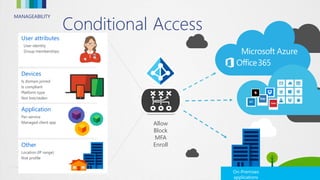
Conditional Access
On-Premises
applications
Application
Per-service
Managed client app
Other
Location (IP range)
Risk profile
Devices
Is domain joined
Is compliant
Platform type
Not lost/stolen
User attributes
User identity
Group memberships
Allow
Block
MFA
Enroll
MANAGEABILITY
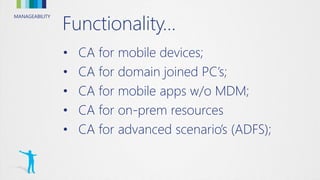
Functionality…
• CA for mobile devices;
• CA for domain joined PC’s;
• CA for mobile apps w/o MDM;
• CA for on-prem resources
• CA for advanced scenario’s (ADFS);
MANAGEABILITY
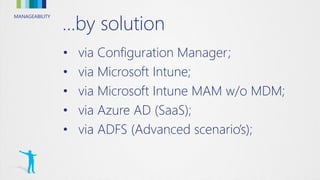
…by solution
• via Configuration Manager;
• via Microsoft Intune;
• via Microsoft Intune MAM w/o MDM;
• via Azure AD (SaaS);
• via ADFS (Advanced scenario’s);
MANAGEABILITY
MANAGEABILITY
MANAGEABILITY
MANAGEABILITY
MANAGEABILITY
MANAGEABILITY
MANAGEABILITYMANAGEABILITY
Conditional Access for
mobile devices
MANAGEABILITY
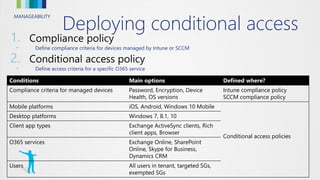
Deploying conditional access
1.
• Define compliance criteria for devices managed by Intune or SCCM
2.
• Define access criteria for a specific O365 service
Conditions Main options Defined where?
Compliance criteria for managed devices Password, Encryption, Device
Health, OS versions
Intune compliance policy
SCCM compliance policy
Mobile platforms iOS, Android, Windows 10 Mobile
Conditional access policies
Desktop platforms Windows 7, 8.1, 10
Client app types Exchange ActiveSync clients, Rich
client apps, Browser
O365 services Exchange Online, SharePoint
Online, Skype for Business,
Dynamics CRM
Users All users in tenant, targeted SGs,
exempted SGs
MANAGEABILITY
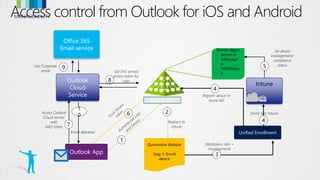
Unified Enrollment
Azure AD
Device object
- device id
- isManage
d
- MDMStatu
s
Quarantine Website
Step 1: Enroll
device
Outlook App
Access control from Outlook for iOS and Android
4
Register device in
Azure AD
Outlook
Cloud
Service
1
(Workplace Join +
management)
3
Enroll into Intune
4
Intune
Set device
management/
compliance
status5
6Access Outlook
Cloud service
with
AAD token 7
8
Get EAS service
access token for
user
9Get Corporate
email
1
0
Email delivered
Redirect to
Intune
2
Office 365
Email service
MANAGEABILITY
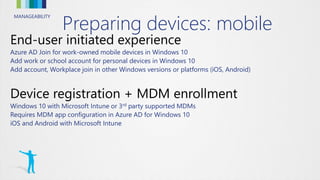
Preparing devices: mobile
Azure AD Join for work-owned mobile devices in Windows 10
Add work or school account for personal devices in Windows 10
Add account, Workplace join in other Windows versions or platforms (iOS, Android)
Windows 10 with Microsoft Intune or 3rd party supported MDMs
Requires MDM app configuration in Azure AD for Windows 10
iOS and Android with Microsoft Intune
MANAGEABILITYMANAGEABILITY
Conditional Access for
domain joined PCs
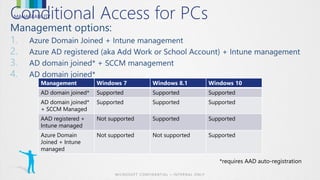
MANAGEABILITYConditional Access for PCs
1.
2.
3.
4.
Management Windows 7 Windows 8.1 Windows 10
AD domain joined* Supported Supported Supported
AD domain joined*
+ SCCM Managed
Supported Supported Supported
AAD registered +
Intune managed
Not supported Supported Supported
Azure Domain
Joined + Intune
managed
Not supported Not supported Supported
MANAGEABILITY
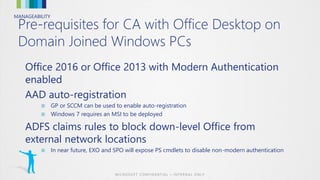
Pre-requisites for CA with Office Desktop on
Domain Joined Windows PCs
Office 2016 or Office 2013 with Modern Authentication
enabled
AAD auto-registration
■ GP or SCCM can be used to enable auto-registration
■ Windows 7 requires an MSI to be deployed
ADFS claims rules to block down-level Office from
external network locations
■ In near future, EXO and SPO will expose PS cmdlets to disable non-modern authentication
MANAGEABILITYMANAGEABILITY
Condition Access for mobile
apps w/o MDM
MANAGEABILITY
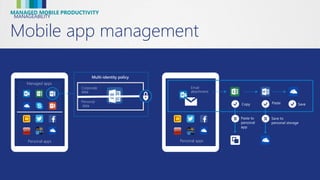
Mobile app management
MANAGED MOBILE PRODUCTIVITY
Managed
apps
Personal
apps
Personal apps
Managed apps
Corporate
data
Personal
data
Multi-identity policy
Personal apps
Managed
apps
Copy Paste Save
Save to
personal storage
Paste to
personal
app
Email
attachment
MANAGEABILITY
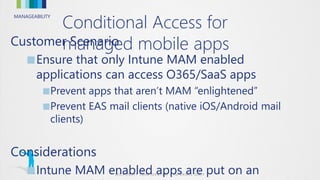
Customer Scenario
■Ensure that only Intune MAM enabled
applications can access O365/SaaS apps
■Prevent apps that aren’t MAM “enlightened”
■Prevent EAS mail clients (native iOS/Android mail
clients)
Considerations
■Intune MAM enabled apps are put on an
Conditional Access for
managed mobile apps
MANAGEABILITY
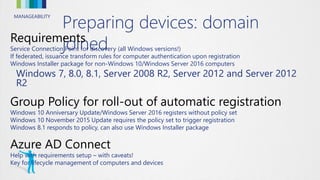
Preparing devices: domain
joinedService Connection Point for discovery (all Windows versions!)
If federated, issuance transform rules for computer authentication upon registration
Windows Installer package for non-Windows 10/Windows Server 2016 computers
Windows 7, 8.0, 8.1, Server 2008 R2, Server 2012 and Server 2012
R2
Windows 10 Anniversary Update/Windows Server 2016 registers without policy set
Windows 10 November 2015 Update requires the policy set to trigger registration
Windows 8.1 responds to policy, can also use Windows Installer package
Help with requirements setup – with caveats!
Key for lifecycle management of computers and devices
MANAGEABILITYMANAGEABILITY
Condition Access for on-
prem resources
MANAGEABILITY
Conditional Access for
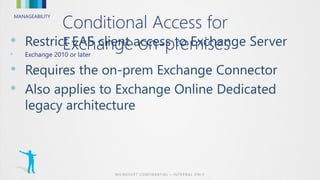
Exchange on-premises•
• Exchange 2010 or later
•
•
MANAGEABILITY
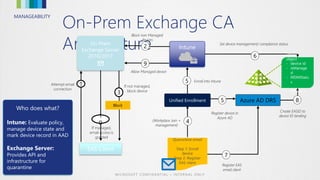
On-Prem Exchange CA
Architecture
EAS Client
Attempt email
connection
1
Block
If not managed,
block device
3
On Prem
Exchange Server
2010/2013
Who does what?
Intune: Evaluate policy,
manage device state and
mark device record in AAD
Exchange Server:
Provides API and
infrastructure for
quarantine
1
0
If managed,
email access is
granted
Unified Enrollment
Register EAS
email client
7
Create EASID to
device ID binding
8
Set device management/ compliance status
6
Azure AD DRS
Device
object
- device id
- isManage
d
- MDMStatu
s
- EASIDsAzure AD
Quarantine email
Step 1: Enroll
device
Step 2: Register
EAS client
(Workplace Join +
management)
4
Intune
5
Register device in
Azure AD
5 Enroll into Intune
2
Block non Managed
devices
9
Allow Managed device
MANAGEABILITY
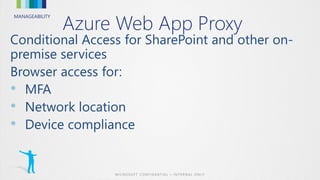
Azure Web App Proxy
•
•
•
MANAGEABILITY
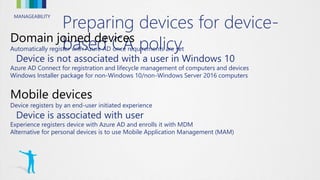
Preparing devices for device-
based CA policyAutomatically register with Azure AD once requirements are set
Device is not associated with a user in Windows 10
Azure AD Connect for registration and lifecycle management of computers and devices
Windows Installer package for non-Windows 10/non-Windows Server 2016 computers
Device registers by an end-user initiated experience
Device is associated with user
Experience registers device with Azure AD and enrolls it with MDM
Alternative for personal devices is to use Mobile Application Management (MAM)
MANAGEABILITYMANAGEABILITY
Conditional Access for
advanced scenario’s (ADFS)
MANAGEABILITY
On-premises applications and
access controlYou can publish on-prem apps through Azure AD
They show in the ‘applications’ tab in the management portal and the ‘myapps’ portal for the user
You can set Device-based CA policy to control access the same way as O365 apps and SaaS apps
Don’t miss: EMS320: Using Azure AD to enable and manage access to on-premises applications
Require device write-back in Azure AD Connect
AD FS in Windows Server 2016 required for Windows 10 authentication
MANAGEABILITYMANAGEABILITY
FAQ
MANAGEABILITYFAQs
•
• No, CA will trump ABQ
•
1. Turn CA off for EAS with Basic Auth; but on for Android and iOS modern auth
apps
2. Configure ADFS to block EAS
3. Exchange ActiveSync ABQ to only allow the Outlook app
•
• We’re working on it.
• For now the main options are:
• Allow all Macs
• Block all Macs
• Exempt Mac users
MANAGEABILITYFAQs cont’d
•
• Recommended for reporting, but not required
•
• ADFS
• OWA app will soon leave the app stores
•
• Azure AD admin console will include Device CA polices (public preview soon)
• Both write to the same back-end AAD policy
• Azure AD console also includes MFA and network based policy
• Plan to consolidate in the new Azure admin console (aka Ibiza)
MANAGEABILITY
14:45 – 15:45
Ten most common mistakes
when deploying ADFS & Hybrid
Identity and how to avoid them
Raymond Comvalius & Sander Berkouwer
MANAGEABILITY
MANAGEABILITY
<Titel>
<Tekst>

Taking conditional access to the next level

  • 1.
    MANAGEABILITY Taking Conditional Access tothe next level Peter van der Woude & Ronny de Jong
  • 2.
  • 3.
    MANAGEABILITY Session objectives and takeaways Overviewof conditional access for devices and mobile apps accessing O365 Overview of conditional access to on-prem Exchange and SharePoint Sneak-peak into upcoming features
  • 4.
    MANAGEABILITY Conditional Access On-Premises applications Application Per-service Managed clientapp Other Location (IP range) Risk profile Devices Is domain joined Is compliant Platform type Not lost/stolen User attributes User identity Group memberships Allow Block MFA Enroll
  • 5.
    MANAGEABILITY Functionality… • CA formobile devices; • CA for domain joined PC’s; • CA for mobile apps w/o MDM; • CA for on-prem resources • CA for advanced scenario’s (ADFS);
  • 6.
    MANAGEABILITY …by solution • viaConfiguration Manager; • via Microsoft Intune; • via Microsoft Intune MAM w/o MDM; • via Azure AD (SaaS); • via ADFS (Advanced scenario’s);
  • 7.
  • 8.
  • 9.
  • 10.
  • 11.
  • 12.
  • 13.
  • 14.
    MANAGEABILITY Deploying conditional access 1. •Define compliance criteria for devices managed by Intune or SCCM 2. • Define access criteria for a specific O365 service Conditions Main options Defined where? Compliance criteria for managed devices Password, Encryption, Device Health, OS versions Intune compliance policy SCCM compliance policy Mobile platforms iOS, Android, Windows 10 Mobile Conditional access policies Desktop platforms Windows 7, 8.1, 10 Client app types Exchange ActiveSync clients, Rich client apps, Browser O365 services Exchange Online, SharePoint Online, Skype for Business, Dynamics CRM Users All users in tenant, targeted SGs, exempted SGs
  • 15.
    MANAGEABILITY Unified Enrollment Azure AD Deviceobject - device id - isManage d - MDMStatu s Quarantine Website Step 1: Enroll device Outlook App Access control from Outlook for iOS and Android 4 Register device in Azure AD Outlook Cloud Service 1 (Workplace Join + management) 3 Enroll into Intune 4 Intune Set device management/ compliance status5 6Access Outlook Cloud service with AAD token 7 8 Get EAS service access token for user 9Get Corporate email 1 0 Email delivered Redirect to Intune 2 Office 365 Email service
  • 16.
    MANAGEABILITY Preparing devices: mobile AzureAD Join for work-owned mobile devices in Windows 10 Add work or school account for personal devices in Windows 10 Add account, Workplace join in other Windows versions or platforms (iOS, Android) Windows 10 with Microsoft Intune or 3rd party supported MDMs Requires MDM app configuration in Azure AD for Windows 10 iOS and Android with Microsoft Intune
  • 17.
  • 18.
    MANAGEABILITYConditional Access forPCs 1. 2. 3. 4. Management Windows 7 Windows 8.1 Windows 10 AD domain joined* Supported Supported Supported AD domain joined* + SCCM Managed Supported Supported Supported AAD registered + Intune managed Not supported Supported Supported Azure Domain Joined + Intune managed Not supported Not supported Supported
  • 19.
    MANAGEABILITY Pre-requisites for CAwith Office Desktop on Domain Joined Windows PCs Office 2016 or Office 2013 with Modern Authentication enabled AAD auto-registration ■ GP or SCCM can be used to enable auto-registration ■ Windows 7 requires an MSI to be deployed ADFS claims rules to block down-level Office from external network locations ■ In near future, EXO and SPO will expose PS cmdlets to disable non-modern authentication
  • 20.
  • 21.
    MANAGEABILITY Mobile app management MANAGEDMOBILE PRODUCTIVITY Managed apps Personal apps Personal apps Managed apps Corporate data Personal data Multi-identity policy Personal apps Managed apps Copy Paste Save Save to personal storage Paste to personal app Email attachment
  • 22.
    MANAGEABILITY Customer Scenario ■Ensure thatonly Intune MAM enabled applications can access O365/SaaS apps ■Prevent apps that aren’t MAM “enlightened” ■Prevent EAS mail clients (native iOS/Android mail clients) Considerations ■Intune MAM enabled apps are put on an Conditional Access for managed mobile apps
  • 23.
    MANAGEABILITY Preparing devices: domain joinedServiceConnection Point for discovery (all Windows versions!) If federated, issuance transform rules for computer authentication upon registration Windows Installer package for non-Windows 10/Windows Server 2016 computers Windows 7, 8.0, 8.1, Server 2008 R2, Server 2012 and Server 2012 R2 Windows 10 Anniversary Update/Windows Server 2016 registers without policy set Windows 10 November 2015 Update requires the policy set to trigger registration Windows 8.1 responds to policy, can also use Windows Installer package Help with requirements setup – with caveats! Key for lifecycle management of computers and devices
  • 24.
  • 25.
    MANAGEABILITY Conditional Access for Exchangeon-premises• • Exchange 2010 or later • •
  • 26.
    MANAGEABILITY On-Prem Exchange CA Architecture EASClient Attempt email connection 1 Block If not managed, block device 3 On Prem Exchange Server 2010/2013 Who does what? Intune: Evaluate policy, manage device state and mark device record in AAD Exchange Server: Provides API and infrastructure for quarantine 1 0 If managed, email access is granted Unified Enrollment Register EAS email client 7 Create EASID to device ID binding 8 Set device management/ compliance status 6 Azure AD DRS Device object - device id - isManage d - MDMStatu s - EASIDsAzure AD Quarantine email Step 1: Enroll device Step 2: Register EAS client (Workplace Join + management) 4 Intune 5 Register device in Azure AD 5 Enroll into Intune 2 Block non Managed devices 9 Allow Managed device
  • 27.
    MANAGEABILITY Azure Web AppProxy • • •
  • 28.
    MANAGEABILITY Preparing devices fordevice- based CA policyAutomatically register with Azure AD once requirements are set Device is not associated with a user in Windows 10 Azure AD Connect for registration and lifecycle management of computers and devices Windows Installer package for non-Windows 10/non-Windows Server 2016 computers Device registers by an end-user initiated experience Device is associated with user Experience registers device with Azure AD and enrolls it with MDM Alternative for personal devices is to use Mobile Application Management (MAM)
  • 29.
  • 30.
    MANAGEABILITY On-premises applications and accesscontrolYou can publish on-prem apps through Azure AD They show in the ‘applications’ tab in the management portal and the ‘myapps’ portal for the user You can set Device-based CA policy to control access the same way as O365 apps and SaaS apps Don’t miss: EMS320: Using Azure AD to enable and manage access to on-premises applications Require device write-back in Azure AD Connect AD FS in Windows Server 2016 required for Windows 10 authentication
  • 31.
  • 32.
    MANAGEABILITYFAQs • • No, CAwill trump ABQ • 1. Turn CA off for EAS with Basic Auth; but on for Android and iOS modern auth apps 2. Configure ADFS to block EAS 3. Exchange ActiveSync ABQ to only allow the Outlook app • • We’re working on it. • For now the main options are: • Allow all Macs • Block all Macs • Exempt Mac users
  • 33.
    MANAGEABILITYFAQs cont’d • • Recommendedfor reporting, but not required • • ADFS • OWA app will soon leave the app stores • • Azure AD admin console will include Device CA polices (public preview soon) • Both write to the same back-end AAD policy • Azure AD console also includes MFA and network based policy • Plan to consolidate in the new Azure admin console (aka Ibiza)
  • 34.
    MANAGEABILITY 14:45 – 15:45 Tenmost common mistakes when deploying ADFS & Hybrid Identity and how to avoid them Raymond Comvalius & Sander Berkouwer
  • 35.
  • 36.