®

CADISON Electric-Designer

CADISON® Electric-Designer
(Integrated Designer Module)
The CADISON® Electric-Designer combines planning efforts
with process control engineering. PLT points (measuring
points) defined by the process engineer are further detailed
by CADISON® Electric-Designer with the required
instrumentation. The electrical planning engineers base their
work on the specified media data and connection parameters
delivered by the process engineer.
Key Features
?
Integrated and Intelligent database Electrical 2D

schematic, 3D model system.
?
Automatic creation of Terminal Drawings and contact sets

(automatic adjustment of pin numbers, etc).

Facility Management
Electric-Designer is used both for electrical planning of a
plant in classical plant engineering and even for facility
management. For example, this module is used for document
creation for operation management of complex line
networks.
Typical
Pre-fabricated typicals are used for automatic graphic
generation and presentation of instrumentation in the
measuring-point chart. The planning engineer may use prefabricated ‘Typical’. It is easy to extend the ‘Typical’ to suit
project need.

?
Numbering and identification system according to DIN

and KKS. Automatic Device Tagging and Wire numbering.

Loop Wiring Diagrams

?
Configurable Logic Analyzer for error checking.

?
Predefined measuring point structure in form of ‘Typical’.

?
Real-time coil and contacts cross-referencing.

?
Reference / Assign ‘Typical’ to a measuring point.

?
Automatic connection of wiring between components.

?
Easy creation and updating of Measuring Point ‘Typical’.

?
Customizable object designation (Text Mask).

? Drop to create automatic loop wiring diagram.
Drag and

?
Auto generation of Legend, Notes and Abbreviation.
? quick cross referencing of components
Easy and

represented in different drawings. (Devices with
distributed representation - Relay contacts, Terminals etc).
?
Automatic and customizable reports generation.
? revision management for reports and drawings.
Project
?
ETAP interface for SLD’s which reduces the need for
manual entries by 50%.
3D cable tray and bus duct routing & 3D Panel layout
drawings
?
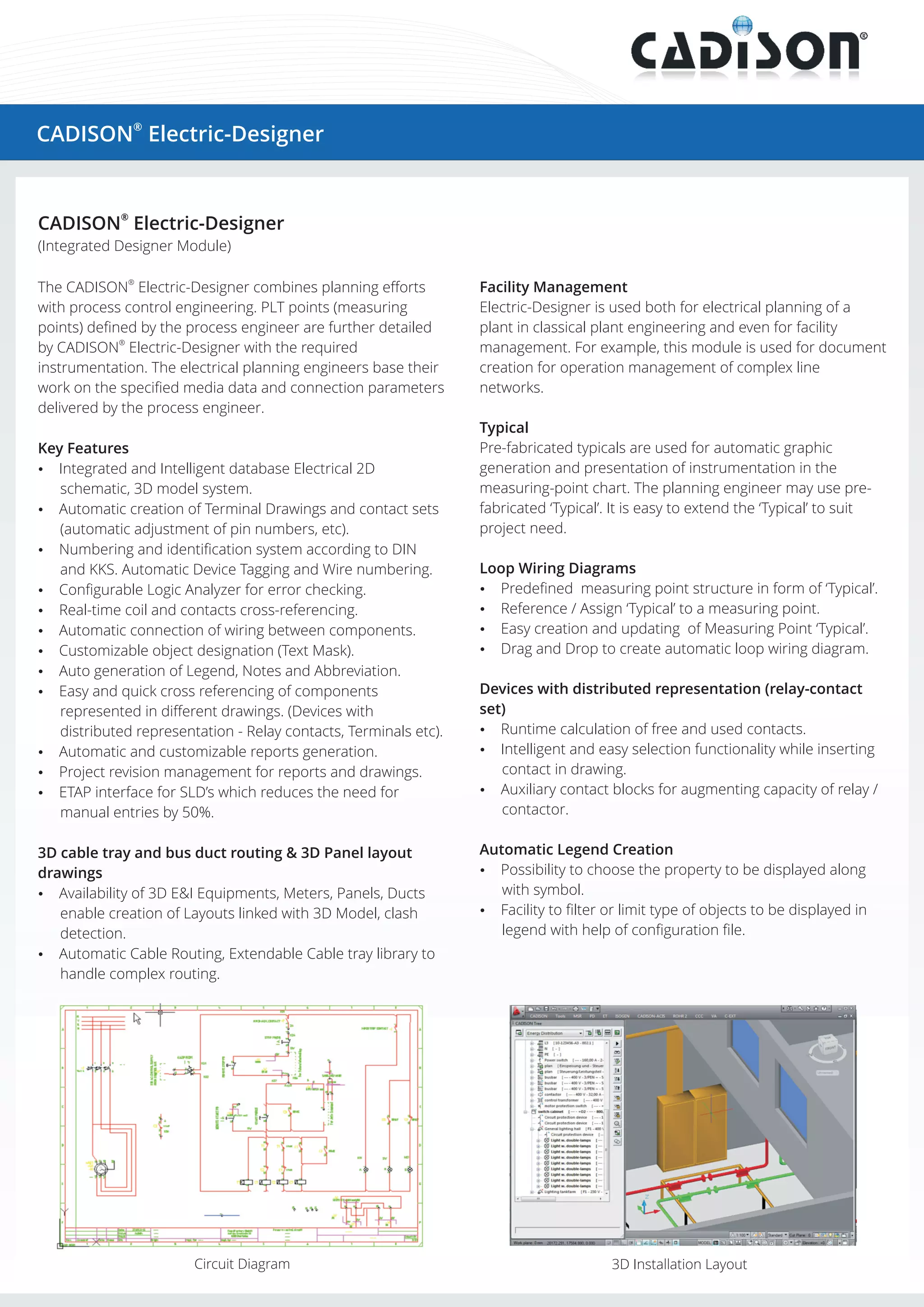
Availability of 3D E&I Equipments, Meters, Panels, Ducts
enable creation of Layouts linked with 3D Model, clash
detection.
?
Automatic Cable Routing, Extendable Cable tray library to
handle complex routing.

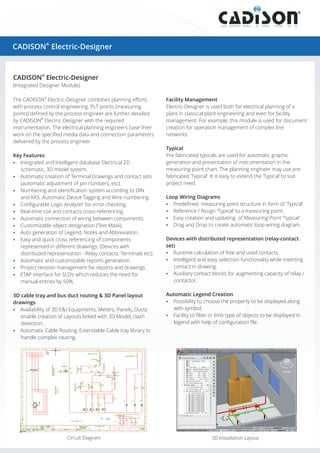
Circuit Diagram

Devices with distributed representation (relay-contact
set)
? calculation of free and used contacts.
Runtime
?
Intelligent and easy selection functionality while inserting
contact in drawing.
? contact blocks for augmenting capacity of relay /
Auxiliary
contactor.
Automatic Legend Creation
?
Possibility to choose the property to be displayed along

with symbol.
? to filter or limit type of objects to be displayed in
Facility

legend with help of configuration file.

3D Installation Layout
Automatic Device Tagging and Wire Numbering
? possibilities for auto numbering of wires and
Multiple

devices.
? number assignment at the time of creation.
Dynamic
?
Renumbering will reassign the number based on level of

selection, position of devices with in drawing. Provision for
renumbering at drawing, logical plant, location and project
levels.
Automatic Terminal Drawing
?
Automatic terminal drawing feature to create new

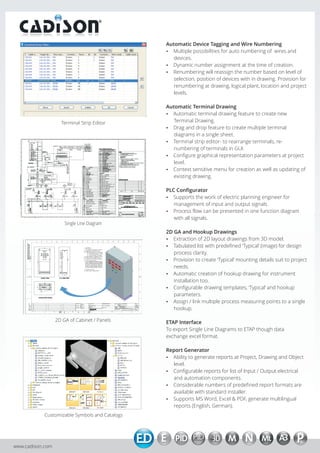
Terminal Strip Editor

Terminal Drawing.
? drop feature to create multiple terminal
Drag and
diagrams in a single sheet.
? strip editor- to rearrange terminals, reTerminal
numbering of terminals in GUI.
?
Configure graphical representation parameters at project
level.
? sensitive menu for creation as well as updating of
Context
existing drawing.
PLC Configurator
? the work of electric planning engineer for
Supports

management of input and output signals.
? flow can be presented in one function diagram
Process

with all signals.
Single Line Diagram

2D GA and Hookup Drawings
?
Extraction of 2D layout drawings from 3D model.
?
Tabulated list with predefined ‘Typical’ (image) for design

process clarity.
? to create ‘Typical’ mounting details suit to project
Provision

needs.
?
Automatic creation of hookup drawing for instrument

installation too.
?
Configurable drawing templates, ‘Typical’ and hookup

parameters.
?/ link multiple process measuring points to a single
Assign

hookup.
2D GA of Cabinet / Panels

ETAP Interface
To export Single Line Diagrams to ETAP though data
exchange excel format.
Report Generator
? generate reports at Project, Drawing and Object
Ability to
level.
?
Configurable reports for list of Input / Output electrical
and automation components.
?
Considerable numbers of predefined report formats are
available with standard installer.
? MS Word, Excel & PDF, generate multilingual
Supports
reports (English, German).

Customizable Symbols and Catalogs

www.cadison.com

Electric designer

  • 1.
    ® CADISON Electric-Designer CADISON® Electric-Designer (IntegratedDesigner Module) The CADISON® Electric-Designer combines planning efforts with process control engineering. PLT points (measuring points) defined by the process engineer are further detailed by CADISON® Electric-Designer with the required instrumentation. The electrical planning engineers base their work on the specified media data and connection parameters delivered by the process engineer. Key Features ? Integrated and Intelligent database Electrical 2D schematic, 3D model system. ? Automatic creation of Terminal Drawings and contact sets (automatic adjustment of pin numbers, etc). Facility Management Electric-Designer is used both for electrical planning of a plant in classical plant engineering and even for facility management. For example, this module is used for document creation for operation management of complex line networks. Typical Pre-fabricated typicals are used for automatic graphic generation and presentation of instrumentation in the measuring-point chart. The planning engineer may use prefabricated ‘Typical’. It is easy to extend the ‘Typical’ to suit project need. ? Numbering and identification system according to DIN and KKS. Automatic Device Tagging and Wire numbering. Loop Wiring Diagrams ? Configurable Logic Analyzer for error checking. ? Predefined measuring point structure in form of ‘Typical’. ? Real-time coil and contacts cross-referencing. ? Reference / Assign ‘Typical’ to a measuring point. ? Automatic connection of wiring between components. ? Easy creation and updating of Measuring Point ‘Typical’. ? Customizable object designation (Text Mask). ? Drop to create automatic loop wiring diagram. Drag and ? Auto generation of Legend, Notes and Abbreviation. ? quick cross referencing of components Easy and represented in different drawings. (Devices with distributed representation - Relay contacts, Terminals etc). ? Automatic and customizable reports generation. ? revision management for reports and drawings. Project ? ETAP interface for SLD’s which reduces the need for manual entries by 50%. 3D cable tray and bus duct routing & 3D Panel layout drawings ? Availability of 3D E&I Equipments, Meters, Panels, Ducts enable creation of Layouts linked with 3D Model, clash detection. ? Automatic Cable Routing, Extendable Cable tray library to handle complex routing. Circuit Diagram Devices with distributed representation (relay-contact set) ? calculation of free and used contacts. Runtime ? Intelligent and easy selection functionality while inserting contact in drawing. ? contact blocks for augmenting capacity of relay / Auxiliary contactor. Automatic Legend Creation ? Possibility to choose the property to be displayed along with symbol. ? to filter or limit type of objects to be displayed in Facility legend with help of configuration file. 3D Installation Layout
  • 2.
    Automatic Device Taggingand Wire Numbering ? possibilities for auto numbering of wires and Multiple devices. ? number assignment at the time of creation. Dynamic ? Renumbering will reassign the number based on level of selection, position of devices with in drawing. Provision for renumbering at drawing, logical plant, location and project levels. Automatic Terminal Drawing ? Automatic terminal drawing feature to create new Terminal Strip Editor Terminal Drawing. ? drop feature to create multiple terminal Drag and diagrams in a single sheet. ? strip editor- to rearrange terminals, reTerminal numbering of terminals in GUI. ? Configure graphical representation parameters at project level. ? sensitive menu for creation as well as updating of Context existing drawing. PLC Configurator ? the work of electric planning engineer for Supports management of input and output signals. ? flow can be presented in one function diagram Process with all signals. Single Line Diagram 2D GA and Hookup Drawings ? Extraction of 2D layout drawings from 3D model. ? Tabulated list with predefined ‘Typical’ (image) for design process clarity. ? to create ‘Typical’ mounting details suit to project Provision needs. ? Automatic creation of hookup drawing for instrument installation too. ? Configurable drawing templates, ‘Typical’ and hookup parameters. ?/ link multiple process measuring points to a single Assign hookup. 2D GA of Cabinet / Panels ETAP Interface To export Single Line Diagrams to ETAP though data exchange excel format. Report Generator ? generate reports at Project, Drawing and Object Ability to level. ? Configurable reports for list of Input / Output electrical and automation components. ? Considerable numbers of predefined report formats are available with standard installer. ? MS Word, Excel & PDF, generate multilingual Supports reports (English, German). Customizable Symbols and Catalogs www.cadison.com