DESIGN AND IMPLEMENTATION
OF AN
SYSTEM
PRESENTED BY
LAWANI TOMILAYO IKPONMWOSA
INTRODUCTION
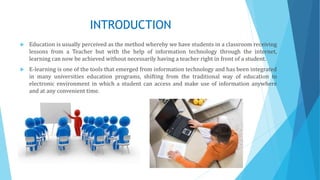
 Education is usually perceived as the method whereby we have students in a classroom receiving
lessons from a Teacher but with the help of information technology through the internet,
learning can now be achieved without necessarily having a teacher right in front of a student.
 E-learning is one of the tools that emerged from information technology and has been integrated
in many universities education programs, shifting from the traditional way of education to
electronic environment in which a student can access and make use of information anywhere
and at any convenient time.
PROBLEM STATEMENT
 Students' inability to grasp key ideas and concepts.
 Too much focus on presentation, little time left for practice.
 Lack of motivational push.
NOTE: This method of education is therefore a danger to the student as this will only make the
student unqualified for the career industry.
AIM AND OBJECTIVES
AIM
The aim of this project is to develop an e-learning system that will improvise on the manual, large
class learning techniques used in teaching Computer Science
OBJECTIVES
The objectives of this project are as follows;
 To design an e-learning system with various multimedia features.
 To integrate concurrent access features in the system
 To create a database for easy retrieval, storage and maintenance of student records as well as
sharing of data between users.
 To make the training process easier for the trainer as well.
LITERATURE REVIEW
 Origin
The origins of the term e-learning is not certain, although it is suggested
that the term most likely originated during the 1980's but the term “e-
learning” has been in existence since 1999 where it was first used at a CBT
systems seminar.
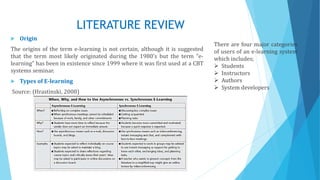
 Types of E-learning
Source: (Hrastinski, 2008)
There are four major categories
of users of an e-learning system
which includes;
 Students
 Instructors
 Authors
 System developers
LITERATURE REVIEW
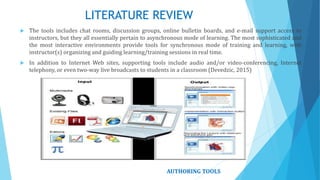
 The tools includes chat rooms, discussion groups, online bulletin boards, and e-mail support access to
instructors, but they all essentially pertain to asynchronous mode of learning. The most sophisticated and
the most interactive environments provide tools for synchronous mode of training and learning, with
instructor(s) organizing and guiding learning/training sessions in real time.
 In addition to Internet Web sites, supporting tools include audio and/or video-conferencing, Internet
telephony, or even two-way live broadcasts to students in a classroom (Devedzic, 2015)
AUTHORING TOOLS
LITERATURE REVIEW
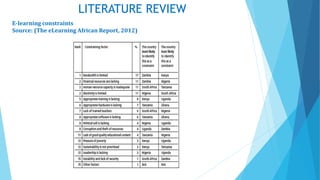
E-learning constraints
Source: (The eLearning African Report, 2012)
REVIEW OF RELATED WORK
 W3Schools is optimized for learning, testing, and training. Examples might be
simplified to improve reading and basic understanding. Tutorials, references, and
examples are constantly reviewed to avoid errors.
 Coursera provides universal access to the world’s best education, partnering with
top universities and organizations to offer courses for anyone to take, for free.
 Code. Org is based on the idea that every student in every school should have the
opportunity to learn computer science
 Tutorialspoint makes available an Online Lab where you can create your programs
in more than 80 programming languages, compile, execute and share them over
the web, which provides you remarkable learning experience at a cost of just an
internet connection.
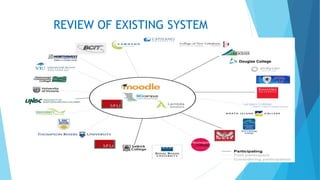
REVIEW OF EXISTING SYSTEM
METHODOLOGY
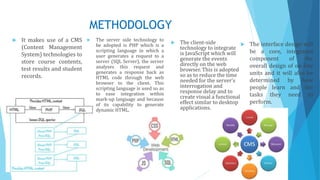
 It makes use of a CMS
(Content Management
System) technologies to
store course contents,
test results and student
records.
 The server side technology to
be adopted is PHP which is a
scripting language in which a
user generates a request to a
server (SQL Server), the server
analyses this request and
generates a response back as
HTML code through the web
browser to the client. This
scripting language is used so as
to ease integration within
mark-up language and because
of its capability to generate
dynamic HTML.
 The client-side
technology to integrate
is JavaScript which will
generate the events
directly on the web
browser. This is adopted
so as to reduce the time
needed for the server’s
interrogation and
response delay and to
create visual a functional
effect similar to desktop
applications.
 The interface design will
be a core, integrated
component of the
overall design of on-line
units and it will also be
determined by how
people learn and the
tasks they need to
perform.
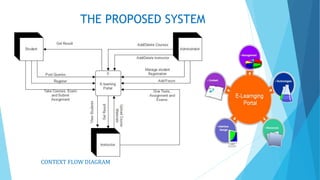
THE PROPOSED SYSTEM
CONTEXT FLOW DIAGRAM
THE PROPOSED SYSTEM
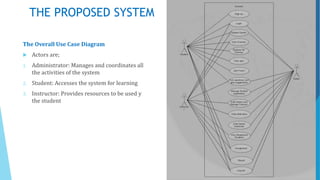
The Overall Use Case Diagram
 Actors are;
1. Administrator: Manages and coordinates all
the activities of the system
2. Student: Accesses the system for learning
3. Instructor: Provides resources to be used y
the student
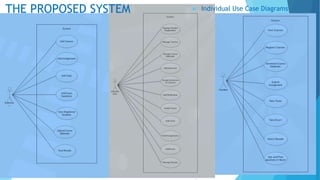
THE PROPOSED SYSTEM  Individual Use Case Diagrams
THE PROPOSED SYSTEM
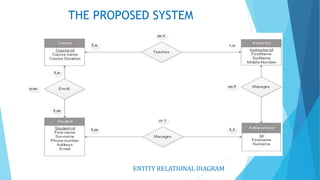
ENTITY RELATIONAL DIAGRAM
1,m
THE PROPOSED SYSTEM
FIELDS
DATATYP
E CHARACTER LENGTH KEY
Student-id Varchar 8 Primary key
First-name Varchar 20
Sur-name Varchar 20
Phone-
number
Varchar 11
E-mail Varchar 30
Username Varchar 10
Password Varchar 10
Course-id Varchar 7 Foreign Key
FIELDS DATATYPE CHARACTER LENGTH KEY
Course-id Varchar 8 Primary key
Course-name Varchar 20
Duration Varchar 20
Instructor-id Varchar 8 Foreign Key
Course Table
Student Table
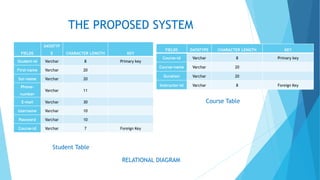
RELATIONAL DIAGRAM
THE PROPOSED SYSTEM
Instructor Table
FIELDS DATATYPE CHARACTER LENGTH KEY
Instructor-id Varchar 8 Primary key
FirstName Varchar 20
Surname Varchar 20
PhoneNumbe
r
Varchar 8
Username Varchar 10
Password Varchar 10
Student_id Varchar 7 Foreign Key
Course_id Varchar 8 Foreign Key
FIELDS
DATATYP
E CHARACTER LENGTH KEY
Admin-id Varchar 8 Primary key
First-name Varchar 20
Surname Varchar 20
Course-id Varchar 8 Foreign Key
Instructor-id Varchar 8 Foreign Key
Student-id Varchar 8 Foreign Key
Administrator Table
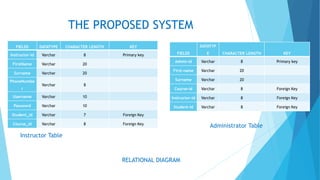
RELATIONAL DIAGRAM
THE PROPOSED SYSTEM
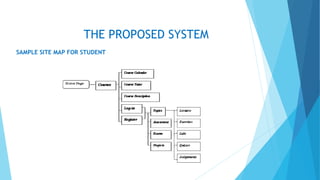
SAMPLE SITE MAP FOR STUDENT
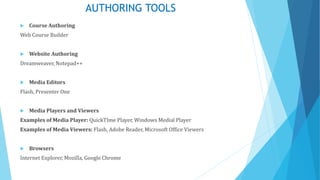
AUTHORING TOOLS
 Course Authoring
Web Course Builder
 Website Authoring
Dreamweaver, Notepad++
 Media Editors
Flash, Presenter One
 Media Players and Viewers
Examples of Media Player: QuickTIme Player, Windows Medial Player
Examples of Media Viewers: Flash, Adobe Reader, Microsoft Office Viewers
 Browsers
Internet Explorer, Mozilla, Google Chrome
CONCLUSION
 "Tell me and I forget; teach me and I may remember; involve me and I will learn” (Credited to
Benjamin Franklin in 1980s)

E-learning system

  • 1.
    DESIGN AND IMPLEMENTATION OFAN SYSTEM PRESENTED BY LAWANI TOMILAYO IKPONMWOSA
  • 2.
    INTRODUCTION  Education isusually perceived as the method whereby we have students in a classroom receiving lessons from a Teacher but with the help of information technology through the internet, learning can now be achieved without necessarily having a teacher right in front of a student.  E-learning is one of the tools that emerged from information technology and has been integrated in many universities education programs, shifting from the traditional way of education to electronic environment in which a student can access and make use of information anywhere and at any convenient time.
  • 3.
    PROBLEM STATEMENT  Students'inability to grasp key ideas and concepts.  Too much focus on presentation, little time left for practice.  Lack of motivational push. NOTE: This method of education is therefore a danger to the student as this will only make the student unqualified for the career industry.
  • 4.
    AIM AND OBJECTIVES AIM Theaim of this project is to develop an e-learning system that will improvise on the manual, large class learning techniques used in teaching Computer Science OBJECTIVES The objectives of this project are as follows;  To design an e-learning system with various multimedia features.  To integrate concurrent access features in the system  To create a database for easy retrieval, storage and maintenance of student records as well as sharing of data between users.  To make the training process easier for the trainer as well.
  • 5.
    LITERATURE REVIEW  Origin Theorigins of the term e-learning is not certain, although it is suggested that the term most likely originated during the 1980's but the term “e- learning” has been in existence since 1999 where it was first used at a CBT systems seminar.  Types of E-learning Source: (Hrastinski, 2008) There are four major categories of users of an e-learning system which includes;  Students  Instructors  Authors  System developers
  • 6.
    LITERATURE REVIEW  Thetools includes chat rooms, discussion groups, online bulletin boards, and e-mail support access to instructors, but they all essentially pertain to asynchronous mode of learning. The most sophisticated and the most interactive environments provide tools for synchronous mode of training and learning, with instructor(s) organizing and guiding learning/training sessions in real time.  In addition to Internet Web sites, supporting tools include audio and/or video-conferencing, Internet telephony, or even two-way live broadcasts to students in a classroom (Devedzic, 2015) AUTHORING TOOLS
  • 7.
    LITERATURE REVIEW E-learning constraints Source:(The eLearning African Report, 2012)
  • 8.
  • 9.
    REVIEW OF RELATEDWORK  W3Schools is optimized for learning, testing, and training. Examples might be simplified to improve reading and basic understanding. Tutorials, references, and examples are constantly reviewed to avoid errors.  Coursera provides universal access to the world’s best education, partnering with top universities and organizations to offer courses for anyone to take, for free.  Code. Org is based on the idea that every student in every school should have the opportunity to learn computer science  Tutorialspoint makes available an Online Lab where you can create your programs in more than 80 programming languages, compile, execute and share them over the web, which provides you remarkable learning experience at a cost of just an internet connection.
  • 10.
  • 11.
    METHODOLOGY  It makesuse of a CMS (Content Management System) technologies to store course contents, test results and student records.  The server side technology to be adopted is PHP which is a scripting language in which a user generates a request to a server (SQL Server), the server analyses this request and generates a response back as HTML code through the web browser to the client. This scripting language is used so as to ease integration within mark-up language and because of its capability to generate dynamic HTML.  The client-side technology to integrate is JavaScript which will generate the events directly on the web browser. This is adopted so as to reduce the time needed for the server’s interrogation and response delay and to create visual a functional effect similar to desktop applications.  The interface design will be a core, integrated component of the overall design of on-line units and it will also be determined by how people learn and the tasks they need to perform.
  • 12.
  • 13.
    THE PROPOSED SYSTEM TheOverall Use Case Diagram  Actors are; 1. Administrator: Manages and coordinates all the activities of the system 2. Student: Accesses the system for learning 3. Instructor: Provides resources to be used y the student
  • 14.
    THE PROPOSED SYSTEM Individual Use Case Diagrams
  • 15.
    THE PROPOSED SYSTEM ENTITYRELATIONAL DIAGRAM 1,m
  • 16.
    THE PROPOSED SYSTEM FIELDS DATATYP ECHARACTER LENGTH KEY Student-id Varchar 8 Primary key First-name Varchar 20 Sur-name Varchar 20 Phone- number Varchar 11 E-mail Varchar 30 Username Varchar 10 Password Varchar 10 Course-id Varchar 7 Foreign Key FIELDS DATATYPE CHARACTER LENGTH KEY Course-id Varchar 8 Primary key Course-name Varchar 20 Duration Varchar 20 Instructor-id Varchar 8 Foreign Key Course Table Student Table RELATIONAL DIAGRAM
  • 17.
    THE PROPOSED SYSTEM InstructorTable FIELDS DATATYPE CHARACTER LENGTH KEY Instructor-id Varchar 8 Primary key FirstName Varchar 20 Surname Varchar 20 PhoneNumbe r Varchar 8 Username Varchar 10 Password Varchar 10 Student_id Varchar 7 Foreign Key Course_id Varchar 8 Foreign Key FIELDS DATATYP E CHARACTER LENGTH KEY Admin-id Varchar 8 Primary key First-name Varchar 20 Surname Varchar 20 Course-id Varchar 8 Foreign Key Instructor-id Varchar 8 Foreign Key Student-id Varchar 8 Foreign Key Administrator Table RELATIONAL DIAGRAM
  • 18.
    THE PROPOSED SYSTEM SAMPLESITE MAP FOR STUDENT
  • 19.
    AUTHORING TOOLS  CourseAuthoring Web Course Builder  Website Authoring Dreamweaver, Notepad++  Media Editors Flash, Presenter One  Media Players and Viewers Examples of Media Player: QuickTIme Player, Windows Medial Player Examples of Media Viewers: Flash, Adobe Reader, Microsoft Office Viewers  Browsers Internet Explorer, Mozilla, Google Chrome
  • 20.
    CONCLUSION  "Tell meand I forget; teach me and I may remember; involve me and I will learn” (Credited to Benjamin Franklin in 1980s)