DESIGN & DEVELOPMENT OF DISTANCE & DISTRIBUTED
LEARNING SYSTEM
Group Member
Kazi Zannatul Ferdaus
ID:21CSE090516
Afroza Akther
ID:21CSE090506
Ahmmad Ali
ID:21CSE090512
Project Supervisor
Mohammad Abdullah Al Mamun
Lecturer
Department of Computer Science
University of Development
Alternative
1
5/27/2013
OUTLINE
 Overview
 Objective
 Mission
 Vision
 Output
 Input
 Tools
 Time Frame
 Conclusion
2
5/27/2013
OVERVIEW
 Project
The name of our selected project is Distance & Distributed Learning System
(DDLS).
We have decided to take on this project because our fields of interest
exchange from traditional learning system to digitalize where stored all
educational materials and academic needs.
 Current System
The goal of any education system is being educated the nation. The
current education system is very traditional. In our daily life it is very
common that the time table may be mismatched, any serious
problem may occur any time. Then our study will be interrupted.
5/27/2013
OVERVIEW
 Background
Most of the students are facing problems when they start their
education in a university or end it and forwarding to a
competitive job market. They must need some proper guidelines
during this period. Not only that, in the whole student life it is
very necessary for them to make good communication with
friends, teachers and among students. Although we have decided
to develop this system for providing all educational documents
in one platform and which one is an open source site for every
student.
5/27/2013
4
OVERVIEW (BACKGROUND)
 This system are designed by two modules one is Academic and
other one is Tutor .
 Academic
 Every student can upload & download his/her academic resources
without any cost such as assignments , lab reports , lecture sheet &
projects .
 Course
 This module will offer online course where include weekly
lectures one specific subject . Also it’s provide home work
, assignment and quiz test depends on weekly lectures.
5/27/2013
5
OBJECTIVE
Our main goal of the project is to responsive aspect with mobile
application (Android & iPhone). The benefits to the end user from our
project include:
 To make learning available anytime, anywhere.
 To reduce the time.
 To reduce learning costs.
 To improve flexibility of course delivery.
 To access every devices (Mobile, Tablet PC and Desktop PC).
 To enhance communication between instructors , students, and
among students.
 To provide different media formats
(text, images, animation, audio and video).
6
5/27/2013
OBJECTIVE
 To provide access to course materials.
 Get solution of problems.
 Easy to post any kind of article and share with everyone.
 Open source learning environment.
 A way to ask any solution to friends, teacher.
 Students become completely familiar with online utilities and
resources.
 Formal and informal learning.
 Self-study and collaborative learning. 7
5/27/2013
MISSION
The mission of the Distance & Distributed Learning System
(DDLS) is to create new solutions to the emerging challenges
and opportunities in optimizing the application of technology to
enhanced learning environments that transcend the educational
and training needs of every students. This involves the
study, development, and research, practices, and learning
environments that contribute to the engagement of learners
across the life span in the pedagogy of Distance & Distributed
Learning System (DDLS).
8
5/27/2013
VISION
Our vision of “Distance & Distributed Learning System” is to
make broad experience where educational materials are to be
stored digitally. Wide variety of subject that can be organize day
by day. In this system we will provide a good mobility in
constructing a widely used application of Android & iPhone . In
future we will extend this project by some new features which
will be more exciting.
9
5/27/2013
DESIGN OF OUTPUT
 List of outputs
 Details of outputs
10
5/27/2013
LIST OF OUTPUT
 School
 List of all department and subjects.
 Syllabus of every subject.
 Faculty info.
 Display lectures.
 Homework.
 Quiz.
 Drop box.
11
5/27/2013
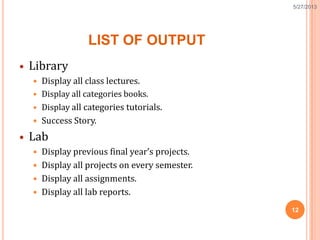
LIST OF OUTPUT
 Library
 Display all class lectures.
 Display all categories books.
 Display all categories tutorials.
 Success Story.
 Lab
 Display previous final year’s projects.
 Display all projects on every semester.
 Display all assignments.
 Display all lab reports.
12
5/27/2013
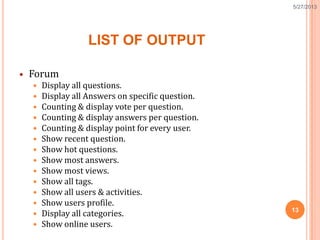
LIST OF OUTPUT
 Forum
 Display all questions.
 Display all Answers on specific question.
 Counting & display vote per question.
 Counting & display answers per question.
 Counting & display point for every user.
 Show recent question.
 Show hot questions.
 Show most answers.
 Show most views.
 Show all tags.
 Show all users & activities.
 Show users profile.
 Display all categories.
 Show online users.
13
5/27/2013
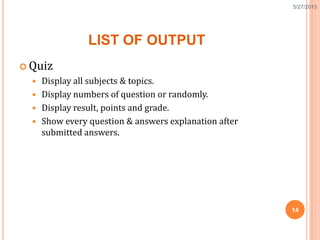
LIST OF OUTPUT
 Quiz
 Display all subjects & topics.
 Display numbers of question or randomly.
 Display result, points and grade.
 Show every question & answers explanation after
submitted answers.
14
5/27/2013
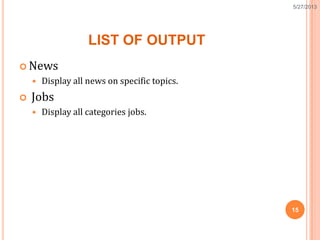
LIST OF OUTPUT
 News
 Display all news on specific topics.
 Jobs
 Display all categories jobs.
15
5/27/2013
DESIGN OF INPUT
 List of input
 Details of input
16
5/27/2013
LIST OF INPUT
 School
 Upload Lecture
 Make quiz question
 Design Homework
 Library
 Upload class lectures.
 Upload books.
 Create module of tutorial.
 Design syllabus of every subject.
17
5/27/2013
LIST OF INPUT
 Lab
 Upload Project by user/admin.
 Upload assignment by user/admin.
 Upload lab report by user/admin.
 Forum
 Registration form.
 Sign in section.
 Ask question.
 Answer question. 18
5/27/2013
LIST OF INPUT
 Quiz
 Select the subject from subjects list.
 Select the topic of selected subject from topic list.
 Start quiz.
 Select answer from four options.
 News
 Publish news.
 Create category.
19
5/27/2013
LIST OF INPUT
 Jobs
 Published job.
 Create category.
20
5/27/2013
REQUIRED TOOLS
21
5/27/2013
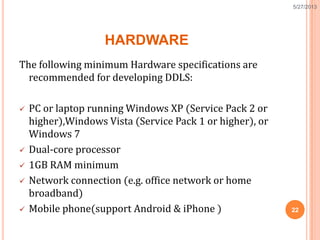
HARDWARE
The following minimum Hardware specifications are
recommended for developing DDLS:
 PC or laptop running Windows XP (Service Pack 2 or
higher),Windows Vista (Service Pack 1 or higher), or
Windows 7
 Dual-core processor
 1GB RAM minimum
 Network connection (e.g. office network or home
broadband)
 Mobile phone(support Android & iPhone ) 22
5/27/2013
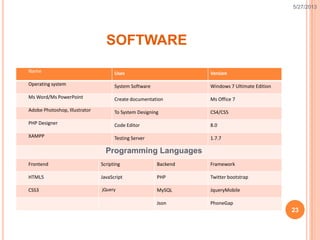
SOFTWARE
Name Uses Version
Operating system System Software Windows 7 Ultimate Edition
Ms Word/Ms PowerPoint Create documentation Ms Office 7
Adobe Photoshop, Illustrator To System Designing CS4/CS5
PHP Designer Code Editor 8.0
XAMPP Testing Server 1.7.7
Programming Languages
Frontend Scripting Backend Framework
HTML5 JavaScript PHP Twitter bootstrap
CSS3 jQuery MySQL JqueryMobile
Json PhoneGap
23
5/27/2013
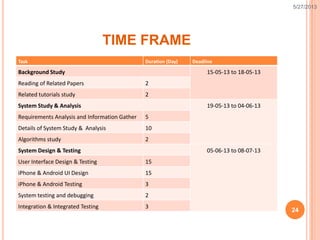
TIME FRAME
Task Duration (Day) Deadline
Background Study 15-05-13 to 18-05-13
Reading of Related Papers 2
Related tutorials study 2
System Study & Analysis 19-05-13 to 04-06-13
Requirements Analysis and Information Gather 5
Details of System Study & Analysis 10
Algorithms study 2
System Design & Testing 05-06-13 to 08-07-13
User Interface Design & Testing 15
iPhone & Android UI Design 15
iPhone & Android Testing 3
System testing and debugging 2
Integration & Integrated Testing 3
24
5/27/2013
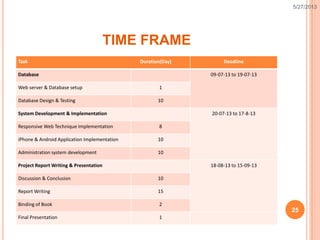
TIME FRAME
Task Duration(Day) Deadline
Database 09-07-13 to 19-07-13
Web server & Database setup 1
Database Design & Testing 10
System Development & Implementation 20-07-13 to 17-8-13
Responsive Web Technique Implementation 8
iPhone & Android Application Implementation 10
Administration system development 10
Project Report Writing & Presentation 18-08-13 to 15-09-13
Discussion & Conclusion 10
Report Writing 15
Binding of Book 2
Final Presentation 1
25
5/27/2013
CONCLUSION
In this system we have done quite a number of things. And we
try our level best to help any kind of users to provide all
educational materials and online tutor to learn.
By this system the world wide online students will be get a very
effective educational way. The students can enhance their skills
by distributing their ideas by using this system. One user can get
the facilities of using this project anytime and anywhere because
it is not only the web based system it has also a Mobile
Application facilities.
26
5/27/2013
27
5/27/2013

Design & Development of Distance & Distributed Learning System

  • 1.
    DESIGN & DEVELOPMENTOF DISTANCE & DISTRIBUTED LEARNING SYSTEM Group Member Kazi Zannatul Ferdaus ID:21CSE090516 Afroza Akther ID:21CSE090506 Ahmmad Ali ID:21CSE090512 Project Supervisor Mohammad Abdullah Al Mamun Lecturer Department of Computer Science University of Development Alternative 1 5/27/2013
  • 2.
    OUTLINE  Overview  Objective Mission  Vision  Output  Input  Tools  Time Frame  Conclusion 2 5/27/2013
  • 3.
    OVERVIEW  Project The nameof our selected project is Distance & Distributed Learning System (DDLS). We have decided to take on this project because our fields of interest exchange from traditional learning system to digitalize where stored all educational materials and academic needs.  Current System The goal of any education system is being educated the nation. The current education system is very traditional. In our daily life it is very common that the time table may be mismatched, any serious problem may occur any time. Then our study will be interrupted. 5/27/2013
  • 4.
    OVERVIEW  Background Most ofthe students are facing problems when they start their education in a university or end it and forwarding to a competitive job market. They must need some proper guidelines during this period. Not only that, in the whole student life it is very necessary for them to make good communication with friends, teachers and among students. Although we have decided to develop this system for providing all educational documents in one platform and which one is an open source site for every student. 5/27/2013 4
  • 5.
    OVERVIEW (BACKGROUND)  Thissystem are designed by two modules one is Academic and other one is Tutor .  Academic  Every student can upload & download his/her academic resources without any cost such as assignments , lab reports , lecture sheet & projects .  Course  This module will offer online course where include weekly lectures one specific subject . Also it’s provide home work , assignment and quiz test depends on weekly lectures. 5/27/2013 5
  • 6.
    OBJECTIVE Our main goalof the project is to responsive aspect with mobile application (Android & iPhone). The benefits to the end user from our project include:  To make learning available anytime, anywhere.  To reduce the time.  To reduce learning costs.  To improve flexibility of course delivery.  To access every devices (Mobile, Tablet PC and Desktop PC).  To enhance communication between instructors , students, and among students.  To provide different media formats (text, images, animation, audio and video). 6 5/27/2013
  • 7.
    OBJECTIVE  To provideaccess to course materials.  Get solution of problems.  Easy to post any kind of article and share with everyone.  Open source learning environment.  A way to ask any solution to friends, teacher.  Students become completely familiar with online utilities and resources.  Formal and informal learning.  Self-study and collaborative learning. 7 5/27/2013
  • 8.
    MISSION The mission ofthe Distance & Distributed Learning System (DDLS) is to create new solutions to the emerging challenges and opportunities in optimizing the application of technology to enhanced learning environments that transcend the educational and training needs of every students. This involves the study, development, and research, practices, and learning environments that contribute to the engagement of learners across the life span in the pedagogy of Distance & Distributed Learning System (DDLS). 8 5/27/2013
  • 9.
    VISION Our vision of“Distance & Distributed Learning System” is to make broad experience where educational materials are to be stored digitally. Wide variety of subject that can be organize day by day. In this system we will provide a good mobility in constructing a widely used application of Android & iPhone . In future we will extend this project by some new features which will be more exciting. 9 5/27/2013
  • 10.
    DESIGN OF OUTPUT List of outputs  Details of outputs 10 5/27/2013
  • 11.
    LIST OF OUTPUT School  List of all department and subjects.  Syllabus of every subject.  Faculty info.  Display lectures.  Homework.  Quiz.  Drop box. 11 5/27/2013
  • 12.
    LIST OF OUTPUT Library  Display all class lectures.  Display all categories books.  Display all categories tutorials.  Success Story.  Lab  Display previous final year’s projects.  Display all projects on every semester.  Display all assignments.  Display all lab reports. 12 5/27/2013
  • 13.
    LIST OF OUTPUT Forum  Display all questions.  Display all Answers on specific question.  Counting & display vote per question.  Counting & display answers per question.  Counting & display point for every user.  Show recent question.  Show hot questions.  Show most answers.  Show most views.  Show all tags.  Show all users & activities.  Show users profile.  Display all categories.  Show online users. 13 5/27/2013
  • 14.
    LIST OF OUTPUT Quiz  Display all subjects & topics.  Display numbers of question or randomly.  Display result, points and grade.  Show every question & answers explanation after submitted answers. 14 5/27/2013
  • 15.
    LIST OF OUTPUT News  Display all news on specific topics.  Jobs  Display all categories jobs. 15 5/27/2013
  • 16.
    DESIGN OF INPUT List of input  Details of input 16 5/27/2013
  • 17.
    LIST OF INPUT School  Upload Lecture  Make quiz question  Design Homework  Library  Upload class lectures.  Upload books.  Create module of tutorial.  Design syllabus of every subject. 17 5/27/2013
  • 18.
    LIST OF INPUT Lab  Upload Project by user/admin.  Upload assignment by user/admin.  Upload lab report by user/admin.  Forum  Registration form.  Sign in section.  Ask question.  Answer question. 18 5/27/2013
  • 19.
    LIST OF INPUT Quiz  Select the subject from subjects list.  Select the topic of selected subject from topic list.  Start quiz.  Select answer from four options.  News  Publish news.  Create category. 19 5/27/2013
  • 20.
    LIST OF INPUT Jobs  Published job.  Create category. 20 5/27/2013
  • 21.
  • 22.
    HARDWARE The following minimumHardware specifications are recommended for developing DDLS:  PC or laptop running Windows XP (Service Pack 2 or higher),Windows Vista (Service Pack 1 or higher), or Windows 7  Dual-core processor  1GB RAM minimum  Network connection (e.g. office network or home broadband)  Mobile phone(support Android & iPhone ) 22 5/27/2013
  • 23.
    SOFTWARE Name Uses Version Operatingsystem System Software Windows 7 Ultimate Edition Ms Word/Ms PowerPoint Create documentation Ms Office 7 Adobe Photoshop, Illustrator To System Designing CS4/CS5 PHP Designer Code Editor 8.0 XAMPP Testing Server 1.7.7 Programming Languages Frontend Scripting Backend Framework HTML5 JavaScript PHP Twitter bootstrap CSS3 jQuery MySQL JqueryMobile Json PhoneGap 23 5/27/2013
  • 24.
    TIME FRAME Task Duration(Day) Deadline Background Study 15-05-13 to 18-05-13 Reading of Related Papers 2 Related tutorials study 2 System Study & Analysis 19-05-13 to 04-06-13 Requirements Analysis and Information Gather 5 Details of System Study & Analysis 10 Algorithms study 2 System Design & Testing 05-06-13 to 08-07-13 User Interface Design & Testing 15 iPhone & Android UI Design 15 iPhone & Android Testing 3 System testing and debugging 2 Integration & Integrated Testing 3 24 5/27/2013
  • 25.
    TIME FRAME Task Duration(Day)Deadline Database 09-07-13 to 19-07-13 Web server & Database setup 1 Database Design & Testing 10 System Development & Implementation 20-07-13 to 17-8-13 Responsive Web Technique Implementation 8 iPhone & Android Application Implementation 10 Administration system development 10 Project Report Writing & Presentation 18-08-13 to 15-09-13 Discussion & Conclusion 10 Report Writing 15 Binding of Book 2 Final Presentation 1 25 5/27/2013
  • 26.
    CONCLUSION In this systemwe have done quite a number of things. And we try our level best to help any kind of users to provide all educational materials and online tutor to learn. By this system the world wide online students will be get a very effective educational way. The students can enhance their skills by distributing their ideas by using this system. One user can get the facilities of using this project anytime and anywhere because it is not only the web based system it has also a Mobile Application facilities. 26 5/27/2013
  • 27.

Editor's Notes

  • #2 At first I want to thank the almighty Allah, then I want to thank you all for giving me such an opportunity like this to speak something about our project. Our project is about Distance & Distributed Learning System.