
UOZ – Computer Science E-learning System Design Workshop
E-learning System Design Workshop
Teacher-Student Websites
2013.09.16-17 1
Karwan Jacksi
Karwan Jacksi – Ari Shawkat – Khalid Bady
Computer Science Department
Faculty of Science
University of Zakho
UOZ – Computer Science E-learning System Design Workshop
Agenda
• Live Demo
• Principles of Website Design
• Online Website Builders
• Google Sites
• Google Accounts
• Hands-On
2013.09.16-17
Karwan Jacksi 2
UOZ – Computer Science E-learning System Design Workshop
Live Demo
• Before we start constructing our websites, we start by
checking the website of our university:
www.uoz-krg.org
• And a course website:
cs.uoz-krg.org/alc1
2013.09.16-17
Karwan Jacksi 3
UOZ – Computer Science E-learning System Design Workshop
Agenda
• Live Demo
• Principles of Website Design
• Online Website Builders
• Google Sites
• Google Accounts
• Hands-On
2013.09.16-17
Karwan Jacksi 4
UOZ – Computer Science E-learning System Design Workshop
Principles of Website Design
• Step 1: Planning
– Who is your audience?
• Students?
• Professors?
• Wide Audience?
• Etc…
– What is the content?
• Text only?
• Pictures?
• Music?
• Etc…
2013.09.16-17
Karwan Jacksi 5
UOZ – Computer Science E-learning System Design Workshop
Principles of Website Design
• Step 1: Planning
– What is the depth of your website?
• Ex: One course
• Multiple courses
– Goals?
• Ex: The purpose of my website is to provide information to
my students about the courses they are taking with me.
2013.09.16-17
Karwan Jacksi 6
UOZ – Computer Science E-learning System Design Workshop
Principles of Website Design
• Step 2: Design
– Always do:
• Put the most important information at the TOP of the page.
• Less important information belongs lower down on the page
• Present information in short paragraphs
• Type and size of used fonts should be easy to read
– Background vs. Text
• Do not use graphical backgrounds that make it difficult to
read the text
• Do not use garish colors for your background (neon green,
magenta, etc.)
• In general, use a light background with dark text – it will be
easier to read
2013.09.16-17
Karwan Jacksi 7
UOZ – Computer Science E-learning System Design Workshop
Principles of Website Design
• Step 2: Design
– Navigation:
• Titles, headings and subheadings should be meaningful out
of context
• Buttons, targets and links should allow a reader to navigate
easily through the site
• Menus allow a reader to choose where to move
– Graphics:
• Do not use too much animation on a page – one is MORE
than enough
• File size should be as small as possible to make
downloading quick
– Consistency:
• Background, graphic elements should be consistent so the
entire site has the same “look and feel”
2013.09.16-17
Karwan Jacksi 8
UOZ – Computer Science E-learning System Design Workshop
Agenda
• Live Demo
• Principles of Website Design
• Online Website Builders
• Google Sites
• Google Accounts
• Hands-On
2013.09.16-17
Karwan Jacksi 9
UOZ – Computer Science E-learning System Design Workshop
Online Website Builders
• There are many browser based Website Software:
2013.09.16-17
Karwan Jacksi 10
UOZ – Computer Science E-learning System Design Workshop
Online Website Builders
• The one that we take will be Google Sites
sites.google.com
2013.09.16-17
Karwan Jacksi 11
UOZ – Computer Science E-learning System Design Workshop
Agenda
• Live Demo
• Principles of Website Design
• Online Website Builders
• Google Sites
• Google Accounts
• Hands-On
2013.09.16-17
Karwan Jacksi 12
UOZ – Computer Science E-learning System Design Workshop
Google Sites
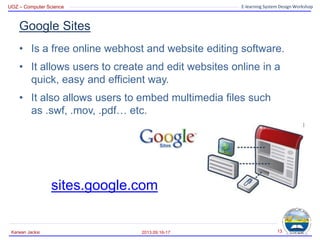
• Is a free online webhost and website editing software.
• It allows users to create and edit websites online in a
quick, easy and efficient way.
• It also allows users to embed multimedia files such
as .swf, .mov, .pdf… etc.
sites.google.com
2013.09.16-17
Karwan Jacksi 13
UOZ – Computer Science E-learning System Design Workshop
Google Sites
• Benefits of Google Sites:
– Free
– No HTML required - no markup language for you to learn!
– Easy learning curve
– Editing available in the cloud (online)
– Choice of templates
– Easy integration -Add file attachments and information
from other Google applications (like Google Docs, Google
Calendar, YouTube, etc).
– Control who has access, whether it's just yourself, your
office, or your whole organization.
– Revision history
2013.09.16-17
Karwan Jacksi 14
UOZ – Computer Science E-learning System Design Workshop
Agenda
• Live Demo
• Principles of Website Design
• Online Website Builders
• Google Sites
• Google Accounts
• Hands-On
2013.09.16-17
Karwan Jacksi 15
UOZ – Computer Science E-learning System Design Workshop
Google Account
• Getting started with Google Sites:
– To create a Google Site, you need to have a Google
account (Google ID).
– If you don’t have a Google Account yet, you need to create
one
– Let’s create a Google Account at www.google.com or just
go to sites.google.com
2013.09.16-17
Karwan Jacksi 16
UOZ – Computer Science E-learning System Design Workshop
Google Account
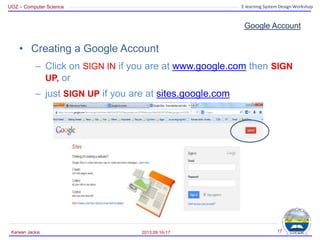
• Creating a Google Account
– Click on SIGN IN if you are at www.google.com then SIGN
UP, or
– just SIGN UP if you are at sites.google.com
2013.09.16-17
Karwan Jacksi 17
UOZ – Computer Science E-learning System Design Workshop
Google Account
2013.09.16-17
Karwan Jacksi 18
UOZ – Computer Science E-learning System Design Workshop
Agenda
• Live Demo
• Principles of Website Design
• Online Website Builders
• Google Sites
• Google Accounts
• Hands-On
2013.09.16-17
Karwan Jacksi 19
UOZ – Computer Science E-learning System Design Workshop
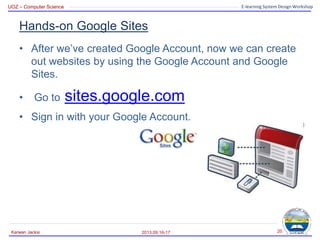
Hands-on Google Sites
• After we’ve created Google Account, now we can create
out websites by using the Google Account and Google
Sites.
• Go to sites.google.com
• Sign in with your Google Account.
2013.09.16-17
Karwan Jacksi 20
UOZ – Computer Science E-learning System Design Workshop
Hands-on Google Sites
2013.09.16-17
Karwan Jacksi 21
Creating a new site
Your Created Sites
UOZ – Computer Science E-learning System Design Workshop
Hands-on Google Sites
2013.09.16-17
Karwan Jacksi 22
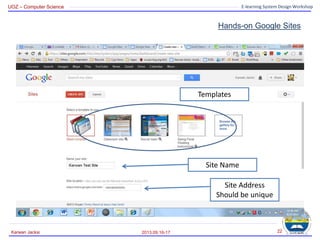
Templates
Site Name
Site Address
Should be unique
UOZ – Computer Science E-learning System Design Workshop
Hands-on Google Sites
2013.09.16-17
Karwan Jacksi 23
Selecting a Theme
Then Create
UOZ – Computer Science E-learning System Design Workshop
Hands-on Google Sites
2013.09.16-17
Karwan Jacksi 24
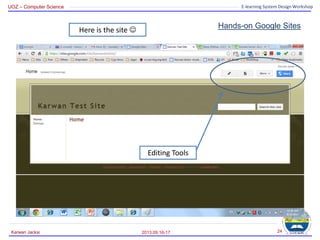
Here is the site 
Editing Tools
UOZ – Computer Science E-learning System Design Workshop
Hands-on Google Sites
2013.09.16-17
Karwan Jacksi 25
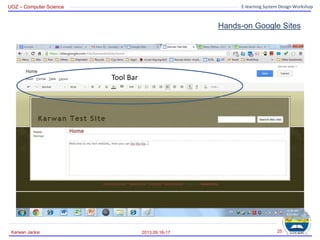
Tool Bar
UOZ – Computer Science E-learning System Design Workshop
Hands-on Google Sites
2013.09.16-17
Karwan Jacksi 26
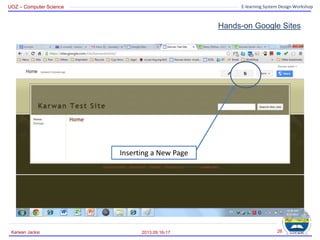
Inserting a New Page
UOZ – Computer Science E-learning System Design Workshop
Hands-on Google Sites
2013.09.16-17
Karwan Jacksi 27
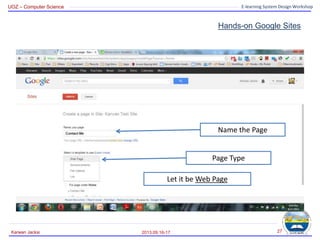
Name the Page
Page Type
Let it be Web Page
UOZ – Computer Science E-learning System Design Workshop
Hands-on Google Sites
2013.09.16-17
Karwan Jacksi 28
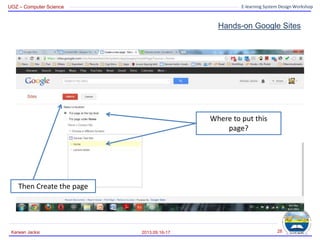
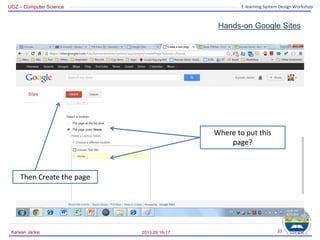
Where to put this
page?
Then Create the page
UOZ – Computer Science E-learning System Design Workshop
Hands-on Google Sites
2013.09.16-17
Karwan Jacksi 29
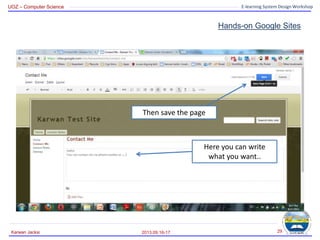
Here you can write
what you want..
Then save the page
UOZ – Computer Science E-learning System Design Workshop
Hands-on Google Sites
• What to do if you want to add files (ex: lecture notes) to
the website?
– It is easy!
• Let’s create a new page.
2013.09.16-17
Karwan Jacksi 30
UOZ – Computer Science E-learning System Design Workshop
Hands-on Google Sites
2013.09.16-17
Karwan Jacksi 31
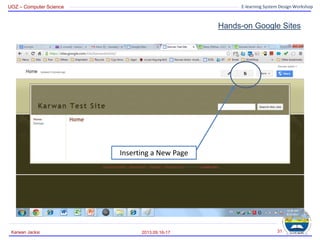
Inserting a New Page
UOZ – Computer Science E-learning System Design Workshop
Hands-on Google Sites
2013.09.16-17
Karwan Jacksi 32
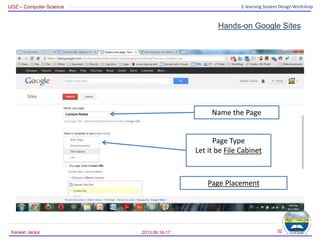
Name the Page
Page Type
Let it be File Cabinet
Page Placement
UOZ – Computer Science E-learning System Design Workshop
Hands-on Google Sites
2013.09.16-17
Karwan Jacksi 33
Where to put this
page?
Then Create the page
UOZ – Computer Science E-learning System Design Workshop
Hands-on Google Sites
2013.09.16-17
Karwan Jacksi 34
Page Type
UOZ – Computer Science E-learning System Design Workshop
Hands-on Google Sites
2013.09.16-17
Karwan Jacksi 35
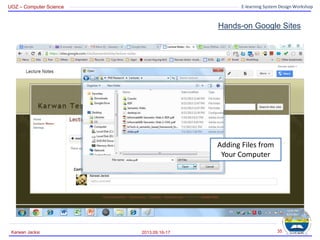
Adding Files from
Your Computer
UOZ – Computer Science E-learning System Design Workshop
Hands-on Google Sites
2013.09.16-17
Karwan Jacksi 36
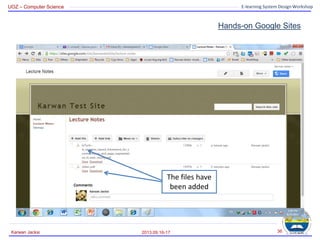
The files have
been added
UOZ – Computer Science E-learning System Design Workshop
Hands-on Google Sites
2013.09.16-17
Karwan Jacksi 37
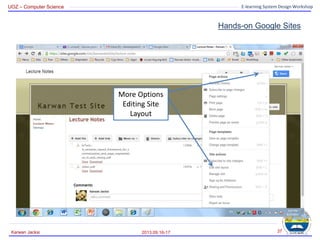
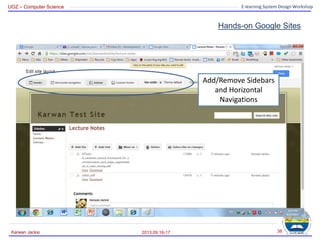
More Options
Editing Site
Layout
UOZ – Computer Science E-learning System Design Workshop
Hands-on Google Sites
2013.09.16-17
Karwan Jacksi 38
Add/Remove Sidebars
and Horizontal
Navigations
UOZ – Computer Science E-learning System Design Workshop
Hands-on Google Sites
2013.09.16-17
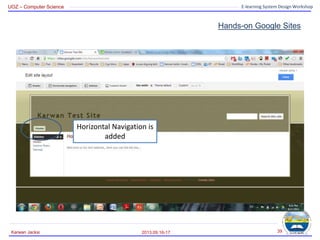
Karwan Jacksi 39
Horizontal Navigation is
added
UOZ – Computer Science E-learning System Design Workshop
Hands-on Google Sites
2013.09.16-17
Karwan Jacksi 40
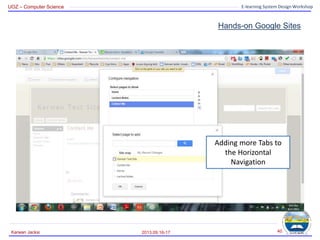
Adding more Tabs to
the Horizontal
Navigation
UOZ – Computer Science E-learning System Design Workshop
Hands-on Google Sites
2013.09.16-17
Karwan Jacksi 41
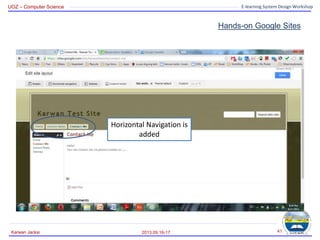
Horizontal Navigation is
added
UOZ – Computer Science E-learning System Design Workshop
Hands-on Google Sites
• How about making a news page? (announcements)?
– It is easy as well!
• Let’s create a new page the same way as we did.
• The only different thing is to change the page type.
2013.09.16-17
Karwan Jacksi 42
UOZ – Computer Science E-learning System Design Workshop
Hands-on Google Sites
2013.09.16-17
Karwan Jacksi 43
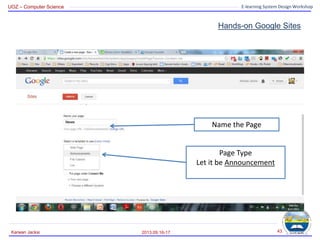
Name the Page
Page Type
Let it be Announcement
UOZ – Computer Science E-learning System Design Workshop
Hands-on Google Sites
2013.09.16-17
Karwan Jacksi 44
To insert a new post
(News) click here
UOZ – Computer Science E-learning System Design Workshop
Hands-on Google Sites
2013.09.16-17
Karwan Jacksi 45
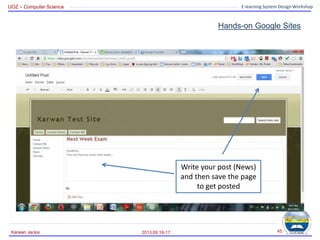
Write your post (News)
and then save the page
to get posted
UOZ – Computer Science E-learning System Design Workshop
Hands-on Google Sites
2013.09.16-17
Karwan Jacksi 46
You can edit your post
(News) as well by clicking on
edit post. Edit the post and
then save it
Here is the post (News)
UOZ – Computer Science E-learning System Design Workshop
Hands-on Google Sites
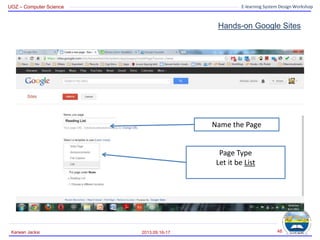
• How to create List pages?
• Let’s create a new page the same way as we did.
• The different thing here is to change the page type to
list.
2013.09.16-17
Karwan Jacksi 47
UOZ – Computer Science E-learning System Design Workshop
Hands-on Google Sites
2013.09.16-17
Karwan Jacksi 48
Name the Page
Page Type
Let it be List
UOZ – Computer Science E-learning System Design Workshop
Hands-on Google Sites
2013.09.16-17
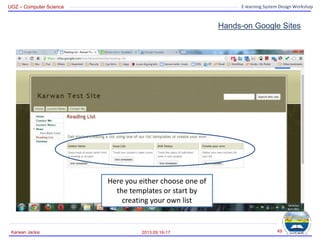
Karwan Jacksi 49
Here you either choose one of
the templates or start by
creating your own list
UOZ – Computer Science E-learning System Design Workshop
Hands-on Google Sites
2013.09.16-17
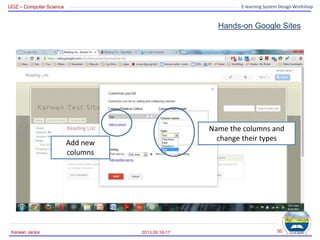
Karwan Jacksi 50
Name the columns and
change their types
Add new
columns
UOZ – Computer Science E-learning System Design Workshop
Hands-on Google Sites
2013.09.16-17
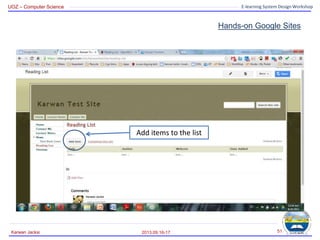
Karwan Jacksi 51
Add items to the list
UOZ – Computer Science E-learning System Design Workshop
Hands-on Google Sites
2013.09.16-17
Karwan Jacksi 52
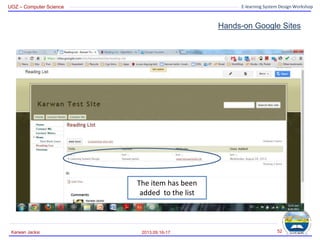
The item has been
added to the list
UOZ – Computer Science E-learning System Design Workshop
Hands-on Google Sites
2013.09.16-17
Karwan Jacksi 53
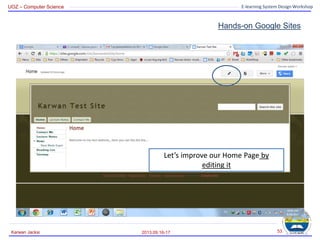
Let’s improve our Home Page by
editing it
UOZ – Computer Science E-learning System Design Workshop
Hands-on Google Sites
2013.09.16-17
Karwan Jacksi 54
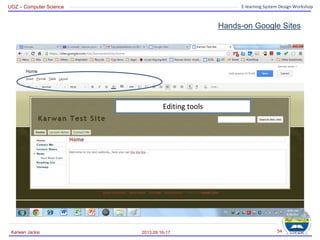
Editing tools
UOZ – Computer Science E-learning System Design Workshop
Hands-on Google Sites
2013.09.16-17
Karwan Jacksi 55
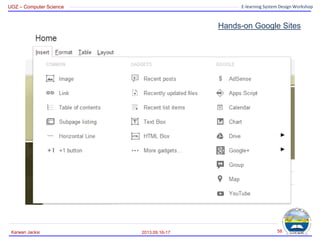
Lots of options
UOZ – Computer Science E-learning System Design Workshop
Hands-on Google Sites
2013.09.16-17
Karwan Jacksi 56
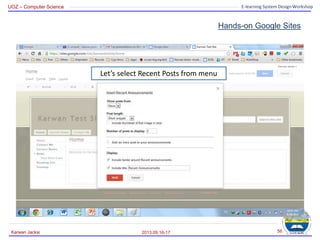
Let’s select Recent Posts from menu
UOZ – Computer Science E-learning System Design Workshop
Hands-on Google Sites
2013.09.16-17
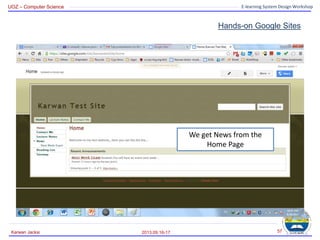
Karwan Jacksi 57
We get News from the
Home Page
UOZ – Computer Science E-learning System Design Workshop
Hands-on Google Sites
2013.09.16-17
Karwan Jacksi 58
UOZ – Computer Science E-learning System Design Workshop
Hands-on Google Sites
2013.09.16-17
Karwan Jacksi 59
• Paragraph Format Settings:
UOZ – Computer Science E-learning System Design Workshop
Hands-on Google Sites
2013.09.16-17
Karwan Jacksi 60
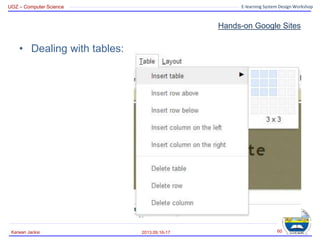
• Dealing with tables:
UOZ – Computer Science E-learning System Design Workshop
Hands-on Google Sites
2013.09.16-17
Karwan Jacksi 61
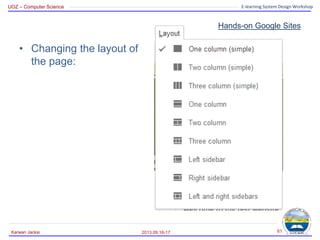
• Changing the layout of
the page:
UOZ – Computer Science E-learning System Design Workshop
Hands-on Google Sites
2013.09.16-17
Karwan Jacksi 62
• Integrating Google Apps
– Calendar
– YouTube
– Photos
– Drive
• Spreadsheets
• Presentation
• Etc…
– Maps
– Charts
– Etc…
UOZ – Computer Science E-learning System Design Workshop
Feedback
2013.09.16-17
Karwan Jacksi 63
• Your feedback please!
• Go to www.KarwanJacksi.tk
• Click on take the poll/survey.
UOZ – Computer Science E-learning System Design Workshop
THE END
Your Questions!
2013.09.16-17
Karwan Jacksi 64

E-Learning System Design: Teacher-Student Websites

  • 1.
    UOZ – ComputerScience E-learning System Design Workshop E-learning System Design Workshop Teacher-Student Websites 2013.09.16-17 1 Karwan Jacksi Karwan Jacksi – Ari Shawkat – Khalid Bady Computer Science Department Faculty of Science University of Zakho
  • 2.
    UOZ – ComputerScience E-learning System Design Workshop Agenda • Live Demo • Principles of Website Design • Online Website Builders • Google Sites • Google Accounts • Hands-On 2013.09.16-17 Karwan Jacksi 2
  • 3.
    UOZ – ComputerScience E-learning System Design Workshop Live Demo • Before we start constructing our websites, we start by checking the website of our university: www.uoz-krg.org • And a course website: cs.uoz-krg.org/alc1 2013.09.16-17 Karwan Jacksi 3
  • 4.
    UOZ – ComputerScience E-learning System Design Workshop Agenda • Live Demo • Principles of Website Design • Online Website Builders • Google Sites • Google Accounts • Hands-On 2013.09.16-17 Karwan Jacksi 4
  • 5.
    UOZ – ComputerScience E-learning System Design Workshop Principles of Website Design • Step 1: Planning – Who is your audience? • Students? • Professors? • Wide Audience? • Etc… – What is the content? • Text only? • Pictures? • Music? • Etc… 2013.09.16-17 Karwan Jacksi 5
  • 6.
    UOZ – ComputerScience E-learning System Design Workshop Principles of Website Design • Step 1: Planning – What is the depth of your website? • Ex: One course • Multiple courses – Goals? • Ex: The purpose of my website is to provide information to my students about the courses they are taking with me. 2013.09.16-17 Karwan Jacksi 6
  • 7.
    UOZ – ComputerScience E-learning System Design Workshop Principles of Website Design • Step 2: Design – Always do: • Put the most important information at the TOP of the page. • Less important information belongs lower down on the page • Present information in short paragraphs • Type and size of used fonts should be easy to read – Background vs. Text • Do not use graphical backgrounds that make it difficult to read the text • Do not use garish colors for your background (neon green, magenta, etc.) • In general, use a light background with dark text – it will be easier to read 2013.09.16-17 Karwan Jacksi 7
  • 8.
    UOZ – ComputerScience E-learning System Design Workshop Principles of Website Design • Step 2: Design – Navigation: • Titles, headings and subheadings should be meaningful out of context • Buttons, targets and links should allow a reader to navigate easily through the site • Menus allow a reader to choose where to move – Graphics: • Do not use too much animation on a page – one is MORE than enough • File size should be as small as possible to make downloading quick – Consistency: • Background, graphic elements should be consistent so the entire site has the same “look and feel” 2013.09.16-17 Karwan Jacksi 8
  • 9.
    UOZ – ComputerScience E-learning System Design Workshop Agenda • Live Demo • Principles of Website Design • Online Website Builders • Google Sites • Google Accounts • Hands-On 2013.09.16-17 Karwan Jacksi 9
  • 10.
    UOZ – ComputerScience E-learning System Design Workshop Online Website Builders • There are many browser based Website Software: 2013.09.16-17 Karwan Jacksi 10
  • 11.
    UOZ – ComputerScience E-learning System Design Workshop Online Website Builders • The one that we take will be Google Sites sites.google.com 2013.09.16-17 Karwan Jacksi 11
  • 12.
    UOZ – ComputerScience E-learning System Design Workshop Agenda • Live Demo • Principles of Website Design • Online Website Builders • Google Sites • Google Accounts • Hands-On 2013.09.16-17 Karwan Jacksi 12
  • 13.
    UOZ – ComputerScience E-learning System Design Workshop Google Sites • Is a free online webhost and website editing software. • It allows users to create and edit websites online in a quick, easy and efficient way. • It also allows users to embed multimedia files such as .swf, .mov, .pdf… etc. sites.google.com 2013.09.16-17 Karwan Jacksi 13
  • 14.
    UOZ – ComputerScience E-learning System Design Workshop Google Sites • Benefits of Google Sites: – Free – No HTML required - no markup language for you to learn! – Easy learning curve – Editing available in the cloud (online) – Choice of templates – Easy integration -Add file attachments and information from other Google applications (like Google Docs, Google Calendar, YouTube, etc). – Control who has access, whether it's just yourself, your office, or your whole organization. – Revision history 2013.09.16-17 Karwan Jacksi 14
  • 15.
    UOZ – ComputerScience E-learning System Design Workshop Agenda • Live Demo • Principles of Website Design • Online Website Builders • Google Sites • Google Accounts • Hands-On 2013.09.16-17 Karwan Jacksi 15
  • 16.
    UOZ – ComputerScience E-learning System Design Workshop Google Account • Getting started with Google Sites: – To create a Google Site, you need to have a Google account (Google ID). – If you don’t have a Google Account yet, you need to create one – Let’s create a Google Account at www.google.com or just go to sites.google.com 2013.09.16-17 Karwan Jacksi 16
  • 17.
    UOZ – ComputerScience E-learning System Design Workshop Google Account • Creating a Google Account – Click on SIGN IN if you are at www.google.com then SIGN UP, or – just SIGN UP if you are at sites.google.com 2013.09.16-17 Karwan Jacksi 17
  • 18.
    UOZ – ComputerScience E-learning System Design Workshop Google Account 2013.09.16-17 Karwan Jacksi 18
  • 19.
    UOZ – ComputerScience E-learning System Design Workshop Agenda • Live Demo • Principles of Website Design • Online Website Builders • Google Sites • Google Accounts • Hands-On 2013.09.16-17 Karwan Jacksi 19
  • 20.
    UOZ – ComputerScience E-learning System Design Workshop Hands-on Google Sites • After we’ve created Google Account, now we can create out websites by using the Google Account and Google Sites. • Go to sites.google.com • Sign in with your Google Account. 2013.09.16-17 Karwan Jacksi 20
  • 21.
    UOZ – ComputerScience E-learning System Design Workshop Hands-on Google Sites 2013.09.16-17 Karwan Jacksi 21 Creating a new site Your Created Sites
  • 22.
    UOZ – ComputerScience E-learning System Design Workshop Hands-on Google Sites 2013.09.16-17 Karwan Jacksi 22 Templates Site Name Site Address Should be unique
  • 23.
    UOZ – ComputerScience E-learning System Design Workshop Hands-on Google Sites 2013.09.16-17 Karwan Jacksi 23 Selecting a Theme Then Create
  • 24.
    UOZ – ComputerScience E-learning System Design Workshop Hands-on Google Sites 2013.09.16-17 Karwan Jacksi 24 Here is the site  Editing Tools
  • 25.
    UOZ – ComputerScience E-learning System Design Workshop Hands-on Google Sites 2013.09.16-17 Karwan Jacksi 25 Tool Bar
  • 26.
    UOZ – ComputerScience E-learning System Design Workshop Hands-on Google Sites 2013.09.16-17 Karwan Jacksi 26 Inserting a New Page
  • 27.
    UOZ – ComputerScience E-learning System Design Workshop Hands-on Google Sites 2013.09.16-17 Karwan Jacksi 27 Name the Page Page Type Let it be Web Page
  • 28.
    UOZ – ComputerScience E-learning System Design Workshop Hands-on Google Sites 2013.09.16-17 Karwan Jacksi 28 Where to put this page? Then Create the page
  • 29.
    UOZ – ComputerScience E-learning System Design Workshop Hands-on Google Sites 2013.09.16-17 Karwan Jacksi 29 Here you can write what you want.. Then save the page
  • 30.
    UOZ – ComputerScience E-learning System Design Workshop Hands-on Google Sites • What to do if you want to add files (ex: lecture notes) to the website? – It is easy! • Let’s create a new page. 2013.09.16-17 Karwan Jacksi 30
  • 31.
    UOZ – ComputerScience E-learning System Design Workshop Hands-on Google Sites 2013.09.16-17 Karwan Jacksi 31 Inserting a New Page
  • 32.
    UOZ – ComputerScience E-learning System Design Workshop Hands-on Google Sites 2013.09.16-17 Karwan Jacksi 32 Name the Page Page Type Let it be File Cabinet Page Placement
  • 33.
    UOZ – ComputerScience E-learning System Design Workshop Hands-on Google Sites 2013.09.16-17 Karwan Jacksi 33 Where to put this page? Then Create the page
  • 34.
    UOZ – ComputerScience E-learning System Design Workshop Hands-on Google Sites 2013.09.16-17 Karwan Jacksi 34 Page Type
  • 35.
    UOZ – ComputerScience E-learning System Design Workshop Hands-on Google Sites 2013.09.16-17 Karwan Jacksi 35 Adding Files from Your Computer
  • 36.
    UOZ – ComputerScience E-learning System Design Workshop Hands-on Google Sites 2013.09.16-17 Karwan Jacksi 36 The files have been added
  • 37.
    UOZ – ComputerScience E-learning System Design Workshop Hands-on Google Sites 2013.09.16-17 Karwan Jacksi 37 More Options Editing Site Layout
  • 38.
    UOZ – ComputerScience E-learning System Design Workshop Hands-on Google Sites 2013.09.16-17 Karwan Jacksi 38 Add/Remove Sidebars and Horizontal Navigations
  • 39.
    UOZ – ComputerScience E-learning System Design Workshop Hands-on Google Sites 2013.09.16-17 Karwan Jacksi 39 Horizontal Navigation is added
  • 40.
    UOZ – ComputerScience E-learning System Design Workshop Hands-on Google Sites 2013.09.16-17 Karwan Jacksi 40 Adding more Tabs to the Horizontal Navigation
  • 41.
    UOZ – ComputerScience E-learning System Design Workshop Hands-on Google Sites 2013.09.16-17 Karwan Jacksi 41 Horizontal Navigation is added
  • 42.
    UOZ – ComputerScience E-learning System Design Workshop Hands-on Google Sites • How about making a news page? (announcements)? – It is easy as well! • Let’s create a new page the same way as we did. • The only different thing is to change the page type. 2013.09.16-17 Karwan Jacksi 42
  • 43.
    UOZ – ComputerScience E-learning System Design Workshop Hands-on Google Sites 2013.09.16-17 Karwan Jacksi 43 Name the Page Page Type Let it be Announcement
  • 44.
    UOZ – ComputerScience E-learning System Design Workshop Hands-on Google Sites 2013.09.16-17 Karwan Jacksi 44 To insert a new post (News) click here
  • 45.
    UOZ – ComputerScience E-learning System Design Workshop Hands-on Google Sites 2013.09.16-17 Karwan Jacksi 45 Write your post (News) and then save the page to get posted
  • 46.
    UOZ – ComputerScience E-learning System Design Workshop Hands-on Google Sites 2013.09.16-17 Karwan Jacksi 46 You can edit your post (News) as well by clicking on edit post. Edit the post and then save it Here is the post (News)
  • 47.
    UOZ – ComputerScience E-learning System Design Workshop Hands-on Google Sites • How to create List pages? • Let’s create a new page the same way as we did. • The different thing here is to change the page type to list. 2013.09.16-17 Karwan Jacksi 47
  • 48.
    UOZ – ComputerScience E-learning System Design Workshop Hands-on Google Sites 2013.09.16-17 Karwan Jacksi 48 Name the Page Page Type Let it be List
  • 49.
    UOZ – ComputerScience E-learning System Design Workshop Hands-on Google Sites 2013.09.16-17 Karwan Jacksi 49 Here you either choose one of the templates or start by creating your own list
  • 50.
    UOZ – ComputerScience E-learning System Design Workshop Hands-on Google Sites 2013.09.16-17 Karwan Jacksi 50 Name the columns and change their types Add new columns
  • 51.
    UOZ – ComputerScience E-learning System Design Workshop Hands-on Google Sites 2013.09.16-17 Karwan Jacksi 51 Add items to the list
  • 52.
    UOZ – ComputerScience E-learning System Design Workshop Hands-on Google Sites 2013.09.16-17 Karwan Jacksi 52 The item has been added to the list
  • 53.
    UOZ – ComputerScience E-learning System Design Workshop Hands-on Google Sites 2013.09.16-17 Karwan Jacksi 53 Let’s improve our Home Page by editing it
  • 54.
    UOZ – ComputerScience E-learning System Design Workshop Hands-on Google Sites 2013.09.16-17 Karwan Jacksi 54 Editing tools
  • 55.
    UOZ – ComputerScience E-learning System Design Workshop Hands-on Google Sites 2013.09.16-17 Karwan Jacksi 55 Lots of options
  • 56.
    UOZ – ComputerScience E-learning System Design Workshop Hands-on Google Sites 2013.09.16-17 Karwan Jacksi 56 Let’s select Recent Posts from menu
  • 57.
    UOZ – ComputerScience E-learning System Design Workshop Hands-on Google Sites 2013.09.16-17 Karwan Jacksi 57 We get News from the Home Page
  • 58.
    UOZ – ComputerScience E-learning System Design Workshop Hands-on Google Sites 2013.09.16-17 Karwan Jacksi 58
  • 59.
    UOZ – ComputerScience E-learning System Design Workshop Hands-on Google Sites 2013.09.16-17 Karwan Jacksi 59 • Paragraph Format Settings:
  • 60.
    UOZ – ComputerScience E-learning System Design Workshop Hands-on Google Sites 2013.09.16-17 Karwan Jacksi 60 • Dealing with tables:
  • 61.
    UOZ – ComputerScience E-learning System Design Workshop Hands-on Google Sites 2013.09.16-17 Karwan Jacksi 61 • Changing the layout of the page:
  • 62.
    UOZ – ComputerScience E-learning System Design Workshop Hands-on Google Sites 2013.09.16-17 Karwan Jacksi 62 • Integrating Google Apps – Calendar – YouTube – Photos – Drive • Spreadsheets • Presentation • Etc… – Maps – Charts – Etc…
  • 63.
    UOZ – ComputerScience E-learning System Design Workshop Feedback 2013.09.16-17 Karwan Jacksi 63 • Your feedback please! • Go to www.KarwanJacksi.tk • Click on take the poll/survey.
  • 64.
    UOZ – ComputerScience E-learning System Design Workshop THE END Your Questions! 2013.09.16-17 Karwan Jacksi 64