2017 Teaching & Learning Series
Center for Excellence in Learning and Teaching
RE-IMAGINING LEARNING:
INTEGRATING CONTENT,TEACHING & TECHNOLOGY
Technology with Intent: Selecting Tools that Work
Bob Andersen
Saint Mary’s University of Minnesota
Director, Instructional Technology-SGPP
rganders@smumn.edu
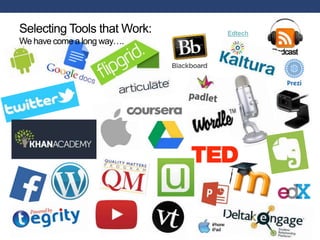
EdtechSelecting Tools that Work:
We have come a long way….
Selecting Technologies: What I’ve Learned
• It’s not about the technology;
it’s about the learning
• Keep it simple
• Be purposeful, intentional and
guided by course learning
objectives
• Selecting technologies is not
formulaic; it’s a creative
process
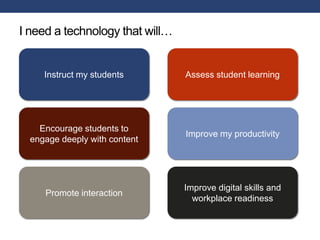
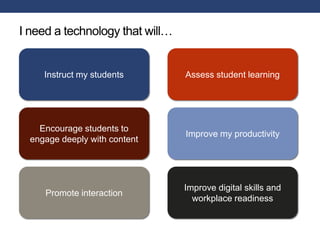
I need a technology that will…
Instruct my students
Encourage students to
engage deeply with content
Promote interaction
Assess student learning
Improve my productivity
Improve digital skills and
workplace readiness
Presentation Tools
• PowerPoint
• Keynote
• Google Slides
• Prezi
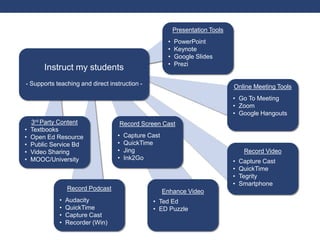
Instruct my students
- Supports teaching and direct instruction - Online Meeting Tools
• Go To Meeting
• Zoom
• Google Hangouts
Record Video
• Capture Cast
• QuickTime
• Tegrity
• Smartphone
Record Screen Cast
• Capture Cast
• QuickTime
• Jing
• Ink2Go
Record Podcast
• Audacity
• QuickTime
• Capture Cast
• Recorder (Win)
3rd Party Content
• Textbooks
• Open Ed Resource
• Public Service Bd
• Video Sharing
• MOOC/University
Enhance Video
• Ted Ed
• ED Puzzle
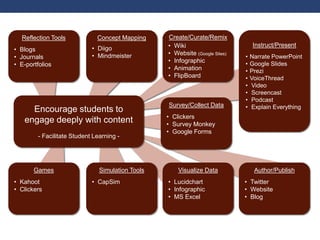
Encourage students to
engage deeply with content
- Facilitate Student Learning -
Reflection Tools
• Blogs
• Journals
• E-portfolios
Concept Mapping
• Diigo
• Mindmeister
Create/Curate/Remix
• Wiki
• Website (Google Sites)
• Infographic
• Animation
• FlipBoard
Instruct/Present
• Narrate PowerPoint
• Google Slides
• Prezi
• VoiceThread
• Video
• Screencast
• Podcast
• Explain Everything
Games
• Kahoot
• Clickers
Simulation Tools
• CapSim
Visualize Data
• Lucidchart
• Infographic
• MS Excel
Author/Publish
• Twitter
• Website
• Blog
Survey/Collect Data
• Clickers
• Survey Monkey
• Google Forms
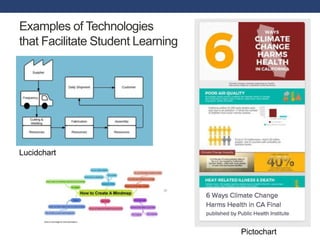
Examples of Technologies
that Facilitate Student Learning
Pictochart
Lucidchart
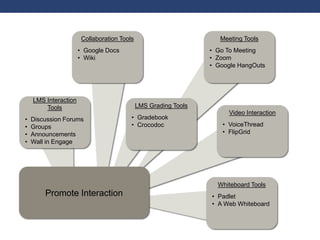
Promote Interaction
Meeting Tools
• Go To Meeting
• Zoom
• Google HangOuts
Video Interaction
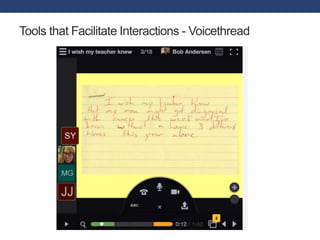
• VoiceThread
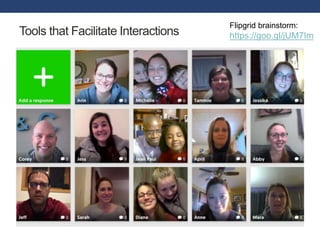
• FlipGrid
LMS Interaction
Tools
• Discussion Forums
• Groups
• Announcements
• Wall in Engage
Whiteboard Tools
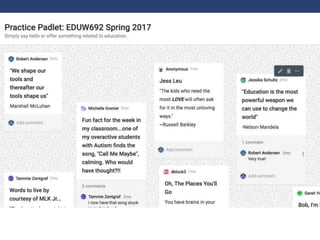
• Padlet
• A Web Whiteboard
LMS Grading Tools
• Gradebook
• Crocodoc
Collaboration Tools
• Google Docs
• Wiki
Tools that Facilitate Interactions - Voicethread
Tools that Facilitate Interactions
Flipgrid brainstorm:
https://goo.gl/jUM7Im
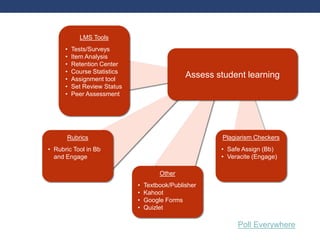
Assess student learning
Plagiarism Checkers
• Safe Assign (Bb)
• Veracite (Engage)
LMS Tools
• Tests/Surveys
• Item Analysis
• Retention Center
• Course Statistics
• Assignment tool
• Set Review Status
• Peer Assessment
Other
• Textbook/Publisher
• Kahoot
• Google Forms
• Quizlet
Rubrics
• Rubric Tool in Bb
and Engage
Poll Everywhere
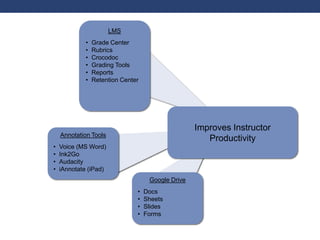
Improves Instructor
ProductivityAnnotation Tools
• Voice (MS Word)
• Ink2Go
• Audacity
• iAnnotate (iPad)
LMS
• Grade Center
• Rubrics
• Crocodoc
• Grading Tools
• Reports
• Retention Center
Google Drive
• Docs
• Sheets
• Slides
• Forms
Crocodoc
Improve digital skills and
workplace readiness
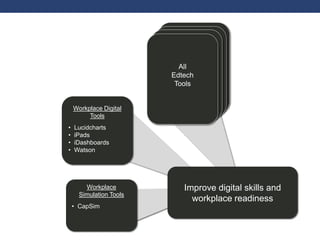
Tools that build
digital literacies
Tools that build
digital literacies
Tools that build
digital literacies
Improve digital skills and
workplace readiness
Workplace Digital
Tools
• Lucidcharts
• iPads
• iDashboards
• Watson
All
Edtech
Tools
Workplace
Simulation Tools
• CapSim
I need a technology that will…
Instruct my students
Encourage students to
engage deeply with content
Promote interaction
Assess student learning
Improve my productivity
Improve digital skills and
workplace readiness
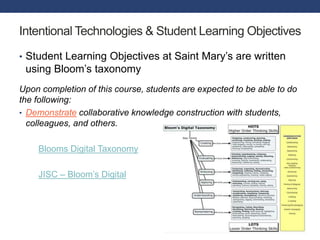
Intentional Technologies & Student Learning Objectives
• Student Learning Objectives at Saint Mary’s are written
using Bloom’s taxonomy
Upon completion of this course, students are expected to be able to do
the following:
• Demonstrate collaborative knowledge construction with students,
colleagues, and others.
Blooms Digital Taxonomy
JISC – Bloom’s Digital
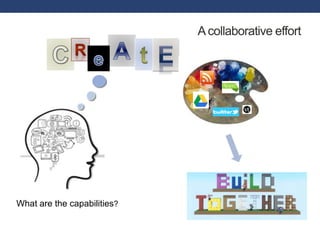
What are the capabilities?
Acollaborative effort

Ed tech tools and categories

  • 1.
    2017 Teaching &Learning Series Center for Excellence in Learning and Teaching RE-IMAGINING LEARNING: INTEGRATING CONTENT,TEACHING & TECHNOLOGY Technology with Intent: Selecting Tools that Work Bob Andersen Saint Mary’s University of Minnesota Director, Instructional Technology-SGPP rganders@smumn.edu
  • 2.
    EdtechSelecting Tools thatWork: We have come a long way….
  • 3.
    Selecting Technologies: WhatI’ve Learned • It’s not about the technology; it’s about the learning • Keep it simple • Be purposeful, intentional and guided by course learning objectives • Selecting technologies is not formulaic; it’s a creative process
  • 4.
    I need atechnology that will… Instruct my students Encourage students to engage deeply with content Promote interaction Assess student learning Improve my productivity Improve digital skills and workplace readiness
  • 5.
    Presentation Tools • PowerPoint •Keynote • Google Slides • Prezi Instruct my students - Supports teaching and direct instruction - Online Meeting Tools • Go To Meeting • Zoom • Google Hangouts Record Video • Capture Cast • QuickTime • Tegrity • Smartphone Record Screen Cast • Capture Cast • QuickTime • Jing • Ink2Go Record Podcast • Audacity • QuickTime • Capture Cast • Recorder (Win) 3rd Party Content • Textbooks • Open Ed Resource • Public Service Bd • Video Sharing • MOOC/University Enhance Video • Ted Ed • ED Puzzle
  • 6.
    Encourage students to engagedeeply with content - Facilitate Student Learning - Reflection Tools • Blogs • Journals • E-portfolios Concept Mapping • Diigo • Mindmeister Create/Curate/Remix • Wiki • Website (Google Sites) • Infographic • Animation • FlipBoard Instruct/Present • Narrate PowerPoint • Google Slides • Prezi • VoiceThread • Video • Screencast • Podcast • Explain Everything Games • Kahoot • Clickers Simulation Tools • CapSim Visualize Data • Lucidchart • Infographic • MS Excel Author/Publish • Twitter • Website • Blog Survey/Collect Data • Clickers • Survey Monkey • Google Forms
  • 7.
    Examples of Technologies thatFacilitate Student Learning Pictochart Lucidchart
  • 8.
    Promote Interaction Meeting Tools •Go To Meeting • Zoom • Google HangOuts Video Interaction • VoiceThread • FlipGrid LMS Interaction Tools • Discussion Forums • Groups • Announcements • Wall in Engage Whiteboard Tools • Padlet • A Web Whiteboard LMS Grading Tools • Gradebook • Crocodoc Collaboration Tools • Google Docs • Wiki
  • 10.
    Tools that FacilitateInteractions - Voicethread
  • 11.
    Tools that FacilitateInteractions Flipgrid brainstorm: https://goo.gl/jUM7Im
  • 12.
    Assess student learning PlagiarismCheckers • Safe Assign (Bb) • Veracite (Engage) LMS Tools • Tests/Surveys • Item Analysis • Retention Center • Course Statistics • Assignment tool • Set Review Status • Peer Assessment Other • Textbook/Publisher • Kahoot • Google Forms • Quizlet Rubrics • Rubric Tool in Bb and Engage Poll Everywhere
  • 13.
    Improves Instructor ProductivityAnnotation Tools •Voice (MS Word) • Ink2Go • Audacity • iAnnotate (iPad) LMS • Grade Center • Rubrics • Crocodoc • Grading Tools • Reports • Retention Center Google Drive • Docs • Sheets • Slides • Forms
  • 14.
  • 15.
    Improve digital skillsand workplace readiness
  • 16.
    Tools that build digitalliteracies Tools that build digital literacies Tools that build digital literacies Improve digital skills and workplace readiness Workplace Digital Tools • Lucidcharts • iPads • iDashboards • Watson All Edtech Tools Workplace Simulation Tools • CapSim
  • 17.
    I need atechnology that will… Instruct my students Encourage students to engage deeply with content Promote interaction Assess student learning Improve my productivity Improve digital skills and workplace readiness
  • 18.
    Intentional Technologies &Student Learning Objectives • Student Learning Objectives at Saint Mary’s are written using Bloom’s taxonomy Upon completion of this course, students are expected to be able to do the following: • Demonstrate collaborative knowledge construction with students, colleagues, and others. Blooms Digital Taxonomy JISC – Bloom’s Digital
  • 19.
    What are thecapabilities? Acollaborative effort

Editor's Notes

  • #4 Examples really help
  • #5 Many perspectives: SME, ID, Teacher
  • #16 The capabilities which fit someone for living, learning and working in a digital society. Digital literacies Digital literacies: Contextually defined; Not just technical skills ; Always changing
  • #18 Many perspectives: SME, ID, Teacher