Using iPads in the
Classroom to Engage
  the 21st Century
       Learner
           Shauna Néro
 French Immersion, FSL and Spanish
             Teacher
            @MmeNero
      mmenero@edublogs.org
The Digital Innovation
     Project in SD36
THE GUIDING PRINCIPLE:

Engaging students in their learning requires a
multidimensional approach. While social and
academic engagement is imperative to student
success, we know that "...ultimately, we need to
achieve the more ambitious goal of promoting deep
cognitive engagement that results in learning."
 National Research Council, cited in Dunleavey and Milton, 2008
11 schools in the district were given access to 30 iPads (7 elementary, 3
secondary and 1 Learning Center)

KWANTLEN PARK SECONDARY is an inner-city school in Surrey (the
Whalley area).

At Kwantlen Park, 6 teachers (Science, Math, English, LST and French
Immersion/Modern Languages) are sharing 30 iPads and 16 iPods to
complete their research

Following the results of our first year, district students involved in the
project are filling out a survey before, during and at the end of the
semester/year.

We will be completing our research at the end of this year to share with the
district and our school. We hope to encourage the district to purchase
more iPads in order to make this technological tool available to more.

Our school is also a testing school for a Learning Commons library project
which will see the integration of iPads, media devices (digital cameras)
and a space for learning.
Why I use the iPad in
        class?
• To increase student engagement

• To empower the digital native student with
  using what they know (technology)

• To give choices to students through a variety
  of apps can appeal to different learning styles

         A. Allows for differentiated learning so
            that students of all levels can be
            successful
What other teachers have to say:
• @MmeHibou uses iPads in the math classroom to help
  students who struggle, she loves the visual aspect

• @msewen uses them for student success and ease of
  use. He recently used iPad dictation for a student who
  cannot write (a great example of empowering the
  student)
Learning from my mistakes:
      practical knowledge
• Give each student the same iPad number for the whole
  year (even if they are doing group work, choose one
  student's iPad number in the group) and record this on
  a class list

• Put a responsible student in charge, ask him/her to
  distribute the iPads when necessary and collect them.
  Do not let any student leave the classroom until YOU
  have checked that all have been returned.

• Create a contract for students to sign which ensures
  their responsible and respectable use of the iPads in
  class.
Getting to know the iPad
• Do not assume that they know how to use an
  iPad (this was my first and biggest mistake)

• Give students a "Scavenger hunt" activity for
  them to learn the basic uses (taking pictures,
  saving pictures to Photos, surfing the internet
  on Safari, turning it on/off, the use of the
  "Home" button)

• Let them have fun for a class or two in order
  to acquaint themselves with it, those students
  who have used an iPad before become the
  leaders
Apple's iPad User
     Guide
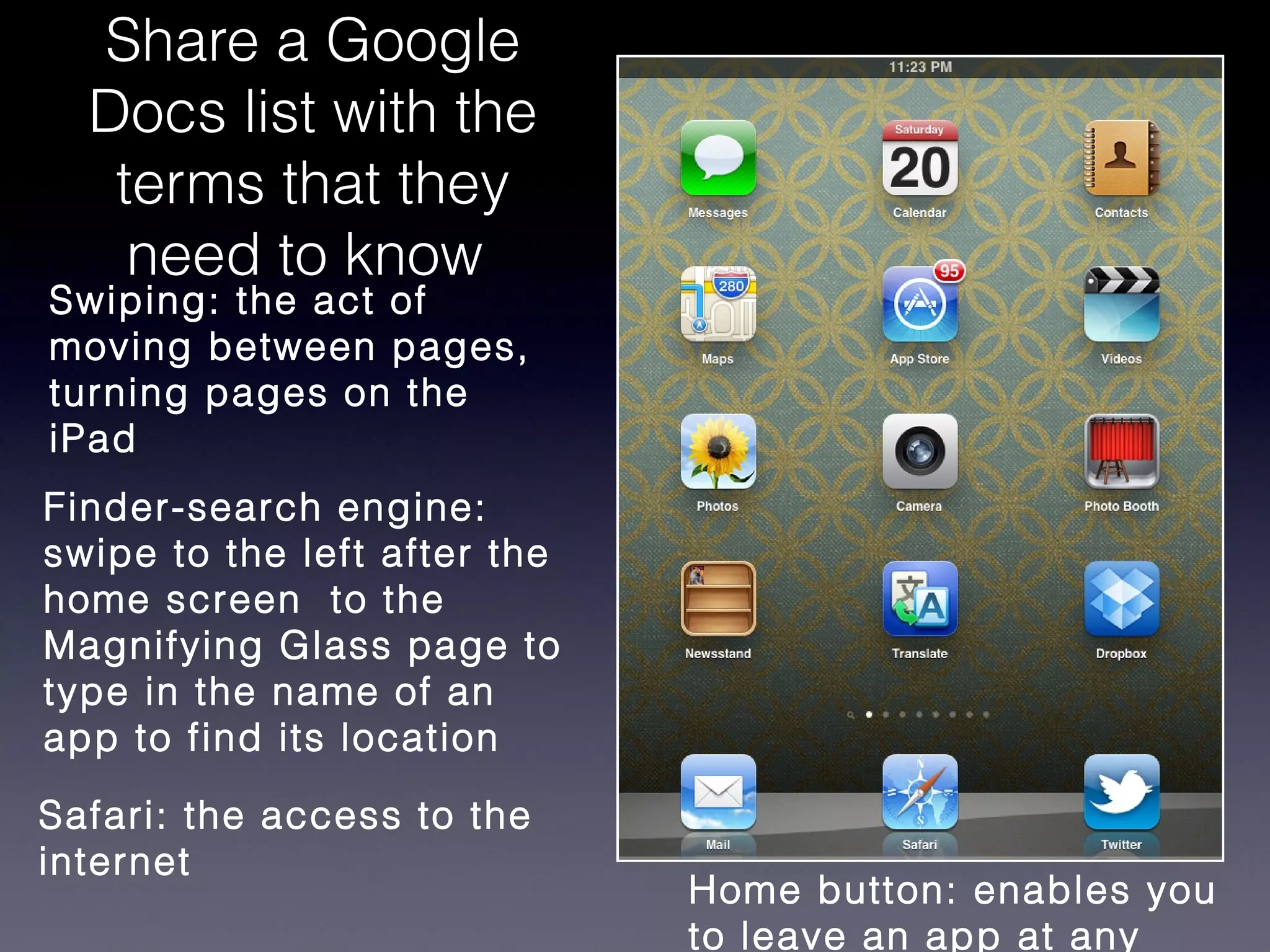
Share a Google
  Docs list with the
   terms that they
    need to know
Swiping: the act of
moving between pages,
turning pages on the
iPad
Finder-search engine:
swipe to the left after the
home screen to the
Magnifying Glass page to
type in the name of an
app to find its location

Safari: the access to the
internet
                              Home button: enables you
                              to leave an app at any
Do you know....
             (because I sure didn't...)
• that to take a picture of the screen (Screen Capture),
  you hold the Power button and the Home button at the
  same time (your pic is then saved in Photos)?

• in order to save battery power, double tap the Home
  button and "x" (delete) the apps that appear at the
  bottom of the screen?

• to save a picture in Safari, you press and hold the
  picture and then choose "Save Image" or "Copy"?
Power of surveys and
     exit tickets
• They give you the opportunity to know what
  they know

• Students are given a voice, a voice to express
  their concerns or their joy of using the iPads

• A great learning tool for you, it lets them know
  that you are learning as well and want to learn
  from them
Methods to do polling
• polleverywhere.com: students can text or
  send answers online to open-ended or
  multiple choice questions

      •   (free account is limited to 40 answers)

• Socrative app (Teacher and Student) :
  Questions or Quiz-based activities
Set up a place to
     receive projects

• Classroom gmail account (students also know
  the password)

• Dropbox (using that Gmail account)

Using iPads to engage the 21st century learner copy

  • 1.
    Using iPads inthe Classroom to Engage the 21st Century Learner Shauna Néro French Immersion, FSL and Spanish Teacher @MmeNero mmenero@edublogs.org
  • 2.
    The Digital Innovation Project in SD36 THE GUIDING PRINCIPLE: Engaging students in their learning requires a multidimensional approach. While social and academic engagement is imperative to student success, we know that "...ultimately, we need to achieve the more ambitious goal of promoting deep cognitive engagement that results in learning." National Research Council, cited in Dunleavey and Milton, 2008
  • 3.
    11 schools inthe district were given access to 30 iPads (7 elementary, 3 secondary and 1 Learning Center) KWANTLEN PARK SECONDARY is an inner-city school in Surrey (the Whalley area). At Kwantlen Park, 6 teachers (Science, Math, English, LST and French Immersion/Modern Languages) are sharing 30 iPads and 16 iPods to complete their research Following the results of our first year, district students involved in the project are filling out a survey before, during and at the end of the semester/year. We will be completing our research at the end of this year to share with the district and our school. We hope to encourage the district to purchase more iPads in order to make this technological tool available to more. Our school is also a testing school for a Learning Commons library project which will see the integration of iPads, media devices (digital cameras) and a space for learning.
  • 4.
    Why I usethe iPad in class? • To increase student engagement • To empower the digital native student with using what they know (technology) • To give choices to students through a variety of apps can appeal to different learning styles A. Allows for differentiated learning so that students of all levels can be successful
  • 5.
    What other teachershave to say: • @MmeHibou uses iPads in the math classroom to help students who struggle, she loves the visual aspect • @msewen uses them for student success and ease of use. He recently used iPad dictation for a student who cannot write (a great example of empowering the student)
  • 6.
    Learning from mymistakes: practical knowledge • Give each student the same iPad number for the whole year (even if they are doing group work, choose one student's iPad number in the group) and record this on a class list • Put a responsible student in charge, ask him/her to distribute the iPads when necessary and collect them. Do not let any student leave the classroom until YOU have checked that all have been returned. • Create a contract for students to sign which ensures their responsible and respectable use of the iPads in class.
  • 7.
    Getting to knowthe iPad • Do not assume that they know how to use an iPad (this was my first and biggest mistake) • Give students a "Scavenger hunt" activity for them to learn the basic uses (taking pictures, saving pictures to Photos, surfing the internet on Safari, turning it on/off, the use of the "Home" button) • Let them have fun for a class or two in order to acquaint themselves with it, those students who have used an iPad before become the leaders
  • 8.
  • 9.
    Share a Google Docs list with the terms that they need to know Swiping: the act of moving between pages, turning pages on the iPad Finder-search engine: swipe to the left after the home screen to the Magnifying Glass page to type in the name of an app to find its location Safari: the access to the internet Home button: enables you to leave an app at any
  • 10.
    Do you know.... (because I sure didn't...) • that to take a picture of the screen (Screen Capture), you hold the Power button and the Home button at the same time (your pic is then saved in Photos)? • in order to save battery power, double tap the Home button and "x" (delete) the apps that appear at the bottom of the screen? • to save a picture in Safari, you press and hold the picture and then choose "Save Image" or "Copy"?
  • 11.
    Power of surveysand exit tickets • They give you the opportunity to know what they know • Students are given a voice, a voice to express their concerns or their joy of using the iPads • A great learning tool for you, it lets them know that you are learning as well and want to learn from them
  • 12.
    Methods to dopolling • polleverywhere.com: students can text or send answers online to open-ended or multiple choice questions • (free account is limited to 40 answers) • Socrative app (Teacher and Student) : Questions or Quiz-based activities
  • 13.
    Set up aplace to receive projects • Classroom gmail account (students also know the password) • Dropbox (using that Gmail account)