Edmodo: Social Networking for
   the Digital Age Student

            MARTY BLAYDES,
   CHRISTEN KAUFFMAN, ELIZABETH KING

      UNIVERSITY OF WEST GEORGIA
What is Edmodo?

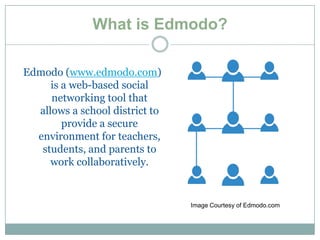
Edmodo (www.edmodo.com)
     is a web-based social
     networking tool that
  allows a school district to
        provide a secure
  environment for teachers,
   students, and parents to
     work collaboratively.


                                Image Courtesy of Edmodo.com
Use Edmodo….

 In any subject area
 To provide online assessments
 To interact with students and other teachers in an
  online academic setting
 To teach students how to manage their work
  digitally
 To provide supplemental support and information
  to classroom units
Cost

 FREE!


 There is no fee to sign up for Edmodo and no limit
 to the number of users that a site may have

 Also free of charge are numerous support material
 to help educate teachers, students and parents
Users: Teachers


    Teachers can use Edmodo to post
 assignments, take class polls, and support
       students outside school hours.
Users: Students


 Students upload assignments, including
 podcasts and video recordings, directly to
              their teacher.

They can also interact with their peers and
  teachers outside of school to gain extra
    support for class and assignments.
Users: Parents


 Parents use Edmodo to keep track of their
  children's upcoming assignments, events,
   and grades; and they can receive a text
  message or e-mail if the teacher sends out
              an announcement.
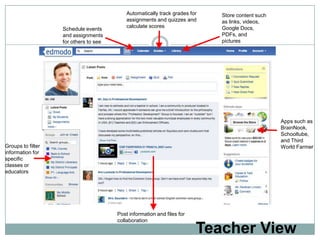
Automatically track grades for   Store content such
                                           assignments and quizzes and      as links, videos,
                                           calculate scores                 Google Docs,
                   Schedule events
                   and assignments                                          PDFs, and
                   for others to see                                        pictures


                                                                                                 Apps such as
                                                                                                 BrainNook,
                                                                                                 Schooltube,
                                                                                                 and Third
Groups to filter                                                                                 World Farmer
information for
specific
classes or
educators


                                       Post information and files for
                                       collaboration

                                                                        Teacher View
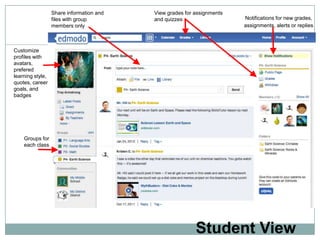
Share information and   View grades for assignments
                  files with group        and quizzes                   Notifications for new grades,
                  members only                                          assignments, alerts or replies


Customize
profiles with
avatars,
prefered
learning style,
quotes, career
goals, and
badges


    Groups for
    each class


                                                          Student View
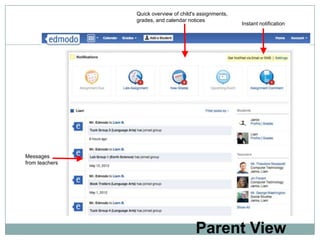
Quick overview of child's assignments,
                grades, and calendar notices
                                                         Instant notification


Messages
from teachers


                                        Parent View
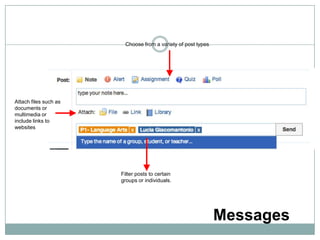
Choose from a variety of post types


Attach files such as
documents or
multimedia or
include links to
websites


                       Filter posts to certain
                       groups or individuals.


                                                              Messages
Why use technology with
                    instruction?
    In a study done by Mazten and Edwards (2007), they
      found that “by utilizing technology in the classroom,
      there is a shift toward student-centered instruction.”
    Technology is a catalyst for changing the way teachers
    teach in a way that moves us away from old traditional
     instructional methods into new instructional methods
              that involve the learner in the process.


Matzen, N., & Edmunds, J. A. (2007, Summer). Technology as a Catalyst for Change: The Role of
  professional Development. Journal of Research on Techology in Education, 39(4), pp. 417-430.
  Retrieved July 9, 2012, from http://www.eric.ed.gov/contentdelivery/servlet?accno=EJ768887

Edmodo Presentation

  • 1.
    Edmodo: Social Networkingfor the Digital Age Student MARTY BLAYDES, CHRISTEN KAUFFMAN, ELIZABETH KING UNIVERSITY OF WEST GEORGIA
  • 2.
    What is Edmodo? Edmodo(www.edmodo.com) is a web-based social networking tool that allows a school district to provide a secure environment for teachers, students, and parents to work collaboratively. Image Courtesy of Edmodo.com
  • 3.
    Use Edmodo….  Inany subject area  To provide online assessments  To interact with students and other teachers in an online academic setting  To teach students how to manage their work digitally  To provide supplemental support and information to classroom units
  • 4.
    Cost  FREE!  Thereis no fee to sign up for Edmodo and no limit to the number of users that a site may have  Also free of charge are numerous support material to help educate teachers, students and parents
  • 5.
    Users: Teachers Teachers can use Edmodo to post assignments, take class polls, and support students outside school hours.
  • 6.
    Users: Students Studentsupload assignments, including podcasts and video recordings, directly to their teacher. They can also interact with their peers and teachers outside of school to gain extra support for class and assignments.
  • 7.
    Users: Parents Parentsuse Edmodo to keep track of their children's upcoming assignments, events, and grades; and they can receive a text message or e-mail if the teacher sends out an announcement.
  • 8.
    Automatically track gradesfor Store content such assignments and quizzes and as links, videos, calculate scores Google Docs, Schedule events and assignments PDFs, and for others to see pictures Apps such as BrainNook, Schooltube, and Third Groups to filter World Farmer information for specific classes or educators Post information and files for collaboration Teacher View
  • 9.
    Share information and View grades for assignments files with group and quizzes Notifications for new grades, members only assignments, alerts or replies Customize profiles with avatars, prefered learning style, quotes, career goals, and badges Groups for each class Student View
  • 10.
    Quick overview ofchild's assignments, grades, and calendar notices Instant notification Messages from teachers Parent View
  • 11.
    Choose from avariety of post types Attach files such as documents or multimedia or include links to websites Filter posts to certain groups or individuals. Messages
  • 12.
    Why use technologywith instruction? In a study done by Mazten and Edwards (2007), they found that “by utilizing technology in the classroom, there is a shift toward student-centered instruction.” Technology is a catalyst for changing the way teachers teach in a way that moves us away from old traditional instructional methods into new instructional methods that involve the learner in the process. Matzen, N., & Edmunds, J. A. (2007, Summer). Technology as a Catalyst for Change: The Role of professional Development. Journal of Research on Techology in Education, 39(4), pp. 417-430. Retrieved July 9, 2012, from http://www.eric.ed.gov/contentdelivery/servlet?accno=EJ768887