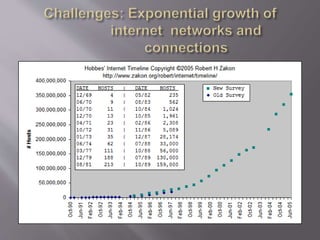
Subject - Cyber Laws & Rights
M. tech. 3rd Sem., ISM.
 By: Prashant Kr. Vats,
 M.tech., Ph.D.
• E-Commerce: What is it?
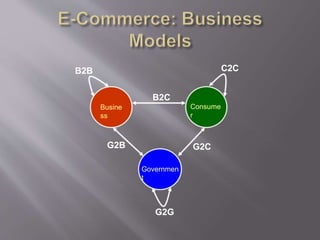
• E-Commerce: Business Models
• Why is E-Commerce important?
• Challenges and Issues
• Conclusions
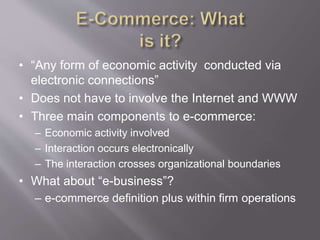
• “Any form of economic activity conducted via
electronic connections”
• Does not have to involve the Internet and WWW
• Three main components to e-commerce:
– Economic activity involved
– Interaction occurs electronically
– The interaction crosses organizational boundaries
• What about “e-business”?
– e-commerce definition plus within firm operations
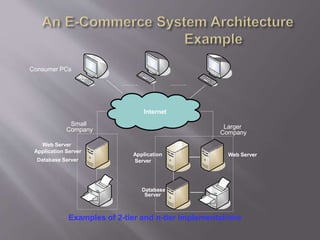
Examples of 2-tier and n-tier implementations
Consumer PCs
Web Server
Application Server
Database Server
Application
Server
Database
Server
Small
Company Larger
Company
Internet
Web Server
Busine
ss
Consume
r
Governmen
t
B2C
G2C
G2B
B2B C2C
G2G
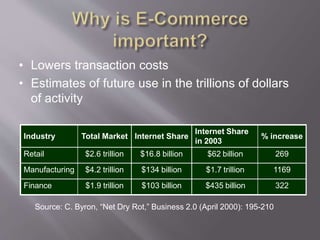
• Lowers transaction costs
• Estimates of future use in the trillions of dollars
of activity
Industry Total Market Internet Share
Internet Share
in 2003
% increase
Retail $2.6 trillion $16.8 billion $62 billion 269
Manufacturing $4.2 trillion $134 billion $1.7 trillion 1169
Finance $1.9 trillion $103 billion $435 billion 322
Source: C. Byron, “Net Dry Rot,” Business 2.0 (April 2000): 195-210
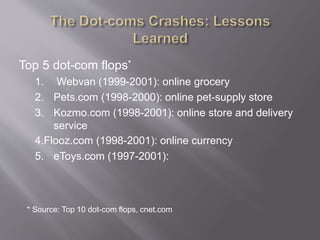
Top 5 dot-com flops*
1. Webvan (1999-2001): online grocery
2. Pets.com (1998-2000): online pet-supply store
3. Kozmo.com (1998-2001): online store and delivery
service
4.Flooz.com (1998-2001): online currency
5. eToys.com (1997-2001):
* Source: Top 10 dot-com flops, cnet.com
• Technical issues
• Perceptual issues
• Societal issues
• Legal and ethical issues
• Intellectual property issues
• Interoperability
• Security
• Privacy
• Connectivity to existing systems (backward compatibility)
– Web-based front-end systems must be able to connect with back-end legacy
systems that tend to be large, complex, and poorly documented.
– Must use “middleware” to translate data from one system to another.
• Internet “pipeline” capacity to support efficient transmission of possibly
large-sized contents (music, videos, high-resolution graphics/photos)
– E.g., Napster phenomenon
• Web organization – how to conveniently locate products or services on-line
from a dozen of “directories” on the Web.
• The ability of systems running in different
operating environments to communicate and
work together.
– E.g., clients running Windows XP can access Web
pages from servers running Linux.
• For the interoperability to work, the same set of
rules (protocols) must be followed.
• Internetworking standard, i.e., TCP/IP
– TCP: managing overall network transport function
• Breaking information into data packets, tagging each packet
with a sequence number before submitting it to the IP layer.
• At the other end, TCP layer assembles all packets received
and rearrange them in original order.
– IP: managing addressing and routing
• Addressing – determining the addresses to be used
• Routing – determining the best possible route for packet
transmission
• Threats to systems
• Three types of security threats
– denial of service,
– unauthorized access, and
– theft and fraud
• Denial of Service (DOS)
• Two primary types of DOS attacks: spamming and
viruses
• Spamming
– Sending unsolicited commercial emails to individuals
– E-mail bombing caused by a hacker targeting one computer or
network, and sending thousands of email messages to it.
– Smurfing involves hackers placing software agents onto a third-
party system and setting it off to send requests to an intended
target.
– DDOS (distributed denial of service attacks) involves hackers
placing software agents onto a number of third-party systems
and setting them off to simultaneously send requests to an
intended target
• Viruses: self-replicating computer programs
designed to perform unwanted events
• Worms: special viruses that spread using direct
Internet connections
• Trojan Horses: disguised as legitimate software
and trick users into running the program
• Illegal access to systems, applications or data
• Passive unauthorized access – listening to
communications channel for finding secrets.
– May use content for damaging purposes
• Active unauthorized access
– Modifying system or data
– Message stream modification
• Changes intent of messages, e.g., to abort or delay a
negotiation on a contract
• Masquerading or spoofing – sending a message
that appears to be from someone else.
– Impersonating another user at the “name” (changing
the “From” field) or IP levels (changing the source
and/or destination IP address of packets in the
network)
• Sniffers – software that illegally access data
traversing across the network.
• Software and operating systems’ security holes
• Data theft already discussed under the
unauthorized access section
• Fraud occurs when the stolen data is used or
modified
• Theft of software via illegal copying from
company’s servers
• Theft of hardware, specifically laptops
• Threats to data
• Data collection
– Faster and easier data collection thru online technology
– Cross-referencing (aggregation) real offline consumer data with
online purchasing habits collected with or without their
knowledge. Or cross-referencing online data with other online
data between several Web entrepreneurs, for example
– Hidden data collection without consumer consent, possibly thru
cookies, for example
• Usage tracking
– Patterns of online activity lead to inferences about the user’s
product preferences for providing customized pop-up ads and
referring sites.
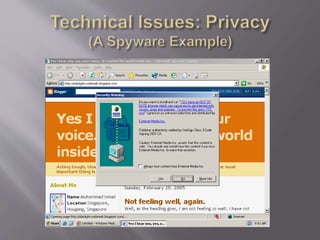
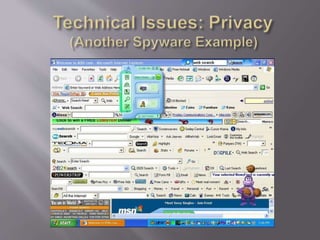
– May include today’s spyware.
• Spyware: a type of program that watches what
users do with their computer and then sends that
information over the Internet to the spyware’s
author
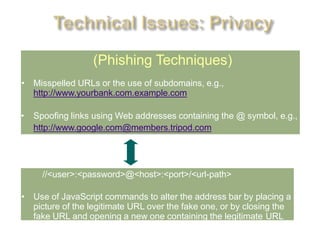
(Phishing Techniques)
• Misspelled URLs or the use of subdomains, e.g.,
http://www.yourbank.com.example.com
• Spoofing links using Web addresses containing the @ symbol, e.g.,
http://www.google.com@members.tripod.com
//<user>:<password>@<host>:<port>/<url-path>
• Use of JavaScript commands to alter the address bar by placing a
picture of the legitimate URL over the fake one, or by closing the
fake URL and opening a new one containing the legitimate URL
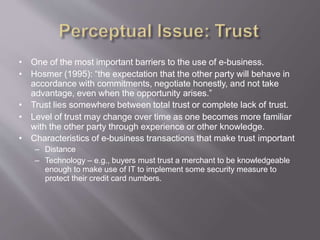
• One of the most important barriers to the use of e-business.
• Hosmer (1995): “the expectation that the other party will behave in
accordance with commitments, negotiate honestly, and not take
advantage, even when the opportunity arises.”
• Trust lies somewhere between total trust or complete lack of trust.
• Level of trust may change over time as one becomes more familiar
with the other party through experience or other knowledge.
• Characteristics of e-business transactions that make trust important
– Distance
– Technology – e.g., buyers must trust a merchant to be knowledgeable
enough to make use of IT to implement some security measure to
protect their credit card numbers.
• Predictability
– Establishing clear expectations – e.g., consistently sending email
notifications of order confirmation, and of order shipment.
• Reliability
– Providing follow through (do according to what merchants’
promise)
• Technical competence
– Ability to carry out responsibilities (and show this clearly to
potential users)
• Fiduciary responsibility
– Act on behalf of the customer’s interests (e.g., on-line travel
agencies)
• Telecommunications Infrastructure
– Differences in cost of connecting and (cost/income)
• Access Inequalities
– Digital Divide and access to equipment
• Information Technology Skills Shortage
– Workforce shortage (large number of unfilled IT positions)
– Global movement of IT workers (“brain drain”) from developing
countries to developed ones for higher salaries
– Retaining IT workers in the field (jobs rotations, providing
training)
• Digital signatures
– Knowing whose messages come from
– Used for 2 purposes
• Authenticate identity of signer
• Nonrepudiation
• Consumer Protections!
– Small-claims courts
– Limited liability
– Return policies
• Protection
– Copyrights – software, arts (literature, artwork, music)
– Patents – inventions
– Trademarks – name brands and logos
• Global uniformity of laws – different countries may
enforce software copyright laws differently
• “Link liability” – linking to other sites that publish
materials belonging to other people without permission
• Domain names (who owns “lakers.com”?)
– The basketball team or some individual
• Patenting business processes
– Amazon’s “1-Click” VS Barnes & Noble’s “Express Lane”
– Priceline’s name-your-price VS Expedia’s price matching system
• To achieve projected goal of Internet exercise of
e-commerce activities, several tasks must be
accomplished
– Telecom and basic infrastructure must be widespread
throughout the country and affordable
– Relevant laws must be in place and strictly enforced
– Independent organizations must be established to
protect consumer’s right
– People must be educated enough to understand how
to use the Internet to its fullest capacity
– IT personnel must be built

E-Commerce: Challenges and Issues

  • 1.
    Subject - CyberLaws & Rights M. tech. 3rd Sem., ISM.  By: Prashant Kr. Vats,  M.tech., Ph.D.
  • 3.
    • E-Commerce: Whatis it? • E-Commerce: Business Models • Why is E-Commerce important? • Challenges and Issues • Conclusions
  • 4.
    • “Any formof economic activity conducted via electronic connections” • Does not have to involve the Internet and WWW • Three main components to e-commerce: – Economic activity involved – Interaction occurs electronically – The interaction crosses organizational boundaries • What about “e-business”? – e-commerce definition plus within firm operations
  • 5.
    Examples of 2-tierand n-tier implementations Consumer PCs Web Server Application Server Database Server Application Server Database Server Small Company Larger Company Internet Web Server
  • 6.
  • 7.
    • Lowers transactioncosts • Estimates of future use in the trillions of dollars of activity Industry Total Market Internet Share Internet Share in 2003 % increase Retail $2.6 trillion $16.8 billion $62 billion 269 Manufacturing $4.2 trillion $134 billion $1.7 trillion 1169 Finance $1.9 trillion $103 billion $435 billion 322 Source: C. Byron, “Net Dry Rot,” Business 2.0 (April 2000): 195-210
  • 10.
    Top 5 dot-comflops* 1. Webvan (1999-2001): online grocery 2. Pets.com (1998-2000): online pet-supply store 3. Kozmo.com (1998-2001): online store and delivery service 4.Flooz.com (1998-2001): online currency 5. eToys.com (1997-2001): * Source: Top 10 dot-com flops, cnet.com
  • 11.
    • Technical issues •Perceptual issues • Societal issues • Legal and ethical issues • Intellectual property issues
  • 12.
    • Interoperability • Security •Privacy • Connectivity to existing systems (backward compatibility) – Web-based front-end systems must be able to connect with back-end legacy systems that tend to be large, complex, and poorly documented. – Must use “middleware” to translate data from one system to another. • Internet “pipeline” capacity to support efficient transmission of possibly large-sized contents (music, videos, high-resolution graphics/photos) – E.g., Napster phenomenon • Web organization – how to conveniently locate products or services on-line from a dozen of “directories” on the Web.
  • 13.
    • The abilityof systems running in different operating environments to communicate and work together. – E.g., clients running Windows XP can access Web pages from servers running Linux. • For the interoperability to work, the same set of rules (protocols) must be followed.
  • 14.
    • Internetworking standard,i.e., TCP/IP – TCP: managing overall network transport function • Breaking information into data packets, tagging each packet with a sequence number before submitting it to the IP layer. • At the other end, TCP layer assembles all packets received and rearrange them in original order. – IP: managing addressing and routing • Addressing – determining the addresses to be used • Routing – determining the best possible route for packet transmission
  • 15.
    • Threats tosystems • Three types of security threats – denial of service, – unauthorized access, and – theft and fraud
  • 16.
    • Denial ofService (DOS) • Two primary types of DOS attacks: spamming and viruses • Spamming – Sending unsolicited commercial emails to individuals – E-mail bombing caused by a hacker targeting one computer or network, and sending thousands of email messages to it. – Smurfing involves hackers placing software agents onto a third- party system and setting it off to send requests to an intended target. – DDOS (distributed denial of service attacks) involves hackers placing software agents onto a number of third-party systems and setting them off to simultaneously send requests to an intended target
  • 17.
    • Viruses: self-replicatingcomputer programs designed to perform unwanted events • Worms: special viruses that spread using direct Internet connections • Trojan Horses: disguised as legitimate software and trick users into running the program
  • 18.
    • Illegal accessto systems, applications or data • Passive unauthorized access – listening to communications channel for finding secrets. – May use content for damaging purposes • Active unauthorized access – Modifying system or data – Message stream modification • Changes intent of messages, e.g., to abort or delay a negotiation on a contract
  • 19.
    • Masquerading orspoofing – sending a message that appears to be from someone else. – Impersonating another user at the “name” (changing the “From” field) or IP levels (changing the source and/or destination IP address of packets in the network) • Sniffers – software that illegally access data traversing across the network. • Software and operating systems’ security holes
  • 20.
    • Data theftalready discussed under the unauthorized access section • Fraud occurs when the stolen data is used or modified • Theft of software via illegal copying from company’s servers • Theft of hardware, specifically laptops
  • 21.
    • Threats todata • Data collection – Faster and easier data collection thru online technology – Cross-referencing (aggregation) real offline consumer data with online purchasing habits collected with or without their knowledge. Or cross-referencing online data with other online data between several Web entrepreneurs, for example – Hidden data collection without consumer consent, possibly thru cookies, for example • Usage tracking – Patterns of online activity lead to inferences about the user’s product preferences for providing customized pop-up ads and referring sites. – May include today’s spyware.
  • 22.
    • Spyware: atype of program that watches what users do with their computer and then sends that information over the Internet to the spyware’s author
  • 25.
    (Phishing Techniques) • MisspelledURLs or the use of subdomains, e.g., http://www.yourbank.com.example.com • Spoofing links using Web addresses containing the @ symbol, e.g., http://www.google.com@members.tripod.com //<user>:<password>@<host>:<port>/<url-path> • Use of JavaScript commands to alter the address bar by placing a picture of the legitimate URL over the fake one, or by closing the fake URL and opening a new one containing the legitimate URL
  • 28.
    • One ofthe most important barriers to the use of e-business. • Hosmer (1995): “the expectation that the other party will behave in accordance with commitments, negotiate honestly, and not take advantage, even when the opportunity arises.” • Trust lies somewhere between total trust or complete lack of trust. • Level of trust may change over time as one becomes more familiar with the other party through experience or other knowledge. • Characteristics of e-business transactions that make trust important – Distance – Technology – e.g., buyers must trust a merchant to be knowledgeable enough to make use of IT to implement some security measure to protect their credit card numbers.
  • 29.
    • Predictability – Establishingclear expectations – e.g., consistently sending email notifications of order confirmation, and of order shipment. • Reliability – Providing follow through (do according to what merchants’ promise) • Technical competence – Ability to carry out responsibilities (and show this clearly to potential users) • Fiduciary responsibility – Act on behalf of the customer’s interests (e.g., on-line travel agencies)
  • 30.
    • Telecommunications Infrastructure –Differences in cost of connecting and (cost/income) • Access Inequalities – Digital Divide and access to equipment • Information Technology Skills Shortage – Workforce shortage (large number of unfilled IT positions) – Global movement of IT workers (“brain drain”) from developing countries to developed ones for higher salaries – Retaining IT workers in the field (jobs rotations, providing training)
  • 31.
    • Digital signatures –Knowing whose messages come from – Used for 2 purposes • Authenticate identity of signer • Nonrepudiation • Consumer Protections! – Small-claims courts – Limited liability – Return policies
  • 32.
    • Protection – Copyrights– software, arts (literature, artwork, music) – Patents – inventions – Trademarks – name brands and logos • Global uniformity of laws – different countries may enforce software copyright laws differently • “Link liability” – linking to other sites that publish materials belonging to other people without permission • Domain names (who owns “lakers.com”?) – The basketball team or some individual • Patenting business processes – Amazon’s “1-Click” VS Barnes & Noble’s “Express Lane” – Priceline’s name-your-price VS Expedia’s price matching system
  • 33.
    • To achieveprojected goal of Internet exercise of e-commerce activities, several tasks must be accomplished – Telecom and basic infrastructure must be widespread throughout the country and affordable – Relevant laws must be in place and strictly enforced – Independent organizations must be established to protect consumer’s right – People must be educated enough to understand how to use the Internet to its fullest capacity – IT personnel must be built