WORK FLOW AUTOMATION
Workflow Automation
 Workflow Automation is a technology solution,
which automates the tasks, resources and internal
operations that form the process known as
“workflow.”
 Workflow is the process, which encompasses
many small, definable tasks that link together to
achieve the desired result.
 Workflow automation utilizes software to link
together the elements of workflow (events, tasks,
resources) in an attempt to increase the speed,
visibility and coordination by which the work gets
done.
ADVANTAGES
 Priorities and timelines are linked across the
organization
 Tasks and calendars are visible to all users
enabling workloads to be shared and efficiently
managed
 visibility- Managers can quickly see the status of a
process but beyond that they can also identify
roadblocks, resources constraints and opportunity
for process improvement
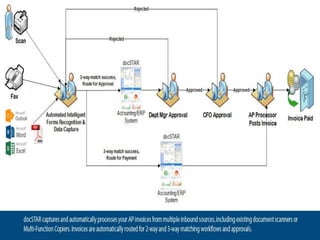
 Workflow Automation software provides a graphical
representation of people, projects and financial
processes for workflow design, configuration and
self-service. The graphical workflow interface
enables you to visually define, control, track and
audit approvals, routing, role-based assignments
and notifications.
 Workflow automation helps to ensure that at
the right time the right person gets the
right information about what needs to be done and
in what order
 A salesman incurs an expense and fills out an electronic form
directly within the system.
 He takes a photo of his receipt with his iPhone camera and
attaches it to the expense form he just completed.
 When he presses the submit button, it is uploaded and deposited
into the ECM repository.
The system recognizes the total amount on the expense form and
automatically sends it to the appropriate person for approval prior to
accounting receiving it.
 The manager receives a notification on his tablet that an approval
must be completed. He opens the form, reviews the receipt, and
approves the expense.
 It then gets automatically routed to accounting to kick off the
reimbursement workflow and get posted to the appropriate
accounts.
Example :
WORKFLOW MANAGEMENT SYSTEMS CAN BE
CATEGORISED INTO THE FOLLOWING CATEGORIES:
 Routing System- Process of selecting the best
method of doing a process
 Distribution System- Best way to distribute and
allocate the resources
 Coordination System- Coordinates the activities of
different departments
WORKFLOW MANAGEMENT SOFTWARES
 Activity
 Apache ODE
 Bonita BPM
 CEITON Workflow System
 jBPM
 Microsoft Windows Workflow Foundation
 Hyland Software
 Perceptive Software
 SAP Business Workflow
 Workgroups DaVinci
 FreeFlow Core (Xerox)

Workflow automation

  • 1.
  • 2.
    Workflow Automation  WorkflowAutomation is a technology solution, which automates the tasks, resources and internal operations that form the process known as “workflow.”  Workflow is the process, which encompasses many small, definable tasks that link together to achieve the desired result.
  • 3.
     Workflow automationutilizes software to link together the elements of workflow (events, tasks, resources) in an attempt to increase the speed, visibility and coordination by which the work gets done.
  • 4.
    ADVANTAGES  Priorities andtimelines are linked across the organization  Tasks and calendars are visible to all users enabling workloads to be shared and efficiently managed  visibility- Managers can quickly see the status of a process but beyond that they can also identify roadblocks, resources constraints and opportunity for process improvement
  • 5.
     Workflow Automationsoftware provides a graphical representation of people, projects and financial processes for workflow design, configuration and self-service. The graphical workflow interface enables you to visually define, control, track and audit approvals, routing, role-based assignments and notifications.  Workflow automation helps to ensure that at the right time the right person gets the right information about what needs to be done and in what order
  • 7.
     A salesmanincurs an expense and fills out an electronic form directly within the system.  He takes a photo of his receipt with his iPhone camera and attaches it to the expense form he just completed.  When he presses the submit button, it is uploaded and deposited into the ECM repository. The system recognizes the total amount on the expense form and automatically sends it to the appropriate person for approval prior to accounting receiving it.  The manager receives a notification on his tablet that an approval must be completed. He opens the form, reviews the receipt, and approves the expense.  It then gets automatically routed to accounting to kick off the reimbursement workflow and get posted to the appropriate accounts. Example :
  • 8.
    WORKFLOW MANAGEMENT SYSTEMSCAN BE CATEGORISED INTO THE FOLLOWING CATEGORIES:  Routing System- Process of selecting the best method of doing a process  Distribution System- Best way to distribute and allocate the resources  Coordination System- Coordinates the activities of different departments
  • 9.
    WORKFLOW MANAGEMENT SOFTWARES Activity  Apache ODE  Bonita BPM  CEITON Workflow System  jBPM  Microsoft Windows Workflow Foundation  Hyland Software  Perceptive Software  SAP Business Workflow  Workgroups DaVinci  FreeFlow Core (Xerox)