Copyright © 2009 Pearson Education, Inc. Slide 4-1
E-commerce
Kenneth C. Laudon
Carol Guercio Traver
business. technology. society.
Sixth Edition
BY:MADDY.KALEE
M
Copyright © 2009 Pearson Education, Inc. Slide 4-2
Chapter 4
Building an E-commerce Web Site
BY:MADDY.KALEE
M
Building an E-commerce Site:
A Systematic Approach
 Most important management
challenges:
Developing a clear understanding of
business objectives
Knowing how to choose the right
technology to achieve those objectives
Slide 4-3
BY:MADDY.KALEE
M
Pieces of the Site-Building Puzzle
 Main areas where you will need to make
decisions:
Human resources and organizational capabilities
 Creating team with skill set needed to build and
manage a successful site
Hardware
Software
Telecommunications
Site design
Slide 4-4
BY:MADDY.KALEE
M
The Systems Development Life Cycle
 Methodology for understanding business
objectives of a system and designing an
appropriate solution
 Five major steps:
1. Systems analysis/planning
2. Systems design
3. Building the system
4. Testing
5. Implementation
Slide 4-5
BY:MADDY.KALEE
M
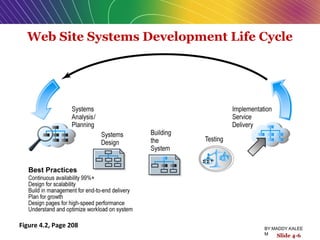
Web Site Systems Development Life Cycle
Figure 4.2, Page 208
Slide 4-6
BY:MADDY.KALEE
M
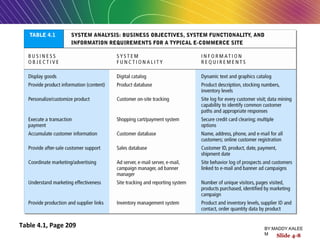
System Analysis/Planning
 Business objectives:
List of capabilities you want your site to have
 System functionalities:
List of information system capabilities needed to
achieve business objectives
 Information requirements:
Information elements that system must produce
in order to achieve business objectives
Slide 4-7
BY:MADDY.KALEE
M
Table 4.1, Page 209
Slide 4-8
BY:MADDY.KALEE
M
Systems Design:
Hardware and Software Platforms
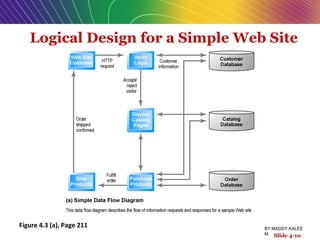
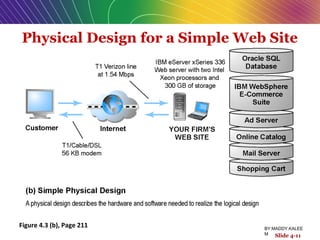
 System design specification:
 Description of main components of a system
and their relationship to one another
 Two components of system design:
1. Logical design
 Data flow diagrams, processing functions, databases
1. Physical design
 Specifies actual physical, software components, models, etc.
Slide 4-9
BY:MADDY.KALEE
M
Logical Design for a Simple Web Site
Figure 4.3 (a), Page 211
Slide 4-10
BY:MADDY.KALEE
M
Physical Design for a Simple Web Site
Figure 4.3 (b), Page 211
Slide 4-11
BY:MADDY.KALEE
M
Build/Host Your Own versus
Outsourcing
 Outsourcing: hiring vendors(sellers,
merchants) to provide services involved in
building site
 Build own vs. outsourcing:
 Build your own requires team with diverse skill set; choice of software
tools; both risks and possible benefits
 Host own vs. outsourcing
 Hosting: hosting company responsible for ensuring site is accessible
24/7, for monthly fee
 Co-location: firm purchases or leases Web server (with control over its
operation), but server is located at vendor’s facility
Slide 4-12
BY:MADDY.KALEE
M
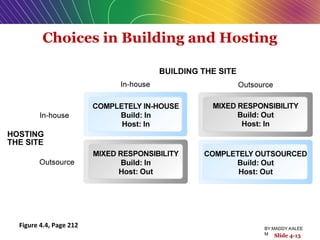
Choices in Building and Hosting
Figure 4.4, Page 212
Slide 4-13
BY:MADDY.KALEE
M
Insight on Business
Curly Hair and MotorMouths:
Getting Started on the Cheap
Class Discussion
 How does a small, niche Web site become
profitable?
 What is the primary source of income for
these kinds of sites?
 What benefits are there to starting a business
in a recession?
Slide 4-14
BY:MADDY.KALEE
M
Testing, Implementation, and
Maintenance
 Testing
Unit testing
System testing
Acceptance testing
 Implementation and maintenance:
Maintenance is ongoing
Maintenance costs: parallel to development costs
Benchmarking
Slide 4-15
BY:MADDY.KALEE
M
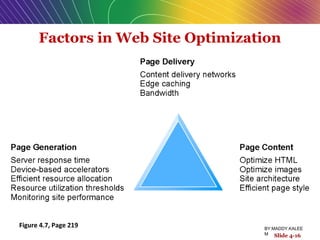
Factors in Web Site Optimization
Figure 4.7, Page 219
Slide 4-16
BY:MADDY.KALEE
M
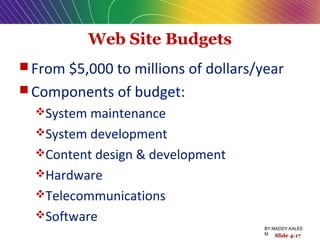
Web Site Budgets
 From $5,000 to millions of dollars/year
 Components of budget:
System maintenance
System development
Content design & development
Hardware
Telecommunications
Software
Slide 4-17
BY:MADDY.KALEE
M
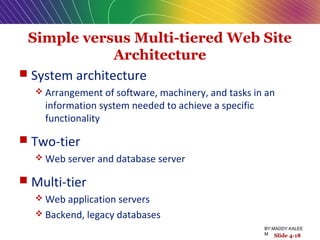
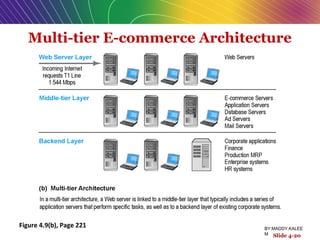
Simple versus Multi-tiered Web Site
Architecture
 System architecture
 Arrangement of software, machinery, and tasks in an
information system needed to achieve a specific
functionality
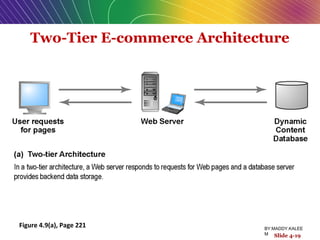
 Two-tier
 Web server and database server
 Multi-tier
 Web application servers
 Backend, legacy databases
Slide 4-18
BY:MADDY.KALEE
M
Two-Tier E-commerce Architecture
Figure 4.9(a), Page 221
Slide 4-19
BY:MADDY.KALEE
M
Multi-tier E-commerce Architecture
Figure 4.9(b), Page 221
Slide 4-20
BY:MADDY.KALEE
M
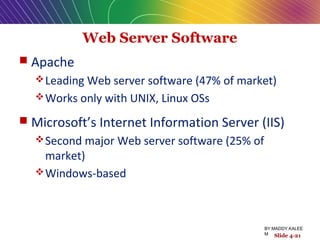
Web Server Software
 Apache
Leading Web server software (47% of market)
Works only with UNIX, Linux OSs
 Microsoft’s Internet Information Server (IIS)
Second major Web server software (25% of
market)
Windows-based
Slide 4-21
BY:MADDY.KALEE
M
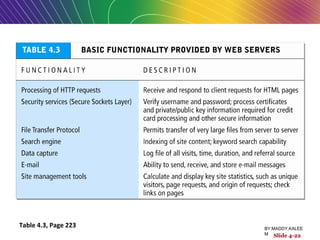
Table 4.3, Page 223
Slide 4-22
BY:MADDY.KALEE
M
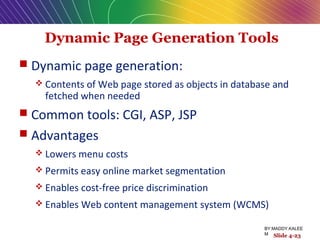
Dynamic Page Generation Tools
 Dynamic page generation:
 Contents of Web page stored as objects in database and
fetched when needed
 Common tools: CGI, ASP, JSP
 Advantages
 Lowers menu costs
 Permits easy online market segmentation
 Enables cost-free price discrimination
 Enables Web content management system (WCMS)
Slide 4-23
BY:MADDY.KALEE
M
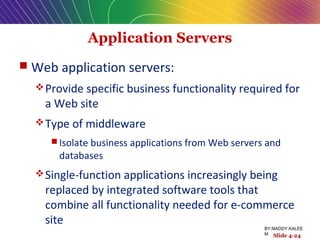
Application Servers
 Web application servers:
Provide specific business functionality required for
a Web site
Type of middleware
 Isolate business applications from Web servers and
databases
Single-function applications increasingly being
replaced by integrated software tools that
combine all functionality needed for e-commerce
site
Slide 4-24
BY:MADDY.KALEE
M
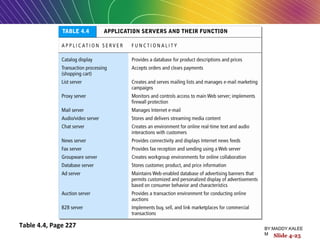
Table 4.4, Page 227
Slide 4-25
BY:MADDY.KALEE
M
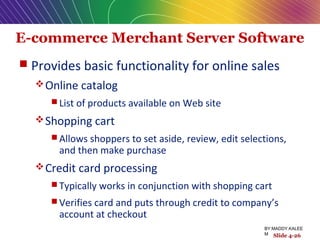
E-commerce Merchant Server Software
 Provides basic functionality for online sales
Online catalog
 List of products available on Web site
Shopping cart
 Allows shoppers to set aside, review, edit selections,
and then make purchase
Credit card processing
 Typically works in conjunction with shopping cart
 Verifies card and puts through credit to company’s
account at checkout
Slide 4-26
BY:MADDY.KALEE
M
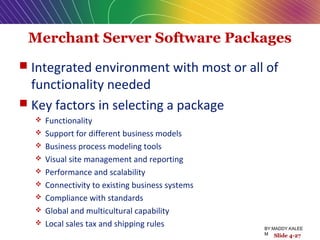
Merchant Server Software Packages
 Integrated environment with most or all of
functionality needed
 Key factors in selecting a package
 Functionality
 Support for different business models
 Business process modeling tools
 Visual site management and reporting
 Performance and scalability
 Connectivity to existing business systems
 Compliance with standards
 Global and multicultural capability
 Local sales tax and shipping rules
Slide 4-27
BY:MADDY.KALEE
M
Building Your Own E-commerce Site
 Options for small firms
Hosted e-commerce sites, e.g., Yahoo’s
Merchant Solutions
Site building tools
E-commerce templates
Open-source merchant server software
Enables you to build truly custom site
Requires programmer with expertise, time
Slide 4-28
BY:MADDY.KALEE
M
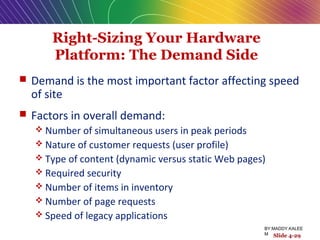
Right-Sizing Your Hardware
Platform: The Demand Side
 Demand is the most important factor affecting speed
of site
 Factors in overall demand:
 Number of simultaneous users in peak periods
 Nature of customer requests (user profile)
 Type of content (dynamic versus static Web pages)
 Required security
 Number of items in inventory
 Number of page requests
 Speed of legacy applications
Slide 4-29
BY:MADDY.KALEE
M
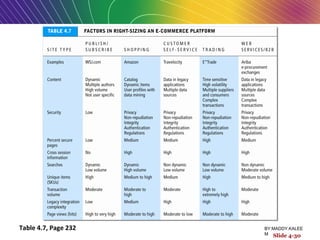
Table 4.7, Page 232
Slide 4-30
BY:MADDY.KALEE
M
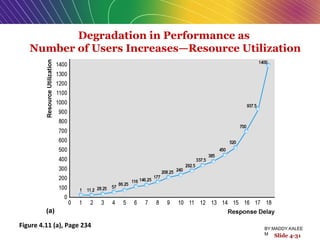
Degradation in Performance as
Number of Users Increases—Resource Utilization
Figure 4.11 (a), Page 234
Slide 4-31
BY:MADDY.KALEE
M
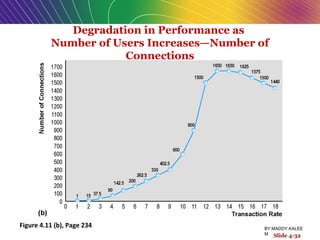
Slide 4-32
Figure 4.11 (b), Page 234
Degradation in Performance as
Number of Users Increases—Number of
Connections
BY:MADDY.KALEE
M
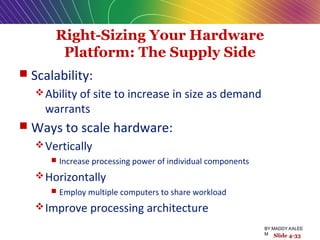
Right-Sizing Your Hardware
Platform: The Supply Side
 Scalability:
Ability of site to increase in size as demand
warrants
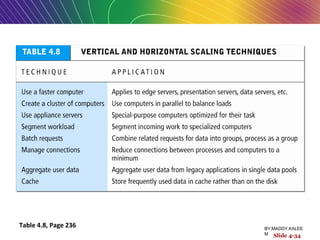
 Ways to scale hardware:
Vertically
 Increase processing power of individual components
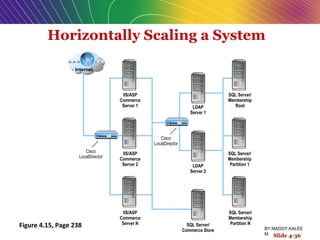
Horizontally
 Employ multiple computers to share workload
Improve processing architecture
Slide 4-33
BY:MADDY.KALEE
M
Table 4.8, Page 236
Slide 4-34
BY:MADDY.KALEE
M
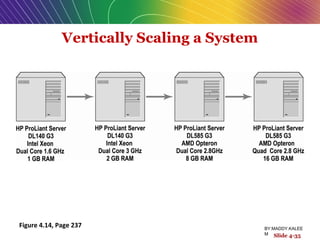
Vertically Scaling a System
Figure 4.14, Page 237
Slide 4-35
BY:MADDY.KALEE
M
Horizontally Scaling a System
Figure 4.15, Page 238
Slide 4-36
BY:MADDY.KALEE
M
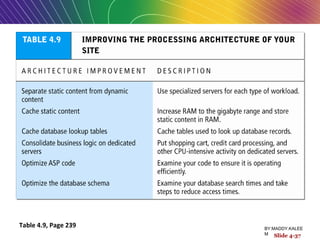
Table 4.9, Page 239
Slide 4-37
BY:MADDY.KALEE
M
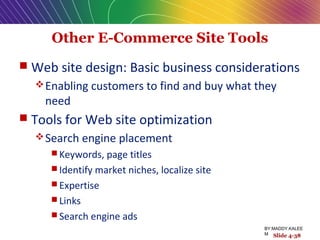
Other E-Commerce Site Tools
 Web site design: Basic business considerations
Enabling customers to find and buy what they
need
 Tools for Web site optimization
Search engine placement
 Keywords, page titles
 Identify market niches, localize site
 Expertise
 Links
 Search engine ads
Slide 4-38
BY:MADDY.KALEE
M
Tools for Interactivity and
Active Content
 Web 2.0 design elements: Widgets, Mashups
 CGI (Common Gateway Interface)
 ASP (Active Server Pages)
 Java, JSP, and Javascript
 ActiveX and VBScript
 Coldfusion
Slide 4-39
BY:MADDY.KALEE
M
Insight on Technology
Pumping Up the Customer Experience
Using AJAX and Flash
Class Discussion
 What is AJAX? How does it work?
 How does AJAX improve on client/server
interactivity?
 How does Google Maps use AJAX?
 What are some alternative technologies
to achieve the same results as AJAX?
Slide 4-40
BY:MADDY.KALEE
M
The Information Policy Set
 Privacy policy
Set of public statements declaring how site will
treat customers’ personal information that is
gathered by site
 Accessibility rules
Set of design objectives that ensure disabled users
can affectively access site
Slide 4-41
BY:MADDY.KALEE
M Slide 4-41
Insight on Society
Designing for Accessibility with Web 2.0
Class Discussion
 What is Section 508 of the Rehabilitation Act?
 Why might some merchants be reluctant to
make their Web sites accessible to disabled
Americans?
 How can Web sites be made more accessible?
 Should all Web sites be required by law to
provide “equivalent alternatives” for visual
and sound content?
Slide 4-42
BY:MADDY.KALEE
M
Slide 4-43
All rights reserved. No part of this publication may be reproduced, stored in a
retrieval system, or transmitted, in any form or by any means, electronic,
mechanical, photocopying, recording, or otherwise, without the prior written
permission of the publisher. Printed in the United States of America.
Copyright © 2010 Pearson Education, Inc.  Copyright © 2010 Pearson Education, Inc.  
Publishing as Prentice HallPublishing as Prentice Hall
BY:MADDY.KALEE
M

E-BM Building an E-commerce Web Site

  • 1.
    Copyright © 2009Pearson Education, Inc. Slide 4-1 E-commerce Kenneth C. Laudon Carol Guercio Traver business. technology. society. Sixth Edition BY:MADDY.KALEE M
  • 2.
    Copyright © 2009Pearson Education, Inc. Slide 4-2 Chapter 4 Building an E-commerce Web Site BY:MADDY.KALEE M
  • 3.
    Building an E-commerceSite: A Systematic Approach  Most important management challenges: Developing a clear understanding of business objectives Knowing how to choose the right technology to achieve those objectives Slide 4-3 BY:MADDY.KALEE M
  • 4.
    Pieces of theSite-Building Puzzle  Main areas where you will need to make decisions: Human resources and organizational capabilities  Creating team with skill set needed to build and manage a successful site Hardware Software Telecommunications Site design Slide 4-4 BY:MADDY.KALEE M
  • 5.
    The Systems DevelopmentLife Cycle  Methodology for understanding business objectives of a system and designing an appropriate solution  Five major steps: 1. Systems analysis/planning 2. Systems design 3. Building the system 4. Testing 5. Implementation Slide 4-5 BY:MADDY.KALEE M
  • 6.
    Web Site SystemsDevelopment Life Cycle Figure 4.2, Page 208 Slide 4-6 BY:MADDY.KALEE M
  • 7.
    System Analysis/Planning  Businessobjectives: List of capabilities you want your site to have  System functionalities: List of information system capabilities needed to achieve business objectives  Information requirements: Information elements that system must produce in order to achieve business objectives Slide 4-7 BY:MADDY.KALEE M
  • 8.
    Table 4.1, Page209 Slide 4-8 BY:MADDY.KALEE M
  • 9.
    Systems Design: Hardware andSoftware Platforms  System design specification:  Description of main components of a system and their relationship to one another  Two components of system design: 1. Logical design  Data flow diagrams, processing functions, databases 1. Physical design  Specifies actual physical, software components, models, etc. Slide 4-9 BY:MADDY.KALEE M
  • 10.
    Logical Design fora Simple Web Site Figure 4.3 (a), Page 211 Slide 4-10 BY:MADDY.KALEE M
  • 11.
    Physical Design fora Simple Web Site Figure 4.3 (b), Page 211 Slide 4-11 BY:MADDY.KALEE M
  • 12.
    Build/Host Your Ownversus Outsourcing  Outsourcing: hiring vendors(sellers, merchants) to provide services involved in building site  Build own vs. outsourcing:  Build your own requires team with diverse skill set; choice of software tools; both risks and possible benefits  Host own vs. outsourcing  Hosting: hosting company responsible for ensuring site is accessible 24/7, for monthly fee  Co-location: firm purchases or leases Web server (with control over its operation), but server is located at vendor’s facility Slide 4-12 BY:MADDY.KALEE M
  • 13.
    Choices in Buildingand Hosting Figure 4.4, Page 212 Slide 4-13 BY:MADDY.KALEE M
  • 14.
    Insight on Business CurlyHair and MotorMouths: Getting Started on the Cheap Class Discussion  How does a small, niche Web site become profitable?  What is the primary source of income for these kinds of sites?  What benefits are there to starting a business in a recession? Slide 4-14 BY:MADDY.KALEE M
  • 15.
    Testing, Implementation, and Maintenance Testing Unit testing System testing Acceptance testing  Implementation and maintenance: Maintenance is ongoing Maintenance costs: parallel to development costs Benchmarking Slide 4-15 BY:MADDY.KALEE M
  • 16.
    Factors in WebSite Optimization Figure 4.7, Page 219 Slide 4-16 BY:MADDY.KALEE M
  • 17.
    Web Site Budgets From $5,000 to millions of dollars/year  Components of budget: System maintenance System development Content design & development Hardware Telecommunications Software Slide 4-17 BY:MADDY.KALEE M
  • 18.
    Simple versus Multi-tieredWeb Site Architecture  System architecture  Arrangement of software, machinery, and tasks in an information system needed to achieve a specific functionality  Two-tier  Web server and database server  Multi-tier  Web application servers  Backend, legacy databases Slide 4-18 BY:MADDY.KALEE M
  • 19.
    Two-Tier E-commerce Architecture Figure4.9(a), Page 221 Slide 4-19 BY:MADDY.KALEE M
  • 20.
    Multi-tier E-commerce Architecture Figure4.9(b), Page 221 Slide 4-20 BY:MADDY.KALEE M
  • 21.
    Web Server Software Apache Leading Web server software (47% of market) Works only with UNIX, Linux OSs  Microsoft’s Internet Information Server (IIS) Second major Web server software (25% of market) Windows-based Slide 4-21 BY:MADDY.KALEE M
  • 22.
    Table 4.3, Page223 Slide 4-22 BY:MADDY.KALEE M
  • 23.
    Dynamic Page GenerationTools  Dynamic page generation:  Contents of Web page stored as objects in database and fetched when needed  Common tools: CGI, ASP, JSP  Advantages  Lowers menu costs  Permits easy online market segmentation  Enables cost-free price discrimination  Enables Web content management system (WCMS) Slide 4-23 BY:MADDY.KALEE M
  • 24.
    Application Servers  Webapplication servers: Provide specific business functionality required for a Web site Type of middleware  Isolate business applications from Web servers and databases Single-function applications increasingly being replaced by integrated software tools that combine all functionality needed for e-commerce site Slide 4-24 BY:MADDY.KALEE M
  • 25.
    Table 4.4, Page227 Slide 4-25 BY:MADDY.KALEE M
  • 26.
    E-commerce Merchant ServerSoftware  Provides basic functionality for online sales Online catalog  List of products available on Web site Shopping cart  Allows shoppers to set aside, review, edit selections, and then make purchase Credit card processing  Typically works in conjunction with shopping cart  Verifies card and puts through credit to company’s account at checkout Slide 4-26 BY:MADDY.KALEE M
  • 27.
    Merchant Server SoftwarePackages  Integrated environment with most or all of functionality needed  Key factors in selecting a package  Functionality  Support for different business models  Business process modeling tools  Visual site management and reporting  Performance and scalability  Connectivity to existing business systems  Compliance with standards  Global and multicultural capability  Local sales tax and shipping rules Slide 4-27 BY:MADDY.KALEE M
  • 28.
    Building Your OwnE-commerce Site  Options for small firms Hosted e-commerce sites, e.g., Yahoo’s Merchant Solutions Site building tools E-commerce templates Open-source merchant server software Enables you to build truly custom site Requires programmer with expertise, time Slide 4-28 BY:MADDY.KALEE M
  • 29.
    Right-Sizing Your Hardware Platform:The Demand Side  Demand is the most important factor affecting speed of site  Factors in overall demand:  Number of simultaneous users in peak periods  Nature of customer requests (user profile)  Type of content (dynamic versus static Web pages)  Required security  Number of items in inventory  Number of page requests  Speed of legacy applications Slide 4-29 BY:MADDY.KALEE M
  • 30.
    Table 4.7, Page232 Slide 4-30 BY:MADDY.KALEE M
  • 31.
    Degradation in Performanceas Number of Users Increases—Resource Utilization Figure 4.11 (a), Page 234 Slide 4-31 BY:MADDY.KALEE M
  • 32.
    Slide 4-32 Figure 4.11(b), Page 234 Degradation in Performance as Number of Users Increases—Number of Connections BY:MADDY.KALEE M
  • 33.
    Right-Sizing Your Hardware Platform:The Supply Side  Scalability: Ability of site to increase in size as demand warrants  Ways to scale hardware: Vertically  Increase processing power of individual components Horizontally  Employ multiple computers to share workload Improve processing architecture Slide 4-33 BY:MADDY.KALEE M
  • 34.
    Table 4.8, Page236 Slide 4-34 BY:MADDY.KALEE M
  • 35.
    Vertically Scaling aSystem Figure 4.14, Page 237 Slide 4-35 BY:MADDY.KALEE M
  • 36.
    Horizontally Scaling aSystem Figure 4.15, Page 238 Slide 4-36 BY:MADDY.KALEE M
  • 37.
    Table 4.9, Page239 Slide 4-37 BY:MADDY.KALEE M
  • 38.
    Other E-Commerce SiteTools  Web site design: Basic business considerations Enabling customers to find and buy what they need  Tools for Web site optimization Search engine placement  Keywords, page titles  Identify market niches, localize site  Expertise  Links  Search engine ads Slide 4-38 BY:MADDY.KALEE M
  • 39.
    Tools for Interactivityand Active Content  Web 2.0 design elements: Widgets, Mashups  CGI (Common Gateway Interface)  ASP (Active Server Pages)  Java, JSP, and Javascript  ActiveX and VBScript  Coldfusion Slide 4-39 BY:MADDY.KALEE M
  • 40.
    Insight on Technology PumpingUp the Customer Experience Using AJAX and Flash Class Discussion  What is AJAX? How does it work?  How does AJAX improve on client/server interactivity?  How does Google Maps use AJAX?  What are some alternative technologies to achieve the same results as AJAX? Slide 4-40 BY:MADDY.KALEE M
  • 41.
    The Information PolicySet  Privacy policy Set of public statements declaring how site will treat customers’ personal information that is gathered by site  Accessibility rules Set of design objectives that ensure disabled users can affectively access site Slide 4-41 BY:MADDY.KALEE M Slide 4-41
  • 42.
    Insight on Society Designingfor Accessibility with Web 2.0 Class Discussion  What is Section 508 of the Rehabilitation Act?  Why might some merchants be reluctant to make their Web sites accessible to disabled Americans?  How can Web sites be made more accessible?  Should all Web sites be required by law to provide “equivalent alternatives” for visual and sound content? Slide 4-42 BY:MADDY.KALEE M
  • 43.
    Slide 4-43 All rightsreserved. No part of this publication may be reproduced, stored in a retrieval system, or transmitted, in any form or by any means, electronic, mechanical, photocopying, recording, or otherwise, without the prior written permission of the publisher. Printed in the United States of America. Copyright © 2010 Pearson Education, Inc.  Copyright © 2010 Pearson Education, Inc.   Publishing as Prentice HallPublishing as Prentice Hall BY:MADDY.KALEE M