TECHNOLOGY-BASED
TRAINING METHODS
CAPTER 8
REPORTERS:
SINGCO, ANAMAE
CARDENAS, SHEILA MAE PAYAO
ENCIERTO, JENECELLE CABANAG
YAPOYCO, RALPH BIARCAL
OBJECTIVES
• Explain how new technologies are influencing training
• Evaluate a Web-based training site
• Explain how learning and transfer of training are enhanced by using new training technologies
• Explain the strengths and limitations of e-learning, mobile technology training methods (such as
iPads), and simulations
• Explain the different types of social media and the conditions conducive to their use for training
• Describe to a manager the various types of distance learning
• Recommend what should be included in an electronic performance support system
• Compare and contrast the strengths and weaknesses of traditional training methods versus those
of technology-based training methods
• Identify and explain the benefits of learning management systems
2
Technology Influence on
Training and Learning
• New Technology’s have made it possible to:
• Reduce costs associated with delivering training
• Increase effectiveness of the learning environment
• Help training contribute to business goals
20XX presentation title 4
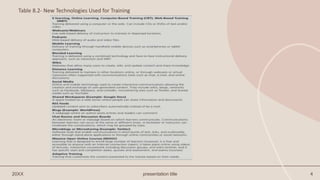
Table 8.2- New Technologies Used for Training
Benefits of Technology
• Employees can gain control over when and where they receive training
• Employees can access knowledge and expert systems on an as-needed basis
• The learning environment can look, feel, and sound just like the work environment
• Employees can choose the type of media they want to use in a training program
• Paper work and time needed for administrative activities is reduced
• Employees accomplishments during training can be monitored
• Traditional training methods can be delivered to trainees rather than requiring them to
come to a central training location
Technology and Collaboration
• Digital collaboration- Use of technology to enhance and extend emplyees’ abilities to
work together regardless of their geographic proximity.
• Types of Communicatios:
• Synchronous communication- Tainers, experts and learners interact with each other live
and in real time, the same way they would is face-to-face classroom instruction
• Asynchronous communication- Non-real-time interactions
20XX presentation title 7
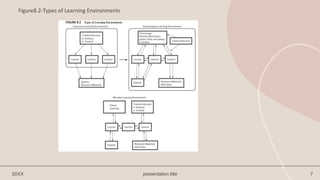
Figure8.2-Types of Learning Environments
Computer-based training (CBT), online learning, e-
learning, and web-based training
• refer to instruction and delivery of training by computer through the
internet or the web.
Potential Features of Online Learning
• In online learning, it is possible to enable learners to
interact with the training content and other learners and
to decide how they want to learn.
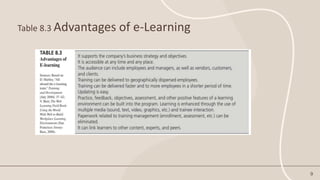
Table 8.3 Advantages of e-Learning
9
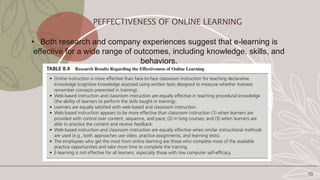
• Both research and company experiences suggest that e-learning is
effective for a wide range of outcomes, including knowledge, skills, and
behaviors.
10
PEFFECTIVENESS OF ONLINE LEARNING
Needs Assessment
• This includes getting manangement to support online learning.
Bandwidth
• Refers to the number of bytes and bits (information) that can travel
between computers per second.
Plug-in
• Refers to additional software that needs to be loaded on the computer to
listen to sound, watch video, or perform other functions.
11
DEVELOPING EFFECTIVE ONLINE LEARNING
CREATING A POSITIVE ONLINE
LEARNING EXPERIENCE
12
Rapid Prototyping
• refers to an iterative process in which initial design ideas are proposed and provided
in rough form in an online working prototype that is reviewed and refined by design
team members and key learning stakeholders.
Repurposing
• refers to directly translating an instructor-led, face-to-face training program to an
online format.
Learner Control
• refers to giving trainess the option to learn actively through self-pacing, exercises,
exploring links to other material, and conversation with other trainess and experts.
PROVIDE TIME AND SPACE FOR ONLINE LEARNING
13
• Companies need to ensure that employees are given time and space for e-learning to
occur.
TECHNOLOGY FOR COLLABORATION AND LINKING
Hyperlinks
• Links that allow a trainee to access other websites that include printed materials, as well as
communications links to experts, trainers, and other learners.
MASSIVE OPEN ONLINE COURSES (MOOCs)
• Refers to learning that is design to enroll large number of learners (massive), it is free and
accessible to anyone with an internet connection (open), it takes place online using videos of
lectures, interactive coursework including discussion groups, and wikis (online), and it has specific
start and ompletion dates, quizzes and assessment, and exams (courses).
Social Media;
Blogs
A webpage where an author posts entries and readers can comment
Wiki
A website that allows many users to create, edit, and update content and share knowledge
Blended Learning
Combines online learning, face-to-face instruction, and other methods for distributing learning
content and instruction
o provides increased learner control
o allows for self-directedness
o requires learners to take more responsibility
o More face-to-face social interaction
o Ensures a dedicated environment
14
Social Media;
oMicroblogs
Software tools like Twitter that enable communications in
short bursts of texts, links, and multimedia through:
oShared media
Audio or video such as YouTube that can be accessed and
shared with others.
15
Blended Learning
oCombines online learning, face-to-face instruction,
and other methods for distributing learning content
and instruction
• provides increased learner control
• allows for self-directedness
• requires learners to take more responsibility
• More face-to-face social interaction
• Ensures a dedicated environment
16
The Flipped Classroom
o The flipped classroom is a popular application of blended learning
o The classroom is designed for interaction and application; lecturing
occurs online
o Instructional content is delivered online and activities, including
those that may have traditionally been considered homework, are
moved to the classroom
17
Simulations & Games
Branching story
Trainees are presented with a story, make decisions, and progress based on decisions
Interactive spreadsheet
Trainees are given a set of business tools and make decisions
Game-based
Trainees play a video game
Virtual
Trainees interact with a computer representative of the job
Virtual Reality
A computer-based technology that provides trainees with a tree-dimensional learning experiences.
Virtual Worlds
Computer-based, simulated online three-dimensional representations of the real world where learning
programs or experiences can be hosted.
18
Mobile Technology & Learning
Consists of;
• Wireless transmission systems – Wi-Fi and Bluetooth
• Mobile devices – PDAs, smartphones
• Software applications related to processing audio files, word
processing, spreadsheets, Internet, e-mail, and instant messaging
coordinate e-business applications
Mobile Learning
• Training delivered using a mobile device such as a smartphone,
netbook, notebook computer, or ipad
Involves
● FORMAL LEARNING
● INFORMAL LEARNING
• APPS: Applications designed specifically for smartphones and tablet
computers.
Distance Learning
• Distance learning is used by geographically dispersed companies and
features two-way communications between people.
Involves two types of technology:
• Teleconferencing: and
• Individualized, computer-based training
• Interactive Distance Learning (IDL) uses satellite technology to
broadcast and allows trainees to respond to questions using a keypad
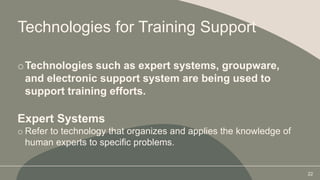
Technologies for Training Support
oTechnologies such as expert systems, groupware,
and electronic support system are being used to
support training efforts.
Expert Systems
o Refer to technology that organizes and applies the knowledge of
human experts to specific problems.
22
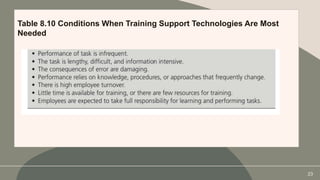
Table 8.10 Conditions When Training Support Technologies Are Most
Needed
23
Choosing new Technology Training
Methods
Advantages of theses methods:
• Cost savings due to training being accessible to employees at their home of office
• Reduced number of trainers needed
• Reduced costs associated with employees traveling to a central training location
Should be considered when:
• Sufficient budget and resources are provided
• Trainees are geographically dispersed
• Trainees are comfortable using technology
• It is a part of the company’s business strategy and suits its culture
• Employees have limited or no time for training
• Current training methods allow limited time for practice, feedback, and assessment
• Its use fits into the organizational culture or business strategy
24
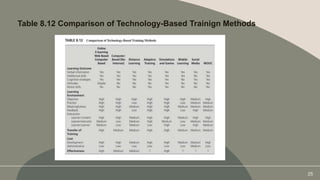
Table 8.12 Comparison of Technology-Based Trainign Methods
25
Reporters:
SINGCO, ANAMAE CARDENAS SHEILA MAE P.
ENCIERTO, JENECELLE
CABANAG YAPOYCO RALPH
26
THANK YOU

HRMChapter8Report (1).pptx

  • 1.
    TECHNOLOGY-BASED TRAINING METHODS CAPTER 8 REPORTERS: SINGCO,ANAMAE CARDENAS, SHEILA MAE PAYAO ENCIERTO, JENECELLE CABANAG YAPOYCO, RALPH BIARCAL
  • 2.
    OBJECTIVES • Explain hownew technologies are influencing training • Evaluate a Web-based training site • Explain how learning and transfer of training are enhanced by using new training technologies • Explain the strengths and limitations of e-learning, mobile technology training methods (such as iPads), and simulations • Explain the different types of social media and the conditions conducive to their use for training • Describe to a manager the various types of distance learning • Recommend what should be included in an electronic performance support system • Compare and contrast the strengths and weaknesses of traditional training methods versus those of technology-based training methods • Identify and explain the benefits of learning management systems 2
  • 3.
    Technology Influence on Trainingand Learning • New Technology’s have made it possible to: • Reduce costs associated with delivering training • Increase effectiveness of the learning environment • Help training contribute to business goals
  • 4.
    20XX presentation title4 Table 8.2- New Technologies Used for Training
  • 5.
    Benefits of Technology •Employees can gain control over when and where they receive training • Employees can access knowledge and expert systems on an as-needed basis • The learning environment can look, feel, and sound just like the work environment • Employees can choose the type of media they want to use in a training program • Paper work and time needed for administrative activities is reduced • Employees accomplishments during training can be monitored • Traditional training methods can be delivered to trainees rather than requiring them to come to a central training location
  • 6.
    Technology and Collaboration •Digital collaboration- Use of technology to enhance and extend emplyees’ abilities to work together regardless of their geographic proximity. • Types of Communicatios: • Synchronous communication- Tainers, experts and learners interact with each other live and in real time, the same way they would is face-to-face classroom instruction • Asynchronous communication- Non-real-time interactions
  • 7.
    20XX presentation title7 Figure8.2-Types of Learning Environments
  • 8.
    Computer-based training (CBT),online learning, e- learning, and web-based training • refer to instruction and delivery of training by computer through the internet or the web. Potential Features of Online Learning • In online learning, it is possible to enable learners to interact with the training content and other learners and to decide how they want to learn.
  • 9.
    Table 8.3 Advantagesof e-Learning 9
  • 10.
    • Both researchand company experiences suggest that e-learning is effective for a wide range of outcomes, including knowledge, skills, and behaviors. 10 PEFFECTIVENESS OF ONLINE LEARNING
  • 11.
    Needs Assessment • Thisincludes getting manangement to support online learning. Bandwidth • Refers to the number of bytes and bits (information) that can travel between computers per second. Plug-in • Refers to additional software that needs to be loaded on the computer to listen to sound, watch video, or perform other functions. 11 DEVELOPING EFFECTIVE ONLINE LEARNING
  • 12.
    CREATING A POSITIVEONLINE LEARNING EXPERIENCE 12 Rapid Prototyping • refers to an iterative process in which initial design ideas are proposed and provided in rough form in an online working prototype that is reviewed and refined by design team members and key learning stakeholders. Repurposing • refers to directly translating an instructor-led, face-to-face training program to an online format. Learner Control • refers to giving trainess the option to learn actively through self-pacing, exercises, exploring links to other material, and conversation with other trainess and experts.
  • 13.
    PROVIDE TIME ANDSPACE FOR ONLINE LEARNING 13 • Companies need to ensure that employees are given time and space for e-learning to occur. TECHNOLOGY FOR COLLABORATION AND LINKING Hyperlinks • Links that allow a trainee to access other websites that include printed materials, as well as communications links to experts, trainers, and other learners. MASSIVE OPEN ONLINE COURSES (MOOCs) • Refers to learning that is design to enroll large number of learners (massive), it is free and accessible to anyone with an internet connection (open), it takes place online using videos of lectures, interactive coursework including discussion groups, and wikis (online), and it has specific start and ompletion dates, quizzes and assessment, and exams (courses).
  • 14.
    Social Media; Blogs A webpagewhere an author posts entries and readers can comment Wiki A website that allows many users to create, edit, and update content and share knowledge Blended Learning Combines online learning, face-to-face instruction, and other methods for distributing learning content and instruction o provides increased learner control o allows for self-directedness o requires learners to take more responsibility o More face-to-face social interaction o Ensures a dedicated environment 14
  • 15.
    Social Media; oMicroblogs Software toolslike Twitter that enable communications in short bursts of texts, links, and multimedia through: oShared media Audio or video such as YouTube that can be accessed and shared with others. 15
  • 16.
    Blended Learning oCombines onlinelearning, face-to-face instruction, and other methods for distributing learning content and instruction • provides increased learner control • allows for self-directedness • requires learners to take more responsibility • More face-to-face social interaction • Ensures a dedicated environment 16
  • 17.
    The Flipped Classroom oThe flipped classroom is a popular application of blended learning o The classroom is designed for interaction and application; lecturing occurs online o Instructional content is delivered online and activities, including those that may have traditionally been considered homework, are moved to the classroom 17
  • 18.
    Simulations & Games Branchingstory Trainees are presented with a story, make decisions, and progress based on decisions Interactive spreadsheet Trainees are given a set of business tools and make decisions Game-based Trainees play a video game Virtual Trainees interact with a computer representative of the job Virtual Reality A computer-based technology that provides trainees with a tree-dimensional learning experiences. Virtual Worlds Computer-based, simulated online three-dimensional representations of the real world where learning programs or experiences can be hosted. 18
  • 19.
    Mobile Technology &Learning Consists of; • Wireless transmission systems – Wi-Fi and Bluetooth • Mobile devices – PDAs, smartphones • Software applications related to processing audio files, word processing, spreadsheets, Internet, e-mail, and instant messaging coordinate e-business applications
  • 20.
    Mobile Learning • Trainingdelivered using a mobile device such as a smartphone, netbook, notebook computer, or ipad Involves ● FORMAL LEARNING ● INFORMAL LEARNING • APPS: Applications designed specifically for smartphones and tablet computers.
  • 21.
    Distance Learning • Distancelearning is used by geographically dispersed companies and features two-way communications between people. Involves two types of technology: • Teleconferencing: and • Individualized, computer-based training • Interactive Distance Learning (IDL) uses satellite technology to broadcast and allows trainees to respond to questions using a keypad
  • 22.
    Technologies for TrainingSupport oTechnologies such as expert systems, groupware, and electronic support system are being used to support training efforts. Expert Systems o Refer to technology that organizes and applies the knowledge of human experts to specific problems. 22
  • 23.
    Table 8.10 ConditionsWhen Training Support Technologies Are Most Needed 23
  • 24.
    Choosing new TechnologyTraining Methods Advantages of theses methods: • Cost savings due to training being accessible to employees at their home of office • Reduced number of trainers needed • Reduced costs associated with employees traveling to a central training location Should be considered when: • Sufficient budget and resources are provided • Trainees are geographically dispersed • Trainees are comfortable using technology • It is a part of the company’s business strategy and suits its culture • Employees have limited or no time for training • Current training methods allow limited time for practice, feedback, and assessment • Its use fits into the organizational culture or business strategy 24
  • 25.
    Table 8.12 Comparisonof Technology-Based Trainign Methods 25
  • 26.
    Reporters: SINGCO, ANAMAE CARDENASSHEILA MAE P. ENCIERTO, JENECELLE CABANAG YAPOYCO RALPH 26
  • 27.