Sass 101 Cleaning up your CSS Closet (once & for all)! 
Eric Sembrat - DrupalCamp Chattanooga - September 2014
Who Am I? 
A quick introduction!
Eric Sembrat 
• Web Manager for the College of 
Engineering at Georgia Tech 
• Ph.D. Student in Instructional 
Technology at Georgia State 
University 
! 
• Website: http://ericsembrat.com 
• Twitter: @esembrat 
• Hashtag: #Sassnooga
Our Roadmap 
• State of CSS 
• What is Sass? 
• How to Use Sass 
• Demo 
• Questions / Comments
The State of CSS 
Time to get serious about how we theme our themes
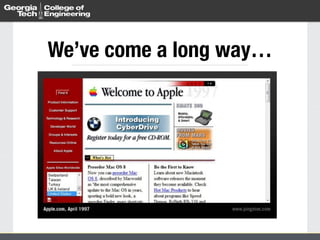
We’ve come a long way…
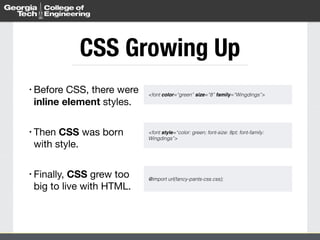
CSS Growing Up 
• Before CSS, there were 
inline element styles. 
! 
• Then CSS was born 
with style. 
! 
• Finally, CSS grew too 
big to live with HTML. 
<font color=“green” size=“8” family=“Wingdings”> 
<font style=“color: green; font-size: 8pt; font-family: 
Wingdings”> 
@import url(fancy-pants-css.css);
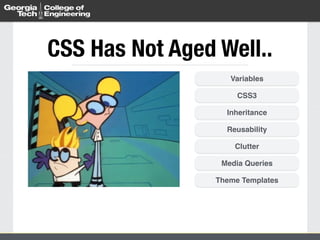
CSS Has Not Aged Well.. 
Variables 
CSS3 
Inheritance 
Reusability 
Clutter 
Media Queries 
Theme Templates
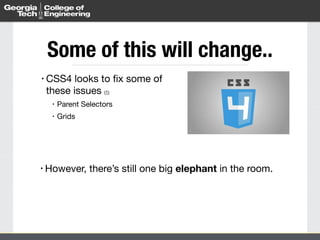
Some of this will change.. 
• CSS4 looks to fix some of 
these issues (1) 
• Parent Selectors 
• Grids 
• However, there’s still one big elephant in the room.
Don’t Repeat Yourself (DRY) 
The programming mantra of “Don’t Repeat Yourself”
What is DRY? 
• Minimizing repeating the 
same declaration over 
and over again 
• Modifications only happen in 
one place 
! 
• Modeled around the 
construction of 
repetitive, reusable, 
and scalable elements
DRY in CSS 
• CSS is too lazy to learn 
to DRY 
• Variables like color, font 
• Media queries 
• Chunks of CSS 
• So, how do we fix this mess we are in?
Sass to the Rescue!
What is Sass? 
How Sass cleans out the CSS closet, once and for all!
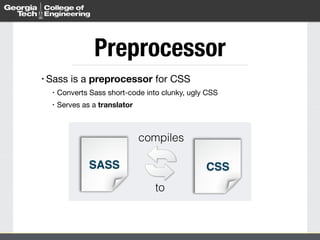
Preprocessor 
• Sass is a preprocessor for CSS 
• Converts Sass short-code into clunky, ugly CSS 
• Serves as a translator 
CSS 
compiles 
to 
SASS
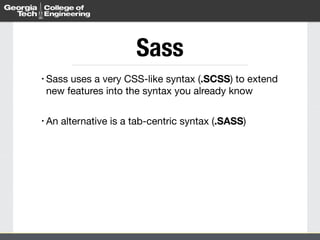
Sass 
• Sass uses a very CSS-like syntax (.SCSS) to extend 
new features into the syntax you already know 
! 
• An alternative is a tab-centric syntax (.SASS)
Compare 
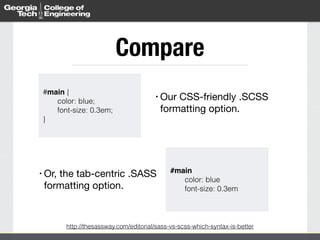
#main { 
color: blue; 
font-size: 0.3em; 
• Our CSS-friendly .SCSS 
formatting option. 
http://thesassway.com/editorial/sass-vs-scss-which-syntax-is-better 
} 
#main! 
color: blue 
font-size: 0.3em 
• Or, the tab-centric .SASS 
formatting option.
.SCSS vs. .SASS 
• Changing syntax is an automated process: 
• http://sass-lang.com/documentation/file.SASS_REFERENCE.html#syntax
Using Sass 
How Sass cleans out the CSS closet, once and for all!
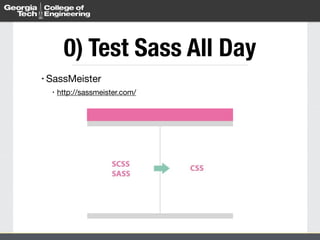
0) Test Sass All Day 
• SassMeister 
• http://sassmeister.com/
1) Get a App 
• Easiest way to get started is to download a Sass 
application. 
• http://sass-lang.com/install 
• Multi-platform releases 
• Free and paid products available
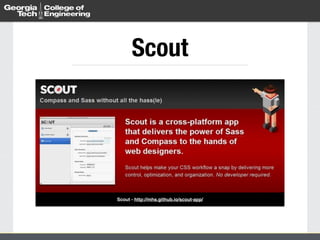
Scout 
Scout - http://mhs.github.io/scout-app/
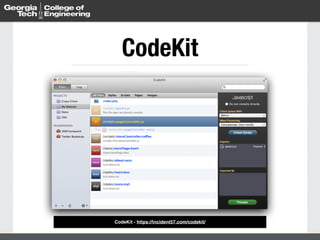
CodeKit 
CodeKit - https://incident57.com/codekit/
2) Learn the Syntax 
• Learn many of the essential 
features of Sass. 
• Variables 
• Nesting 
• Mixins 
• Plugins 
• Partials 
• (and more!)
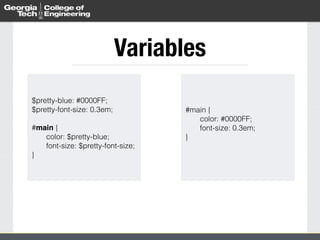
Variables 
$pretty-blue: #0000FF; 
$pretty-font-size: 0.3em; 
! 
#main { 
color: $pretty-blue; 
font-size: $pretty-font-size; 
} 
#main { 
color: #0000FF; 
font-size: 0.3em; 
}
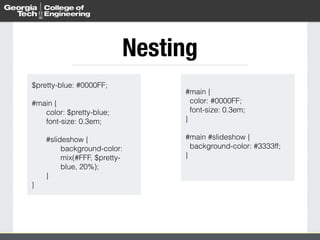
Nesting 
$pretty-blue: #0000FF; 
! 
#main { 
color: $pretty-blue; 
font-size: 0.3em; 
#slideshow { 
background-color: 
mix(#FFF, $pretty-blue, 
20%); 
} 
} 
#main { 
color: #0000FF; 
font-size: 0.3em; 
} 
! 
#main #slideshow { 
background-color: #3333ff; 
}
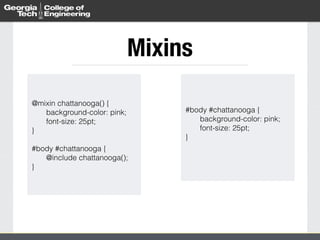
Mixins 
@mixin chattanooga() { 
background-color: pink; 
font-size: 25pt; 
} 
! 
#body #chattanooga { 
@include chattanooga(); 
} 
#body #chattanooga { 
background-color: pink; 
font-size: 25pt; 
}
Mixins 
@mixin chattanooga() { 
background-color: pink; 
font-size: 25pt; 
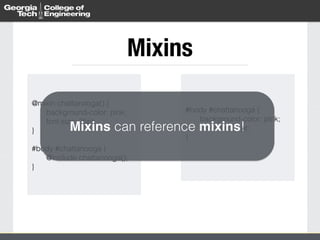
Mixins can reference mixins! 
} 
! 
#body #chattanooga { 
@include chattanooga(); 
} 
#body #chattanooga { 
background-color: pink; 
font-size: 25pt; 
}
Mixins 
@mixin chattanooga() { 
background-color: pink; 
font-size: 25pt; 
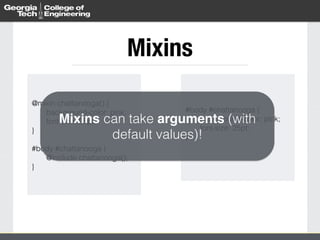
Mixins can take arguments (with 
} 
! 
#body #chattanooga { 
default values)! 
@include chattanooga(); 
} 
#body #chattanooga { 
background-color: pink; 
font-size: 25pt; 
}
Plugins 
• Compass 
• http://compass-style.org/ 
• Sass Globbing 
• https://github.com/chriseppstein/sass-globbing 
• Breakpoint 
• http://breakpoint-sass.com/ 
• Bourbon 
• http://bourbon.io/
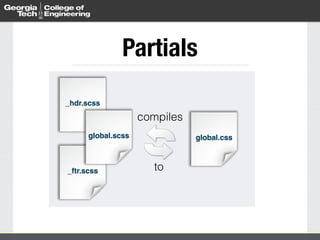
Partials 
compiles 
global.scss global.css 
to 
_hdr.scss 
_ftr.scss
Configure CSS Output 
• Sass uses a configuration file (config.rb) to control 
CSS output 
• Requires Compass 
• http://compass-style.org/help/documentation/configuration-reference/
Demo 
Quick highlights and features!
Let’s Chat 
Questions, Comments, Concerns, Discussions about Sass

DrupalCamp Chattanooga - September 2014 - Sass 101

  • 1.
    Sass 101 Cleaningup your CSS Closet (once & for all)! Eric Sembrat - DrupalCamp Chattanooga - September 2014
  • 2.
    Who Am I? A quick introduction!
  • 3.
    Eric Sembrat •Web Manager for the College of Engineering at Georgia Tech • Ph.D. Student in Instructional Technology at Georgia State University ! • Website: http://ericsembrat.com • Twitter: @esembrat • Hashtag: #Sassnooga
  • 4.
    Our Roadmap •State of CSS • What is Sass? • How to Use Sass • Demo • Questions / Comments
  • 5.
    The State ofCSS Time to get serious about how we theme our themes
  • 6.
    We’ve come along way…
  • 7.
    We’ve come along way…
  • 8.
    CSS Growing Up • Before CSS, there were inline element styles. ! • Then CSS was born with style. ! • Finally, CSS grew too big to live with HTML. <font color=“green” size=“8” family=“Wingdings”> <font style=“color: green; font-size: 8pt; font-family: Wingdings”> @import url(fancy-pants-css.css);
  • 9.
    CSS Has NotAged Well.. Variables CSS3 Inheritance Reusability Clutter Media Queries Theme Templates
  • 10.
    Some of thiswill change.. • CSS4 looks to fix some of these issues (1) • Parent Selectors • Grids • However, there’s still one big elephant in the room.
  • 11.
    Don’t Repeat Yourself(DRY) The programming mantra of “Don’t Repeat Yourself”
  • 12.
    What is DRY? • Minimizing repeating the same declaration over and over again • Modifications only happen in one place ! • Modeled around the construction of repetitive, reusable, and scalable elements
  • 13.
    DRY in CSS • CSS is too lazy to learn to DRY • Variables like color, font • Media queries • Chunks of CSS • So, how do we fix this mess we are in?
  • 14.
    Sass to theRescue!
  • 15.
    What is Sass? How Sass cleans out the CSS closet, once and for all!
  • 16.
    Preprocessor • Sassis a preprocessor for CSS • Converts Sass short-code into clunky, ugly CSS • Serves as a translator CSS compiles to SASS
  • 17.
    Sass • Sassuses a very CSS-like syntax (.SCSS) to extend new features into the syntax you already know ! • An alternative is a tab-centric syntax (.SASS)
  • 18.
    Compare #main { color: blue; font-size: 0.3em; • Our CSS-friendly .SCSS formatting option. http://thesassway.com/editorial/sass-vs-scss-which-syntax-is-better } #main! color: blue font-size: 0.3em • Or, the tab-centric .SASS formatting option.
  • 19.
    .SCSS vs. .SASS • Changing syntax is an automated process: • http://sass-lang.com/documentation/file.SASS_REFERENCE.html#syntax
  • 20.
    Using Sass HowSass cleans out the CSS closet, once and for all!
  • 21.
    0) Test SassAll Day • SassMeister • http://sassmeister.com/
  • 22.
    1) Get aApp • Easiest way to get started is to download a Sass application. • http://sass-lang.com/install • Multi-platform releases • Free and paid products available
  • 23.
    Scout Scout -http://mhs.github.io/scout-app/
  • 24.
    CodeKit CodeKit -https://incident57.com/codekit/
  • 25.
    2) Learn theSyntax • Learn many of the essential features of Sass. • Variables • Nesting • Mixins • Plugins • Partials • (and more!)
  • 26.
    Variables $pretty-blue: #0000FF; $pretty-font-size: 0.3em; ! #main { color: $pretty-blue; font-size: $pretty-font-size; } #main { color: #0000FF; font-size: 0.3em; }
  • 27.
    Nesting $pretty-blue: #0000FF; ! #main { color: $pretty-blue; font-size: 0.3em; #slideshow { background-color: mix(#FFF, $pretty-blue, 20%); } } #main { color: #0000FF; font-size: 0.3em; } ! #main #slideshow { background-color: #3333ff; }
  • 28.
    Mixins @mixin chattanooga(){ background-color: pink; font-size: 25pt; } ! #body #chattanooga { @include chattanooga(); } #body #chattanooga { background-color: pink; font-size: 25pt; }
  • 29.
    Mixins @mixin chattanooga(){ background-color: pink; font-size: 25pt; Mixins can reference mixins! } ! #body #chattanooga { @include chattanooga(); } #body #chattanooga { background-color: pink; font-size: 25pt; }
  • 30.
    Mixins @mixin chattanooga(){ background-color: pink; font-size: 25pt; Mixins can take arguments (with } ! #body #chattanooga { default values)! @include chattanooga(); } #body #chattanooga { background-color: pink; font-size: 25pt; }
  • 31.
    Plugins • Compass • http://compass-style.org/ • Sass Globbing • https://github.com/chriseppstein/sass-globbing • Breakpoint • http://breakpoint-sass.com/ • Bourbon • http://bourbon.io/
  • 32.
    Partials compiles global.scssglobal.css to _hdr.scss _ftr.scss
  • 33.
    Configure CSS Output • Sass uses a configuration file (config.rb) to control CSS output • Requires Compass • http://compass-style.org/help/documentation/configuration-reference/
  • 34.
    Demo Quick highlightsand features!
  • 35.
    Let’s Chat Questions,Comments, Concerns, Discussions about Sass