SASS
BY - Neha Sharma (nehha255@gmail.com)
Syntactically Awesome Style Sheets
AGENDA
Part One – Introduction
• What is SASS
• Why we need SASS
• SASS vs SCSS
• Let’s meet the SASS
Part Two – Syntax
• Nesting
• Variables and Scope
• !default
• !global
• Data Types
• @extend and @extend only
• Mixins
• &
• Interpolation #{}
• @at-root
We love CSS
It’s a question not a statement.
CSS and Issues
• Lot of CSS3 Vendor Prefixes
• Repeated code
• Changing value in single file is nightmare
• Big team working on same and big css file is issue
• No logic base styling
What you want to change?
Cleaner code, Logical Code, non-repeated code, less pain to write
and maintain and much more…
Why SASS?
What is SASS?
• Scripting language
• Syntactically Awesome stylesheet
• CSS Pre- Processor – Compile the SASS/SCSS files to CSS
• Developed in 2007
• Full css3 compatible
• Helps in writing clean, DRY-approach CSS
Advantages of SASS
• DRY – Don’t Repeat Yourself
• Modules
• Lots of features
• Mathematical calculations
• Conditional statements
• Functions and much more
SASS and Ruby
• Ruby is required ONLY to install SASS.
SASS on Production?
• You need SASS only for your local development.
• SASS is not required to be configured on the SERVER
SASS and IE/Error handling
It works on IE and code will only lead to broken css on your page
.sass vs .scss
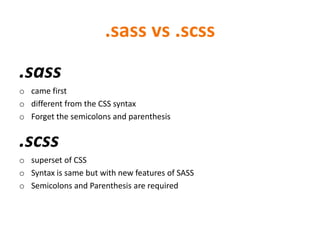
.sass
o came first
o different from the CSS syntax
o Forget the semicolons and parenthesis
.scss
o superset of CSS
o Syntax is same but with new features of SASS
o Semicolons and Parenthesis are required
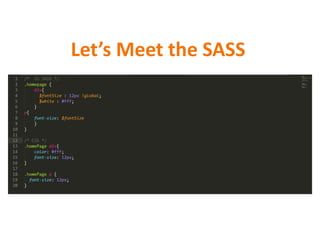
Let’s Meet the SASS
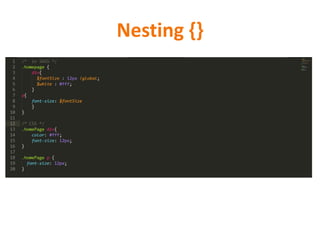
Nesting {}
• SASS use the nested code.
• Nested code helps in making the code cleaner and
easier to read and maintain
• It helps in achieving DRY
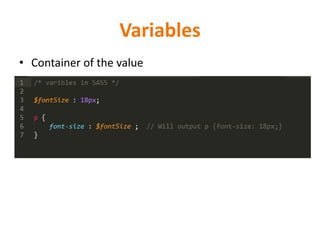
Variables
• Container of the value
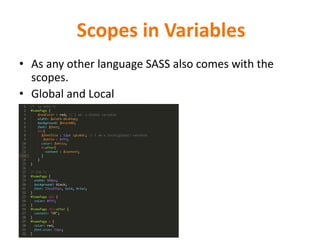
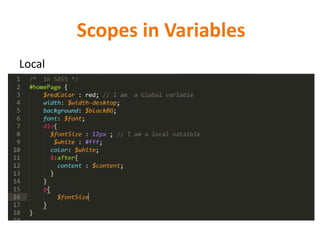
Scopes in Variables
• As any other language SASS also comes with the
scopes.
• Global and Local
Scopes in Variables
Local
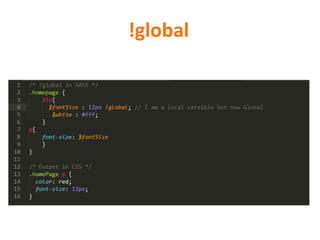
!global
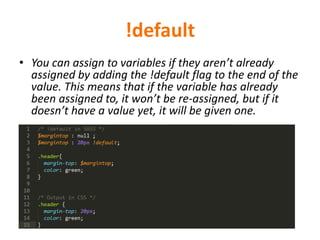
!default
• You can assign to variables if they aren’t already
assigned by adding the !default flag to the end of the
value. This means that if the variable has already
been assigned to, it won’t be re-assigned, but if it
doesn’t have a value yet, it will be given one.
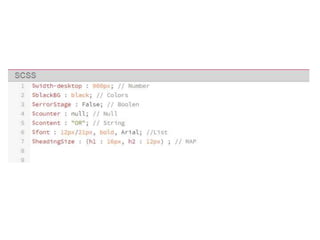
Data types
• Numbers
• Strings
• Colors
• Boolean
• Null
• List
• Maps
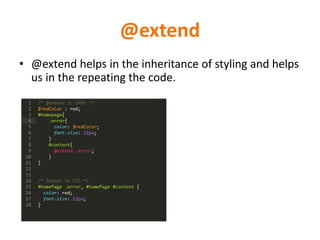
@extend
• @extend helps in the inheritance of styling and helps
us in the repeating the code.
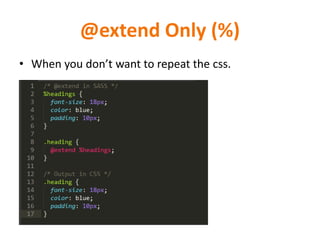
@extend Only (%)
• When you don’t want to repeat the css.
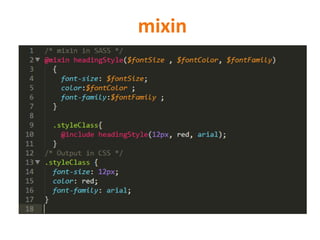
mixin
• Mixin are the most useful and powerful feature of the SASS
[Define, Include , arguments]
• It helps in making the repeated code declared once and use it
n number of times.
• You can have the mixin with arguments too, Defaults,
Varibales, maps, content, to mixin
mixin
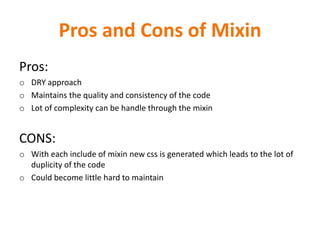
Pros and Cons of Mixin
Pros:
o DRY approach
o Maintains the quality and consistency of the code
o Lot of complexity can be handle through the mixin
CONS:
o With each include of mixin new css is generated which leads to the lot of
duplicity of the code
o Could become little hard to maintain
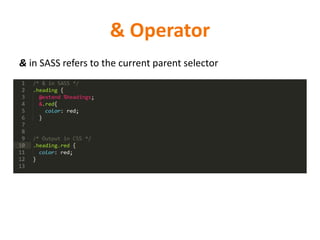
& Operator
& in SASS refers to the current parent selector
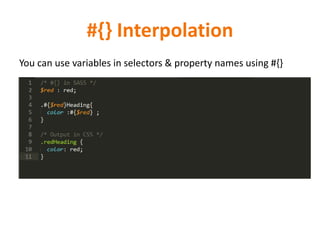
#{} Interpolation
You can use variables in selectors & property names using #{}
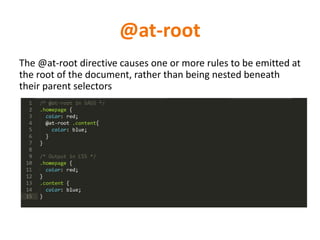
@at-root
The @at-root directive causes one or more rules to be emitted at
the root of the document, rather than being nested beneath
their parent selectors
Best Practice
o Make a single file to create your variables
o Make a single file to create your mixin
o Make a single file to create Overloading of the libraries and 3rd party
plugin
o Make a single file to handle the structure of the website/Application
o Break the files into modules, pages etc
Other Frameworks
• LESS
• Stylus
References
o http://sass-lang.com/documentation

SASS - Syntactically Awesome Stylesheet

  • 1.
    SASS BY - NehaSharma (nehha255@gmail.com) Syntactically Awesome Style Sheets
  • 2.
    AGENDA Part One –Introduction • What is SASS • Why we need SASS • SASS vs SCSS • Let’s meet the SASS Part Two – Syntax • Nesting • Variables and Scope • !default • !global • Data Types • @extend and @extend only • Mixins • & • Interpolation #{} • @at-root
  • 3.
    We love CSS It’sa question not a statement.
  • 4.
    CSS and Issues •Lot of CSS3 Vendor Prefixes • Repeated code • Changing value in single file is nightmare • Big team working on same and big css file is issue • No logic base styling
  • 5.
    What you wantto change? Cleaner code, Logical Code, non-repeated code, less pain to write and maintain and much more…
  • 6.
  • 7.
    What is SASS? •Scripting language • Syntactically Awesome stylesheet • CSS Pre- Processor – Compile the SASS/SCSS files to CSS • Developed in 2007 • Full css3 compatible • Helps in writing clean, DRY-approach CSS
  • 8.
    Advantages of SASS •DRY – Don’t Repeat Yourself • Modules • Lots of features • Mathematical calculations • Conditional statements • Functions and much more
  • 9.
    SASS and Ruby •Ruby is required ONLY to install SASS.
  • 10.
    SASS on Production? •You need SASS only for your local development. • SASS is not required to be configured on the SERVER
  • 11.
    SASS and IE/Errorhandling It works on IE and code will only lead to broken css on your page
  • 12.
    .sass vs .scss .sass ocame first o different from the CSS syntax o Forget the semicolons and parenthesis .scss o superset of CSS o Syntax is same but with new features of SASS o Semicolons and Parenthesis are required
  • 13.
  • 14.
    Nesting {} • SASSuse the nested code. • Nested code helps in making the code cleaner and easier to read and maintain • It helps in achieving DRY
  • 15.
  • 16.
    Scopes in Variables •As any other language SASS also comes with the scopes. • Global and Local
  • 17.
  • 18.
  • 19.
    !default • You canassign to variables if they aren’t already assigned by adding the !default flag to the end of the value. This means that if the variable has already been assigned to, it won’t be re-assigned, but if it doesn’t have a value yet, it will be given one.
  • 20.
    Data types • Numbers •Strings • Colors • Boolean • Null • List • Maps
  • 22.
    @extend • @extend helpsin the inheritance of styling and helps us in the repeating the code.
  • 23.
    @extend Only (%) •When you don’t want to repeat the css.
  • 24.
    mixin • Mixin arethe most useful and powerful feature of the SASS [Define, Include , arguments] • It helps in making the repeated code declared once and use it n number of times. • You can have the mixin with arguments too, Defaults, Varibales, maps, content, to mixin
  • 25.
  • 26.
    Pros and Consof Mixin Pros: o DRY approach o Maintains the quality and consistency of the code o Lot of complexity can be handle through the mixin CONS: o With each include of mixin new css is generated which leads to the lot of duplicity of the code o Could become little hard to maintain
  • 27.
    & Operator & inSASS refers to the current parent selector
  • 28.
    #{} Interpolation You canuse variables in selectors & property names using #{}
  • 29.
    @at-root The @at-root directivecauses one or more rules to be emitted at the root of the document, rather than being nested beneath their parent selectors
  • 30.
    Best Practice o Makea single file to create your variables o Make a single file to create your mixin o Make a single file to create Overloading of the libraries and 3rd party plugin o Make a single file to handle the structure of the website/Application o Break the files into modules, pages etc
  • 31.
  • 32.