TRENDSETTING:
Web Design and Beyond


      Andy Stratton • http://theandystratton.com
How do we define web design?

• “...the way content is delivered to an end-user
  through the World Wide Web, using a web
  browser
  or other web-enabled software...”
  — from Wikipedia.org


• Design as a solution for content delivery
• More than browser: mobile, tablet, search
  engine, etc.
Where we’ve been...

• Visual movements toward better usability and
   outstanding user experience
   (Fitt’s law, Hick’s law, return to true design principles)


• Subtle design details that make a big
   difference
   (softer gradients, white space, grid systems & frameworks)


• Hacks to replacement, JSgap from printPNG
  (font image
              bridge the
                           rounded corners,
                                            design
   transparency)
Where we’Re going...

• Web Fonts no more image replacement, part of CSS3)
  (embed real fonts,

• CSS3 borders, box and text shadows, and much more!)
  (rounded

• HTML5
  (better semantics, geolocation, better video support, drag
   and drop
   and much more!)

• Better Devicedesign, mobile, touch, etc.)
  (responsive web
                  Support
Web Fonts

• Hell,hear it in the crowd if you’ve had to deal with sIFR,
  (let’s
         yeah.
   Cúfon or image replacement techniques)


• Use CSS3 toType (.otf),REAL fonts in your site
  Includes: Open
                 embed
                         TrueType (.ttf), Embedded
   OpenType (.eot), Scalable Vector Graphics (.svg), Web Open
   Font Format (.woff)


• Simple to use, many services hosting popular
   fonts
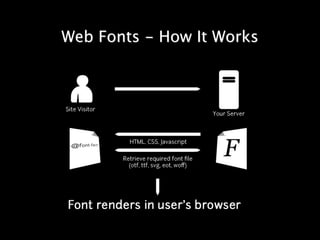
Web Fonts - How It Works
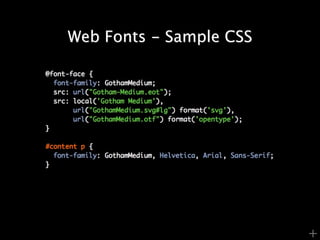
Web Fonts - Sample CSS


                         +
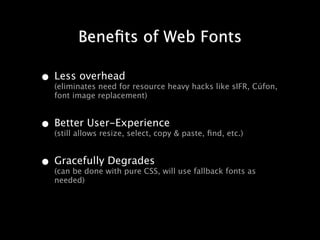
Benefits of Web Fonts

• Less overhead resource heavy hacks like sIFR, Cúfon,
  (eliminates need for
   font image replacement)


• Better User-Experience & paste, find, etc.)
  (still allows resize, select, copy


• Gracefully with pure CSS, will use fallback fonts as
  (can be done
               Degrades
   needed)
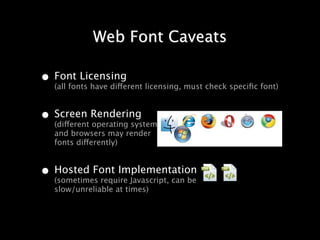
Web Font Caveats

• Font Licensing licensing, must check specific font)
  (all fonts have different


• Screen Rendering
  (different operating systems
   and browsers may render
   fonts differently)


• Hosted Font Implementation
  (sometimes require Javascript, can be
   slow/unreliable at times)
Web Fonts - Resources

• How to/Info Posts
  http://nicewebtype.com/notes/2009/10/30/how-to-use-
   css-font-face/

   http://snook.ca/archives/html_and_css/becoming-a-font-
   embedding-master

   http://sixrevisions.com/css/font-face-guide/

• Font Conversion
  http://snook.ca/archives/html_and_css/screencast-
   converting-ttf2eot

   http://www.fontsquirrel.com/fontface/generator
Web Fonts - Resources

• Free Font Directories
  http://www.fontsquirrel.com/

   http://www.google.com/webfonts

   http://theleagueofmoveabletype.com/

• Paid Font Directories
  http://typekit.com/

   http://webfonts.fonts.com/

   http://webink.com/

   http://fontdeck.com/
Web Fonts - Who’s Using?


                 Jonathan Snook
                 web designer, developer,
                 speaker & author


                 Matt Mullenweg
                 WordPress founding developer
                 Founder/CEO of Automattic
CSS3

• Border Radius (and BorderCSS)
  (that’s right: rounded rectangles via
                                        Image)


• Shadows (boxes and text) without images)
  (duplicate your drop-shadow effects


• RGBA Transparency, Gradients, Multiple
   BG’s
   (better transparency support, native gradient, multiple
   background images and much more)
CSS3 - Border Radius
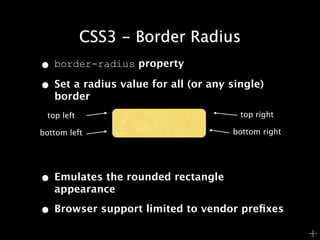
• border-radius property
• Set a radius value for all (or any single)
   border
 top left                              top right

bottom left                          bottom right


• Emulates the rounded rectangle
   appearance

• Browser support limited to vendor prefixes
                                                    +
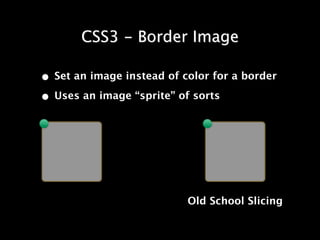
CSS3 - Border Image

• Set an image instead of color for a border
• Uses an image “sprite” of sorts


                           Old School Slicing
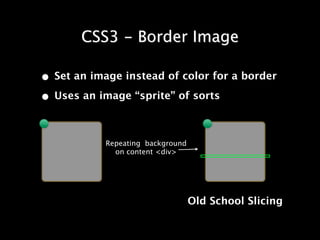
CSS3 - Border Image

• Set an image instead of color for a border
• Uses an image “sprite” of sorts

            Repeating background
              on content <div>


                                   Old School Slicing
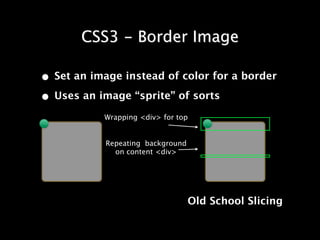
CSS3 - Border Image

• Set an image instead of color for a border
• Uses an image “sprite” of sorts
           Wrapping <div> for top


            Repeating background
              on content <div>


                                   Old School Slicing
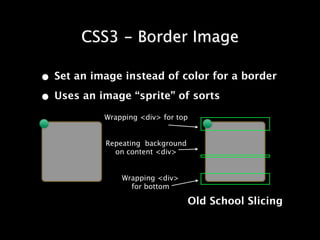
CSS3 - Border Image

• Set an image instead of color for a border
• Uses an image “sprite” of sorts
           Wrapping <div> for top


            Repeating background
              on content <div>


                Wrapping <div>
                  for bottom

                                   Old School Slicing
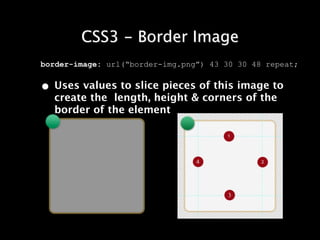
CSS3 - Border Image
border-image: url(“border-img.png”) 43 30 30 48 repeat;


• Uses values to slice pieces of this image to
  create the length, height & corners of the
  border of the element
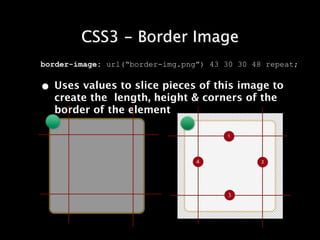
CSS3 - Border Image
border-image: url(“border-img.png”) 43 30 30 48 repeat;


• Uses values to slice pieces of this image to
  create the length, height & corners of the
  border of the element
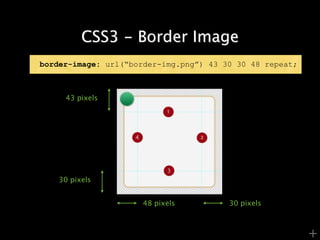
CSS3 - Border Image
border-image: url(“border-img.png”) 43 30 30 48 repeat;


     43 pixels


    30 pixels


                      48 pixels         30 pixels


                                                          +
CSS3 - Border Image

• More examples and resources on border-
  image

 •   http://articles.sitepoint.com/article/css3-border-
     images

 •   http://sitepoint-examples.s3.amazonaws.com/css3-
     border-image/demos.html

 •   http://css-tricks.com/understanding-border-image/

 •   http://www.norabrowndesign.com/css-experiments/
     border-image-anim.html
                        These are also some resources I
                        used when developing this
                        presentation ;]
CSS3 - Shadows

• Drop Your Shadowsdrop-shadows withHot
  (Duplicate your Photoshop
                            Like They’re
                                         CSS!)


• box-shadow gives block-level elements
   shadows


• text-shadow gives selectable text shadows
   and definition
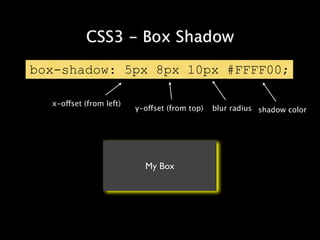
CSS3 - Box Shadow

box-shadow: 5px 8px 10px #FFFF00;

  x-offset (from left)
                         y-offset (from top)   blur radius shadow color


                           My Box
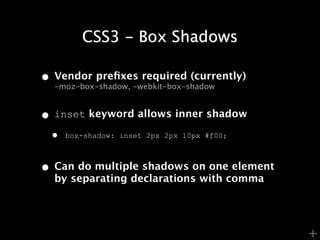
CSS3 - Box Shadows

• Vendor prefixes required (currently)
  -moz-box-shadow, -webkit-box-shadow


• inset keyword allows inner shadow
 •   box-shadow: inset 2px 2px 10px #f00;


• Can do multiple shadows on one element
  by separating declarations with comma


                                            +
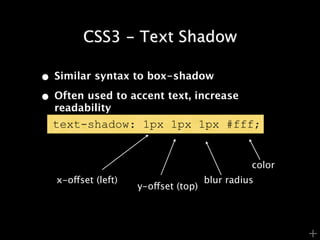
CSS3 - Text Shadow

• Similar syntax to box-shadow
• Often used to accent text, increase
  readability
  text-shadow: 1px 1px 1px #fff;


                                                color
   x-offset (left)                    blur radius
                     y-offset (top)


                                                        +
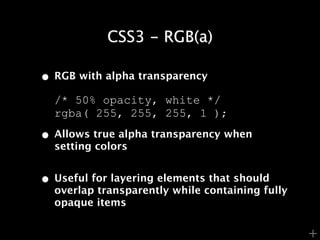
CSS3 - RGB(a)

• RGB with alpha transparency
  /* 50% opacity, white */
  rgba( 255, 255, 255, 1 );

• Allows true alpha transparency when
  setting colors


• Useful for layering elements that should
  overlap transparently while containing fully
  opaque items


                                                 +
Further CSS3 Resources

•   http://thinkvitamin.com/code/30-essential-css3-
    resources/

•   http://www.css3.info/

•   http://www.w3schools.com


                                                      +
HTML .......

•   Super simple DOCTYPE

    •   From:
        <!DOCTYPE html PUBLIC "-//W3C//DTD XHTML 1.0
        Transitional//EN" "http://www.w3.org/TR/xhtml1/
        DTD/xhtml1-transitional.dtd">

    •   To:
        <!DOCTYPE html>

•   More semantic elements

    <header> <footer> <section> <aside> <video>


•   Widely accepted by newer mobile & tablet devices

                                                          +
HTML .......

• Support built-in for:
 • native video (no flash)
 • geolocation
 • offline storage
 • drag and drop files (like Gmail’s new
    feature)
 • canvas (SVG)
 • enhanced form input elements and
    attributes:
    • text, search, url, tel,week, time,
      datetime, date, month,
                              email,
      number, range, etc.

    • attributes like autofocus and        +
HTML       ..... Resources

• http://www.apple.com/html5/
• http://diveintohtml5.org/
• http://html5boilerplate.com/
• http://www.modernizr.com/
• http://sixrevisions.com/html/the-only-
  html5-resources-you-need-for-getting-up-
  to-speed/


                                             +
Responsive Web Design

• How your web design responds to the
  medium (or device) in which it is being viewed


• One site for all (or many) mediums/users
• http://www.alistapart.com/articles/
  responsive-web-design/


• http://www.alistapart.com/d/responsive-
  web-design/ex/ex-site-flexible.html
Get Trendy

• CSS3 changes the typography game with
  @font-face


• Properties like shadows, border-radius and
  gradients help us duplicate Photoshop
  effects that used to require images


• Enhanced alpha transparency support can
  create some interesting effects
Get Trendier

• HTML5 improves semantics and adds some
  nifty UI elements that used to require
  Javascript


• Geolocation support is a nice capability to
  keep in mind when designing user-
  experiences


• Enhanced alpha transparency support can
  create some interesting effects
You Trendsetter, You.

• Designing for both desktop and mobile is
  becoming a bigger need as mobile browsing
  is growing fast


• Responsive web design uses existing
  technologies to allow your design to respond
  to what is being used to view it


• Tools like modernizr.js and HTML5 boilerplate
  can help enhance older browsers to support
  early adoption of these technologies
Thanks.
Oh, yeah... Questions? Comments? Donations?

Trendsetting: Web Design and Beyond

  • 1.
    TRENDSETTING: Web Design andBeyond Andy Stratton • http://theandystratton.com
  • 2.
    How do wedefine web design? • “...the way content is delivered to an end-user through the World Wide Web, using a web browser or other web-enabled software...” — from Wikipedia.org • Design as a solution for content delivery • More than browser: mobile, tablet, search engine, etc.
  • 3.
    Where we’ve been... •Visual movements toward better usability and outstanding user experience (Fitt’s law, Hick’s law, return to true design principles) • Subtle design details that make a big difference (softer gradients, white space, grid systems & frameworks) • Hacks to replacement, JSgap from printPNG (font image bridge the rounded corners, design transparency)
  • 4.
    Where we’Re going... •Web Fonts no more image replacement, part of CSS3) (embed real fonts, • CSS3 borders, box and text shadows, and much more!) (rounded • HTML5 (better semantics, geolocation, better video support, drag and drop and much more!) • Better Devicedesign, mobile, touch, etc.) (responsive web Support
  • 5.
    Web Fonts • Hell,hearit in the crowd if you’ve had to deal with sIFR, (let’s yeah. Cúfon or image replacement techniques) • Use CSS3 toType (.otf),REAL fonts in your site Includes: Open embed TrueType (.ttf), Embedded OpenType (.eot), Scalable Vector Graphics (.svg), Web Open Font Format (.woff) • Simple to use, many services hosting popular fonts
  • 6.
    Web Fonts -How It Works
  • 7.
    Web Fonts -Sample CSS +
  • 8.
    Benefits of WebFonts • Less overhead resource heavy hacks like sIFR, Cúfon, (eliminates need for font image replacement) • Better User-Experience & paste, find, etc.) (still allows resize, select, copy • Gracefully with pure CSS, will use fallback fonts as (can be done Degrades needed)
  • 9.
    Web Font Caveats •Font Licensing licensing, must check specific font) (all fonts have different • Screen Rendering (different operating systems and browsers may render fonts differently) • Hosted Font Implementation (sometimes require Javascript, can be slow/unreliable at times)
  • 10.
    Web Fonts -Resources • How to/Info Posts http://nicewebtype.com/notes/2009/10/30/how-to-use- css-font-face/ http://snook.ca/archives/html_and_css/becoming-a-font- embedding-master http://sixrevisions.com/css/font-face-guide/ • Font Conversion http://snook.ca/archives/html_and_css/screencast- converting-ttf2eot http://www.fontsquirrel.com/fontface/generator
  • 11.
    Web Fonts -Resources • Free Font Directories http://www.fontsquirrel.com/ http://www.google.com/webfonts http://theleagueofmoveabletype.com/ • Paid Font Directories http://typekit.com/ http://webfonts.fonts.com/ http://webink.com/ http://fontdeck.com/
  • 12.
    Web Fonts -Who’s Using? Jonathan Snook web designer, developer, speaker & author Matt Mullenweg WordPress founding developer Founder/CEO of Automattic
  • 13.
    CSS3 • Border Radius(and BorderCSS) (that’s right: rounded rectangles via Image) • Shadows (boxes and text) without images) (duplicate your drop-shadow effects • RGBA Transparency, Gradients, Multiple BG’s (better transparency support, native gradient, multiple background images and much more)
  • 14.
    CSS3 - BorderRadius • border-radius property • Set a radius value for all (or any single) border top left top right bottom left bottom right • Emulates the rounded rectangle appearance • Browser support limited to vendor prefixes +
  • 15.
    CSS3 - BorderImage • Set an image instead of color for a border • Uses an image “sprite” of sorts Old School Slicing
  • 16.
    CSS3 - BorderImage • Set an image instead of color for a border • Uses an image “sprite” of sorts Repeating background on content <div> Old School Slicing
  • 17.
    CSS3 - BorderImage • Set an image instead of color for a border • Uses an image “sprite” of sorts Wrapping <div> for top Repeating background on content <div> Old School Slicing
  • 18.
    CSS3 - BorderImage • Set an image instead of color for a border • Uses an image “sprite” of sorts Wrapping <div> for top Repeating background on content <div> Wrapping <div> for bottom Old School Slicing
  • 19.
    CSS3 - BorderImage border-image: url(“border-img.png”) 43 30 30 48 repeat; • Uses values to slice pieces of this image to create the length, height & corners of the border of the element
  • 20.
    CSS3 - BorderImage border-image: url(“border-img.png”) 43 30 30 48 repeat; • Uses values to slice pieces of this image to create the length, height & corners of the border of the element
  • 21.
    CSS3 - BorderImage border-image: url(“border-img.png”) 43 30 30 48 repeat; 43 pixels 30 pixels 48 pixels 30 pixels +
  • 22.
    CSS3 - BorderImage • More examples and resources on border- image • http://articles.sitepoint.com/article/css3-border- images • http://sitepoint-examples.s3.amazonaws.com/css3- border-image/demos.html • http://css-tricks.com/understanding-border-image/ • http://www.norabrowndesign.com/css-experiments/ border-image-anim.html These are also some resources I used when developing this presentation ;]
  • 23.
    CSS3 - Shadows •Drop Your Shadowsdrop-shadows withHot (Duplicate your Photoshop Like They’re CSS!) • box-shadow gives block-level elements shadows • text-shadow gives selectable text shadows and definition
  • 24.
    CSS3 - BoxShadow box-shadow: 5px 8px 10px #FFFF00; x-offset (from left) y-offset (from top) blur radius shadow color My Box
  • 25.
    CSS3 - BoxShadows • Vendor prefixes required (currently) -moz-box-shadow, -webkit-box-shadow • inset keyword allows inner shadow • box-shadow: inset 2px 2px 10px #f00; • Can do multiple shadows on one element by separating declarations with comma +
  • 26.
    CSS3 - TextShadow • Similar syntax to box-shadow • Often used to accent text, increase readability text-shadow: 1px 1px 1px #fff; color x-offset (left) blur radius y-offset (top) +
  • 27.
    CSS3 - RGB(a) •RGB with alpha transparency /* 50% opacity, white */ rgba( 255, 255, 255, 1 ); • Allows true alpha transparency when setting colors • Useful for layering elements that should overlap transparently while containing fully opaque items +
  • 28.
    Further CSS3 Resources • http://thinkvitamin.com/code/30-essential-css3- resources/ • http://www.css3.info/ • http://www.w3schools.com +
  • 31.
    HTML ....... • Super simple DOCTYPE • From: <!DOCTYPE html PUBLIC "-//W3C//DTD XHTML 1.0 Transitional//EN" "http://www.w3.org/TR/xhtml1/ DTD/xhtml1-transitional.dtd"> • To: <!DOCTYPE html> • More semantic elements <header> <footer> <section> <aside> <video> • Widely accepted by newer mobile & tablet devices +
  • 32.
    HTML ....... • Supportbuilt-in for: • native video (no flash) • geolocation • offline storage • drag and drop files (like Gmail’s new feature) • canvas (SVG) • enhanced form input elements and attributes: • text, search, url, tel,week, time, datetime, date, month, email, number, range, etc. • attributes like autofocus and +
  • 33.
    HTML ..... Resources • http://www.apple.com/html5/ • http://diveintohtml5.org/ • http://html5boilerplate.com/ • http://www.modernizr.com/ • http://sixrevisions.com/html/the-only- html5-resources-you-need-for-getting-up- to-speed/ +
  • 34.
    Responsive Web Design •How your web design responds to the medium (or device) in which it is being viewed • One site for all (or many) mediums/users • http://www.alistapart.com/articles/ responsive-web-design/ • http://www.alistapart.com/d/responsive- web-design/ex/ex-site-flexible.html
  • 35.
    Get Trendy • CSS3changes the typography game with @font-face • Properties like shadows, border-radius and gradients help us duplicate Photoshop effects that used to require images • Enhanced alpha transparency support can create some interesting effects
  • 36.
    Get Trendier • HTML5improves semantics and adds some nifty UI elements that used to require Javascript • Geolocation support is a nice capability to keep in mind when designing user- experiences • Enhanced alpha transparency support can create some interesting effects
  • 37.
    You Trendsetter, You. •Designing for both desktop and mobile is becoming a bigger need as mobile browsing is growing fast • Responsive web design uses existing technologies to allow your design to respond to what is being used to view it • Tools like modernizr.js and HTML5 boilerplate can help enhance older browsers to support early adoption of these technologies
  • 38.
    Thanks. Oh, yeah... Questions?Comments? Donations?