Developing and
                                     Enforcing a Bring-Your-
                                      Own-Device (BYOD)
                                             Policy

SANS Analysts:
Tony DeLaGrange, Senior Security Consultant
Secure Ideas                                  Lee Howarth, Senior Product Manager
Ben Wright, SANS Instructor, Attorney,        Oracle Corporation
Technology Law Expert/Author


              © 2012 The SANS™ Institute - www.sans.org
Tony DeLaGrange


• Security Consultant at Secure Ideas
• Over 25 Years IT Experience
   – 15 Years in financial services
   – Over decade in IT Security
• Co-author of SEC571
   – Mobile Device Security
• Open Source Project Lead
   – MobiSec & SH5ARK
• Co-chair of SANS first Mobile
  Device Security Summit

 © 2012 The SANS™ Institute - www.sans.org   2
Topics Today


  • Mobility Security Survey

  • Mobile Security Policies

  • Top 3 Security Practices

  • Conclusions


                                            3
© 2012 The SANS™ Institute - www.sans.org
Mobility Survey


• Full results here:
  www.sans.org/reading_room/anal
  ysts_program
• Focused on policies and controls
• Survey ran in the 3rd quarter
  of 2012
• More than 650 people responded
   – From a wide range of organizations


                                            4
© 2012 The SANS™ Institute - www.sans.org
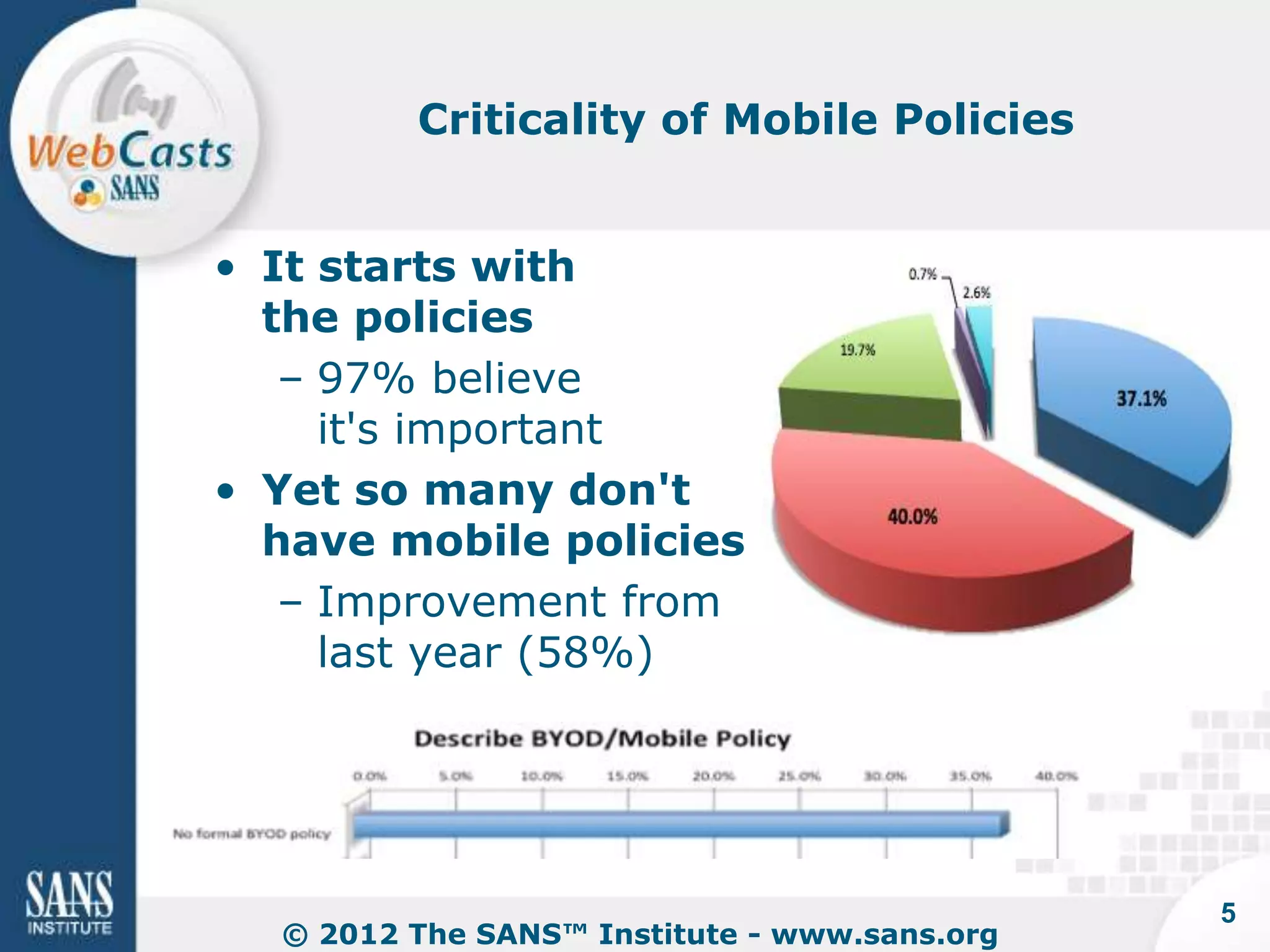
Criticality of Mobile Policies


• It starts with
  the policies
   – 97% believe
     it's important
• Yet so many don't
  have mobile policies
   – Improvement from
     last year (58%)


                                              5
  © 2012 The SANS™ Institute - www.sans.org
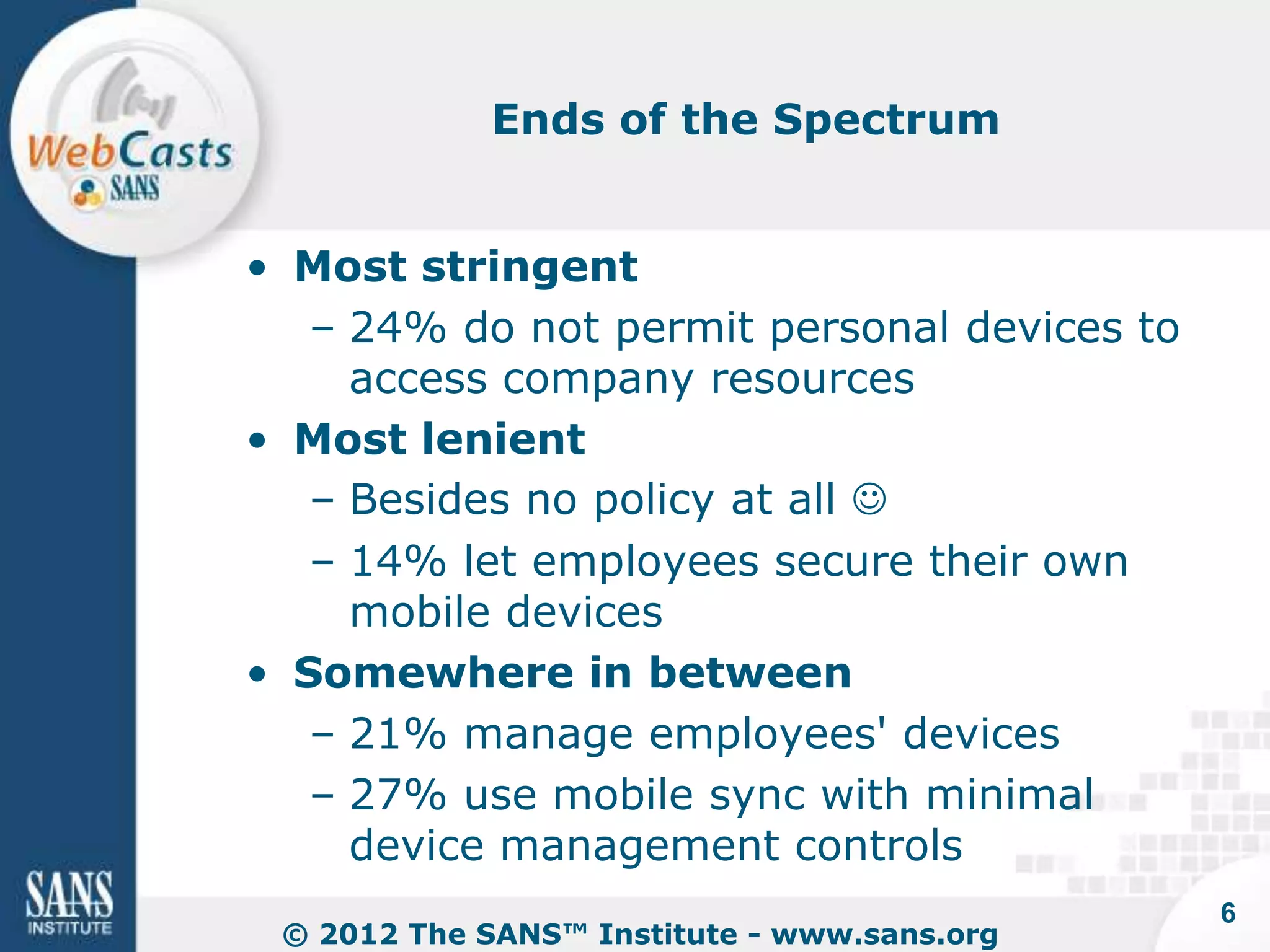
Ends of the Spectrum


• Most stringent
   – 24% do not permit personal devices to
     access company resources
• Most lenient
   – Besides no policy at all 
   – 14% let employees secure their own
     mobile devices
• Somewhere in between
   – 21% manage employees' devices
   – 27% use mobile sync with minimal
     device management controls
                                             6
 © 2012 The SANS™ Institute - www.sans.org
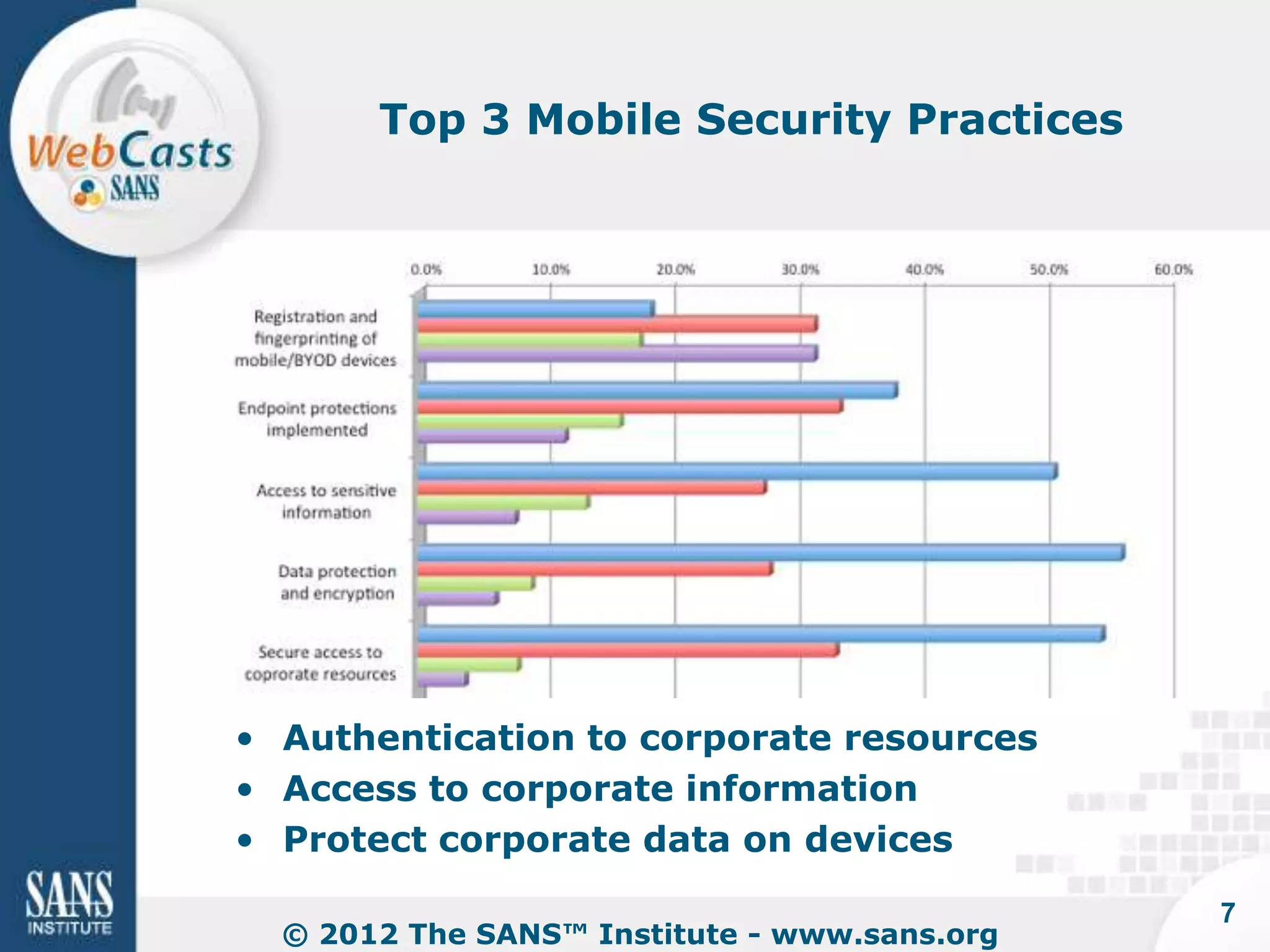
Top 3 Mobile Security Practices


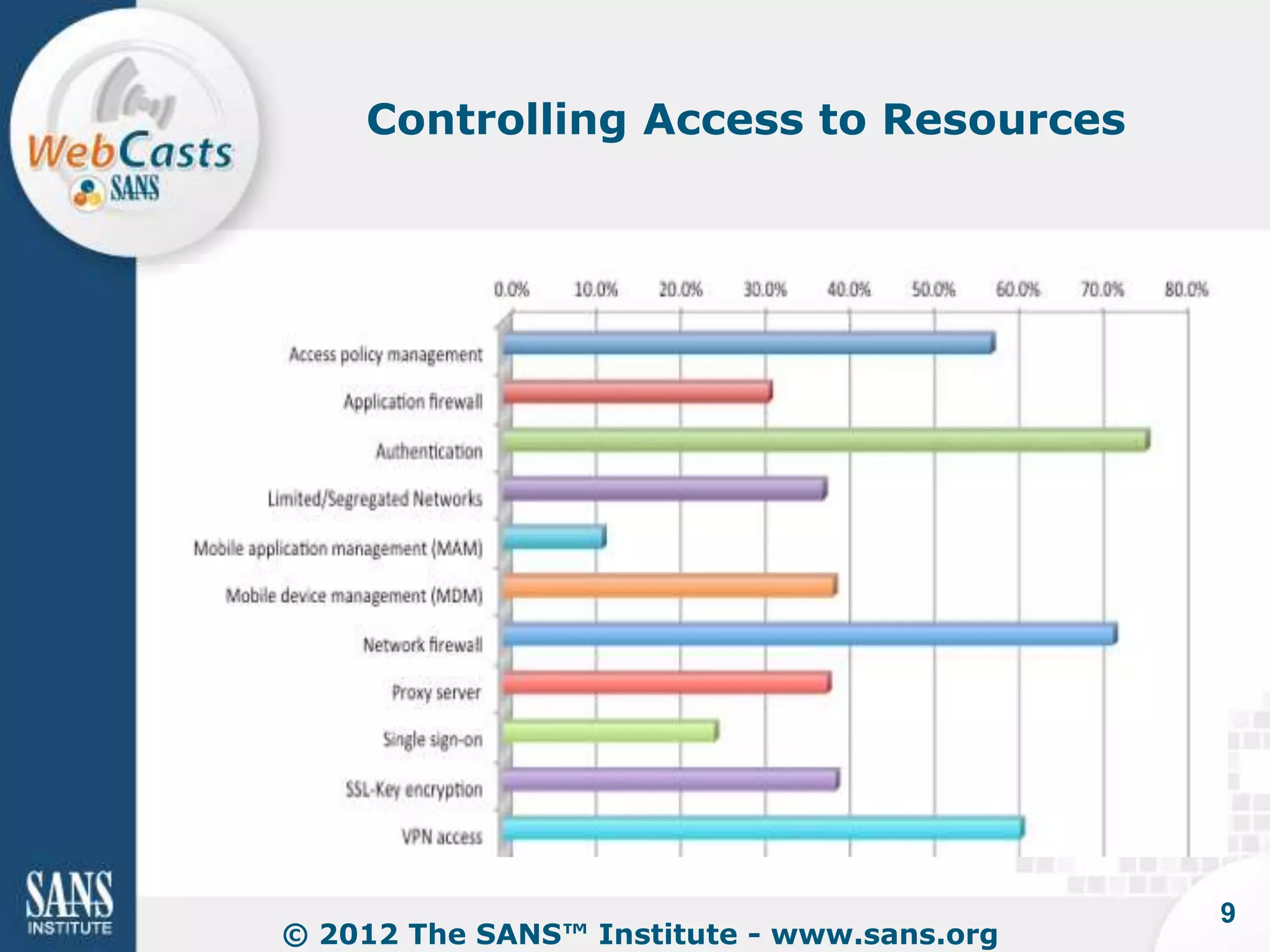
• Authentication to corporate resources
• Access to corporate information
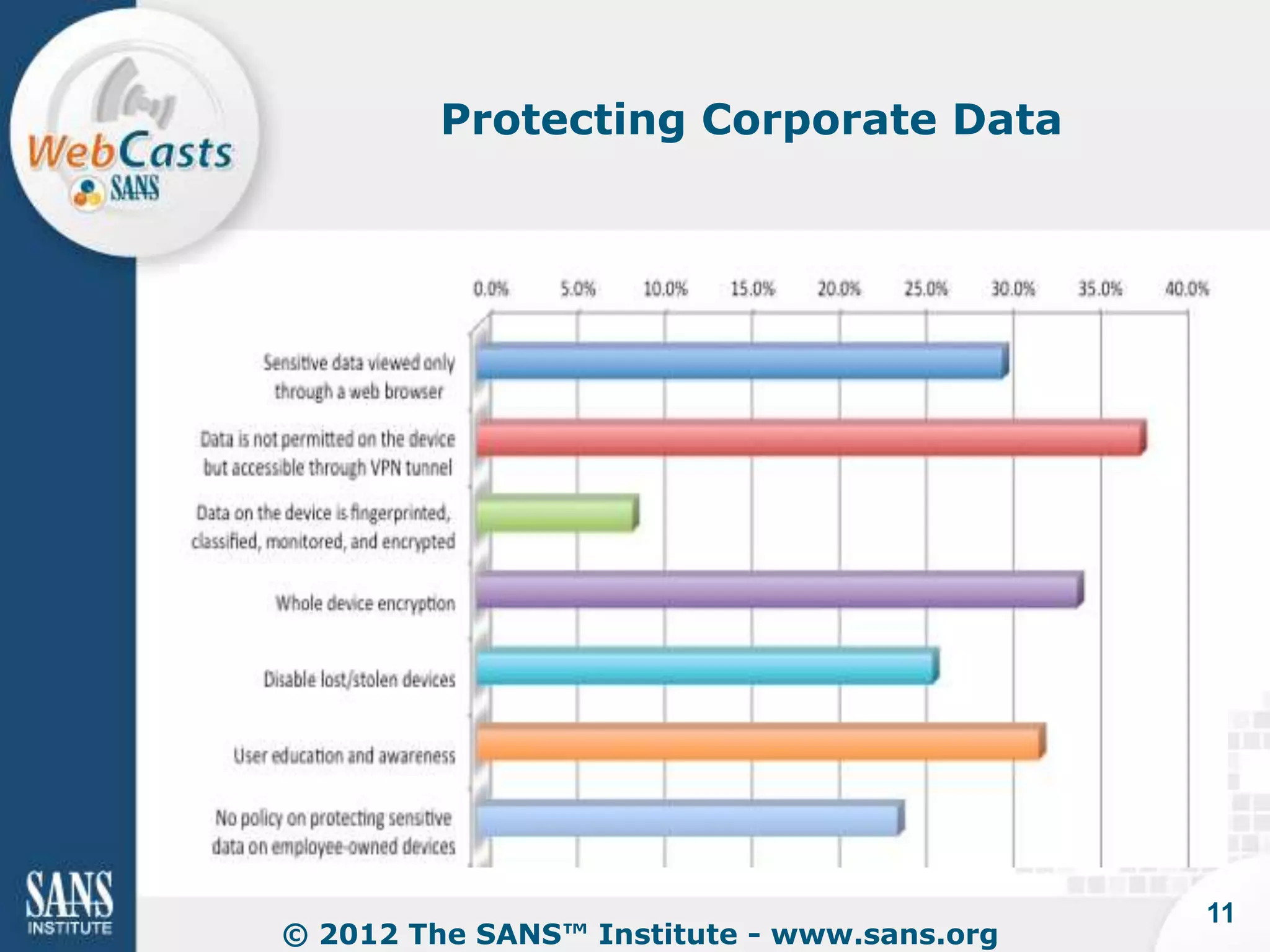
• Protect corporate data on devices

                                              7
  © 2012 The SANS™ Institute - www.sans.org
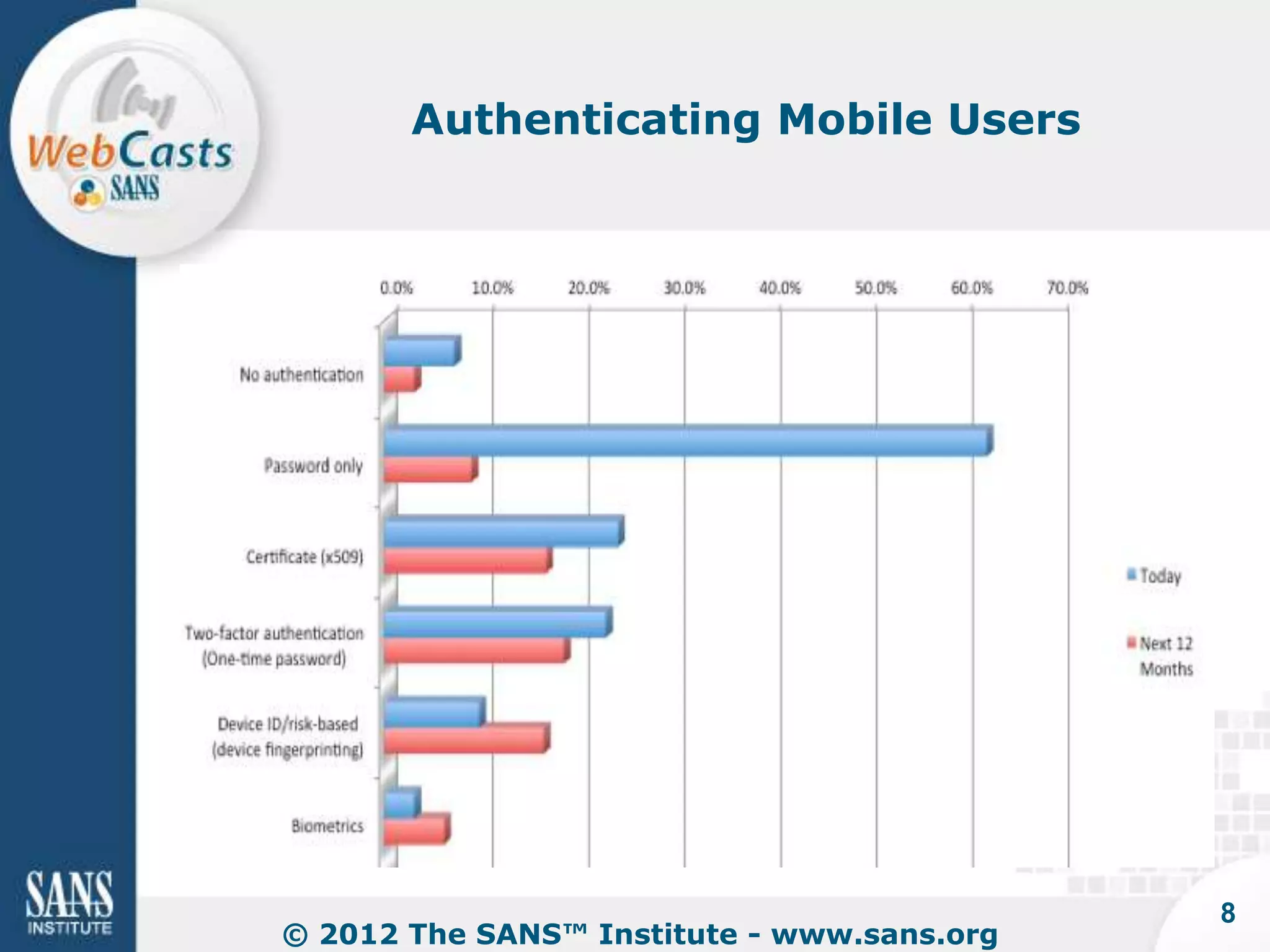
Authenticating Mobile Users


                                            8
© 2012 The SANS™ Institute - www.sans.org
Controlling Access to Resources


                                            9
© 2012 The SANS™ Institute - www.sans.org
Challenges


• How should companies implement
  authentication and access controls?
   – User credentials?
   – Location?
   – Device type?
   – Applications?

• Where should organizations "touch"
  employee devices?
   – Device?
   – Applications?
                                             10
 © 2012 The SANS™ Institute - www.sans.org
Protecting Corporate Data


                                            11
© 2012 The SANS™ Institute - www.sans.org
Challenges


• How should employers ensure
  protection of data on lost/stolen
  devices?
   – Wipe sensitive data?
   – Wipe entire device?
   – Locate the device?
   – Lock/Disable the device?

• How should fraud controls be
  implemented?

                                             12
 © 2012 The SANS™ Institute - www.sans.org
Conclusions


• Policies are important
   – 37% still don't have them
   – Many are developing policies after
     building their controls
• Companies are most interested in
   – Authentication
   – Access to resources
   – Data protection
• Challenges with BYOD
   – Finding a balance in controls
   – While not upsetting employees too much 
                                                13
    © 2012 The SANS™ Institute - www.sans.org
Tony DeLaGrange
                 tony@secureideas.com
                     904-639-6709


                        Q@SANS.org


© 2012 The SANS™ Institute - www.sans.org
Bring Your Own Device
                                   (BYOD) Policy


Benjamin Wright
Attorney & SANS Institute Instructor
benjaminwright.us
This is education, not legal advice.
Bring Your Own Device (BYOD)


• Rules for employees using own
  laptop, tablet, smartphone,
  webmail services for business
• Controversial topic; no perfect
  policy exists
• See discussions:
  http://goo.gl/txlCU,
  http://goo.gl/7bEAQ,
  http://goo.gl/QX6Uz,
  http://goo.gl/edSFF
Subpoena for Employee’s
      Home Hard Drive

• Local government employment
  dispute
• Plaintiff able to subpoena hard
  drive of manager’s home
  computer
• Wood v. Town of Warsaw, N.C.,
  No. 7:10-CV-00219-D, 2011 WL
  6748797 (E.D.N.C. Dec. 22, 2011)
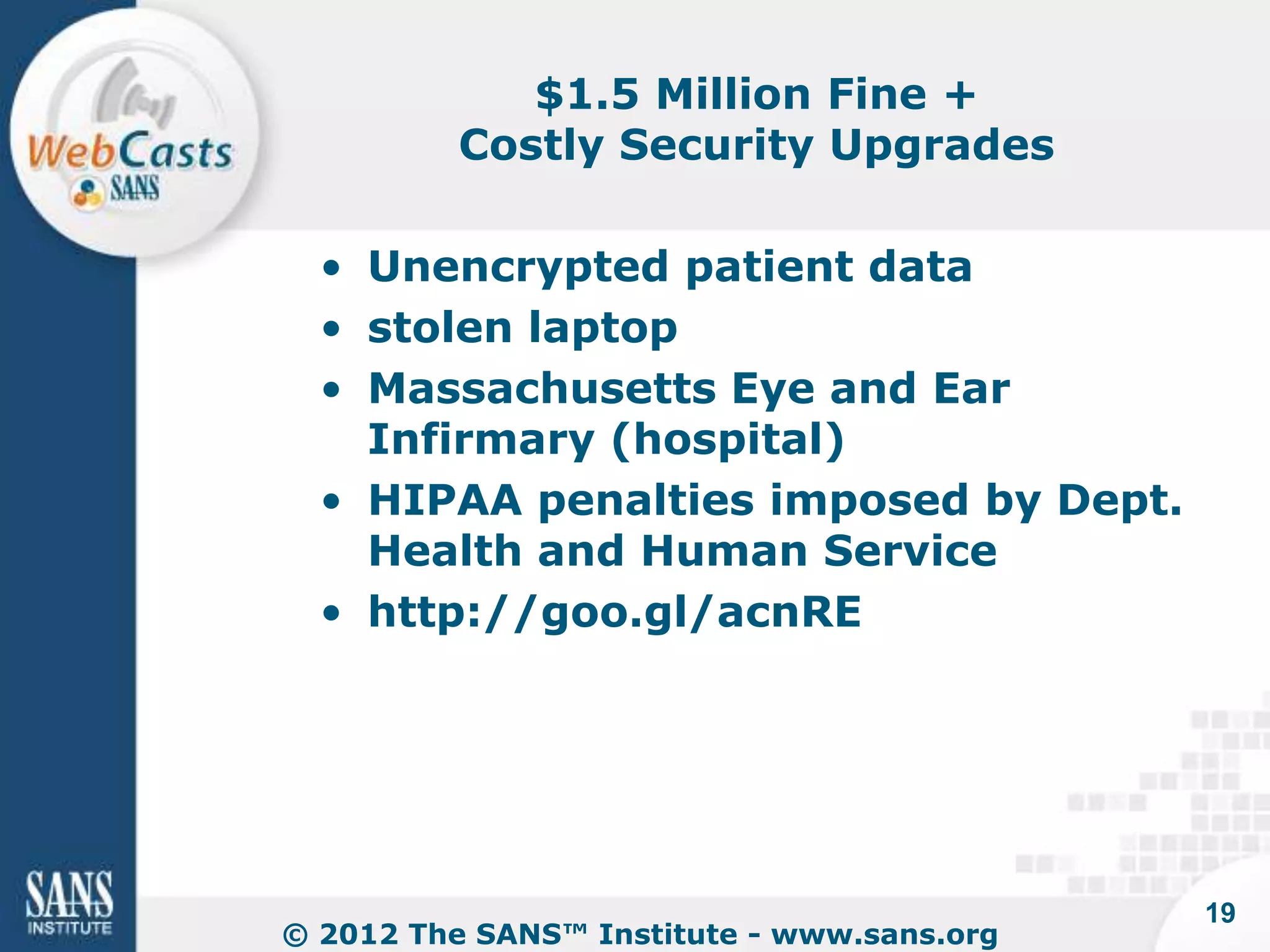
Employer Liability for Security


• Massachusetts 201 CMR 17.00:
  PII on mobile devices must be
  encrypted
• Cal SB 1386 - many breach
  notices because of stolen,
  unencrypted laptops (e.g. Guin v.
  Brazos Higher Education)
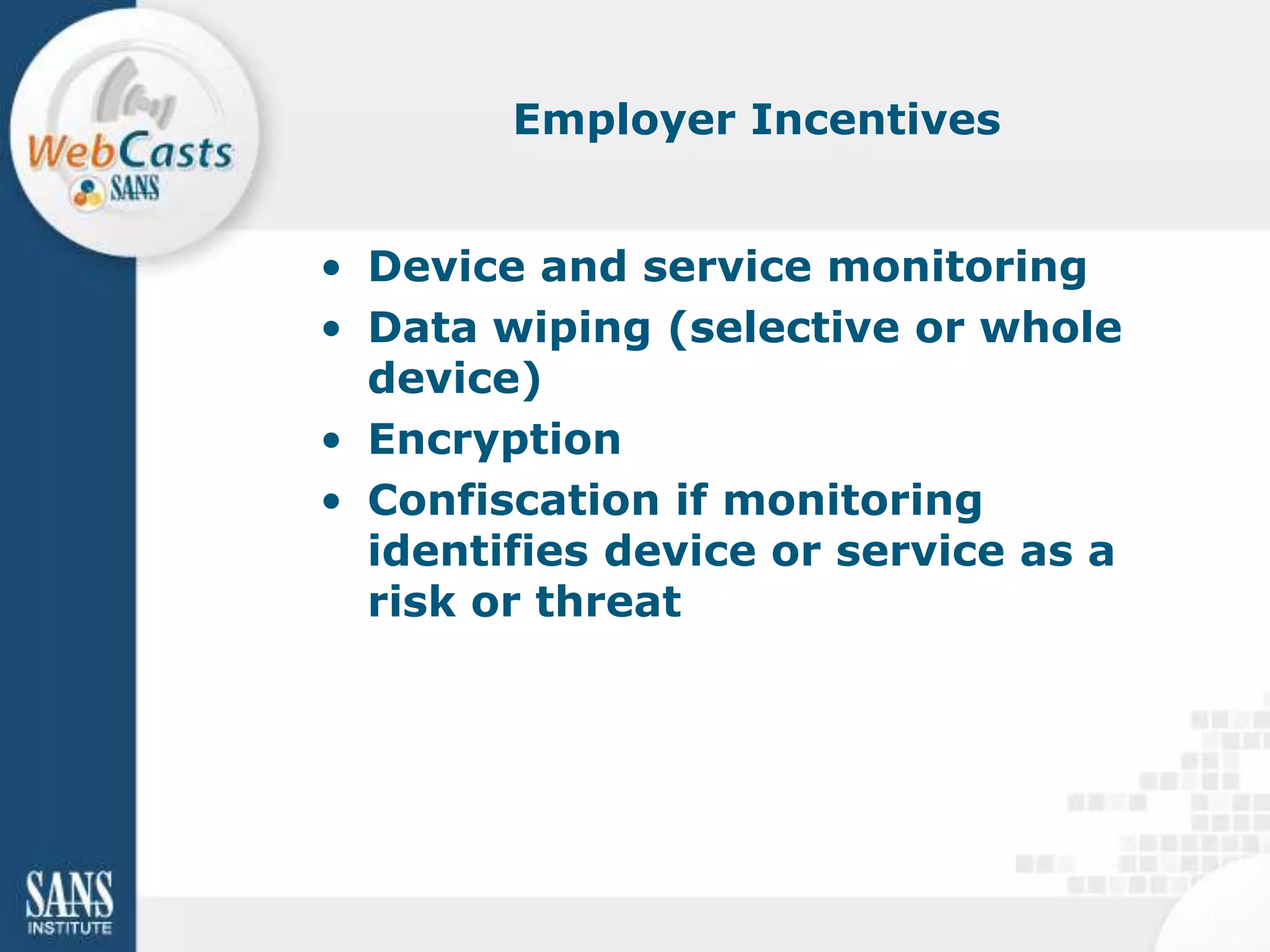
$1.5 Million Fine +
          Costly Security Upgrades

  • Unencrypted patient data
  • stolen laptop
  • Massachusetts Eye and Ear
    Infirmary (hospital)
  • HIPAA penalties imposed by Dept.
    Health and Human Service
  • http://goo.gl/acnRE


                                            19
© 2012 The SANS™ Institute - www.sans.org
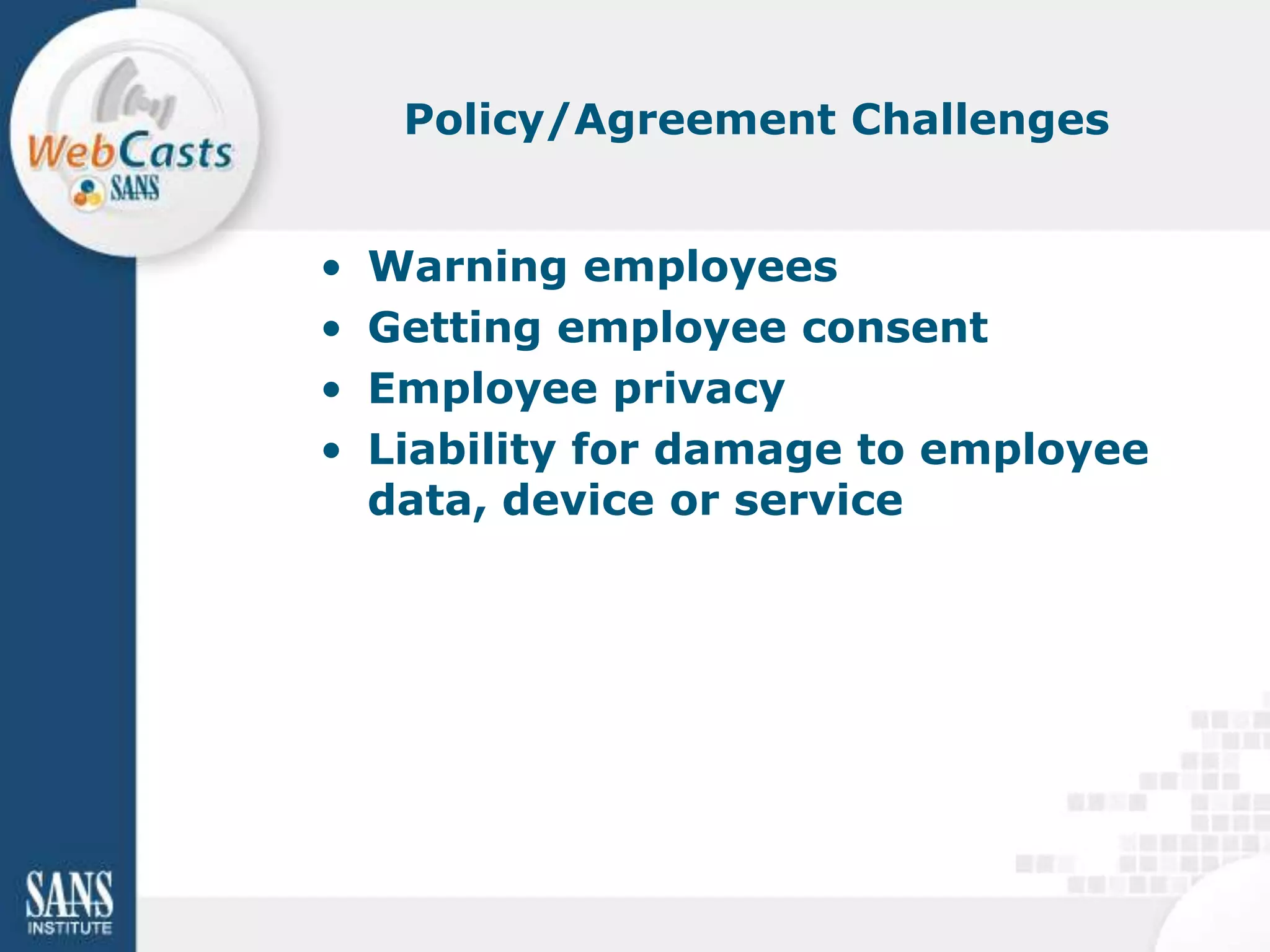
Employer Incentives


• Device and service monitoring
• Data wiping (selective or whole
  device)
• Encryption
• Confiscation if monitoring
  identifies device or service as a
  risk or threat
Policy/Agreement Challenges


•   Warning employees
•   Getting employee consent
•   Employee privacy
•   Liability for damage to employee
    data, device or service
BYOD Policy – Sample Language


• http://goo.gl/19idt
• Workable policy will come from
  negotiations among stakeholders
• This language tilts toward needs
  of employer
BYOD Policy


"Employees are informed that when they
create electronic records or work product in
the course of their work for the Company,
the records and work product belong to the
Company."
BYOD Policy Continued


"When an employee uses his or her own device,
such as a computer, a digital tablet or a
smartphone, to connect to Company information
resources, then the Company reserves the right
to take security measures relative to the device,
including but not limited to inspect the device and
. . ."
BYOD Continued


Employees are informed, and employees agree, as follows: If the
Company takes control or possession of a Device or Service, or
takes security measures relative to it, then:

(a) the Company might not return the Device or Service;

(b) the employee is entitled to no compensation for loss of use,
control or possession of the Device or Service;

(c) the Device or Service could be damaged, the employee could
lose data and the employee’s data could be disclosed to others.
The Company will not be liable or responsible for such damage,
loss or disclosure.
BYOD Policy Continued


"As a matter of honor and reputation -- but not as
a matter of legal liability or obligation – the
Company aspires to be forthcoming with
employees as a whole about the practical impact
of this Policy on employees over time."
Blogs:
                                 benjaminwright.us

This presentation is not legal advice for any particular situation. If you
need legal advice, you should consult the lawyer who advises your
organization.
Any person may reuse this material freely.
Enforcing your BYOD
                             Mobile Access Policies
                              with Oracle Access
                                 Management


Lee Howarth
Senior Principal Product Manager
Oracle
Mobile Access Roadmap


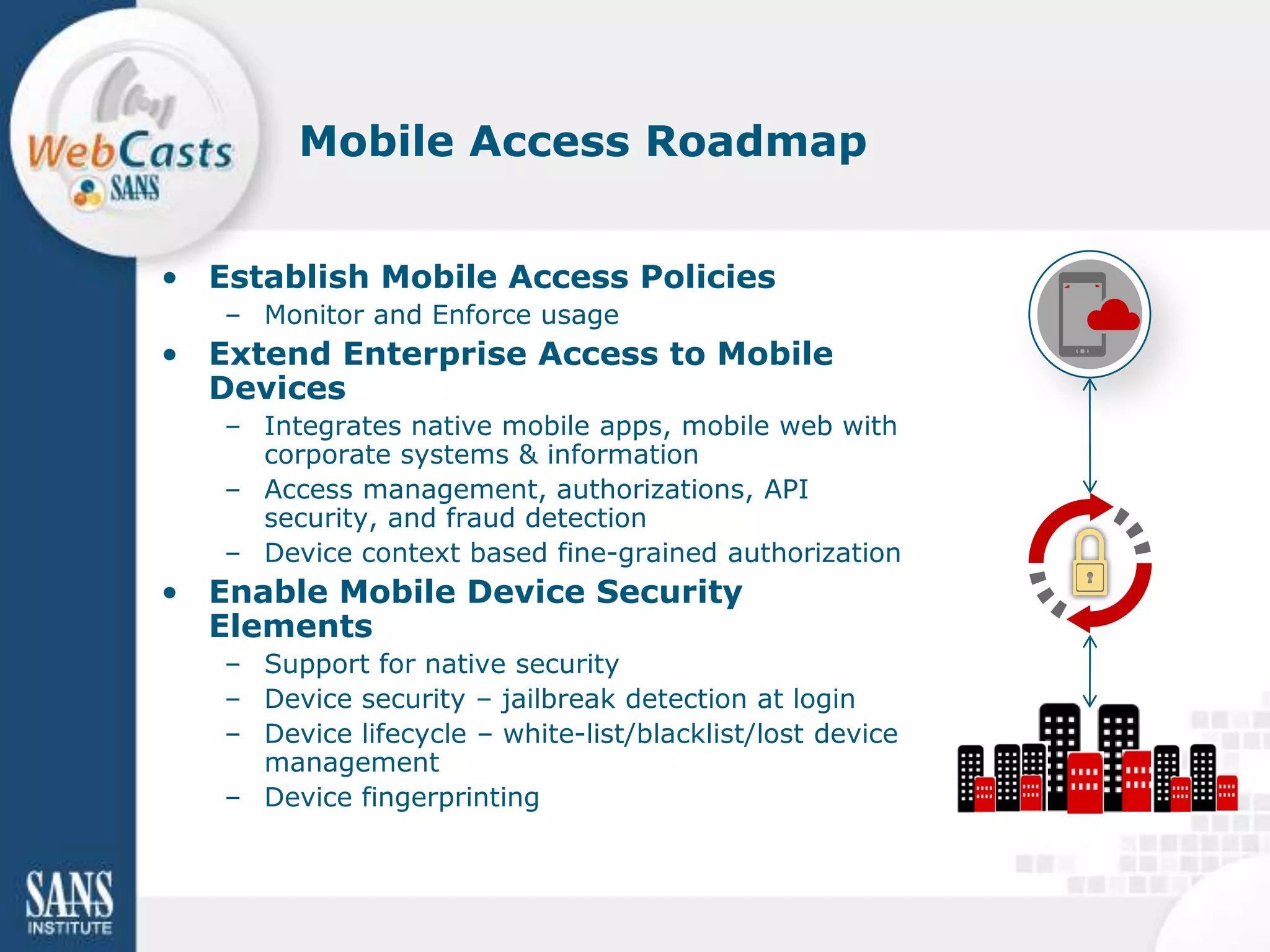
• Establish Mobile Access Policies
   – Monitor and Enforce usage
• Extend Enterprise Access to Mobile
  Devices
   – Integrates native mobile apps, mobile web with
     corporate systems & information
   – Access management, authorizations, API
     security, and fraud detection
   – Device context based fine-grained authorization
• Enable Mobile Device Security
  Elements
   – Support for native security
   – Device security – jailbreak detection at login
   – Device lifecycle – white-list/blacklist/lost device
     management
   – Device fingerprinting
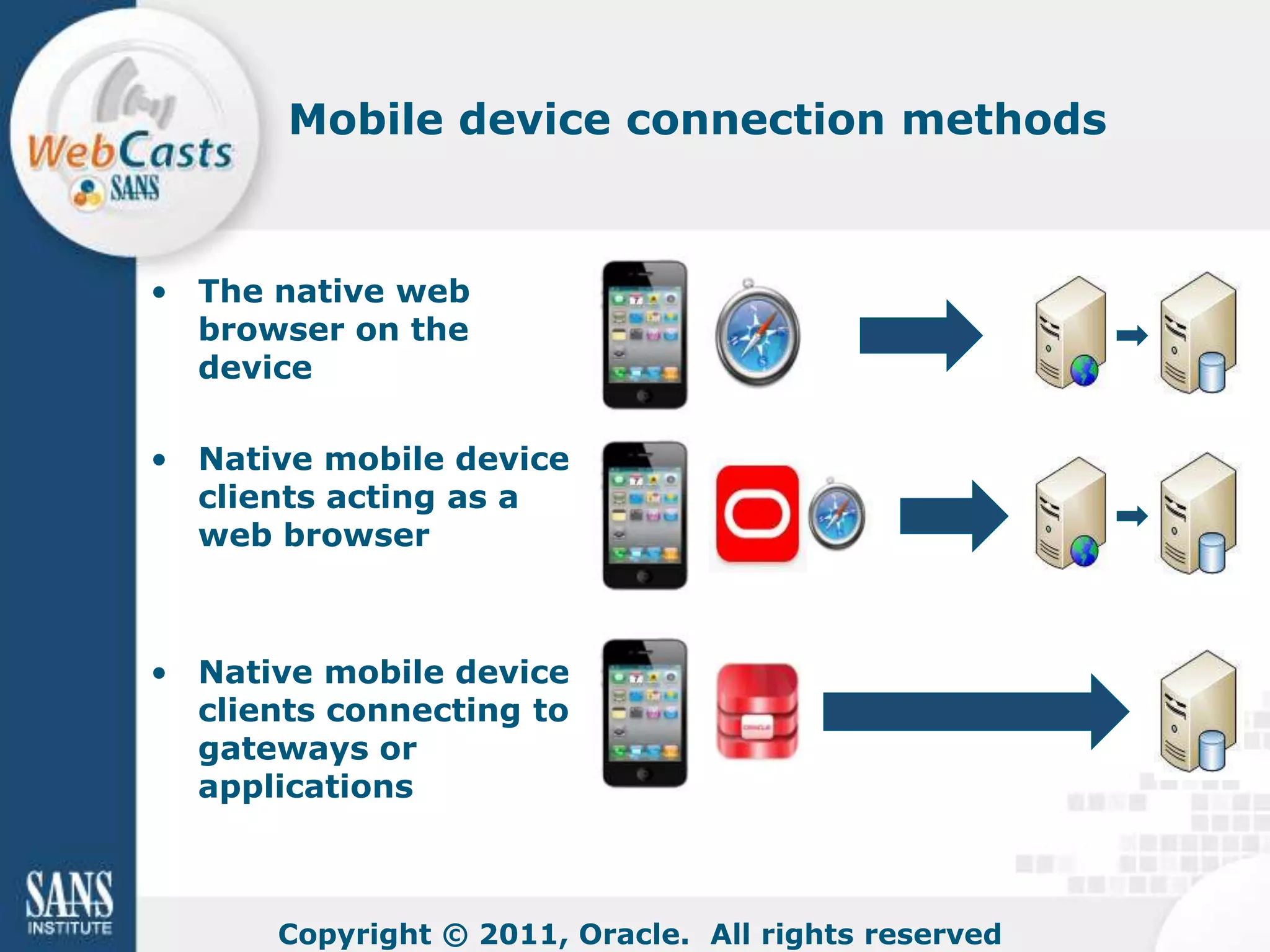
Mobile device connection methods


• The native web
  browser on the
  device

• Native mobile device
  clients acting as a
  web browser


• Native mobile device
  clients connecting to
  gateways or
  applications


      Copyright © 2011, Oracle. All rights reserved
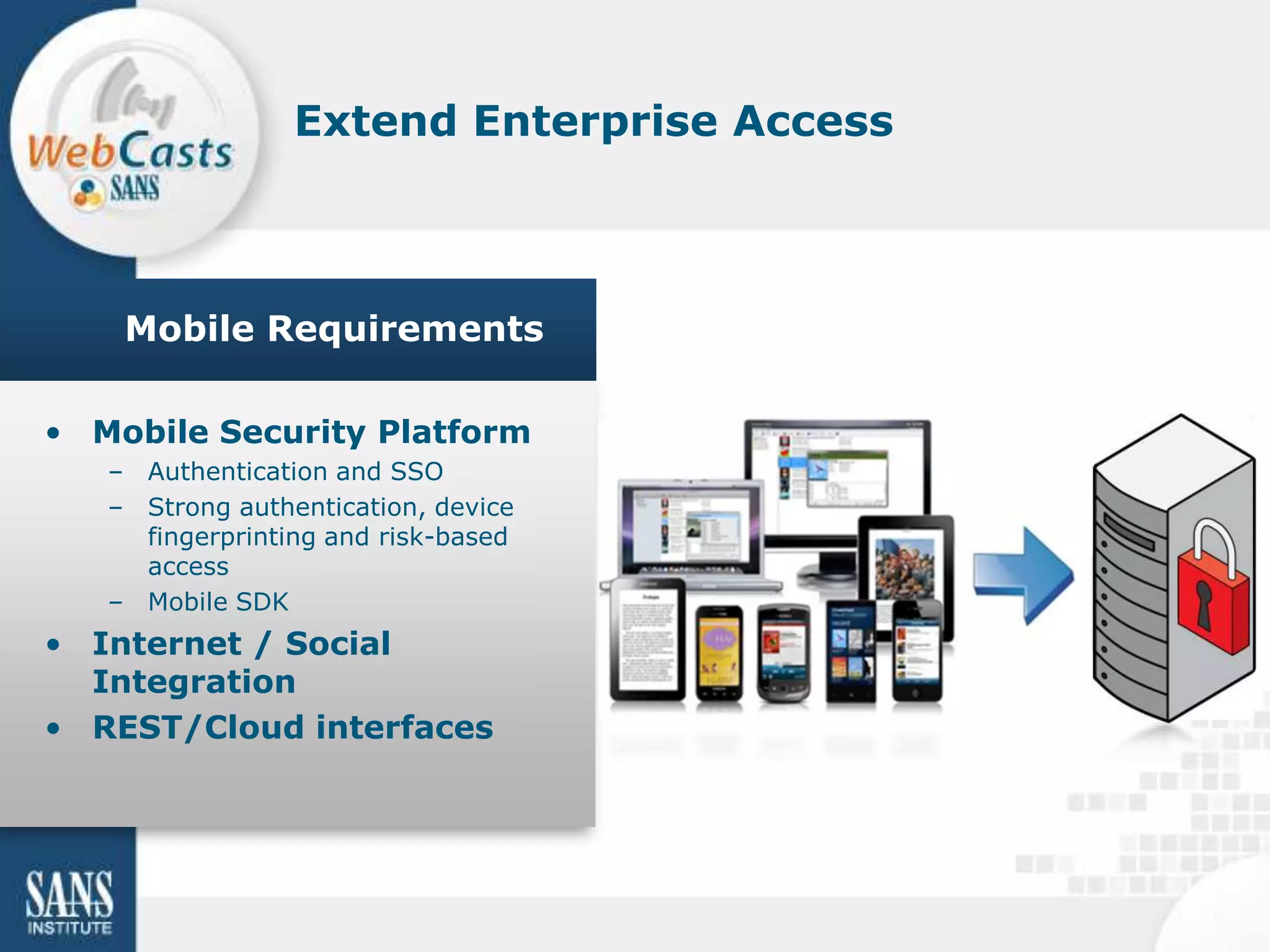
Extend Enterprise Access


    Mobile Requirements

• Mobile Security Platform
   – Authentication and SSO
   – Strong authentication, device
     fingerprinting and risk-based
     access
   – Mobile SDK
• Internet / Social
  Integration
• REST/Cloud interfaces
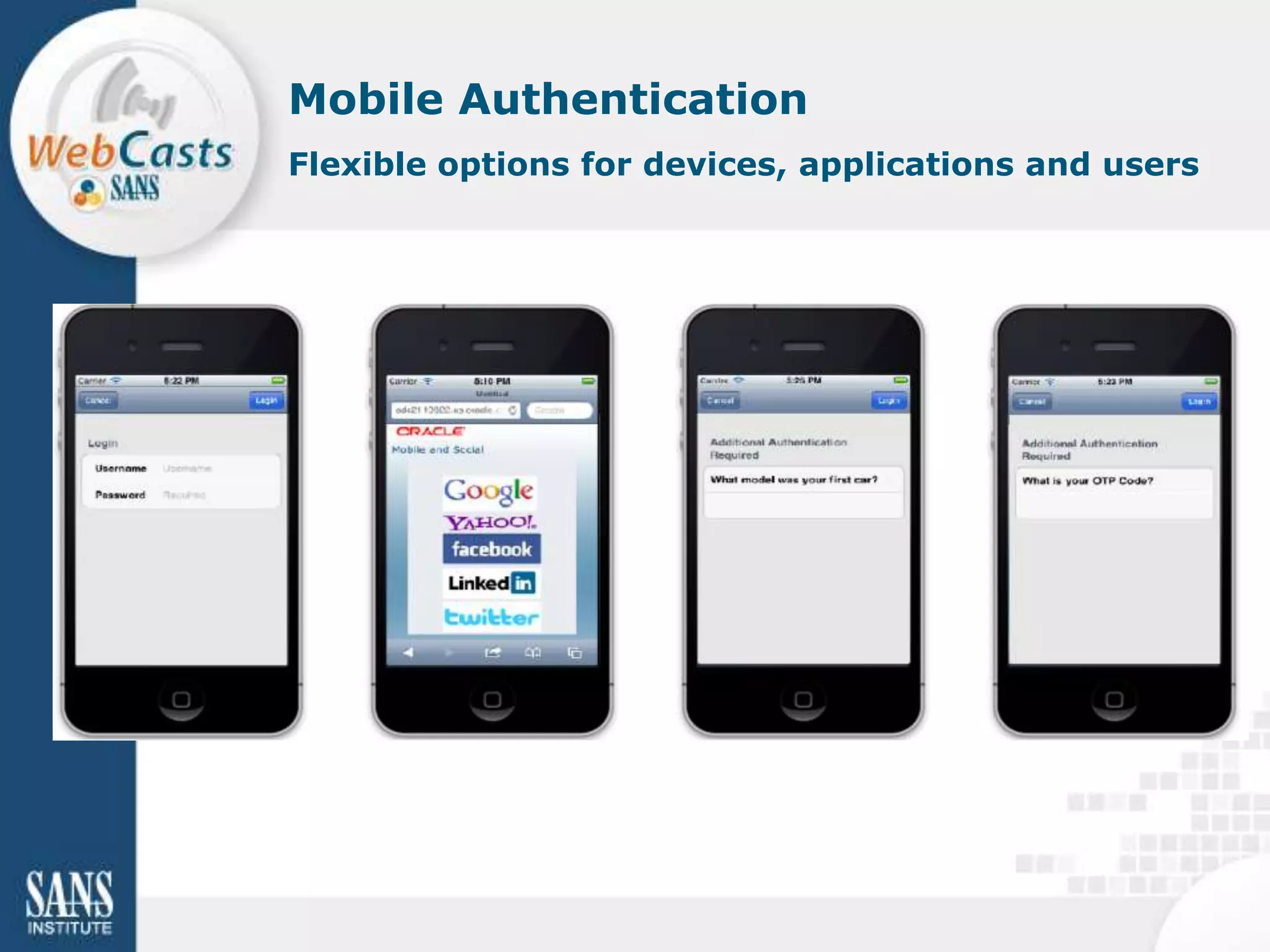
Mobile Authentication
Flexible options for devices, applications and users
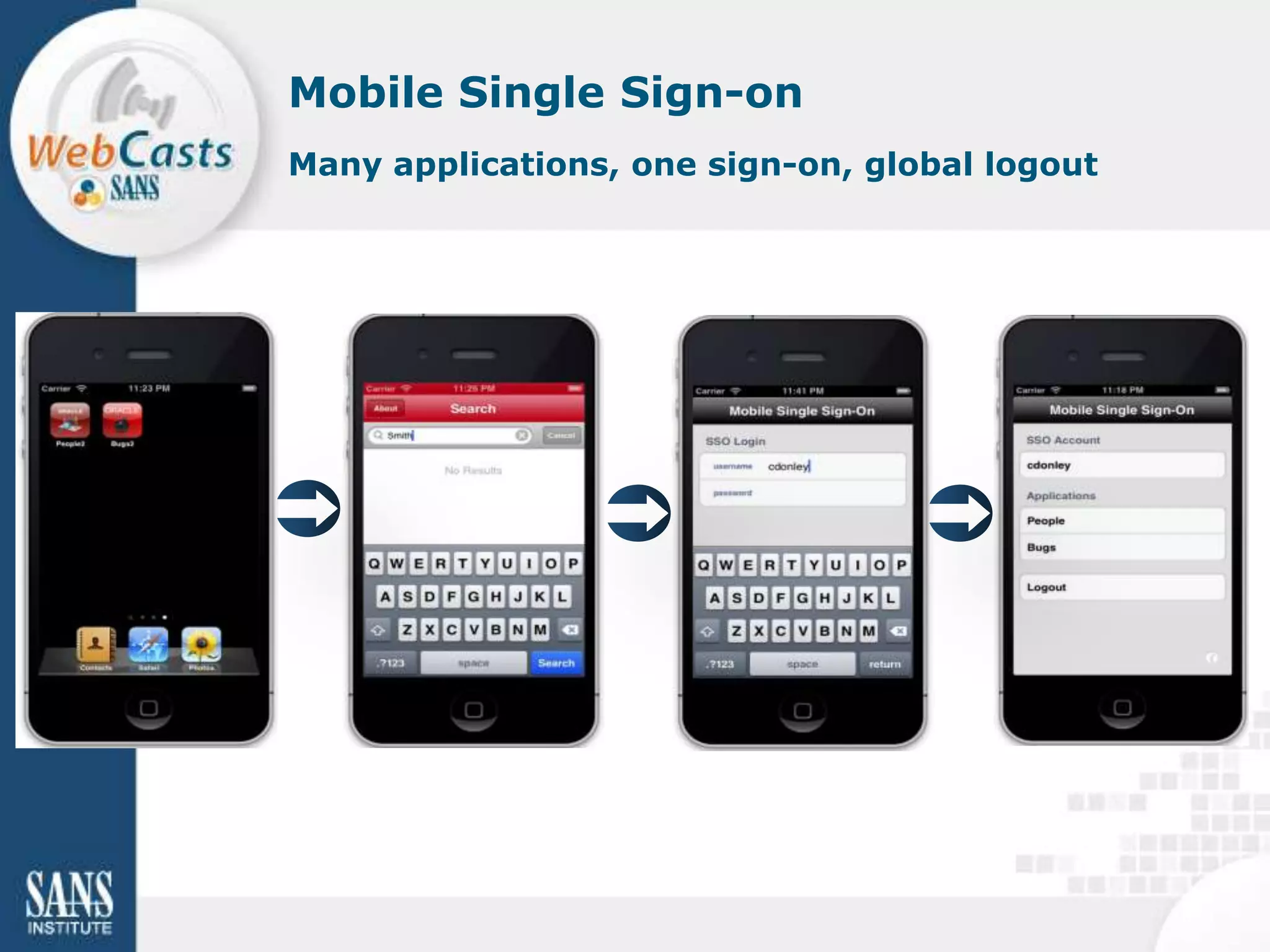
Mobile Single Sign-on
Many applications, one sign-on, global logout
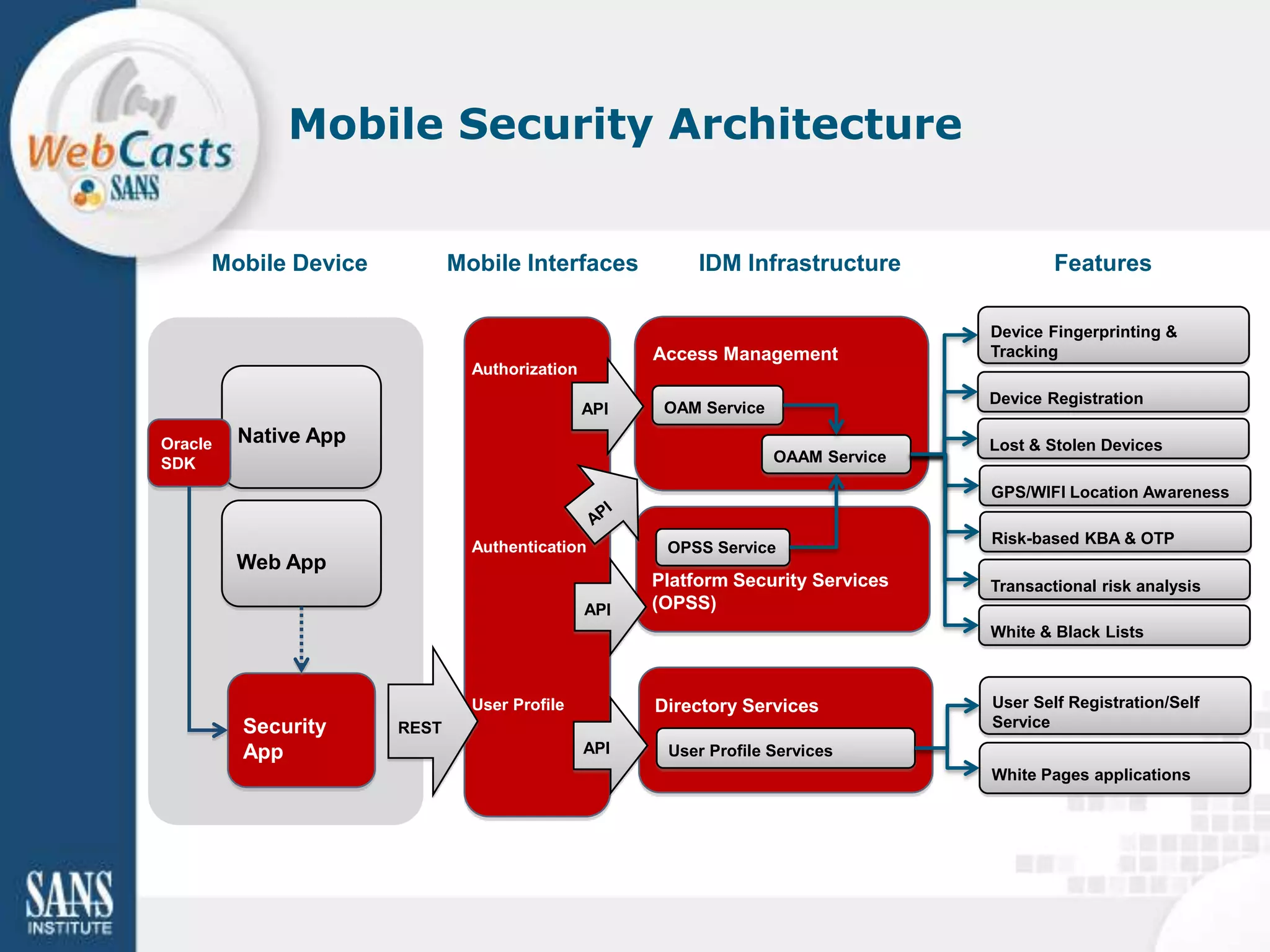
Mobile Security Architecture


     Mobile Device           Mobile Interfaces            IDM Infrastructure               Features

                                                                                   Device Fingerprinting &
                                                     Access Management             Tracking
                               Authorization
                                                                                   Device Registration
                                               API    OAM Service

Oracle   Native App                                                                Lost & Stolen Devices
SDK                                                                 OAAM Service

                                                                                   GPS/WIFI Location Awareness

                                                                                   Risk-based KBA & OTP
                               Authentication         OPSS Service
         Web App
                                                     Platform Security Services    Transactional risk analysis
                                               API   (OPSS)
                                                                                   White & Black Lists


                               User Profile          Directory Services            User Self Registration/Self
         Security     REST                                                         Service
         App                                   API    User Profile Services
                                                                                   White Pages applications
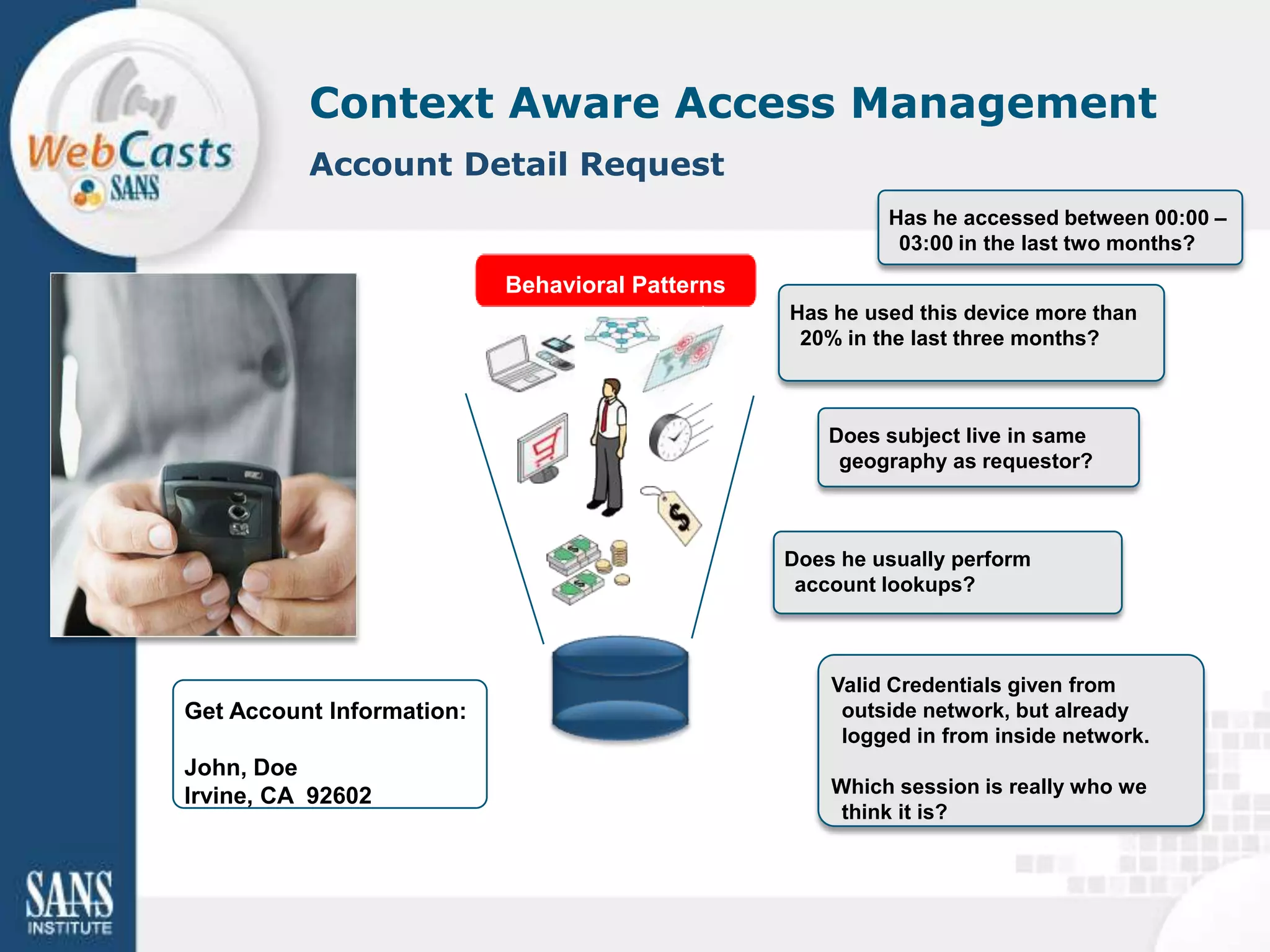
Context Aware Access Management
          Account Detail Request
                                                          Has he accessed between 00:00 –
                                                           03:00 in the last two months?

                           Behavioral Patterns
                                                 Has he used this device more than
                                                  20% in the last three months?


                                                     Does subject live in same
                                                      geography as requestor?


                                                 Does he usually perform
                                                  account lookups?


                                                     Valid Credentials given from
Get Account Information:                              outside network, but already
                                                      logged in from inside network.
John, Doe
Irvine, CA 92602                                     Which session is really who we
                                                      think it is?
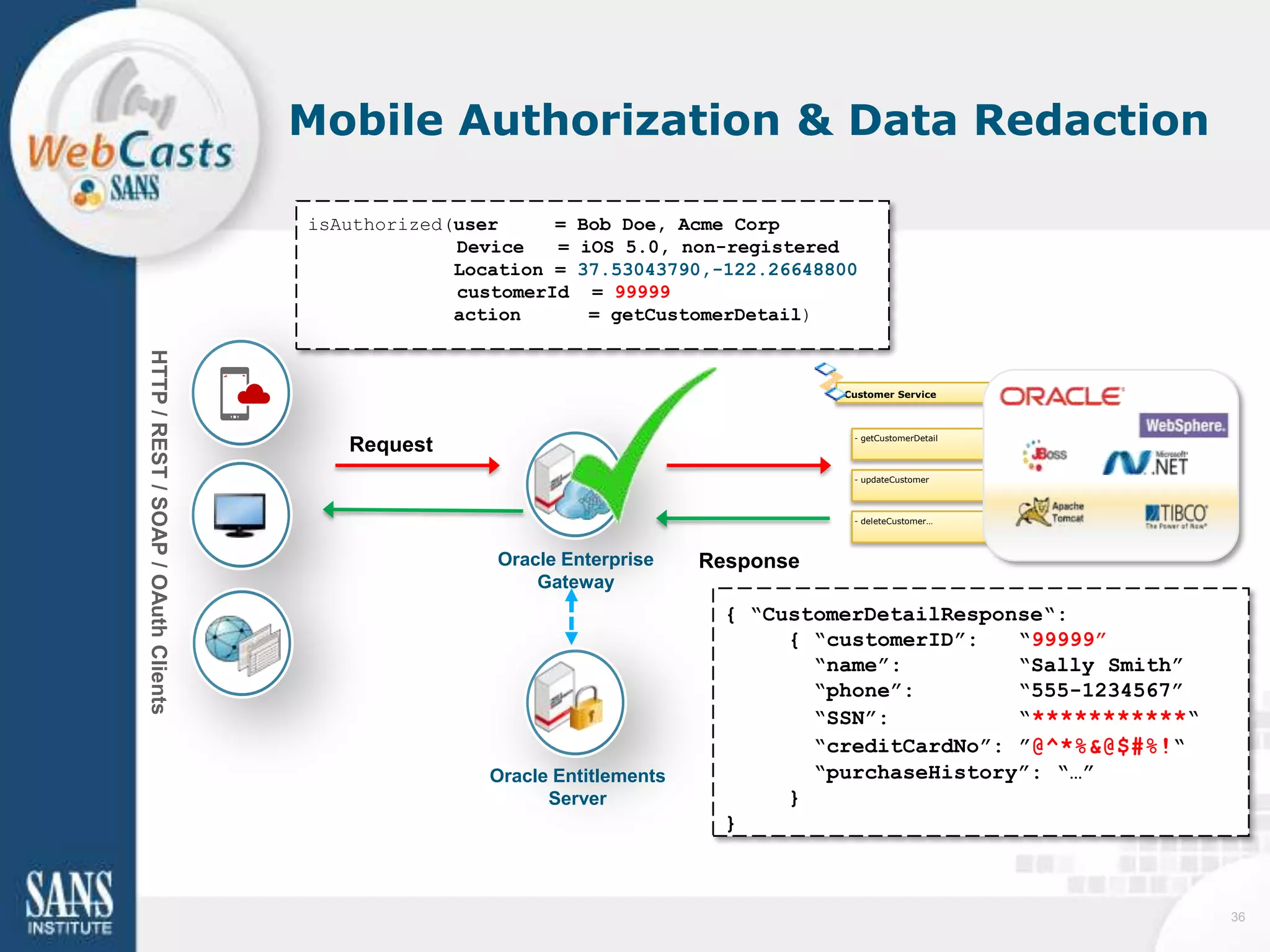
Mobile Authorization & Data Redaction

                                     isAuthorized(user     = Bob Doe, Acme Corp
                                                  Device   = iOS 5.0, non-registered
                                                  Location = 37.53043790,-122.26648800
                                                  customerId = 99999
                                                  action      = getCustomerDetail)
HTTP / REST / SOAP / OAuth Clients


                                                                                      Customer Service


                                                                                       - getCustomerDetail
                                        Request
                                                                                       - updateCustomer


                                                                                       - deleteCustomer…


                                                     Oracle Enterprise     Response
                                                         Gateway
                                                                             { “CustomerDetailResponse“:
                                                                                  { “customerID”:   “99999”
                                                                                    “name”:         “Sally Smith”
                                                                                    “phone”:        “555-1234567”
                                                                                    “SSN”:          “***********“
                                                                                    “creditCardNo”: ”@^*%&@$#%!“
                                                     Oracle Entitlements            “purchaseHistory”: “…”
                                                           Server                 }
                                                                             }


                                                                                                                    36
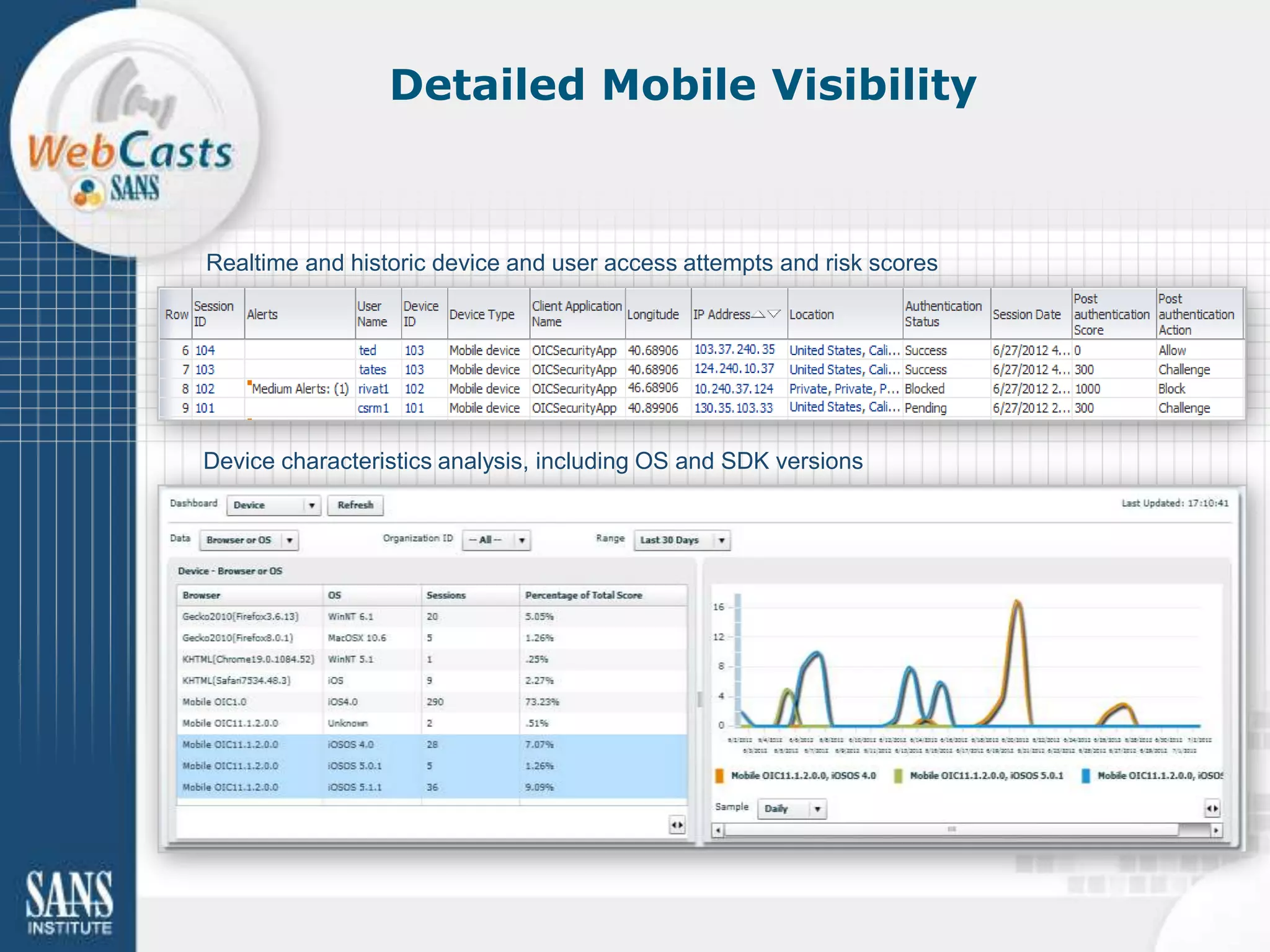
Detailed Mobile Visibility


Realtime and historic device and user access attempts and risk scores


Device characteristics analysis, including OS and SDK versions
Oracle Mobile Access Technology


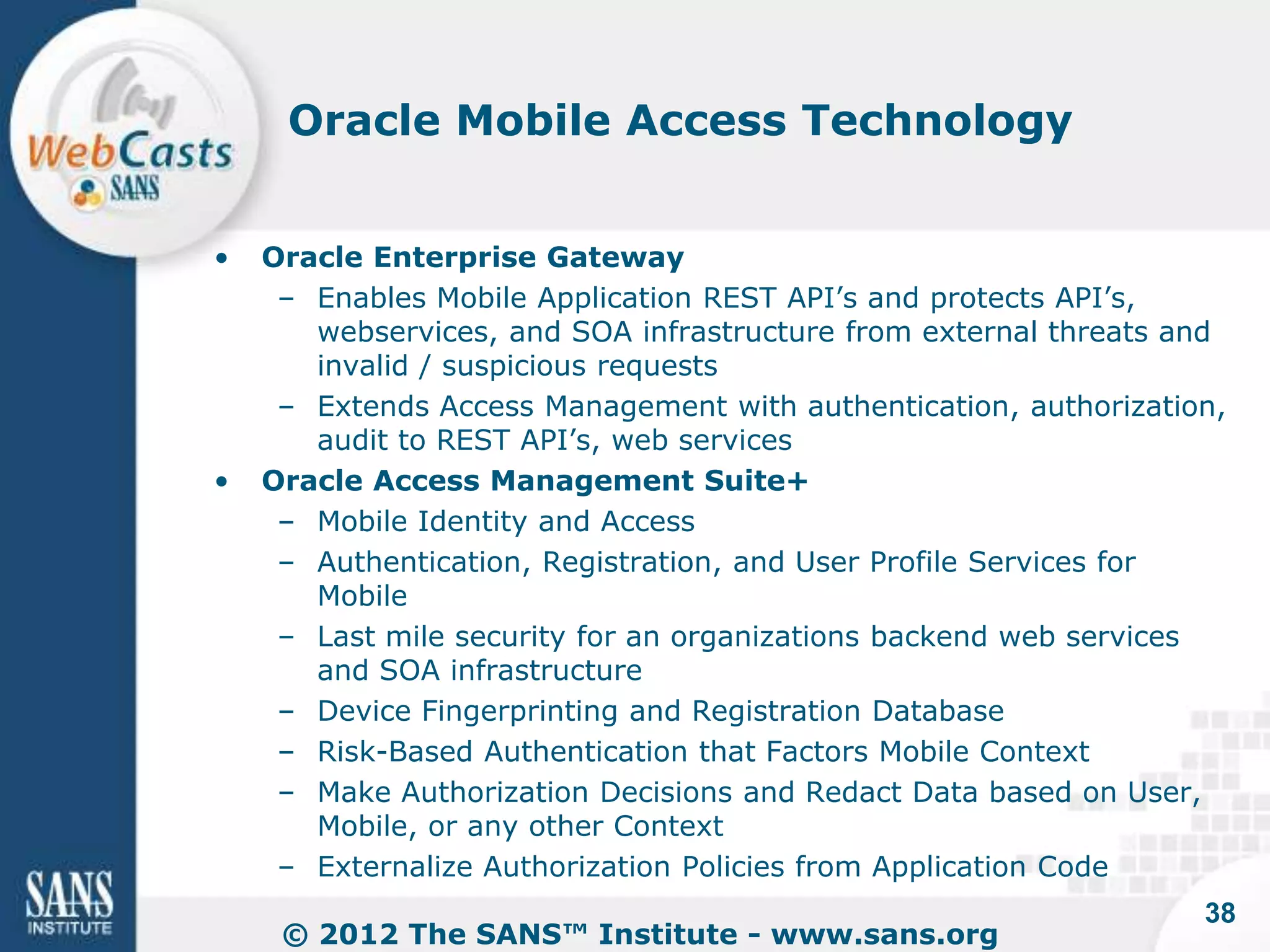
•   Oracle Enterprise Gateway
     – Enables Mobile Application REST API’s and protects API’s,
       webservices, and SOA infrastructure from external threats and
       invalid / suspicious requests
     – Extends Access Management with authentication, authorization,
       audit to REST API’s, web services
•   Oracle Access Management Suite+
     – Mobile Identity and Access
     – Authentication, Registration, and User Profile Services for
       Mobile
     – Last mile security for an organizations backend web services
       and SOA infrastructure
     – Device Fingerprinting and Registration Database
     – Risk-Based Authentication that Factors Mobile Context
     – Make Authorization Decisions and Redact Data based on User,
       Mobile, or any other Context
     – Externalize Authorization Policies from Application Code
                                                                  38
     © 2012 The SANS™ Institute - www.sans.org
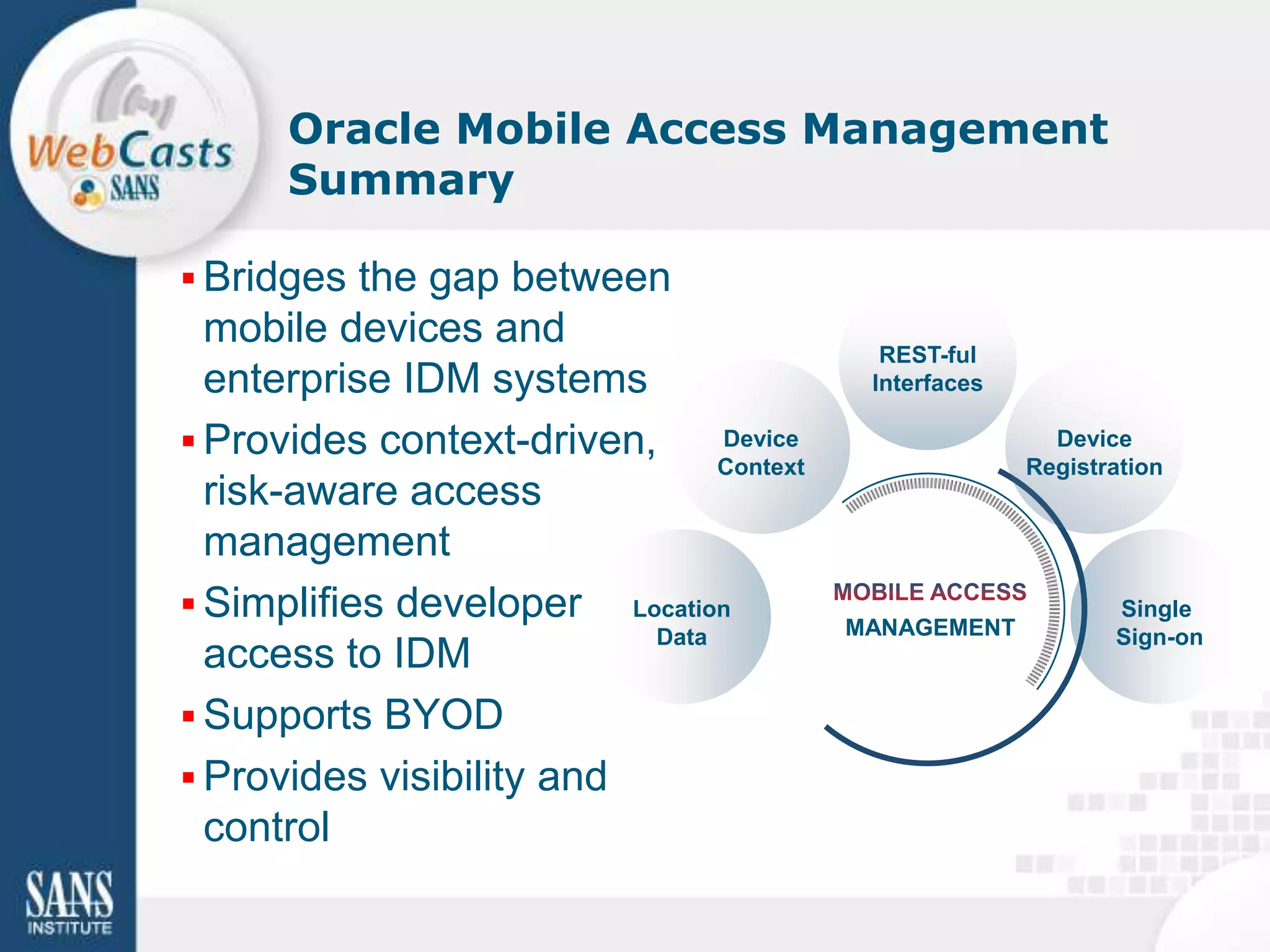
Oracle Mobile Access Management
      Summary

 Bridges the gap between
  mobile devices and                       REST-ful
  enterprise IDM systems                  Interfaces

 Provides context-driven,     Device                    Device
                               Context                 Registration
  risk-aware access
  management
 Simplifies developer Location                               Single
                          Data           MANAGEMENT           Sign-on
  access to IDM
 Supports BYOD
 Provides visibility and
  control
Q&A
If we don’t answer your question
during the webcast, we will post a
follow up on:

http://blogs.oracle.com/oracleidm
Thank You!

Associated Paper:
http://www.sans.org/reading_room/
analysts_program/SANS-survey-
mobility.pdf

Develop and Enforce a Bring-Your-Own-Device (BYOD) Policy

  • 1.
    Developing and Enforcing a Bring-Your- Own-Device (BYOD) Policy SANS Analysts: Tony DeLaGrange, Senior Security Consultant Secure Ideas Lee Howarth, Senior Product Manager Ben Wright, SANS Instructor, Attorney, Oracle Corporation Technology Law Expert/Author © 2012 The SANS™ Institute - www.sans.org
  • 2.
    Tony DeLaGrange • SecurityConsultant at Secure Ideas • Over 25 Years IT Experience – 15 Years in financial services – Over decade in IT Security • Co-author of SEC571 – Mobile Device Security • Open Source Project Lead – MobiSec & SH5ARK • Co-chair of SANS first Mobile Device Security Summit © 2012 The SANS™ Institute - www.sans.org 2
  • 3.
    Topics Today • Mobility Security Survey • Mobile Security Policies • Top 3 Security Practices • Conclusions 3 © 2012 The SANS™ Institute - www.sans.org
  • 4.
    Mobility Survey • Fullresults here: www.sans.org/reading_room/anal ysts_program • Focused on policies and controls • Survey ran in the 3rd quarter of 2012 • More than 650 people responded – From a wide range of organizations 4 © 2012 The SANS™ Institute - www.sans.org
  • 5.
    Criticality of MobilePolicies • It starts with the policies – 97% believe it's important • Yet so many don't have mobile policies – Improvement from last year (58%) 5 © 2012 The SANS™ Institute - www.sans.org
  • 6.
    Ends of theSpectrum • Most stringent – 24% do not permit personal devices to access company resources • Most lenient – Besides no policy at all  – 14% let employees secure their own mobile devices • Somewhere in between – 21% manage employees' devices – 27% use mobile sync with minimal device management controls 6 © 2012 The SANS™ Institute - www.sans.org
  • 7.
    Top 3 MobileSecurity Practices • Authentication to corporate resources • Access to corporate information • Protect corporate data on devices 7 © 2012 The SANS™ Institute - www.sans.org
  • 8.
    Authenticating Mobile Users 8 © 2012 The SANS™ Institute - www.sans.org
  • 9.
    Controlling Access toResources 9 © 2012 The SANS™ Institute - www.sans.org
  • 10.
    Challenges • How shouldcompanies implement authentication and access controls? – User credentials? – Location? – Device type? – Applications? • Where should organizations "touch" employee devices? – Device? – Applications? 10 © 2012 The SANS™ Institute - www.sans.org
  • 11.
    Protecting Corporate Data 11 © 2012 The SANS™ Institute - www.sans.org
  • 12.
    Challenges • How shouldemployers ensure protection of data on lost/stolen devices? – Wipe sensitive data? – Wipe entire device? – Locate the device? – Lock/Disable the device? • How should fraud controls be implemented? 12 © 2012 The SANS™ Institute - www.sans.org
  • 13.
    Conclusions • Policies areimportant – 37% still don't have them – Many are developing policies after building their controls • Companies are most interested in – Authentication – Access to resources – Data protection • Challenges with BYOD – Finding a balance in controls – While not upsetting employees too much  13 © 2012 The SANS™ Institute - www.sans.org
  • 14.
    Tony DeLaGrange tony@secureideas.com 904-639-6709 Q@SANS.org © 2012 The SANS™ Institute - www.sans.org
  • 15.
    Bring Your OwnDevice (BYOD) Policy Benjamin Wright Attorney & SANS Institute Instructor benjaminwright.us This is education, not legal advice.
  • 16.
    Bring Your OwnDevice (BYOD) • Rules for employees using own laptop, tablet, smartphone, webmail services for business • Controversial topic; no perfect policy exists • See discussions: http://goo.gl/txlCU, http://goo.gl/7bEAQ, http://goo.gl/QX6Uz, http://goo.gl/edSFF
  • 17.
    Subpoena for Employee’s Home Hard Drive • Local government employment dispute • Plaintiff able to subpoena hard drive of manager’s home computer • Wood v. Town of Warsaw, N.C., No. 7:10-CV-00219-D, 2011 WL 6748797 (E.D.N.C. Dec. 22, 2011)
  • 18.
    Employer Liability forSecurity • Massachusetts 201 CMR 17.00: PII on mobile devices must be encrypted • Cal SB 1386 - many breach notices because of stolen, unencrypted laptops (e.g. Guin v. Brazos Higher Education)
  • 19.
    $1.5 Million Fine+ Costly Security Upgrades • Unencrypted patient data • stolen laptop • Massachusetts Eye and Ear Infirmary (hospital) • HIPAA penalties imposed by Dept. Health and Human Service • http://goo.gl/acnRE 19 © 2012 The SANS™ Institute - www.sans.org
  • 20.
    Employer Incentives • Deviceand service monitoring • Data wiping (selective or whole device) • Encryption • Confiscation if monitoring identifies device or service as a risk or threat
  • 21.
    Policy/Agreement Challenges • Warning employees • Getting employee consent • Employee privacy • Liability for damage to employee data, device or service
  • 22.
    BYOD Policy –Sample Language • http://goo.gl/19idt • Workable policy will come from negotiations among stakeholders • This language tilts toward needs of employer
  • 23.
    BYOD Policy "Employees areinformed that when they create electronic records or work product in the course of their work for the Company, the records and work product belong to the Company."
  • 24.
    BYOD Policy Continued "Whenan employee uses his or her own device, such as a computer, a digital tablet or a smartphone, to connect to Company information resources, then the Company reserves the right to take security measures relative to the device, including but not limited to inspect the device and . . ."
  • 25.
    BYOD Continued Employees areinformed, and employees agree, as follows: If the Company takes control or possession of a Device or Service, or takes security measures relative to it, then: (a) the Company might not return the Device or Service; (b) the employee is entitled to no compensation for loss of use, control or possession of the Device or Service; (c) the Device or Service could be damaged, the employee could lose data and the employee’s data could be disclosed to others. The Company will not be liable or responsible for such damage, loss or disclosure.
  • 26.
    BYOD Policy Continued "Asa matter of honor and reputation -- but not as a matter of legal liability or obligation – the Company aspires to be forthcoming with employees as a whole about the practical impact of this Policy on employees over time."
  • 27.
    Blogs: benjaminwright.us This presentation is not legal advice for any particular situation. If you need legal advice, you should consult the lawyer who advises your organization. Any person may reuse this material freely.
  • 28.
    Enforcing your BYOD Mobile Access Policies with Oracle Access Management Lee Howarth Senior Principal Product Manager Oracle
  • 29.
    Mobile Access Roadmap •Establish Mobile Access Policies – Monitor and Enforce usage • Extend Enterprise Access to Mobile Devices – Integrates native mobile apps, mobile web with corporate systems & information – Access management, authorizations, API security, and fraud detection – Device context based fine-grained authorization • Enable Mobile Device Security Elements – Support for native security – Device security – jailbreak detection at login – Device lifecycle – white-list/blacklist/lost device management – Device fingerprinting
  • 30.
    Mobile device connectionmethods • The native web browser on the device • Native mobile device clients acting as a web browser • Native mobile device clients connecting to gateways or applications Copyright © 2011, Oracle. All rights reserved
  • 31.
    Extend Enterprise Access Mobile Requirements • Mobile Security Platform – Authentication and SSO – Strong authentication, device fingerprinting and risk-based access – Mobile SDK • Internet / Social Integration • REST/Cloud interfaces
  • 32.
    Mobile Authentication Flexible optionsfor devices, applications and users
  • 33.
    Mobile Single Sign-on Manyapplications, one sign-on, global logout
  • 34.
    Mobile Security Architecture Mobile Device Mobile Interfaces IDM Infrastructure Features Device Fingerprinting & Access Management Tracking Authorization Device Registration API OAM Service Oracle Native App Lost & Stolen Devices SDK OAAM Service GPS/WIFI Location Awareness Risk-based KBA & OTP Authentication OPSS Service Web App Platform Security Services Transactional risk analysis API (OPSS) White & Black Lists User Profile Directory Services User Self Registration/Self Security REST Service App API User Profile Services White Pages applications
  • 35.
    Context Aware AccessManagement Account Detail Request Has he accessed between 00:00 – 03:00 in the last two months? Behavioral Patterns Has he used this device more than 20% in the last three months? Does subject live in same geography as requestor? Does he usually perform account lookups? Valid Credentials given from Get Account Information: outside network, but already logged in from inside network. John, Doe Irvine, CA 92602 Which session is really who we think it is?
  • 36.
    Mobile Authorization &Data Redaction isAuthorized(user = Bob Doe, Acme Corp Device = iOS 5.0, non-registered Location = 37.53043790,-122.26648800 customerId = 99999 action = getCustomerDetail) HTTP / REST / SOAP / OAuth Clients Customer Service - getCustomerDetail Request - updateCustomer - deleteCustomer… Oracle Enterprise Response Gateway { “CustomerDetailResponse“: { “customerID”: “99999” “name”: “Sally Smith” “phone”: “555-1234567” “SSN”: “***********“ “creditCardNo”: ”@^*%&@$#%!“ Oracle Entitlements “purchaseHistory”: “…” Server } } 36
  • 37.
    Detailed Mobile Visibility Realtimeand historic device and user access attempts and risk scores Device characteristics analysis, including OS and SDK versions
  • 38.
    Oracle Mobile AccessTechnology • Oracle Enterprise Gateway – Enables Mobile Application REST API’s and protects API’s, webservices, and SOA infrastructure from external threats and invalid / suspicious requests – Extends Access Management with authentication, authorization, audit to REST API’s, web services • Oracle Access Management Suite+ – Mobile Identity and Access – Authentication, Registration, and User Profile Services for Mobile – Last mile security for an organizations backend web services and SOA infrastructure – Device Fingerprinting and Registration Database – Risk-Based Authentication that Factors Mobile Context – Make Authorization Decisions and Redact Data based on User, Mobile, or any other Context – Externalize Authorization Policies from Application Code 38 © 2012 The SANS™ Institute - www.sans.org
  • 39.
    Oracle Mobile AccessManagement Summary  Bridges the gap between mobile devices and REST-ful enterprise IDM systems Interfaces  Provides context-driven, Device Device Context Registration risk-aware access management  Simplifies developer Location Single Data MANAGEMENT Sign-on access to IDM  Supports BYOD  Provides visibility and control
  • 40.
    Q&A If we don’tanswer your question during the webcast, we will post a follow up on: http://blogs.oracle.com/oracleidm
  • 41.

Editor's Notes

  • #7 Companies managing employee devices cut in half, down from 40% to 21%.
  • #11 If you were to authenticate users through location, device, and applications being requested, where does the organization need to touch the device?
  • #13 How do organizations apply common fraud controls against these new devices without angering the employees who own their devices •    And what if the employer needs to locate devices, or wipe sensitive access and data off devices that are infected, lost or stolen?
  • #32 Internet/Social Integration – Desktop Browser or Mobile – easy add on to existing OAM
  • #33 LocalUsername and Password-or-Social Logon(can be user choice)Step up Auth and OTP, can be applied:-first time with this device (device registration)-sensitive application-high risk score-user with high level of access to application
  • #34 Single Sign on between native applications, and also with mobile browser based applications
  • #35 Mobile Security – web and mobile appDevice registration and fingerprintLost & stolen device securityGPS/WIFI based location awareness
  • #37 Once secure access is setup, you can enforce mobile access policy
  • #38 Risk analysis to determine whether to allow, flag, challenge or blockEnforce unjailbroken status, check VPN statusDetailed reporting on device attributes like OS version, GPS/WIFI geolocation, MAC/IP address