How to Manage the
Great BlackBerry Migration
Presented by:
Troy Fulton, Director, Product Marketing
Thursday, January 16, 2014

© 2014 Tangoe, Inc.
Today’s Speaker
Troy Fulton
Director, Product Marketing
• 20+ years in high-tech and communications devices
• Senior product marketing and management positions with global
corporations including Motorola Mobility, Nokia, and Compaq
• MBA from The College of William and Mary; BA from Boston
College

© 2014 Tangoe, Inc.

2
Agenda
• What’s Driving the Great BlackBerry Migration
• Managing Expectations
• Risk Analysis
• Help Desk Considerations
• Mistakes to Avoid
• Security and Access in a Consumerized World

© 2014 Tangoe, Inc.
Why the Great BlackBerry Migration is Happening
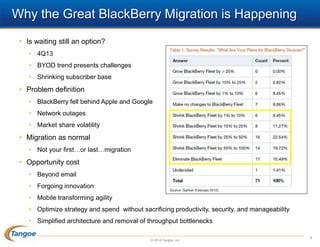
• Is waiting still an option?
• 4Q13
• BYOD trend presents challenges
• Shrinking subscriber base

• Problem definition
• BlackBerry fell behind Apple and Google
• Network outages
• Market share volatility

• Migration as normal
• Not your first…or last…migration

• Opportunity cost
• Beyond email
• Forgoing innovation
• Mobile transforming agility
• Optimize strategy and spend without sacrificing productivity, security, and manageability
• Simplified architecture and removal of throughput bottlenecks
© 2014 Tangoe, Inc.

4
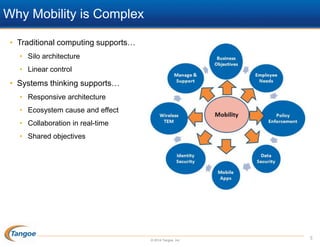
Why Mobility is Complex
• Traditional computing supports…
• Silo architecture
• Linear control

• Systems thinking supports…
• Responsive architecture
• Ecosystem cause and effect
• Collaboration in real-time
• Shared objectives

© 2014 Tangoe, Inc.

5
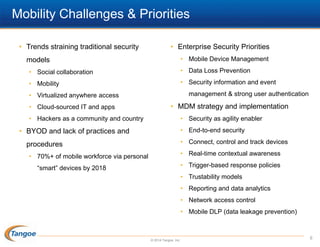
Mobility Challenges & Priorities
• Trends straining traditional security

• Enterprise Security Priorities
• Mobile Device Management

models
• Social collaboration

• Data Loss Prevention

• Mobility

• Security information and event
management & strong user authentication

• Virtualized anywhere access
• Cloud-sourced IT and apps

• MDM strategy and implementation

• Hackers as a community and country

• Security as agility enabler
• End-to-end security

• BYOD and lack of practices and

• Connect, control and track devices

procedures

• Real-time contextual awareness

• 70%+ of mobile workforce via personal

• Trigger-based response policies

“smart” devices by 2018

• Trustability models

• Reporting and data analytics
• Network access control
• Mobile DLP (data leakage prevention)

© 2014 Tangoe, Inc.

6
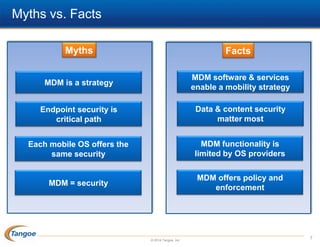
Myths vs. Facts
Myths

Facts

MDM is a strategy

MDM software & services
enable a mobility strategy

Endpoint security is
critical path

Data & content security
matter most

Each mobile OS offers the
same security

MDM functionality is
limited by OS providers

MDM = security

MDM offers policy and
enforcement

© 2014 Tangoe, Inc.

7
Risk Analysis
• Do you have a risk analysis already?
• What were the protection mechanisms of your BES and the endpoints?
• Levels of policy enforcement

• Update your firm’s risk profile
•

Wide range of capabilities among BlackBerry, iOS, Android, and Windows Phone 8

•

Business and service environment(s)

•

Mobile endpoint use cases

• Risk types
• Sensitive data loss, malicious software, device loss, out-of-date
• Application architecture

• Risk is not horizontal
• Diverse user base
• Other variations


Business unit



Location



Mobile device usage location(s)

© 2014 Tangoe, Inc.

8
Involve HR, Finance, Business Unit Leads
• Technically, this is not difficult
• Managing change requires leadership from the front
• Visible platform transition

• Applications and use cases

• Expectation Management
• Who chooses the device?
• Ownership matters
• Focus on the User Experience
• Lock-down approach is losing most of its appeal

• Migration creates ownership policy issues for privacy and personal liability
• Company provided device offers minimal privacy for an employee
• No privacy challenges yet for BYOD liability model
• Uncharted: personal media content…

© 2014 Tangoe, Inc.

9
To the Help Desk & Beyond
• Help desk funding
• Critical path to productivity
• Any device? Person? Liability model?

• What level of support will you, or not, provide?
• Complete self-service not likely to fly

• Develop and clearly communicate your support policy
• Demark responsibilities and scenarios
•

You already know a lot can go wrong…and will

• Data plan options and/or requirements
• If BYO is their only device and employee does not pay their bill?


Incurred data roaming costs on a 4G network



Inability to access email

• Going beyond
• Exec has first tablet device, does not know how to use it….
• Non-executive: do they wait? Unable to work?

© 2014 Tangoe, Inc.

10
Getting Started: Policy Strategy Questions
• Who qualifies?
• What devices are allowed?
• Who buys/owns the device?
• What service expenses will be covered, and how?
• What is supported, at what level?
• What does the employee have to do?
• Enterprise security, data usage and privacy restrictions
• Employee privacy issues
• Labor implications of after-hours support
• Liability issues (E-discovery)
• Limitations on reimbursement (what is the strategy?)

• Penalties for noncompliance (and enforcement?
• Data and phone number transition at termination
• Support policies and liability issues must be reviewed by the corporate legal department, the
executive board, HR and business unit managers.
© 2014 Tangoe, Inc.

11
Minimize Platforms and Devices
• Do not support every device

• Understand the implications of

• Minimize options based on value

multiple platforms

• Determine minimal OS version

• Can equal greater opportunity but also



Encryption enforcement?



Robust VPN configuration?



Application management tools?



Understand how and frequency for OS updates

be a challenge if considered after the
fact
• Consider device lifecycle
•

• Usability and performance

Policy enforcement, usability, apps,
usage monitoring, secure data and

• Hotspot and tethering support?

communications, support, warranty

• 6-ft. drop on concrete test

• Multi-platform, multi-department
• Multi-departments will use the same

enterprise apps
• Cost of internal app development can rise
dramatically with BYOD

© 2014 Tangoe, Inc.

12
Mistakes to Avoid: Inconsistent Security Policies
• Focus on business requirements first and devices second
• Policy gaps are the origins of most mobile security failures

• Determine approved platform options for BYOD
• Get cross-departmental buy-in
• Business information requirements may be overly broad and difficult to fulfill
across mobile platforms

• Security policies need to account for OS limitations
• Adapt data and application policies accordingly, and document your policies

• All mobile devices are work platforms, irrespective of liability model
• Anticipate that mobile work platform loss could result in data breach event
• May require disclosure
• Know and track your device, application, and data inventory

© 2014 Tangoe, Inc.

13
Security and Access Critical Success Factors
• Create an access baseline

• Automate device provisioning

• Determine who has access

• Pre-configure AUP liability models

• Identify access control gaps

• Integrate with TEM procurement

• Tie access controls to environment

• Terminate unused accounts

• Segregate access by role and liability model

• Prevent access to resources

• Best practice what works best for your

• Consider a device recycle program

company

• Proactively monitor for unusual activity

• Check applicable regulations

• Monitor high volume of SMS or data

• Policy of “least access”

• Control remote access to apps and

• Regulators want doctrine of “least privilege”
applied

databases
• Mobility and cloud computing expand the

• Enable specific security roles to enforce

enterprise operational perimeter

security and access management policies

• NAC is becoming a baseline requirement

© 2014 Tangoe, Inc.
Horizontal AUP’s
• All devices

• Personal devices

• Device will lock your account after 10 failed

• Limit device enrollments at company

login attempts

discretion

• Device will lock every 30 minutes requiring

• Filter sensitive data at company

reentry of password

discretion

• Password rotation every 90 days with

• Accept company lock/wipe decisions
• Require end-user acceptable-use

minimal strength
• Remote wipe..full vs. partial?

policy agreement

• Minimum device level: iPhone 4, iOS 5.0x,

• What about…

Android 3.x

• Intentional data leakage

• Company-administered MDM

• NA vs. EMEA vs. APAC?

• No jailbreak & no rooting policies

• MDM client and monitoring apps?

• Certificates for any and all access: email,

• Monitoring WLAN usage


apps, networks
• Application and data encryption at all times

© 2014 Tangoe, Inc.

BYOD…sites visited, etc?



Restrict WLAN access?

15
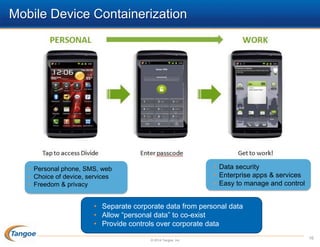
Mobile Device Containerization

• Data security
• Enterprise apps & services
• Easy to manage and control

• Personal phone, SMS, web
• Choice of device, services
• Freedom & privacy

• Separate corporate data from personal data
• Allow “personal data” to co-exist
• Provide controls over corporate data
© 2014 Tangoe, Inc.

16
Getting Started
• Lack of formal mobility strategy creates security risks
• A well-intentioned employee is the biggest risk with unmanaged personal device
• Have an action response plan

• Encrypt all data…everywhere (native on-device & behind the firewall)
• Deploy iOS and Android apps that utilize data protection APIs

• 2014: Agile Scalability
• Ownership

Trust

• Identity and “trustability”
• Monitoring, consulting… and less controls
• Implement enforceable policies

• Cross-discipline buy-in
• One approach (aka PC) will not fly
• Security enforcement consistency across segments
• Know what employees need now vs. next year
• Guide business leaders

© 2014 Tangoe, Inc.

17
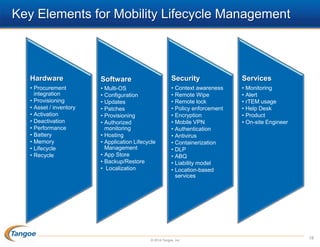
Key Elements for Mobility Lifecycle Management

Hardware

Software

Security

Services

• Procurement
integration
• Provisioning
• Asset / inventory
• Activation
• Deactivation
• Performance
• Battery
• Memory
• Lifecycle
• Recycle

• Multi-OS
• Configuration
• Updates
• Patches
• Provisioning
• Authorized
monitoring
• Hosting
• Application Lifecycle
Management
• App Store
• Backup/Restore
• Localization

• Context awareness
• Remote Wipe
• Remote lock
• Policy enforcement
• Encryption
• Mobile VPN
• Authentication
• Antivirus
• Containerization
• DLP
• ABQ
• Liability model
• Location-based
services

• Monitoring
• Alert
• rTEM usage
• Help Desk
• Product
• On-site Engineer

© 2014 Tangoe, Inc.

18
First Business, Last Technology
• Mobility is a business challenge
• Systems thinking approach for shared objectives across business disciplines
• Technology issues driven by business unit end results

• Focus on the business first, then the technology
• Identify use cases
• Consult with business units
• Assess risk

• Focus on your data
• Satisfaction counts

• Assess requirements and use cases
• Prioritize business requirements
• Not everyone is high value
• Trustability does not mean lock down across the mobile estate
• Requirements for data mobility and endpoint control

© 2014 Tangoe, Inc.

19
Questions and Contacts

Troy Fulton
Director Product Marketing
Troy.Fulton@tangoe.com

Tangoe
203.859.9300
info@tangoe.com
www.tangoe.com

© 2014 Tangoe, Inc.
APPENDIX

© 2014 Tangoe, Inc.

21
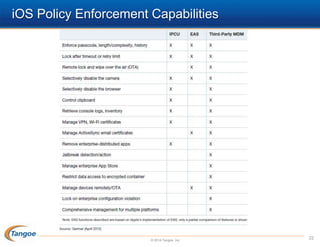
iOS Policy Enforcement Capabilities

© 2014 Tangoe, Inc.

22
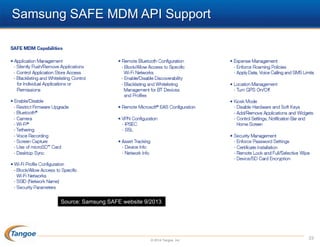
Samsung SAFE MDM API Support

Source: Samsung SAFE website 9/2013

© 2014 Tangoe, Inc.

23
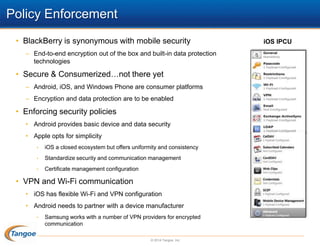
Policy Enforcement
• BlackBerry is synonymous with mobile security
– End-to-end encryption out of the box and built-in data protection
technologies

• Secure & Consumerized…not there yet
– Android, iOS, and Windows Phone are consumer platforms
– Encryption and data protection are to be enabled

• Enforcing security policies
• Android provides basic device and data security
• Apple opts for simplicity
•

iOS a closed ecosystem but offers uniformity and consistency

•

Standardize security and communication management

•

Certificate management configuration

• VPN and Wi-Fi communication
• iOS has flexible Wi-Fi and VPN configuration
• Android needs to partner with a device manufacturer
•

Samsung works with a number of VPN providers for encrypted
communication
© 2014 Tangoe, Inc.

iOS IPCU
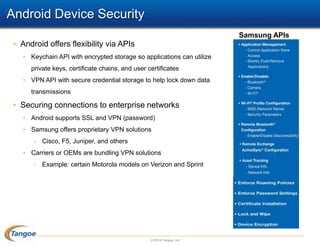
Android Device Security
Samsung APIs

• Android offers flexibility via APIs
• Keychain API with encrypted storage so applications can utilize
private keys, certificate chains, and user certificates
• VPN API with secure credential storage to help lock down data
transmissions

• Securing connections to enterprise networks
• Android supports SSL and VPN (password)
• Samsung offers proprietary VPN solutions
•

Cisco, F5, Juniper, and others

• Carriers or OEMs are bundling VPN solutions
•

Example: certain Motorola models on Verizon and Sprint

© 2014 Tangoe, Inc.

How to Manage the Great BlackBerry Migration

  • 1.
    How to Managethe Great BlackBerry Migration Presented by: Troy Fulton, Director, Product Marketing Thursday, January 16, 2014 © 2014 Tangoe, Inc.
  • 2.
    Today’s Speaker Troy Fulton Director,Product Marketing • 20+ years in high-tech and communications devices • Senior product marketing and management positions with global corporations including Motorola Mobility, Nokia, and Compaq • MBA from The College of William and Mary; BA from Boston College © 2014 Tangoe, Inc. 2
  • 3.
    Agenda • What’s Drivingthe Great BlackBerry Migration • Managing Expectations • Risk Analysis • Help Desk Considerations • Mistakes to Avoid • Security and Access in a Consumerized World © 2014 Tangoe, Inc.
  • 4.
    Why the GreatBlackBerry Migration is Happening • Is waiting still an option? • 4Q13 • BYOD trend presents challenges • Shrinking subscriber base • Problem definition • BlackBerry fell behind Apple and Google • Network outages • Market share volatility • Migration as normal • Not your first…or last…migration • Opportunity cost • Beyond email • Forgoing innovation • Mobile transforming agility • Optimize strategy and spend without sacrificing productivity, security, and manageability • Simplified architecture and removal of throughput bottlenecks © 2014 Tangoe, Inc. 4
  • 5.
    Why Mobility isComplex • Traditional computing supports… • Silo architecture • Linear control • Systems thinking supports… • Responsive architecture • Ecosystem cause and effect • Collaboration in real-time • Shared objectives © 2014 Tangoe, Inc. 5
  • 6.
    Mobility Challenges &Priorities • Trends straining traditional security • Enterprise Security Priorities • Mobile Device Management models • Social collaboration • Data Loss Prevention • Mobility • Security information and event management & strong user authentication • Virtualized anywhere access • Cloud-sourced IT and apps • MDM strategy and implementation • Hackers as a community and country • Security as agility enabler • End-to-end security • BYOD and lack of practices and • Connect, control and track devices procedures • Real-time contextual awareness • 70%+ of mobile workforce via personal • Trigger-based response policies “smart” devices by 2018 • Trustability models • Reporting and data analytics • Network access control • Mobile DLP (data leakage prevention) © 2014 Tangoe, Inc. 6
  • 7.
    Myths vs. Facts Myths Facts MDMis a strategy MDM software & services enable a mobility strategy Endpoint security is critical path Data & content security matter most Each mobile OS offers the same security MDM functionality is limited by OS providers MDM = security MDM offers policy and enforcement © 2014 Tangoe, Inc. 7
  • 8.
    Risk Analysis • Doyou have a risk analysis already? • What were the protection mechanisms of your BES and the endpoints? • Levels of policy enforcement • Update your firm’s risk profile • Wide range of capabilities among BlackBerry, iOS, Android, and Windows Phone 8 • Business and service environment(s) • Mobile endpoint use cases • Risk types • Sensitive data loss, malicious software, device loss, out-of-date • Application architecture • Risk is not horizontal • Diverse user base • Other variations  Business unit  Location  Mobile device usage location(s) © 2014 Tangoe, Inc. 8
  • 9.
    Involve HR, Finance,Business Unit Leads • Technically, this is not difficult • Managing change requires leadership from the front • Visible platform transition • Applications and use cases • Expectation Management • Who chooses the device? • Ownership matters • Focus on the User Experience • Lock-down approach is losing most of its appeal • Migration creates ownership policy issues for privacy and personal liability • Company provided device offers minimal privacy for an employee • No privacy challenges yet for BYOD liability model • Uncharted: personal media content… © 2014 Tangoe, Inc. 9
  • 10.
    To the HelpDesk & Beyond • Help desk funding • Critical path to productivity • Any device? Person? Liability model? • What level of support will you, or not, provide? • Complete self-service not likely to fly • Develop and clearly communicate your support policy • Demark responsibilities and scenarios • You already know a lot can go wrong…and will • Data plan options and/or requirements • If BYO is their only device and employee does not pay their bill?  Incurred data roaming costs on a 4G network  Inability to access email • Going beyond • Exec has first tablet device, does not know how to use it…. • Non-executive: do they wait? Unable to work? © 2014 Tangoe, Inc. 10
  • 11.
    Getting Started: PolicyStrategy Questions • Who qualifies? • What devices are allowed? • Who buys/owns the device? • What service expenses will be covered, and how? • What is supported, at what level? • What does the employee have to do? • Enterprise security, data usage and privacy restrictions • Employee privacy issues • Labor implications of after-hours support • Liability issues (E-discovery) • Limitations on reimbursement (what is the strategy?) • Penalties for noncompliance (and enforcement? • Data and phone number transition at termination • Support policies and liability issues must be reviewed by the corporate legal department, the executive board, HR and business unit managers. © 2014 Tangoe, Inc. 11
  • 12.
    Minimize Platforms andDevices • Do not support every device • Understand the implications of • Minimize options based on value multiple platforms • Determine minimal OS version • Can equal greater opportunity but also  Encryption enforcement?  Robust VPN configuration?  Application management tools?  Understand how and frequency for OS updates be a challenge if considered after the fact • Consider device lifecycle • • Usability and performance Policy enforcement, usability, apps, usage monitoring, secure data and • Hotspot and tethering support? communications, support, warranty • 6-ft. drop on concrete test • Multi-platform, multi-department • Multi-departments will use the same enterprise apps • Cost of internal app development can rise dramatically with BYOD © 2014 Tangoe, Inc. 12
  • 13.
    Mistakes to Avoid:Inconsistent Security Policies • Focus on business requirements first and devices second • Policy gaps are the origins of most mobile security failures • Determine approved platform options for BYOD • Get cross-departmental buy-in • Business information requirements may be overly broad and difficult to fulfill across mobile platforms • Security policies need to account for OS limitations • Adapt data and application policies accordingly, and document your policies • All mobile devices are work platforms, irrespective of liability model • Anticipate that mobile work platform loss could result in data breach event • May require disclosure • Know and track your device, application, and data inventory © 2014 Tangoe, Inc. 13
  • 14.
    Security and AccessCritical Success Factors • Create an access baseline • Automate device provisioning • Determine who has access • Pre-configure AUP liability models • Identify access control gaps • Integrate with TEM procurement • Tie access controls to environment • Terminate unused accounts • Segregate access by role and liability model • Prevent access to resources • Best practice what works best for your • Consider a device recycle program company • Proactively monitor for unusual activity • Check applicable regulations • Monitor high volume of SMS or data • Policy of “least access” • Control remote access to apps and • Regulators want doctrine of “least privilege” applied databases • Mobility and cloud computing expand the • Enable specific security roles to enforce enterprise operational perimeter security and access management policies • NAC is becoming a baseline requirement © 2014 Tangoe, Inc.
  • 15.
    Horizontal AUP’s • Alldevices • Personal devices • Device will lock your account after 10 failed • Limit device enrollments at company login attempts discretion • Device will lock every 30 minutes requiring • Filter sensitive data at company reentry of password discretion • Password rotation every 90 days with • Accept company lock/wipe decisions • Require end-user acceptable-use minimal strength • Remote wipe..full vs. partial? policy agreement • Minimum device level: iPhone 4, iOS 5.0x, • What about… Android 3.x • Intentional data leakage • Company-administered MDM • NA vs. EMEA vs. APAC? • No jailbreak & no rooting policies • MDM client and monitoring apps? • Certificates for any and all access: email, • Monitoring WLAN usage  apps, networks • Application and data encryption at all times © 2014 Tangoe, Inc. BYOD…sites visited, etc?  Restrict WLAN access? 15
  • 16.
    Mobile Device Containerization •Data security • Enterprise apps & services • Easy to manage and control • Personal phone, SMS, web • Choice of device, services • Freedom & privacy • Separate corporate data from personal data • Allow “personal data” to co-exist • Provide controls over corporate data © 2014 Tangoe, Inc. 16
  • 17.
    Getting Started • Lackof formal mobility strategy creates security risks • A well-intentioned employee is the biggest risk with unmanaged personal device • Have an action response plan • Encrypt all data…everywhere (native on-device & behind the firewall) • Deploy iOS and Android apps that utilize data protection APIs • 2014: Agile Scalability • Ownership Trust • Identity and “trustability” • Monitoring, consulting… and less controls • Implement enforceable policies • Cross-discipline buy-in • One approach (aka PC) will not fly • Security enforcement consistency across segments • Know what employees need now vs. next year • Guide business leaders © 2014 Tangoe, Inc. 17
  • 18.
    Key Elements forMobility Lifecycle Management Hardware Software Security Services • Procurement integration • Provisioning • Asset / inventory • Activation • Deactivation • Performance • Battery • Memory • Lifecycle • Recycle • Multi-OS • Configuration • Updates • Patches • Provisioning • Authorized monitoring • Hosting • Application Lifecycle Management • App Store • Backup/Restore • Localization • Context awareness • Remote Wipe • Remote lock • Policy enforcement • Encryption • Mobile VPN • Authentication • Antivirus • Containerization • DLP • ABQ • Liability model • Location-based services • Monitoring • Alert • rTEM usage • Help Desk • Product • On-site Engineer © 2014 Tangoe, Inc. 18
  • 19.
    First Business, LastTechnology • Mobility is a business challenge • Systems thinking approach for shared objectives across business disciplines • Technology issues driven by business unit end results • Focus on the business first, then the technology • Identify use cases • Consult with business units • Assess risk • Focus on your data • Satisfaction counts • Assess requirements and use cases • Prioritize business requirements • Not everyone is high value • Trustability does not mean lock down across the mobile estate • Requirements for data mobility and endpoint control © 2014 Tangoe, Inc. 19
  • 20.
    Questions and Contacts TroyFulton Director Product Marketing Troy.Fulton@tangoe.com Tangoe 203.859.9300 info@tangoe.com www.tangoe.com © 2014 Tangoe, Inc.
  • 21.
  • 22.
    iOS Policy EnforcementCapabilities © 2014 Tangoe, Inc. 22
  • 23.
    Samsung SAFE MDMAPI Support Source: Samsung SAFE website 9/2013 © 2014 Tangoe, Inc. 23
  • 24.
    Policy Enforcement • BlackBerryis synonymous with mobile security – End-to-end encryption out of the box and built-in data protection technologies • Secure & Consumerized…not there yet – Android, iOS, and Windows Phone are consumer platforms – Encryption and data protection are to be enabled • Enforcing security policies • Android provides basic device and data security • Apple opts for simplicity • iOS a closed ecosystem but offers uniformity and consistency • Standardize security and communication management • Certificate management configuration • VPN and Wi-Fi communication • iOS has flexible Wi-Fi and VPN configuration • Android needs to partner with a device manufacturer • Samsung works with a number of VPN providers for encrypted communication © 2014 Tangoe, Inc. iOS IPCU
  • 25.
    Android Device Security SamsungAPIs • Android offers flexibility via APIs • Keychain API with encrypted storage so applications can utilize private keys, certificate chains, and user certificates • VPN API with secure credential storage to help lock down data transmissions • Securing connections to enterprise networks • Android supports SSL and VPN (password) • Samsung offers proprietary VPN solutions • Cisco, F5, Juniper, and others • Carriers or OEMs are bundling VPN solutions • Example: certain Motorola models on Verizon and Sprint © 2014 Tangoe, Inc.