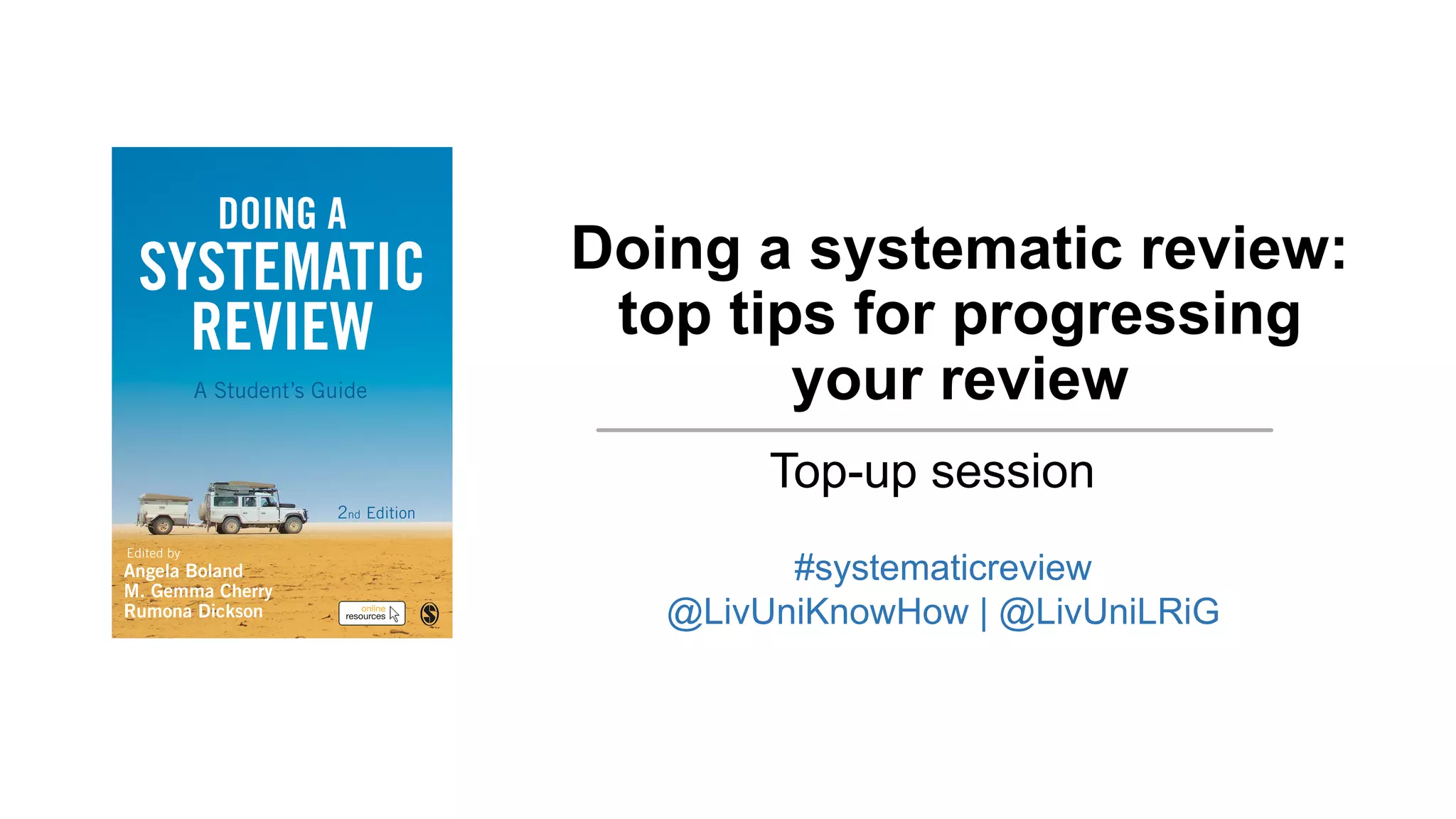
Doing a systematic review:
top tips for progressing
your review
Top-up session
#systematicreview
@LivUniKnowHow | @LivUniLRiG
This session
A series of prompts and demonstrations to help you
progress your systematic review:
§ Searching
§ Selecting evidence
§ Data extraction
§ Reporting of your review
We Map
LRiG – Health Data Science,
Institute of Population Health
Liverpool Reviews and Implementation Group (LRiG) –
20 years at the core of evidence-based guidance
development at NICE.
LRiG delivers a range of high-quality Health Technology
Assessments and capacity development initiatives
Capacity development – support for individuals and
teams to use evidence to develop practice, services and
research.
@LivUniLRiG | liverpool.ac.uk/LRiG
Our book
www.tinyURL.com/DoingaReview2
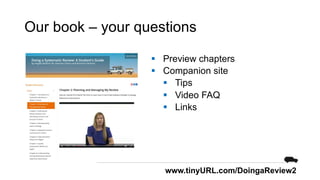
Our book – your questions
§ Preview chapters
§ Companion site
§ Tips
§ Video FAQ
§ Links
www.tinyURL.com/DoingaReview2
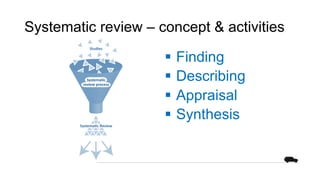
Systematic review – concept & activities
§ Finding
§ Describing
§ Appraisal
§ Synthesis
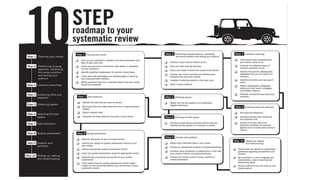
Systematic review – our 10-step road
map
Systematic review approaches – for
different questions
• To present a concept
Descriptive
• Explore preferences about what should happen
Normative
• Investigate a relationship between two or more
variables
Observational/relational
• Investigate the effect of one or more independent
variables on one or more outcome variables
Causal
• Explore factors that cause a condition, event or
process
Theoretical
Searching
◉◎◎◎
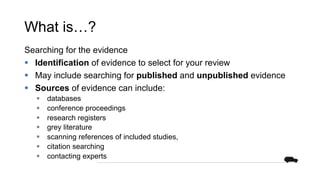
What is…?
Searching for the evidence
§ Identification of evidence to select for your review
§ May include searching for published and unpublished evidence
§ Sources of evidence can include:
§ databases
§ conference proceedings
§ research registers
§ grey literature
§ scanning references of included studies,
§ citation searching
§ contacting experts
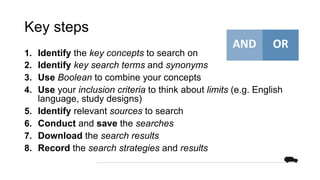
Key steps
1. Identify the key concepts to search on
2. Identify key search terms and synonyms
3. Use Boolean to combine your concepts
4. Use your inclusion criteria to think about limits (e.g. English
language, study designs)
5. Identify relevant sources to search
6. Conduct and save the searches
7. Download the search results
8. Record the search strategies and results
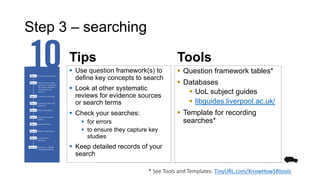
Step 3 – searching
Tips Tools
§ Question framework tables*
§ Databases
§ UoL subject guides
§ libguides.liverpool.ac.uk/
§ Template for recording
searches*
§ Use question framework(s) to
define key concepts to search
§ Look at other systematic
reviews for evidence sources
or search terms
§ Check your searches:
§ for errors
§ to ensure they capture key
studies
§ Keep detailed records of your
search
* See Tools and Templates: TinyURL.com/KnowHowSRtools
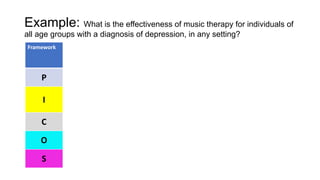
Example: What is the effectiveness of music therapy for individuals of
all age groups with a diagnosis of depression, in any setting?
Framework
P
I
C
O
S
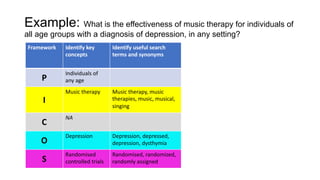
Example: What is the effectiveness of music therapy for individuals of
all age groups with a diagnosis of depression, in any setting?
Framework Identify key
concepts
P
Individuals of any
age
I
Music therapy
C
NA
O
Depression
S
Randomised
controlled trials
Example: What is the effectiveness of music therapy for individuals of
all age groups with a diagnosis of depression, in any setting?
Framework Identify key
concepts
Identify useful search
terms and synonyms
P
Individuals of
any age
I
Music therapy Music therapy, music
therapies, music, musical,
singing
C
NA
O
Depression Depression, depressed,
depression, dysthymia
S
Randomised
controlled trials
Randomised, randomized,
randomly assigned
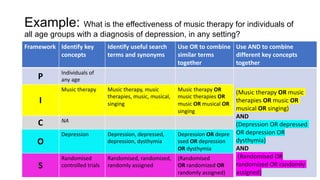
Example: What is the effectiveness of music therapy for individuals of
all age groups with a diagnosis of depression, in any setting?
Framework Identify key
concepts
Identify useful search
terms and synonyms
Use OR to combine
similar terms together
P Individuals of
any age
I
Music therapy Music therapy, music
therapies, music, musical,
singing
Music therapy OR music
therapies OR music OR
musical OR singing
C NA
O
Depression Depression, depressed,
depression, dysthymia
Depression OR depresse
d OR depression OR
dysthymia
S
Randomised
controlled trials
Randomised, randomized,
randomly assigned
(Randomised
OR randomized OR
randomly assigned)
Example: What is the effectiveness of music therapy for individuals of
all age groups with a diagnosis of depression, in any setting?
Framework Identify key
concepts
Identify useful search
terms and synonyms
Use OR to combine
similar terms
together
Use AND to combine
different key concepts
together
P Individuals of
any age
(Music therapy OR music
therapies OR music OR
musical OR singing)
AND
(Depression OR depressed
OR depression OR
dysthymia)
AND
(Randomised OR
randomized OR randomly
assigned)
I
Music therapy Music therapy, music
therapies, music, musical,
singing
Music therapy OR
music therapies OR
music OR musical OR
singing
C NA
O
Depression Depression, depressed,
depression, dysthymia
Depression OR depre
ssed OR depression
OR dysthymia
S
Randomised
controlled trials
Randomised, randomized,
randomly assigned
(Randomised
OR randomized OR
randomly assigned)
Demo – searching
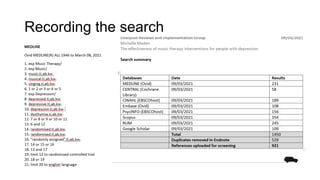
Recording the search
Selection
◎◎◎◎
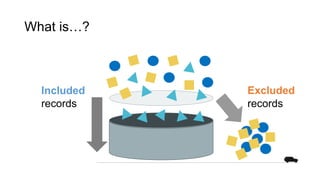
What is…?
Included
records
Excluded
records
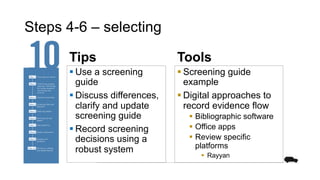
Steps 4-6 – selecting
Tips Tools
§ Screening guide
example
§ Digital approaches to
record evidence flow
§ Bibliographic software
§ Office apps
§ Review specific
platforms
§ Rayyan
§ Use a screening
guide
§ Discuss differences,
clarify and update
screening guide
§ Record screening
decisions using a
robust system
What is…?
Selecting evidence from your search results
2 stages:
• Screen the titles and abstracts of search results against your
inclusion and exclusion criteria
• Select full-text papers for inclusion in your review, noting
reason for exclusion
Keeping records:
Record and report the results of your search and process of
selecting evidence
Screening guide
Screening tool
Criteria for first screen – using title & abstract, a rapid assessment to exclude or mark for retrieval of
full text
Question frame Options Examples/notes
Can I not exclude this record?
Does the record appear to be:
music therapy
AND
eating disorders
AND
experimental design
OR
case series (see notes)
Refer to the Screening
Tool with inclusion and
exclusions criteria.
Yes – code as: Include
(for consideration of
the full text at a further
stage of review)
If you have included
but have strong doubt
about its suitability
mark as ‘Maybe’
instead. Add a note
briefly describing your
area of doubt.
Also see
If considering for more than 2 min,
do not exclude and move to next
record
If the record appears to describe a
case study or case series - then code
as ‘Include’ and [Label] ‘Case series’
at at ti.abs. (A decision will be made
on inclusion at the next stage of the
review.)
If the record is a review (of any kind)
or an Expert piece - then code as
‘Include’ at ti.abs (for identification
of other primary research and
analysis framework purposes) and
use [Label] facility, ‘Systematic
review’, ‘Review’ or an ‘Expert
piece’.
If the record is a book chapter and
may report primary data, then. then
code as ‘Include’ at ti.abs (for
identification of other primary
research and analysis framework
purposes) and use [Label] facility,
‘Book’. (A decision will be made on
inclusion at the next stage of the
review.)
Can I exclude this record? Yes – code as: Exclude Exclusion include:
Population – not eating disorders
such as dementia-related eating
difficulties anatomical, coordination,
§ Written, agreed and tested
guide to the process and
criteria for screening
§ Should be consistent with
your protocol
§ Report deviations
See Tools and Templates: TinyURL.com/KnowHowSRtools
Demo – review systems
Data extraction
◎◎◉◎
What is…?
• A data extraction involves identify, extracting and recording
relevant data to answer your review question
§ Data extraction forms record relevant data from a particular
study – therefore you need form for each study.
§ Data extraction tables are tables which allow you to store
extracted data from one or all of your studies in one place.
§ Data tables (or evidence tables) are tables that describe and
summarize your extracted data in your thesis.
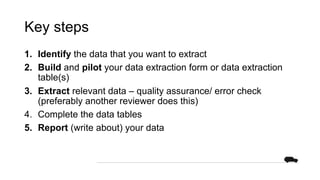
Key steps
1. Identify the data that you want to extract
2. Build and pilot your data extraction form or data extraction
table(s)
3. Extract relevant data – quality assurance/ error check
(preferably another reviewer does this)
4. Complete the data tables
5. Report (write about) your data
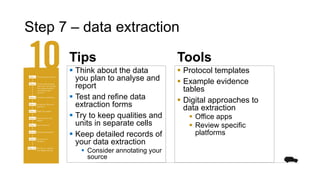
Step 7 – data extraction
Tips Tools
§ Protocol templates
§ Example evidence
tables
§ Digital approaches to
data extraction
§ Office apps
§ Review specific
platforms
§ Think about the data
you plan to analyse and
report
§ Test and refine data
extraction forms
§ Try to keep qualities and
units in separate cells
§ Keep detailed records of
your data extraction
§ Consider annotating your
source
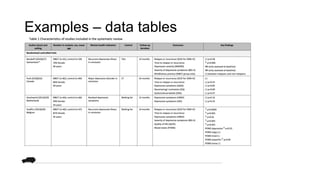
Examples – data tables
Examples – data tables (quantitative)
Bibliographi c reference
Interventio n Comparato r Method of allocation
Intervention in detail (who, where, when) Methods use to minimize confounders
Number of
participants
Participant
characteristics
Length of
follow-up
Methods of
analysis
Outcomes/
Results
Limitations
Additional
comments
Power
information
Method of
recruitment
Information on
representativen
ess
Loss to
follow-up
ITT or
completer
Adjustments
for baseline
differences
Objective/
subjective
Time points
Health
inequalities
impact
Identified by
authors
Identified by
developers
Evidence
gaps
Further
research
identified
§ NICE Guidelines Maunual Appendix H
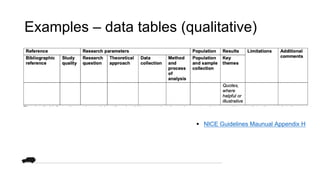
Examples – data tables (qualitative)
§ NICE Guidelines Maunual Appendix H
Reporting
◎◎◎◉
What is….?
Discussion of findings and evidence quality and conclusions
§ Provide a critical interpretation of the results of your review in
relation to the review question that you set out to answer.
§ Explore uncertainties and their implications on your findings.
Key steps
First, start with a brief overview of review question and
methodology.
Then, answer the following questions:
§ What were the main findings of my review?
§ How do my findings fit with previous research?
§ What are the strengths and limitations of the included studies?
§ What are the strengths and limitations of the review?
§ Can the findings be generalised?
§ What are the implications of the review?
§ What conclusions can be drawn from the review?
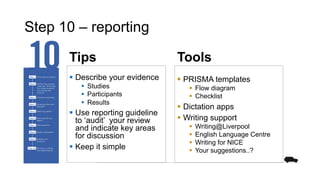
Step 10 – reporting
Tips Tools
§ PRISMA templates
§ Flow diagram
§ Checklist
§ Dictation apps
§ Writing support
§ Writing@Liverpool
§ English Language Centre
§ Writing for NICE
§ Your suggestions..?
§ Describe your evidence
§ Studies
§ Participants
§ Results
§ Use reporting guideline
to ‘audit’ your review
and indicate key areas
for discussion
§ Keep it simple
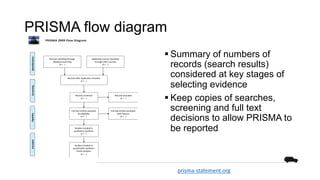
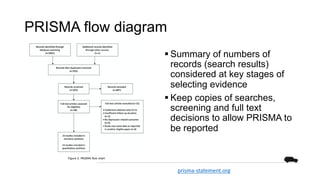
PRISMA flow diagram
§ Summary of numbers of
records (search results)
considered at key stages of
selecting evidence
§ Keep copies of searches,
screening and full text
decisions to allow PRISMA to
be reported
PRISMA 2009 Flow Diagram
Records identified through
database searching
(n = )
Screening
Included
Eligibility
Identification
Additional records identified
through other sources
(n = )
Records after duplicates removed
(n = )
Records screened
(n = )
Records excluded
(n = )
Full-text articles assessed
for eligibility
(n = )
Full-text articles excluded,
with reasons
(n = )
Studies included in
qualitative synthesis
(n = )
Studies included in
quantitative synthesis
(meta-analysis)
(n = )
prisma-statement.org
PRISMA flow diagram
§ Summary of numbers of
records (search results)
considered at key stages of
selecting evidence
§ Keep copies of searches,
screening and full text
decisions to allow PRISMA to
be reported
prisma-statement.org
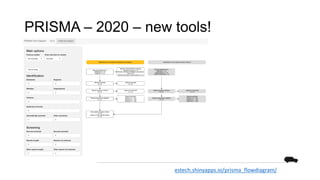
PRISMA – 2020 – new tools!
estech.shinyapps.io/prisma_flowdiagram/
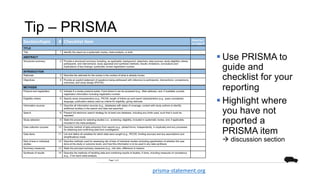
PRISMA 2009 Checklist
Section/topic # Checklist item Reported
on page #
TITLE
Title 1 Identify the report as a systematic review, meta-analysis, or both.
ABSTRACT
Structured summary 2 Provide a structured summary including, as applicable: background; objectives; data sources; study eligibility criteria,
participants, and interventions; study appraisal and synthesis methods; results; limitations; conclusions and
implications of key findings; systematic review registration number.
INTRODUCTION
Rationale 3 Describe the rationale for the review in the context of what is already known.
Objectives 4 Provide an explicit statement of questions being addressed with reference to participants, interventions, comparisons,
outcomes, and study design (PICOS).
METHODS
Protocol and registration 5 Indicate if a review protocol exists, if and where it can be accessed (e.g., Web address), and, if available, provide
registration information including registration number.
Eligibility criteria 6 Specify study characteristics (e.g., PICOS, length of follow-up) and report characteristics (e.g., years considered,
language, publication status) used as criteria for eligibility, giving rationale.
Information sources 7 Describe all information sources (e.g., databases with dates of coverage, contact with study authors to identify
additional studies) in the search and date last searched.
Search 8 Present full electronic search strategy for at least one database, including any limits used, such that it could be
repeated.
Study selection 9 State the process for selecting studies (i.e., screening, eligibility, included in systematic review, and, if applicable,
included in the meta-analysis).
Data collection process 10 Describe method of data extraction from reports (e.g., piloted forms, independently, in duplicate) and any processes
for obtaining and confirming data from investigators.
Data items 11 List and define all variables for which data were sought (e.g., PICOS, funding sources) and any assumptions and
simplifications made.
Risk of bias in individual
studies
12 Describe methods used for assessing risk of bias of individual studies (including specification of whether this was
done at the study or outcome level), and how this information is to be used in any data synthesis.
Summary measures 13 State the principal summary measures (e.g., risk ratio, difference in means).
Synthesis of results 14 Describe the methods of handling data and combining results of studies, if done, including measures of consistency
(e.g., I2) for each meta-analysis.
Page 1 of 2
Tip – PRISMA
§ Use PRISMA to
guide and
checklist for your
reporting
§ Highlight where
you have not
reported a
PRISMA item
à discussion section
prisma-statement.org
Summary – next steps
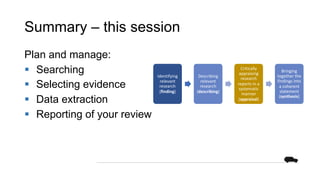
Summary – this session
Plan and manage:
§ Searching
§ Selecting evidence
§ Data extraction
§ Reporting of your review
Identifying
relevant
research
(finding)
Describing
relevant
research
(describing)
Critically
appraising
research
reports in a
systematic
manner
(appraisal)
Bringing
together the
findings into
a coherent
statement
(synthesis)
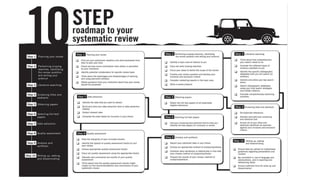
Systematic review – our 10-step road
map
Next steps
§ Your questions
§ References
§ This presentation
§ Finding tools…
§ Download our tools:
TinyURL.com/KnowHowSRtools
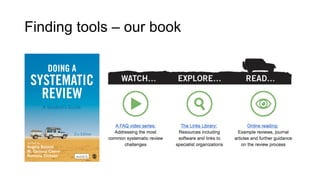
Finding tools – our book
Finding tools – SR toolbox
systematicreviewtools.com
Finding tools – methods guides
nice.org.uk/process/pmg20/
training.cochrane.org/handbook/
tinyURl.com/DoingaReview2
Finding tools – reporting standards
equator-
network.org
References
Key steps and top tips based on:
Boland, A., Cherry, G. and Dickson,
R. eds., 2017. Doing a systematic
review: A student's guide. Sage.
§ TinyURL.com/DoingaReview2
NICE, 2014. Developing NICE guidelines: the manual. NICE,
Manchester
§ https://www.nice.org.uk/process/pmg20/chapter/reviewing-
research-evidence#summarising-evidence
§ https://www.nice.org.uk/process/pmg20/chapter/writing-the-
guideline#interpreting-the-evidence-to-make-
recommendations
§ https://www.nice.org.uk/process/pmg20/resources/appendix-
h-appraisal-checklists-evidence-tables-grade-and-economic-
profiles-pdf-8779777885
NICE, 2016. Writing for NICE: a guide to help you write more
clearly. NICE, Manchester
§ https://www.nice.org.uk/corporate/ecd2/chapter/rules-of-
clear-writing
Doing a systematic
review: top tips for
progressing your review
Top-up session
#systematicreview
@LivUniKnowHow | @LivUniLRiG

Doing a systematic review: top tips for progressing your review

  • 1.
    Doing a systematicreview: top tips for progressing your review Top-up session #systematicreview @LivUniKnowHow | @LivUniLRiG
  • 2.
    This session A seriesof prompts and demonstrations to help you progress your systematic review: § Searching § Selecting evidence § Data extraction § Reporting of your review
  • 3.
    We Map LRiG –Health Data Science, Institute of Population Health Liverpool Reviews and Implementation Group (LRiG) – 20 years at the core of evidence-based guidance development at NICE. LRiG delivers a range of high-quality Health Technology Assessments and capacity development initiatives Capacity development – support for individuals and teams to use evidence to develop practice, services and research. @LivUniLRiG | liverpool.ac.uk/LRiG
  • 4.
  • 5.
    Our book –your questions § Preview chapters § Companion site § Tips § Video FAQ § Links www.tinyURL.com/DoingaReview2
  • 6.
    Systematic review –concept & activities § Finding § Describing § Appraisal § Synthesis
  • 7.
    Systematic review –our 10-step road map
  • 8.
    Systematic review approaches– for different questions • To present a concept Descriptive • Explore preferences about what should happen Normative • Investigate a relationship between two or more variables Observational/relational • Investigate the effect of one or more independent variables on one or more outcome variables Causal • Explore factors that cause a condition, event or process Theoretical
  • 9.
  • 10.
    What is…? Searching forthe evidence § Identification of evidence to select for your review § May include searching for published and unpublished evidence § Sources of evidence can include: § databases § conference proceedings § research registers § grey literature § scanning references of included studies, § citation searching § contacting experts
  • 11.
    Key steps 1. Identifythe key concepts to search on 2. Identify key search terms and synonyms 3. Use Boolean to combine your concepts 4. Use your inclusion criteria to think about limits (e.g. English language, study designs) 5. Identify relevant sources to search 6. Conduct and save the searches 7. Download the search results 8. Record the search strategies and results
  • 12.
    Step 3 –searching Tips Tools § Question framework tables* § Databases § UoL subject guides § libguides.liverpool.ac.uk/ § Template for recording searches* § Use question framework(s) to define key concepts to search § Look at other systematic reviews for evidence sources or search terms § Check your searches: § for errors § to ensure they capture key studies § Keep detailed records of your search * See Tools and Templates: TinyURL.com/KnowHowSRtools
  • 13.
    Example: What isthe effectiveness of music therapy for individuals of all age groups with a diagnosis of depression, in any setting? Framework P I C O S
  • 14.
    Example: What isthe effectiveness of music therapy for individuals of all age groups with a diagnosis of depression, in any setting? Framework Identify key concepts P Individuals of any age I Music therapy C NA O Depression S Randomised controlled trials
  • 15.
    Example: What isthe effectiveness of music therapy for individuals of all age groups with a diagnosis of depression, in any setting? Framework Identify key concepts Identify useful search terms and synonyms P Individuals of any age I Music therapy Music therapy, music therapies, music, musical, singing C NA O Depression Depression, depressed, depression, dysthymia S Randomised controlled trials Randomised, randomized, randomly assigned
  • 16.
    Example: What isthe effectiveness of music therapy for individuals of all age groups with a diagnosis of depression, in any setting? Framework Identify key concepts Identify useful search terms and synonyms Use OR to combine similar terms together P Individuals of any age I Music therapy Music therapy, music therapies, music, musical, singing Music therapy OR music therapies OR music OR musical OR singing C NA O Depression Depression, depressed, depression, dysthymia Depression OR depresse d OR depression OR dysthymia S Randomised controlled trials Randomised, randomized, randomly assigned (Randomised OR randomized OR randomly assigned)
  • 17.
    Example: What isthe effectiveness of music therapy for individuals of all age groups with a diagnosis of depression, in any setting? Framework Identify key concepts Identify useful search terms and synonyms Use OR to combine similar terms together Use AND to combine different key concepts together P Individuals of any age (Music therapy OR music therapies OR music OR musical OR singing) AND (Depression OR depressed OR depression OR dysthymia) AND (Randomised OR randomized OR randomly assigned) I Music therapy Music therapy, music therapies, music, musical, singing Music therapy OR music therapies OR music OR musical OR singing C NA O Depression Depression, depressed, depression, dysthymia Depression OR depre ssed OR depression OR dysthymia S Randomised controlled trials Randomised, randomized, randomly assigned (Randomised OR randomized OR randomly assigned)
  • 18.
  • 19.
  • 20.
  • 21.
  • 22.
    Steps 4-6 –selecting Tips Tools § Screening guide example § Digital approaches to record evidence flow § Bibliographic software § Office apps § Review specific platforms § Rayyan § Use a screening guide § Discuss differences, clarify and update screening guide § Record screening decisions using a robust system
  • 23.
    What is…? Selecting evidencefrom your search results 2 stages: • Screen the titles and abstracts of search results against your inclusion and exclusion criteria • Select full-text papers for inclusion in your review, noting reason for exclusion Keeping records: Record and report the results of your search and process of selecting evidence
  • 24.
    Screening guide Screening tool Criteriafor first screen – using title & abstract, a rapid assessment to exclude or mark for retrieval of full text Question frame Options Examples/notes Can I not exclude this record? Does the record appear to be: music therapy AND eating disorders AND experimental design OR case series (see notes) Refer to the Screening Tool with inclusion and exclusions criteria. Yes – code as: Include (for consideration of the full text at a further stage of review) If you have included but have strong doubt about its suitability mark as ‘Maybe’ instead. Add a note briefly describing your area of doubt. Also see If considering for more than 2 min, do not exclude and move to next record If the record appears to describe a case study or case series - then code as ‘Include’ and [Label] ‘Case series’ at at ti.abs. (A decision will be made on inclusion at the next stage of the review.) If the record is a review (of any kind) or an Expert piece - then code as ‘Include’ at ti.abs (for identification of other primary research and analysis framework purposes) and use [Label] facility, ‘Systematic review’, ‘Review’ or an ‘Expert piece’. If the record is a book chapter and may report primary data, then. then code as ‘Include’ at ti.abs (for identification of other primary research and analysis framework purposes) and use [Label] facility, ‘Book’. (A decision will be made on inclusion at the next stage of the review.) Can I exclude this record? Yes – code as: Exclude Exclusion include: Population – not eating disorders such as dementia-related eating difficulties anatomical, coordination, § Written, agreed and tested guide to the process and criteria for screening § Should be consistent with your protocol § Report deviations See Tools and Templates: TinyURL.com/KnowHowSRtools
  • 25.
  • 26.
  • 27.
    What is…? • Adata extraction involves identify, extracting and recording relevant data to answer your review question § Data extraction forms record relevant data from a particular study – therefore you need form for each study. § Data extraction tables are tables which allow you to store extracted data from one or all of your studies in one place. § Data tables (or evidence tables) are tables that describe and summarize your extracted data in your thesis.
  • 28.
    Key steps 1. Identifythe data that you want to extract 2. Build and pilot your data extraction form or data extraction table(s) 3. Extract relevant data – quality assurance/ error check (preferably another reviewer does this) 4. Complete the data tables 5. Report (write about) your data
  • 29.
    Step 7 –data extraction Tips Tools § Protocol templates § Example evidence tables § Digital approaches to data extraction § Office apps § Review specific platforms § Think about the data you plan to analyse and report § Test and refine data extraction forms § Try to keep qualities and units in separate cells § Keep detailed records of your data extraction § Consider annotating your source
  • 30.
  • 31.
    Examples – datatables (quantitative) Bibliographi c reference Interventio n Comparato r Method of allocation Intervention in detail (who, where, when) Methods use to minimize confounders Number of participants Participant characteristics Length of follow-up Methods of analysis Outcomes/ Results Limitations Additional comments Power information Method of recruitment Information on representativen ess Loss to follow-up ITT or completer Adjustments for baseline differences Objective/ subjective Time points Health inequalities impact Identified by authors Identified by developers Evidence gaps Further research identified § NICE Guidelines Maunual Appendix H
  • 32.
    Examples – datatables (qualitative) § NICE Guidelines Maunual Appendix H
  • 33.
  • 34.
    What is….? Discussion offindings and evidence quality and conclusions § Provide a critical interpretation of the results of your review in relation to the review question that you set out to answer. § Explore uncertainties and their implications on your findings.
  • 35.
    Key steps First, startwith a brief overview of review question and methodology. Then, answer the following questions: § What were the main findings of my review? § How do my findings fit with previous research? § What are the strengths and limitations of the included studies? § What are the strengths and limitations of the review? § Can the findings be generalised? § What are the implications of the review? § What conclusions can be drawn from the review?
  • 36.
    Step 10 –reporting Tips Tools § PRISMA templates § Flow diagram § Checklist § Dictation apps § Writing support § Writing@Liverpool § English Language Centre § Writing for NICE § Your suggestions..? § Describe your evidence § Studies § Participants § Results § Use reporting guideline to ‘audit’ your review and indicate key areas for discussion § Keep it simple
  • 37.
    PRISMA flow diagram §Summary of numbers of records (search results) considered at key stages of selecting evidence § Keep copies of searches, screening and full text decisions to allow PRISMA to be reported PRISMA 2009 Flow Diagram Records identified through database searching (n = ) Screening Included Eligibility Identification Additional records identified through other sources (n = ) Records after duplicates removed (n = ) Records screened (n = ) Records excluded (n = ) Full-text articles assessed for eligibility (n = ) Full-text articles excluded, with reasons (n = ) Studies included in qualitative synthesis (n = ) Studies included in quantitative synthesis (meta-analysis) (n = ) prisma-statement.org
  • 38.
    PRISMA flow diagram §Summary of numbers of records (search results) considered at key stages of selecting evidence § Keep copies of searches, screening and full text decisions to allow PRISMA to be reported prisma-statement.org
  • 39.
    PRISMA – 2020– new tools! estech.shinyapps.io/prisma_flowdiagram/
  • 40.
    PRISMA 2009 Checklist Section/topic# Checklist item Reported on page # TITLE Title 1 Identify the report as a systematic review, meta-analysis, or both. ABSTRACT Structured summary 2 Provide a structured summary including, as applicable: background; objectives; data sources; study eligibility criteria, participants, and interventions; study appraisal and synthesis methods; results; limitations; conclusions and implications of key findings; systematic review registration number. INTRODUCTION Rationale 3 Describe the rationale for the review in the context of what is already known. Objectives 4 Provide an explicit statement of questions being addressed with reference to participants, interventions, comparisons, outcomes, and study design (PICOS). METHODS Protocol and registration 5 Indicate if a review protocol exists, if and where it can be accessed (e.g., Web address), and, if available, provide registration information including registration number. Eligibility criteria 6 Specify study characteristics (e.g., PICOS, length of follow-up) and report characteristics (e.g., years considered, language, publication status) used as criteria for eligibility, giving rationale. Information sources 7 Describe all information sources (e.g., databases with dates of coverage, contact with study authors to identify additional studies) in the search and date last searched. Search 8 Present full electronic search strategy for at least one database, including any limits used, such that it could be repeated. Study selection 9 State the process for selecting studies (i.e., screening, eligibility, included in systematic review, and, if applicable, included in the meta-analysis). Data collection process 10 Describe method of data extraction from reports (e.g., piloted forms, independently, in duplicate) and any processes for obtaining and confirming data from investigators. Data items 11 List and define all variables for which data were sought (e.g., PICOS, funding sources) and any assumptions and simplifications made. Risk of bias in individual studies 12 Describe methods used for assessing risk of bias of individual studies (including specification of whether this was done at the study or outcome level), and how this information is to be used in any data synthesis. Summary measures 13 State the principal summary measures (e.g., risk ratio, difference in means). Synthesis of results 14 Describe the methods of handling data and combining results of studies, if done, including measures of consistency (e.g., I2) for each meta-analysis. Page 1 of 2 Tip – PRISMA § Use PRISMA to guide and checklist for your reporting § Highlight where you have not reported a PRISMA item à discussion section prisma-statement.org
  • 41.
  • 42.
    Summary – thissession Plan and manage: § Searching § Selecting evidence § Data extraction § Reporting of your review Identifying relevant research (finding) Describing relevant research (describing) Critically appraising research reports in a systematic manner (appraisal) Bringing together the findings into a coherent statement (synthesis)
  • 43.
    Systematic review –our 10-step road map
  • 44.
    Next steps § Yourquestions § References § This presentation § Finding tools… § Download our tools: TinyURL.com/KnowHowSRtools
  • 45.
  • 46.
    Finding tools –SR toolbox systematicreviewtools.com
  • 47.
    Finding tools –methods guides nice.org.uk/process/pmg20/ training.cochrane.org/handbook/ tinyURl.com/DoingaReview2
  • 48.
    Finding tools –reporting standards equator- network.org
  • 49.
    References Key steps andtop tips based on: Boland, A., Cherry, G. and Dickson, R. eds., 2017. Doing a systematic review: A student's guide. Sage. § TinyURL.com/DoingaReview2 NICE, 2014. Developing NICE guidelines: the manual. NICE, Manchester § https://www.nice.org.uk/process/pmg20/chapter/reviewing- research-evidence#summarising-evidence § https://www.nice.org.uk/process/pmg20/chapter/writing-the- guideline#interpreting-the-evidence-to-make- recommendations § https://www.nice.org.uk/process/pmg20/resources/appendix- h-appraisal-checklists-evidence-tables-grade-and-economic- profiles-pdf-8779777885 NICE, 2016. Writing for NICE: a guide to help you write more clearly. NICE, Manchester § https://www.nice.org.uk/corporate/ecd2/chapter/rules-of- clear-writing
  • 50.
    Doing a systematic review:top tips for progressing your review Top-up session #systematicreview @LivUniKnowHow | @LivUniLRiG