Getting Started With Google
Container Engine
Khoi Lai
iOS Developer
Khoi.lai@niteco.se
Getting Started With Google
Container Engine
Khoi Lai / khoi.lai@niteco.se
iOS Developer / Cloud Enthusiast
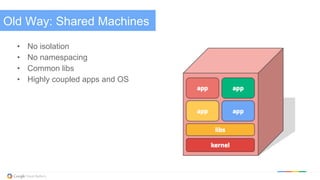
Old Way: Shared Machines
•  No isolation
•  No namespacing
•  Common libs
•  Highly coupled apps and OS
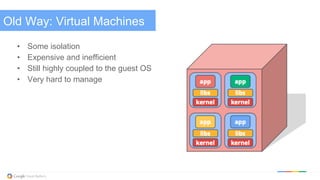
Old Way: Virtual Machines
•  Some isolation
•  Expensive and inefficient
•  Still highly coupled to the guest OS
•  Very hard to manage
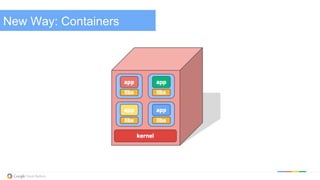
New Way: Containers
But what ARE they?
Lightweight VMs
•  no guest OS, lower overhead than VMs, but no virtualization hardware
Better packages
•  no DLL hell
Hermetically sealed static binaries - portable!
•  no external dependencies
Provide Isolation (from each other and from the host)
•  Resources (CPU, RAM, Disk, etc.)
•  Users
•  Filesystem
•  Network
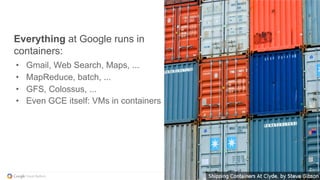
Everything at Google runs in
containers:
•  Gmail, Web Search, Maps, ...
•  MapReduce, batch, ...
•  GFS, Colossus, ...
•  Even GCE itself: VMs in containers
Everything at Google runs in
containers:
•  Gmail, Web Search, Maps, ...
•  MapReduce, batch, ...
•  GFS, Colossus, ...
•  Even GCE itself: VMs in containers
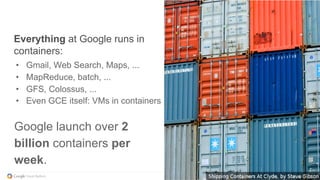
Google launch over 2
billion containers per
week.
But what IS Docker?
An implementation of the container idea
A package format
An ecosystem
A company
An open-source juggernaut
A phenomenon
Hoorah! The world is starting to adopt containers!
Now that we have containers...
Isolation: Keep jobs from interfering with each other
Scheduling: Where should my job be run?
Lifecycle: Keep my job running
Discovery: Where is my job now?
Constituency: Who is part of my job?
Scale-up: Making my jobs bigger or smaller
Auth{n,z}: Who can do things to my job?
Monitoring: What’s happening with my job?
Health: How is my job feeling?
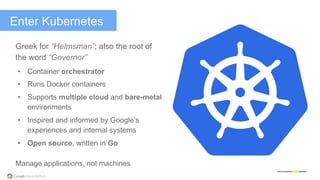
Enter Kubernetes
Greek for “Helmsman”; also the root of
the word “Governor”
•  Container orchestrator
•  Runs Docker containers
•  Supports multiple cloud and bare-metal
environments
•  Inspired and informed by Google’s
experiences and internal systems
•  Open source, written in Go
Manage applications, not machines
Primary concepts
Container: A sealed application package (Docker)
Pod: A small group of tightly coupled Containers
example: content syncer & web server
Controller: A loop that drives current state towards desired state
example: replication controller
Service: A set of running pods that work together
example: load-balanced backends
Labels: Identifying metadata attached to other objects
example: phase=canary vs. phase=prod
Selector: A query against labels, producing a set result
example: all pods where label phase == prod
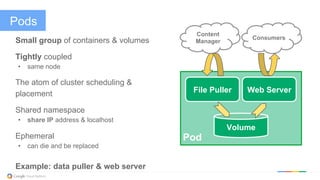
Pods
Small group of containers & volumes
Tightly coupled
•  same node
The atom of cluster scheduling &
placement
Shared namespace
•  share IP address & localhost
Ephemeral
•  can die and be replaced
Example: data puller & web server
Pod
File Puller Web Server
Volume
Consumers
Content
Manager
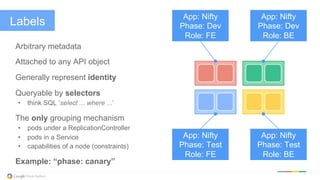
Labels
Arbitrary metadata
Attached to any API object
Generally represent identity
Queryable by selectors
•  think SQL ‘select ... where ...’
The only grouping mechanism
•  pods under a ReplicationController
•  pods in a Service
•  capabilities of a node (constraints)
Example: “phase: canary”
App: Nifty
Phase: Dev
Role: FE
App: Nifty
Phase: Dev
Role: BE
App: Nifty
Phase: Test
Role: FE
App: Nifty
Phase: Test
Role: BE
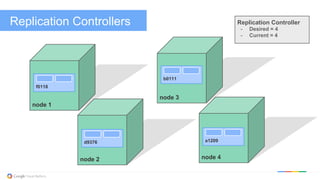
Replication Controllers
node 1
f0118
node 3
node 4node 2
d9376
b0111
a1209
Replication Controller
-  Desired = 4
-  Current = 4
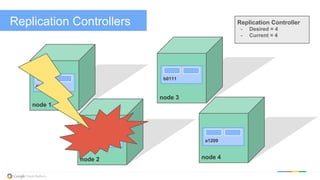
Replication Controllers
node 1
f0118
node 3
node 4node 2
Replication Controller
-  Desired = 4
-  Current = 4
d9376
b0111
a1209
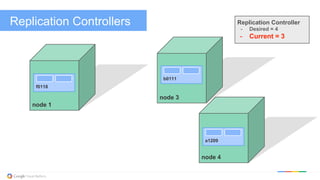
Replication Controllers
node 1
f0118
node 3
node 4
Replication Controller
-  Desired = 4
-  Current = 3
b0111
a1209
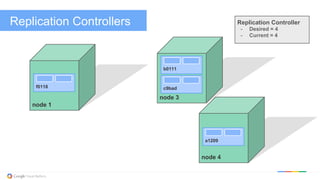
Replication Controllers
node 1
f0118
node 3
node 4
Replication Controller
-  Desired = 4
-  Current = 4
b0111
a1209
c9bad
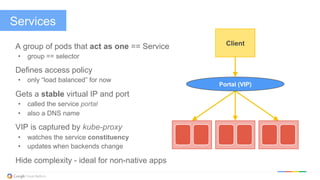
Services
A group of pods that act as one == Service
•  group == selector
Defines access policy
•  only “load balanced” for now
Gets a stable virtual IP and port
•  called the service portal
•  also a DNS name
VIP is captured by kube-proxy
•  watches the service constituency
•  updates when backends change
Hide complexity - ideal for non-native apps
Portal (VIP)
Client
Some very quick summary of Google container Engine.
Gioi thieu qua ve Google Cloud Platform
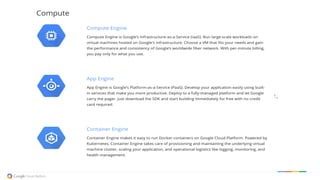
Google Container Engine
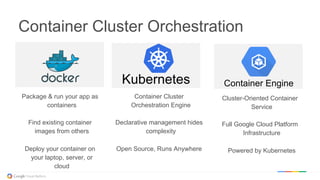
Container Cluster Orchestration
Package & run your app as
containers
Find existing container
images from others
Deploy your container on
your laptop, server, or
cloud
Container Cluster
Orchestration Engine
Declarative management hides
complexity
Open Source, Runs Anywhere
Cluster-Oriented Container
Service
Full Google Cloud Platform
Infrastructure
Powered by Kubernetes
Kubernetes Container Engine
Demo Time
Questions?
Images by Connie Zhou
http://kubernetes.io

DockerDay2015: Getting started with Google Container Engine

  • 1.
    Getting Started WithGoogle Container Engine Khoi Lai iOS Developer Khoi.lai@niteco.se
  • 2.
    Getting Started WithGoogle Container Engine Khoi Lai / khoi.lai@niteco.se iOS Developer / Cloud Enthusiast
  • 3.
    Old Way: SharedMachines •  No isolation •  No namespacing •  Common libs •  Highly coupled apps and OS
  • 4.
    Old Way: VirtualMachines •  Some isolation •  Expensive and inefficient •  Still highly coupled to the guest OS •  Very hard to manage
  • 5.
  • 6.
    But what AREthey? Lightweight VMs •  no guest OS, lower overhead than VMs, but no virtualization hardware Better packages •  no DLL hell Hermetically sealed static binaries - portable! •  no external dependencies Provide Isolation (from each other and from the host) •  Resources (CPU, RAM, Disk, etc.) •  Users •  Filesystem •  Network
  • 7.
    Everything at Googleruns in containers: •  Gmail, Web Search, Maps, ... •  MapReduce, batch, ... •  GFS, Colossus, ... •  Even GCE itself: VMs in containers
  • 8.
    Everything at Googleruns in containers: •  Gmail, Web Search, Maps, ... •  MapReduce, batch, ... •  GFS, Colossus, ... •  Even GCE itself: VMs in containers Google launch over 2 billion containers per week.
  • 9.
    But what ISDocker? An implementation of the container idea A package format An ecosystem A company An open-source juggernaut A phenomenon Hoorah! The world is starting to adopt containers!
  • 10.
    Now that wehave containers... Isolation: Keep jobs from interfering with each other Scheduling: Where should my job be run? Lifecycle: Keep my job running Discovery: Where is my job now? Constituency: Who is part of my job? Scale-up: Making my jobs bigger or smaller Auth{n,z}: Who can do things to my job? Monitoring: What’s happening with my job? Health: How is my job feeling?
  • 11.
    Enter Kubernetes Greek for“Helmsman”; also the root of the word “Governor” •  Container orchestrator •  Runs Docker containers •  Supports multiple cloud and bare-metal environments •  Inspired and informed by Google’s experiences and internal systems •  Open source, written in Go Manage applications, not machines
  • 12.
    Primary concepts Container: Asealed application package (Docker) Pod: A small group of tightly coupled Containers example: content syncer & web server Controller: A loop that drives current state towards desired state example: replication controller Service: A set of running pods that work together example: load-balanced backends Labels: Identifying metadata attached to other objects example: phase=canary vs. phase=prod Selector: A query against labels, producing a set result example: all pods where label phase == prod
  • 13.
    Pods Small group ofcontainers & volumes Tightly coupled •  same node The atom of cluster scheduling & placement Shared namespace •  share IP address & localhost Ephemeral •  can die and be replaced Example: data puller & web server Pod File Puller Web Server Volume Consumers Content Manager
  • 14.
    Labels Arbitrary metadata Attached toany API object Generally represent identity Queryable by selectors •  think SQL ‘select ... where ...’ The only grouping mechanism •  pods under a ReplicationController •  pods in a Service •  capabilities of a node (constraints) Example: “phase: canary” App: Nifty Phase: Dev Role: FE App: Nifty Phase: Dev Role: BE App: Nifty Phase: Test Role: FE App: Nifty Phase: Test Role: BE
  • 15.
    Replication Controllers node 1 f0118 node3 node 4node 2 d9376 b0111 a1209 Replication Controller -  Desired = 4 -  Current = 4
  • 16.
    Replication Controllers node 1 f0118 node3 node 4node 2 Replication Controller -  Desired = 4 -  Current = 4 d9376 b0111 a1209
  • 17.
    Replication Controllers node 1 f0118 node3 node 4 Replication Controller -  Desired = 4 -  Current = 3 b0111 a1209
  • 18.
    Replication Controllers node 1 f0118 node3 node 4 Replication Controller -  Desired = 4 -  Current = 4 b0111 a1209 c9bad
  • 19.
    Services A group ofpods that act as one == Service •  group == selector Defines access policy •  only “load balanced” for now Gets a stable virtual IP and port •  called the service portal •  also a DNS name VIP is captured by kube-proxy •  watches the service constituency •  updates when backends change Hide complexity - ideal for non-native apps Portal (VIP) Client
  • 20.
    Some very quicksummary of Google container Engine. Gioi thieu qua ve Google Cloud Platform Google Container Engine
  • 21.
    Container Cluster Orchestration Package& run your app as containers Find existing container images from others Deploy your container on your laptop, server, or cloud Container Cluster Orchestration Engine Declarative management hides complexity Open Source, Runs Anywhere Cluster-Oriented Container Service Full Google Cloud Platform Infrastructure Powered by Kubernetes Kubernetes Container Engine
  • 22.
  • 23.
    Questions? Images by ConnieZhou http://kubernetes.io