Dockerize a small
business
HOW DOCKER TRANSFORM OUR DEVELOPMENT & DEPLOYMENT
PROCESS
Contents
• The Dark age (Why Docker and Container matter)
• The Dockerization progress (How Docker fits in)
• Practice time
• Some useful recipes
• Example 1: Setup your own CI environments
• Example 2: Fantasy Football App
The Dark age
Modern “app” requirements
Not so thin front end app on various clients: browser, mobile, tablet
Assemble many different services from inside/outside sources
Running on any available set of physical resources (public/private/virtualized)
Modern “app” requirements
How to setup development environment fast and reliable
How to ensure services interact consistently, avoids dependencies hell
How to avoids NxN different configs
How to migrate and scale quickly, ensure compatibility across different deployment
environments
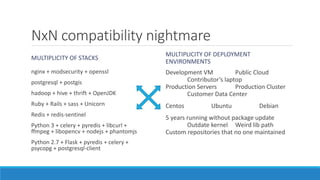
NxN compatibility nightmare
MULTIPLICITY OF STACKS
nginx + modsecurity + openssl
postgresql + postgis
hadoop + hive + thrift + OpenJDK
Ruby + Rails + sass + Unicorn
Redis + redis-sentinel
Python 3 + celery + pyredis + libcurl +
ffmpeg + libopencv + nodejs + phantomjs
Python 2.7 + Flask + pyredis + celery +
psycopg + postgresql-client
MULTIPLICITY OF DEPLOYMENT
ENVIRONMENTS
Development VM Public Cloud
Contributor’s laptop
Production Servers Production Cluster
Customer Data Center
Centos Ubuntu Debian
5 years running without package update
Outdate kernel Weird lib path
Custom repositories that no one maintained
isolation = k * repeatability
Where k is a constant that is inversely proportional to the probability of you saying "It works on
my machine".
Multiple tools for every stack to solve the isolation problem
◦ Compile your Python + virtualenv + pip + buildout + supervisord
◦ Rbenv + bundle + foreman + Capistrano + foreman
“This is like having sex with two condoms and anticonception pills.”
Still there will be inconsistency
◦ Incomplete version locks file
◦ Download cache in local machine
◦ Lack of / different version of C/C++ devel packages
Also, It takes hours to setup the environments
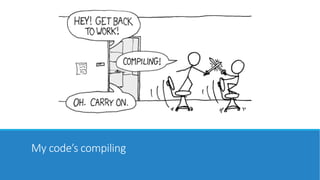
My code’s compiling
Virtualization saves the day
A virtual server for each app
Consistent environment
Easier for management (backup/migrate/increase resource …)
Vagrant automate dev environment setup
…for a price!
Heavy weight / expensive / slow
Different VMs for different hypervisors
Image migration between different infrastructure/PaaS providers was/is quite painful
Resource allocation is not good enough
Still takes time to setup
People need something even more lightweight/atomic
Container is the future
And Docker popularized the technology
◦ Can encapsulate almost everything and its dependencies
◦ Run consistently on any hardware without modification
◦ Resource, network and content isolation
◦ Almost no resource overhead
◦ Good set of operation: run, start, stop, commit, pull, search… Perfect for CI, CD, auto scaling, hybrid
clouds…
◦ Separation of duty: Dev worries about code, Ops worries about infrastructure
Why dev care: Build once, run anywhere
A clean, safe, hygienic and portable runtime environment for your app.
Run each app in its own isolated container, so you can run various versions of libraries and other
dependencies for each app without worrying
Reduce/eliminate concerns about compatibility on different platforms
Cheap, zero-penalty containers to deploy services
Instant replay and reset of image snapshots
Why ops care: Configure once, run
anything
Make the entire lifecycle more efficient, consistent, and repeatable
Eliminate inconsistencies between development, test, production, and customer environments
Significantly improves the speed and reliability of continuous deployment and continuous
integration systems
Because the containers are so lightweight, address significant performance, costs, deployment,
and portability issues normally associated with VMs
The Dockerization
progress
Use Docker as new building block
Thinks Service and Volume
Design apps as multiple services talk with each others via API
Each service run in 1 or multiple, replicated containers
No containers run multiple services
Design persistent bits of app as multiple volumes
A service can either rw or ro a volume
Dev describes services and dependencies via compose file
New dev use compose file to setup dev environment
Ops look at the compose file and translate/create platform specific service configuration files.
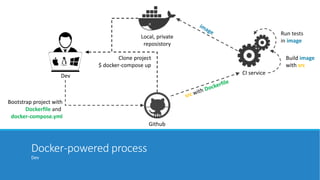
Docker-powered process
Dev
Github
Local, private
reposistory
CI service
Build image
with src
Run tests
in image
Dev
Bootstrap project with
Dockerfile and
docker-compose.yml
Clone project
$ docker-compose up
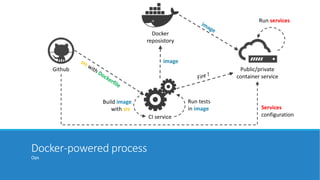
Docker-powered process
Ops
Github
Docker
reposistory
CI service
Public/private
container service
image
Build image
with src
Run tests
in image Services
configuration
Run services
Bootstrap a new project
Dev create new project with Dockerfile and docker-compose.yml
Dev declare dependencies and external services through docker-compose.yml
◦ Services start with build: . will have a .: /app volume
Dev add test/CI related files and push to github
The image is built and pushed to private docker registry
Join an ongoing project
Dev clone the repository
Dev download necessary volumes from other dev/staging server (db, configuration etc)
$ docker-compose up
Deploy and scale services
Ops look at the docker-compose file and create necessary services on the production docker
environment
Ops configure the volume storage options (nfs, ebs …)
Ops configure the forward proxy (nginx, certbot, load balancing…)
Ops run multiple containers base on the built image
Update and migrate
New app image is built and pushed into registry.
New containers are sequentially created and replace the old ones (rolling update).
If there is data need to be migrated (scheduled downtime):
◦ Stop the gateway (nginx)
◦ Hot backup the data volumes
◦ Run the migration scripts
◦ Restart the gateway
◦ Fall back is easy and instant since both old data volumes and images are there
Practice
SOME RECIPES TO BOOTSTRAP YOUR OWN DOCKERIZATION.
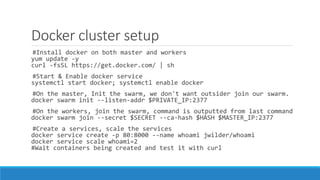
Docker cluster setup
#Install docker on both master and workers
yum update -y
curl -fsSL https://get.docker.com/ | sh
#Start & Enable docker service
systemctl start docker; systemctl enable docker
#On the master, Init the swarm, we don't want outsider join our swarm.
docker swarm init --listen-addr $PRIVATE_IP:2377
#On the workers, join the swarm, command is outputted from last command
docker swarm join --secret $SECRET --ca-hash $HASH $MASTER_IP:2377
#Create a services, scale the services
docker service create -p 80:8000 --name whoami jwilder/whoami
docker service scale whoami=2
#Wait containers being created and test it with curl
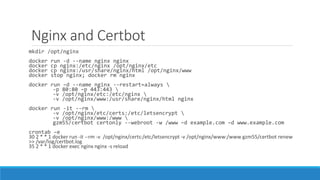
Nginx and Certbot
mkdir /opt/nginx
docker run -d --name nginx nginx
docker cp nginx:/etc/nginx /opt/nginx/etc
docker cp nginx:/usr/share/nginx/html /opt/nginx/www
docker stop nginx; docker rm nginx
docker run –d --name nginx --restart=always 
-p 80:80 –p 443:443 
-v /opt/nginx/etc:/etc/nginx 
-v /opt/nginx/www:/usr/share/nginx/html nginx
docker run -it --rm 
-v /opt/nginx/etc/certs:/etc/letsencrypt 
-v /opt/nginx/www:/www 
gzm55/certbot certonly --webroot -w /www –d example.com –d www.example.com
crontab –e
30 2 * * 1 docker run -it --rm -v /opt/nginx/certs:/etc/letsencrypt -v /opt/nginx/www:/www gzm55/certbot renew
>> /var/log/certbot.log
35 2 * * 1 docker exec nginx nginx -s reload
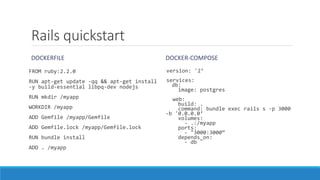
Rails quickstart
DOCKERFILE
FROM ruby:2.2.0
RUN apt-get update -qq && apt-get install
-y build-essential libpq-dev nodejs
RUN mkdir /myapp
WORKDIR /myapp
ADD Gemfile /myapp/Gemfile
ADD Gemfile.lock /myapp/Gemfile.lock
RUN bundle install
ADD . /myapp
DOCKER-COMPOSE
version: '2’
services:
db:
image: postgres
web:
build: .
command: bundle exec rails s -p 3000
-b '0.0.0.0‘
volumes:
- .:/myapp
ports:
- "3000:3000“
depends_on:
- db
Python quickstart
DOCKERFILE
FROM python:2.7
RUN mkdir /myapp
WORKDIR /myapp
ADD requirements.txt /myapp/
RUN pip install -r requirements.txt
ADD . /myapp/
DOCKER-COMPOSE
version: '2'
services:
db:
image: postgres
web:
build: .
command: python app.py
volumes:
- .:/myapp
ports:
- "5000:5000"
depends_on:
- db
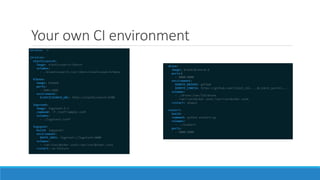
Your own CI environment
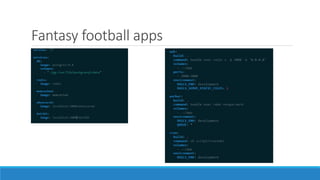
Fantasy football apps

ContainerDayVietnam2016: Dockerize a small business

  • 1.
    Dockerize a small business HOWDOCKER TRANSFORM OUR DEVELOPMENT & DEPLOYMENT PROCESS
  • 2.
    Contents • The Darkage (Why Docker and Container matter) • The Dockerization progress (How Docker fits in) • Practice time • Some useful recipes • Example 1: Setup your own CI environments • Example 2: Fantasy Football App
  • 3.
  • 4.
    Modern “app” requirements Notso thin front end app on various clients: browser, mobile, tablet Assemble many different services from inside/outside sources Running on any available set of physical resources (public/private/virtualized)
  • 5.
    Modern “app” requirements Howto setup development environment fast and reliable How to ensure services interact consistently, avoids dependencies hell How to avoids NxN different configs How to migrate and scale quickly, ensure compatibility across different deployment environments
  • 6.
    NxN compatibility nightmare MULTIPLICITYOF STACKS nginx + modsecurity + openssl postgresql + postgis hadoop + hive + thrift + OpenJDK Ruby + Rails + sass + Unicorn Redis + redis-sentinel Python 3 + celery + pyredis + libcurl + ffmpeg + libopencv + nodejs + phantomjs Python 2.7 + Flask + pyredis + celery + psycopg + postgresql-client MULTIPLICITY OF DEPLOYMENT ENVIRONMENTS Development VM Public Cloud Contributor’s laptop Production Servers Production Cluster Customer Data Center Centos Ubuntu Debian 5 years running without package update Outdate kernel Weird lib path Custom repositories that no one maintained
  • 7.
    isolation = k* repeatability Where k is a constant that is inversely proportional to the probability of you saying "It works on my machine". Multiple tools for every stack to solve the isolation problem ◦ Compile your Python + virtualenv + pip + buildout + supervisord ◦ Rbenv + bundle + foreman + Capistrano + foreman “This is like having sex with two condoms and anticonception pills.” Still there will be inconsistency ◦ Incomplete version locks file ◦ Download cache in local machine ◦ Lack of / different version of C/C++ devel packages Also, It takes hours to setup the environments
  • 8.
  • 9.
    Virtualization saves theday A virtual server for each app Consistent environment Easier for management (backup/migrate/increase resource …) Vagrant automate dev environment setup
  • 10.
    …for a price! Heavyweight / expensive / slow Different VMs for different hypervisors Image migration between different infrastructure/PaaS providers was/is quite painful Resource allocation is not good enough Still takes time to setup People need something even more lightweight/atomic
  • 11.
    Container is thefuture And Docker popularized the technology ◦ Can encapsulate almost everything and its dependencies ◦ Run consistently on any hardware without modification ◦ Resource, network and content isolation ◦ Almost no resource overhead ◦ Good set of operation: run, start, stop, commit, pull, search… Perfect for CI, CD, auto scaling, hybrid clouds… ◦ Separation of duty: Dev worries about code, Ops worries about infrastructure
  • 12.
    Why dev care:Build once, run anywhere A clean, safe, hygienic and portable runtime environment for your app. Run each app in its own isolated container, so you can run various versions of libraries and other dependencies for each app without worrying Reduce/eliminate concerns about compatibility on different platforms Cheap, zero-penalty containers to deploy services Instant replay and reset of image snapshots
  • 13.
    Why ops care:Configure once, run anything Make the entire lifecycle more efficient, consistent, and repeatable Eliminate inconsistencies between development, test, production, and customer environments Significantly improves the speed and reliability of continuous deployment and continuous integration systems Because the containers are so lightweight, address significant performance, costs, deployment, and portability issues normally associated with VMs
  • 14.
  • 15.
    Use Docker asnew building block Thinks Service and Volume Design apps as multiple services talk with each others via API Each service run in 1 or multiple, replicated containers No containers run multiple services Design persistent bits of app as multiple volumes A service can either rw or ro a volume Dev describes services and dependencies via compose file New dev use compose file to setup dev environment Ops look at the compose file and translate/create platform specific service configuration files.
  • 16.
    Docker-powered process Dev Github Local, private reposistory CIservice Build image with src Run tests in image Dev Bootstrap project with Dockerfile and docker-compose.yml Clone project $ docker-compose up
  • 17.
    Docker-powered process Ops Github Docker reposistory CI service Public/private containerservice image Build image with src Run tests in image Services configuration Run services
  • 18.
    Bootstrap a newproject Dev create new project with Dockerfile and docker-compose.yml Dev declare dependencies and external services through docker-compose.yml ◦ Services start with build: . will have a .: /app volume Dev add test/CI related files and push to github The image is built and pushed to private docker registry
  • 19.
    Join an ongoingproject Dev clone the repository Dev download necessary volumes from other dev/staging server (db, configuration etc) $ docker-compose up
  • 20.
    Deploy and scaleservices Ops look at the docker-compose file and create necessary services on the production docker environment Ops configure the volume storage options (nfs, ebs …) Ops configure the forward proxy (nginx, certbot, load balancing…) Ops run multiple containers base on the built image
  • 21.
    Update and migrate Newapp image is built and pushed into registry. New containers are sequentially created and replace the old ones (rolling update). If there is data need to be migrated (scheduled downtime): ◦ Stop the gateway (nginx) ◦ Hot backup the data volumes ◦ Run the migration scripts ◦ Restart the gateway ◦ Fall back is easy and instant since both old data volumes and images are there
  • 22.
    Practice SOME RECIPES TOBOOTSTRAP YOUR OWN DOCKERIZATION.
  • 23.
    Docker cluster setup #Installdocker on both master and workers yum update -y curl -fsSL https://get.docker.com/ | sh #Start & Enable docker service systemctl start docker; systemctl enable docker #On the master, Init the swarm, we don't want outsider join our swarm. docker swarm init --listen-addr $PRIVATE_IP:2377 #On the workers, join the swarm, command is outputted from last command docker swarm join --secret $SECRET --ca-hash $HASH $MASTER_IP:2377 #Create a services, scale the services docker service create -p 80:8000 --name whoami jwilder/whoami docker service scale whoami=2 #Wait containers being created and test it with curl
  • 24.
    Nginx and Certbot mkdir/opt/nginx docker run -d --name nginx nginx docker cp nginx:/etc/nginx /opt/nginx/etc docker cp nginx:/usr/share/nginx/html /opt/nginx/www docker stop nginx; docker rm nginx docker run –d --name nginx --restart=always -p 80:80 –p 443:443 -v /opt/nginx/etc:/etc/nginx -v /opt/nginx/www:/usr/share/nginx/html nginx docker run -it --rm -v /opt/nginx/etc/certs:/etc/letsencrypt -v /opt/nginx/www:/www gzm55/certbot certonly --webroot -w /www –d example.com –d www.example.com crontab –e 30 2 * * 1 docker run -it --rm -v /opt/nginx/certs:/etc/letsencrypt -v /opt/nginx/www:/www gzm55/certbot renew >> /var/log/certbot.log 35 2 * * 1 docker exec nginx nginx -s reload
  • 25.
    Rails quickstart DOCKERFILE FROM ruby:2.2.0 RUNapt-get update -qq && apt-get install -y build-essential libpq-dev nodejs RUN mkdir /myapp WORKDIR /myapp ADD Gemfile /myapp/Gemfile ADD Gemfile.lock /myapp/Gemfile.lock RUN bundle install ADD . /myapp DOCKER-COMPOSE version: '2’ services: db: image: postgres web: build: . command: bundle exec rails s -p 3000 -b '0.0.0.0‘ volumes: - .:/myapp ports: - "3000:3000“ depends_on: - db
  • 26.
    Python quickstart DOCKERFILE FROM python:2.7 RUNmkdir /myapp WORKDIR /myapp ADD requirements.txt /myapp/ RUN pip install -r requirements.txt ADD . /myapp/ DOCKER-COMPOSE version: '2' services: db: image: postgres web: build: . command: python app.py volumes: - .:/myapp ports: - "5000:5000" depends_on: - db
  • 27.
    Your own CIenvironment
  • 28.