in 30 mins
Steve Poole, IBM
@spoole167
the promise
Ship a complicated software environment
that leaves no trace when finished…
Be total confident that if it works for me it will
work the same for you
https://localhost:9043/ibm/console/logon.jsp
docker run --name test -h test -v $(pwd)/PASSWORD:/tmp/PASSWORD 
-p 9043:9043 -p 9443:9443 -d ibmcom/websphere-traditional:install
The basics
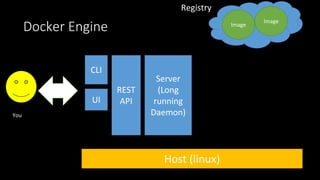
Docker Engine
Server
(Long
running
Daemon)
Host (linux)
REST
API
CLI
You
Image
Image
UI
Registry
Docker Engine
Server
(Long
running
Daemon)
Host (not linux)
REST
API
CLI
You
Image
Image
UI
VM (linux)
Registry
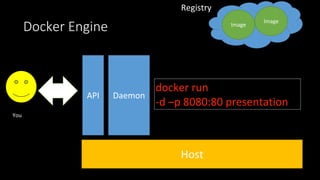
Docker Engine
DaemonAPI
You
Image
Image
Host
Registry
Docker Engine
Daemon
Host
API
You
Image
Image
docker run
-d –p 8080:80 presentation
Registry
Docker Engine
Daemon
Host
API
You
Image
Image
Registry
Presentation
Image cache
Container
8080
:8080
:80
docker run -d –p 8080:80 presentation
docker run -d –p 8081:80 presentation
docker ps
quick check
• Images are the unit of delivery. You only share images
• Images are immutable
• Images are stored in local caches or shared via registries.
• DockerHub is a central point Think “github” for docker images
• Containers are the runtime units. They run on a single host
• Containers retain state until terminated
• Containers are the unit of scale.
• docker ps lists the running containers
• docker ps -a lists all containers
Let’s build a Docker Image
docker build -t presentation .
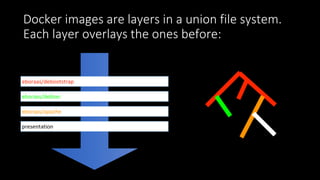
Docker images are layers in a union file system.
Each layer overlays the ones before:
presentation
eboraas/apache
eboraas/debian
eboraas/debootstrap
Dockerfile - automated image creation
FROM eboraas/apache
COPY ./DockerIn30Minutes /var/www/html
Where’s the command to run the apache server? I inherited it
FROM eboraas/debian:stable
MAINTAINER Ed Boraas <ed@boraas.ca>
RUN apt-get update && apt-get -y install apache2 && apt-get clean 
&& rm -rf /var/lib/apt/lists/*
ENV APACHE_RUN_USER www-data
ENV APACHE_RUN_GROUP www-data
ENV APACHE_LOG_DIR /var/log/apache2
RUN /usr/sbin/a2ensite default-ssl
RUN /usr/sbin/a2enmod ssl
EXPOSE 80
EXPOSE 443
CMD ["/usr/sbin/apache2ctl", "-D", "FOREGROUND"]
quick check
• Dockerfiles are the normal way to create docker images.
• Usually:
• has a name of image to inherit from
• has a set of build instructions to run at build time
• has some runtime instruction (ie what to start)
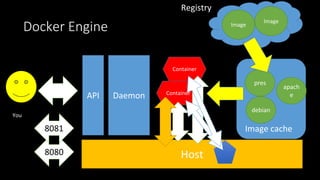
Docker Engine
Daemon
Host
API
You
Image
Image
Registry
Presentation
Image cache
Container
8080
:8080
:80
Docker Engine
Daemon
Host
API
You
Image
Image
Registry
pres
Image cache
Container
8080
Container
8081
apach
e
debian
Volumes
• Think of containers as mini VM’s
• Any mutations made to the containers contents will be lost when the
container is stopped
• How to share or persist state?
• Two options..
docker run -d -v $PWD:/var/www/html p 8082:80 —t presentation
Think of as an nfs mount style command
mounts a local directory on the host over the top of a directory in the container
Both directory paths must be absolute
The container can read/write the contents of the host file system
-v
VOLUME command
VOLUME /data
Dockerfile command to create a persistent data store on the host system that is
accessed inside the container at the path given.
Volumes persist on the host until deleted.
Volumes are a great way to share state between containers
docker run -d —volumes-from container image
auto magically mount the volumes created by another container
Docker Engine
Daemon
Host
API
You
Image
Image
Registry
pres
Image cache
Container
8080
Container
8081
apach
e
debian
It’s getting messy
• Let me introduce kitematic
Advanced section
• Docker for encapsulating a single instance of a complex environment is
useful
• Docker as the packing and deployment of an single micro service is
compelling
• Docker tools exist to network containers together and to scale and load
balance across multiple hosts and data centres.
• Containerisation is the enabler for industrial application deployments on
truly gigantic scales.
Docker compose
• “Compose is a tool for defining and running multi-container Docker
applications. With Compose, you use a Compose file to configure your
application’s services. Then, using a single command, you create and
start all the services from your configuration”
• https://docs.docker.com/compose/overview/
version: '2'
services:
dbserver:
image: couchdb
ports:
- "5984:5984"
volumes:
- ./.couchsummary:/usr/local/var/lib/couchdb
dbteam:
image: couchdb
ports:
- "5985:5984"
volumes:
- ./.couchteam:/usr/local/var/lib/couchdb
teamserver:
image: dashboard
build: .
command: bundle exec rackup -s puma -p 8080
volumes:
- .:/dashboard
ports:
- "80:8080"
depends_on:
- dbteam
environment:
MODE: team
TEAM: test
DBURL: http://dbteam:5984/
There’s more - but thats for another talk
thank you.

Docker in 30 minutes