Platform to help code, test and deploy
applications
Open platform for developers and
sysadmins to build, ship, and run
distributed applications.
Light weight containers
Available on most linux distros
Deploy reliably & consistently
Everything will be exactly the same
Distros
Software versions
Library dependencies
If it works locally, it will work everywhere
Ship More Software Faster
Minimal overhead/resource usage
Quickly Scale
Run thousands of containers
Easy to run your whole production stack
locally
Simply share your application with others
Bare metal: 8 to 24 Hours
Cloud VM: 5 to 10 Minutes
Container: 5 to 15 Seconds
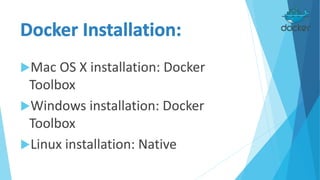
Mac OS X installation: Docker
Toolbox
Windows installation: Docker
Toolbox
Linux installation: Native
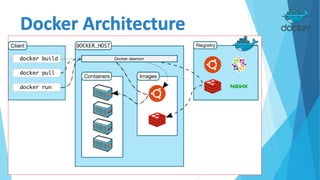
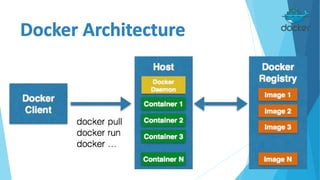
Docker host, the computer running
the Docker Engine.
The daemon managing Docker images
and containers.
using namespaces and cgroups
It runs on the (Linux-based) Host
It accepts commands from the user
and communicates back and forth
with a Docker daemon.
https://hub.docker.com/
Docker registries hold images. These are
public or private stores from which you
upload or download images. The public
Docker registry is provided with the Docker
Hub.
You can create your own Docker Registry with
Docker Distribution
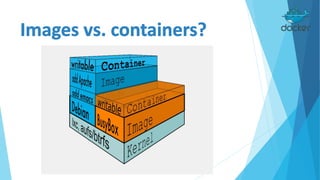
A Docker image is a read-only
template.
Docker images are the build
component of Docker.
Docker containers are similar to a
directory. A Docker container holds
everything that is needed for an
application to run.
Each container is created from a
Docker image.
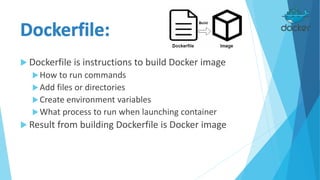
 Dockerfile is instructions to build Docker image
How to run commands
Add files or directories
Create environment variables
What process to run when launching container
 Result from building Dockerfile is Docker image
 ADD: Copy a file from the host into the container
 CMD: Set default commands to be executed, or passed to the ENTRYPOINT
 ENTRYPOINT: Set the default entrypoint application inside the container
 ENV: Set environment variable (e.g. key = value)
 EXPOSE: Expose a port to outside
 FROM: Set the base image to use
 MAINTAINER: Set the author / owner data of the Dockerfile
 RUN: Run a command and commit the ending result (container) image
 VOLUME: Mount a directory from the host to the container
 WORKDIR: Set the directory for the directives of CMD to be executed
 COPY: copies new files or directories from source to destination
FROM ubuntu:14.04
MAINTAINER Jirayut Nimsaeng <w [at] winginfotech.net>
ADD build-files /build-files
RUN apt-get update
RUN apt-get install -y openssh-server vim tmux rsync byobu
RUN mkdir /var/run/sshd
RUN sed -i 's/required pam_loginuid.so/optional
pam_loginuid.so/g' /etc/pam.d/sshd
CMD /start.sh
EXPOSE 22
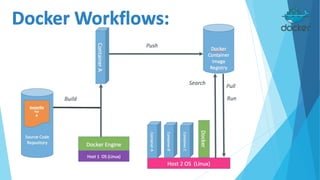
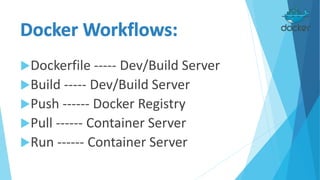
Dockerfile ----- Dev/Build Server
Build ----- Dev/Build Server
Push ------ Docker Registry
Pull ------ Container Server
Run ------ Container Server
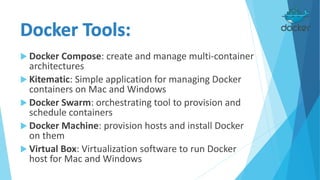
 Docker Compose: create and manage multi-container
architectures
 Kitematic: Simple application for managing Docker
containers on Mac and Windows
 Docker Swarm: orchestrating tool to provision and
schedule containers
 Docker Machine: provision hosts and install Docker
on them
 Virtual Box: Virtualization software to run Docker
host for Mac and Windows
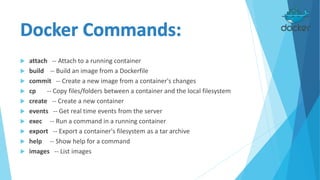
 attach -- Attach to a running container
 build -- Build an image from a Dockerfile
 commit -- Create a new image from a container's changes
 cp -- Copy files/folders between a container and the local filesystem
 create -- Create a new container
 events -- Get real time events from the server
 exec -- Run a command in a running container
 export -- Export a container's filesystem as a tar archive
 help -- Show help for a command
 images -- List images
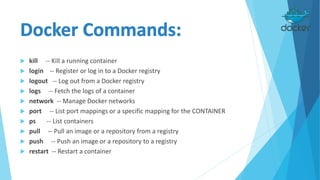
 kill -- Kill a running container
 login -- Register or log in to a Docker registry
 logout -- Log out from a Docker registry
 logs -- Fetch the logs of a container
 network -- Manage Docker networks
 port -- List port mappings or a specific mapping for the CONTAINER
 ps -- List containers
 pull -- Pull an image or a repository from a registry
 push -- Push an image or a repository to a registry
 restart -- Restart a container
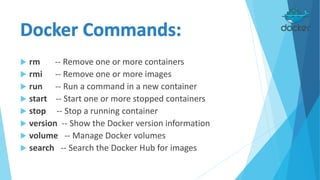
 rm -- Remove one or more containers
 rmi -- Remove one or more images
 run -- Run a command in a new container
 start -- Start one or more stopped containers
 stop -- Stop a running container
 version -- Show the Docker version information
 volume -- Manage Docker volumes
 search -- Search the Docker Hub for images

Docker Workshop

  • 3.
    Platform to helpcode, test and deploy applications Open platform for developers and sysadmins to build, ship, and run distributed applications. Light weight containers Available on most linux distros
  • 4.
    Deploy reliably &consistently Everything will be exactly the same Distros Software versions Library dependencies If it works locally, it will work everywhere
  • 5.
    Ship More SoftwareFaster Minimal overhead/resource usage Quickly Scale Run thousands of containers Easy to run your whole production stack locally Simply share your application with others
  • 6.
    Bare metal: 8to 24 Hours Cloud VM: 5 to 10 Minutes Container: 5 to 15 Seconds
  • 9.
    Mac OS Xinstallation: Docker Toolbox Windows installation: Docker Toolbox Linux installation: Native
  • 12.
    Docker host, thecomputer running the Docker Engine. The daemon managing Docker images and containers. using namespaces and cgroups It runs on the (Linux-based) Host
  • 13.
    It accepts commandsfrom the user and communicates back and forth with a Docker daemon.
  • 14.
    https://hub.docker.com/ Docker registries holdimages. These are public or private stores from which you upload or download images. The public Docker registry is provided with the Docker Hub. You can create your own Docker Registry with Docker Distribution
  • 15.
    A Docker imageis a read-only template. Docker images are the build component of Docker.
  • 16.
    Docker containers aresimilar to a directory. A Docker container holds everything that is needed for an application to run. Each container is created from a Docker image.
  • 18.
     Dockerfile isinstructions to build Docker image How to run commands Add files or directories Create environment variables What process to run when launching container  Result from building Dockerfile is Docker image
  • 19.
     ADD: Copya file from the host into the container  CMD: Set default commands to be executed, or passed to the ENTRYPOINT  ENTRYPOINT: Set the default entrypoint application inside the container  ENV: Set environment variable (e.g. key = value)  EXPOSE: Expose a port to outside  FROM: Set the base image to use  MAINTAINER: Set the author / owner data of the Dockerfile  RUN: Run a command and commit the ending result (container) image  VOLUME: Mount a directory from the host to the container  WORKDIR: Set the directory for the directives of CMD to be executed  COPY: copies new files or directories from source to destination
  • 20.
    FROM ubuntu:14.04 MAINTAINER JirayutNimsaeng <w [at] winginfotech.net> ADD build-files /build-files RUN apt-get update RUN apt-get install -y openssh-server vim tmux rsync byobu RUN mkdir /var/run/sshd RUN sed -i 's/required pam_loginuid.so/optional pam_loginuid.so/g' /etc/pam.d/sshd CMD /start.sh EXPOSE 22
  • 22.
    Dockerfile ----- Dev/BuildServer Build ----- Dev/Build Server Push ------ Docker Registry Pull ------ Container Server Run ------ Container Server
  • 23.
     Docker Compose:create and manage multi-container architectures  Kitematic: Simple application for managing Docker containers on Mac and Windows  Docker Swarm: orchestrating tool to provision and schedule containers  Docker Machine: provision hosts and install Docker on them  Virtual Box: Virtualization software to run Docker host for Mac and Windows
  • 24.
     attach --Attach to a running container  build -- Build an image from a Dockerfile  commit -- Create a new image from a container's changes  cp -- Copy files/folders between a container and the local filesystem  create -- Create a new container  events -- Get real time events from the server  exec -- Run a command in a running container  export -- Export a container's filesystem as a tar archive  help -- Show help for a command  images -- List images
  • 25.
     kill --Kill a running container  login -- Register or log in to a Docker registry  logout -- Log out from a Docker registry  logs -- Fetch the logs of a container  network -- Manage Docker networks  port -- List port mappings or a specific mapping for the CONTAINER  ps -- List containers  pull -- Pull an image or a repository from a registry  push -- Push an image or a repository to a registry  restart -- Restart a container
  • 26.
     rm --Remove one or more containers  rmi -- Remove one or more images  run -- Run a command in a new container  start -- Start one or more stopped containers  stop -- Stop a running container  version -- Show the Docker version information  volume -- Manage Docker volumes  search -- Search the Docker Hub for images