Agenda
Day One:
01. Key Concept of Dockers - 15min.
02. Key Concept of Docker Container - 15min.
03. VM Vs Docker - 15min.
04. FAQ and Lab work. - Time will be depending of requirement - 1hr.
05. Security Of Docker. - 15min.
06. Availability and rapid deployment with Docker using their own Containers. - 15min.
07. Integration With AWS cloud Environment - 10min.
08. What is a Docker file - 30min.
09. FAQ and Lab Work - Time will be depending of requirement - 1hr.
10. How to Own Docker image build with Docker Configure file - 30min.
11. What is Docker Composer and Compose file configure. - 20min.
12. Docker Hub & Own CCLK Docker Private Registry. - 30min.
13. FAQ & Lab Work. - Time will be depending of requirement - 1hr.
14. Persistent Storage Usage and Why. - 5min.
15. How to Setting-up Environment variables over a specific Docker Container - 20min.
Docker Freamwork Workshop
Agenda
Day Two:
16. How to NFS mount, CPU Cores allocation and Memory Allocation. - 30min.
17. FAQ & Lab Work. - Time will be depending of requirement - 1hr.
18. Build a own Docker Image and run the container with Resource limitations. - 30min.
19. FAQ & Lab Work. - Time will be depending of requirement - 1hr.
20. How to Docker Tagging and Pushing into the CCLK Private Docker Registry. - 15min.
21. How to Docker Clone from the CCLK Docker and Run it within second. - 15min.
22. FAQ & Lab Work. - Time will be depending of requirement - 1hr.
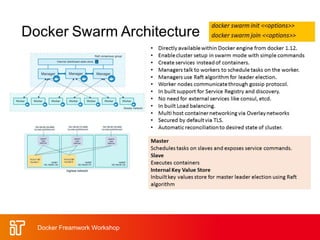
23. What is the Docker Swarm Cluster. - 15min.
24. The Structure of Docker Swarm Cluster. - 15min.
25. FAQ & Lab Work - Time will be depending of requirement - 1hr.
26. What is a Docker GUI based Manager and Why? - 15min.
27. The Concept of Portainer Docker Cluster GUI Framework Manager. - 20min.
28. FAQ & Lab Work - Time will be depending of requirement - 1hr.
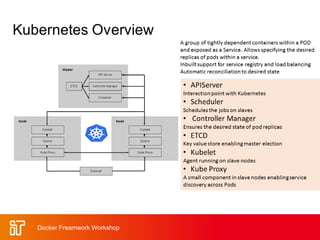
29. Basic Concept Ansible, Kubernetes. - 30min.
30. The End of the training Session.
Docker Freamwork Workshop
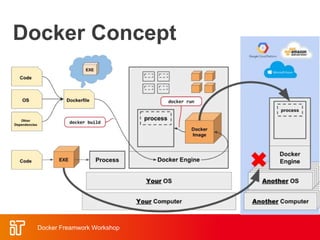
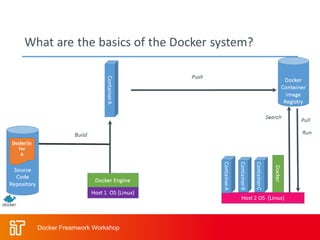
Docker Concept
Docker Freamwork Workshop
Docker: Name
docker [naut.]: der Dockarbeiter, der
Hafenarbeiter
Source: leo.org
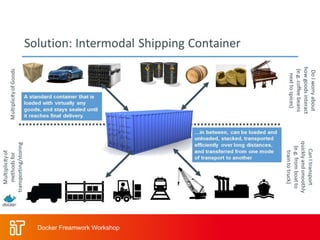
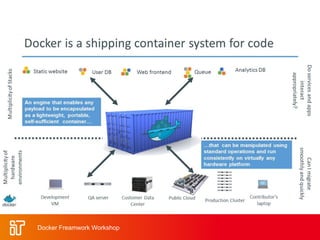
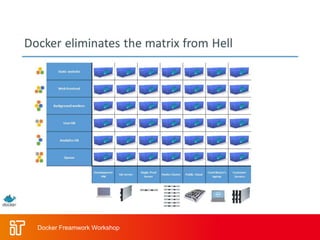
• Provide a uniformed wrapper around a
software package: «Build, Ship and Run Any
App, Anywhere» [www.docker.com]
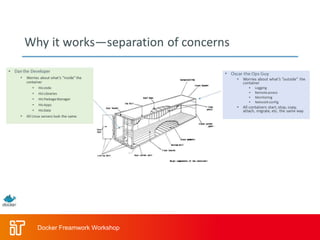
– Similar to shipping containers: The
container is always the same, regardless
of the contents and thus fits on all trucks,
cranes, ships, ...
[www.docker.com]
Docker Freamwork Workshop
Popularity & Benefits of
Using Docker.
Docker Freamwork Workshop
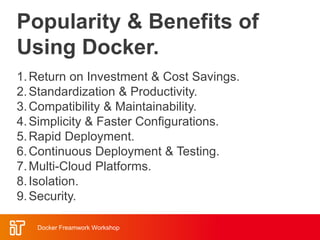
1.Return on Investment & Cost Savings.
2.Standardization & Productivity.
3.Compatibility & Maintainability.
4.Simplicity & Faster Configurations.
5.Rapid Deployment.
6.Continuous Deployment & Testing.
7.Multi-Cloud Platforms.
8.Isolation.
9.Security.
Docker Freamwork Workshop
Docker Technology
• libvirt: Platform Virtualization
• LXC (LinuX Containers): Multiple
isolated Linux systems (containers)
on a single host
• Layered File System
[Source: https://docs.docker.com/terms/layer/]
Docker Freamwork Workshop
Run Platforms
• Various Linux distributions
(Ubuntu, Fedora, RHEL, Centos,
openSUSE, ...)
• Cloud (Amazon EC2, Google
Compute Engine, Rackspace)
• 2014-10: Microsoft announces
plans to integrate Docker with next
release of Windows Server
Docker Freamwork Workshop
Hello World
Simple Command - Ad-Hoc
Container
• docker run ubuntu echo
Hello World
– docker images [-a]
– docker ps –a
Docker Freamwork Workshop
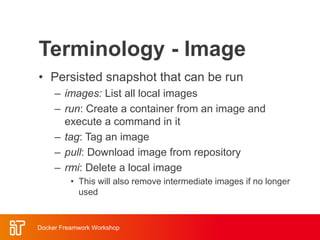
Terminology - Image
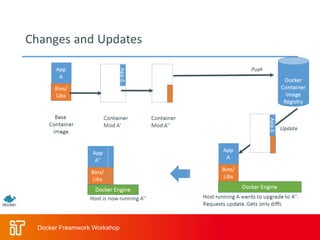
• Persisted snapshot that can be run
– images: List all local images
– run: Create a container from an image and
execute a command in it
– tag: Tag an image
– pull: Download image from repository
– rmi: Delete a local image
• This will also remove intermediate images if no longer
used
Docker Freamwork Workshop
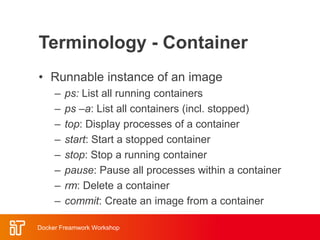
Terminology - Container
• Runnable instance of an image
– ps: List all running containers
– ps –a: List all containers (incl. stopped)
– top: Display processes of a container
– start: Start a stopped container
– stop: Stop a running container
– pause: Pause all processes within a container
– rm: Delete a container
– commit: Create an image from a container
Docker Freamwork Workshop
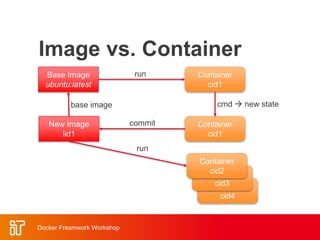
Container
cid4
Container
cid3
Image vs. Container
Base Image
ubuntu:latest
Container
cid1
run
Container
cid1
cmd  new state
New Image
iid1
commit
base image
Container
cid2
run
Docker Freamwork Workshop
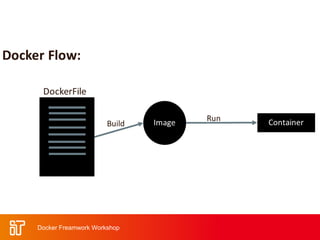
Dockerfile
• Create images automatically using
a build script: «Dockerfile»
• Can be versioned in a version
control system like Git or SVN,
along with all dependencies
• Docker Hub can automatically build
images based on dockerfiles on
Github
Docker Freamwork Workshop
Dockerfile Example
• Dockerfile:
– FROM ubuntu
ENV DOCK_MESSAGE Hello My World
ADD dir /files
CMD ["bash", "someScript"]
• docker build [DockerFileDir]
• docker inspect [imageId]
Docker Freamwork Workshop
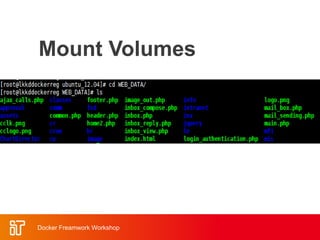
Mount Volumes
• docker run –ti –v
/hostLog:/log ubuntu
• Run second container: Volume can
be shared
– docker run –ti --volumes-
from firstContainerName
ubuntu
Docker Freamwork Workshop
Mount Volumes
Docker Freamwork Workshop
Publish Port
• docker run –t –p 8080:80
ubuntu nc –l 80
– Map container port 80 to host port
8080
– Check on host: nc localhost 8080
• Link with other docker container
– docker run -ti --link
containerName:alias ubuntu
– See link info with set
Docker Freamwork Workshop
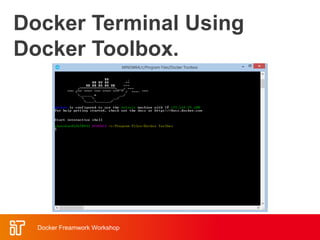
Docker Terminal Using
Docker Toolbox.
Docker Freamwork Workshop
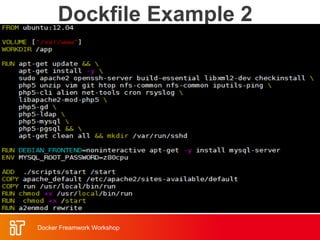
Dockfile Example 2
Docker Freamwork Workshop
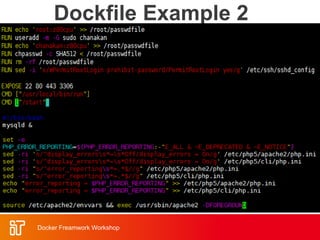
Dockfile Example 2
Docker Freamwork Workshop
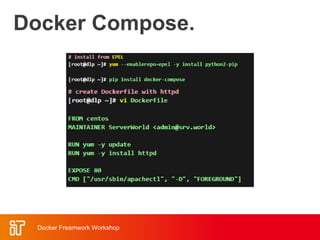
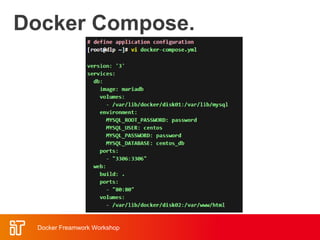
Docker Compose.
Docker Freamwork Workshop
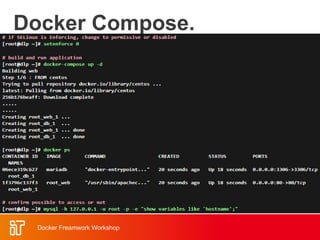
Docker Compose.
Docker Freamwork Workshop
Docker Compose.
Docker Freamwork Workshop
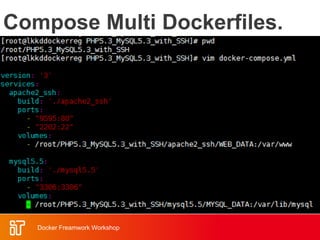
Compose Multi Dockerfiles.
Docker Freamwork Workshop
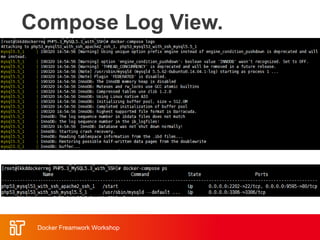
Compose Log View.
Docker Freamwork Workshop
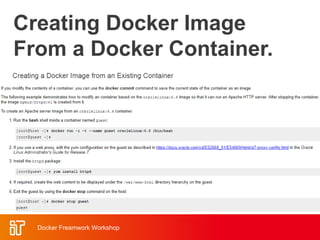
Creating Docker Image
From a Docker Container.
Docker Freamwork Workshop
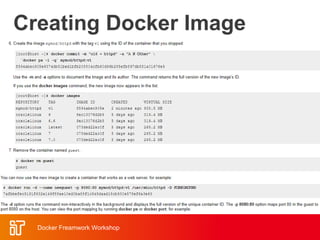
Creating Docker Image
From a Docker Container.
Docker Freamwork Workshop
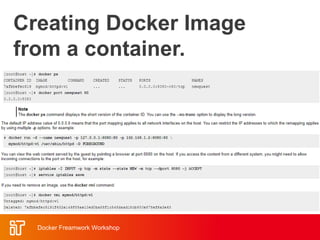
Creating Docker Image
from a container.
Docker Freamwork Workshop
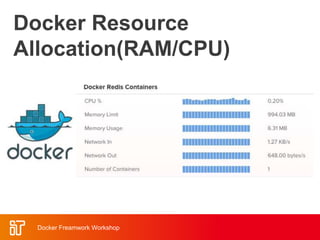
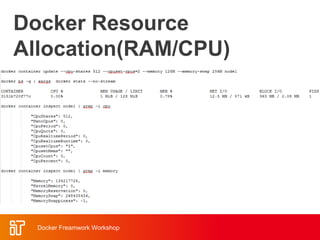
Docker Resource
Allocation(RAM/CPU)
Docker Freamwork Workshop
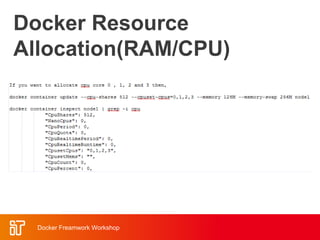
Docker Resource
Allocation(RAM/CPU)
Docker Freamwork Workshop
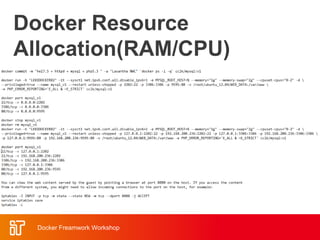
Docker Resource
Allocation(RAM/CPU)
Docker Freamwork Workshop
Docker Resource
Allocation(RAM/CPU)
Docker Freamwork Workshop
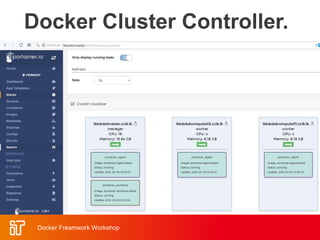
Docker Cluster Controller.
Docker Freamwork Workshop
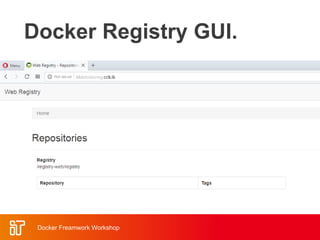
Docker Registry GUI.
Docker Freamwork Workshop
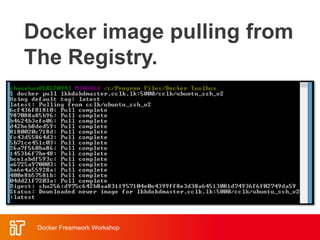
Docker image pulling from
The Registry.
Docker Freamwork Workshop
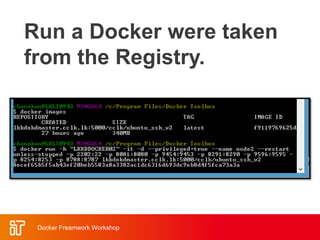
Run a Docker were taken
from the Registry.
Docker Freamwork Workshop
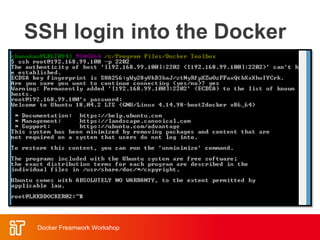
SSH login into the Docker
Docker Freamwork Workshop
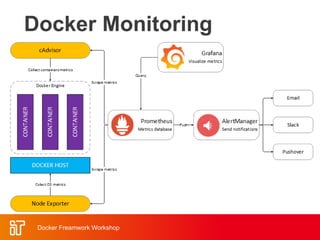
Docker Monitoring
Docker Freamwork Workshop
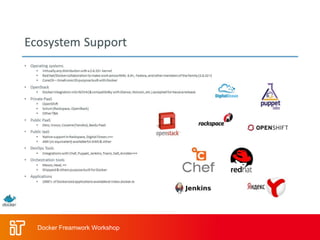
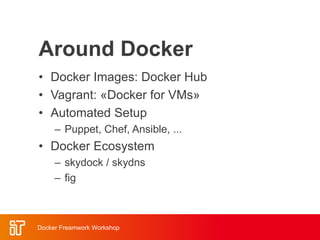
Around Docker
• Docker Images: Docker Hub
• Vagrant: «Docker for VMs»
• Automated Setup
– Puppet, Chef, Ansible, ...
• Docker Ecosystem
– skydock / skydns
– fig
Docker Freamwork Workshop
Docker Hub
• Public repository of Docker images
– https://hub.docker.com/
– docker search [term]
• Automated: Has been
automatically built from Dockerfile
– Source for build is available on
GitHub
Docker Freamwork Workshop
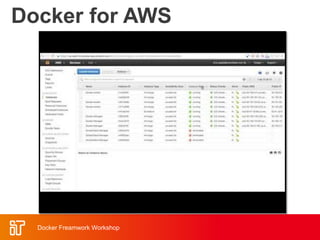
Docker for AWS
Docker Freamwork Workshop
Conclusion.
A Docker containers share their operating system, so they run
as isolated processes regardless of the host operating system.
As Docker proudly admits, this means that its containers can
“run on any computer, on any infrastructure and in any cloud.”
The portability, flexibility and simplicity that this enables, is a
key reason why Docker has been able to generate such strong
momentum. We are big fans of using Docker and we believe
that it will continue growing.
Docker Freamwork Workshop

Docker framework

Editor's Notes

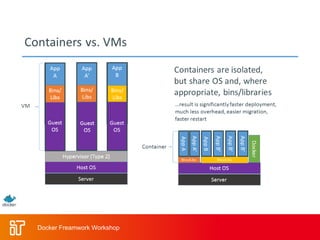
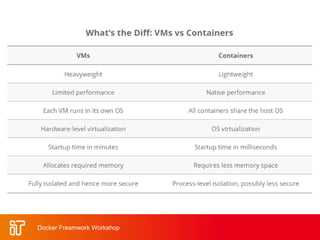
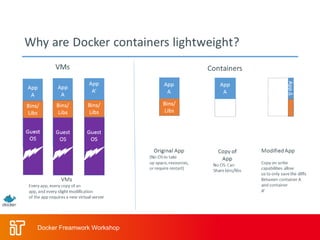
  • #6 Virtual Machines Each virtualized application includes not only the application - which may be only 10s of MB - and the necessary binaries and libraries, but also an entire guest operating system - which may weigh 10s of GB. Docker The Docker Engine container comprises just the application and its dependencies. It runs as an isolated process in userspace on the host operating system, sharing the kernel with other containers. Thus, it enjoys the resource isolation and allocation benefits of VMs but is much more portable and efficient. Docker provides base images that contain OS installations we can start from: The OS is not more than an application running on the Kernel...
  • #7 Virtual Machines Each virtualized application includes not only the application - which may be only 10s of MB - and the necessary binaries and libraries, but also an entire guest operating system - which may weigh 10s of GB. Docker The Docker Engine container comprises just the application and its dependencies. It runs as an isolated process in userspace on the host operating system, sharing the kernel with other containers. Thus, it enjoys the resource isolation and allocation benefits of VMs but is much more portable and efficient. Docker provides base images that contain OS installations we can start from: The OS is not more than an application running on the Kernel...
  • #11 Windows: http://www.zdnet.com/docker-cto-why-microsofts-docker-plans-for-windows-will-matter-to-you-7000035150/ "That's why the result of the Microsoft announcement will not allow a container that runs on Linux to run seamlessly on Windows or vice versa. But that's OK because in the context of distributed applications that's not what developers are asking for."
  • #14 Immediately exits docker ps docker ps –a Re-attach: docker start –i stoic_wozniak docker commit –m «message» containerId imageName(e.g. mytest/test1:1.0) New Image docker images
  • #15 Immediately exits docker ps docker ps –a Re-attach: docker start –i stoic_wozniak docker commit –m «message» containerId imageName(e.g. mytest/test1:1.0) New Image docker images
  • #16 Immediately exits docker ps docker ps –a Re-attach: docker start –i stoic_wozniak docker commit –m «message» containerId imageName(e.g. mytest/test1:1.0) New Image docker images
  • #19 docker run --rm to remove container after termination
  • #29 docker run -ti d97 /bin/bash testFile.txt -> present set -> env Variable PROVIDER set docker run –P -d d97
  • #30 Use docker start, docker attach to reuse container Change script to echo ... >> /log/hello3.log
  • #31 Use docker start, docker attach to reuse container Change script to echo ... >> /log/hello3.log
  • #32 Use ifconfig -> eht1 to access from host
  • #33 Use ifconfig -> eht1 to access from host
  • #34 Use ifconfig -> eht1 to access from host
  • #35 Use ifconfig -> eht1 to access from host
  • #36 Use ifconfig -> eht1 to access from host
  • #37 Use ifconfig -> eht1 to access from host
  • #38 Use ifconfig -> eht1 to access from host
  • #39 Use ifconfig -> eht1 to access from host
  • #40 Use ifconfig -> eht1 to access from host
  • #41 Use ifconfig -> eht1 to access from host
  • #42 Use ifconfig -> eht1 to access from host
  • #43 Use ifconfig -> eht1 to access from host
  • #44 Use ifconfig -> eht1 to access from host
  • #45 Use ifconfig -> eht1 to access from host
  • #46 Use ifconfig -> eht1 to access from host
  • #47 Use ifconfig -> eht1 to access from host
  • #48 Use ifconfig -> eht1 to access from host
  • #49 Use ifconfig -> eht1 to access from host
  • #50 Use ifconfig -> eht1 to access from host
  • #51 Use ifconfig -> eht1 to access from host
  • #52 skydock / skydns: Docker discovery by lightweight DNS server fig: fig.xml: discribe how to build or retrieve each service’s Docker image
  • #53 skydock / skydns: Docker discovery by lightweight DNS server fig: fig.xml: discribe how to build or retrieve each service’s Docker image
  • #54 skydock / skydns: Docker discovery by lightweight DNS server fig: fig.xml: discribe how to build or retrieve each service’s Docker image
  • #55 skydock / skydns: Docker discovery by lightweight DNS server fig: fig.xml: discribe how to build or retrieve each service’s Docker image
  • #56 skydock / skydns: Docker discovery by lightweight DNS server fig: fig.xml: discribe how to build or retrieve each service’s Docker image
  • #57 skydock / skydns: Docker discovery by lightweight DNS server fig: fig.xml: discribe how to build or retrieve each service’s Docker image
  • #58 skydock / skydns: Docker discovery by lightweight DNS server fig: fig.xml: discribe how to build or retrieve each service’s Docker image
  • #59 Automatically build a Docker image on Docker-Hub: Example: playground-docker-echoey in Bitbucket: https://bitbucket.org/inftec/playground-docker-echoey/overview Automated Build Repository on Docker Hub: https://registry.hub.docker.com/u/pazoozoo/playground-docker-echoey/ Build took around 5 minutes... Run on AWS Elastic Beanstalk: Need to ZIP Dockerfile and dependencies (ADD files) Beanstalk environment expects HTTP service on first EXPOSEd port though  not working with dummy echo service
  • #60 Automatically build a Docker image on Docker-Hub: Example: playground-docker-echoey in Bitbucket: https://bitbucket.org/inftec/playground-docker-echoey/overview Automated Build Repository on Docker Hub: https://registry.hub.docker.com/u/pazoozoo/playground-docker-echoey/ Build took around 5 minutes... Run on AWS Elastic Beanstalk: Need to ZIP Dockerfile and dependencies (ADD files) Beanstalk environment expects HTTP service on first EXPOSEd port though  not working with dummy echo service
  • #61 cat /proc/meminfo serverCount=1 startDate=$(date) for n in $(seq 1 1 $serverCount) do hostPort=$(($n + 10000)) provider="World #$n" echo Starting $n. Host Port: $hostPort, Message: $provider docker run -d -p $hostPort:5000 -e "PROVIDER=$provider" training/webapp done echo echo Started $n containers. Start time: $startDate, end time: $(date) Stop all: docker stop $(docker ps –q) Remove all stopped: docker rm $(docker ps –aq) Test run: free –m: 1494 1 Container: 1480 100 Containers: 124
  • #62 cat /proc/meminfo serverCount=1 startDate=$(date) for n in $(seq 1 1 $serverCount) do hostPort=$(($n + 10000)) provider="World #$n" echo Starting $n. Host Port: $hostPort, Message: $provider docker run -d -p $hostPort:5000 -e "PROVIDER=$provider" training/webapp done echo echo Started $n containers. Start time: $startDate, end time: $(date) Stop all: docker stop $(docker ps –q) Remove all stopped: docker rm $(docker ps –aq) Test run: free –m: 1494 1 Container: 1480 100 Containers: 124