Using Docker in The Real World
PHP Craft 2015
Tim Haak
tim@haak.co @tim_haakhttps://github.com/timhaak
Who I am
Tim Haak
What do I do:
Consulting as a developer across the stack
Though focusing on php and web and linux
side of the world.
tim@haak.co @tim_haakhttps://github.com/timhaak
So you heard docker was
great
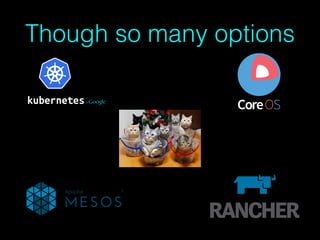
Though so many options
Why would you want docker
Repeatability
Can allow simpler scaling
No difference of libraries between dev and live
Shrink wrapping
Versioning
Simple rollback of libraries programs
Multiple version of programs on the same pc
Isolation
More lightweight that virtualization
What doesn't it solve
Replication/Resiliency
Bad code
Its a tool that help with specific problems
Its not a magic bullet
Part of Dev/Ops
Why Dev/Ops/Automation
Remove the fear of breaking
Simple Roll forward or back
Free you time for more important things
You can't manage what you can't see
But how
The following are tips and methods on how to bring it into your
organisation.
Not an exact recipe. Take the bits that make sense for you.
Assumes you already have systems that tend to the monolithic
application side.
Start with something simple
Don't start with your biggest critical app
You will fail
Take small steps that keep moving you to a better place
Start with a non critical piece of your architecture
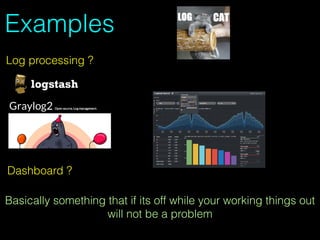
Examples
Log processing ?
Dashboard ?
Basically something that if its off while your working things out
will not be a problem
Run your own registry
https://github.com/docker/distribution/blob/master/docs/deploying.md
Docker images are available
Don't forget to add a ssl cert
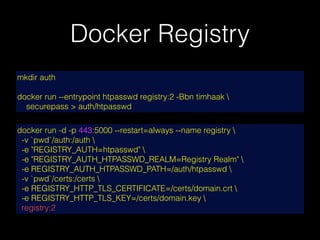
Docker Registry
docker run -d -p 443:5000 --restart=always --name registry 
-v `pwd`/auth:/auth 
-e "REGISTRY_AUTH=htpasswd" 
-e "REGISTRY_AUTH_HTPASSWD_REALM=Registry Realm" 
-e REGISTRY_AUTH_HTPASSWD_PATH=/auth/htpasswd 
-v `pwd`/certs:/certs 
-e REGISTRY_HTTP_TLS_CERTIFICATE=/certs/domain.crt 
-e REGISTRY_HTTP_TLS_KEY=/certs/domain.key 
registry:2
mkdir auth
docker run --entrypoint htpasswd registry:2 -Bbn timhaak 
securepass > auth/htpasswd
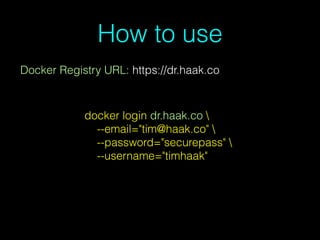
How to use
Docker Registry URL: https://dr.haak.co
docker login dr.haak.co 
--email="tim@haak.co" 
--password="securepass" 
--username="timhaak"
Put one person on it
Who Cares
With The Need Skills
Not the new intern/junior developer
Why
Only one person will go through the wrong path pain
Faster iteration while learning
Can back out a wrong path quickly
Rest of the team only see the final simpler path
Store configs externally
While your starting mount the configs etc via a volume
into the container
Easier debugging
You don't have to rebuild the container to update
Other members of your team can just edit the file
Allows you to use something like Ansible to generate the
configs
Known good state
When restarting the image. DELETE the previous container then restart.
This way your always starting from a know good state.
The only thing that can change is the config.
Make sure that docker cleans up previous containers and starts new
ones on reboot.
That way rebooting always puts you into a good state
docker rm -f image_name
docker start -d -v /config/config -p 321:321 timhaak/awesome1
Dev Environment
Before working on your live servers. Start but using docker as
you dev environment.
Its safer
Faster testing
Don't have to worry about testing
You can make sure you have all the required packages.
Though we all know exactly whats installed on our servers :)
Mongo
This is actually a good candidate for service bring into docker
Add a docker version into a replica set
Make sure it will only be a slave while testing
If you mess something up your can just remove it as the other
servers will still have a copy of the data.
Don't for get to store the data in a volume
Add DNS Rest Api
Sounds hard but isn't
Allow of adding and removing servers from DNS rotation
You can't get it wrong (Especially when your panicking)
Can eventually be automated
Please secure it
ie https://api.haak.co/dnsapi/mainweb/srv1/enable
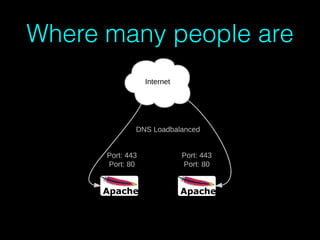
Where many people are
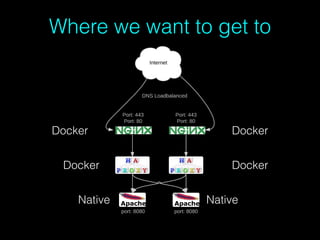
Where we want to get to
DockerDocker
Docker Docker
Native Native
HaProxy / Load Balancer
This is actually one of the most important pieces of the system
as it allows you to switch out or test underlying application
servers.
You don't have to use HaProxy its just one of the more popular
ones to use and actually gives very nice reporting. Also its
been quiet battle tested.
There are good node and go alternatives.
I would look to setting up an api here to change config. Fairly
easy agains haproxy.
SSL Off loader / Load balancer
This is a good place to start bringing docker into your live
environment. (Assuming you have a monolithic app)
Fairly simple to test.
Makes your system more resilient.
Allows you to do things like fix cache headers etc.
Once in place can simplify your updates.
Starts you down the path of microservices
Initial testing
Just spin up a temporary server for initial testing.
If you can't do it with your infrastructure look at one of the
cloud servers providers that charge for only the time you use.
Locally you can look at cloudafrica.net (R0.09 per hour.)
Setup server and install docker (I hope your using something
like Ansible)
Initial testing
Set up your config
Run the docker container
If you change your host file it should all just work
Make it live
With this you'll have to move the port that your application
server listens on.
This is the most dangerous bit.
Especially if you have a single server.
Though once you've got the pieces all working together
switching docker images in and out become quiet simple.
Wrap the code
Ok so how do you now wrap the actual application server into
docker.
You don't want to mess up the current server incase you get
something wrong.
Also you want to make sure its using the same files as the
current server.
Well you've got the image that you've been testing on your
local pc while doing dev?
Wrap the code
Start it up on the live server mounting the current server's web
directory as a volume into the docker container running on a
new different port.
Don't you have to stop the old server?
No the only problem you may have is with things like cache
files or if your using locks.
Wrap the code
Test the server on the new port is it all working. No client will
see it as the load balancer not using it. But its on the same
server should have access to everything it needs.
If everything is working tell your load balancer to switch to the
new server's port.
Check the live site if its all working great. If not switch back.
The only delay will be you as you never stopped the old server.
Going forward
You can now start moving more services into docker.
As you feel secure in that its work start removing the unused
programs and cruft from the old server.
This will reduce the chance of problems. Also you are now
decreasing the things that need to updated and managed on
the base pc.
Future things to look at
The follow are things you may want to start looking at
Some are available now some are near future.
Though each does increase the complexity which you may not
want to do
VPN
Something that seems to be over looked quiet often as people
move to micro service and more servers. Is secure
communication.
Main advantage is safe zones so you don't have to wrap
everything.
As an example servers talking to a centralised redis cache
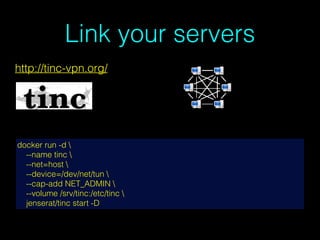
Link your servers
docker run -d 
--name tinc 
--net=host 
--device=/dev/net/tun 
--cap-add NET_ADMIN 
--volume /srv/tinc:/etc/tinc 
jenserat/tinc start -D
http://tinc-vpn.org/
Auto Discovery / Config
Eventually your going to want to have your containers auto
configure them selves as they start up
There are a couple options here each will depend on your
personal preference.
Alternatives
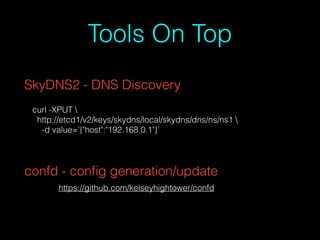
Tools On Top
SkyDNS2 - DNS Discovery
curl -XPUT 
http://etcd1/v2/keys/skydns/local/skydns/dns/ns/ns1 
-d value='{"host":"192.168.0.1"}'
https://github.com/kelseyhightower/confd
confd - config generation/update
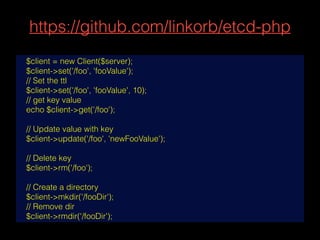
https://github.com/linkorb/etcd-php
$client = new Client($server);
$client->set('/foo', 'fooValue');
// Set the ttl
$client->set('/foo', 'fooValue', 10);
// get key value
echo $client->get('/foo');
// Update value with key
$client->update('/foo', 'newFooValue');
// Delete key
$client->rm('/foo');
// Create a directory
$client->mkdir('/fooDir');
// Remove dir
$client->rmdir('/fooDir');
Replication
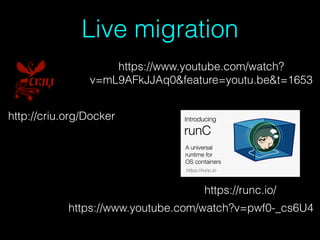
Live migration
http://criu.org/Docker
https://www.youtube.com/watch?v=pwf0-_cs6U4
https://runc.io/
https://www.youtube.com/watch?
v=mL9AFkJJAq0&feature=youtu.be&t=1653
Networking
Lots of active work here but no clear winner as yet.
Though most only provide a single network.
Still waiting for one that can give you more SDN functionality.
Basically single network and ability to move containers in and
out easily.
Though if you know what your doing using Pipework and
openvswitch you could build your own system.
Though very few people would have this requirement.
tim@haak.co @tim_haakhttps://github.com/timhaak
Thanks

Using Docker in the Real World

  • 1.
    Using Docker inThe Real World PHP Craft 2015 Tim Haak tim@haak.co @tim_haakhttps://github.com/timhaak
  • 2.
    Who I am TimHaak What do I do: Consulting as a developer across the stack Though focusing on php and web and linux side of the world. tim@haak.co @tim_haakhttps://github.com/timhaak
  • 3.
    So you hearddocker was great
  • 4.
  • 5.
    Why would youwant docker Repeatability Can allow simpler scaling No difference of libraries between dev and live Shrink wrapping Versioning Simple rollback of libraries programs Multiple version of programs on the same pc Isolation More lightweight that virtualization
  • 6.
    What doesn't itsolve Replication/Resiliency Bad code Its a tool that help with specific problems Its not a magic bullet
  • 7.
    Part of Dev/Ops WhyDev/Ops/Automation Remove the fear of breaking Simple Roll forward or back Free you time for more important things You can't manage what you can't see
  • 8.
    But how The followingare tips and methods on how to bring it into your organisation. Not an exact recipe. Take the bits that make sense for you. Assumes you already have systems that tend to the monolithic application side.
  • 9.
    Start with somethingsimple Don't start with your biggest critical app You will fail Take small steps that keep moving you to a better place Start with a non critical piece of your architecture
  • 10.
    Examples Log processing ? Dashboard? Basically something that if its off while your working things out will not be a problem
  • 11.
    Run your ownregistry https://github.com/docker/distribution/blob/master/docs/deploying.md Docker images are available Don't forget to add a ssl cert
  • 12.
    Docker Registry docker run-d -p 443:5000 --restart=always --name registry -v `pwd`/auth:/auth -e "REGISTRY_AUTH=htpasswd" -e "REGISTRY_AUTH_HTPASSWD_REALM=Registry Realm" -e REGISTRY_AUTH_HTPASSWD_PATH=/auth/htpasswd -v `pwd`/certs:/certs -e REGISTRY_HTTP_TLS_CERTIFICATE=/certs/domain.crt -e REGISTRY_HTTP_TLS_KEY=/certs/domain.key registry:2 mkdir auth docker run --entrypoint htpasswd registry:2 -Bbn timhaak securepass > auth/htpasswd
  • 13.
    How to use DockerRegistry URL: https://dr.haak.co docker login dr.haak.co --email="tim@haak.co" --password="securepass" --username="timhaak"
  • 14.
    Put one personon it Who Cares With The Need Skills Not the new intern/junior developer
  • 15.
    Why Only one personwill go through the wrong path pain Faster iteration while learning Can back out a wrong path quickly Rest of the team only see the final simpler path
  • 16.
    Store configs externally Whileyour starting mount the configs etc via a volume into the container Easier debugging You don't have to rebuild the container to update Other members of your team can just edit the file Allows you to use something like Ansible to generate the configs
  • 17.
    Known good state Whenrestarting the image. DELETE the previous container then restart. This way your always starting from a know good state. The only thing that can change is the config. Make sure that docker cleans up previous containers and starts new ones on reboot. That way rebooting always puts you into a good state docker rm -f image_name docker start -d -v /config/config -p 321:321 timhaak/awesome1
  • 18.
    Dev Environment Before workingon your live servers. Start but using docker as you dev environment. Its safer Faster testing Don't have to worry about testing You can make sure you have all the required packages. Though we all know exactly whats installed on our servers :)
  • 19.
    Mongo This is actuallya good candidate for service bring into docker Add a docker version into a replica set Make sure it will only be a slave while testing If you mess something up your can just remove it as the other servers will still have a copy of the data. Don't for get to store the data in a volume
  • 20.
    Add DNS RestApi Sounds hard but isn't Allow of adding and removing servers from DNS rotation You can't get it wrong (Especially when your panicking) Can eventually be automated Please secure it ie https://api.haak.co/dnsapi/mainweb/srv1/enable
  • 21.
  • 22.
    Where we wantto get to DockerDocker Docker Docker Native Native
  • 23.
    HaProxy / LoadBalancer This is actually one of the most important pieces of the system as it allows you to switch out or test underlying application servers. You don't have to use HaProxy its just one of the more popular ones to use and actually gives very nice reporting. Also its been quiet battle tested. There are good node and go alternatives. I would look to setting up an api here to change config. Fairly easy agains haproxy.
  • 24.
    SSL Off loader/ Load balancer This is a good place to start bringing docker into your live environment. (Assuming you have a monolithic app) Fairly simple to test. Makes your system more resilient. Allows you to do things like fix cache headers etc. Once in place can simplify your updates. Starts you down the path of microservices
  • 25.
    Initial testing Just spinup a temporary server for initial testing. If you can't do it with your infrastructure look at one of the cloud servers providers that charge for only the time you use. Locally you can look at cloudafrica.net (R0.09 per hour.) Setup server and install docker (I hope your using something like Ansible)
  • 26.
    Initial testing Set upyour config Run the docker container If you change your host file it should all just work
  • 27.
    Make it live Withthis you'll have to move the port that your application server listens on. This is the most dangerous bit. Especially if you have a single server. Though once you've got the pieces all working together switching docker images in and out become quiet simple.
  • 28.
    Wrap the code Okso how do you now wrap the actual application server into docker. You don't want to mess up the current server incase you get something wrong. Also you want to make sure its using the same files as the current server. Well you've got the image that you've been testing on your local pc while doing dev?
  • 29.
    Wrap the code Startit up on the live server mounting the current server's web directory as a volume into the docker container running on a new different port. Don't you have to stop the old server? No the only problem you may have is with things like cache files or if your using locks.
  • 30.
    Wrap the code Testthe server on the new port is it all working. No client will see it as the load balancer not using it. But its on the same server should have access to everything it needs. If everything is working tell your load balancer to switch to the new server's port. Check the live site if its all working great. If not switch back. The only delay will be you as you never stopped the old server.
  • 31.
    Going forward You cannow start moving more services into docker. As you feel secure in that its work start removing the unused programs and cruft from the old server. This will reduce the chance of problems. Also you are now decreasing the things that need to updated and managed on the base pc.
  • 32.
    Future things tolook at The follow are things you may want to start looking at Some are available now some are near future. Though each does increase the complexity which you may not want to do
  • 33.
    VPN Something that seemsto be over looked quiet often as people move to micro service and more servers. Is secure communication. Main advantage is safe zones so you don't have to wrap everything. As an example servers talking to a centralised redis cache
  • 34.
    Link your servers dockerrun -d --name tinc --net=host --device=/dev/net/tun --cap-add NET_ADMIN --volume /srv/tinc:/etc/tinc jenserat/tinc start -D http://tinc-vpn.org/
  • 35.
    Auto Discovery /Config Eventually your going to want to have your containers auto configure them selves as they start up There are a couple options here each will depend on your personal preference.
  • 37.
  • 38.
    Tools On Top SkyDNS2- DNS Discovery curl -XPUT http://etcd1/v2/keys/skydns/local/skydns/dns/ns/ns1 -d value='{"host":"192.168.0.1"}' https://github.com/kelseyhightower/confd confd - config generation/update
  • 39.
    https://github.com/linkorb/etcd-php $client = newClient($server); $client->set('/foo', 'fooValue'); // Set the ttl $client->set('/foo', 'fooValue', 10); // get key value echo $client->get('/foo'); // Update value with key $client->update('/foo', 'newFooValue'); // Delete key $client->rm('/foo'); // Create a directory $client->mkdir('/fooDir'); // Remove dir $client->rmdir('/fooDir');
  • 40.
  • 41.
  • 42.
    Networking Lots of activework here but no clear winner as yet. Though most only provide a single network. Still waiting for one that can give you more SDN functionality. Basically single network and ability to move containers in and out easily. Though if you know what your doing using Pipework and openvswitch you could build your own system. Though very few people would have this requirement.
  • 45.