Docker Puebla
Bday #4 Celebration
FCC BUAP - Puebla, México
25.03.2017
#dockerbday
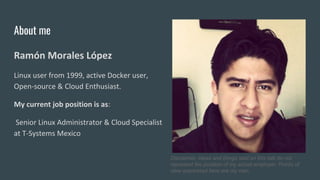
About me
Ramón Morales López
Linux user from 1999, active Docker user,
Open-source & Cloud Enthusiast.
My current job position is as:
Senior Linux Administrator & Cloud Specialist
at T-Systems Mexico
Disclaimer, ideas and things said on this talk do not
represent the position of my actual employer. Points of
view expressed here are my own.
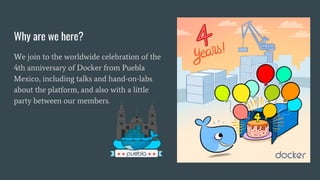
Why are we here?
We join to the worldwide celebration of the
4th anniversary of Docker from Puebla
Mexico, including talks and hand-on-labs
about the platform, and also with a little
party between our members.
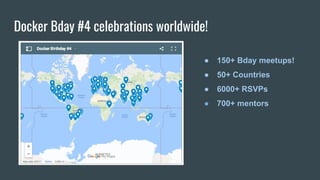
Docker Bday #4 celebrations worldwide!
● 150+ Bday meetups!
● 50+ Countries
● 6000+ RSVPs
● 700+ mentors
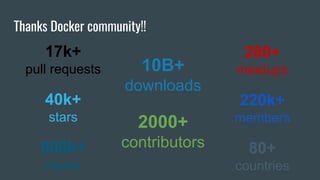
Thanks Docker community!!
17k+
pull requests
40k+
stars
800k+
repos
10B+
downloads
2000+
contributors
280+
meetups
220k+
members
80+
countries
What is Docker?
Docker
Docker is an open platform for developing, shipping, and running applications quickly.
It automates the deployment of applications into containers.
“Build, Ship & Run Apps
anywhere anytime…”
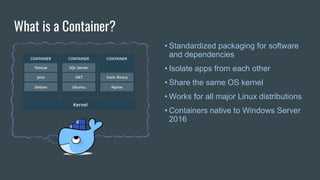
What is a Container?
• Standardized packaging for software
and dependencies
• Isolate apps from each other
• Share the same OS kernel
• Works for all major Linux distributions
• Containers native to Windows Server
2016
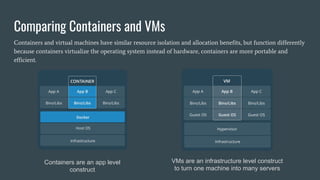
Comparing Containers and VMs
Containers are an app level
construct
VMs are an infrastructure level construct
to turn one machine into many servers
Containers and virtual machines have similar resource isolation and allocation benefits, but function differently
because containers virtualize the operating system instead of hardware, containers are more portable and
efficient.
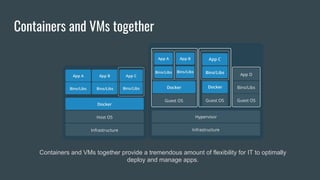
Containers and VMs together
Containers and VMs together provide a tremendous amount of flexibility for IT to optimally
deploy and manage apps.
Docker Components
Let's look at the core components that compose Docker:
● The Docker client and server, also called the Docker Engine.
● Docker Images
● Registries
● Docker Containers
What is Docker Engine?
Docker Engine is a client-server application with these major components:
● A server which is a type of long-running program called a daemon process.
● A REST API which specifies interfaces that programs can use to talk to the
daemon and instruct it what to do.
● A command line interface (CLI) client.
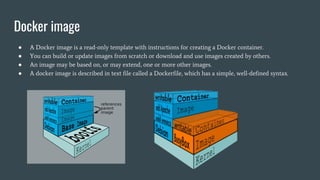
Docker image
● A Docker image is a read-only template with instructions for creating a Docker container.
● You can build or update images from scratch or download and use images created by others.
● An image may be based on, or may extend, one or more other images.
● A docker image is described in text file called a Dockerfile, which has a simple, well-defined syntax.
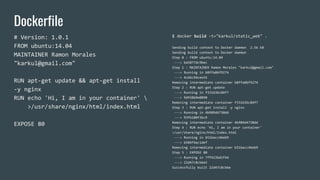
Dockerfile
# Version: 1.0.1
FROM ubuntu:14.04
MAINTAINER Ramon Morales
"karkul@gmail.com"
RUN apt-get update && apt-get install
-y nginx
RUN echo 'Hi, I am in your container' 
>/usr/share/nginx/html/index.html
EXPOSE 80
$ docker build -t="karkul/static_web" .
Sending build context to Docker daemon 2.56 kB
Sending build context to Docker daemon
Step 0 : FROM ubuntu:14.04
---> ba5877dc9bec
Step 1 : MAINTAINER Ramon Morales "karkul@gmail.com"
---> Running in b8ffa06f9274
---> 4c66c9dcee35
Removing intermediate container b8ffa06f9274
Step 2 : RUN apt-get update
---> Running in f331636c84f7
---> 9d938b9e0090
Removing intermediate container f331636c84f7
Step 3 : RUN apt-get install -y nginx
---> Running in 4b989d4730dd
---> 93fb180f3bc9
Removing intermediate container 4b989d4730dd
Step 4 : RUN echo 'Hi, I am in your container'
>/usr/share/nginx/html/index.html
---> Running in b51bacc46eb9
---> b584f4ac1def
Removing intermediate container b51bacc46eb9
Step 5 : EXPOSE 80
---> Running in 7ff423bd1f4d
---> 22d47c8cb6e5
Successfully built 22d47c8cb6e
Docker Registry
A docker registry is a library of images. A registry can be public or private, and can be
on the same server as the Docker daemon or Docker client, or on a totally separate
server.
Examples of public registries:
https://hub.docker.com
https://store.docker.com
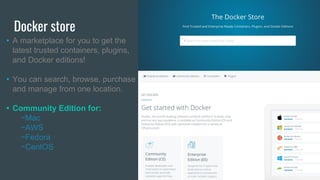
Docker store
• A marketplace for you to get the
latest trusted containers, plugins,
and Docker editions!
• You can search, browse, purchase
and manage from one location.
• Community Edition for:
−Mac
−AWS
−Fedora
−CentOS
Docker Container
A Docker container is a runnable instance of a Docker image.
You can run, start, stop, move, or delete a container using
Docker API or CLI commands.
How does Docker works?
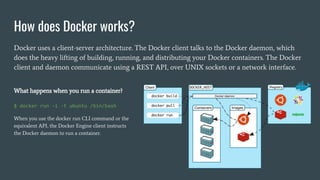
Docker uses a client-server architecture. The Docker client talks to the Docker daemon, which
does the heavy lifting of building, running, and distributing your Docker containers. The Docker
client and daemon communicate using a REST API, over UNIX sockets or a network interface.
What happens when you run a container?
$ docker run -i -t ubuntu /bin/bash
When you use the docker run CLI command or the
equivalent API, the Docker Engine client instructs
the Docker daemon to run a container.
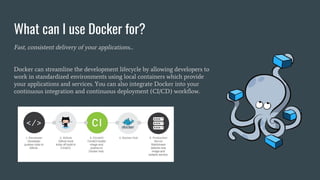
What can I use Docker for?
Fast, consistent delivery of your applications...
Docker can streamline the development lifecycle by allowing developers to
work in standardized environments using local containers which provide
your applications and services. You can also integrate Docker into your
continuous integration and continuous deployment (CI/CD) workflow.
Containers use cases and success stories...
Uber Accelerates Developer Onboarding from Weeks to Minutes with Docker
“Docker provides a very good isolation of resources. We used to have a case where applications stepped on each
other. This is annoying because all applications on the host if going to be affected. But Docker provides resource
isolation , which helps us to prevent this scenario from happening.”
Xiaojian Huang, Software Engineer, Uber
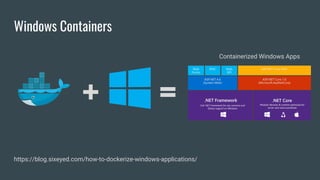
Windows Containers
+ =
Containerized Windows Apps
https://blog.sixeyed.com/how-to-dockerize-windows-applications/
Questions?
Remember: we all start the same way...
Thank you!!
Ramón Morales
--
https://github.com/karkul
karkul@gmail.com
@karkull
What else?
● Learn Docker with Bday #4 Labs!
● Join to the Docker community
● Practise, practise, practise!
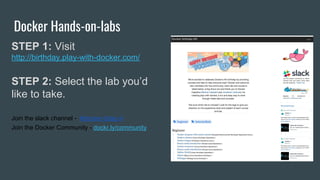
Docker Hands-on-labs
STEP 1: Visit
http://birthday.play-with-docker.com/
STEP 2: Select the lab you’d
like to take.
Join the slack channel - #docker-bday-4
Join the Docker Community - dockr.ly/community

Docker puebla bday #4 celebration

  • 1.
    Docker Puebla Bday #4Celebration FCC BUAP - Puebla, México 25.03.2017 #dockerbday
  • 2.
    About me Ramón MoralesLópez Linux user from 1999, active Docker user, Open-source & Cloud Enthusiast. My current job position is as: Senior Linux Administrator & Cloud Specialist at T-Systems Mexico Disclaimer, ideas and things said on this talk do not represent the position of my actual employer. Points of view expressed here are my own.
  • 3.
    Why are wehere? We join to the worldwide celebration of the 4th anniversary of Docker from Puebla Mexico, including talks and hand-on-labs about the platform, and also with a little party between our members.
  • 4.
    Docker Bday #4celebrations worldwide! ● 150+ Bday meetups! ● 50+ Countries ● 6000+ RSVPs ● 700+ mentors
  • 5.
    Thanks Docker community!! 17k+ pullrequests 40k+ stars 800k+ repos 10B+ downloads 2000+ contributors 280+ meetups 220k+ members 80+ countries
  • 6.
  • 7.
    Docker Docker is anopen platform for developing, shipping, and running applications quickly. It automates the deployment of applications into containers. “Build, Ship & Run Apps anywhere anytime…”
  • 8.
    What is aContainer? • Standardized packaging for software and dependencies • Isolate apps from each other • Share the same OS kernel • Works for all major Linux distributions • Containers native to Windows Server 2016
  • 10.
    Comparing Containers andVMs Containers are an app level construct VMs are an infrastructure level construct to turn one machine into many servers Containers and virtual machines have similar resource isolation and allocation benefits, but function differently because containers virtualize the operating system instead of hardware, containers are more portable and efficient.
  • 11.
    Containers and VMstogether Containers and VMs together provide a tremendous amount of flexibility for IT to optimally deploy and manage apps.
  • 12.
    Docker Components Let's lookat the core components that compose Docker: ● The Docker client and server, also called the Docker Engine. ● Docker Images ● Registries ● Docker Containers
  • 13.
    What is DockerEngine? Docker Engine is a client-server application with these major components: ● A server which is a type of long-running program called a daemon process. ● A REST API which specifies interfaces that programs can use to talk to the daemon and instruct it what to do. ● A command line interface (CLI) client.
  • 14.
    Docker image ● ADocker image is a read-only template with instructions for creating a Docker container. ● You can build or update images from scratch or download and use images created by others. ● An image may be based on, or may extend, one or more other images. ● A docker image is described in text file called a Dockerfile, which has a simple, well-defined syntax.
  • 15.
    Dockerfile # Version: 1.0.1 FROMubuntu:14.04 MAINTAINER Ramon Morales "karkul@gmail.com" RUN apt-get update && apt-get install -y nginx RUN echo 'Hi, I am in your container' >/usr/share/nginx/html/index.html EXPOSE 80 $ docker build -t="karkul/static_web" . Sending build context to Docker daemon 2.56 kB Sending build context to Docker daemon Step 0 : FROM ubuntu:14.04 ---> ba5877dc9bec Step 1 : MAINTAINER Ramon Morales "karkul@gmail.com" ---> Running in b8ffa06f9274 ---> 4c66c9dcee35 Removing intermediate container b8ffa06f9274 Step 2 : RUN apt-get update ---> Running in f331636c84f7 ---> 9d938b9e0090 Removing intermediate container f331636c84f7 Step 3 : RUN apt-get install -y nginx ---> Running in 4b989d4730dd ---> 93fb180f3bc9 Removing intermediate container 4b989d4730dd Step 4 : RUN echo 'Hi, I am in your container' >/usr/share/nginx/html/index.html ---> Running in b51bacc46eb9 ---> b584f4ac1def Removing intermediate container b51bacc46eb9 Step 5 : EXPOSE 80 ---> Running in 7ff423bd1f4d ---> 22d47c8cb6e5 Successfully built 22d47c8cb6e
  • 16.
    Docker Registry A dockerregistry is a library of images. A registry can be public or private, and can be on the same server as the Docker daemon or Docker client, or on a totally separate server. Examples of public registries: https://hub.docker.com https://store.docker.com
  • 17.
    Docker store • Amarketplace for you to get the latest trusted containers, plugins, and Docker editions! • You can search, browse, purchase and manage from one location. • Community Edition for: −Mac −AWS −Fedora −CentOS
  • 18.
    Docker Container A Dockercontainer is a runnable instance of a Docker image. You can run, start, stop, move, or delete a container using Docker API or CLI commands.
  • 19.
    How does Dockerworks? Docker uses a client-server architecture. The Docker client talks to the Docker daemon, which does the heavy lifting of building, running, and distributing your Docker containers. The Docker client and daemon communicate using a REST API, over UNIX sockets or a network interface. What happens when you run a container? $ docker run -i -t ubuntu /bin/bash When you use the docker run CLI command or the equivalent API, the Docker Engine client instructs the Docker daemon to run a container.
  • 20.
    What can Iuse Docker for? Fast, consistent delivery of your applications... Docker can streamline the development lifecycle by allowing developers to work in standardized environments using local containers which provide your applications and services. You can also integrate Docker into your continuous integration and continuous deployment (CI/CD) workflow.
  • 21.
    Containers use casesand success stories... Uber Accelerates Developer Onboarding from Weeks to Minutes with Docker “Docker provides a very good isolation of resources. We used to have a case where applications stepped on each other. This is annoying because all applications on the host if going to be affected. But Docker provides resource isolation , which helps us to prevent this scenario from happening.” Xiaojian Huang, Software Engineer, Uber
  • 22.
    Windows Containers + = ContainerizedWindows Apps https://blog.sixeyed.com/how-to-dockerize-windows-applications/
  • 23.
  • 24.
    Remember: we allstart the same way...
  • 25.
  • 26.
    What else? ● LearnDocker with Bday #4 Labs! ● Join to the Docker community ● Practise, practise, practise!
  • 27.
    Docker Hands-on-labs STEP 1:Visit http://birthday.play-with-docker.com/ STEP 2: Select the lab you’d like to take. Join the slack channel - #docker-bday-4 Join the Docker Community - dockr.ly/community