Total Site to Sites Linux Based Open VPN Solution with DDNS Page 1
Advanced Internet Service Provider Billing System
for Wifi/WiMax/VPN/Hotspot/LTE with DDNS
chanaka.lasantha@gmail.com
ව්‍යාපාරාක් ලෙස ්ම්කිසි අන්තකජාෙ ලසේව්‍ාව්‍ ෙබලදනල ොට ඔ්ාෙට ව්‍ැදගත්ම ලේ තම යි Billing කිරීම , එ එ ල නාට
Gigabyte පාරකමන් ල ොටා එ ෙබාදීම , ආක ෂාව්‍ සහ ව්‍ාර්තාව්‍ ලෙස සි්ල්ෙ සමී ෂණ් !..
Dynamic DNS (DDNS) instalation & Config on CentOS/RedHat Enterprise Linux Server
ලමලම ස්ථාපාරන් සිදු කගත් පාරසුව්‍ ඔබට Router එල හි DDNS Settings ල ොන්ෆිග් ලනො ක හුලද ම එහි ලපාරොර්ට් එ පාරමණ
ඔබලග් LAN එ තුෙ IP Address එ ට ල ෝව්‍ර්ඩ් කිරීම පාරමණ ප්‍රමාණව්‍ත් ්.
දැන් No-ip DDNS Windows ලහෝ LINUX Client එ ස්ථාපිත ෙ විට එ් මගින් එ තකා ාෙ පාරකතක් ඇතුෙත
අපාරලග් Router එල හි Dynamic Public IP Address එ ලව්‍නස් ව්‍න විටම එ් no-ip ලසේව්‍ාව්‍ ලව්‍ත අන්තකජාේ
හකහා ්ාව්‍ත් ාලින කනු ෙැලේ. එවිට ඔව්න් ෙබාදුන් ෆ්‍රී ල ොලම්න් එ ෑනෑම කට ලව්‍ේ ‍රව්සක් මත ඇතුෙත් ක
උදාහකන් ලෙස සමන් ලව්‍ේ අ වි් බෙන ආ ාකල්න් අපාරලග් LAN Network Side එල තිලබන පාරරිගණ ්
තුෙ තිලබන ලව්‍ේ අ වි් / යිල් සර්ව්‍ර් එ / VPN සර්ව්‍ර් එ බාහික කට සිට Access ෙ හැකි් .
Install “Make” compiler program in preparation to compile the no-ip program. You might also have to install
the “GCC” compiler if “Make” compiler don’t work; I have both GCC and Make installed. The following is
the commands to download &install them:
yum install gcc
yum install make
DESIGEND , DOCUMEMTED AND TESTED BY CHANAKA LASANTHA NANAYAKKARA
Total Site to Sites Linux Based Open VPN Solution with DDNS Page 2
Now onto the easy step-by-step installation of no-ip client. Run the following 6 commands from the
terminal:
mkdir noip && cd noip
wget http://www.no-ip.com/client/linux/noip-duc-linux.tar.gz
tar zvxf noip-duc-linux.tar.gz
cd noip-2.1.9-1
make
make install
Please enter the login/email string for no-ip.com (email account that you used to set-up no-ip account)
Please enter the password for user(password that you used to login to no-ip)
Please enter an update interval: [30] 30
(Increments in minutes that you want no-ip client to check if your router’s external dynamic IP address has changed
and updates it accordingly.)
Do you wish to run something at successful update? [N] (y/N) N(Just enter “N” here.)
/usr/local/bin/noip2(To start/run noip client)
echo ‘/usr/local/bin/noip2′ >> /etc/rc.local(To start/run noip client after each system reboot
More useful no-ip commands
 /usr/local/bin/noip2 -C to configure noip client
 /usr/local/bin/noip2 -S to display info about running noip client
 /usr/local/bin/noip2 -U to set update intervals (in minutes)
Most Important Settings on Free Radius Server (192.168.2.205) and Open VPN Server
(192.168.2.204)
 Please set the correct Time & date in your VPN Access server and Free Radius Server:
Date:
date -s "9 AUG 2013 11:32:08"
Time:
date +%T -s "11:32:08"
 After that you must be correctly Setup that yours VPN server's CA.cert Time Zone and Server Key Time
Settings as well.
 Please make sure to use same version of VPN Clent Software aslo with the server verions as well.
Total Site to Sites Linux Based Open VPN Solution with DDNS Page 3
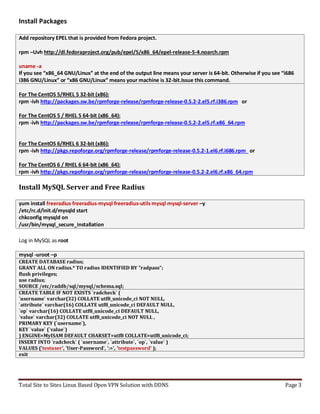
Install Packages
Add repository EPEL that is provided from Fedora project.
rpm –Uvh http://dl.fedoraproject.org/pub/epel/5/x86_64/epel-release-5-4.noarch.rpm
uname -a
If you see “x86_64 GNU/Linux” at the end of the output line means your server is 64-bit. Otherwise if you see “i686
i386 GNU/Linux” or “x86 GNU/Linux” means your machine is 32-bit.Issue this command.
For The CentOS 5/RHEL 5 32-bit (x86):
rpm -ivh http://packages.sw.be/rpmforge-release/rpmforge-release-0.5.2-2.el5.rf.i386.rpm or
For The CentOS 5 / RHEL 5 64-bit (x86_64):
rpm -ivh http://packages.sw.be/rpmforge-release/rpmforge-release-0.5.2-2.el5.rf.x86_64.rpm
For The CentOS 6/RHEL 6 32-bit (x86):
rpm -ivh http://pkgs.repoforge.org/rpmforge-release/rpmforge-release-0.5.2-1.el6.rf.i686.rpm or
For The CentOS 6 / RHEL 6 64-bit (x86_64):
rpm -ivh http://pkgs.repoforge.org/rpmforge-release/rpmforge-release-0.5.2-2.el6.rf.x86_64.rpm
Install MySQL Server and Free Radius
yum install freeradius freeradius-mysql freeradius-utils mysql mysql-server –y
/etc/rc.d/init.d/mysqld start
chkconfig mysqld on
/usr/bin/mysql_secure_installation
Log in MySQL as root
mysql -uroot –p
CREATE DATABASE radius;
GRANT ALL ON radius.* TO radius IDENTIFIED BY "radpass";
flush privileges;
use radius;
SOURCE /etc/raddb/sql/mysql/schema.sql;
CREATE TABLE IF NOT EXISTS `radcheck` (
`username` varchar(32) COLLATE utf8_unicode_ci NOT NULL,
`attribute` varchar(16) COLLATE utf8_unicode_ci DEFAULT NULL,
`op` varchar(16) COLLATE utf8_unicode_ci DEFAULT NULL,
`value` varchar(32) COLLATE utf8_unicode_ci NOT NULL ,
PRIMARY KEY (`username`),
KEY `value` (`value`)
) ENGINE=MyISAM DEFAULT CHARSET=utf8 COLLATE=utf8_unicode_ci;
INSERT INTO `radcheck` ( `username`, `attribute`, `op`, `value` )
VALUES ('testuser', 'User-Password', ':=', 'testpassword' );
exit
Total Site to Sites Linux Based Open VPN Solution with DDNS Page 4
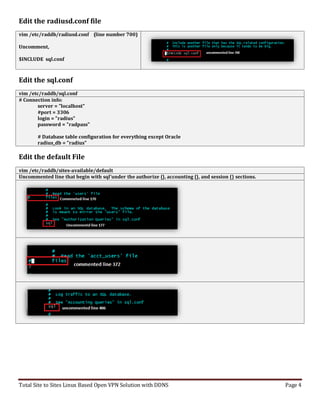
Edit the radiusd.conf file
vim /etc/raddb/radiusd.conf (line number 700)
Uncomment,
$INCLUDE sql.conf
Edit the sql.conf
vim /etc/raddb/sql.conf
# Connection info:
server = "localhost"
#port = 3306
login = "radius"
password = "radpass"
# Database table configuration for everything except Oracle
radius_db = "radius"
Edit the default File
vim /etc/raddb/sites-available/default
Uncommented line that begin with sql'under the authorize {}, accounting {}, and session {} sections.
Total Site to Sites Linux Based Open VPN Solution with DDNS Page 5
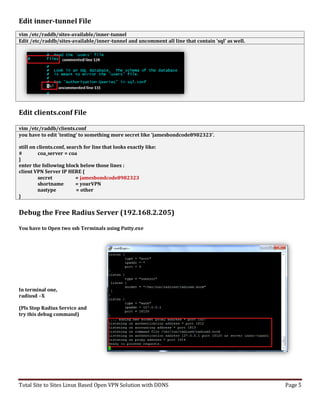
Edit inner-tunnel File
vim /etc/raddb/sites-available/inner-tunnel
Edit /etc/raddb/sites-available/inner-tunnel and uncomment all line that contain 'sql' as well.
Edit clients.conf File
vim /etc/raddb/clients.conf
you have to edit 'testing' to something more secret like 'jamesbondcode8982323'.
still on clients.conf, search for line that looks exactly like:
# coa_server = coa
}
enter the following block below those lines :
client VPN Server IP HERE {
secret = jamesbondcode8982323
shortname = yourVPN
nastype = other
}
Debug the Free Radius Server (192.168.2.205)
You have to Open two ssh Terminals using Putty.exe
In terminal one,
radiusd –X
(Pls Stop Radius Service and
try this debug command)
Total Site to Sites Linux Based Open VPN Solution with DDNS Page 6
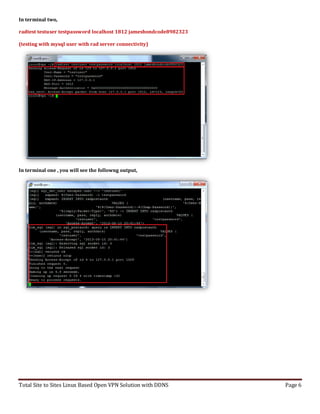
In terminal two,
radtest testuser testpassword localhost 1812 jamesbondcode8982323
(testing with mysql user with rad server connectivity)
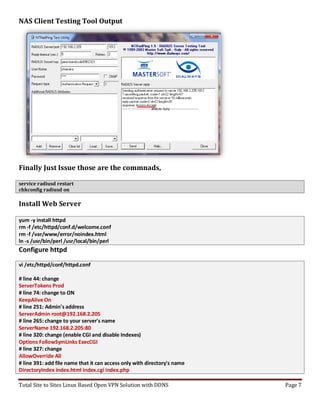
In terminal one , you will see the followng output,
Total Site to Sites Linux Based Open VPN Solution with DDNS Page 7
NAS Client Testing Tool Output
Finally Just Issue those are the commnads,
service radiusd restart
chkconfig radiusd on
Install Web Server
yum -y install httpd
rm -f /etc/httpd/conf.d/welcome.conf
rm -f /var/www/error/noindex.html
ln -s /usr/bin/perl /usr/local/bin/perl
Configure httpd
vi /etc/httpd/conf/httpd.conf
# line 44: change
ServerTokens Prod
# line 74: change to ON
KeepAlive On
# line 251: Admin's address
ServerAdmin root@192.168.2.205
# line 265: change to your server's name
ServerName 192.168.2.205:80
# line 320: change (enable CGI and disable Indexes)
Options FollowSymLinks ExecCGI
# line 327: change
AllowOverride All
# line 391: add file name that it can access only with directory's name
DirectoryIndex index.html index.cgi index.php
Total Site to Sites Linux Based Open VPN Solution with DDNS Page 8
# line 524: change
ServerSignature Off
# line 747: make it comment
#AddDefaultCharset UTF-8
# line 778: uncomment and add file-type that apache looks them CGI
AddHandler cgi-script .cgi .pl
/etc/rc.d/init.d/httpd start
chkconfig httpd on
Installing PHP 5.3, MCrypt & Pear
service httpd stop
yum remove php php-*
yum install -y php53-devel libmcrypt-devel
yum install -y php53 php53-cli php53-common php53-gd php53-mbstring gcc php53-mysql php53-pdo php53-pgsql php53-xml
php53-xmlrpc php53-devel php53-imap php53-odbc php53-snmp
Mcrypt installation for php 5.3, for this we need to download the php package and build
from it.
wget http://museum.php.net/php5/php-5.3.3.tar.gz
tar xf php-5.3.3.tar.gz
cd php-5.3.3/ext/mcrypt/
phpize
aclocal
./configure
make test
make install
// now to complete mcrypt installation, we will need to add the extension to php 5.3
// you need to create the mcrypt.ini file and add the extension to it
vim /etc/php.d/mcrypt.ini
// add the following line to the above file and save it
extension=mcrypt.so
// now we need to download and install the pear package
cd
wget http://pear.php.net/go-pear.phar
php go-pear.phar
yum install php-pear
pear install DB
service httpd start
Total Site to Sites Linux Based Open VPN Solution with DDNS Page 9
Web Interface for RAD Server
wget http://kaz.dl.sourceforge.net/project/daloradius/daloradius/daloradius0.9-9/daloradius-0.9-9.tar.gz
tar zxvf daloradius-0.9-9.tar.gz
mysql -pz80cpu radius < /root/daloradius-0.9-9/contrib/db/fr2-mysql-daloradius-and-freeradius.sql
mv daloradius-0.9-9 /var/www/html/daloradius
cd /var/www/html/daloradius/library
vim daloradius.conf.php
Now you can login into http://192.168.2.205/daloradius/login.php
Total Site to Sites Linux Based Open VPN Solution with DDNS Page 10
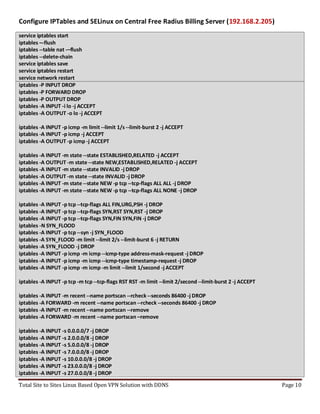
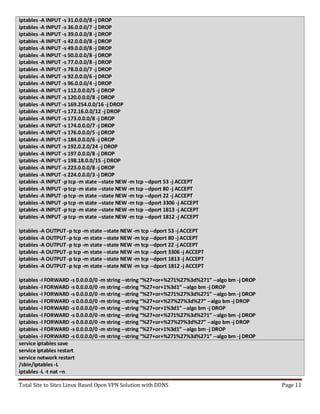
Configure IPTables and SELinux on Central Free Radius Billing Server (192.168.2.205)
service iptables start
iptables –-flush
iptables --table nat -–flush
iptables --delete-chain
service iptables save
service iptables restart
service network restart
iptables -P INPUT DROP
iptables -P FORWARD DROP
iptables -P OUTPUT DROP
iptables -A INPUT -i lo -j ACCEPT
iptables -A OUTPUT -o lo -j ACCEPT
iptables -A INPUT -p icmp -m limit --limit 1/s --limit-burst 2 -j ACCEPT
iptables -A INPUT -p icmp -j ACCEPT
iptables -A OUTPUT -p icmp -j ACCEPT
iptables -A INPUT -m state --state ESTABLISHED,RELATED -j ACCEPT
iptables -A OUTPUT -m state --state NEW,ESTABLISHED,RELATED -j ACCEPT
iptables -A INPUT -m state --state INVALID -j DROP
iptables -A OUTPUT -m state --state INVALID -j DROP
iptables -A INPUT -m state --state NEW -p tcp --tcp-flags ALL ALL -j DROP
iptables -A INPUT -m state --state NEW -p tcp --tcp-flags ALL NONE -j DROP
iptables -A INPUT -p tcp --tcp-flags ALL FIN,URG,PSH -j DROP
iptables -A INPUT -p tcp --tcp-flags SYN,RST SYN,RST -j DROP
iptables -A INPUT -p tcp --tcp-flags SYN,FIN SYN,FIN -j DROP
iptables -N SYN_FLOOD
iptables -A INPUT -p tcp --syn -j SYN_FLOOD
iptables -A SYN_FLOOD -m limit --limit 2/s --limit-burst 6 -j RETURN
iptables -A SYN_FLOOD -j DROP
iptables -A INPUT -p icmp -m icmp --icmp-type address-mask-request -j DROP
iptables -A INPUT -p icmp -m icmp --icmp-type timestamp-request -j DROP
iptables -A INPUT -p icmp -m icmp -m limit --limit 1/second -j ACCEPT
iptables -A INPUT -p tcp -m tcp --tcp-flags RST RST -m limit --limit 2/second --limit-burst 2 -j ACCEPT
iptables -A INPUT -m recent --name portscan --rcheck --seconds 86400 -j DROP
iptables -A FORWARD -m recent --name portscan --rcheck --seconds 86400 -j DROP
iptables -A INPUT -m recent --name portscan --remove
iptables -A FORWARD -m recent --name portscan –remove
iptables -A INPUT -s 0.0.0.0/7 -j DROP
iptables -A INPUT -s 2.0.0.0/8 -j DROP
iptables -A INPUT -s 5.0.0.0/8 -j DROP
iptables -A INPUT -s 7.0.0.0/8 -j DROP
iptables -A INPUT -s 10.0.0.0/8 -j DROP
iptables -A INPUT -s 23.0.0.0/8 -j DROP
iptables -A INPUT -s 27.0.0.0/8 -j DROP
Total Site to Sites Linux Based Open VPN Solution with DDNS Page 11
iptables -A INPUT -s 31.0.0.0/8 -j DROP
iptables -A INPUT -s 36.0.0.0/7 -j DROP
iptables -A INPUT -s 39.0.0.0/8 -j DROP
iptables -A INPUT -s 42.0.0.0/8 -j DROP
iptables -A INPUT -s 49.0.0.0/8 -j DROP
iptables -A INPUT -s 50.0.0.0/8 -j DROP
iptables -A INPUT -s 77.0.0.0/8 -j DROP
iptables -A INPUT -s 78.0.0.0/7 -j DROP
iptables -A INPUT -s 92.0.0.0/6 -j DROP
iptables -A INPUT -s 96.0.0.0/4 -j DROP
iptables -A INPUT -s 112.0.0.0/5 -j DROP
iptables -A INPUT -s 120.0.0.0/8 -j DROP
iptables -A INPUT -s 169.254.0.0/16 -j DROP
iptables -A INPUT -s 172.16.0.0/12 -j DROP
iptables -A INPUT -s 173.0.0.0/8 -j DROP
iptables -A INPUT -s 174.0.0.0/7 -j DROP
iptables -A INPUT -s 176.0.0.0/5 -j DROP
iptables -A INPUT -s 184.0.0.0/6 -j DROP
iptables -A INPUT -s 192.0.2.0/24 -j DROP
iptables -A INPUT -s 197.0.0.0/8 -j DROP
iptables -A INPUT -s 198.18.0.0/15 -j DROP
iptables -A INPUT -s 223.0.0.0/8 -j DROP
iptables -A INPUT -s 224.0.0.0/3 -j DROP
iptables -A INPUT -p tcp -m state --state NEW -m tcp --dport 53 -j ACCEPT
iptables -A INPUT -p tcp -m state --state NEW -m tcp --dport 80 -j ACCEPT
iptables -A INPUT -p tcp -m state --state NEW -m tcp --dport 22 -j ACCEPT
iptables -A INPUT -p tcp -m state --state NEW -m tcp --dport 3306 -j ACCEPT
iptables -A INPUT -p tcp -m state --state NEW -m tcp --dport 1813 -j ACCEPT
iptables -A INPUT -p tcp -m state --state NEW -m tcp --dport 1812 -j ACCEPT
iptables -A OUTPUT -p tcp -m state --state NEW -m tcp --dport 53 -j ACCEPT
iptables -A OUTPUT -p tcp -m state --state NEW -m tcp --dport 80 -j ACCEPT
iptables -A OUTPUT -p tcp -m state --state NEW -m tcp --dport 22 -j ACCEPT
iptables -A OUTPUT -p tcp -m state --state NEW -m tcp --dport 3306 -j ACCEPT
iptables -A OUTPUT -p tcp -m state --state NEW -m tcp --dport 1813 -j ACCEPT
iptables -A OUTPUT -p tcp -m state --state NEW -m tcp --dport 1812 -j ACCEPT
iptables -I FORWARD -s 0.0.0.0/0 -m string --string “%27+or+%271%27%3d%271” --algo bm -j DROP
iptables -I FORWARD -s 0.0.0.0/0 -m string --string “%27+or+1%3d1” --algo bm -j DROP
iptables -I FORWARD -s 0.0.0.0/0 -m string --string “%27+or+%271%27%3d%271” --algo bm -j DROP
iptables -I FORWARD -s 0.0.0.0/0 -m string --string “%27+or+%27%27%3d%27” --algo bm -j DROP
iptables -I FORWARD -s 0.0.0.0/0 -m string --string “%27+or+1%3d1” --algo bm -j DROP
iptables -I FORWARD -s 0.0.0.0/0 -m string --string “%27+or+%271%27%3d%271” --algo bm -j DROP
iptables -I FORWARD -s 0.0.0.0/0 -m string --string “%27+or+%27%27%3d%27” --algo bm -j DROP
iptables -I FORWARD -s 0.0.0.0/0 -m string --string “%27+or+1%3d1” --algo bm -j DROP
iptables -I FORWARD -s 0.0.0.0/0 -m string --string “%27+or+%271%27%3d%271” --algo bm -j DROP
service iptables save
service iptables restart
service network restart
/sbin/iptables -L
iptables -L -t nat –n
Total Site to Sites Linux Based Open VPN Solution with DDNS Page 12
iptables -vnL
use radius;
CREATE TABLE IF NOT EXISTS `radcheck` (
`username` varchar(32) COLLATE utf8_unicode_ci NOT NULL,
`attribute` varchar(16) COLLATE utf8_unicode_ci DEFAULT NULL,
`op` varchar(16) COLLATE utf8_unicode_ci DEFAULT NULL,
`value` varchar(32) COLLATE utf8_unicode_ci NOT NULL ,
PRIMARY KEY (`username`),
KEY `value` (`value`)
) ENGINE=MyISAM DEFAULT CHARSET=utf8 COLLATE=utf8_unicode_ci;
INSERT INTO `radcheck` ( `username`, `attribute`, `op`, `value` )
VALUES ('testuser', 'User-Password', ':=', 'testpassword' );
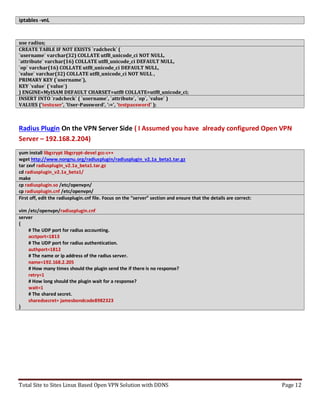
Radius Plugin On the VPN Server Side ( I Assumed you have already configured Open VPN
Server – 192.168.2.204)
yum install libgcrypt libgcrypt-devel gcc-c++
wget http://www.nongnu.org/radiusplugin/radiusplugin_v2.1a_beta1.tar.gz
tar zxvf radiusplugin_v2.1a_beta1.tar.gz
cd radiusplugin_v2.1a_beta1/
make
cp radiusplugin.so /etc/openvpn/
cp radiusplugin.cnf /etc/openvpn/
First off, edit the radiusplugin.cnf file. Focus on the “server” section and ensure that the details are correct:
vim /etc/openvpn/radiusplugin.cnf
server
{
# The UDP port for radius accounting.
acctport=1813
# The UDP port for radius authentication.
authport=1812
# The name or ip address of the radius server.
name=192.168.2.205
# How many times should the plugin send the if there is no response?
retry=1
# How long should the plugin wait for a response?
wait=1
# The shared secret.
sharedsecret= jamesbondcode8982323
}
Total Site to Sites Linux Based Open VPN Solution with DDNS Page 13
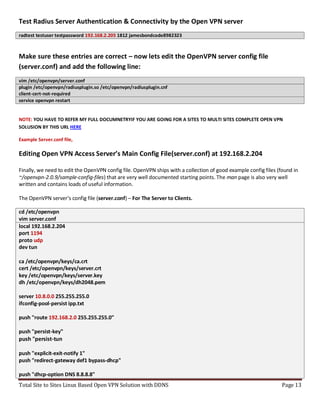
Test Radius Server Authentication & Connectivity by the Open VPN server
radtest testuser testpassword 192.168.2.205 1812 jamesbondcode8982323
Make sure these entries are correct – now lets edit the OpenVPN server config file
(server.conf) and add the following line:
vim /etc/openvpn/server.conf
plugin /etc/openvpn/radiusplugin.so /etc/openvpn/radiusplugin.cnf
client-cert-not-required
service openvpn restart
NOTE: YOU HAVE TO REFER MY FULL DOCUMNETRYIF YOU ARE GOING FOR A SITES TO MULTI SITES COMPLETE OPEN VPN
SOLUSION BY THIS URL HERE
Example Server.conf file,
Editing Open VPN Access Server’s Main Config File(server.conf) at 192.168.2.204
Finally, we need to edit the OpenVPN config file. OpenVPN ships with a collection of good example config files (found in
~/openvpn-2.0.9/sample-config-files) that are very well documented starting points. The man page is also very well
written and contains loads of useful information.
The OpenVPN server's config file (server.conf) – For The Server to Clients.
cd /etc/openvpn
vim server.conf
local 192.168.2.204
port 1194
proto udp
dev tun
ca /etc/openvpn/keys/ca.crt
cert /etc/openvpn/keys/server.crt
key /etc/openvpn/keys/server.key
dh /etc/openvpn/keys/dh2048.pem
server 10.8.0.0 255.255.255.0
ifconfig-pool-persist ipp.txt
push "route 192.168.2.0 255.255.255.0"
push "persist-key"
push "persist-tun
push "explicit-exit-notify 1"
push "redirect-gateway def1 bypass-dhcp"
push "dhcp-option DNS 8.8.8.8"
Total Site to Sites Linux Based Open VPN Solution with DDNS Page 14
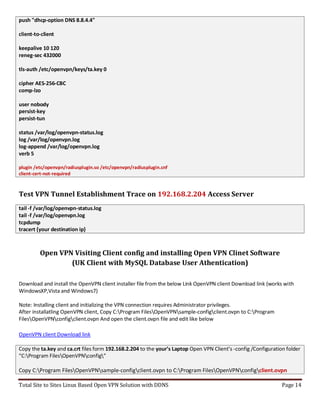
push "dhcp-option DNS 8.8.4.4"
client-to-client
keepalive 10 120
reneg-sec 432000
tls-auth /etc/openvpn/keys/ta.key 0
cipher AES-256-CBC
comp-lzo
user nobody
persist-key
persist-tun
status /var/log/openvpn-status.log
log /var/log/openvpn.log
log-append /var/log/openvpn.log
verb 5
plugin /etc/openvpn/radiusplugin.so /etc/openvpn/radiusplugin.cnf
client-cert-not-required
Test VPN Tunnel Establishment Trace on 192.168.2.204 Access Server
tail -f /var/log/openvpn-status.log
tail -f /var/log/openvpn.log
tcpdump
tracert {your destination ip}
Open VPN Visiting Client config and installing Open VPN Clinet Software
(UK Client with MySQL Database User Athentication)
Download and install the OpenVPN client installer file from the below Link OpenVPN client Download link (works with
WindowsXP,Vista and Windows7)
Note: Installing client and initializing the VPN connection requires Administrator privileges.
After installatling OpenVPN client, Copy C:Program FilesOpenVPNsample-configclient.ovpn to C:Program
FilesOpenVPNconfigclient.ovpn And open the client.ovpn file and edit like below
OpenVPN client Download link
Copy the ta.key and ca.crt files form 192.168.2.204 to the your’s Laptop Open VPN Client’s -config /Configuration folder
“C:Program FilesOpenVPNconfig”
Copy C:Program FilesOpenVPNsample-configclient.ovpn to C:Program FilesOpenVPNconfigclient.ovpn
Total Site to Sites Linux Based Open VPN Solution with DDNS Page 15
client
dev tun
proto udp
remote openvpngil.no-ip.biz 1194
reneg-sec 432000
nobind
auth-user-pass
resolv-retry infinite
route 192.168.2.0 255.255.255.0
user nobody
group nobody
persist-tun
persist-key
ca ca.crt
tls-auth ta.key 1
cipher AES-256-CBC
comp-lzo
verb 3
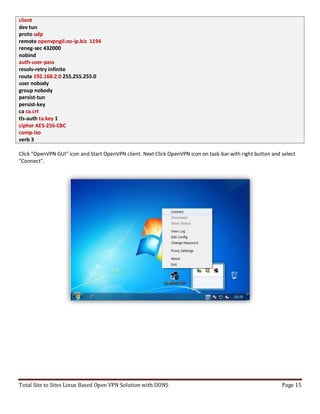
Click "OpenVPN GUI" icon and Start OpenVPN client. Next Click OpenVPN icon on task-bar with right button and select
"Connect".
Total Site to Sites Linux Based Open VPN Solution with DDNS Page 16
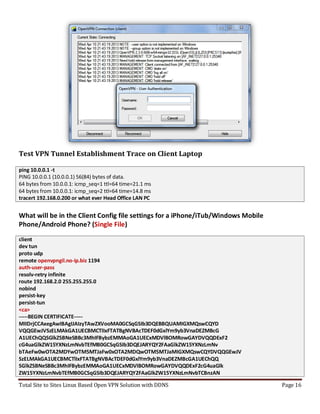
Test VPN Tunnel Establishment Trace on Client Laptop
ping 10.0.0.1 -t
PING 10.0.0.1 (10.0.0.1) 56(84) bytes of data.
64 bytes from 10.0.0.1: icmp_seq=1 ttl=64 time=21.1 ms
64 bytes from 10.0.0.1: icmp_seq=2 ttl=64 time=14.8 ms
tracert 192.168.0.200 or what ever Head Office LAN PC
What will be in the Client Config file settings for a iPhone/iTub/Windows Mobile
Phone/Android Phone? (Single File)
client
dev tun
proto udp
remote openvpngil.no-ip.biz 1194
auth-user-pass
resolv-retry infinite
route 192.168.2.0 255.255.255.0
nobind
persist-key
persist-tun
<ca>
-----BEGIN CERTIFICATE-----
MIIDrjCCAxegAwIBAgIJAIzyTAwZXVooMA0GCSqGSIb3DQEBBQUAMIGXMQswCQYD
VQQGEwJVSzELMAkGA1UECBMCTlIxFTATBgNVBAcTDEF0dGxlYm9yb3VnaDEZMBcG
A1UEChQQSGlkZSBNeSBBc3MhIFBybzEMMAoGA1UECxMDVlBOMRowGAYDVQQDExF2
cG4uaGlkZW15YXNzLmNvbTEfMB0GCSqGSIb3DQEJARYQY2FAaGlkZW15YXNzLmNv
bTAeFw0wOTA2MDYwOTM5MTJaFw0xOTA2MDQwOTM5MTJaMIGXMQswCQYDVQQGEwJV
SzELMAkGA1UECBMCTlIxFTATBgNVBAcTDEF0dGxlYm9yb3VnaDEZMBcGA1UEChQQ
SGlkZSBNeSBBc3MhIFBybzEMMAoGA1UECxMDVlBOMRowGAYDVQQDExF2cG4uaGlk
ZW15YXNzLmNvbTEfMB0GCSqGSIb3DQEJARYQY2FAaGlkZW15YXNzLmNvbTCBnzAN
Total Site to Sites Linux Based Open VPN Solution with DDNS Page 17
BgkqhkiG9w0BAQEFAAOBjQAwgYkCgYEAuMcVrtq8Y/en+R6scsKl4EHMSU1e9xzQ
nHsbG8U93YHGQL8iJThdCaw/FS85ekTQmyQLS5qdFPOWEYPGbiR/ROH9yjD/VWzC
2OHSdmE+6w909tKjLWQSNpiBQaq5InSd/UrJ98Usw2hHz6yk/gkeTwkNip75UHGG
XREC6FUa6zUCAwEAAaOB/zCB/DAdBgNVHQ4EFgQUzli9ONAdxV7S73RTOpfaXP99
HDIwgcwGA1UdIwSBxDCBwYAUzli9ONAdxV7S73RTOpfaXP99HDKhgZ2kgZowgZcx
CzAJBgNVBAYTAlVLMQswCQYDVQQIEwJOUjEVMBMGA1UEBxMMQXR0bGVib3JvdWdo
MRkwFwYDVQQKFBBIaWRlIE15IEFzcyEgUHJvMQwwCgYDVQQLEwNWUE4xGjAYBgNV
BAMTEXZwbi5oaWRlbXlhc3MuY29tMR8wHQYJKoZIhvcNAQkBFhBjYUBoaWRlbXlh
c3MuY29tggkAjPJMDBldWigwDAYDVR0TBAUwAwEB/zANBgkqhkiG9w0BAQUFAAOB
gQCqNwcaCyebKsSQt6IqnCMB+WaSjrxnRgD1hqgReho/fD2D5+mHYAfs22Y5R0GQ
uLwmH+88OfIgsK9Wy0cKknGVML2E5fV+AUVWpPkAx8nZVNUuhj9N6nN+891pTIQc
jRdJbgqyUwlmc+/eyiLB8/s7GmqOoDK5UrSEyBoi8XhRBQ==
-----END CERTIFICATE-----
</ca>
cipher AES-256-CBC
comp-lzo
verb 3
Troubleshooting
Testing:
 tail -f /var/log/openvpn.log
 tail -f /var/log/openvpn-status.log
 iptables -L -t nat –n
 ip route
 route –n
 radiusd –X
 radtest lasantha 1234 192.168.2.205 1812 jamesbondcode8982323 (Username = lasantha,
Password 1234, Radius Svr = 192.168.2.205, Secret of Radius Server = jamesbondcode8982323)
 tcpdump
 tracert 192.168.2.204
Backup Free Radius Server’s MySQL Database
{mysqldump -u root -p[root_password] [database_name] > dumpfilename.sql}
Ex:-
mysqldump -u root -pz80cpu radius > radius.sql
Restore a database:-
{mysql -u root -p[root_password] [database_name] < dumpfilename.sql}
Ex:-
mysql -u root -pz80cpu radius < /tmp/radius.sql
Just use WinSCP Free Software Tool for Transfering MySQL Backup Database file into you Laptop

Free radius billing server with practical vpn exmaple

  • 1.
    Total Site toSites Linux Based Open VPN Solution with DDNS Page 1 Advanced Internet Service Provider Billing System for Wifi/WiMax/VPN/Hotspot/LTE with DDNS chanaka.lasantha@gmail.com ව්‍යාපාරාක් ලෙස ්ම්කිසි අන්තකජාෙ ලසේව්‍ාව්‍ ෙබලදනල ොට ඔ්ාෙට ව්‍ැදගත්ම ලේ තම යි Billing කිරීම , එ එ ල නාට Gigabyte පාරකමන් ල ොටා එ ෙබාදීම , ආක ෂාව්‍ සහ ව්‍ාර්තාව්‍ ලෙස සි්ල්ෙ සමී ෂණ් !.. Dynamic DNS (DDNS) instalation & Config on CentOS/RedHat Enterprise Linux Server ලමලම ස්ථාපාරන් සිදු කගත් පාරසුව්‍ ඔබට Router එල හි DDNS Settings ල ොන්ෆිග් ලනො ක හුලද ම එහි ලපාරොර්ට් එ පාරමණ ඔබලග් LAN එ තුෙ IP Address එ ට ල ෝව්‍ර්ඩ් කිරීම පාරමණ ප්‍රමාණව්‍ත් ්. දැන් No-ip DDNS Windows ලහෝ LINUX Client එ ස්ථාපිත ෙ විට එ් මගින් එ තකා ාෙ පාරකතක් ඇතුෙත අපාරලග් Router එල හි Dynamic Public IP Address එ ලව්‍නස් ව්‍න විටම එ් no-ip ලසේව්‍ාව්‍ ලව්‍ත අන්තකජාේ හකහා ්ාව්‍ත් ාලින කනු ෙැලේ. එවිට ඔව්න් ෙබාදුන් ෆ්‍රී ල ොලම්න් එ ෑනෑම කට ලව්‍ේ ‍රව්සක් මත ඇතුෙත් ක උදාහකන් ලෙස සමන් ලව්‍ේ අ වි් බෙන ආ ාකල්න් අපාරලග් LAN Network Side එල තිලබන පාරරිගණ ් තුෙ තිලබන ලව්‍ේ අ වි් / යිල් සර්ව්‍ර් එ / VPN සර්ව්‍ර් එ බාහික කට සිට Access ෙ හැකි් . Install “Make” compiler program in preparation to compile the no-ip program. You might also have to install the “GCC” compiler if “Make” compiler don’t work; I have both GCC and Make installed. The following is the commands to download &install them: yum install gcc yum install make DESIGEND , DOCUMEMTED AND TESTED BY CHANAKA LASANTHA NANAYAKKARA
  • 2.
    Total Site toSites Linux Based Open VPN Solution with DDNS Page 2 Now onto the easy step-by-step installation of no-ip client. Run the following 6 commands from the terminal: mkdir noip && cd noip wget http://www.no-ip.com/client/linux/noip-duc-linux.tar.gz tar zvxf noip-duc-linux.tar.gz cd noip-2.1.9-1 make make install Please enter the login/email string for no-ip.com (email account that you used to set-up no-ip account) Please enter the password for user(password that you used to login to no-ip) Please enter an update interval: [30] 30 (Increments in minutes that you want no-ip client to check if your router’s external dynamic IP address has changed and updates it accordingly.) Do you wish to run something at successful update? [N] (y/N) N(Just enter “N” here.) /usr/local/bin/noip2(To start/run noip client) echo ‘/usr/local/bin/noip2′ >> /etc/rc.local(To start/run noip client after each system reboot More useful no-ip commands  /usr/local/bin/noip2 -C to configure noip client  /usr/local/bin/noip2 -S to display info about running noip client  /usr/local/bin/noip2 -U to set update intervals (in minutes) Most Important Settings on Free Radius Server (192.168.2.205) and Open VPN Server (192.168.2.204)  Please set the correct Time & date in your VPN Access server and Free Radius Server: Date: date -s "9 AUG 2013 11:32:08" Time: date +%T -s "11:32:08"  After that you must be correctly Setup that yours VPN server's CA.cert Time Zone and Server Key Time Settings as well.  Please make sure to use same version of VPN Clent Software aslo with the server verions as well.
  • 3.
    Total Site toSites Linux Based Open VPN Solution with DDNS Page 3 Install Packages Add repository EPEL that is provided from Fedora project. rpm –Uvh http://dl.fedoraproject.org/pub/epel/5/x86_64/epel-release-5-4.noarch.rpm uname -a If you see “x86_64 GNU/Linux” at the end of the output line means your server is 64-bit. Otherwise if you see “i686 i386 GNU/Linux” or “x86 GNU/Linux” means your machine is 32-bit.Issue this command. For The CentOS 5/RHEL 5 32-bit (x86): rpm -ivh http://packages.sw.be/rpmforge-release/rpmforge-release-0.5.2-2.el5.rf.i386.rpm or For The CentOS 5 / RHEL 5 64-bit (x86_64): rpm -ivh http://packages.sw.be/rpmforge-release/rpmforge-release-0.5.2-2.el5.rf.x86_64.rpm For The CentOS 6/RHEL 6 32-bit (x86): rpm -ivh http://pkgs.repoforge.org/rpmforge-release/rpmforge-release-0.5.2-1.el6.rf.i686.rpm or For The CentOS 6 / RHEL 6 64-bit (x86_64): rpm -ivh http://pkgs.repoforge.org/rpmforge-release/rpmforge-release-0.5.2-2.el6.rf.x86_64.rpm Install MySQL Server and Free Radius yum install freeradius freeradius-mysql freeradius-utils mysql mysql-server –y /etc/rc.d/init.d/mysqld start chkconfig mysqld on /usr/bin/mysql_secure_installation Log in MySQL as root mysql -uroot –p CREATE DATABASE radius; GRANT ALL ON radius.* TO radius IDENTIFIED BY "radpass"; flush privileges; use radius; SOURCE /etc/raddb/sql/mysql/schema.sql; CREATE TABLE IF NOT EXISTS `radcheck` ( `username` varchar(32) COLLATE utf8_unicode_ci NOT NULL, `attribute` varchar(16) COLLATE utf8_unicode_ci DEFAULT NULL, `op` varchar(16) COLLATE utf8_unicode_ci DEFAULT NULL, `value` varchar(32) COLLATE utf8_unicode_ci NOT NULL , PRIMARY KEY (`username`), KEY `value` (`value`) ) ENGINE=MyISAM DEFAULT CHARSET=utf8 COLLATE=utf8_unicode_ci; INSERT INTO `radcheck` ( `username`, `attribute`, `op`, `value` ) VALUES ('testuser', 'User-Password', ':=', 'testpassword' ); exit
  • 4.
    Total Site toSites Linux Based Open VPN Solution with DDNS Page 4 Edit the radiusd.conf file vim /etc/raddb/radiusd.conf (line number 700) Uncomment, $INCLUDE sql.conf Edit the sql.conf vim /etc/raddb/sql.conf # Connection info: server = "localhost" #port = 3306 login = "radius" password = "radpass" # Database table configuration for everything except Oracle radius_db = "radius" Edit the default File vim /etc/raddb/sites-available/default Uncommented line that begin with sql'under the authorize {}, accounting {}, and session {} sections.
  • 5.
    Total Site toSites Linux Based Open VPN Solution with DDNS Page 5 Edit inner-tunnel File vim /etc/raddb/sites-available/inner-tunnel Edit /etc/raddb/sites-available/inner-tunnel and uncomment all line that contain 'sql' as well. Edit clients.conf File vim /etc/raddb/clients.conf you have to edit 'testing' to something more secret like 'jamesbondcode8982323'. still on clients.conf, search for line that looks exactly like: # coa_server = coa } enter the following block below those lines : client VPN Server IP HERE { secret = jamesbondcode8982323 shortname = yourVPN nastype = other } Debug the Free Radius Server (192.168.2.205) You have to Open two ssh Terminals using Putty.exe In terminal one, radiusd –X (Pls Stop Radius Service and try this debug command)
  • 6.
    Total Site toSites Linux Based Open VPN Solution with DDNS Page 6 In terminal two, radtest testuser testpassword localhost 1812 jamesbondcode8982323 (testing with mysql user with rad server connectivity) In terminal one , you will see the followng output,
  • 7.
    Total Site toSites Linux Based Open VPN Solution with DDNS Page 7 NAS Client Testing Tool Output Finally Just Issue those are the commnads, service radiusd restart chkconfig radiusd on Install Web Server yum -y install httpd rm -f /etc/httpd/conf.d/welcome.conf rm -f /var/www/error/noindex.html ln -s /usr/bin/perl /usr/local/bin/perl Configure httpd vi /etc/httpd/conf/httpd.conf # line 44: change ServerTokens Prod # line 74: change to ON KeepAlive On # line 251: Admin's address ServerAdmin root@192.168.2.205 # line 265: change to your server's name ServerName 192.168.2.205:80 # line 320: change (enable CGI and disable Indexes) Options FollowSymLinks ExecCGI # line 327: change AllowOverride All # line 391: add file name that it can access only with directory's name DirectoryIndex index.html index.cgi index.php
  • 8.
    Total Site toSites Linux Based Open VPN Solution with DDNS Page 8 # line 524: change ServerSignature Off # line 747: make it comment #AddDefaultCharset UTF-8 # line 778: uncomment and add file-type that apache looks them CGI AddHandler cgi-script .cgi .pl /etc/rc.d/init.d/httpd start chkconfig httpd on Installing PHP 5.3, MCrypt & Pear service httpd stop yum remove php php-* yum install -y php53-devel libmcrypt-devel yum install -y php53 php53-cli php53-common php53-gd php53-mbstring gcc php53-mysql php53-pdo php53-pgsql php53-xml php53-xmlrpc php53-devel php53-imap php53-odbc php53-snmp Mcrypt installation for php 5.3, for this we need to download the php package and build from it. wget http://museum.php.net/php5/php-5.3.3.tar.gz tar xf php-5.3.3.tar.gz cd php-5.3.3/ext/mcrypt/ phpize aclocal ./configure make test make install // now to complete mcrypt installation, we will need to add the extension to php 5.3 // you need to create the mcrypt.ini file and add the extension to it vim /etc/php.d/mcrypt.ini // add the following line to the above file and save it extension=mcrypt.so // now we need to download and install the pear package cd wget http://pear.php.net/go-pear.phar php go-pear.phar yum install php-pear pear install DB service httpd start
  • 9.
    Total Site toSites Linux Based Open VPN Solution with DDNS Page 9 Web Interface for RAD Server wget http://kaz.dl.sourceforge.net/project/daloradius/daloradius/daloradius0.9-9/daloradius-0.9-9.tar.gz tar zxvf daloradius-0.9-9.tar.gz mysql -pz80cpu radius < /root/daloradius-0.9-9/contrib/db/fr2-mysql-daloradius-and-freeradius.sql mv daloradius-0.9-9 /var/www/html/daloradius cd /var/www/html/daloradius/library vim daloradius.conf.php Now you can login into http://192.168.2.205/daloradius/login.php
  • 10.
    Total Site toSites Linux Based Open VPN Solution with DDNS Page 10 Configure IPTables and SELinux on Central Free Radius Billing Server (192.168.2.205) service iptables start iptables –-flush iptables --table nat -–flush iptables --delete-chain service iptables save service iptables restart service network restart iptables -P INPUT DROP iptables -P FORWARD DROP iptables -P OUTPUT DROP iptables -A INPUT -i lo -j ACCEPT iptables -A OUTPUT -o lo -j ACCEPT iptables -A INPUT -p icmp -m limit --limit 1/s --limit-burst 2 -j ACCEPT iptables -A INPUT -p icmp -j ACCEPT iptables -A OUTPUT -p icmp -j ACCEPT iptables -A INPUT -m state --state ESTABLISHED,RELATED -j ACCEPT iptables -A OUTPUT -m state --state NEW,ESTABLISHED,RELATED -j ACCEPT iptables -A INPUT -m state --state INVALID -j DROP iptables -A OUTPUT -m state --state INVALID -j DROP iptables -A INPUT -m state --state NEW -p tcp --tcp-flags ALL ALL -j DROP iptables -A INPUT -m state --state NEW -p tcp --tcp-flags ALL NONE -j DROP iptables -A INPUT -p tcp --tcp-flags ALL FIN,URG,PSH -j DROP iptables -A INPUT -p tcp --tcp-flags SYN,RST SYN,RST -j DROP iptables -A INPUT -p tcp --tcp-flags SYN,FIN SYN,FIN -j DROP iptables -N SYN_FLOOD iptables -A INPUT -p tcp --syn -j SYN_FLOOD iptables -A SYN_FLOOD -m limit --limit 2/s --limit-burst 6 -j RETURN iptables -A SYN_FLOOD -j DROP iptables -A INPUT -p icmp -m icmp --icmp-type address-mask-request -j DROP iptables -A INPUT -p icmp -m icmp --icmp-type timestamp-request -j DROP iptables -A INPUT -p icmp -m icmp -m limit --limit 1/second -j ACCEPT iptables -A INPUT -p tcp -m tcp --tcp-flags RST RST -m limit --limit 2/second --limit-burst 2 -j ACCEPT iptables -A INPUT -m recent --name portscan --rcheck --seconds 86400 -j DROP iptables -A FORWARD -m recent --name portscan --rcheck --seconds 86400 -j DROP iptables -A INPUT -m recent --name portscan --remove iptables -A FORWARD -m recent --name portscan –remove iptables -A INPUT -s 0.0.0.0/7 -j DROP iptables -A INPUT -s 2.0.0.0/8 -j DROP iptables -A INPUT -s 5.0.0.0/8 -j DROP iptables -A INPUT -s 7.0.0.0/8 -j DROP iptables -A INPUT -s 10.0.0.0/8 -j DROP iptables -A INPUT -s 23.0.0.0/8 -j DROP iptables -A INPUT -s 27.0.0.0/8 -j DROP
  • 11.
    Total Site toSites Linux Based Open VPN Solution with DDNS Page 11 iptables -A INPUT -s 31.0.0.0/8 -j DROP iptables -A INPUT -s 36.0.0.0/7 -j DROP iptables -A INPUT -s 39.0.0.0/8 -j DROP iptables -A INPUT -s 42.0.0.0/8 -j DROP iptables -A INPUT -s 49.0.0.0/8 -j DROP iptables -A INPUT -s 50.0.0.0/8 -j DROP iptables -A INPUT -s 77.0.0.0/8 -j DROP iptables -A INPUT -s 78.0.0.0/7 -j DROP iptables -A INPUT -s 92.0.0.0/6 -j DROP iptables -A INPUT -s 96.0.0.0/4 -j DROP iptables -A INPUT -s 112.0.0.0/5 -j DROP iptables -A INPUT -s 120.0.0.0/8 -j DROP iptables -A INPUT -s 169.254.0.0/16 -j DROP iptables -A INPUT -s 172.16.0.0/12 -j DROP iptables -A INPUT -s 173.0.0.0/8 -j DROP iptables -A INPUT -s 174.0.0.0/7 -j DROP iptables -A INPUT -s 176.0.0.0/5 -j DROP iptables -A INPUT -s 184.0.0.0/6 -j DROP iptables -A INPUT -s 192.0.2.0/24 -j DROP iptables -A INPUT -s 197.0.0.0/8 -j DROP iptables -A INPUT -s 198.18.0.0/15 -j DROP iptables -A INPUT -s 223.0.0.0/8 -j DROP iptables -A INPUT -s 224.0.0.0/3 -j DROP iptables -A INPUT -p tcp -m state --state NEW -m tcp --dport 53 -j ACCEPT iptables -A INPUT -p tcp -m state --state NEW -m tcp --dport 80 -j ACCEPT iptables -A INPUT -p tcp -m state --state NEW -m tcp --dport 22 -j ACCEPT iptables -A INPUT -p tcp -m state --state NEW -m tcp --dport 3306 -j ACCEPT iptables -A INPUT -p tcp -m state --state NEW -m tcp --dport 1813 -j ACCEPT iptables -A INPUT -p tcp -m state --state NEW -m tcp --dport 1812 -j ACCEPT iptables -A OUTPUT -p tcp -m state --state NEW -m tcp --dport 53 -j ACCEPT iptables -A OUTPUT -p tcp -m state --state NEW -m tcp --dport 80 -j ACCEPT iptables -A OUTPUT -p tcp -m state --state NEW -m tcp --dport 22 -j ACCEPT iptables -A OUTPUT -p tcp -m state --state NEW -m tcp --dport 3306 -j ACCEPT iptables -A OUTPUT -p tcp -m state --state NEW -m tcp --dport 1813 -j ACCEPT iptables -A OUTPUT -p tcp -m state --state NEW -m tcp --dport 1812 -j ACCEPT iptables -I FORWARD -s 0.0.0.0/0 -m string --string “%27+or+%271%27%3d%271” --algo bm -j DROP iptables -I FORWARD -s 0.0.0.0/0 -m string --string “%27+or+1%3d1” --algo bm -j DROP iptables -I FORWARD -s 0.0.0.0/0 -m string --string “%27+or+%271%27%3d%271” --algo bm -j DROP iptables -I FORWARD -s 0.0.0.0/0 -m string --string “%27+or+%27%27%3d%27” --algo bm -j DROP iptables -I FORWARD -s 0.0.0.0/0 -m string --string “%27+or+1%3d1” --algo bm -j DROP iptables -I FORWARD -s 0.0.0.0/0 -m string --string “%27+or+%271%27%3d%271” --algo bm -j DROP iptables -I FORWARD -s 0.0.0.0/0 -m string --string “%27+or+%27%27%3d%27” --algo bm -j DROP iptables -I FORWARD -s 0.0.0.0/0 -m string --string “%27+or+1%3d1” --algo bm -j DROP iptables -I FORWARD -s 0.0.0.0/0 -m string --string “%27+or+%271%27%3d%271” --algo bm -j DROP service iptables save service iptables restart service network restart /sbin/iptables -L iptables -L -t nat –n
  • 12.
    Total Site toSites Linux Based Open VPN Solution with DDNS Page 12 iptables -vnL use radius; CREATE TABLE IF NOT EXISTS `radcheck` ( `username` varchar(32) COLLATE utf8_unicode_ci NOT NULL, `attribute` varchar(16) COLLATE utf8_unicode_ci DEFAULT NULL, `op` varchar(16) COLLATE utf8_unicode_ci DEFAULT NULL, `value` varchar(32) COLLATE utf8_unicode_ci NOT NULL , PRIMARY KEY (`username`), KEY `value` (`value`) ) ENGINE=MyISAM DEFAULT CHARSET=utf8 COLLATE=utf8_unicode_ci; INSERT INTO `radcheck` ( `username`, `attribute`, `op`, `value` ) VALUES ('testuser', 'User-Password', ':=', 'testpassword' ); Radius Plugin On the VPN Server Side ( I Assumed you have already configured Open VPN Server – 192.168.2.204) yum install libgcrypt libgcrypt-devel gcc-c++ wget http://www.nongnu.org/radiusplugin/radiusplugin_v2.1a_beta1.tar.gz tar zxvf radiusplugin_v2.1a_beta1.tar.gz cd radiusplugin_v2.1a_beta1/ make cp radiusplugin.so /etc/openvpn/ cp radiusplugin.cnf /etc/openvpn/ First off, edit the radiusplugin.cnf file. Focus on the “server” section and ensure that the details are correct: vim /etc/openvpn/radiusplugin.cnf server { # The UDP port for radius accounting. acctport=1813 # The UDP port for radius authentication. authport=1812 # The name or ip address of the radius server. name=192.168.2.205 # How many times should the plugin send the if there is no response? retry=1 # How long should the plugin wait for a response? wait=1 # The shared secret. sharedsecret= jamesbondcode8982323 }
  • 13.
    Total Site toSites Linux Based Open VPN Solution with DDNS Page 13 Test Radius Server Authentication & Connectivity by the Open VPN server radtest testuser testpassword 192.168.2.205 1812 jamesbondcode8982323 Make sure these entries are correct – now lets edit the OpenVPN server config file (server.conf) and add the following line: vim /etc/openvpn/server.conf plugin /etc/openvpn/radiusplugin.so /etc/openvpn/radiusplugin.cnf client-cert-not-required service openvpn restart NOTE: YOU HAVE TO REFER MY FULL DOCUMNETRYIF YOU ARE GOING FOR A SITES TO MULTI SITES COMPLETE OPEN VPN SOLUSION BY THIS URL HERE Example Server.conf file, Editing Open VPN Access Server’s Main Config File(server.conf) at 192.168.2.204 Finally, we need to edit the OpenVPN config file. OpenVPN ships with a collection of good example config files (found in ~/openvpn-2.0.9/sample-config-files) that are very well documented starting points. The man page is also very well written and contains loads of useful information. The OpenVPN server's config file (server.conf) – For The Server to Clients. cd /etc/openvpn vim server.conf local 192.168.2.204 port 1194 proto udp dev tun ca /etc/openvpn/keys/ca.crt cert /etc/openvpn/keys/server.crt key /etc/openvpn/keys/server.key dh /etc/openvpn/keys/dh2048.pem server 10.8.0.0 255.255.255.0 ifconfig-pool-persist ipp.txt push "route 192.168.2.0 255.255.255.0" push "persist-key" push "persist-tun push "explicit-exit-notify 1" push "redirect-gateway def1 bypass-dhcp" push "dhcp-option DNS 8.8.8.8"
  • 14.
    Total Site toSites Linux Based Open VPN Solution with DDNS Page 14 push "dhcp-option DNS 8.8.4.4" client-to-client keepalive 10 120 reneg-sec 432000 tls-auth /etc/openvpn/keys/ta.key 0 cipher AES-256-CBC comp-lzo user nobody persist-key persist-tun status /var/log/openvpn-status.log log /var/log/openvpn.log log-append /var/log/openvpn.log verb 5 plugin /etc/openvpn/radiusplugin.so /etc/openvpn/radiusplugin.cnf client-cert-not-required Test VPN Tunnel Establishment Trace on 192.168.2.204 Access Server tail -f /var/log/openvpn-status.log tail -f /var/log/openvpn.log tcpdump tracert {your destination ip} Open VPN Visiting Client config and installing Open VPN Clinet Software (UK Client with MySQL Database User Athentication) Download and install the OpenVPN client installer file from the below Link OpenVPN client Download link (works with WindowsXP,Vista and Windows7) Note: Installing client and initializing the VPN connection requires Administrator privileges. After installatling OpenVPN client, Copy C:Program FilesOpenVPNsample-configclient.ovpn to C:Program FilesOpenVPNconfigclient.ovpn And open the client.ovpn file and edit like below OpenVPN client Download link Copy the ta.key and ca.crt files form 192.168.2.204 to the your’s Laptop Open VPN Client’s -config /Configuration folder “C:Program FilesOpenVPNconfig” Copy C:Program FilesOpenVPNsample-configclient.ovpn to C:Program FilesOpenVPNconfigclient.ovpn
  • 15.
    Total Site toSites Linux Based Open VPN Solution with DDNS Page 15 client dev tun proto udp remote openvpngil.no-ip.biz 1194 reneg-sec 432000 nobind auth-user-pass resolv-retry infinite route 192.168.2.0 255.255.255.0 user nobody group nobody persist-tun persist-key ca ca.crt tls-auth ta.key 1 cipher AES-256-CBC comp-lzo verb 3 Click "OpenVPN GUI" icon and Start OpenVPN client. Next Click OpenVPN icon on task-bar with right button and select "Connect".
  • 16.
    Total Site toSites Linux Based Open VPN Solution with DDNS Page 16 Test VPN Tunnel Establishment Trace on Client Laptop ping 10.0.0.1 -t PING 10.0.0.1 (10.0.0.1) 56(84) bytes of data. 64 bytes from 10.0.0.1: icmp_seq=1 ttl=64 time=21.1 ms 64 bytes from 10.0.0.1: icmp_seq=2 ttl=64 time=14.8 ms tracert 192.168.0.200 or what ever Head Office LAN PC What will be in the Client Config file settings for a iPhone/iTub/Windows Mobile Phone/Android Phone? (Single File) client dev tun proto udp remote openvpngil.no-ip.biz 1194 auth-user-pass resolv-retry infinite route 192.168.2.0 255.255.255.0 nobind persist-key persist-tun <ca> -----BEGIN CERTIFICATE----- MIIDrjCCAxegAwIBAgIJAIzyTAwZXVooMA0GCSqGSIb3DQEBBQUAMIGXMQswCQYD VQQGEwJVSzELMAkGA1UECBMCTlIxFTATBgNVBAcTDEF0dGxlYm9yb3VnaDEZMBcG A1UEChQQSGlkZSBNeSBBc3MhIFBybzEMMAoGA1UECxMDVlBOMRowGAYDVQQDExF2 cG4uaGlkZW15YXNzLmNvbTEfMB0GCSqGSIb3DQEJARYQY2FAaGlkZW15YXNzLmNv bTAeFw0wOTA2MDYwOTM5MTJaFw0xOTA2MDQwOTM5MTJaMIGXMQswCQYDVQQGEwJV SzELMAkGA1UECBMCTlIxFTATBgNVBAcTDEF0dGxlYm9yb3VnaDEZMBcGA1UEChQQ SGlkZSBNeSBBc3MhIFBybzEMMAoGA1UECxMDVlBOMRowGAYDVQQDExF2cG4uaGlk ZW15YXNzLmNvbTEfMB0GCSqGSIb3DQEJARYQY2FAaGlkZW15YXNzLmNvbTCBnzAN
  • 17.
    Total Site toSites Linux Based Open VPN Solution with DDNS Page 17 BgkqhkiG9w0BAQEFAAOBjQAwgYkCgYEAuMcVrtq8Y/en+R6scsKl4EHMSU1e9xzQ nHsbG8U93YHGQL8iJThdCaw/FS85ekTQmyQLS5qdFPOWEYPGbiR/ROH9yjD/VWzC 2OHSdmE+6w909tKjLWQSNpiBQaq5InSd/UrJ98Usw2hHz6yk/gkeTwkNip75UHGG XREC6FUa6zUCAwEAAaOB/zCB/DAdBgNVHQ4EFgQUzli9ONAdxV7S73RTOpfaXP99 HDIwgcwGA1UdIwSBxDCBwYAUzli9ONAdxV7S73RTOpfaXP99HDKhgZ2kgZowgZcx CzAJBgNVBAYTAlVLMQswCQYDVQQIEwJOUjEVMBMGA1UEBxMMQXR0bGVib3JvdWdo MRkwFwYDVQQKFBBIaWRlIE15IEFzcyEgUHJvMQwwCgYDVQQLEwNWUE4xGjAYBgNV BAMTEXZwbi5oaWRlbXlhc3MuY29tMR8wHQYJKoZIhvcNAQkBFhBjYUBoaWRlbXlh c3MuY29tggkAjPJMDBldWigwDAYDVR0TBAUwAwEB/zANBgkqhkiG9w0BAQUFAAOB gQCqNwcaCyebKsSQt6IqnCMB+WaSjrxnRgD1hqgReho/fD2D5+mHYAfs22Y5R0GQ uLwmH+88OfIgsK9Wy0cKknGVML2E5fV+AUVWpPkAx8nZVNUuhj9N6nN+891pTIQc jRdJbgqyUwlmc+/eyiLB8/s7GmqOoDK5UrSEyBoi8XhRBQ== -----END CERTIFICATE----- </ca> cipher AES-256-CBC comp-lzo verb 3 Troubleshooting Testing:  tail -f /var/log/openvpn.log  tail -f /var/log/openvpn-status.log  iptables -L -t nat –n  ip route  route –n  radiusd –X  radtest lasantha 1234 192.168.2.205 1812 jamesbondcode8982323 (Username = lasantha, Password 1234, Radius Svr = 192.168.2.205, Secret of Radius Server = jamesbondcode8982323)  tcpdump  tracert 192.168.2.204 Backup Free Radius Server’s MySQL Database {mysqldump -u root -p[root_password] [database_name] > dumpfilename.sql} Ex:- mysqldump -u root -pz80cpu radius > radius.sql Restore a database:- {mysql -u root -p[root_password] [database_name] < dumpfilename.sql} Ex:- mysql -u root -pz80cpu radius < /tmp/radius.sql Just use WinSCP Free Software Tool for Transfering MySQL Backup Database file into you Laptop