dans.knaw.nl
DANS is een instituut van KNAW en NWO
DANS Docker workshop
Vyacheslav Tykhonov
Senior Information Scientist (DANS)
Docker POC project
29.05.2018
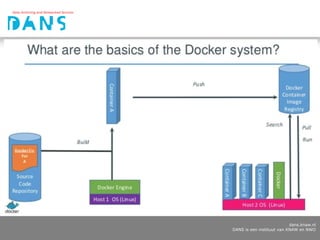
Docker introduction
• Extremely powerful configuration tool
• Allows to install software on any platform (Linux, Mac,
Windows)
• Any software can be installed from Docker as standalone
container or container delivering Microservices (database,
search engine, core service)
• Docker allows to host unlimited amount of the same
software tools on different ports
• Docker can be used to organise multilingual interfaces, for
example
Docker advantages
• Faster development and deployments
• Isolation of running containers allows to scale apps
• Portability saves time to run the same image on the local
computer or in the cloud
• Snapshotting allows to archive Docker images state
• Resource limitation can be adjusted
Docker deployment in Clouds
• Google Cloud (policy for CESSDA SaW)
• Microsoft Azure
• Amazon Cloud
• OpenShift Cloud
• local Docker installation
dans.knaw.nl
DANS is een instituut van KNAW en NWO
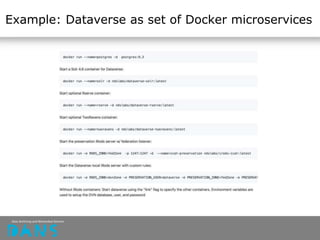
Example: Dataverse as set of Docker microservices
Example: Dataverse multilanguage support
implementation
Problems:
• maintenance costs will increase
• two and more SOLR search indexes
Solutions:
At the moment there are French, Spanish and Chinese localisations.
Possible solutions to support multilingual interfaces:
• different Dataverse containers running on different ports
• implementing switch between Bundle.properties
We can provide switch for language configuration of every subdataverse.
Docker Community Edition
Ideal for developers and small teams looking to get started
with Docker https://www.docker.com/community-edition
Features:
- docker-for-desktop
- docker-compose support
- integrated kubernetes (minikube)
- kitematic: Visual Docker Container Management
Docker Hub
Docker Hub is registry with preinstalled images
Example: https://hub.docker.com/_/httpd/
$ docker pull httpd
Push images to Docker Cloud:
https://docs.docker.com/docker-cloud/builds/push-images/
$ docker login
$ docker tag my_image $DOCKER_ID_USER/my_image
$ docker push $DOCKER_ID_USER/my_image
Docker concepts
• Containers are runnable artefacts
• Images are copies of containers with filesystems
• Containers can be archived as images and executed in
different clouds
• Images can preserved in repositories
https://act.dataverse.nl/dataset.xhtml?persistentId=hdl:106
95/9VCRBR
• data folders can be hosted outside of containers
Hello world app (Flask application)
Dockerfile https://github.com/DANS-KNAW/parthenos-
widget/blob/master/Dockerfile
FROM python:2.7
MAINTAINER Vyacheslav Tykhonov
COPY . /widget
WORKDIR /widget
RUN pip install -r requirements.txt
ENTRYPOINT ["python"]
CMD ["app.py"]
Docker command line usage
Command line allows to manage containers and images and
execute Docker commands
$ docker help run
$ docker ps
$ docker login
$ docker pull, push, commit
$ docker build, run
$ docker exec
$ docker stop, rm, rmi
Typical Docker pipeline (PARTHENOS example)
Install all dependencies and build tool from scratch:
$ docker build -t parthenos:latest .
Run image from command line
$ docker run -p 8081:8081 -name parthenos parthenos
Check if container is running
$ docker ps|grep parthenos
Login inside of the container
$ docker exec -it [CONTAINER_ID] /bin/bash
Copy configuration inside of the container
$ docker cp ./parthenos.config [CONTAINER_ID]:/widget
Copy from container to local folder
$ docker [CONTAINER_ID]:/widget/* ./
Ship “dockerized” app to the world (Docker Hub or another registry)
$ docker push [IMAGE_ID]
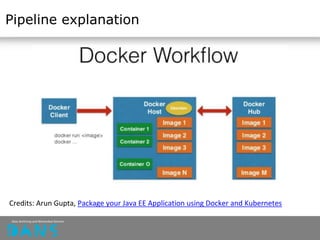
Pipeline explanation
Credits: Arun Gupta, Package your Java EE Application using Docker and Kubernetes
Docker archiving process
Easy process to archive running software, metadata and data
separately
https://docs.docker.com/engine/reference/commandline/save
/
• postgresql database with metadata and users information
• datasets files in separate folder
• software image with some individual settings
$ docker save -o archive.tar [CONTAINER_ID]
Easy to restore complete system with data and metadata by
Docker composer.
$ docker load archive.tar
Docker Compose
Management tool for Docker configuration for multicontainer solutions
All connections, networks, containers, port specifications stored in one file
(YML specification)
Example (DataverseEU):
https://github.com/Dans-labs/dataverse-docker
Tool to turn Docker Compose to Kubernetes config called Kompose:
https://github.com/kubernetes/kompose
Usage:
$ docker-compose [something]
Docker Compose is perfect tool to keep the PROVenance of software
(versions control, etc)
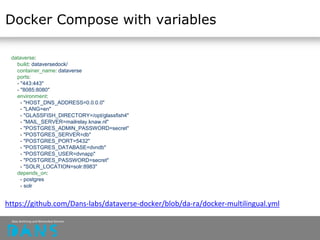
Docker Compose with variables
dataverse:
build: dataversedock/
container_name: dataverse
ports:
- "443:443"
- "8085:8080"
environment:
- "HOST_DNS_ADDRESS=0.0.0.0"
- "LANG=en"
- "GLASSFISH_DIRECTORY=/opt/glassfish4"
- "MAIL_SERVER=mailrelay.knaw.nl"
- "POSTGRES_ADMIN_PASSWORD=secret"
- "POSTGRES_SERVER=db"
- "POSTGRES_PORT=5432"
- "POSTGRES_DATABASE=dvndb"
- "POSTGRES_USER=dvnapp"
- "POSTGRES_PASSWORD=secret"
- "SOLR_LOCATION=solr:8983"
depends_on:
- postgres
- solr
https://github.com/Dans-labs/dataverse-docker/blob/da-ra/docker-multilingual.yml
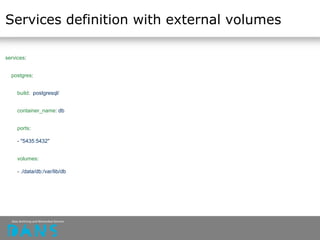
Services definition with external volumes
services:
postgres:
build: postgresql/
container_name: db
ports:
- "5435:5432"
volumes:
- ./data/db:/var/lib/db
Swarm
The cluster management and orchestration features embedded
in the Docker Engine are built using swarmkit.
A swarm consists of multiple Docker hosts which run in swarm
mode and act as managers (to manage membership and
delegation) and workers (which run swarm services).
Key advantage of swarm services over standalone containers:
it’s possible to modify a service’s configuration, including the
networks and volumes it is connected to, without the need to
manually restart the service.
Swarm node is an instance of the Docker engine participating in
the swarm.
Kubernetes introduction
Open Source orchestration system developed by Google.
Kubernetes provides a container-centric management
environment.
Some useful features:
• auto-restart
• replication
• schedule across hosts
Kubernetes concepts
Pods - group of Docker containers
Service - stable name for a set of pods (as single IP)
Replication controller - manages lifecycle of every pod and
controls running containers
Label - groups of objects selection
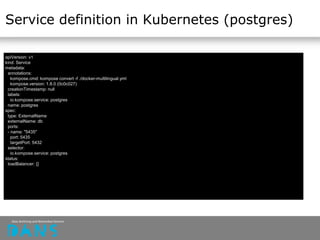
Service definition in Kubernetes (postgres)
apiVersion: v1
kind: Service
metadata:
annotations:
kompose.cmd: kompose convert -f ./docker-multilingual.yml
kompose.version: 1.8.0 (0c0c027)
creationTimestamp: null
labels:
io.kompose.service: postgres
name: postgres
spec:
type: ExternalName
externalName: db
ports:
- name: "5435"
port: 5435
targetPort: 5432
selector:
io.kompose.service: postgres
status:
loadBalancer: {}
kubectl introduction
Major command to manage Kubernetes cluster
https://kubernetes.io/docs/reference/kubectl/overview/
$ kubectl get pods
$ kubectl create -f <filename>
$ kubectl update
$ kubectl delete
Questions?
Ask Slava or open a thread on Docker Forum
https://forums.docker.com
Dataverse installation manual on Docker for Amazon and
Google Cloud (contributed by Slava, Wilko, Eko):
https://docs.google.com/document/d/10slhVGt2X1TfnAzlUQtD
xZKHqwOl0tNMjEZX5YylBL4

Docker DANS workshop

  • 1.
    dans.knaw.nl DANS is eeninstituut van KNAW en NWO DANS Docker workshop Vyacheslav Tykhonov Senior Information Scientist (DANS) Docker POC project 29.05.2018
  • 2.
    Docker introduction • Extremelypowerful configuration tool • Allows to install software on any platform (Linux, Mac, Windows) • Any software can be installed from Docker as standalone container or container delivering Microservices (database, search engine, core service) • Docker allows to host unlimited amount of the same software tools on different ports • Docker can be used to organise multilingual interfaces, for example
  • 3.
    Docker advantages • Fasterdevelopment and deployments • Isolation of running containers allows to scale apps • Portability saves time to run the same image on the local computer or in the cloud • Snapshotting allows to archive Docker images state • Resource limitation can be adjusted
  • 4.
    Docker deployment inClouds • Google Cloud (policy for CESSDA SaW) • Microsoft Azure • Amazon Cloud • OpenShift Cloud • local Docker installation
  • 5.
    dans.knaw.nl DANS is eeninstituut van KNAW en NWO
  • 6.
    Example: Dataverse asset of Docker microservices
  • 7.
    Example: Dataverse multilanguagesupport implementation Problems: • maintenance costs will increase • two and more SOLR search indexes Solutions: At the moment there are French, Spanish and Chinese localisations. Possible solutions to support multilingual interfaces: • different Dataverse containers running on different ports • implementing switch between Bundle.properties We can provide switch for language configuration of every subdataverse.
  • 8.
    Docker Community Edition Idealfor developers and small teams looking to get started with Docker https://www.docker.com/community-edition Features: - docker-for-desktop - docker-compose support - integrated kubernetes (minikube) - kitematic: Visual Docker Container Management
  • 9.
    Docker Hub Docker Hubis registry with preinstalled images Example: https://hub.docker.com/_/httpd/ $ docker pull httpd Push images to Docker Cloud: https://docs.docker.com/docker-cloud/builds/push-images/ $ docker login $ docker tag my_image $DOCKER_ID_USER/my_image $ docker push $DOCKER_ID_USER/my_image
  • 10.
    Docker concepts • Containersare runnable artefacts • Images are copies of containers with filesystems • Containers can be archived as images and executed in different clouds • Images can preserved in repositories https://act.dataverse.nl/dataset.xhtml?persistentId=hdl:106 95/9VCRBR • data folders can be hosted outside of containers
  • 11.
    Hello world app(Flask application) Dockerfile https://github.com/DANS-KNAW/parthenos- widget/blob/master/Dockerfile FROM python:2.7 MAINTAINER Vyacheslav Tykhonov COPY . /widget WORKDIR /widget RUN pip install -r requirements.txt ENTRYPOINT ["python"] CMD ["app.py"]
  • 12.
    Docker command lineusage Command line allows to manage containers and images and execute Docker commands $ docker help run $ docker ps $ docker login $ docker pull, push, commit $ docker build, run $ docker exec $ docker stop, rm, rmi
  • 13.
    Typical Docker pipeline(PARTHENOS example) Install all dependencies and build tool from scratch: $ docker build -t parthenos:latest . Run image from command line $ docker run -p 8081:8081 -name parthenos parthenos Check if container is running $ docker ps|grep parthenos Login inside of the container $ docker exec -it [CONTAINER_ID] /bin/bash Copy configuration inside of the container $ docker cp ./parthenos.config [CONTAINER_ID]:/widget Copy from container to local folder $ docker [CONTAINER_ID]:/widget/* ./ Ship “dockerized” app to the world (Docker Hub or another registry) $ docker push [IMAGE_ID]
  • 14.
    Pipeline explanation Credits: ArunGupta, Package your Java EE Application using Docker and Kubernetes
  • 15.
    Docker archiving process Easyprocess to archive running software, metadata and data separately https://docs.docker.com/engine/reference/commandline/save / • postgresql database with metadata and users information • datasets files in separate folder • software image with some individual settings $ docker save -o archive.tar [CONTAINER_ID] Easy to restore complete system with data and metadata by Docker composer. $ docker load archive.tar
  • 16.
    Docker Compose Management toolfor Docker configuration for multicontainer solutions All connections, networks, containers, port specifications stored in one file (YML specification) Example (DataverseEU): https://github.com/Dans-labs/dataverse-docker Tool to turn Docker Compose to Kubernetes config called Kompose: https://github.com/kubernetes/kompose Usage: $ docker-compose [something] Docker Compose is perfect tool to keep the PROVenance of software (versions control, etc)
  • 17.
    Docker Compose withvariables dataverse: build: dataversedock/ container_name: dataverse ports: - "443:443" - "8085:8080" environment: - "HOST_DNS_ADDRESS=0.0.0.0" - "LANG=en" - "GLASSFISH_DIRECTORY=/opt/glassfish4" - "MAIL_SERVER=mailrelay.knaw.nl" - "POSTGRES_ADMIN_PASSWORD=secret" - "POSTGRES_SERVER=db" - "POSTGRES_PORT=5432" - "POSTGRES_DATABASE=dvndb" - "POSTGRES_USER=dvnapp" - "POSTGRES_PASSWORD=secret" - "SOLR_LOCATION=solr:8983" depends_on: - postgres - solr https://github.com/Dans-labs/dataverse-docker/blob/da-ra/docker-multilingual.yml
  • 18.
    Services definition withexternal volumes services: postgres: build: postgresql/ container_name: db ports: - "5435:5432" volumes: - ./data/db:/var/lib/db
  • 19.
    Swarm The cluster managementand orchestration features embedded in the Docker Engine are built using swarmkit. A swarm consists of multiple Docker hosts which run in swarm mode and act as managers (to manage membership and delegation) and workers (which run swarm services). Key advantage of swarm services over standalone containers: it’s possible to modify a service’s configuration, including the networks and volumes it is connected to, without the need to manually restart the service. Swarm node is an instance of the Docker engine participating in the swarm.
  • 20.
    Kubernetes introduction Open Sourceorchestration system developed by Google. Kubernetes provides a container-centric management environment. Some useful features: • auto-restart • replication • schedule across hosts
  • 21.
    Kubernetes concepts Pods -group of Docker containers Service - stable name for a set of pods (as single IP) Replication controller - manages lifecycle of every pod and controls running containers Label - groups of objects selection
  • 22.
    Service definition inKubernetes (postgres) apiVersion: v1 kind: Service metadata: annotations: kompose.cmd: kompose convert -f ./docker-multilingual.yml kompose.version: 1.8.0 (0c0c027) creationTimestamp: null labels: io.kompose.service: postgres name: postgres spec: type: ExternalName externalName: db ports: - name: "5435" port: 5435 targetPort: 5432 selector: io.kompose.service: postgres status: loadBalancer: {}
  • 23.
    kubectl introduction Major commandto manage Kubernetes cluster https://kubernetes.io/docs/reference/kubectl/overview/ $ kubectl get pods $ kubectl create -f <filename> $ kubectl update $ kubectl delete
  • 24.
    Questions? Ask Slava oropen a thread on Docker Forum https://forums.docker.com Dataverse installation manual on Docker for Amazon and Google Cloud (contributed by Slava, Wilko, Eko): https://docs.google.com/document/d/10slhVGt2X1TfnAzlUQtD xZKHqwOl0tNMjEZX5YylBL4