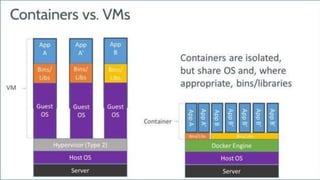
Patrick Chanezon, Docker Inc.
@chanezon
The Docker Ecosystem
With slides from @jpetazzo @timpark @vieux @tnachen IBM
on Microsoft Azure
Ride the Whale!
French
Polyglot
Platforms
San Francisco
Developer Relations
@chanezon
1995 2015
Docker in the cloud market
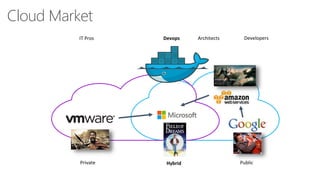
Cloud Market
PublicHybridPrivate
IT Pros Devops DevelopersArchitects
History of containerization
• 1960’s mainframe
• 1990’s hardware virtualization
• 1990’s OS virt precursors: BSD Jails, Solaris zones
• 2006 Cloud IaaS
• 2009 platform virtualization (PaaS)
• 2013 Docker
See @bcantrill’s deck http://www.slideshare.net/bcantrill/docker-and-the-future-of-containers-in-production
7
Happy birthday!
Why Docker success now?
• Cloud adoption
• Portability
• Hybrid
• Devops
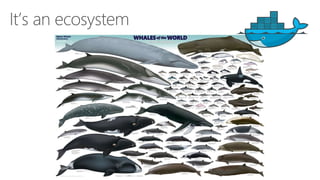
It’s an ecosystem
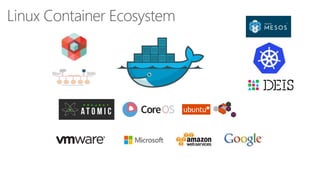
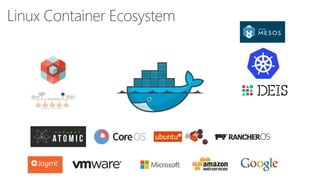
Linux Container Ecosystem
Docker
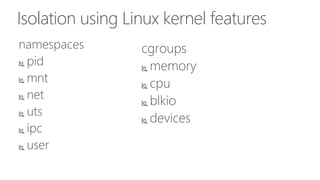
Isolation using Linux kernel features
namespaces
 pid
 mnt
 net
 uts
 ipc
 user
cgroups
 memory
 cpu
 blkio
 devices
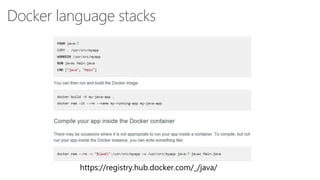
Docker language stacks
https://registry.hub.docker.com/_/java/
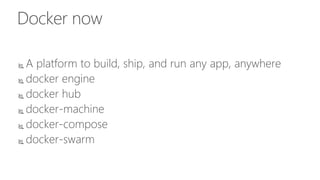
Docker now
 A platform to build, ship, and run any app, anywhere
 docker engine
 docker hub
 docker-machine
 docker-compose
 docker-swarm
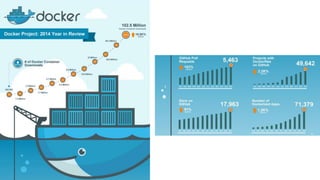
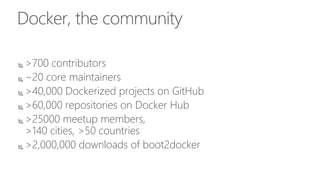
Docker, the community
 >700 contributors
 ~20 core maintainers
 >40,000 Dockerized projects on GitHub
 >60,000 repositories on Docker Hub
 >25000 meetup members,
>140 cities, >50 countries
 >2,000,000 downloads of boot2docker
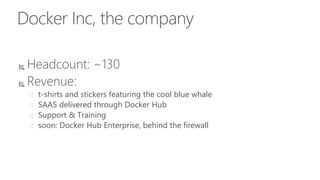
Docker Inc, the company
 Headcount: ~130
 Revenue:
 t-shirts and stickers featuring the cool blue whale
 SAAS delivered through Docker Hub
 Support & Training
 soon: Docker Hub Enterprise, behind the firewall
It’s all about Devops
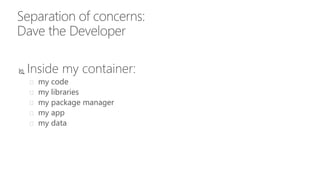
Separation of concerns:
Dave the Developer
 Inside my container:
 my code
 my libraries
 my package manager
 my app
 my data
Separation of concerns:
Oscar the Ops guy
 Outside the container:
 logging
 remote access
 network configuration
 monitoring
Docker on Microsoft
Containers
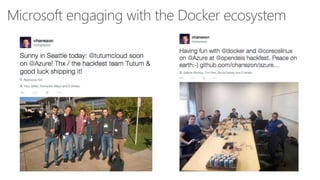
Microsoft engaging with the Docker ecosystem
Windows Server Containers
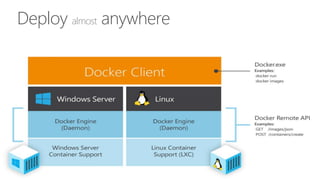
Deploy almost anywhere
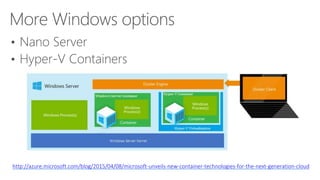
More Windows options
• Nano Server
• Hyper-V Containers
http://azure.microsoft.com/blog/2015/04/08/microsoft-unveils-new-container-technologies-for-the-next-generation-cloud
Docker on Azure
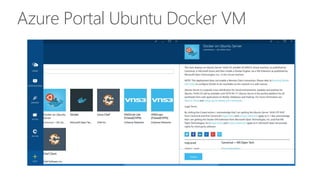
Azure Portal Ubuntu Docker VM
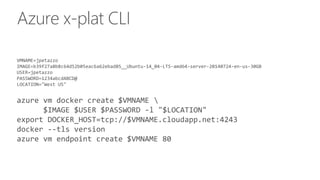
Azure x-plat CLI
VMNAME=jpetazzo
IMAGE=b39f27a8b8c64d52b05eac6a62ebad85__Ubuntu-14_04-LTS-amd64-server-20140724-en-us-30GB
USER=jpetazzo
PASSWORD=1234abcdABCD@
LOCATION="West US"
azure vm docker create $VMNAME 
$IMAGE $USER $PASSWORD -l "$LOCATION"
export DOCKER_HOST=tcp://$VMNAME.cloudapp.net:4243
docker --tls version
azure vm endpoint create $VMNAME 80
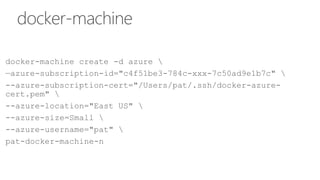
docker-machine
docker-machine create -d azure 
—azure-subscription-id="c4f51be3-784c-xxx-7c50ad9e1b7c" 
--azure-subscription-cert="/Users/pat/.ssh/docker-azure-
cert.pem" 
--azure-location="East US" 
--azure-size=Small 
--azure-username="pat" 
pat-docker-machine-n
Linux Container Ecosystem
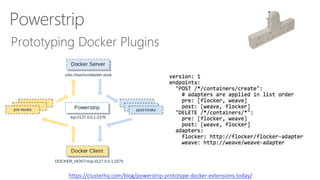
Plugins
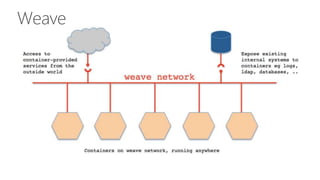
Weave
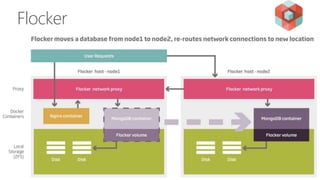
Flocker
Powerstrip
Prototyping Docker Plugins
https://clusterhq.com/blog/powerstrip-prototype-docker-extensions-today/
Orchestration
Docker Swarm
Docker Swarm 0.2.0
@abronan - @aluzzardi - @vieux
Running containers on
multiple hosts
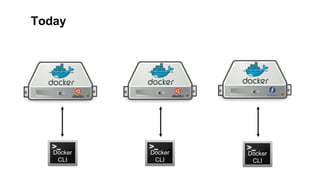
Today
Docker
CLI
Docker
CLI
Docker
CLI
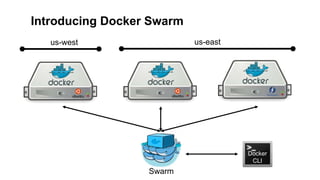
Introducing Docker Swarm
us-west us-east
Docker
CLI
Docker
CLI
Swarm
Swarm in a nutshell
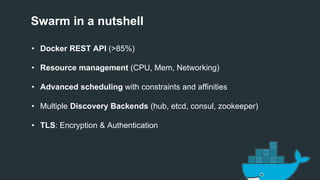
• Docker REST API (>85%)
• Resource management (CPU, Mem, Networking)
• Advanced scheduling with constraints and affinities
• Multiple Discovery Backends (hub, etcd, consul, zookeeper)
• TLS: Encryption & Authentication
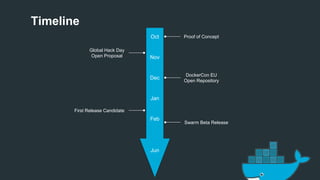
Timeline
Oct
Nov
Dec
Jan
Feb
Jun
Proof of Concept
DockerCon EU
Open Repository
First Release Candidate
Swarm Beta Release
Global Hack Day
Open Proposal
Setup using the hosted discovery service
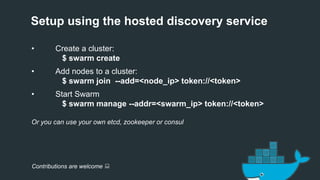
• Create a cluster:
$ swarm create
• Add nodes to a cluster:
$ swarm join --add=<node_ip> token://<token>
• Start Swarm
$ swarm manage --addr=<swarm_ip> token://<token>
Or you can use your own etcd, zookeeper or consul
Contributions are welcome :
Resource Management
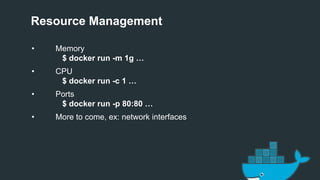
• Memory
$ docker run -m 1g …
• CPU
$ docker run -c 1 …
• Ports
$ docker run -p 80:80 …
• More to come, ex: network interfaces
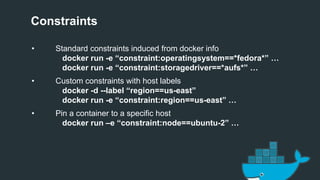
Constraints
• Standard constraints induced from docker info
docker run -e “constraint:operatingsystem==*fedora*” …
docker run -e “constraint:storagedriver==*aufs*” …
• Custom constraints with host labels
docker -d --label “region==us-east”
docker run -e “constraint:region==us-east” …
• Pin a container to a specific host
docker run –e “constraint:node==ubuntu-2” …
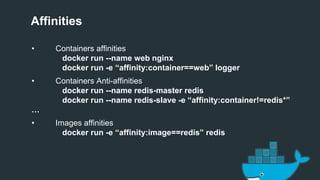
Affinities
• Containers affinities
docker run --name web nginx
docker run -e “affinity:container==web” logger
• Containers Anti-affinities
docker run --name redis-master redis
docker run --name redis-slave -e “affinity:container!=redis*”
…
• Images affinities
docker run -e “affinity:image==redis” redis
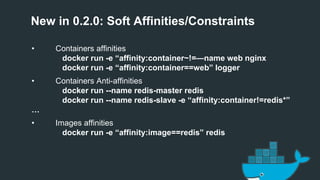
New in 0.2.0: Soft Affinities/Constraints
• Containers affinities
docker run -e “affinity:container~!=—name web nginx
docker run -e “affinity:container==web” logger
• Containers Anti-affinities
docker run --name redis-master redis
docker run --name redis-slave -e “affinity:container!=redis*”
…
• Images affinities
docker run -e “affinity:image==redis” redis
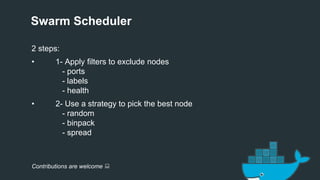
Swarm Scheduler
2 steps:
• 1- Apply filters to exclude nodes
- ports
- labels
- health
• 2- Use a strategy to pick the best node
- random
- binpack
- spread
Contributions are welcome :
Swarm Beta: Integrations
• Fully integrated with Machine
• Partially integrated with Compose
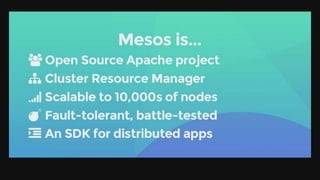
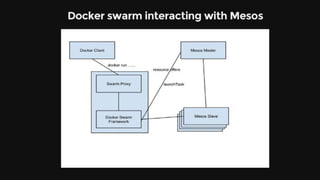
• Mesos integration has started in collaboration with Mesosphere.
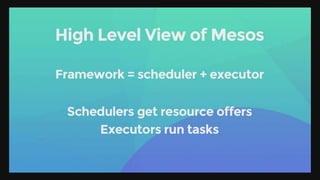
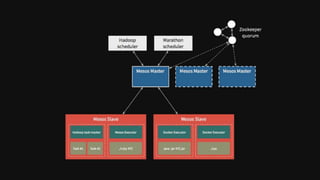
Mesos
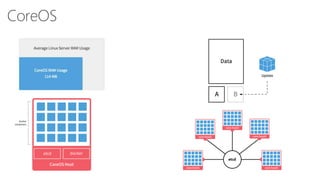
CoreOS
CoreOS
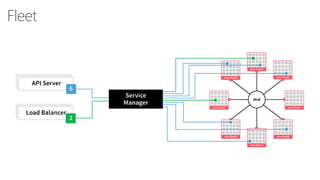
Fleet
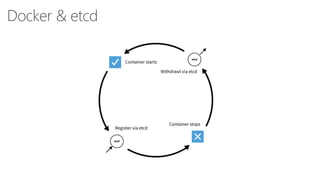
Docker & etcd
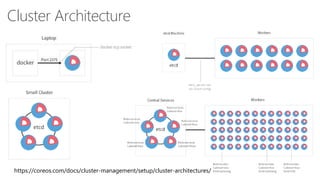
Cluster Architecture
https://coreos.com/docs/cluster-management/setup/cluster-architectures/
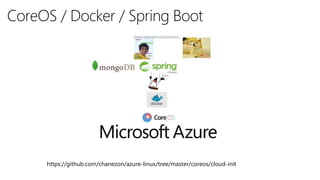
CoreOS / Docker / Spring Boot
https://github.com/chanezon/azure-linux/tree/master/coreos/cloud-init
Deis
Deis (http://deis.io)
• Open source PaaS platform that builds on CoreOS.
• Replicates the popular Heroku devops workflow.
• Primary mechanism for pushing applications is through git.
• Developer experience is not unlike Azure Websites…
• …but is built on Linux so full support for open source stacks.
• Enables us to win migrations from Salesforce to Azure.
• Hackfest in November to enable Deis for Tagboard.
• Enables us to win startups that expect this workflow.
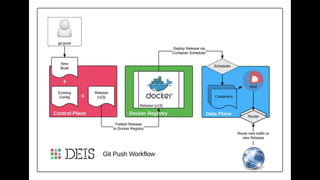
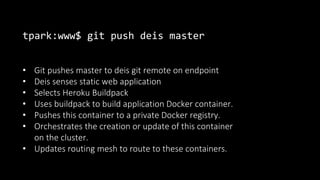
tpark:www$ git push deis master
• Git pushes master to deis git remote on endpoint
• Deis senses static web application
• Selects Heroku Buildpack
• Uses buildpack to build application Docker container.
• Pushes this container to a private Docker registry.
• Orchestrates the creation or update of this container
on the cluster.
• Updates routing mesh to route to these containers.
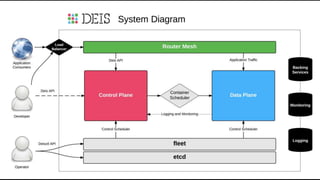
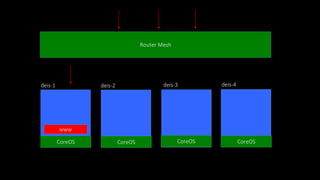
Router Mesh
deis-1 deis-2 deis-3 deis-4
www
CoreOS CoreOS CoreOS CoreOS
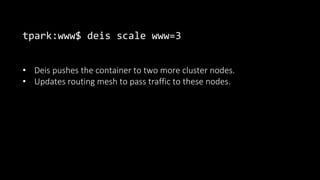
tpark:www$ deis scale www=3
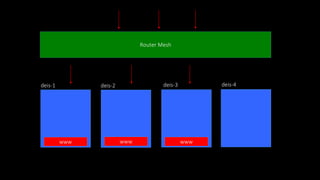
• Deis pushes the container to two more cluster nodes.
• Updates routing mesh to pass traffic to these nodes.
Router Mesh
deis-1 deis-2 deis-3 deis-4
www www www
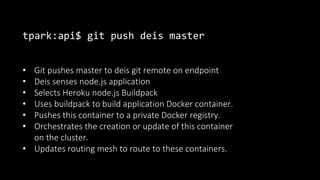
tpark:api$ git push deis master
• Git pushes master to deis git remote on endpoint
• Deis senses node.js application
• Selects Heroku node.js Buildpack
• Uses buildpack to build application Docker container.
• Pushes this container to a private Docker registry.
• Orchestrates the creation or update of this container
on the cluster.
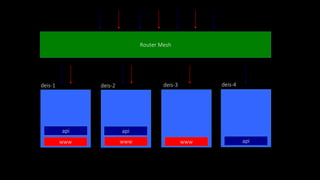
• Updates routing mesh to route to these containers.
Router Mesh
deis-1 deis-2 deis-3 deis-4
www
api
www
api
www api
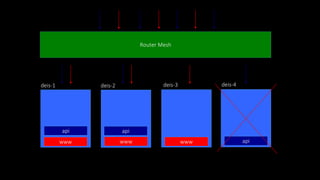
Router Mesh
deis-1 deis-2 deis-3 deis-4
www
api
www
api
www api
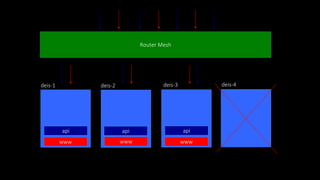
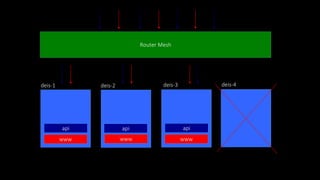
Router Mesh
deis-1 deis-2 deis-3 deis-4
www
api
www
api
www
api
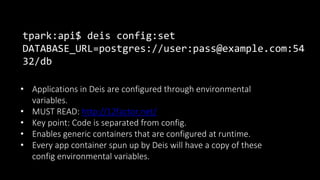
tpark:api$ deis config:set
DATABASE_URL=postgres://user:pass@example.com:54
32/db
• Applications in Deis are configured through environmental
variables.
• MUST READ: http://12factor.net/
• Key point: Code is separated from config.
• Enables generic containers that are configured at runtime.
• Every app container spun up by Deis will have a copy of these
config environmental variables.
tpark:api$ deis logs
• Deis automatically rolls and consolidates logs from all
containers.
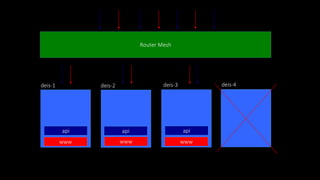
Router Mesh
deis-1 deis-2 deis-3 deis-4
www
api
www
api
www
api
Router Mesh
deis-1 deis-2 deis-3 deis-4
www
api
www
api
www
api
Kubernetes
Kubernetes (http://kubernetes.io)
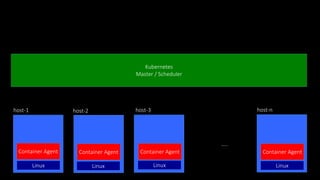
Kubernetes
Master / Scheduler
host-1 host-2 host-3 host-n
…..
Container Agent Container Agent Container Agent Container Agent
Linux Linux Linux Linux
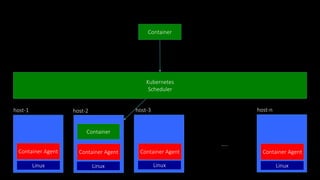
Kubernetes
Scheduler
host-1 host-2 host-3 host-n
…..
Container Agent Container Agent Container Agent Container Agent
Linux Linux Linux Linux
Container
Container
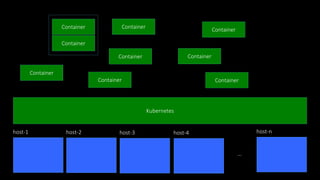
Kubernetes
host-1
Container
host-2 host-3 host-4 host-n
…
Container
Container
Container
Container
ContainerContainer
Container
Container
Kubernetes
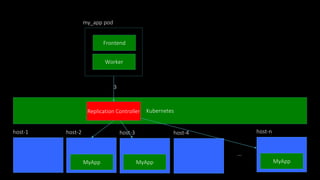
host-1 host-2 host-3 host-4 host-n
…
Frontend
Worker
my_app pod
MyAppMyApp MyApp
Replication Controller
3
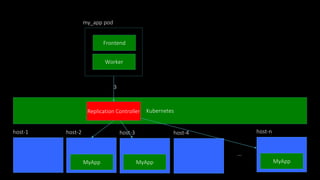
Kubernetes
host-1 host-2 host-3 host-4 host-n
…
Frontend
Worker
my_app pod
MyAppMyApp MyApp
Replication Controller
3
Kubernetes
host-1 host-2 host-3 host-4 host-n
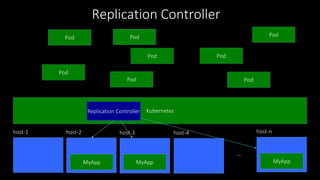
…
MyAppMyApp MyApp
Replication Controller
Pod Pod
Pod
Pod
PodPod
Pod
Pod
Replication Controller
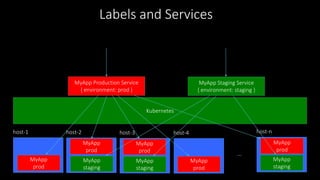
Kubernetes
host-1 host-2 host-3 host-4 host-n
…
MyApp
staging
MyApp
staging
MyApp
staging
MyApp
prod
MyApp
prod
MyApp
prod
MyApp
prod
MyApp
prod
MyApp Production Service
{ environment: prod }
MyApp Staging Service
{ environment: staging }
Labels and Services
Cloud Foundry & IBM BlueMix
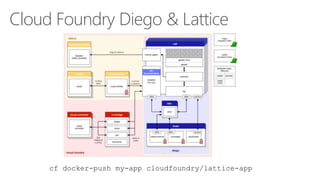
Cloud Foundry Diego & Lattice
cf docker-push my-app cloudfoundry/lattice-app
IBM Bluemix
The Digital Innovation Platform
97
Customer Managed
Service Provider Managed
IBM SoftLayer
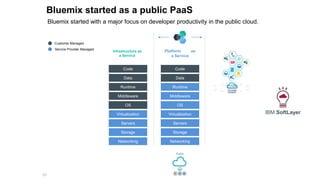
Bluemix started as a public PaaS
Bluemix started with a major focus on developer productivity in the public cloud.
Infrastructure as
a Service
Code
Data
Runtime
Middleware
OS
Virtualization
Servers
Storage
Networking
Code
Data
Runtime
Middleware
OS
Virtualization
Servers
Storage
Networking
Platform as
a Service
98
Customer Managed
Service Provider Managed
IBM SoftLayer
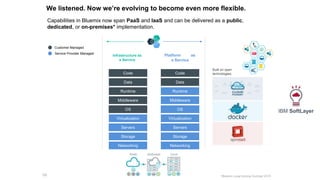
We listened. Now we’re evolving to become even more flexible.
Capabilities in Bluemix now span PaaS and IaaS and can be delivered as a public,
dedicated, or on-premises* implementation.
Infrastructure as
a Service
Code
Data
Runtime
Middleware
OS
Virtualization
Servers
Storage
Networking
Code
Data
Runtime
Middleware
OS
Virtualization
Servers
Storage
Networking
Platform as
a Service
*Bluemix Local coming Summer 2015
Built on open
technologies:
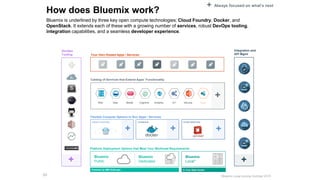
How does Bluemix work?
Bluemix is underlined by three key open compute technologies: Cloud Foundry, Docker, and
OpenStack. It extends each of these with a growing number of services, robust DevOps tooling,
integration capabilities, and a seamless developer experience.
99
Flexible Compute Options to Run Apps / Services
Instant Runtimes Containers Virtual Machines
Platform Deployment Options that Meet Your Workload Requirements
Bluemix
Public
Bluemix
Dedicated
Bluemix
Local*
DevOps
Tooling Your Own Hosted Apps / Services
Integration and
API Mgmt
Powered by IBM SoftLayer In Your Data Center
+ + +
+ +
+ Always focused on what’s next
Catalog of Services that Extend Apps’ Functionality
Web Data Mobile AnalyticsCognitive IoT Security Yours
+
*Bluemix Local coming Summer 2015
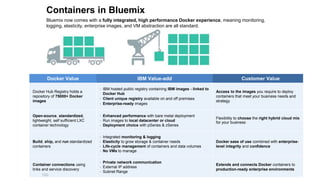
Containers in Bluemix
Bluemix now comes with a fully integrated, high performance Docker experience, meaning monitoring,
logging, elasticity, enterprise images, and VM abstraction are all standard.
100
Docker Value IBM Value-add Customer Value
Docker Hub Registry holds a
repository of 75000+ Docker
images
• IBM hosted public registry containing IBM images - linked to
Docker Hub
• Client unique registry available on and off premises
• Enterprise-ready images
Access to the images you require to deploy
containers that meet your business needs and
strategy
Open-source, standardized,
lightweight, self sufficient LXC
container technology
• Enhanced performance with bare metal deployment
• Run images to local datacenter or cloud
• Deployment choice with pSeries & zSeries
Flexibility to choose the right hybrid cloud mix
for your business
Build, ship, and run standardized
containers
• Integrated monitoring & logging
• Elasticity to grow storage & container needs
• Life-cycle management of containers and data volumes
• No VMs to manage
Docker ease of use combined with enterprise-
level integrity and confidence
Container connections using
links and service discovery
• Private network communication
• External IP address
• Subnet Range
Extends and connects Docker containers to
production-ready enterprise environments
Others
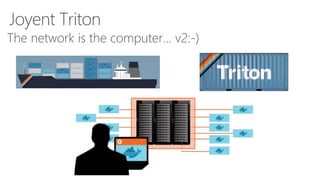
Joyent Triton
The network is the computer… v2:-)
CleverCloud
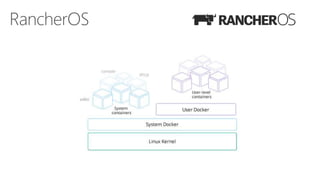
RancherOS
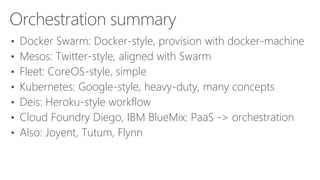
Orchestration summary
• Docker Swarm: Docker-style, provision with docker-machine
• Mesos: Twitter-style, aligned with Swarm
• Fleet: CoreOS-style, simple
• Kubernetes: Google-style, heavy-duty, many concepts
• Deis: Heroku-style workflow
• Cloud Foundry Diego, IBM BlueMix: PaaS -> orchestration
• Also: Joyent, Tutum, Flynn
Fire up your first container today!
on Microsoft Azure
Ride the Whale!
Learning
• https://github.com/chanezon/azure-linux
• Docker container to get started
docker run –ti chanezon/linux
• CoreOS cluster, fleet
• Deis
• Weave
• docker-machine
• Deploy Java app
10
3
References
• talk about cloud platforms: Managing complexity in giant systems http://www.slideshare.net/chanezon/tackling-
complexity-in-giant-systems-approaches-from-several-cloud-providers
• talk about Devops, the Microsoft Way
http://www.slideshare.net/chanezon/devops-the-microsoft-way
• MS Open Tech https://msopentech.com/ Blog, VM Depot
• P@ Linux on Azure pages https://github.com/chanezon/azure-linux/
• Tim’s CoreOS tutorial https://github.com/timfpark/coreos-azure
• Tim’s Deis documentation
• @jpetazzo’s presentations http://www.slideshare.net/jpetazzo/
• @bcantrill’s deck http://www.slideshare.net/bcantrill/docker-and-the-future-of-containers-in-production
• @vieux deck on Swarm
• @htchen deck on Mesos + Swarm https://speakerdeck.com/tnachen/docker-swarm-plus-mesos
Q&A

Devoxx France 2015 - The Docker Orchestration Ecosystem on Azure

  • 1.
    Patrick Chanezon, DockerInc. @chanezon The Docker Ecosystem With slides from @jpetazzo @timpark @vieux @tnachen IBM on Microsoft Azure Ride the Whale!
  • 2.
  • 3.
  • 4.
    Docker in thecloud market
  • 5.
    Cloud Market PublicHybridPrivate IT ProsDevops DevelopersArchitects
  • 6.
    History of containerization •1960’s mainframe • 1990’s hardware virtualization • 1990’s OS virt precursors: BSD Jails, Solaris zones • 2006 Cloud IaaS • 2009 platform virtualization (PaaS) • 2013 Docker See @bcantrill’s deck http://www.slideshare.net/bcantrill/docker-and-the-future-of-containers-in-production
  • 7.
  • 9.
  • 10.
    Why Docker successnow? • Cloud adoption • Portability • Hybrid • Devops
  • 11.
  • 12.
  • 13.
  • 16.
    Isolation using Linuxkernel features namespaces  pid  mnt  net  uts  ipc  user cgroups  memory  cpu  blkio  devices
  • 17.
  • 18.
    Docker now  Aplatform to build, ship, and run any app, anywhere  docker engine  docker hub  docker-machine  docker-compose  docker-swarm
  • 19.
    Docker, the community >700 contributors  ~20 core maintainers  >40,000 Dockerized projects on GitHub  >60,000 repositories on Docker Hub  >25000 meetup members, >140 cities, >50 countries  >2,000,000 downloads of boot2docker
  • 20.
    Docker Inc, thecompany  Headcount: ~130  Revenue:  t-shirts and stickers featuring the cool blue whale  SAAS delivered through Docker Hub  Support & Training  soon: Docker Hub Enterprise, behind the firewall
  • 21.
  • 22.
    Separation of concerns: Davethe Developer  Inside my container:  my code  my libraries  my package manager  my app  my data
  • 23.
    Separation of concerns: Oscarthe Ops guy  Outside the container:  logging  remote access  network configuration  monitoring
  • 24.
  • 25.
  • 26.
    Microsoft engaging withthe Docker ecosystem
  • 27.
  • 28.
  • 29.
    More Windows options •Nano Server • Hyper-V Containers http://azure.microsoft.com/blog/2015/04/08/microsoft-unveils-new-container-technologies-for-the-next-generation-cloud
  • 30.
  • 31.
  • 32.
    Azure x-plat CLI VMNAME=jpetazzo IMAGE=b39f27a8b8c64d52b05eac6a62ebad85__Ubuntu-14_04-LTS-amd64-server-20140724-en-us-30GB USER=jpetazzo PASSWORD=1234abcdABCD@ LOCATION="WestUS" azure vm docker create $VMNAME $IMAGE $USER $PASSWORD -l "$LOCATION" export DOCKER_HOST=tcp://$VMNAME.cloudapp.net:4243 docker --tls version azure vm endpoint create $VMNAME 80
  • 33.
    docker-machine docker-machine create -dazure —azure-subscription-id="c4f51be3-784c-xxx-7c50ad9e1b7c" --azure-subscription-cert="/Users/pat/.ssh/docker-azure- cert.pem" --azure-location="East US" --azure-size=Small --azure-username="pat" pat-docker-machine-n
  • 34.
  • 35.
  • 36.
  • 37.
  • 38.
  • 39.
  • 40.
  • 41.
    Docker Swarm 0.2.0 @abronan- @aluzzardi - @vieux
  • 42.
  • 43.
  • 44.
    Introducing Docker Swarm us-westus-east Docker CLI Docker CLI Swarm
  • 45.
    Swarm in anutshell • Docker REST API (>85%) • Resource management (CPU, Mem, Networking) • Advanced scheduling with constraints and affinities • Multiple Discovery Backends (hub, etcd, consul, zookeeper) • TLS: Encryption & Authentication
  • 46.
    Timeline Oct Nov Dec Jan Feb Jun Proof of Concept DockerConEU Open Repository First Release Candidate Swarm Beta Release Global Hack Day Open Proposal
  • 47.
    Setup using thehosted discovery service • Create a cluster: $ swarm create • Add nodes to a cluster: $ swarm join --add=<node_ip> token://<token> • Start Swarm $ swarm manage --addr=<swarm_ip> token://<token> Or you can use your own etcd, zookeeper or consul Contributions are welcome :
  • 48.
    Resource Management • Memory $docker run -m 1g … • CPU $ docker run -c 1 … • Ports $ docker run -p 80:80 … • More to come, ex: network interfaces
  • 49.
    Constraints • Standard constraintsinduced from docker info docker run -e “constraint:operatingsystem==*fedora*” … docker run -e “constraint:storagedriver==*aufs*” … • Custom constraints with host labels docker -d --label “region==us-east” docker run -e “constraint:region==us-east” … • Pin a container to a specific host docker run –e “constraint:node==ubuntu-2” …
  • 50.
    Affinities • Containers affinities dockerrun --name web nginx docker run -e “affinity:container==web” logger • Containers Anti-affinities docker run --name redis-master redis docker run --name redis-slave -e “affinity:container!=redis*” … • Images affinities docker run -e “affinity:image==redis” redis
  • 51.
    New in 0.2.0:Soft Affinities/Constraints • Containers affinities docker run -e “affinity:container~!=—name web nginx docker run -e “affinity:container==web” logger • Containers Anti-affinities docker run --name redis-master redis docker run --name redis-slave -e “affinity:container!=redis*” … • Images affinities docker run -e “affinity:image==redis” redis
  • 52.
    Swarm Scheduler 2 steps: •1- Apply filters to exclude nodes - ports - labels - health • 2- Use a strategy to pick the best node - random - binpack - spread Contributions are welcome :
  • 53.
    Swarm Beta: Integrations •Fully integrated with Machine • Partially integrated with Compose • Mesos integration has started in collaboration with Mesosphere.
  • 54.
  • 61.
  • 62.
  • 63.
  • 64.
  • 65.
  • 66.
    CoreOS / Docker/ Spring Boot https://github.com/chanezon/azure-linux/tree/master/coreos/cloud-init
  • 67.
  • 69.
    Deis (http://deis.io) • Opensource PaaS platform that builds on CoreOS. • Replicates the popular Heroku devops workflow. • Primary mechanism for pushing applications is through git. • Developer experience is not unlike Azure Websites… • …but is built on Linux so full support for open source stacks. • Enables us to win migrations from Salesforce to Azure. • Hackfest in November to enable Deis for Tagboard. • Enables us to win startups that expect this workflow.
  • 72.
    tpark:www$ git pushdeis master • Git pushes master to deis git remote on endpoint • Deis senses static web application • Selects Heroku Buildpack • Uses buildpack to build application Docker container. • Pushes this container to a private Docker registry. • Orchestrates the creation or update of this container on the cluster. • Updates routing mesh to route to these containers.
  • 73.
    Router Mesh deis-1 deis-2deis-3 deis-4 www CoreOS CoreOS CoreOS CoreOS
  • 74.
    tpark:www$ deis scalewww=3 • Deis pushes the container to two more cluster nodes. • Updates routing mesh to pass traffic to these nodes.
  • 75.
    Router Mesh deis-1 deis-2deis-3 deis-4 www www www
  • 76.
    tpark:api$ git pushdeis master • Git pushes master to deis git remote on endpoint • Deis senses node.js application • Selects Heroku node.js Buildpack • Uses buildpack to build application Docker container. • Pushes this container to a private Docker registry. • Orchestrates the creation or update of this container on the cluster. • Updates routing mesh to route to these containers.
  • 77.
    Router Mesh deis-1 deis-2deis-3 deis-4 www api www api www api
  • 78.
    Router Mesh deis-1 deis-2deis-3 deis-4 www api www api www api
  • 79.
    Router Mesh deis-1 deis-2deis-3 deis-4 www api www api www api
  • 80.
    tpark:api$ deis config:set DATABASE_URL=postgres://user:pass@example.com:54 32/db •Applications in Deis are configured through environmental variables. • MUST READ: http://12factor.net/ • Key point: Code is separated from config. • Enables generic containers that are configured at runtime. • Every app container spun up by Deis will have a copy of these config environmental variables.
  • 81.
    tpark:api$ deis logs •Deis automatically rolls and consolidates logs from all containers.
  • 82.
    Router Mesh deis-1 deis-2deis-3 deis-4 www api www api www api
  • 83.
    Router Mesh deis-1 deis-2deis-3 deis-4 www api www api www api
  • 84.
  • 85.
  • 86.
    Kubernetes Master / Scheduler host-1host-2 host-3 host-n ….. Container Agent Container Agent Container Agent Container Agent Linux Linux Linux Linux
  • 87.
    Kubernetes Scheduler host-1 host-2 host-3host-n ….. Container Agent Container Agent Container Agent Container Agent Linux Linux Linux Linux Container Container
  • 89.
    Kubernetes host-1 Container host-2 host-3 host-4host-n … Container Container Container Container ContainerContainer Container Container
  • 90.
    Kubernetes host-1 host-2 host-3host-4 host-n … Frontend Worker my_app pod MyAppMyApp MyApp Replication Controller 3
  • 91.
    Kubernetes host-1 host-2 host-3host-4 host-n … Frontend Worker my_app pod MyAppMyApp MyApp Replication Controller 3
  • 92.
    Kubernetes host-1 host-2 host-3host-4 host-n … MyAppMyApp MyApp Replication Controller Pod Pod Pod Pod PodPod Pod Pod Replication Controller
  • 93.
    Kubernetes host-1 host-2 host-3host-4 host-n … MyApp staging MyApp staging MyApp staging MyApp prod MyApp prod MyApp prod MyApp prod MyApp prod MyApp Production Service { environment: prod } MyApp Staging Service { environment: staging } Labels and Services
  • 94.
    Cloud Foundry &IBM BlueMix
  • 95.
    Cloud Foundry Diego& Lattice cf docker-push my-app cloudfoundry/lattice-app
  • 96.
    IBM Bluemix The DigitalInnovation Platform
  • 97.
    97 Customer Managed Service ProviderManaged IBM SoftLayer Bluemix started as a public PaaS Bluemix started with a major focus on developer productivity in the public cloud. Infrastructure as a Service Code Data Runtime Middleware OS Virtualization Servers Storage Networking Code Data Runtime Middleware OS Virtualization Servers Storage Networking Platform as a Service
  • 98.
    98 Customer Managed Service ProviderManaged IBM SoftLayer We listened. Now we’re evolving to become even more flexible. Capabilities in Bluemix now span PaaS and IaaS and can be delivered as a public, dedicated, or on-premises* implementation. Infrastructure as a Service Code Data Runtime Middleware OS Virtualization Servers Storage Networking Code Data Runtime Middleware OS Virtualization Servers Storage Networking Platform as a Service *Bluemix Local coming Summer 2015 Built on open technologies:
  • 99.
    How does Bluemixwork? Bluemix is underlined by three key open compute technologies: Cloud Foundry, Docker, and OpenStack. It extends each of these with a growing number of services, robust DevOps tooling, integration capabilities, and a seamless developer experience. 99 Flexible Compute Options to Run Apps / Services Instant Runtimes Containers Virtual Machines Platform Deployment Options that Meet Your Workload Requirements Bluemix Public Bluemix Dedicated Bluemix Local* DevOps Tooling Your Own Hosted Apps / Services Integration and API Mgmt Powered by IBM SoftLayer In Your Data Center + + + + + + Always focused on what’s next Catalog of Services that Extend Apps’ Functionality Web Data Mobile AnalyticsCognitive IoT Security Yours + *Bluemix Local coming Summer 2015

  • 100.
    Containers in Bluemix Bluemixnow comes with a fully integrated, high performance Docker experience, meaning monitoring, logging, elasticity, enterprise images, and VM abstraction are all standard. 100 Docker Value IBM Value-add Customer Value Docker Hub Registry holds a repository of 75000+ Docker images • IBM hosted public registry containing IBM images - linked to Docker Hub • Client unique registry available on and off premises • Enterprise-ready images Access to the images you require to deploy containers that meet your business needs and strategy Open-source, standardized, lightweight, self sufficient LXC container technology • Enhanced performance with bare metal deployment • Run images to local datacenter or cloud • Deployment choice with pSeries & zSeries Flexibility to choose the right hybrid cloud mix for your business Build, ship, and run standardized containers • Integrated monitoring & logging • Elasticity to grow storage & container needs • Life-cycle management of containers and data volumes • No VMs to manage Docker ease of use combined with enterprise- level integrity and confidence Container connections using links and service discovery • Private network communication • External IP address • Subnet Range Extends and connects Docker containers to production-ready enterprise environments
  • 101.
  • 103.
    Joyent Triton The networkis the computer… v2:-)
  • 104.
  • 105.
  • 106.
    Orchestration summary • DockerSwarm: Docker-style, provision with docker-machine • Mesos: Twitter-style, aligned with Swarm • Fleet: CoreOS-style, simple • Kubernetes: Google-style, heavy-duty, many concepts • Deis: Heroku-style workflow • Cloud Foundry Diego, IBM BlueMix: PaaS -> orchestration • Also: Joyent, Tutum, Flynn
  • 107.
    Fire up yourfirst container today! on Microsoft Azure Ride the Whale!
  • 108.
    Learning • https://github.com/chanezon/azure-linux • Dockercontainer to get started docker run –ti chanezon/linux • CoreOS cluster, fleet • Deis • Weave • docker-machine • Deploy Java app
  • 109.
    10 3 References • talk aboutcloud platforms: Managing complexity in giant systems http://www.slideshare.net/chanezon/tackling- complexity-in-giant-systems-approaches-from-several-cloud-providers • talk about Devops, the Microsoft Way http://www.slideshare.net/chanezon/devops-the-microsoft-way • MS Open Tech https://msopentech.com/ Blog, VM Depot • P@ Linux on Azure pages https://github.com/chanezon/azure-linux/ • Tim’s CoreOS tutorial https://github.com/timfpark/coreos-azure • Tim’s Deis documentation • @jpetazzo’s presentations http://www.slideshare.net/jpetazzo/ • @bcantrill’s deck http://www.slideshare.net/bcantrill/docker-and-the-future-of-containers-in-production • @vieux deck on Swarm • @htchen deck on Mesos + Swarm https://speakerdeck.com/tnachen/docker-swarm-plus-mesos
  • 110.

Editor's Notes

  • #70 What I learned from these experiences is that there are a set of key challenges in the internet of things. The first is discovery. Let’s say we want to build an application that managing the lighting in our home. We want to it to be able to ask our own personal internet of things for switches and lights. So the first challenge we have is being able to express those capabilities on devices and be able query for them.
  • #93 e