Docker 
Introduction / Ansible
About Me 
2 
• Have worked 
• Iteration through L1/2/3 SysOps 
• Mostly german automotive sector 
• 01/2013 -> 10/2014 R&D @Bull SAS 
• Now 
• independent R&D / Freelancing 
• DevOps Eng. at Locafox (scale online) 
• Hot topics 
• Containerization 
• Log / Performance Management 
• GO-Lang 
• HPC Cluster Software Stack / Interconnect
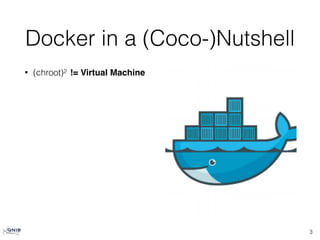
Docker in a (Coco-)Nutshell 
• (chroot)2 != Virtual Machine 
3
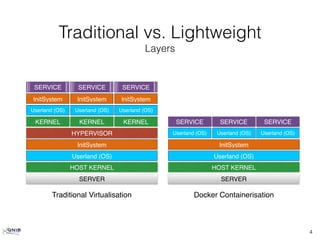
Traditional vs. Lightweight 
Layers 
4 
SERVICE SERVICE SERVICE 
InitSystem InitSystem InitSystem 
Userland (OS) Userland (OS) Userland (OS) 
KERNEL KERNEL 
HYPERVISOR 
InitSystem 
HOST KERNEL 
SERVER 
KERNEL 
Userland (OS) 
SERVICE 
SERVICE SERVICE 
Userland (OS) Userland (OS) Userland (OS) 
InitSystem 
Userland (OS) 
HOST KERNEL 
SERVER 
Traditional Virtualisation Docker Containerisation
Docker in a (Coco-)Nutshell 
• (chroot)2 != Virtual Machine 
• Builds on-top LinuX Containers (LXC) 
• Kernel namespaces (isolation) 
5
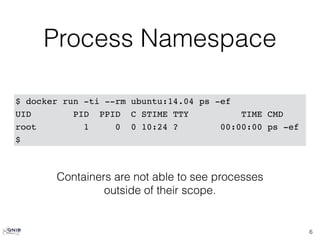
Process Namespace 
6 
$ docker run -ti --rm ubuntu:14.04 ps -ef 
UID PID PPID C STIME TTY TIME CMD 
root 1 0 0 10:24 ? 00:00:00 ps -ef 
$ 
Containers are not able to see processes 
outside of their scope.
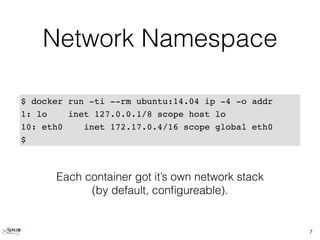
Network Namespace 
7 
$ docker run -ti --rm ubuntu:14.04 ip -4 -o addr 
1: lo inet 127.0.0.1/8 scope host lo 
10: eth0 inet 172.17.0.4/16 scope global eth0 
$ 
Each container got it’s own network stack 
(by default, configureable).
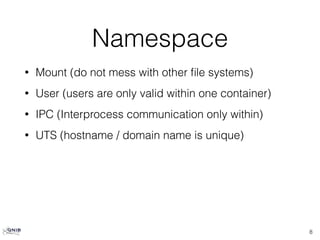
Namespace 
• Mount (do not mess with other file systems) 
• User (users are only valid within one container) 
• IPC (Interprocess communication only within) 
• UTS (hostname / domain name is unique) 
8
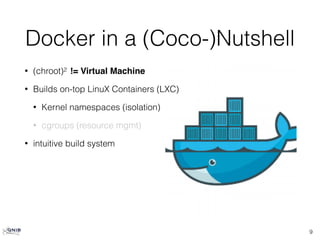
Docker in a (Coco-)Nutshell 
9 
• (chroot)2 != Virtual Machine 
• Builds on-top LinuX Containers (LXC) 
• Kernel namespaces (isolation) 
• cgroups (resource mgmt) 
• intuitive build system
Dockerfile 
10 
$ cat Dockerfile 
# From which image to start from 
FROM fedora:20 
# Who is in charge 
MAINTAINER "Christian Kniep <christian@qnib.org>" 
# Execute bash command 
RUN yum install -y stress 
# if no command is given, this command will be 
# executed at runtime (within a bash). 
CMD ["stress", "-c", "4"]
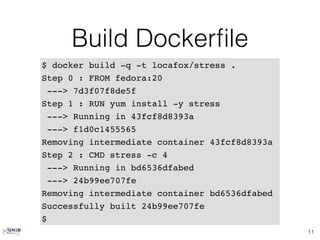
Build Dockerfile 
11 
$ docker build -q -t locafox/stress . 
Step 0 : FROM fedora:20 
---> 7d3f07f8de5f 
Step 1 : RUN yum install -y stress 
---> Running in 43fcf8d8393a 
---> f1d0c1455565 
Removing intermediate container 43fcf8d8393a 
Step 2 : CMD stress -c 4 
---> Running in bd6536dfabed 
---> 24b99ee707fe 
Removing intermediate container bd6536dfabed 
Successfully built 24b99ee707fe 
$
Cached Builds 
12 
$ docker build -q -t locafox/stress . 
Step 0 : FROM fedora:20 
---> 7d3f07f8de5f 
Step 1 : RUN yum install -y stress 
---> Using cache 
---> f1d0c1455565 
Step 2 : CMD stress -c 4 
---> Using cache 
---> 24b99ee707fe 
Successfully built 24b99ee707fe 
$ 
If the build step is already executed, it will be cached.
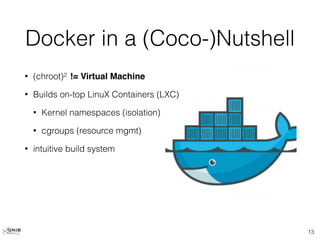
Docker in a (Coco-)Nutshell 
• (chroot)2 != Virtual Machine 
• Builds on-top LinuX Containers (LXC) 
• Kernel namespaces (isolation) 
• cgroups (resource mgmt) 
• intuitive build system 
13
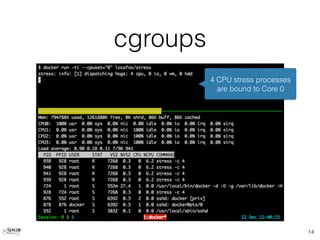
cgroups 
14 
4 CPU stress processes 
are bound to Core 0
cgroups [cont] 
15 
4 CPU stress processes 
are bound to Core 0 & 3
Docker in a (Coco-)Nutshell 
• (chroot)2 != Virtual Machine 
• Builds on-top LinuX Containers (LXC) 
• Kernel namespaces (isolation) 
• cgroups (resource mgmt) 
• intuitive build system 
• repositories public/private/certified 
• RedHat, Microsoft, Community backed 
16
Docker details 
• (chroot)2 != Virtual Machine 
17
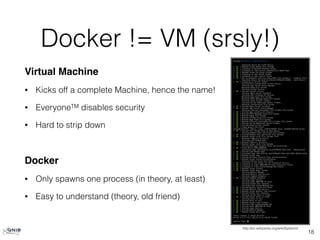
Docker != VM (srsly!) 
http://en.wikipedia.org/wiki/Systemd 
Virtual Machine 
• Kicks off a complete Machine, hence the name! 
• EveryoneTM disables security 
• Hard to strip down 
18 
Docker 
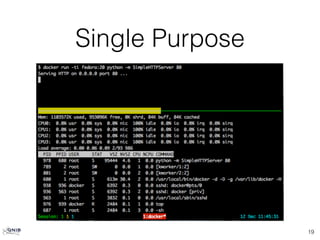
• Only spawns one process (in theory, at least) 
• Easy to understand (theory, old friend)
Single Purpose 
19
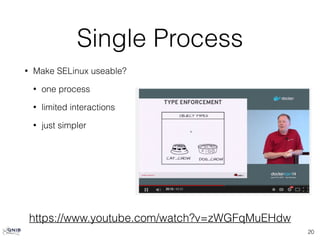
Single Process 
• Make SELinux useable? 
• one process 
• limited interactions 
• just simpler 
20 
https://www.youtube.com/watch?v=zWGFqMuEHdw
Docker details 
• (chroot)2 != Virtual Machine 
• Images and CoW 
21
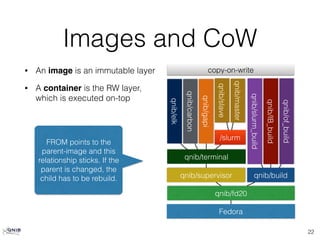
Images and CoW 
• An image is an immutable layer 
• A container is the RW layer, 
which is executed on-top 
22 
qnib/slave 
qnib/terminal 
qnib/supervisor 
qnib/fd20 
Fedora 
qnib/of_build 
qnib/IB_build 
qnib/slurm_build 
qnib/build 
qnib/master 
qnib/gapi 
qnib/carbon 
qnib/elk 
copy-on-write 
/slurm 
FROM points to the 
parent-image and this 
relationship sticks. If the 
parent is changed, the 
child has to be rebuild.
Docker details 
• (chroot)2 != Virtual Machine 
• Images and CoW 
• Ports 
• docker exec (since 1.3) 
23
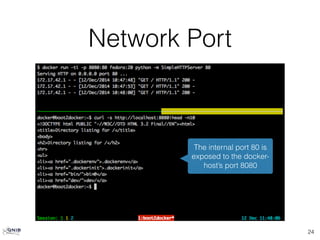
Network Port 
24 
The internal port 80 is 
exposed to the docker-host’s 
port 8080
Docker details 
• (chroot)2 != Virtual Machine 
• Images and CoW 
• Ports 
• docker exec (since 1.3) 
25
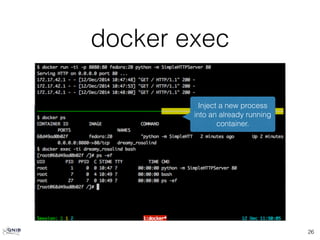
docker exec 
26 
Inject a new process 
into an already running 
container.
Ansible + Docker 
• Purpose of Config-Mgmt 
• Provisioning 
• Orchestration 
• Validation 
• Ansible 
• docker module 
• docker inventory 
• docker facts 
27
Config Mgmt 
• Provisioning 
• Bootstrap DOCKER_HOST 
• Dockerfile vs. playbooks? 
• Orchestration 
• Multiple other project in the woods 
(Docker Swarm, Kubernetes, Apache Mesos[?], …) 
• Validation 
• Is the configuration within still valid? 
28
Ansible + Docker 
• Purpose of Config-Mgmt 
• Provisioning 
• Orchestration 
• Validation 
• Ansible 
• docker module 
• docker inventory 
• docker facts 
29
Ansible 
• docker module 
• Start/Stop Container 
• docker inventory 
• provide dynamic inventory by fetching info about 
running containers 
• docker facts 
• Use information about containers within Ansible 
30
Thoughts 
• Containers mostly do not provide an SSH daemon 
• Connecting via 
• Docker is a nice way to check out playbook 
• Otherwise playbooks shouldn’t be used inside of Dockerfiles [IMHO] 
• Use Ansible to check configuration within container? 
• Setup SELinux rules using Ansible 
• Vagrant vs. Docker 
31 
docker exec <container> bash

Ansible docker

  • 1.
  • 2.
    About Me 2 • Have worked • Iteration through L1/2/3 SysOps • Mostly german automotive sector • 01/2013 -> 10/2014 R&D @Bull SAS • Now • independent R&D / Freelancing • DevOps Eng. at Locafox (scale online) • Hot topics • Containerization • Log / Performance Management • GO-Lang • HPC Cluster Software Stack / Interconnect
  • 3.
    Docker in a(Coco-)Nutshell • (chroot)2 != Virtual Machine 3
  • 4.
    Traditional vs. Lightweight Layers 4 SERVICE SERVICE SERVICE InitSystem InitSystem InitSystem Userland (OS) Userland (OS) Userland (OS) KERNEL KERNEL HYPERVISOR InitSystem HOST KERNEL SERVER KERNEL Userland (OS) SERVICE SERVICE SERVICE Userland (OS) Userland (OS) Userland (OS) InitSystem Userland (OS) HOST KERNEL SERVER Traditional Virtualisation Docker Containerisation
  • 5.
    Docker in a(Coco-)Nutshell • (chroot)2 != Virtual Machine • Builds on-top LinuX Containers (LXC) • Kernel namespaces (isolation) 5
  • 6.
    Process Namespace 6 $ docker run -ti --rm ubuntu:14.04 ps -ef UID PID PPID C STIME TTY TIME CMD root 1 0 0 10:24 ? 00:00:00 ps -ef $ Containers are not able to see processes outside of their scope.
  • 7.
    Network Namespace 7 $ docker run -ti --rm ubuntu:14.04 ip -4 -o addr 1: lo inet 127.0.0.1/8 scope host lo 10: eth0 inet 172.17.0.4/16 scope global eth0 $ Each container got it’s own network stack (by default, configureable).
  • 8.
    Namespace • Mount(do not mess with other file systems) • User (users are only valid within one container) • IPC (Interprocess communication only within) • UTS (hostname / domain name is unique) 8
  • 9.
    Docker in a(Coco-)Nutshell 9 • (chroot)2 != Virtual Machine • Builds on-top LinuX Containers (LXC) • Kernel namespaces (isolation) • cgroups (resource mgmt) • intuitive build system
  • 10.
    Dockerfile 10 $cat Dockerfile # From which image to start from FROM fedora:20 # Who is in charge MAINTAINER "Christian Kniep <christian@qnib.org>" # Execute bash command RUN yum install -y stress # if no command is given, this command will be # executed at runtime (within a bash). CMD ["stress", "-c", "4"]
  • 11.
    Build Dockerfile 11 $ docker build -q -t locafox/stress . Step 0 : FROM fedora:20 ---> 7d3f07f8de5f Step 1 : RUN yum install -y stress ---> Running in 43fcf8d8393a ---> f1d0c1455565 Removing intermediate container 43fcf8d8393a Step 2 : CMD stress -c 4 ---> Running in bd6536dfabed ---> 24b99ee707fe Removing intermediate container bd6536dfabed Successfully built 24b99ee707fe $
  • 12.
    Cached Builds 12 $ docker build -q -t locafox/stress . Step 0 : FROM fedora:20 ---> 7d3f07f8de5f Step 1 : RUN yum install -y stress ---> Using cache ---> f1d0c1455565 Step 2 : CMD stress -c 4 ---> Using cache ---> 24b99ee707fe Successfully built 24b99ee707fe $ If the build step is already executed, it will be cached.
  • 13.
    Docker in a(Coco-)Nutshell • (chroot)2 != Virtual Machine • Builds on-top LinuX Containers (LXC) • Kernel namespaces (isolation) • cgroups (resource mgmt) • intuitive build system 13
  • 14.
    cgroups 14 4CPU stress processes are bound to Core 0
  • 15.
    cgroups [cont] 15 4 CPU stress processes are bound to Core 0 & 3
  • 16.
    Docker in a(Coco-)Nutshell • (chroot)2 != Virtual Machine • Builds on-top LinuX Containers (LXC) • Kernel namespaces (isolation) • cgroups (resource mgmt) • intuitive build system • repositories public/private/certified • RedHat, Microsoft, Community backed 16
  • 17.
    Docker details •(chroot)2 != Virtual Machine 17
  • 18.
    Docker != VM(srsly!) http://en.wikipedia.org/wiki/Systemd Virtual Machine • Kicks off a complete Machine, hence the name! • EveryoneTM disables security • Hard to strip down 18 Docker • Only spawns one process (in theory, at least) • Easy to understand (theory, old friend)
  • 19.
  • 20.
    Single Process •Make SELinux useable? • one process • limited interactions • just simpler 20 https://www.youtube.com/watch?v=zWGFqMuEHdw
  • 21.
    Docker details •(chroot)2 != Virtual Machine • Images and CoW 21
  • 22.
    Images and CoW • An image is an immutable layer • A container is the RW layer, which is executed on-top 22 qnib/slave qnib/terminal qnib/supervisor qnib/fd20 Fedora qnib/of_build qnib/IB_build qnib/slurm_build qnib/build qnib/master qnib/gapi qnib/carbon qnib/elk copy-on-write /slurm FROM points to the parent-image and this relationship sticks. If the parent is changed, the child has to be rebuild.
  • 23.
    Docker details •(chroot)2 != Virtual Machine • Images and CoW • Ports • docker exec (since 1.3) 23
  • 24.
    Network Port 24 The internal port 80 is exposed to the docker-host’s port 8080
  • 25.
    Docker details •(chroot)2 != Virtual Machine • Images and CoW • Ports • docker exec (since 1.3) 25
  • 26.
    docker exec 26 Inject a new process into an already running container.
  • 27.
    Ansible + Docker • Purpose of Config-Mgmt • Provisioning • Orchestration • Validation • Ansible • docker module • docker inventory • docker facts 27
  • 28.
    Config Mgmt •Provisioning • Bootstrap DOCKER_HOST • Dockerfile vs. playbooks? • Orchestration • Multiple other project in the woods (Docker Swarm, Kubernetes, Apache Mesos[?], …) • Validation • Is the configuration within still valid? 28
  • 29.
    Ansible + Docker • Purpose of Config-Mgmt • Provisioning • Orchestration • Validation • Ansible • docker module • docker inventory • docker facts 29
  • 30.
    Ansible • dockermodule • Start/Stop Container • docker inventory • provide dynamic inventory by fetching info about running containers • docker facts • Use information about containers within Ansible 30
  • 31.
    Thoughts • Containersmostly do not provide an SSH daemon • Connecting via • Docker is a nice way to check out playbook • Otherwise playbooks shouldn’t be used inside of Dockerfiles [IMHO] • Use Ansible to check configuration within container? • Setup SELinux rules using Ansible • Vagrant vs. Docker 31 docker exec <container> bash