INTRODUCTION TO DOCKER
Huda Seyam
15/5/2020
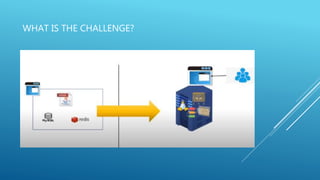
WHAT IS THE CHALLENGE?
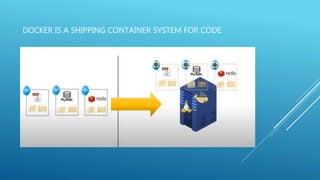
DOCKER IS A SHIPPING CONTAINER SYSTEM FOR CODE
What is Docker?
 Docker is a popular open-source project based on Linux
containers. Docker is written in go and developed by Dotcloud
(A PaaS Company).
 It is basically a container engine that uses the Linux Kernel
features like namespaces and control groups to create
containers on top of an operating system.
VIRTUALIZATION VS CONTAINERIZATION
Unlike hypervisors docker is not meant to virtualize and run different
operating system and kernels on the same hardware
WHAT IS THE PURPOSE OF DOCKER?
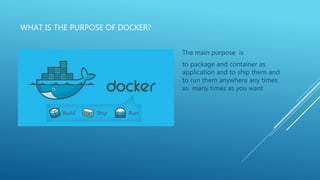
The main purpose is
to package and container as
application and to ship them and
to run them anywhere any times
as many times as you want
Docker Components:
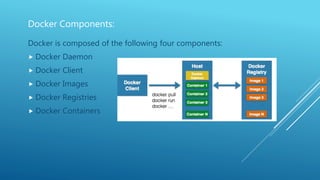
Docker is composed of the following four components:
 Docker Daemon
 Docker Client
 Docker Images
 Docker Registries
 Docker Containers
Docker Components:
Docker Daemon
 Docker has a client-server architecture. Docker Daemon or server is
responsible for all the actions that are related to containers.
 The daemon receives the commands from the Docker client through CLI or
REST API. Docker client can be on the same host as a daemon or it can be
present on any other host.
Docker Images
 Images are the basic building blocks of Docker. Containers are built from
images. Images can be configured with applications and used as a template
for creating containers. It is organized in a layered fashion. Every change in
an image is added as a layer on top of it.
Docker Components:
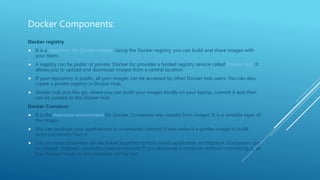
Docker registry
 It is a repository for Docker images. Using the Docker registry, you can build and share images with
your team.
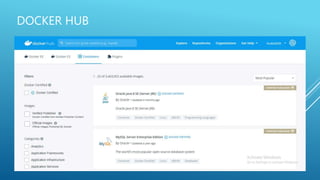
 A registry can be public or private. Docker Inc provides a hosted registry service called Docker Hub. It
allows you to upload and download images from a central location.
 If your repository is public, all your images can be accessed by other Docker hub users. You can also
create a private registry in Docker Hub.
 Docker hub acts like git, where you can build your images locally on your laptop, commit it and then
can be pushed to the Docker hub.
Docker Container
 It is the execution environment for Docker. Containers are created from images. It is a writable layer of
the image.
 You can package your applications in a container, commit it and make it a golden image to build
more containers from it.
 Two or more containers can be linked together to form tiered application architecture. Containers can
be started, stopped, committed and terminated. If you terminate a container without committing it, all
the changes made to the container will be lost.
DOCKER HUB
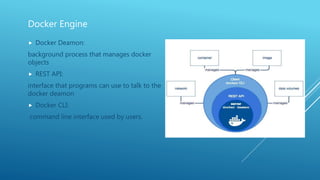
Docker Engine
 Docker Deamon:
background process that manages docker
objects
 REST API:
interface that programs can use to talk to the
docker deamon
 Docker CLI:
command line interface used by users.
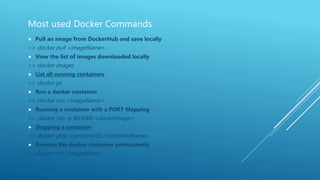
Most used Docker Commands
 Pull an image from DockerHub and save locally
>> docker pull <imageName>
 View the list of images downloaded locally
>> docker images
 List all running containers
>> docker ps
 Run a docker container
>> docker run <imageName>
 Running a container with a PORT Mapping
>> docker run -p 80:5000 <dockerImage>
 Stopping a container
>> docker stop <containerID / containerName>
 Remove the docker container permanently
>>docker rmi <imageName>
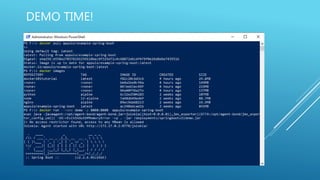
DEMO TIME!
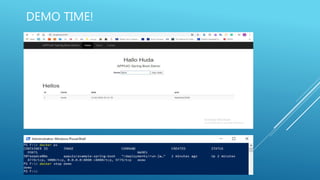
DEMO TIME!
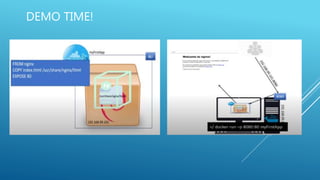
DEMO TIME!
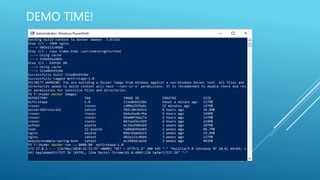
DEMO TIME!
DEMO TIME!
References
 https://devopscube.com/what-is-docker/
 https://www.youtube.com/watch?v=i6NNbaOE_AY&list=PLCsn73j
grZ7fQOGpnb_KY3ackH9LUjFtC&index=1

Docker

  • 1.
  • 2.
    WHAT IS THECHALLENGE?
  • 3.
    DOCKER IS ASHIPPING CONTAINER SYSTEM FOR CODE
  • 4.
    What is Docker? Docker is a popular open-source project based on Linux containers. Docker is written in go and developed by Dotcloud (A PaaS Company).  It is basically a container engine that uses the Linux Kernel features like namespaces and control groups to create containers on top of an operating system.
  • 5.
    VIRTUALIZATION VS CONTAINERIZATION Unlikehypervisors docker is not meant to virtualize and run different operating system and kernels on the same hardware
  • 6.
    WHAT IS THEPURPOSE OF DOCKER? The main purpose is to package and container as application and to ship them and to run them anywhere any times as many times as you want
  • 7.
    Docker Components: Docker iscomposed of the following four components:  Docker Daemon  Docker Client  Docker Images  Docker Registries  Docker Containers
  • 8.
    Docker Components: Docker Daemon Docker has a client-server architecture. Docker Daemon or server is responsible for all the actions that are related to containers.  The daemon receives the commands from the Docker client through CLI or REST API. Docker client can be on the same host as a daemon or it can be present on any other host. Docker Images  Images are the basic building blocks of Docker. Containers are built from images. Images can be configured with applications and used as a template for creating containers. It is organized in a layered fashion. Every change in an image is added as a layer on top of it.
  • 9.
    Docker Components: Docker registry It is a repository for Docker images. Using the Docker registry, you can build and share images with your team.  A registry can be public or private. Docker Inc provides a hosted registry service called Docker Hub. It allows you to upload and download images from a central location.  If your repository is public, all your images can be accessed by other Docker hub users. You can also create a private registry in Docker Hub.  Docker hub acts like git, where you can build your images locally on your laptop, commit it and then can be pushed to the Docker hub. Docker Container  It is the execution environment for Docker. Containers are created from images. It is a writable layer of the image.  You can package your applications in a container, commit it and make it a golden image to build more containers from it.  Two or more containers can be linked together to form tiered application architecture. Containers can be started, stopped, committed and terminated. If you terminate a container without committing it, all the changes made to the container will be lost.
  • 10.
  • 11.
    Docker Engine  DockerDeamon: background process that manages docker objects  REST API: interface that programs can use to talk to the docker deamon  Docker CLI: command line interface used by users.
  • 12.
    Most used DockerCommands  Pull an image from DockerHub and save locally >> docker pull <imageName>  View the list of images downloaded locally >> docker images  List all running containers >> docker ps  Run a docker container >> docker run <imageName>  Running a container with a PORT Mapping >> docker run -p 80:5000 <dockerImage>  Stopping a container >> docker stop <containerID / containerName>  Remove the docker container permanently >>docker rmi <imageName>
  • 13.
  • 14.
  • 15.
  • 16.
  • 17.
  • 18.