LINUX CONTAINERS AND
DOCKER OPEN PLATFORM
Rahul More
Docker is an open platform for developers and
sysadmins to build, ship, and run distributed
applications
?
• “an open source platform to pack, ship and
run any application as a lightweight linux
container.”
• “chroot on steroids.”
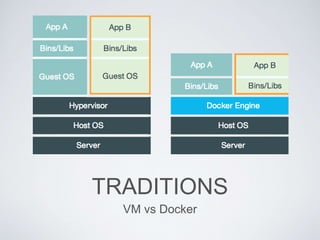
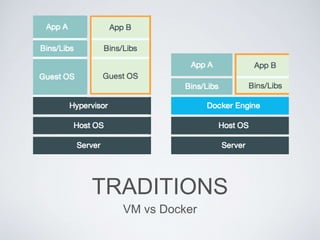
TRADITIONS
VM vs Docker
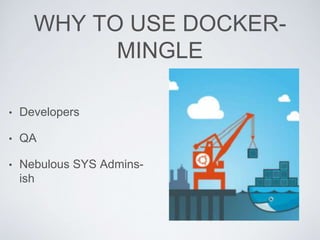
WHY TO USE DOCKER-
MINGLE
• Developers
• QA
• Nebulous SYS Admins-
ish
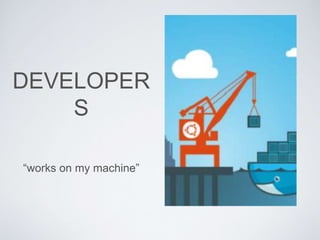
DEVELOPER
S
“works on my machine”
QA
“does not work on my test
environment”
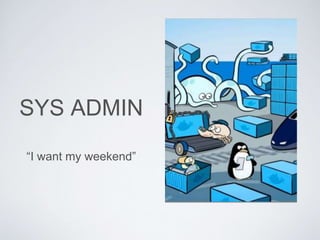
SYS ADMIN
“I want my weekend”
WHY USE DOCKER?
• Portable deployments.
• Fast Application delivery.
• Scale and deployed with ease.
• Higher workloads - greater density.
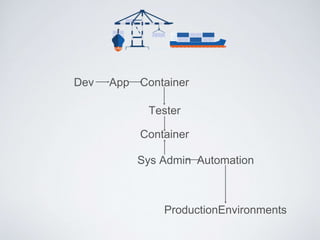
Dev App Container
Tester
Container
Sys Admin Automation
ProductionEnvironments
TRADITIONS
VM vs Docker
DOCKER
ARCHITECTURE
DOCKER
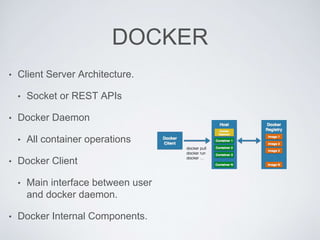
• Client Server Architecture.
• Socket or REST APIs
• Docker Daemon
• All container operations
• Docker Client
• Main interface between user
and docker daemon.
• Docker Internal Components.
DOCKER COMPONENTS
• Docker Internal Components
• Docker Image
• Similar to OS disk images.
• Used as base , layers build upon the base image[Layer
0].
• Portable.
• Docker Registry
• Repository of Docker Images.
• Public or Private.
• Docker Containers
• Running Images
• Directory + Execution Environment.
• Isolated.
• User Space + Networking + Security Components.
Docker
Image
Kernal
Docker
Engine
Docker
Registr
y
Docker
Container
WORKING OF DOCKER
• Docker Image.
• Each image is
association of images.
• Layered approach for
abstraction.
• Unified file system.
Each layer as a
directory.
• Dockerfile.
Base Image
Layered Image-2[add
apache]
Running Container [php
application
Layered Image-2[add php]
Layered Image-3[add mysql]
Reference Image
WORKING OF DOCKER
• Docker Registry.
• All images are stored
in a client.
• Private or public.
• Images are pulled and
pushed in a registry.
WORKING OF DOCKER
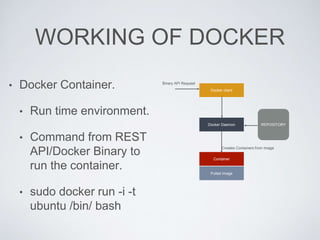
• Docker Container.
• Run time environment.
• Command from REST
API/Docker Binary to
run the container.
• sudo docker run -i -t
ubuntu /bin/ bash
Docker client
Docker Daemon
Container
Pulled Image
REPOSITORY
Creates Containers from Image
Binary API Request
DOCKER
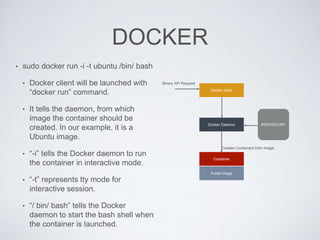
• sudo docker run -i -t ubuntu /bin/ bash
• Docker client will be launched with
“docker run” command.
• It tells the daemon, from which
image the container should be
created. In our example, it is a
Ubuntu image.
• “-i” tells the Docker daemon to run
the container in interactive mode.
• “-t” represents tty mode for
interactive session.
• “/ bin/ bash” tells the Docker
daemon to start the bash shell when
the container is launched.
Docker client
Docker Daemon
Container
Pulled Image
REPOSITORY
Creates Containers from Image
Binary API Request
DOCKER
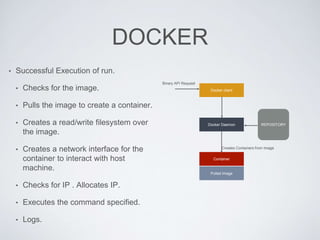
• Successful Execution of run.
• Checks for the image.
• Pulls the image to create a container.
• Creates a read/write filesystem over
the image.
• Creates a network interface for the
container to interact with host
machine.
• Checks for IP . Allocates IP.
• Executes the command specified.
• Logs.
Docker client
Docker Daemon
Container
Pulled Image
REPOSITORY
Creates Containers from Image
Binary API Request
IMMUTABLE
INFRASTRUCURE
• Immutable infrastructure comprises of
immutable components and for every
deployment the components will be replaced
with the updated component rather than
being updated.
DEMO
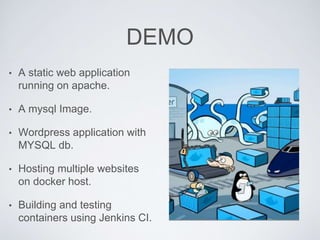
• A static web application
running on apache.
• A mysql Image.
• Wordpress application with
MYSQL db.
• Hosting multiple websites
on docker host.
• Building and testing
containers using Jenkins CI.

Docker lxc win

  • 1.
    LINUX CONTAINERS AND DOCKEROPEN PLATFORM Rahul More
  • 3.
    Docker is anopen platform for developers and sysadmins to build, ship, and run distributed applications
  • 4.
    ? • “an opensource platform to pack, ship and run any application as a lightweight linux container.” • “chroot on steroids.”
  • 6.
  • 7.
    WHY TO USEDOCKER- MINGLE • Developers • QA • Nebulous SYS Admins- ish
  • 8.
  • 9.
    QA “does not workon my test environment”
  • 10.
    SYS ADMIN “I wantmy weekend”
  • 11.
    WHY USE DOCKER? •Portable deployments. • Fast Application delivery. • Scale and deployed with ease. • Higher workloads - greater density.
  • 12.
    Dev App Container Tester Container SysAdmin Automation ProductionEnvironments
  • 13.
  • 14.
  • 15.
    DOCKER • Client ServerArchitecture. • Socket or REST APIs • Docker Daemon • All container operations • Docker Client • Main interface between user and docker daemon. • Docker Internal Components.
  • 16.
    DOCKER COMPONENTS • DockerInternal Components • Docker Image • Similar to OS disk images. • Used as base , layers build upon the base image[Layer 0]. • Portable. • Docker Registry • Repository of Docker Images. • Public or Private. • Docker Containers • Running Images • Directory + Execution Environment. • Isolated. • User Space + Networking + Security Components. Docker Image Kernal Docker Engine Docker Registr y Docker Container
  • 17.
    WORKING OF DOCKER •Docker Image. • Each image is association of images. • Layered approach for abstraction. • Unified file system. Each layer as a directory. • Dockerfile. Base Image Layered Image-2[add apache] Running Container [php application Layered Image-2[add php] Layered Image-3[add mysql] Reference Image
  • 18.
    WORKING OF DOCKER •Docker Registry. • All images are stored in a client. • Private or public. • Images are pulled and pushed in a registry.
  • 19.
    WORKING OF DOCKER •Docker Container. • Run time environment. • Command from REST API/Docker Binary to run the container. • sudo docker run -i -t ubuntu /bin/ bash Docker client Docker Daemon Container Pulled Image REPOSITORY Creates Containers from Image Binary API Request
  • 20.
    DOCKER • sudo dockerrun -i -t ubuntu /bin/ bash • Docker client will be launched with “docker run” command. • It tells the daemon, from which image the container should be created. In our example, it is a Ubuntu image. • “-i” tells the Docker daemon to run the container in interactive mode. • “-t” represents tty mode for interactive session. • “/ bin/ bash” tells the Docker daemon to start the bash shell when the container is launched. Docker client Docker Daemon Container Pulled Image REPOSITORY Creates Containers from Image Binary API Request
  • 21.
    DOCKER • Successful Executionof run. • Checks for the image. • Pulls the image to create a container. • Creates a read/write filesystem over the image. • Creates a network interface for the container to interact with host machine. • Checks for IP . Allocates IP. • Executes the command specified. • Logs. Docker client Docker Daemon Container Pulled Image REPOSITORY Creates Containers from Image Binary API Request
  • 22.
    IMMUTABLE INFRASTRUCURE • Immutable infrastructurecomprises of immutable components and for every deployment the components will be replaced with the updated component rather than being updated.
  • 23.
    DEMO • A staticweb application running on apache. • A mysql Image. • Wordpress application with MYSQL db. • Hosting multiple websites on docker host. • Building and testing containers using Jenkins CI.