• A dotCloud (PAAS provider) project
• Initial commit January 18, 2013
• Docker 0.1.0 released March 25, 2013
• 18,600+ github stars, 3800+ forks,740 Contributors…. and continues
• dotCloud pivots to docker inc. October 29, 2013
DOCKER HISTORY ……
• Open platform for developers and sysadmins to build, ship and run
distributed applications
• Can run on popular 64-bit Linux distributions with kernel 3.8 or later
• Supported by several cloud platforms including Amazon EC2, Google
Compute Engine, and Rackspace.
What is Docker ?!!!
• Light-Weight
o Minimal overhead (cpu/io/network)
o Based on Linux containers
o Uses layered filesystem to save space (AUFS/LVM)
o Uses a copy-on-write filesystem to track changes
• Portable
o Can run on any Linux system that supports LXC (today).
o 0.7 release includes support for RedHat/Fedora family.
o Raspberry pi support.
o Future plans to support other container tools (lmctfy, etc.)
o Possible future support for other operating systems (Solaris, OSX, Windows?)
• Self-sufficient
o A Docker container contains everything it needs to run
o Minimal Base OS
o Libraries and frameworks
o Application code
o A docker container should be able to run anywhere that Docker can run.
Features….
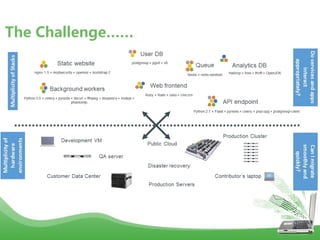
The Challenge……
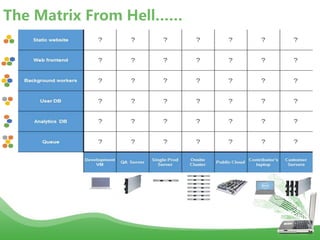
The Matrix From Hell……
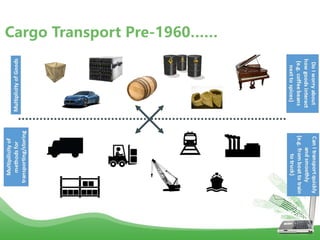
Cargo Transport Pre-1960……
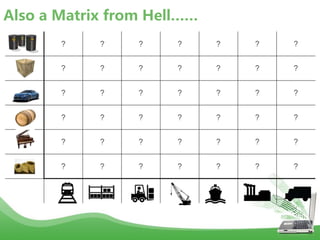
Also a Matrix from Hell……
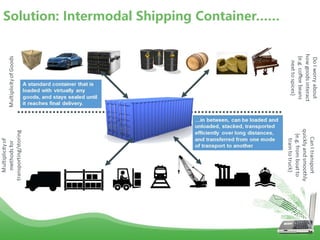
Solution: Intermodal Shipping Container……
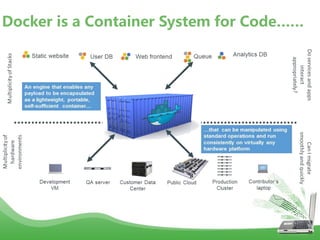
Docker is a Container System for Code……
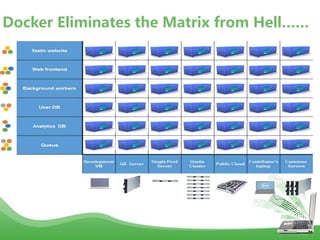
Docker Eliminates the Matrix from Hell……
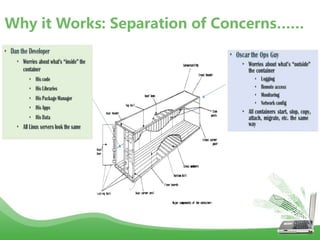
Why it Works: Separation of Concerns……
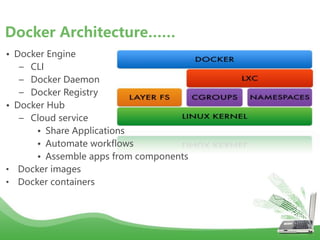
• Docker Engine
– CLI
– Docker Daemon
– Docker Registry
• Docker Hub
– Cloud service
• Share Applications
• Automate workflows
• Assemble apps from components
• Docker images
• Docker containers
Docker Architecture……
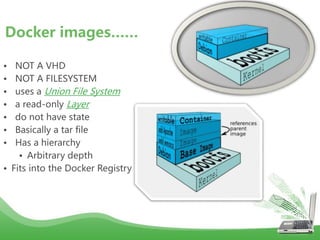
• NOT A VHD
• NOT A FILESYSTEM
• uses a Union File System
• a read-only Layer
• do not have state
• Basically a tar file
• Has a hierarchy
• Arbitrary depth
• Fits into the Docker Registry
Docker images……
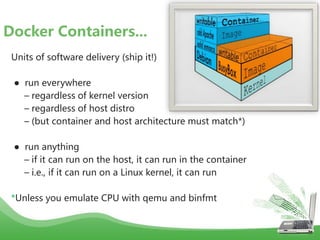
Units of software delivery (ship it!)
● run everywhere
– regardless of kernel version
– regardless of host distro
– (but container and host architecture must match*)
● run anything
– if it can run on the host, it can run in the container
– i.e., if it can run on a Linux kernel, it can run
*Unless you emulate CPU with qemu and binfmt
Docker Containers...
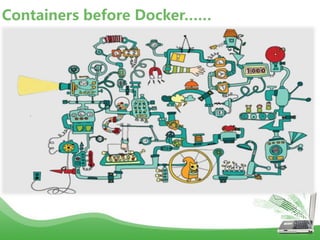
Containers before Docker……
Containers after Docker ……
How does Docker work ?
• You can build Docker images that hold your applications
• You can create Docker containers from those Docker images to run your
applications.
• You can share those Docker images via Docker Hub or your own registry
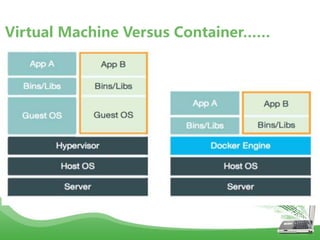
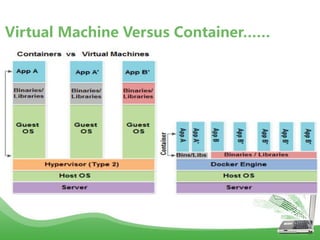
Virtual Machine Versus Container……
• The Life of a Container
– Conception
• BUILD an Image from a Dockerfile
– Birth
• RUN (create+start) a container
– Reproduction
• COMMIT (persist) a container to a new image
• RUN a new container from an image
– Sleep
• KILL a running container
– Wake
• START a stopped container
– Death
• RM (delete) a stopped container
• Extinction
– RMI a container image (delete image)
Docker Container Lifecycle ……
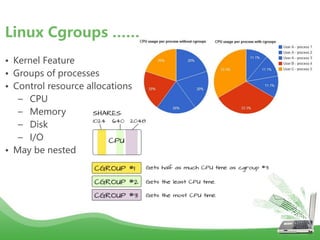
• Kernel Feature
• Groups of processes
• Control resource allocations
– CPU
– Memory
– Disk
– I/O
• May be nested
Linux Cgroups ……
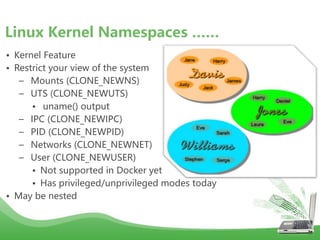
• Kernel Feature
• Restrict your view of the system
– Mounts (CLONE_NEWNS)
– UTS (CLONE_NEWUTS)
• uname() output
– IPC (CLONE_NEWIPC)
– PID (CLONE_NEWPID)
– Networks (CLONE_NEWNET)
– User (CLONE_NEWUSER)
• Not supported in Docker yet
• Has privileged/unprivileged modes today
• May be nested
Linux Kernel Namespaces ……
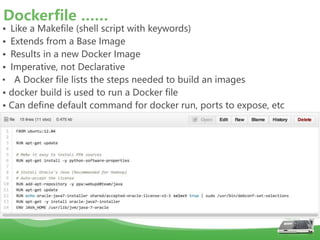
• Like a Makefile (shell script with keywords)
• Extends from a Base Image
• Results in a new Docker Image
• Imperative, not Declarative
• A Docker file lists the steps needed to build an images
• docker build is used to run a Docker file
• Can define default command for docker run, ports to expose, etc
Dockerfile ……
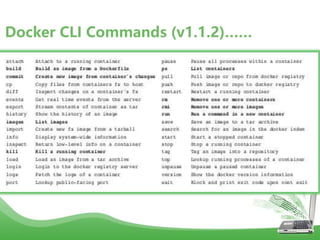
Docker CLI Commands (v1.1.2)……
Want to hack on Docker ?
• Reporting Security Issues
• Design and Cleanup Proposals
• Reporting Issues
• Build Environment
Contributing to Docker ……
• Easy to build, run & share containers
• Rapidly expanding ecosystem
• Better performance vs. VMs
• Layered file system gives us git-like control of images
• Reduces complexity of system builds
• Red Hat - Project Atomic Host, and certifications - containerized
applications, Geard and OpenShift.
• Google is expected to tightly integrate containers with its IaaS and
PaaS offerings.
SUMMARY……

Docker.ppt

  • 2.
    • A dotCloud(PAAS provider) project • Initial commit January 18, 2013 • Docker 0.1.0 released March 25, 2013 • 18,600+ github stars, 3800+ forks,740 Contributors…. and continues • dotCloud pivots to docker inc. October 29, 2013 DOCKER HISTORY ……
  • 3.
    • Open platformfor developers and sysadmins to build, ship and run distributed applications • Can run on popular 64-bit Linux distributions with kernel 3.8 or later • Supported by several cloud platforms including Amazon EC2, Google Compute Engine, and Rackspace. What is Docker ?!!!
  • 4.
    • Light-Weight o Minimaloverhead (cpu/io/network) o Based on Linux containers o Uses layered filesystem to save space (AUFS/LVM) o Uses a copy-on-write filesystem to track changes • Portable o Can run on any Linux system that supports LXC (today). o 0.7 release includes support for RedHat/Fedora family. o Raspberry pi support. o Future plans to support other container tools (lmctfy, etc.) o Possible future support for other operating systems (Solaris, OSX, Windows?) • Self-sufficient o A Docker container contains everything it needs to run o Minimal Base OS o Libraries and frameworks o Application code o A docker container should be able to run anywhere that Docker can run. Features….
  • 5.
  • 6.
    The Matrix FromHell……
  • 7.
  • 8.
    Also a Matrixfrom Hell……
  • 9.
  • 10.
    Docker is aContainer System for Code……
  • 11.
    Docker Eliminates theMatrix from Hell……
  • 12.
    Why it Works:Separation of Concerns……
  • 13.
    • Docker Engine –CLI – Docker Daemon – Docker Registry • Docker Hub – Cloud service • Share Applications • Automate workflows • Assemble apps from components • Docker images • Docker containers Docker Architecture……
  • 14.
    • NOT AVHD • NOT A FILESYSTEM • uses a Union File System • a read-only Layer • do not have state • Basically a tar file • Has a hierarchy • Arbitrary depth • Fits into the Docker Registry Docker images……
  • 15.
    Units of softwaredelivery (ship it!) ● run everywhere – regardless of kernel version – regardless of host distro – (but container and host architecture must match*) ● run anything – if it can run on the host, it can run in the container – i.e., if it can run on a Linux kernel, it can run *Unless you emulate CPU with qemu and binfmt Docker Containers...
  • 16.
  • 17.
  • 18.
    How does Dockerwork ? • You can build Docker images that hold your applications • You can create Docker containers from those Docker images to run your applications. • You can share those Docker images via Docker Hub or your own registry
  • 19.
    Virtual Machine VersusContainer……
  • 20.
    Virtual Machine VersusContainer……
  • 21.
    • The Lifeof a Container – Conception • BUILD an Image from a Dockerfile – Birth • RUN (create+start) a container – Reproduction • COMMIT (persist) a container to a new image • RUN a new container from an image – Sleep • KILL a running container – Wake • START a stopped container – Death • RM (delete) a stopped container • Extinction – RMI a container image (delete image) Docker Container Lifecycle ……
  • 22.
    • Kernel Feature •Groups of processes • Control resource allocations – CPU – Memory – Disk – I/O • May be nested Linux Cgroups ……
  • 23.
    • Kernel Feature •Restrict your view of the system – Mounts (CLONE_NEWNS) – UTS (CLONE_NEWUTS) • uname() output – IPC (CLONE_NEWIPC) – PID (CLONE_NEWPID) – Networks (CLONE_NEWNET) – User (CLONE_NEWUSER) • Not supported in Docker yet • Has privileged/unprivileged modes today • May be nested Linux Kernel Namespaces ……
  • 24.
    • Like aMakefile (shell script with keywords) • Extends from a Base Image • Results in a new Docker Image • Imperative, not Declarative • A Docker file lists the steps needed to build an images • docker build is used to run a Docker file • Can define default command for docker run, ports to expose, etc Dockerfile ……
  • 25.
    Docker CLI Commands(v1.1.2)……
  • 26.
    Want to hackon Docker ? • Reporting Security Issues • Design and Cleanup Proposals • Reporting Issues • Build Environment Contributing to Docker ……
  • 27.
    • Easy tobuild, run & share containers • Rapidly expanding ecosystem • Better performance vs. VMs • Layered file system gives us git-like control of images • Reduces complexity of system builds • Red Hat - Project Atomic Host, and certifications - containerized applications, Geard and OpenShift. • Google is expected to tightly integrate containers with its IaaS and PaaS offerings. SUMMARY……