
www.edureka.co/linux-adminEDUREKA’S LINUX ADMINISTRATION CERTIFICATION TRAINING
What Will You Learn Today?
✓ Birth of Linux: Why did Linux become popular?
✓ Various distributions of Linux
✓ Getting started with Linux
✓ Basic Linux commands
✓ Working with files & directories
✓ Adding/ deleting users
✓ Networking in Linux: Using SSH for communication
www.edureka.co/linux-adminEDUREKA’S LINUX ADMINISTRATION CERTIFICATION TRAINING
Why Did Linux Become Popular?
www.edureka.co/linux-adminEDUREKA’S LINUX ADMINISTRATION CERTIFICATION TRAINING
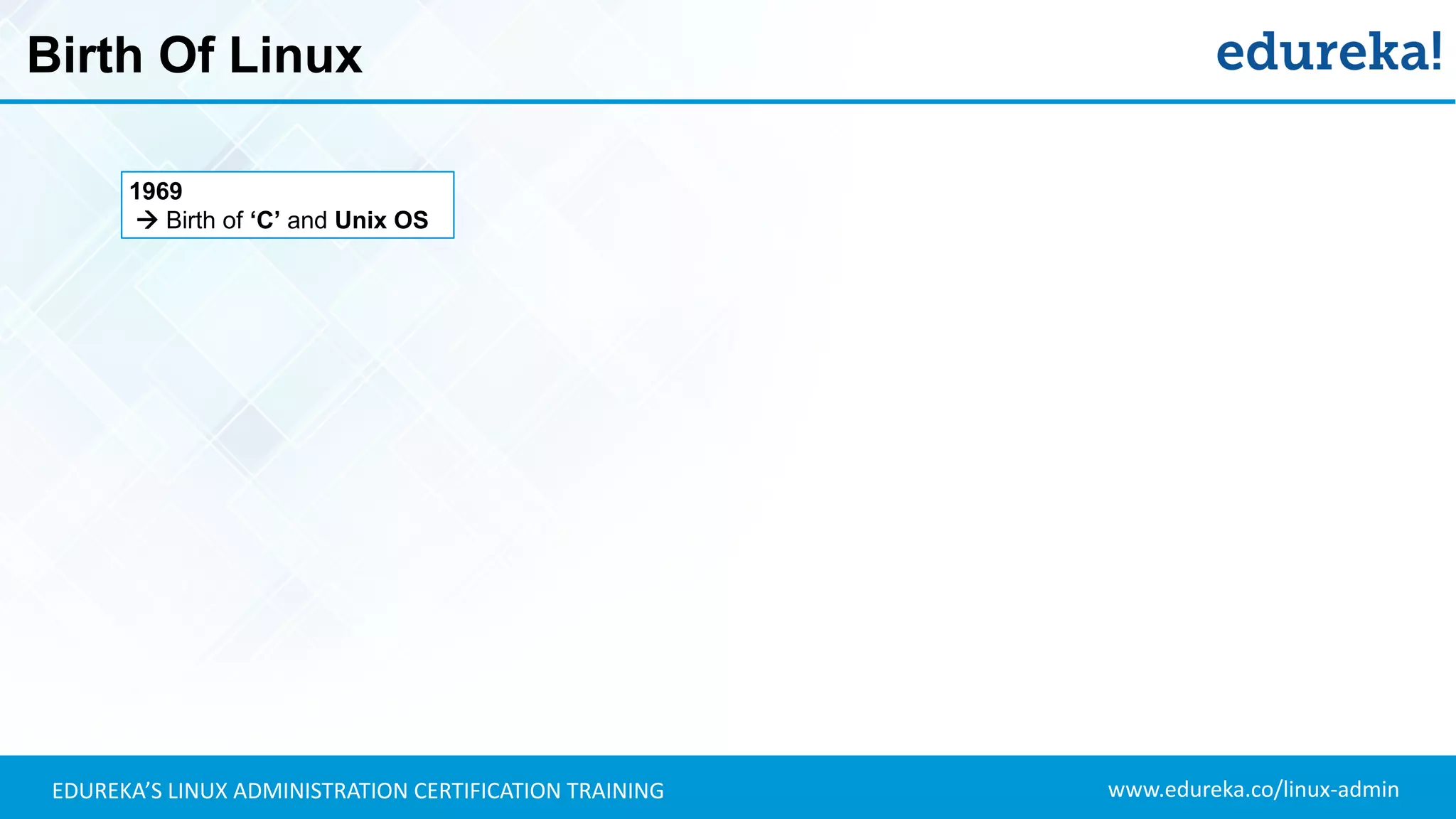
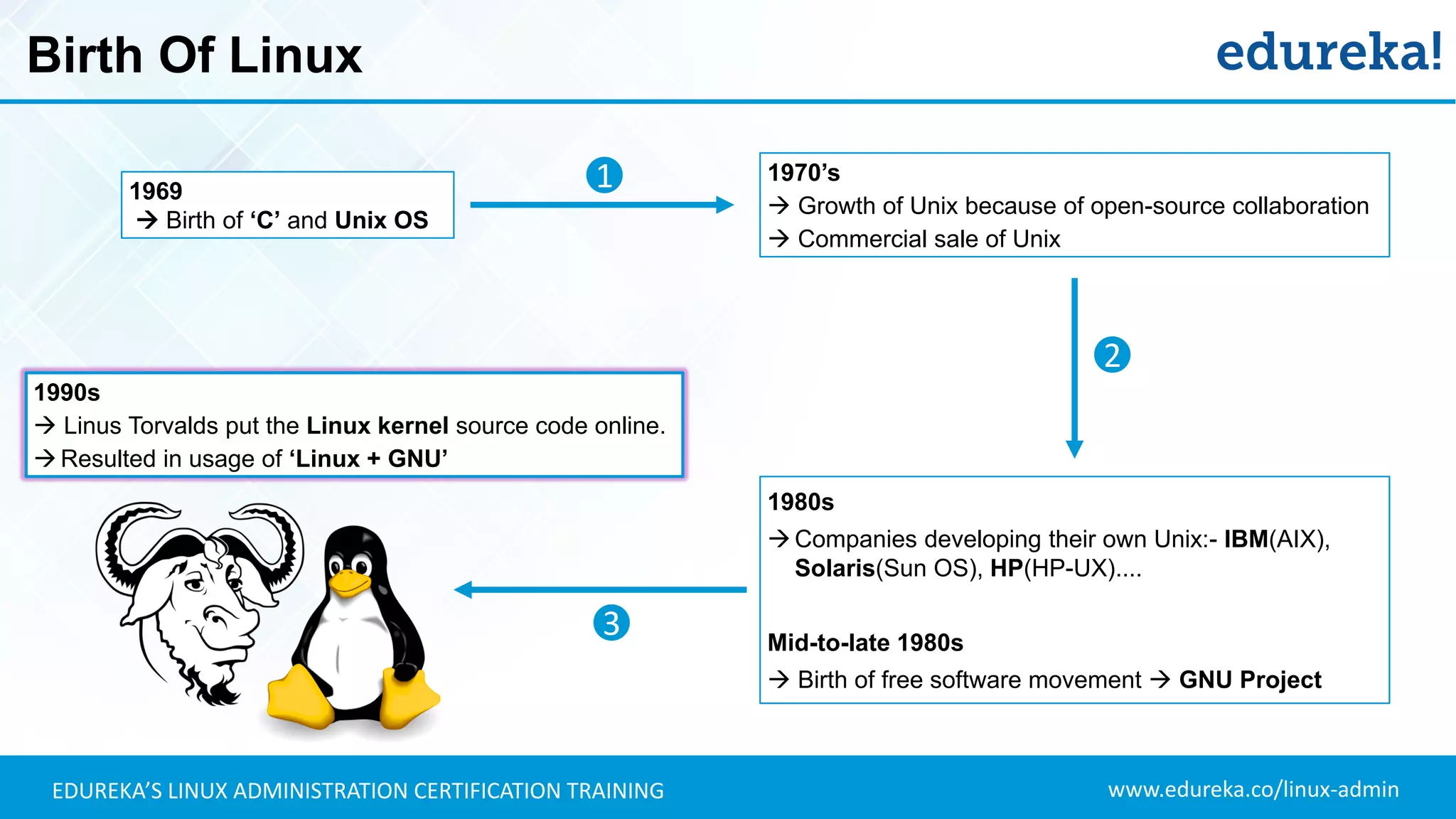
Birth Of Linux
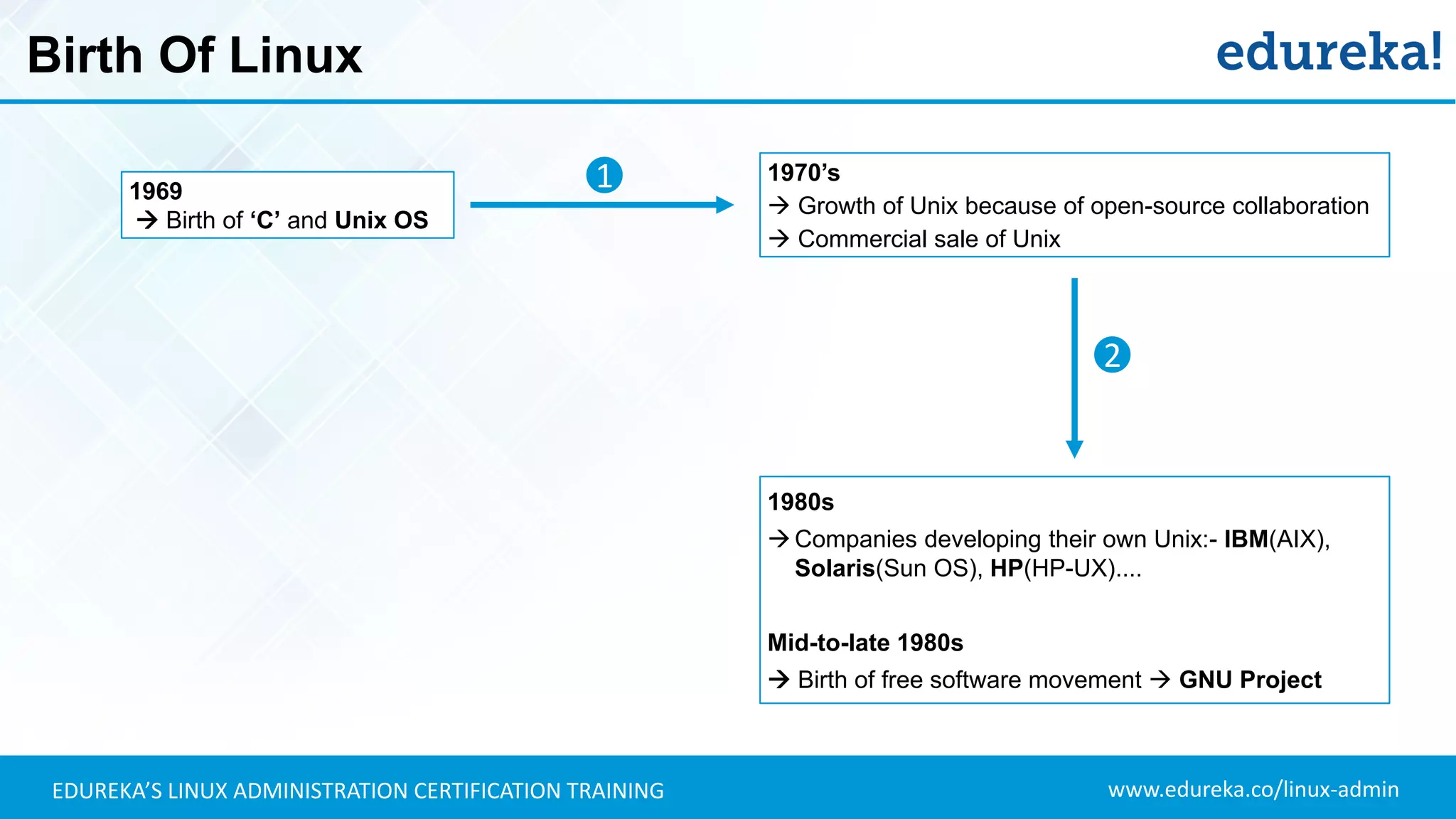
1969
 Birth of ‘C’ and Unix OS
www.edureka.co/linux-adminEDUREKA’S LINUX ADMINISTRATION CERTIFICATION TRAINING
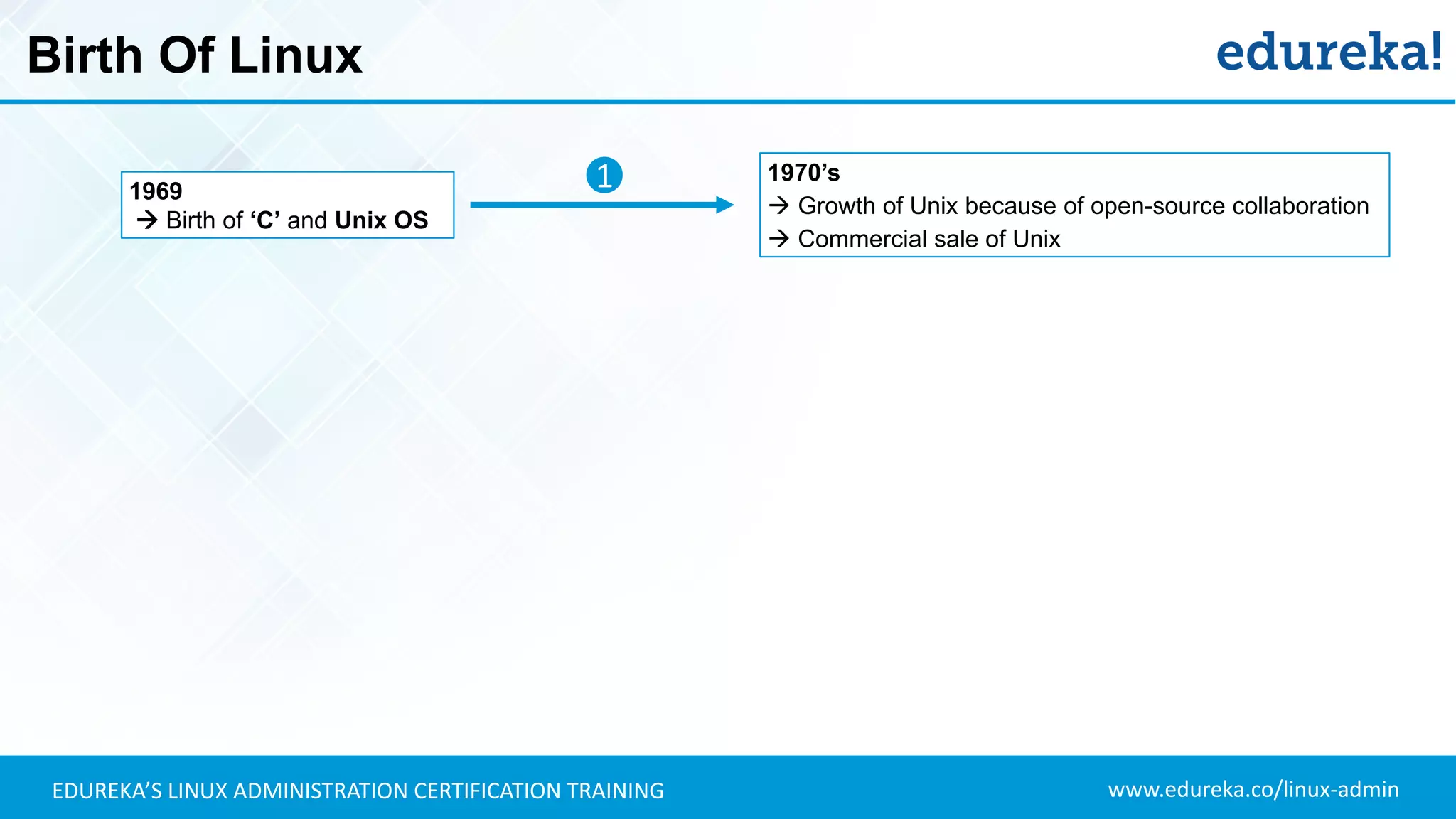
Birth Of Linux
1970’s
 Growth of Unix because of open-source collaboration
 Commercial sale of Unix
1969
 Birth of ‘C’ and Unix OS
1
www.edureka.co/linux-adminEDUREKA’S LINUX ADMINISTRATION CERTIFICATION TRAINING
Birth Of Linux
1970’s
 Growth of Unix because of open-source collaboration
 Commercial sale of Unix
1969
 Birth of ‘C’ and Unix OS
1
2
1980s
Companies developing their own Unix:- IBM(AIX),
Solaris(Sun OS), HP(HP-UX)....
Mid-to-late 1980s
 Birth of free software movement  GNU Project
www.edureka.co/linux-adminEDUREKA’S LINUX ADMINISTRATION CERTIFICATION TRAINING
Birth Of Linux
1980s
Companies developing their own Unix:- IBM(AIX),
Solaris(Sun OS), HP(HP-UX)....
Mid-to-late 1980s
 Birth of free software movement  GNU Project
1970’s
 Growth of Unix because of open-source collaboration
 Commercial sale of Unix
1990s
 Linus Torvalds put the Linux kernel source code online.
Resulted in usage of ‘Linux + GNU’
1969
 Birth of ‘C’ and Unix OS
1
2
3
www.edureka.co/linux-adminEDUREKA’S LINUX ADMINISTRATION CERTIFICATION TRAINING
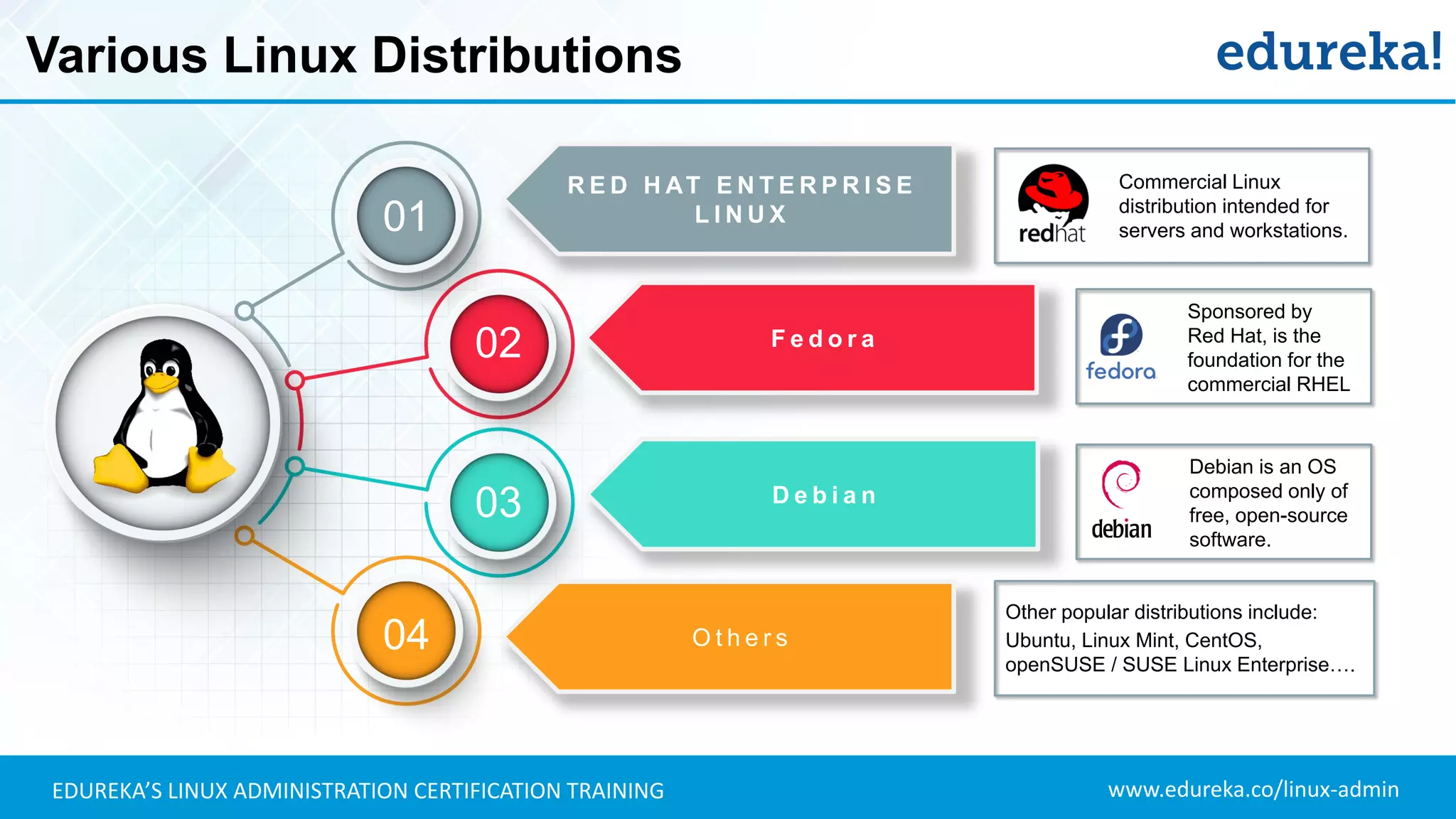
Various Linux Distributions
F e d o r a
R E D H AT E N T E R P R I S E
L I N U X
D e b i a n
O t h e r s
01
02
03
04
Commercial Linux
distribution intended for
servers and workstations.
Sponsored by
Red Hat, is the
foundation for the
commercial RHEL
Debian is an OS
composed only of
free, open-source
software.
Other popular distributions include:
Ubuntu, Linux Mint, CentOS,
openSUSE / SUSE Linux Enterprise….
www.edureka.co/linux-adminEDUREKA’S LINUX ADMINISTRATION CERTIFICATION TRAINING
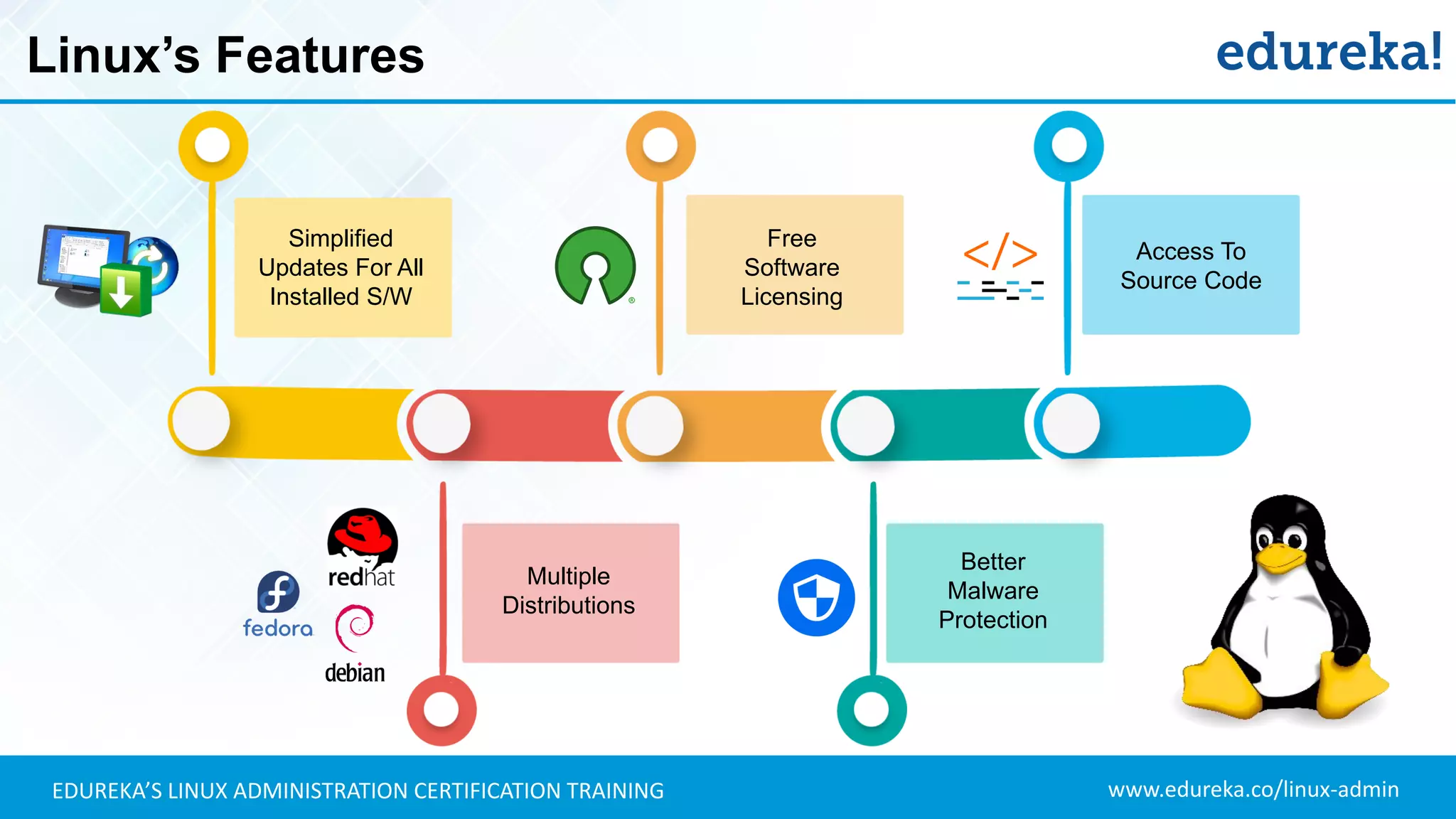
Linux’s Features
Free
Software
Licensing
Better
Malware
Protection
Multiple
Distributions
Access To
Source Code
Simplified
Updates For All
Installed S/W
www.edureka.co/linux-adminEDUREKA’S LINUX ADMINISTRATION CERTIFICATION TRAINING
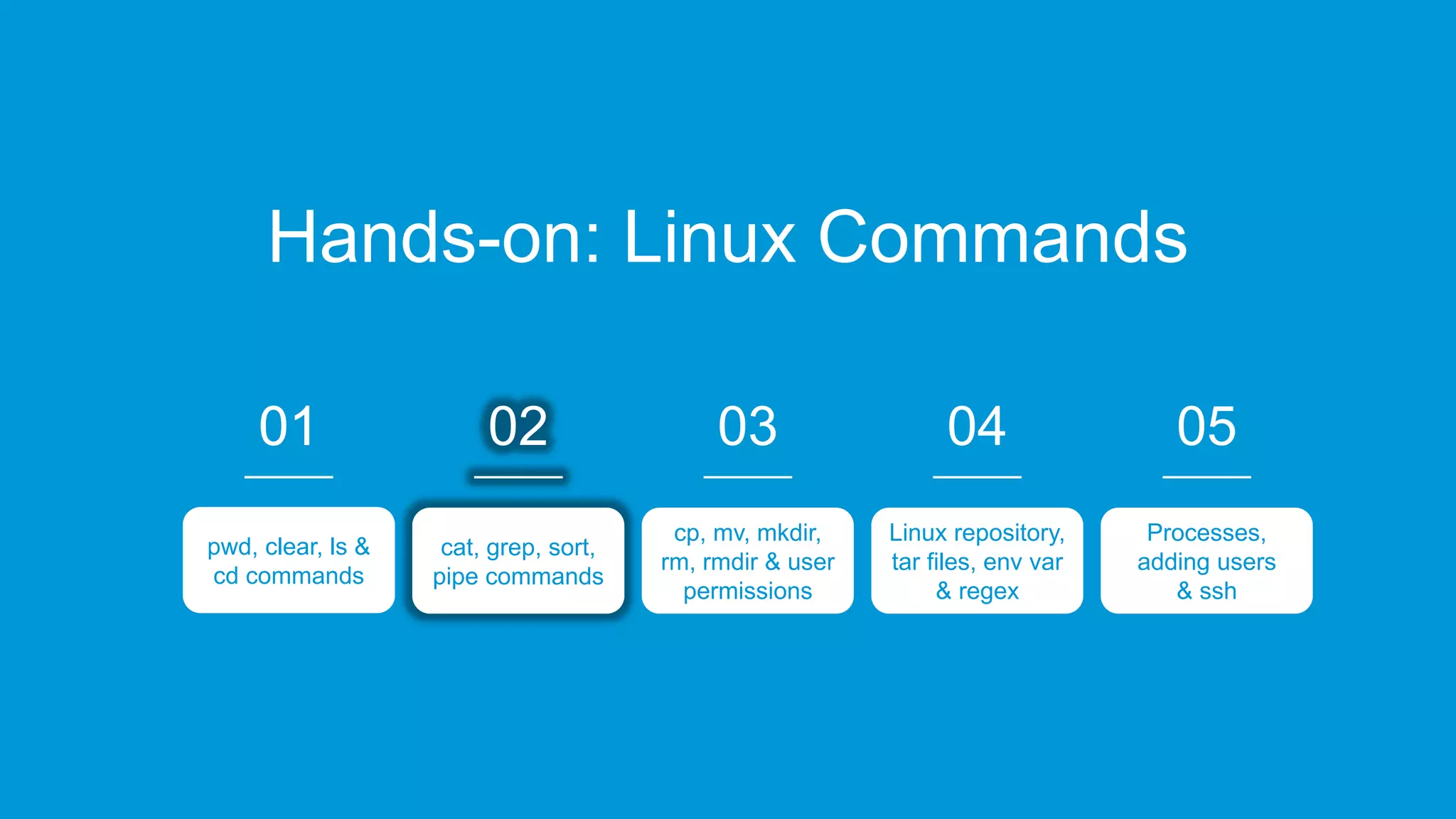
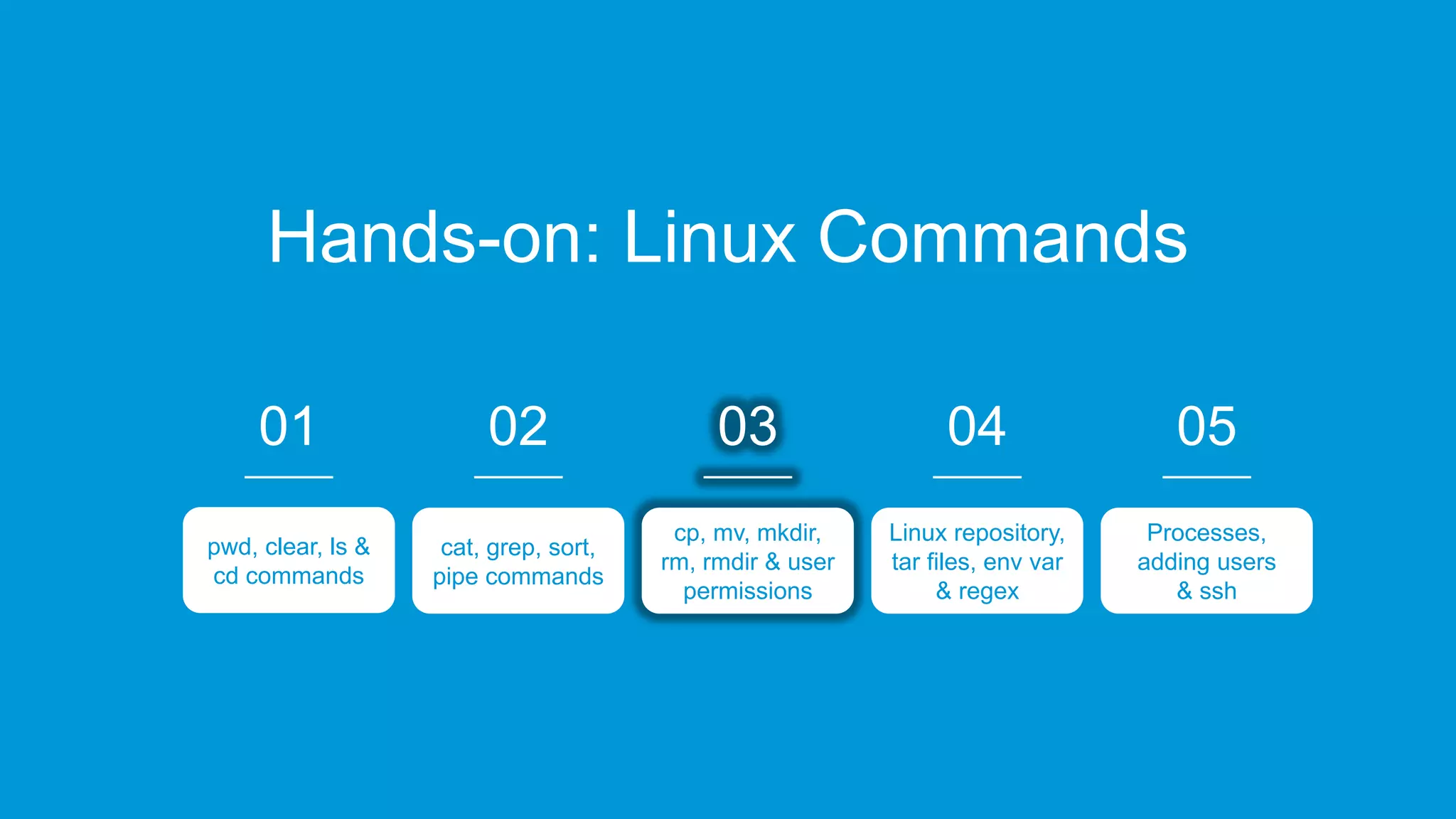
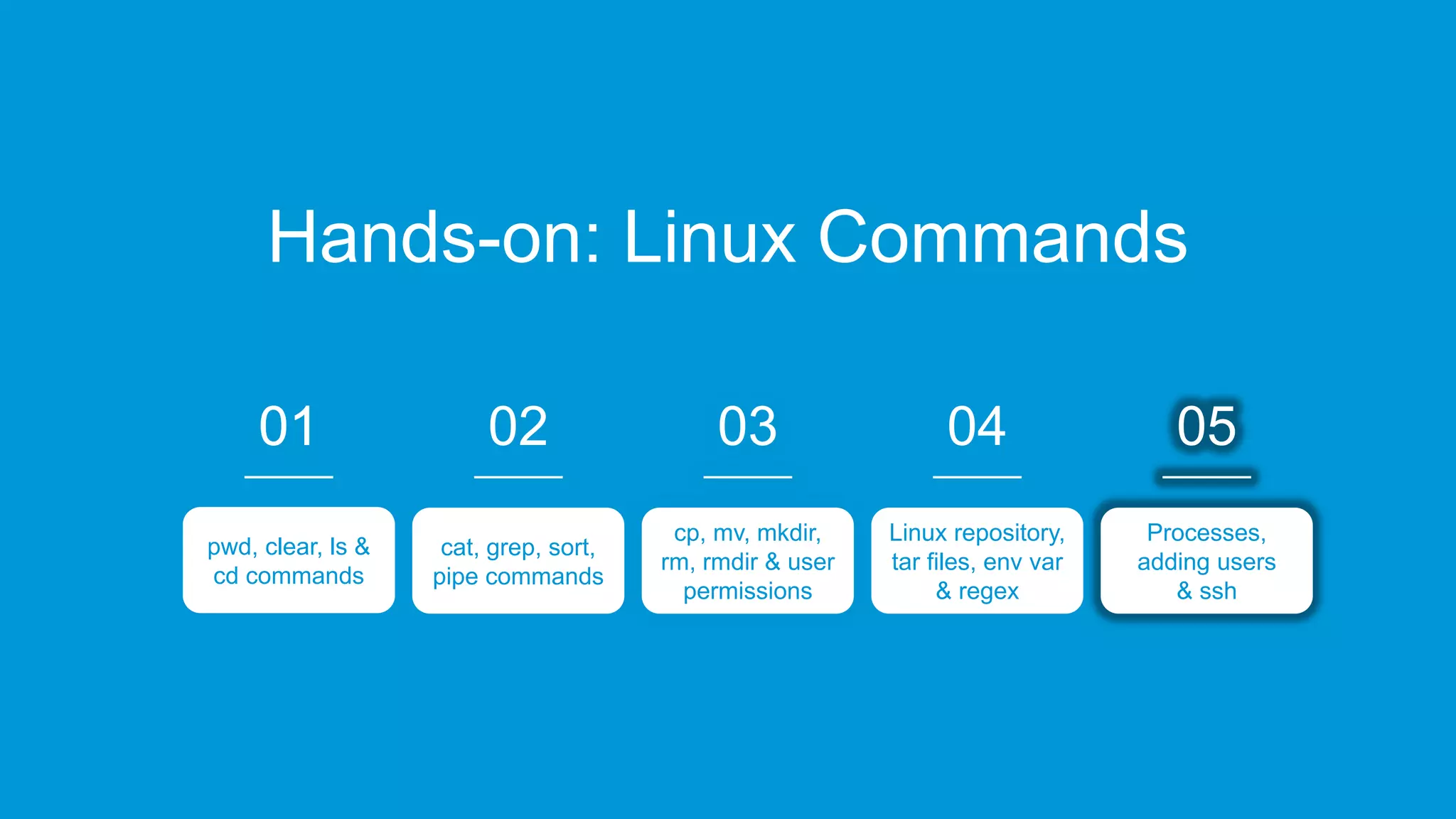
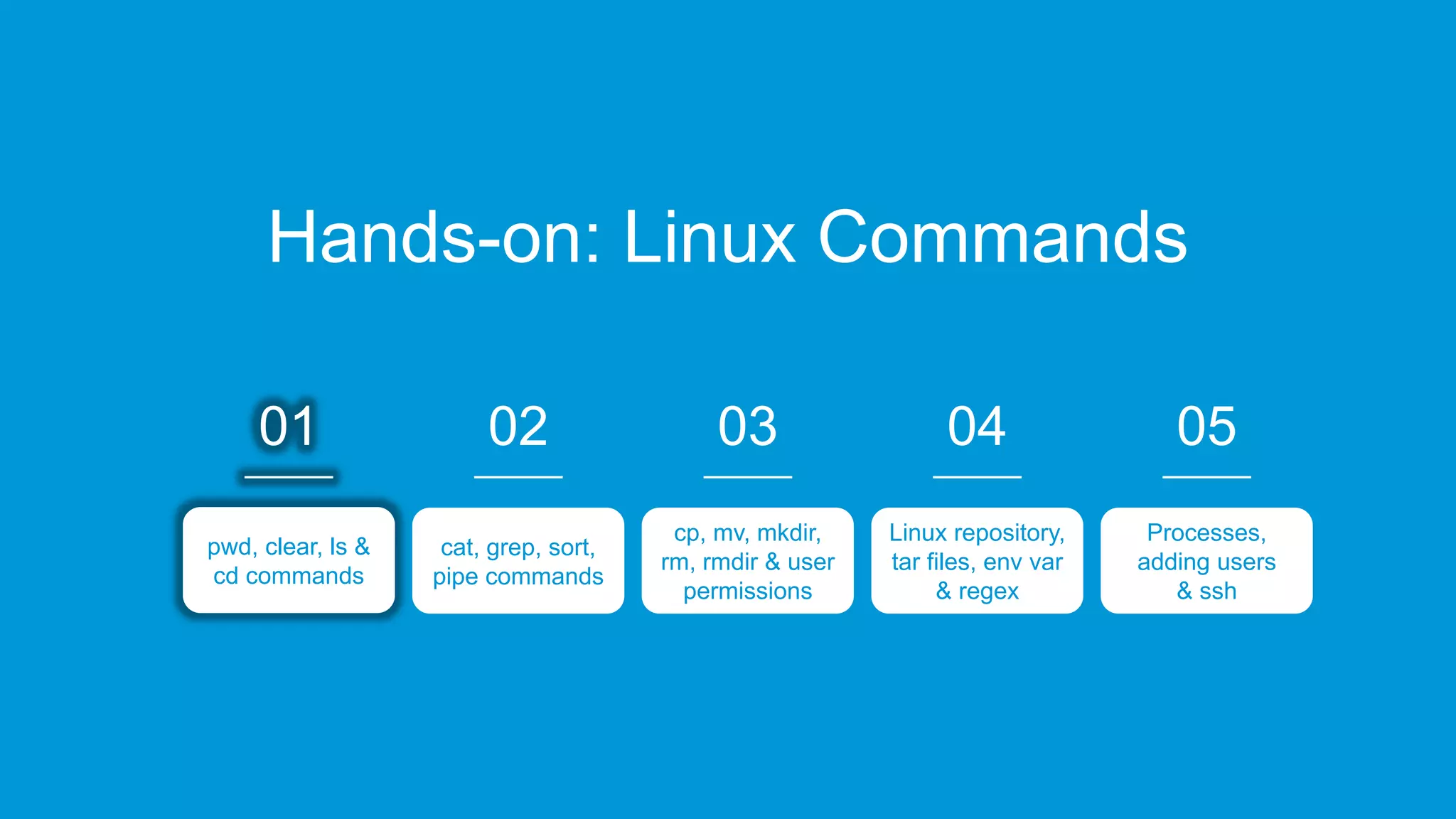
Hands-on: Linux Commands
02
cat, grep, sort,
pipe commands
03
cp, mv, mkdir,
rm, rmdir & user
permissions
04
Linux repository,
tar files, env var
& regex
05
Processes,
adding users
& ssh
01
pwd, clear, ls &
cd commands
www.edureka.co/linux-adminEDUREKA’S LINUX ADMINISTRATION CERTIFICATION TRAINING
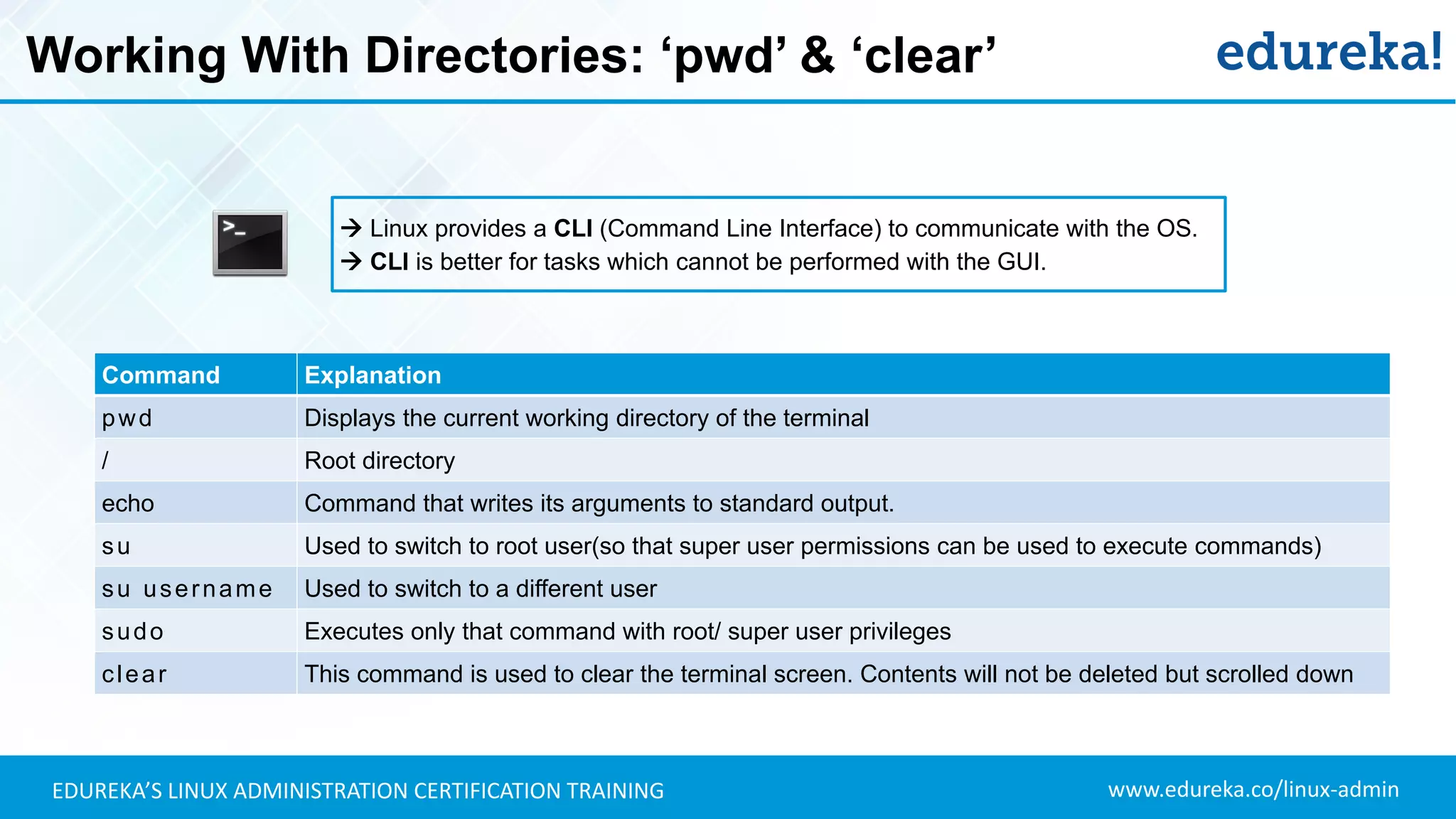
Working With Directories: ‘pwd’ & ‘clear’
 Linux provides a CLI (Command Line Interface) to communicate with the OS.
 CLI is better for tasks which cannot be performed with the GUI.
Command Explanation
pwd Displays the current working directory of the terminal
/ Root directory
echo Command that writes its arguments to standard output.
su Used to switch to root user(so that super user permissions can be used to execute commands)
su username Used to switch to a different user
sudo Executes only that command with root/ super user privileges
clear This command is used to clear the terminal screen. Contents will not be deleted but scrolled down
www.edureka.co/linux-adminEDUREKA’S LINUX ADMINISTRATION CERTIFICATION TRAINING
Working With Directories: ‘ls’ Command
$ ls [options] [file | Directory]
ls This command lists all the contents in the current working directory
ls path By specifying the path after ls, the content in that path will be displayed
ls –l Using ‘l’ flag, lists all the contents along with its owner settings, permissions & time stamp (long format)
ls –a Using ‘a’ flag, lists all the hidden contents in the specified directory
ls --author Using ‘--author’ flag, lists the contents in the specified directory along with its owner
ls –S Using ‘a’ flag, sorts and lists all the contents in the specified directory by size
ls *.html Using ‘*’ flag, lists only the contents in the directory of a particular format
ls –lS > file.txt Using ‘>’ flag, copies the result of ls command into a text file
www.edureka.co/linux-adminEDUREKA’S LINUX ADMINISTRATION CERTIFICATION TRAINING
Working With Directories: ‘cd’
cd Changes the directory to the home directory
cd ~ This command also changes the directory to home directory
cd / Changes the directory to root directory
cd .. Changes the directory to its parent directory
cd ‘xx yy’ We specify the folder name in inverted commas because there is a space in the folder name
$ cd [directory]
www.edureka.co/linux-adminEDUREKA’S LINUX ADMINISTRATION CERTIFICATION TRAINING
Hands-on: Linux Commands
02
cat, grep, sort,
pipe commands
03
cp, mv, mkdir,
rm, rmdir & user
permissions
04
Linux repository,
tar files, env var
& regex
05
Processes,
adding users
& ssh
0101
pwd, clear, ls &
cd commands
01
pwd, clear, ls &
cd commands
www.edureka.co/linux-adminEDUREKA’S LINUX ADMINISTRATION CERTIFICATION TRAINING
Working With Files: ‘cat’ Command
$ cat [options] file1 [file2..]
cat This command is used to display the content of text files and concatenate several files into one
cat -b This is used to add line numbers to non blank lines
cat -n This is used to add line numbers to all lines
cat -s This is used to squeeze blank lines into one line
cat –E Show $ at the end of line
$ cat > file1.txt
The ‘>’ flag can be used to create a new file and enter text contents from the terminal
$ cat >> file1.txt
The ‘>>’ flag can be used to append text contents to an existing file from the terminal
www.edureka.co/linux-adminEDUREKA’S LINUX ADMINISTRATION CERTIFICATION TRAINING
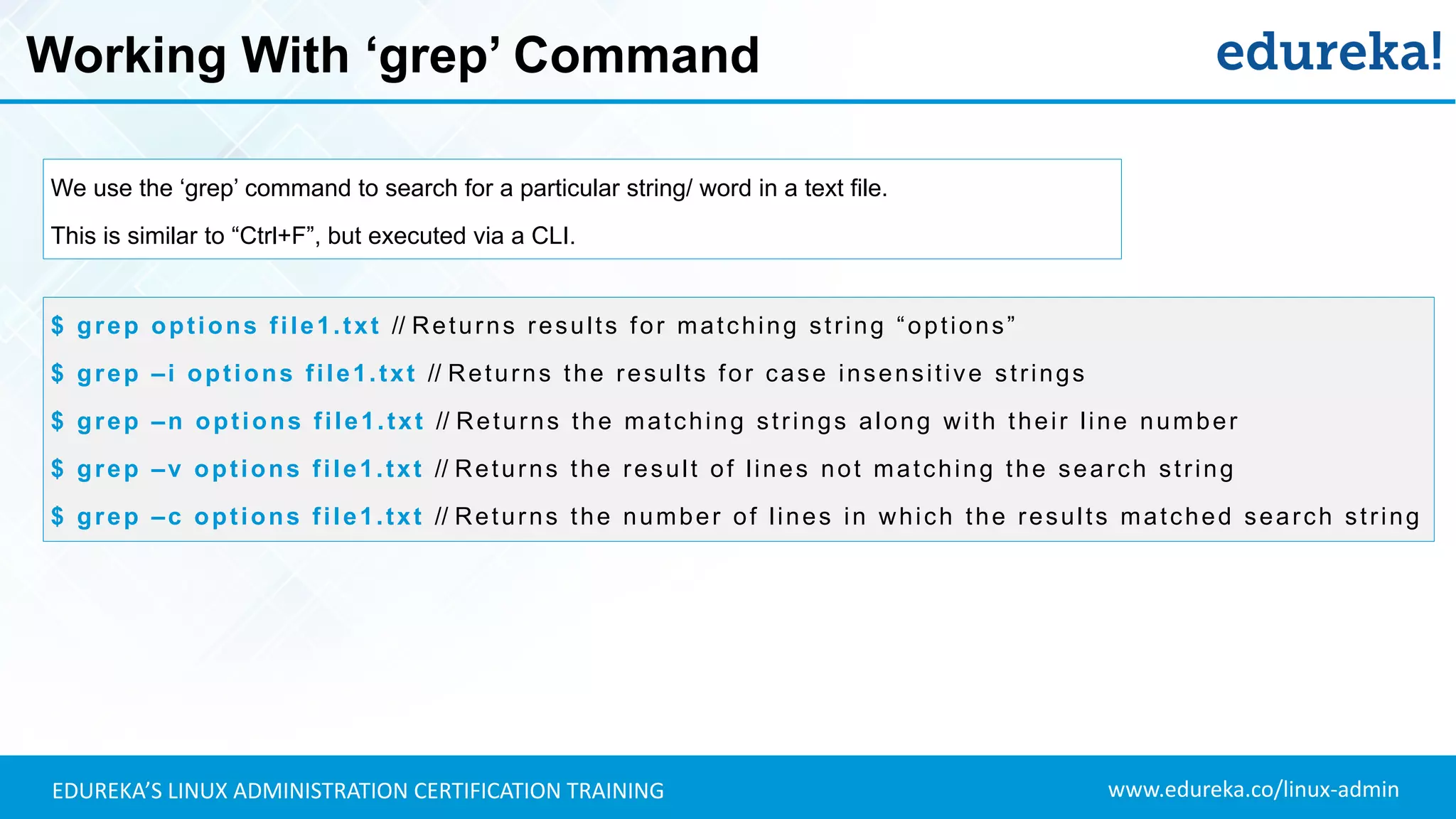
Working With ‘grep’ Command
We use the ‘grep’ command to search for a particular string/ word in a text file.
This is similar to “Ctrl+F”, but executed via a CLI.
$ grep options file1.txt // Returns results for matching string “options”
$ grep –i options file1.txt // Returns the results for case insensitive strings
$ grep –n options file1.txt // Returns the matching strings along with their line number
$ grep –v options file1.txt // Returns the result of lines not matching the search string
$ grep –c options file1.txt // Returns the number of lines in which the results matched search string
www.edureka.co/linux-adminEDUREKA’S LINUX ADMINISTRATION CERTIFICATION TRAINING
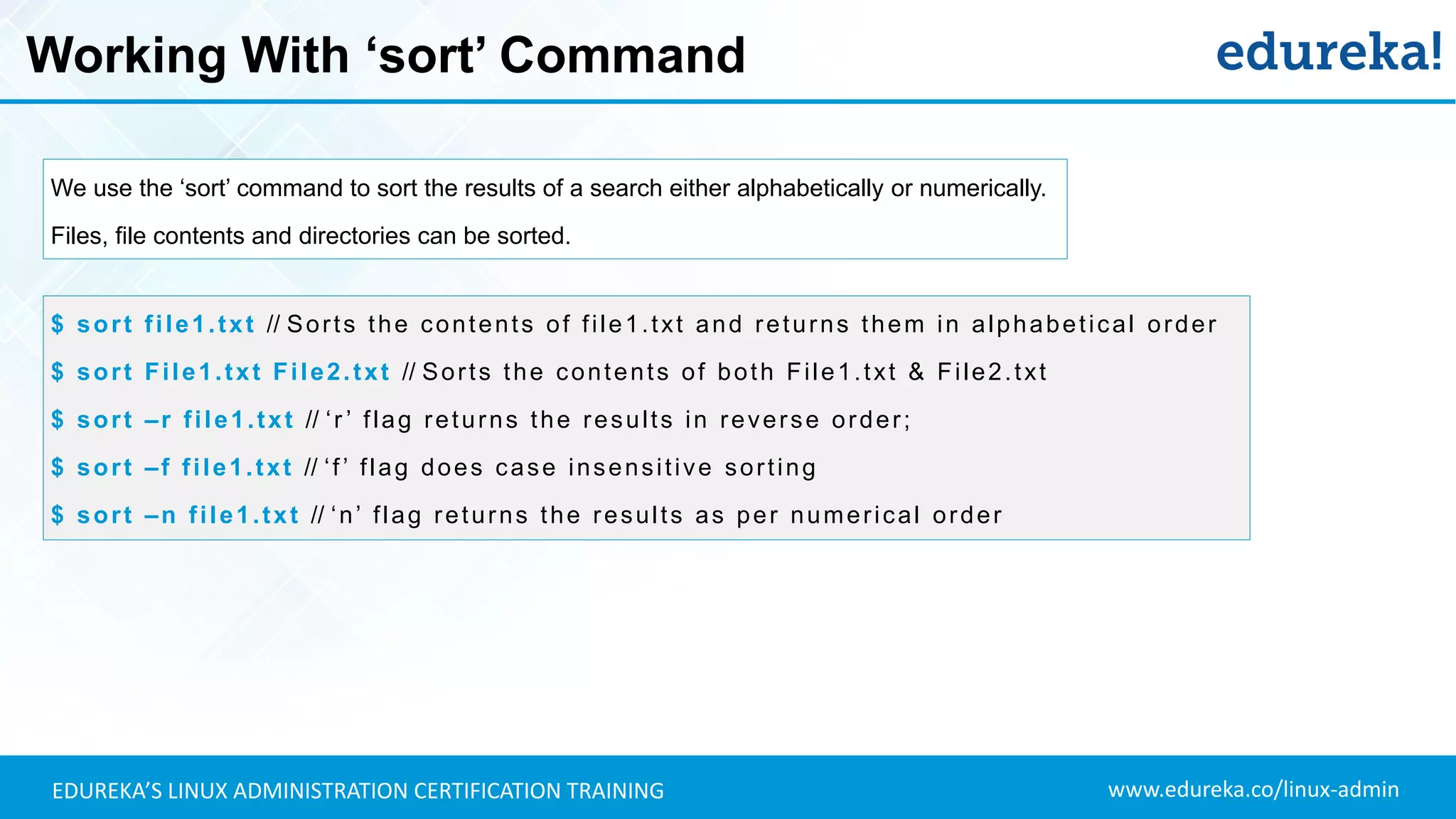
Working With ‘sort’ Command
We use the ‘sort’ command to sort the results of a search either alphabetically or numerically.
Files, file contents and directories can be sorted.
$ sort file1.txt // Sorts the contents of file1.txt and returns them in alphabetical order
$ sort File1.txt File2.txt // Sorts the contents of both File1.txt & File2.txt
$ sort –r file1.txt // ‘r ’ flag returns the results in reverse order;
$ sort –f file1.txt // ‘f’ flag does case insensitive sorting
$ sort –n file1.txt // ‘n’ flag returns the results as per numerical order
www.edureka.co/linux-adminEDUREKA’S LINUX ADMINISTRATION CERTIFICATION TRAINING
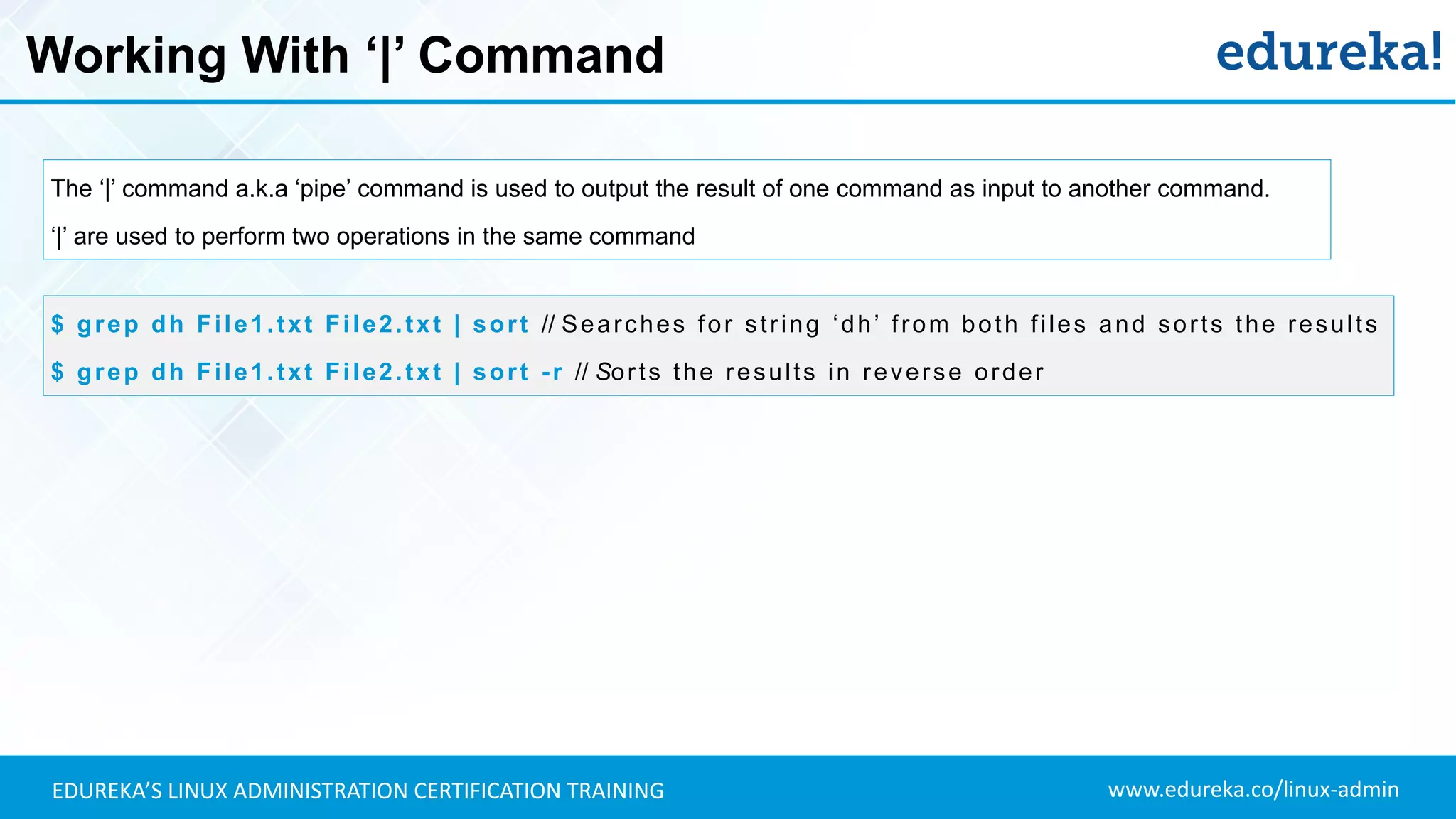
Working With ‘|’ Command
The ‘|’ command a.k.a ‘pipe’ command is used to output the result of one command as input to another command.
‘|’ are used to perform two operations in the same command
$ grep dh File1.txt File2.txt | sort // Searches for string ‘dh’ from both files and sorts the results
$ grep dh File1.txt File2.txt | sort -r // Sorts the results in reverse order
www.edureka.co/linux-adminEDUREKA’S LINUX ADMINISTRATION CERTIFICATION TRAINING
Hands-on: Linux Commands
02
cat, grep, sort,
pipe commands
03
cp, mv, mkdir,
rm, rmdir & user
permissions
04
Linux repository,
tar files, env var
& regex
05
Processes,
adding users
& ssh
01
pwd, clear, ls &
cd commands
www.edureka.co/linux-adminEDUREKA’S LINUX ADMINISTRATION CERTIFICATION TRAINING
Working With Files & Directories: ‘cp’ Command
$ cp [options] source destination
cp This command is used to copy files and directories
cp -i Enters interactive mode; CLI asks before overwriting files
cp -n Does not overwrite the file
cp -u Updates the destination file only when source file is different from destination file
cp -R Recursive copy for copying directories; Copies even hidden files
cp -v Verbose; Prints informative messages
www.edureka.co/linux-adminEDUREKA’S LINUX ADMINISTRATION CERTIFICATION TRAINING
Working With Files & Directories: ‘mv’ Command
$ mv [options] source destination
mv This command is used to move files and directories
mv -i Enters interactive mode; CLI asks before overwriting files
mv -u Updates the destination file only when source file is different from destination file
mv -v Verbose; Prints source and destination files
www.edureka.co/linux-adminEDUREKA’S LINUX ADMINISTRATION CERTIFICATION TRAINING
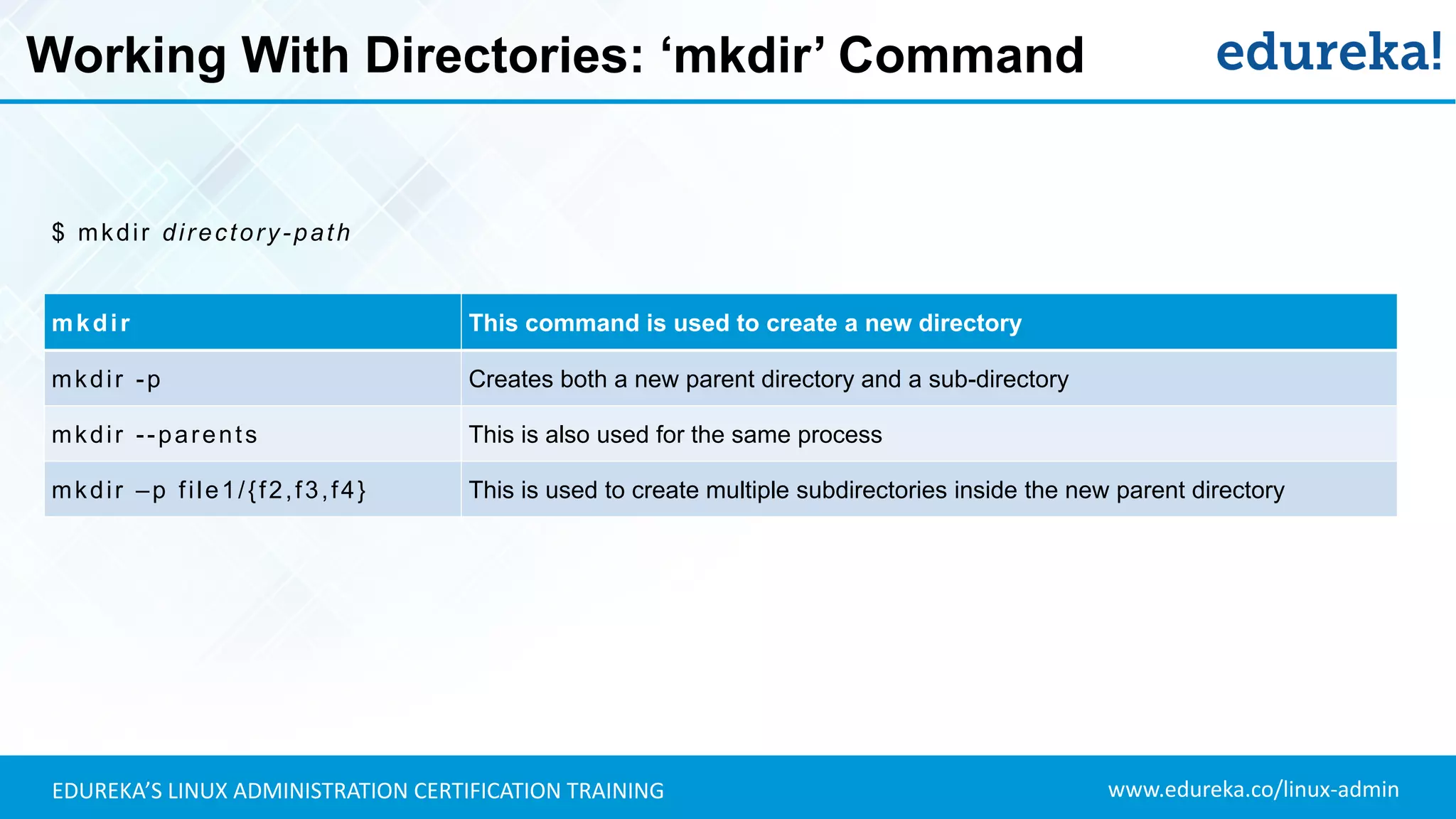
Working With Directories: ‘mkdir’ Command
$ mkdir directory-path
mkdir This command is used to create a new directory
mkdir -p Creates both a new parent directory and a sub-directory
mkdir --parents This is also used for the same process
mkdir –p file1/{f2,f3,f4} This is used to create multiple subdirectories inside the new parent directory
www.edureka.co/linux-adminEDUREKA’S LINUX ADMINISTRATION CERTIFICATION TRAINING
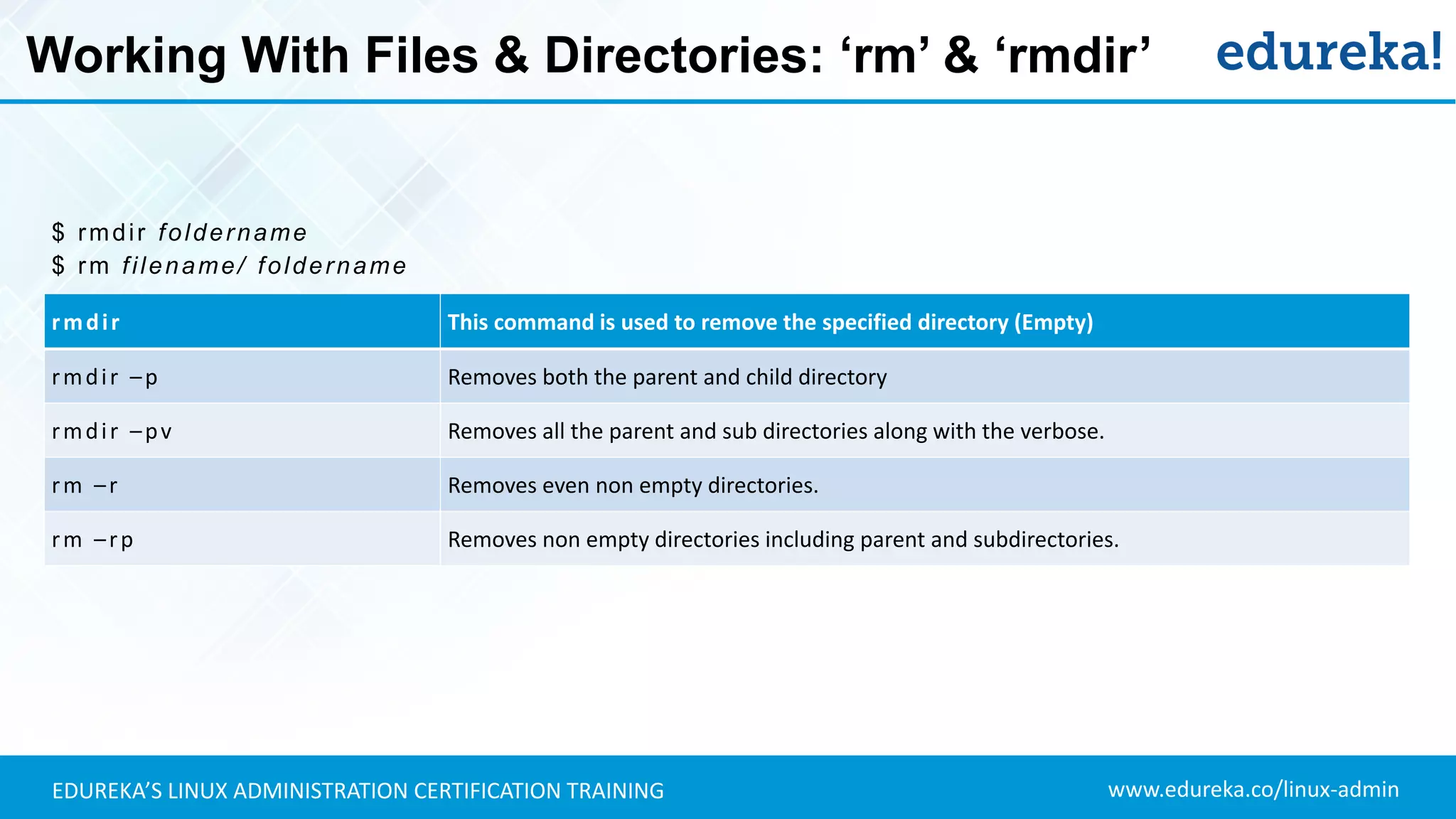
Working With Files & Directories: ‘rm’ & ‘rmdir’
$ rmdir foldername
$ rm filename/ foldername
rmdir This command is used to remove the specified directory (Empty)
rmdir –p Removes both the parent and child directory
rmdir –pv Removes all the parent and sub directories along with the verbose.
rm –r Removes even non empty directories.
rm –rp Removes non empty directories including parent and subdirectories.
www.edureka.co/linux-adminEDUREKA’S LINUX ADMINISTRATION CERTIFICATION TRAINING
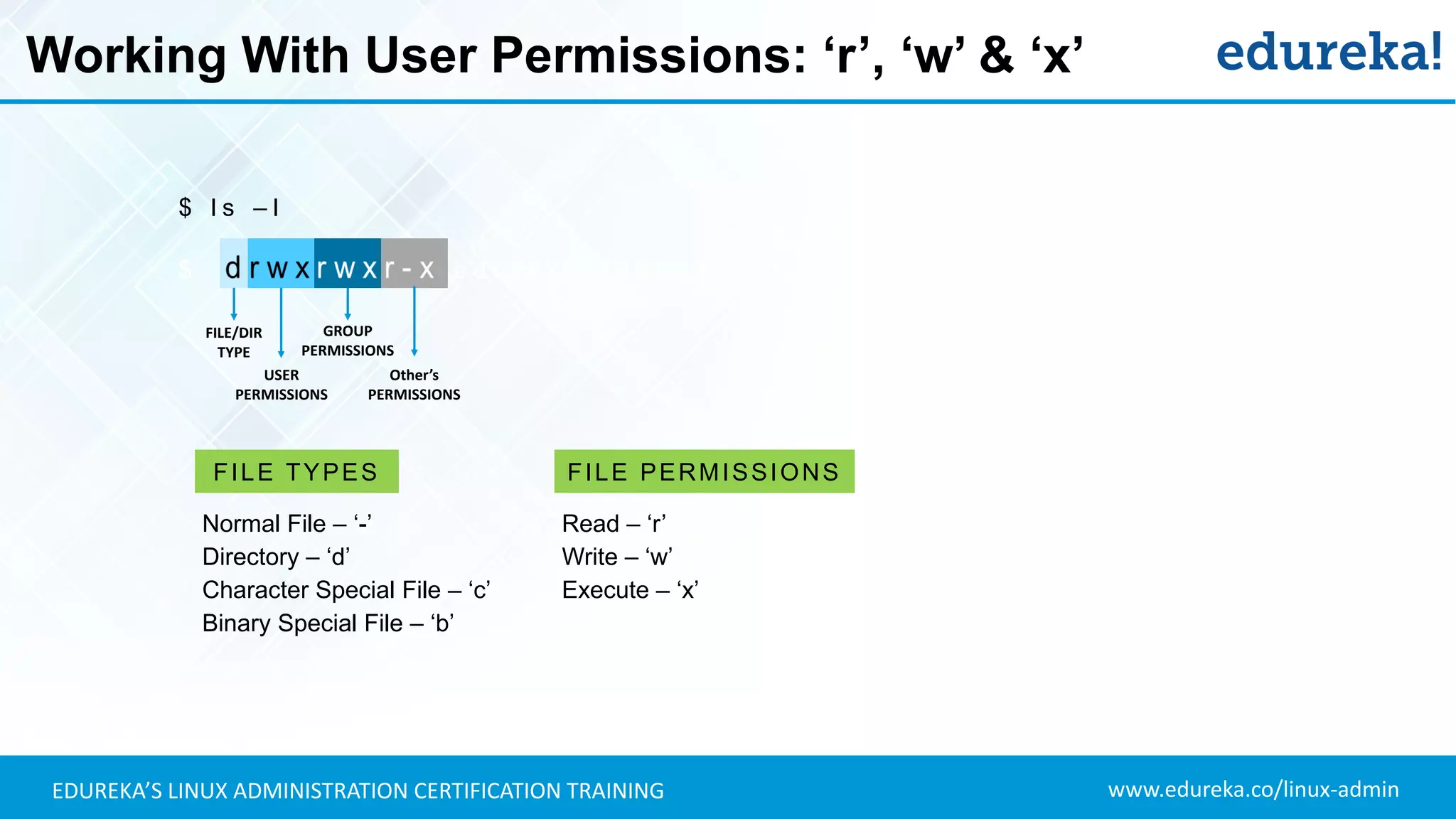
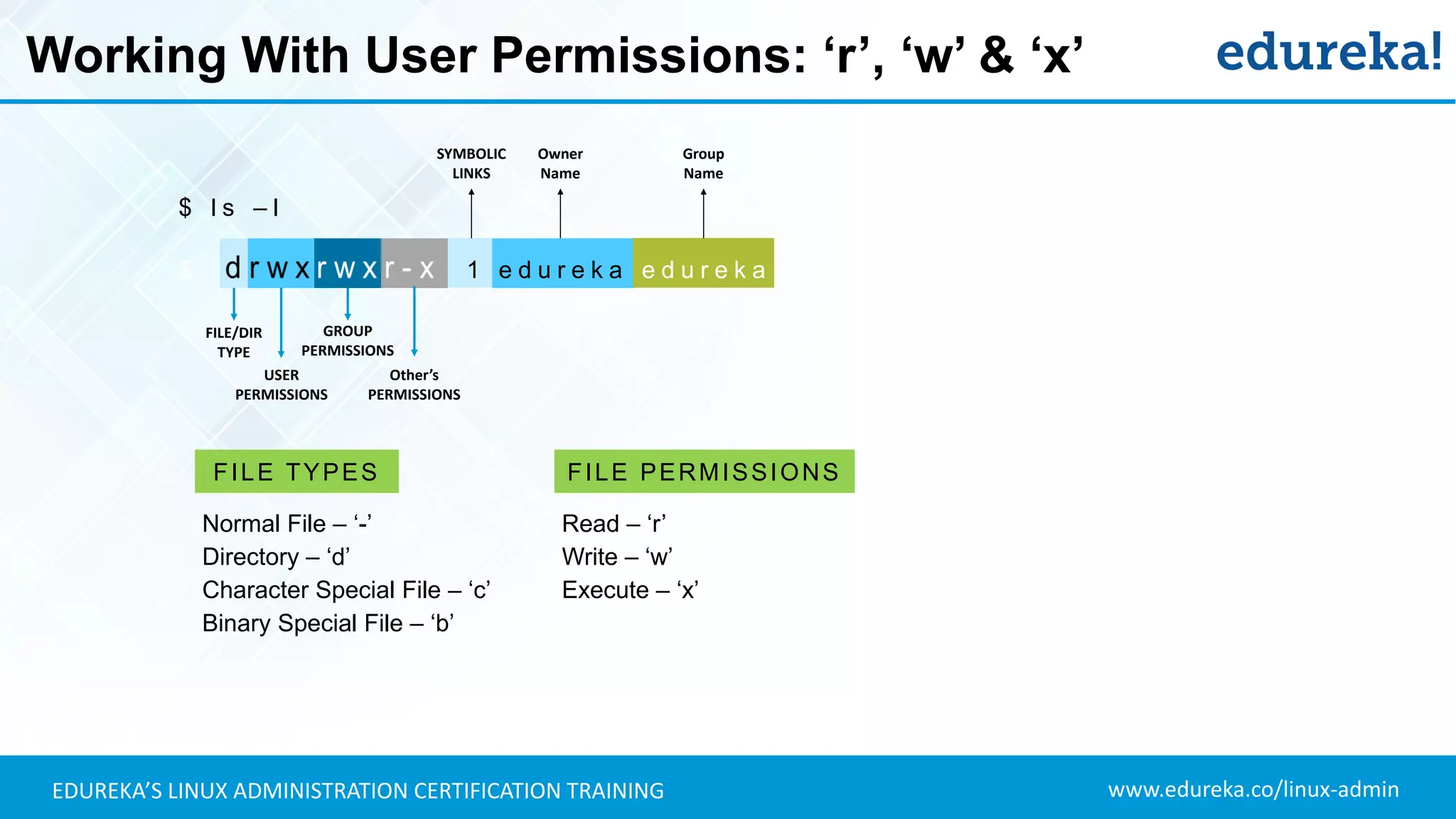
Working With User Permissions: ‘r’, ‘w’ & ‘x’
$ l s – l
$ e d u r e k a 5 2 5 5 0 4 0 2 A u g 1 2 2 0 1 6
FILE/DIR
TYPE
USER
PERMISSIONS
GROUP
PERMISSIONS
Other’s
PERMISSIONS
Read – ‘r’
Write – ‘w’
Execute – ‘x’
FILE PERMISSIONS
Normal File – ‘-’
Directory – ‘d’
Character Special File – ‘c’
Binary Special File – ‘b’
FILE TYPES
www.edureka.co/linux-adminEDUREKA’S LINUX ADMINISTRATION CERTIFICATION TRAINING
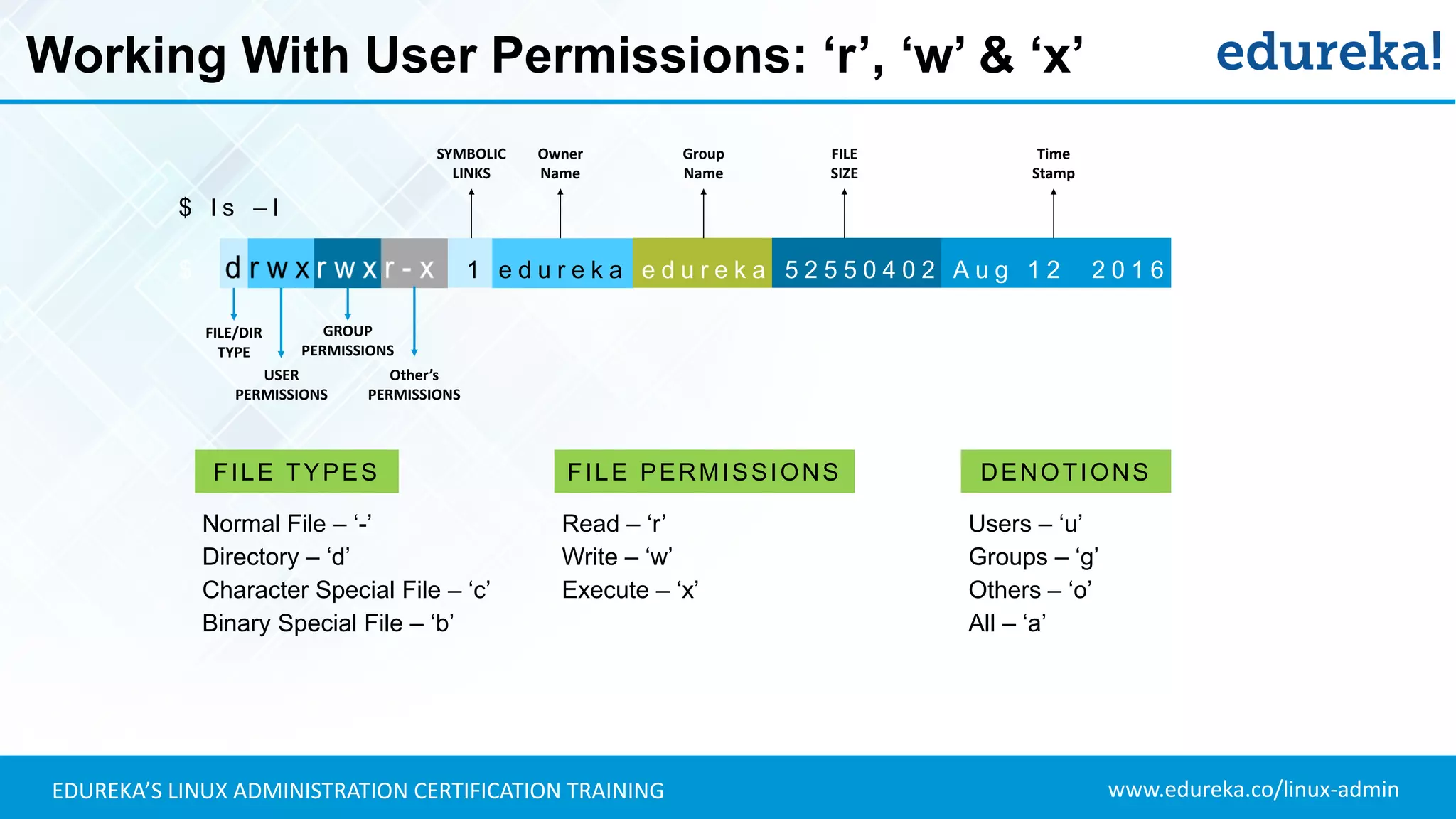
Working With User Permissions: ‘r’, ‘w’ & ‘x’
$ l s – l
$ 1 e d u r e k a e d u r e k a 5 2 5 5 0 4 0 2 A u g 1 2 2 0 1 6
FILE/DIR
TYPE
USER
PERMISSIONS
GROUP
PERMISSIONS
Other’s
PERMISSIONS
SYMBOLIC
LINKS
Owner
Name
Group
Name
Read – ‘r’
Write – ‘w’
Execute – ‘x’
FILE PERMISSIONS
Normal File – ‘-’
Directory – ‘d’
Character Special File – ‘c’
Binary Special File – ‘b’
FILE TYPES
www.edureka.co/linux-adminEDUREKA’S LINUX ADMINISTRATION CERTIFICATION TRAINING
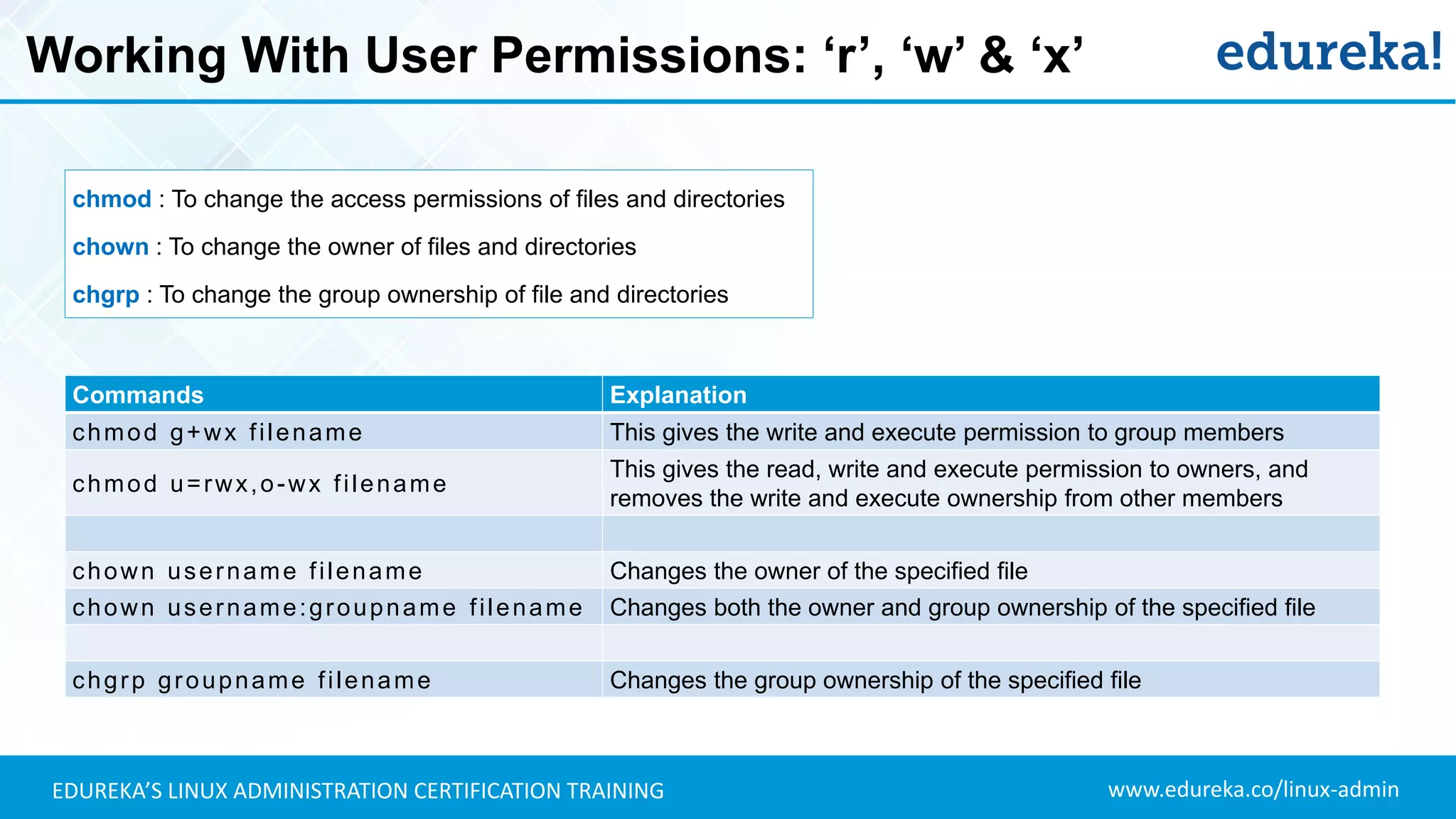
Working With User Permissions: ‘r’, ‘w’ & ‘x’
$ l s – l
$ 1 e d u r e k a e d u r e k a 5 2 5 5 0 4 0 2 A u g 1 2 2 0 1 6
FILE/DIR
TYPE
USER
PERMISSIONS
GROUP
PERMISSIONS
Other’s
PERMISSIONS
SYMBOLIC
LINKS
Owner
Name
Group
Name
Time
Stamp
FILE
SIZE
Read – ‘r’
Write – ‘w’
Execute – ‘x’
FILE PERMISSIONS
Normal File – ‘-’
Directory – ‘d’
Character Special File – ‘c’
Binary Special File – ‘b’
FILE TYPES
Users – ‘u’
Groups – ‘g’
Others – ‘o’
All – ‘a’
DENOTIONS
www.edureka.co/linux-adminEDUREKA’S LINUX ADMINISTRATION CERTIFICATION TRAINING
Working With User Permissions: ‘r’, ‘w’ & ‘x’
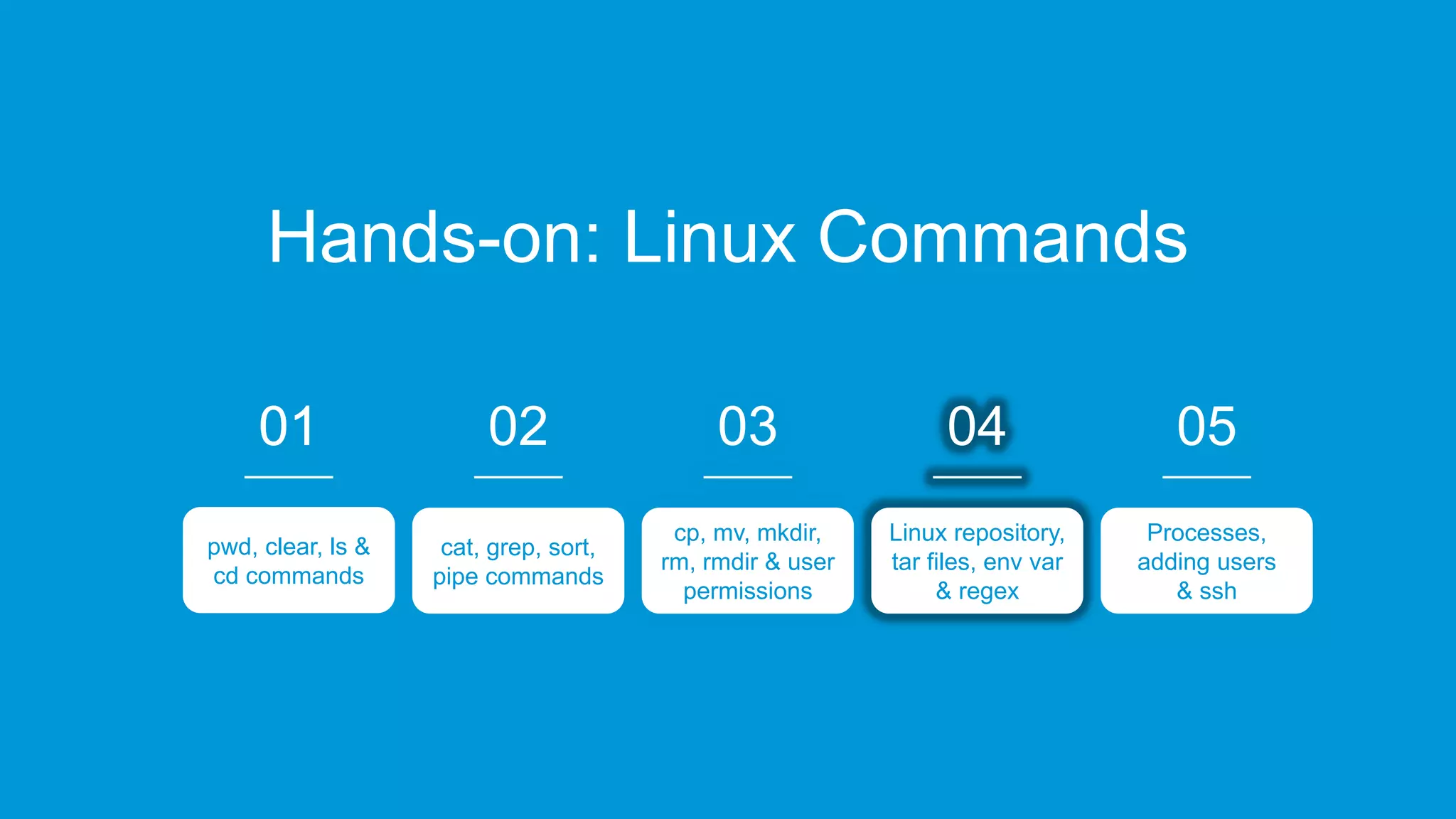
Commands Explanation
chmod g+wx filename This gives the write and execute permission to group members
chmod u=rwx,o-wx filename
This gives the read, write and execute permission to owners, and
removes the write and execute ownership from other members
chown username filename Changes the owner of the specified file
chown username:groupname filename Changes both the owner and group ownership of the specified file
chgrp groupname filename Changes the group ownership of the specified file
chmod : To change the access permissions of files and directories
chown : To change the owner of files and directories
chgrp : To change the group ownership of file and directories
www.edureka.co/linux-adminEDUREKA’S LINUX ADMINISTRATION CERTIFICATION TRAINING
Hands-on: Linux Commands
02
cat, grep, sort,
pipe commands
03
cp, mv, mkdir,
rm, rmdir & user
permissions
04
Linux repository,
tar files, env var
& regex
05
Processes,
adding users
& ssh
0101
pwd, clear, ls &
cd commands
01
pwd, clear, ls &
cd commands
www.edureka.co/linux-adminEDUREKA’S LINUX ADMINISTRATION CERTIFICATION TRAINING
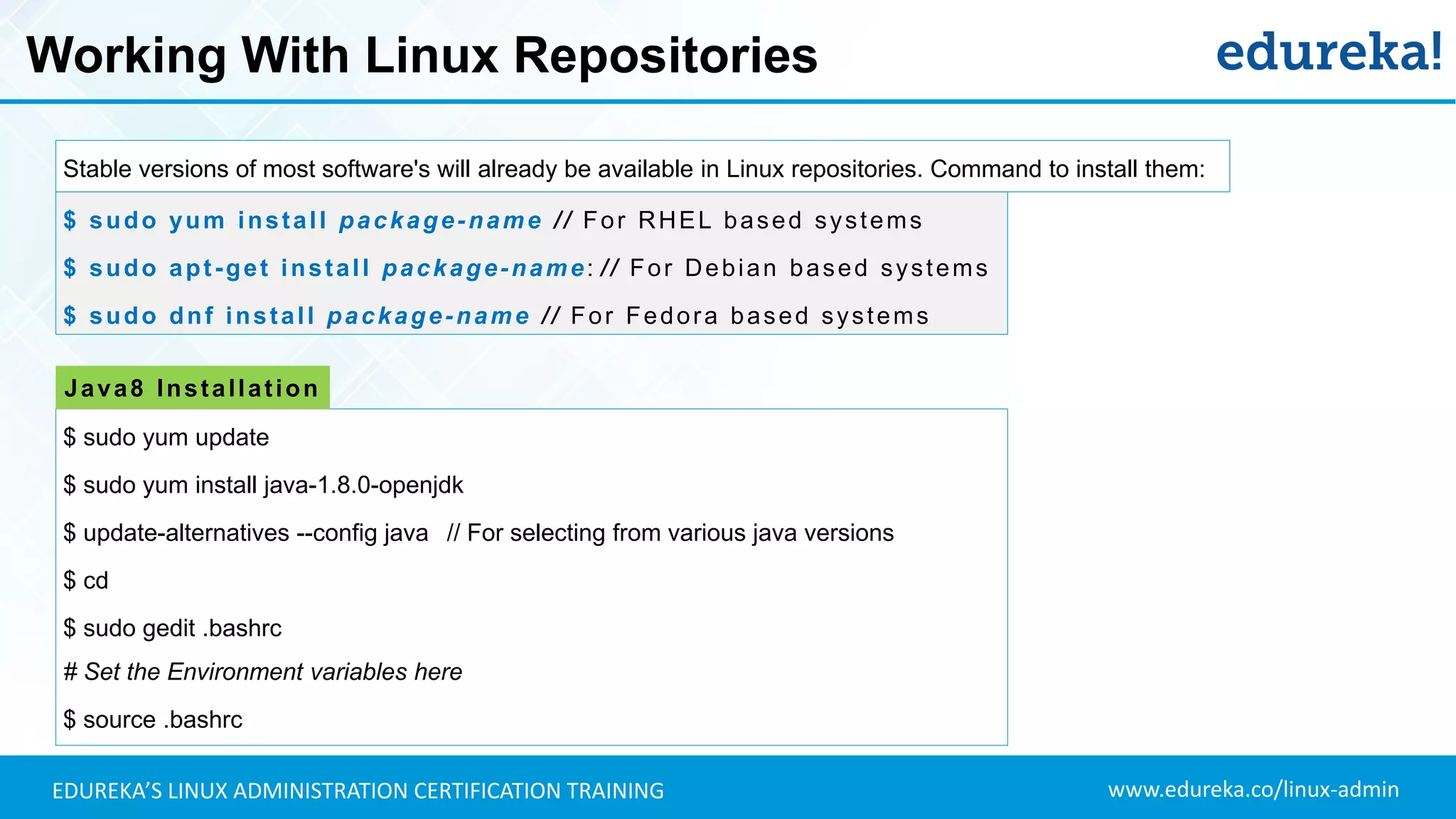
Working With Linux Repositories
$ sudo yum install package-name // For RHEL based systems
$ sudo apt-get install package-name: // For Debian based systems
$ sudo dnf install package-name // For Fedora based systems
$ sudo yum update
$ sudo yum install java-1.8.0-openjdk
$ update-alternatives --config java // For selecting from various java versions
$ cd
$ sudo gedit .bashrc
# Set the Environment variables here
$ source .bashrc
Java8 Installation
Stable versions of most software's will already be available in Linux repositories. Command to install them:
www.edureka.co/linux-adminEDUREKA’S LINUX ADMINISTRATION CERTIFICATION TRAINING
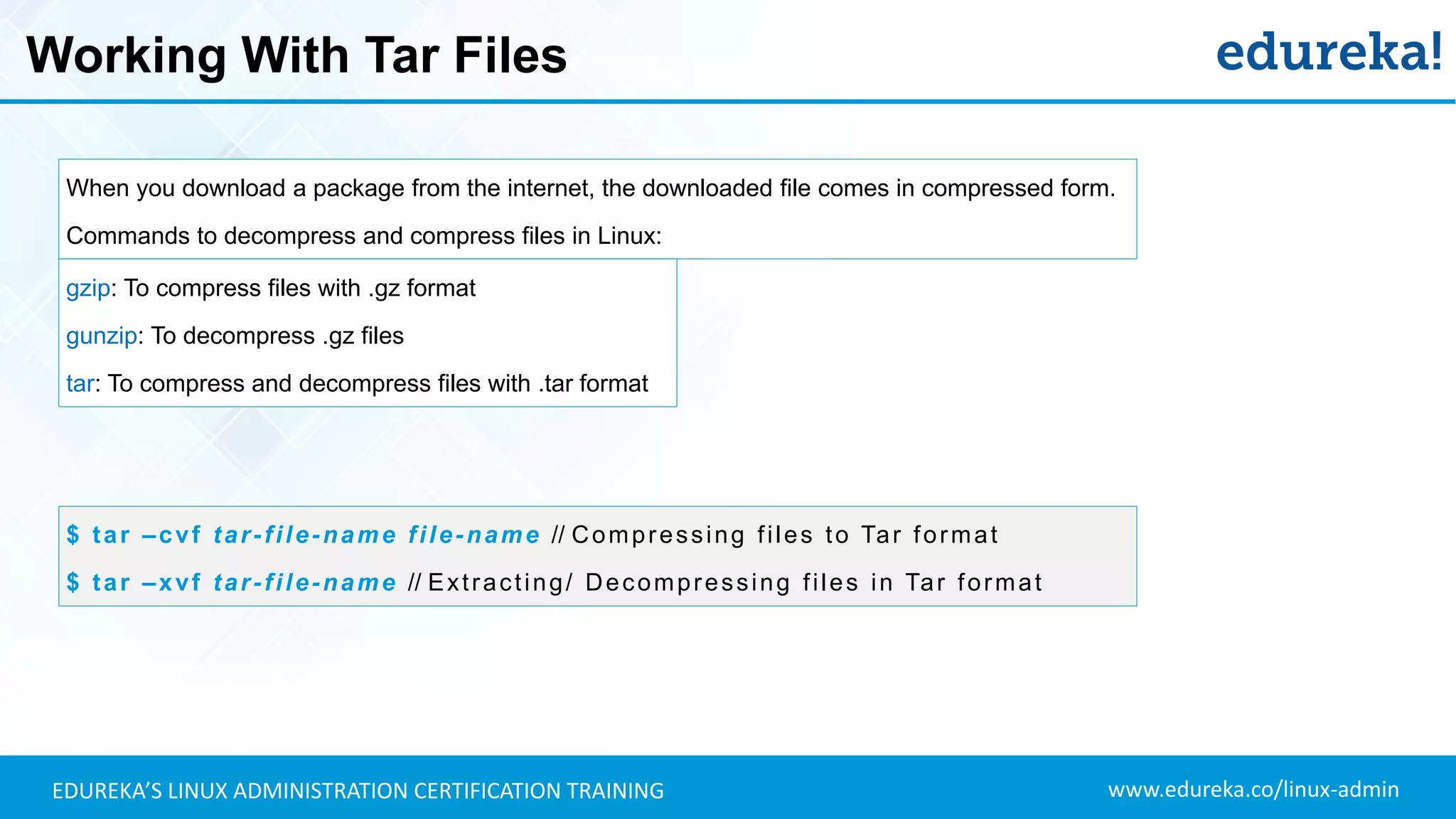
Working With Tar Files
When you download a package from the internet, the downloaded file comes in compressed form.
Commands to decompress and compress files in Linux:
$ tar –cvf tar-file-name file-name // Compressing files to Tar format
$ tar –xvf tar-file-name // Extracting/ Decompressing files in Tar format
gzip: To compress files with .gz format
gunzip: To decompress .gz files
tar: To compress and decompress files with .tar format
www.edureka.co/linux-adminEDUREKA’S LINUX ADMINISTRATION CERTIFICATION TRAINING
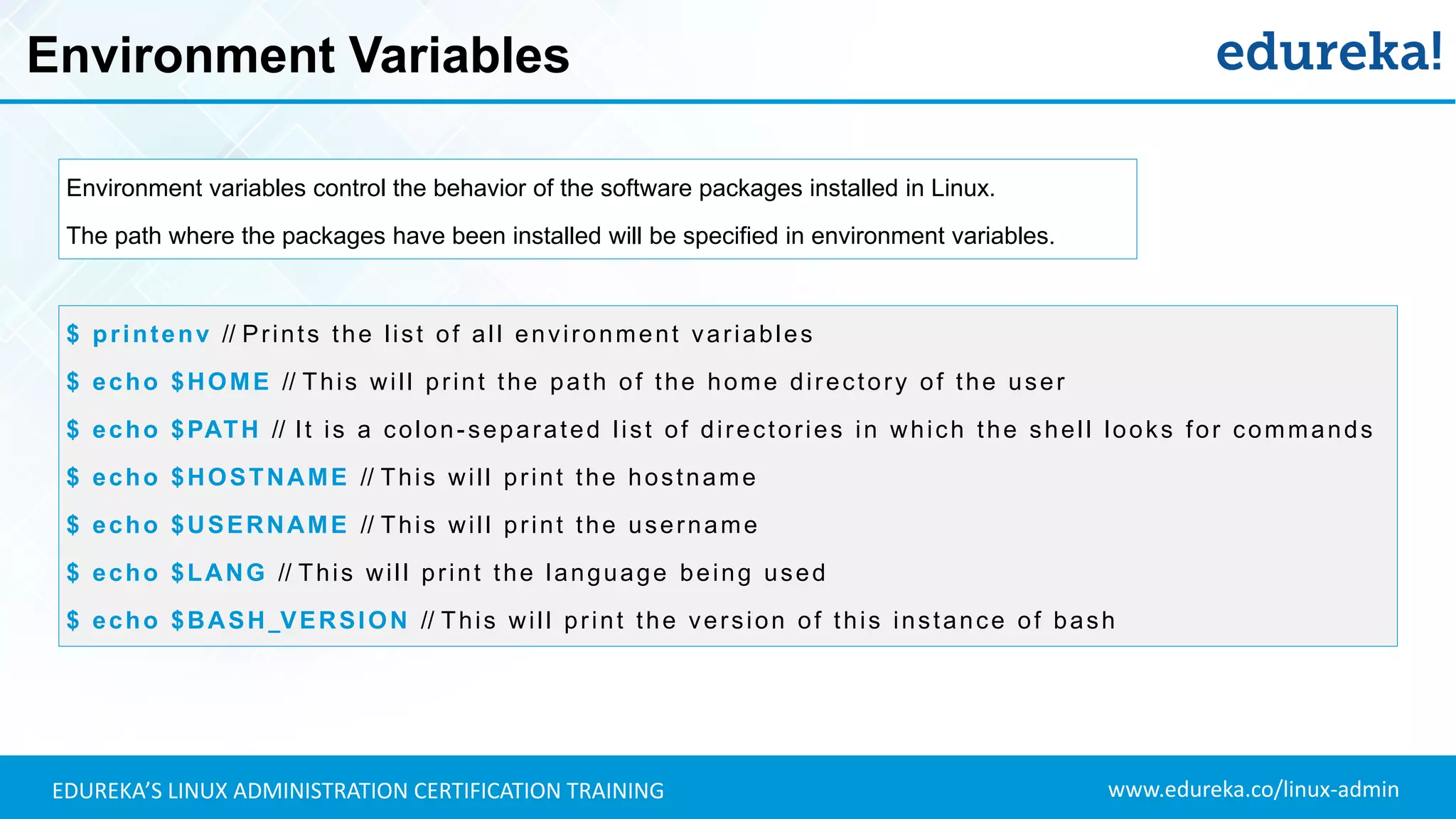
Environment Variables
Environment variables control the behavior of the software packages installed in Linux.
The path where the packages have been installed will be specified in environment variables.
$ printenv // Prints the list of all environment variables
$ echo $HOME // This will print the path of the home directory of the user
$ echo $PATH // It is a colon-separated list of directories in which the shell looks for commands
$ echo $HOSTNAME // This will print the hostname
$ echo $USERNAME // This will print the username
$ echo $LANG // This will print the language being used
$ echo $BASH_VERSION // This will print the version of this instance of bash
www.edureka.co/linux-adminEDUREKA’S LINUX ADMINISTRATION CERTIFICATION TRAINING
Regular Expressions
Regular Expressions (RegEx) are used to search through data.
It can be piped along with ‘grep’ command to find patterns of text in the file.
$ cat File1.txt | grep ^a
$ grep 'a[0-9]x' File1.txt
$ ls | grep '[xt$]'
Symbol Explanation
. Replaces any character
^ Matches the start of the string
$ Matches the end of the string
* Matches the preceding character zero or more times
? Matches the preceding character one or more times
( ) Groups regular expressions
 Represents special characters
$ ls | grep 'le[0-9].txt‘
$ grep -n ['a*'] File1.txt
$ grep ['d.d'] File1.txt
$ echo {a..z}
$ echo {4..45}
$ echo 1{a..z}9
www.edureka.co/linux-adminEDUREKA’S LINUX ADMINISTRATION CERTIFICATION TRAINING
Hands-on: Linux Commands
02
cat, grep, sort,
pipe commands
03
cp, mv, mkdir,
rm, rmdir & user
permissions
04
Linux repository,
tar files, env var
& regex
05
Processes,
adding users
& ssh
0101
pwd, clear, ls &
cd commands
01
pwd, clear, ls &
cd commands
www.edureka.co/linux-adminEDUREKA’S LINUX ADMINISTRATION CERTIFICATION TRAINING
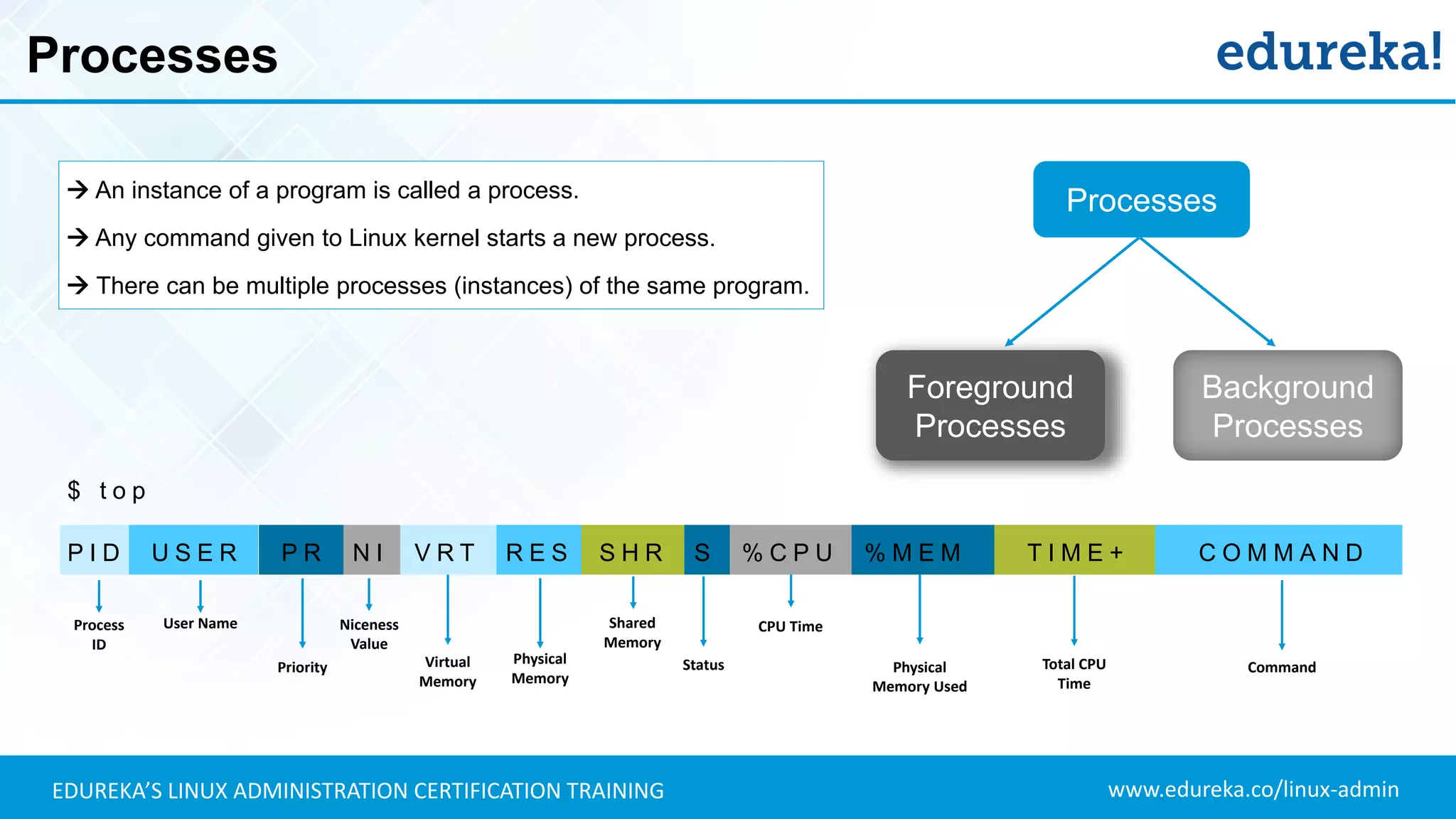
Processes
 An instance of a program is called a process.
 Any command given to Linux kernel starts a new process.
 There can be multiple processes (instances) of the same program.
Processes
Foreground
Processes
Background
Processes
$ t o p
P I D U S E R P R N I V R T R E S S H R S % C P U % M E M T I M E + C O M M A N D
Process
ID
User Name
Priority
Niceness
Value
Virtual
Memory
Physical
Memory
Shared
Memory
Status
CPU Time
Physical
Memory Used
Total CPU
Time
Command
www.edureka.co/linux-adminEDUREKA’S LINUX ADMINISTRATION CERTIFICATION TRAINING
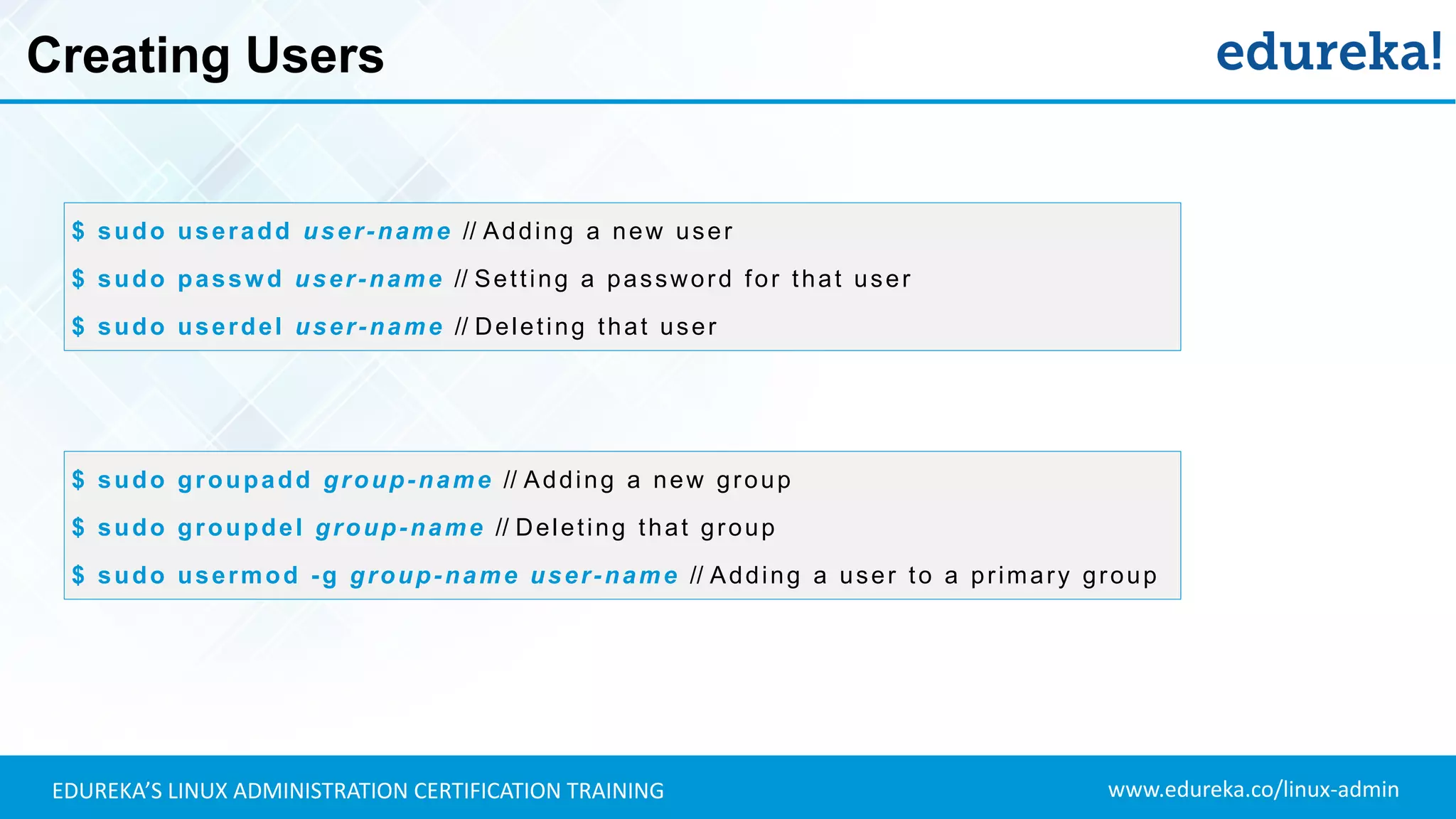
Creating Users
$ sudo useradd user-name // Adding a new user
$ sudo passwd user-name // Setting a password for that user
$ sudo userdel user-name // Deleting that user
$ sudo groupadd group-name // Adding a new group
$ sudo groupdel group-name // Deleting that group
$ sudo usermod -g group-name user-name // Adding a user to a primary group
www.edureka.co/linux-adminEDUREKA’S LINUX ADMINISTRATION CERTIFICATION TRAINING
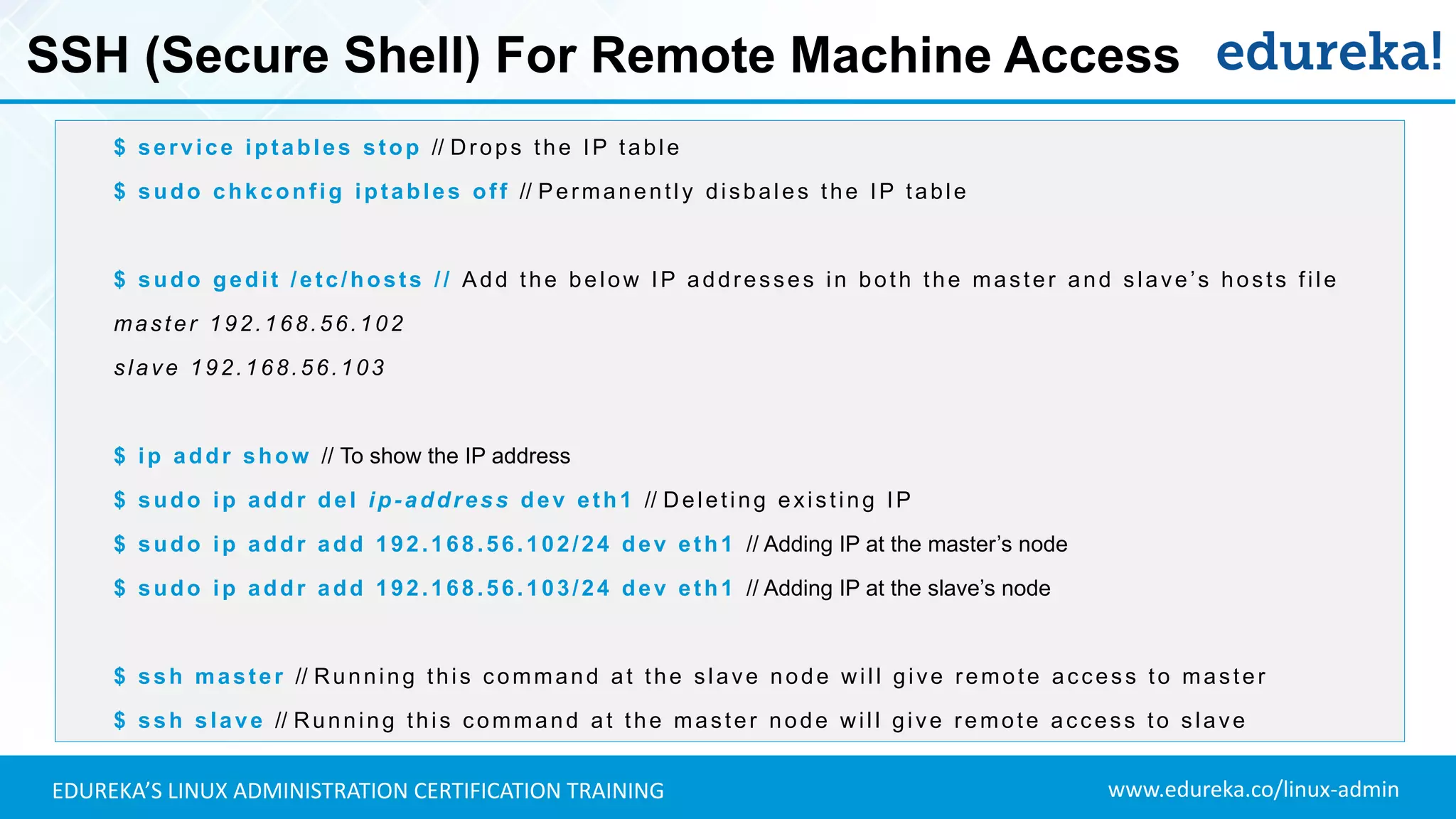
SSH (Secure Shell) For Remote Machine Access
$ service iptables stop // Drops the IP table
$ sudo chkconfig iptables off // Permanently disbales the IP table
$ sudo gedit /etc/hosts // Add the below IP addresses in both the master and slave’s hosts file
master 192.168.56.102
slave 192.168.56.103
$ ip addr show // To show the IP address
$ sudo ip addr del ip-address dev eth1 // Deleting existing IP
$ sudo ip addr add 192.168.56.102/24 dev eth1 // Adding IP at the master’s node
$ sudo ip addr add 192.168.56.103/24 dev eth1 // Adding IP at the slave’s node
$ ssh master // Running this command at the slave node will give remote access to master
$ ssh slave // Running this command at the master node will give remote access to slave
www.edureka.co/linux-adminEDUREKA’S LINUX ADMINISTRATION CERTIFICATION TRAINING
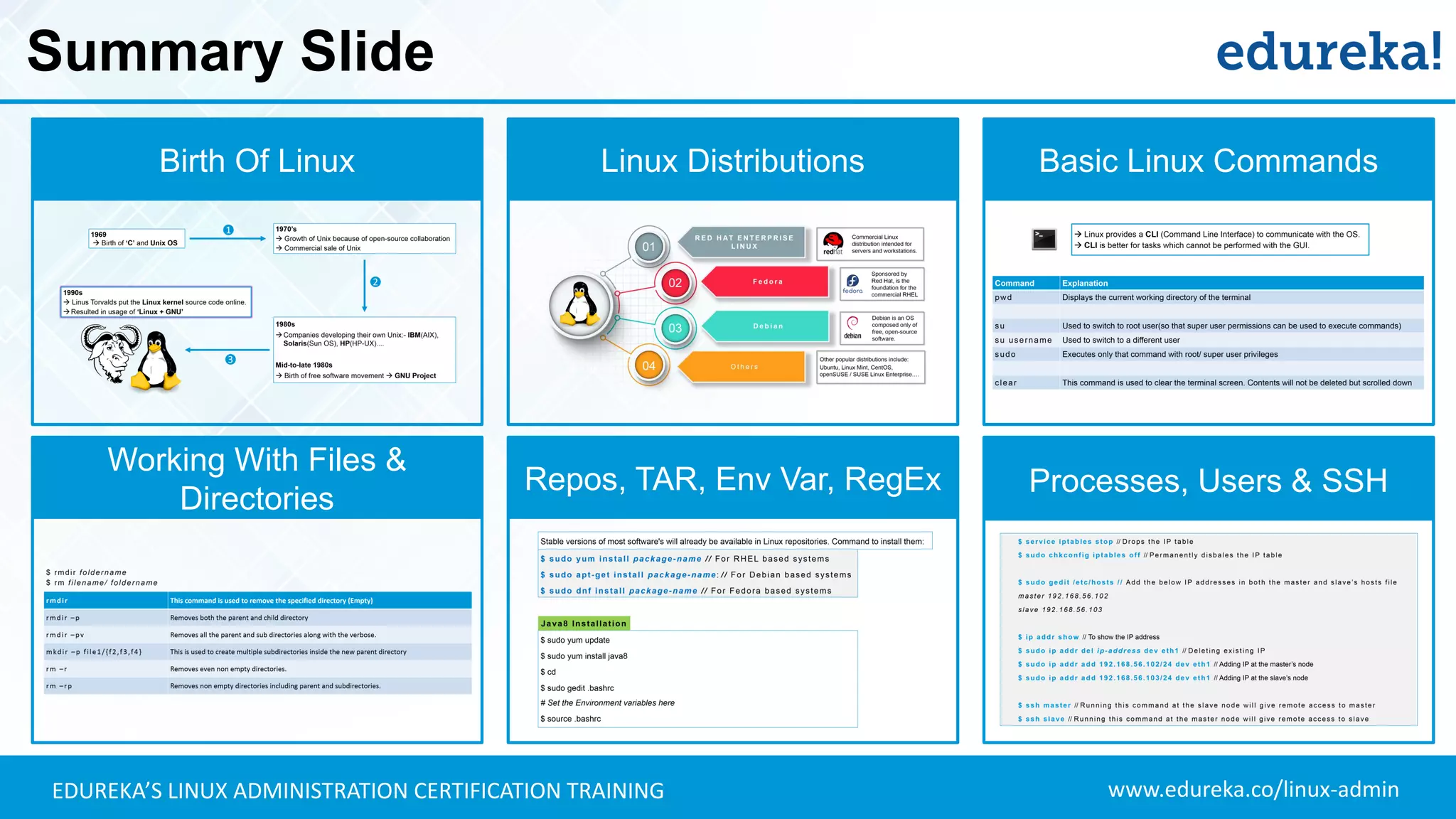
Summary Slide
Birth Of Linux Linux Distributions Basic Linux Commands
Working With Files &
Directories
Repos, TAR, Env Var, RegEx Processes, Users & SSH
www.edureka.co/linux-adminEDUREKA’S LINUX ADMINISTRATION CERTIFICATION TRAINING

Linux Tutorial For Beginners | Linux Administration Tutorial | Linux Commands | Edureka

  • 1.
  • 2.
    www.edureka.co/linux-adminEDUREKA’S LINUX ADMINISTRATIONCERTIFICATION TRAINING What Will You Learn Today? ✓ Birth of Linux: Why did Linux become popular? ✓ Various distributions of Linux ✓ Getting started with Linux ✓ Basic Linux commands ✓ Working with files & directories ✓ Adding/ deleting users ✓ Networking in Linux: Using SSH for communication
  • 3.
    www.edureka.co/linux-adminEDUREKA’S LINUX ADMINISTRATIONCERTIFICATION TRAINING Why Did Linux Become Popular?
  • 4.
    www.edureka.co/linux-adminEDUREKA’S LINUX ADMINISTRATIONCERTIFICATION TRAINING Birth Of Linux 1969  Birth of ‘C’ and Unix OS
  • 5.
    www.edureka.co/linux-adminEDUREKA’S LINUX ADMINISTRATIONCERTIFICATION TRAINING Birth Of Linux 1970’s  Growth of Unix because of open-source collaboration  Commercial sale of Unix 1969  Birth of ‘C’ and Unix OS 1
  • 6.
    www.edureka.co/linux-adminEDUREKA’S LINUX ADMINISTRATIONCERTIFICATION TRAINING Birth Of Linux 1970’s  Growth of Unix because of open-source collaboration  Commercial sale of Unix 1969  Birth of ‘C’ and Unix OS 1 2 1980s Companies developing their own Unix:- IBM(AIX), Solaris(Sun OS), HP(HP-UX).... Mid-to-late 1980s  Birth of free software movement  GNU Project
  • 7.
    www.edureka.co/linux-adminEDUREKA’S LINUX ADMINISTRATIONCERTIFICATION TRAINING Birth Of Linux 1980s Companies developing their own Unix:- IBM(AIX), Solaris(Sun OS), HP(HP-UX).... Mid-to-late 1980s  Birth of free software movement  GNU Project 1970’s  Growth of Unix because of open-source collaboration  Commercial sale of Unix 1990s  Linus Torvalds put the Linux kernel source code online. Resulted in usage of ‘Linux + GNU’ 1969  Birth of ‘C’ and Unix OS 1 2 3
  • 8.
    www.edureka.co/linux-adminEDUREKA’S LINUX ADMINISTRATIONCERTIFICATION TRAINING Various Linux Distributions F e d o r a R E D H AT E N T E R P R I S E L I N U X D e b i a n O t h e r s 01 02 03 04 Commercial Linux distribution intended for servers and workstations. Sponsored by Red Hat, is the foundation for the commercial RHEL Debian is an OS composed only of free, open-source software. Other popular distributions include: Ubuntu, Linux Mint, CentOS, openSUSE / SUSE Linux Enterprise….
  • 9.
    www.edureka.co/linux-adminEDUREKA’S LINUX ADMINISTRATIONCERTIFICATION TRAINING Linux’s Features Free Software Licensing Better Malware Protection Multiple Distributions Access To Source Code Simplified Updates For All Installed S/W
  • 10.
    www.edureka.co/linux-adminEDUREKA’S LINUX ADMINISTRATIONCERTIFICATION TRAINING Hands-on: Linux Commands 02 cat, grep, sort, pipe commands 03 cp, mv, mkdir, rm, rmdir & user permissions 04 Linux repository, tar files, env var & regex 05 Processes, adding users & ssh 01 pwd, clear, ls & cd commands
  • 11.
    www.edureka.co/linux-adminEDUREKA’S LINUX ADMINISTRATIONCERTIFICATION TRAINING Working With Directories: ‘pwd’ & ‘clear’  Linux provides a CLI (Command Line Interface) to communicate with the OS.  CLI is better for tasks which cannot be performed with the GUI. Command Explanation pwd Displays the current working directory of the terminal / Root directory echo Command that writes its arguments to standard output. su Used to switch to root user(so that super user permissions can be used to execute commands) su username Used to switch to a different user sudo Executes only that command with root/ super user privileges clear This command is used to clear the terminal screen. Contents will not be deleted but scrolled down
  • 12.
    www.edureka.co/linux-adminEDUREKA’S LINUX ADMINISTRATIONCERTIFICATION TRAINING Working With Directories: ‘ls’ Command $ ls [options] [file | Directory] ls This command lists all the contents in the current working directory ls path By specifying the path after ls, the content in that path will be displayed ls –l Using ‘l’ flag, lists all the contents along with its owner settings, permissions & time stamp (long format) ls –a Using ‘a’ flag, lists all the hidden contents in the specified directory ls --author Using ‘--author’ flag, lists the contents in the specified directory along with its owner ls –S Using ‘a’ flag, sorts and lists all the contents in the specified directory by size ls *.html Using ‘*’ flag, lists only the contents in the directory of a particular format ls –lS > file.txt Using ‘>’ flag, copies the result of ls command into a text file
  • 13.
    www.edureka.co/linux-adminEDUREKA’S LINUX ADMINISTRATIONCERTIFICATION TRAINING Working With Directories: ‘cd’ cd Changes the directory to the home directory cd ~ This command also changes the directory to home directory cd / Changes the directory to root directory cd .. Changes the directory to its parent directory cd ‘xx yy’ We specify the folder name in inverted commas because there is a space in the folder name $ cd [directory]
  • 14.
    www.edureka.co/linux-adminEDUREKA’S LINUX ADMINISTRATIONCERTIFICATION TRAINING Hands-on: Linux Commands 02 cat, grep, sort, pipe commands 03 cp, mv, mkdir, rm, rmdir & user permissions 04 Linux repository, tar files, env var & regex 05 Processes, adding users & ssh 0101 pwd, clear, ls & cd commands 01 pwd, clear, ls & cd commands
  • 15.
    www.edureka.co/linux-adminEDUREKA’S LINUX ADMINISTRATIONCERTIFICATION TRAINING Working With Files: ‘cat’ Command $ cat [options] file1 [file2..] cat This command is used to display the content of text files and concatenate several files into one cat -b This is used to add line numbers to non blank lines cat -n This is used to add line numbers to all lines cat -s This is used to squeeze blank lines into one line cat –E Show $ at the end of line $ cat > file1.txt The ‘>’ flag can be used to create a new file and enter text contents from the terminal $ cat >> file1.txt The ‘>>’ flag can be used to append text contents to an existing file from the terminal
  • 16.
    www.edureka.co/linux-adminEDUREKA’S LINUX ADMINISTRATIONCERTIFICATION TRAINING Working With ‘grep’ Command We use the ‘grep’ command to search for a particular string/ word in a text file. This is similar to “Ctrl+F”, but executed via a CLI. $ grep options file1.txt // Returns results for matching string “options” $ grep –i options file1.txt // Returns the results for case insensitive strings $ grep –n options file1.txt // Returns the matching strings along with their line number $ grep –v options file1.txt // Returns the result of lines not matching the search string $ grep –c options file1.txt // Returns the number of lines in which the results matched search string
  • 17.
    www.edureka.co/linux-adminEDUREKA’S LINUX ADMINISTRATIONCERTIFICATION TRAINING Working With ‘sort’ Command We use the ‘sort’ command to sort the results of a search either alphabetically or numerically. Files, file contents and directories can be sorted. $ sort file1.txt // Sorts the contents of file1.txt and returns them in alphabetical order $ sort File1.txt File2.txt // Sorts the contents of both File1.txt & File2.txt $ sort –r file1.txt // ‘r ’ flag returns the results in reverse order; $ sort –f file1.txt // ‘f’ flag does case insensitive sorting $ sort –n file1.txt // ‘n’ flag returns the results as per numerical order
  • 18.
    www.edureka.co/linux-adminEDUREKA’S LINUX ADMINISTRATIONCERTIFICATION TRAINING Working With ‘|’ Command The ‘|’ command a.k.a ‘pipe’ command is used to output the result of one command as input to another command. ‘|’ are used to perform two operations in the same command $ grep dh File1.txt File2.txt | sort // Searches for string ‘dh’ from both files and sorts the results $ grep dh File1.txt File2.txt | sort -r // Sorts the results in reverse order
  • 19.
    www.edureka.co/linux-adminEDUREKA’S LINUX ADMINISTRATIONCERTIFICATION TRAINING Hands-on: Linux Commands 02 cat, grep, sort, pipe commands 03 cp, mv, mkdir, rm, rmdir & user permissions 04 Linux repository, tar files, env var & regex 05 Processes, adding users & ssh 01 pwd, clear, ls & cd commands
  • 20.
    www.edureka.co/linux-adminEDUREKA’S LINUX ADMINISTRATIONCERTIFICATION TRAINING Working With Files & Directories: ‘cp’ Command $ cp [options] source destination cp This command is used to copy files and directories cp -i Enters interactive mode; CLI asks before overwriting files cp -n Does not overwrite the file cp -u Updates the destination file only when source file is different from destination file cp -R Recursive copy for copying directories; Copies even hidden files cp -v Verbose; Prints informative messages
  • 21.
    www.edureka.co/linux-adminEDUREKA’S LINUX ADMINISTRATIONCERTIFICATION TRAINING Working With Files & Directories: ‘mv’ Command $ mv [options] source destination mv This command is used to move files and directories mv -i Enters interactive mode; CLI asks before overwriting files mv -u Updates the destination file only when source file is different from destination file mv -v Verbose; Prints source and destination files
  • 22.
    www.edureka.co/linux-adminEDUREKA’S LINUX ADMINISTRATIONCERTIFICATION TRAINING Working With Directories: ‘mkdir’ Command $ mkdir directory-path mkdir This command is used to create a new directory mkdir -p Creates both a new parent directory and a sub-directory mkdir --parents This is also used for the same process mkdir –p file1/{f2,f3,f4} This is used to create multiple subdirectories inside the new parent directory
  • 23.
    www.edureka.co/linux-adminEDUREKA’S LINUX ADMINISTRATIONCERTIFICATION TRAINING Working With Files & Directories: ‘rm’ & ‘rmdir’ $ rmdir foldername $ rm filename/ foldername rmdir This command is used to remove the specified directory (Empty) rmdir –p Removes both the parent and child directory rmdir –pv Removes all the parent and sub directories along with the verbose. rm –r Removes even non empty directories. rm –rp Removes non empty directories including parent and subdirectories.
  • 24.
    www.edureka.co/linux-adminEDUREKA’S LINUX ADMINISTRATIONCERTIFICATION TRAINING Working With User Permissions: ‘r’, ‘w’ & ‘x’ $ l s – l $ e d u r e k a 5 2 5 5 0 4 0 2 A u g 1 2 2 0 1 6 FILE/DIR TYPE USER PERMISSIONS GROUP PERMISSIONS Other’s PERMISSIONS Read – ‘r’ Write – ‘w’ Execute – ‘x’ FILE PERMISSIONS Normal File – ‘-’ Directory – ‘d’ Character Special File – ‘c’ Binary Special File – ‘b’ FILE TYPES
  • 25.
    www.edureka.co/linux-adminEDUREKA’S LINUX ADMINISTRATIONCERTIFICATION TRAINING Working With User Permissions: ‘r’, ‘w’ & ‘x’ $ l s – l $ 1 e d u r e k a e d u r e k a 5 2 5 5 0 4 0 2 A u g 1 2 2 0 1 6 FILE/DIR TYPE USER PERMISSIONS GROUP PERMISSIONS Other’s PERMISSIONS SYMBOLIC LINKS Owner Name Group Name Read – ‘r’ Write – ‘w’ Execute – ‘x’ FILE PERMISSIONS Normal File – ‘-’ Directory – ‘d’ Character Special File – ‘c’ Binary Special File – ‘b’ FILE TYPES
  • 26.
    www.edureka.co/linux-adminEDUREKA’S LINUX ADMINISTRATIONCERTIFICATION TRAINING Working With User Permissions: ‘r’, ‘w’ & ‘x’ $ l s – l $ 1 e d u r e k a e d u r e k a 5 2 5 5 0 4 0 2 A u g 1 2 2 0 1 6 FILE/DIR TYPE USER PERMISSIONS GROUP PERMISSIONS Other’s PERMISSIONS SYMBOLIC LINKS Owner Name Group Name Time Stamp FILE SIZE Read – ‘r’ Write – ‘w’ Execute – ‘x’ FILE PERMISSIONS Normal File – ‘-’ Directory – ‘d’ Character Special File – ‘c’ Binary Special File – ‘b’ FILE TYPES Users – ‘u’ Groups – ‘g’ Others – ‘o’ All – ‘a’ DENOTIONS
  • 27.
    www.edureka.co/linux-adminEDUREKA’S LINUX ADMINISTRATIONCERTIFICATION TRAINING Working With User Permissions: ‘r’, ‘w’ & ‘x’ Commands Explanation chmod g+wx filename This gives the write and execute permission to group members chmod u=rwx,o-wx filename This gives the read, write and execute permission to owners, and removes the write and execute ownership from other members chown username filename Changes the owner of the specified file chown username:groupname filename Changes both the owner and group ownership of the specified file chgrp groupname filename Changes the group ownership of the specified file chmod : To change the access permissions of files and directories chown : To change the owner of files and directories chgrp : To change the group ownership of file and directories
  • 28.
    www.edureka.co/linux-adminEDUREKA’S LINUX ADMINISTRATIONCERTIFICATION TRAINING Hands-on: Linux Commands 02 cat, grep, sort, pipe commands 03 cp, mv, mkdir, rm, rmdir & user permissions 04 Linux repository, tar files, env var & regex 05 Processes, adding users & ssh 0101 pwd, clear, ls & cd commands 01 pwd, clear, ls & cd commands
  • 29.
    www.edureka.co/linux-adminEDUREKA’S LINUX ADMINISTRATIONCERTIFICATION TRAINING Working With Linux Repositories $ sudo yum install package-name // For RHEL based systems $ sudo apt-get install package-name: // For Debian based systems $ sudo dnf install package-name // For Fedora based systems $ sudo yum update $ sudo yum install java-1.8.0-openjdk $ update-alternatives --config java // For selecting from various java versions $ cd $ sudo gedit .bashrc # Set the Environment variables here $ source .bashrc Java8 Installation Stable versions of most software's will already be available in Linux repositories. Command to install them:
  • 30.
    www.edureka.co/linux-adminEDUREKA’S LINUX ADMINISTRATIONCERTIFICATION TRAINING Working With Tar Files When you download a package from the internet, the downloaded file comes in compressed form. Commands to decompress and compress files in Linux: $ tar –cvf tar-file-name file-name // Compressing files to Tar format $ tar –xvf tar-file-name // Extracting/ Decompressing files in Tar format gzip: To compress files with .gz format gunzip: To decompress .gz files tar: To compress and decompress files with .tar format
  • 31.
    www.edureka.co/linux-adminEDUREKA’S LINUX ADMINISTRATIONCERTIFICATION TRAINING Environment Variables Environment variables control the behavior of the software packages installed in Linux. The path where the packages have been installed will be specified in environment variables. $ printenv // Prints the list of all environment variables $ echo $HOME // This will print the path of the home directory of the user $ echo $PATH // It is a colon-separated list of directories in which the shell looks for commands $ echo $HOSTNAME // This will print the hostname $ echo $USERNAME // This will print the username $ echo $LANG // This will print the language being used $ echo $BASH_VERSION // This will print the version of this instance of bash
  • 32.
    www.edureka.co/linux-adminEDUREKA’S LINUX ADMINISTRATIONCERTIFICATION TRAINING Regular Expressions Regular Expressions (RegEx) are used to search through data. It can be piped along with ‘grep’ command to find patterns of text in the file. $ cat File1.txt | grep ^a $ grep 'a[0-9]x' File1.txt $ ls | grep '[xt$]' Symbol Explanation . Replaces any character ^ Matches the start of the string $ Matches the end of the string * Matches the preceding character zero or more times ? Matches the preceding character one or more times ( ) Groups regular expressions Represents special characters $ ls | grep 'le[0-9].txt‘ $ grep -n ['a*'] File1.txt $ grep ['d.d'] File1.txt $ echo {a..z} $ echo {4..45} $ echo 1{a..z}9
  • 33.
    www.edureka.co/linux-adminEDUREKA’S LINUX ADMINISTRATIONCERTIFICATION TRAINING Hands-on: Linux Commands 02 cat, grep, sort, pipe commands 03 cp, mv, mkdir, rm, rmdir & user permissions 04 Linux repository, tar files, env var & regex 05 Processes, adding users & ssh 0101 pwd, clear, ls & cd commands 01 pwd, clear, ls & cd commands
  • 34.
    www.edureka.co/linux-adminEDUREKA’S LINUX ADMINISTRATIONCERTIFICATION TRAINING Processes  An instance of a program is called a process.  Any command given to Linux kernel starts a new process.  There can be multiple processes (instances) of the same program. Processes Foreground Processes Background Processes $ t o p P I D U S E R P R N I V R T R E S S H R S % C P U % M E M T I M E + C O M M A N D Process ID User Name Priority Niceness Value Virtual Memory Physical Memory Shared Memory Status CPU Time Physical Memory Used Total CPU Time Command
  • 35.
    www.edureka.co/linux-adminEDUREKA’S LINUX ADMINISTRATIONCERTIFICATION TRAINING Creating Users $ sudo useradd user-name // Adding a new user $ sudo passwd user-name // Setting a password for that user $ sudo userdel user-name // Deleting that user $ sudo groupadd group-name // Adding a new group $ sudo groupdel group-name // Deleting that group $ sudo usermod -g group-name user-name // Adding a user to a primary group
  • 36.
    www.edureka.co/linux-adminEDUREKA’S LINUX ADMINISTRATIONCERTIFICATION TRAINING SSH (Secure Shell) For Remote Machine Access $ service iptables stop // Drops the IP table $ sudo chkconfig iptables off // Permanently disbales the IP table $ sudo gedit /etc/hosts // Add the below IP addresses in both the master and slave’s hosts file master 192.168.56.102 slave 192.168.56.103 $ ip addr show // To show the IP address $ sudo ip addr del ip-address dev eth1 // Deleting existing IP $ sudo ip addr add 192.168.56.102/24 dev eth1 // Adding IP at the master’s node $ sudo ip addr add 192.168.56.103/24 dev eth1 // Adding IP at the slave’s node $ ssh master // Running this command at the slave node will give remote access to master $ ssh slave // Running this command at the master node will give remote access to slave
  • 37.
    www.edureka.co/linux-adminEDUREKA’S LINUX ADMINISTRATIONCERTIFICATION TRAINING Summary Slide Birth Of Linux Linux Distributions Basic Linux Commands Working With Files & Directories Repos, TAR, Env Var, RegEx Processes, Users & SSH
  • 38.