Saved by PowerPoint
Ahsan Saleem – March 2014
Agenda
 PowerPoint casualties
 How to protect humans from PowerPoint?
and .. I will use PowerPoint for today’s talk
We have been there ..
More Serious Stuff - US Strategy in Afghanistan
wtf!
NASA Shuttle Columbia Disaster 2003
Columbia Shuttle – Death by PowerPoint
Edward Tuft (Information Visualization Specialist) analyzed NASA
Team’s presentation on a launch incident with Columbia Shuttle and
concluded that a bad PowerPoint presentation was one of the major
reasons why NASA could not assess proper risk
Growing dislike for PowerPoint
“The use of presentations has been a disaster.
It should be ditched”
Research by University of New South Wales
Bill Gates and his Slides: Too much content and a sleeping audience!
PowerPoint is the Devil!
Who will save PowerPoint and
Presentations – and Us?
Less and meaningful
content on slides
Jobs to Audience: Ever wondered why we
had this small pocket in pocket ?
To keep iPod Nano!
How to make audience realize how super
thin and light MacBook Air is?
Who is a visual artist here?
Al Gore – An Inconvenient Truth
Using a crane to show the really high CO2 Spike
Randy Pausch – The Last lecture
‘You will get arrows in the back pursuing big dreams in life’, and ‘I have
Cancer but I am still strong’
Jane McGonigal
Jill Bolte
Maysoon Zayid
Some Amazing TED
Speakers made it personal and
people remembered
PowerPoint – Angel or Devil?
What’s wrong these slides?
Slide
 This page contains too many words for a
presentation slide. It is not written in bullets,
making it difficult both for your audience to
read and for you to present properly. Although
more words will not convey anything extra but
now it looks much more complicated. In
short, your audience will spend too much time
trying to read this paragraph instead of
listening to you.
Slide
 Using a font color that does not contrast with the
background color is hard to read
 Using color for decoration is distracting and
annoying.
 Using a different color for each point is unnecessary
– Using a different color for secondary points is also
unnecessary
 Trying to be creative can also be bad
Slide
• Avoid backgrounds that are distracting or
difficult to read from
• Always be consistent with the background
that you use
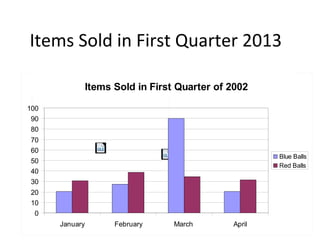
Items Sold in First Quarter of 2002
0
10
20
30
40
50
60
70
80
90
100
January February March April
Blue Balls
Red Balls
Items Sold in First Quarter of 2002
0
10
20
30
40
50
60
70
80
90
100
January February March April
Blue Balls
Red Balls
Items Sold in First Quarter 2013
 Can you read me
 THIS IS NOTHING IMPORTANT BUT I LIKE TO
USE CAPS KEY AND HUGE LETTERS
Font Size
 OMG! This presenter can use animations
 I can not focus what the presenter is saying as these
animations are totally distracting
 OK now! Stop bouncing and let me read
 Finally!
Animations – Important?
Karma For Presentations
 Focus on telling a story and not teaching
 PowerPoint is a visual aid NOT a document
 Look at audience not your slides and hold their
attention
 Learn PowerPoint and do not use default templates
for new slides. A plain empty slide is the best
canvas
This is the Canvas you want to start creating your presentation
What Really helps
 Overcome fear of public speaking
 Love your topic
 Know your topic
 Have fun
‘Never be boring’
Thank You!

'Saved by PowerPoint'

  • 1.
    Saved by PowerPoint AhsanSaleem – March 2014
  • 2.
    Agenda  PowerPoint casualties How to protect humans from PowerPoint? and .. I will use PowerPoint for today’s talk
  • 3.
    We have beenthere ..
  • 4.
    More Serious Stuff- US Strategy in Afghanistan
  • 5.
  • 6.
    NASA Shuttle ColumbiaDisaster 2003
  • 7.
    Columbia Shuttle –Death by PowerPoint
  • 8.
    Edward Tuft (InformationVisualization Specialist) analyzed NASA Team’s presentation on a launch incident with Columbia Shuttle and concluded that a bad PowerPoint presentation was one of the major reasons why NASA could not assess proper risk
  • 9.
  • 12.
    “The use ofpresentations has been a disaster. It should be ditched” Research by University of New South Wales
  • 13.
    Bill Gates andhis Slides: Too much content and a sleeping audience!
  • 15.
  • 16.
    Who will savePowerPoint and Presentations – and Us?
  • 17.
  • 21.
    Jobs to Audience:Ever wondered why we had this small pocket in pocket ?
  • 22.
  • 23.
    How to makeaudience realize how super thin and light MacBook Air is?
  • 24.
    Who is avisual artist here?
  • 25.
    Al Gore –An Inconvenient Truth Using a crane to show the really high CO2 Spike
  • 26.
    Randy Pausch –The Last lecture ‘You will get arrows in the back pursuing big dreams in life’, and ‘I have Cancer but I am still strong’
  • 27.
    Jane McGonigal Jill Bolte MaysoonZayid Some Amazing TED Speakers made it personal and people remembered
  • 28.
  • 29.
  • 30.
    Slide  This pagecontains too many words for a presentation slide. It is not written in bullets, making it difficult both for your audience to read and for you to present properly. Although more words will not convey anything extra but now it looks much more complicated. In short, your audience will spend too much time trying to read this paragraph instead of listening to you.
  • 31.
    Slide  Using afont color that does not contrast with the background color is hard to read  Using color for decoration is distracting and annoying.  Using a different color for each point is unnecessary – Using a different color for secondary points is also unnecessary  Trying to be creative can also be bad
  • 32.
    Slide • Avoid backgroundsthat are distracting or difficult to read from • Always be consistent with the background that you use
  • 33.
    Items Sold inFirst Quarter of 2002 0 10 20 30 40 50 60 70 80 90 100 January February March April Blue Balls Red Balls
  • 34.
    Items Sold inFirst Quarter of 2002 0 10 20 30 40 50 60 70 80 90 100 January February March April Blue Balls Red Balls Items Sold in First Quarter 2013
  • 35.
     Can youread me  THIS IS NOTHING IMPORTANT BUT I LIKE TO USE CAPS KEY AND HUGE LETTERS Font Size
  • 36.
     OMG! Thispresenter can use animations  I can not focus what the presenter is saying as these animations are totally distracting  OK now! Stop bouncing and let me read  Finally! Animations – Important?
  • 37.
    Karma For Presentations Focus on telling a story and not teaching  PowerPoint is a visual aid NOT a document  Look at audience not your slides and hold their attention  Learn PowerPoint and do not use default templates for new slides. A plain empty slide is the best canvas
  • 38.
    This is theCanvas you want to start creating your presentation
  • 39.
    What Really helps Overcome fear of public speaking  Love your topic  Know your topic  Have fun
  • 40.