Computer Graphics
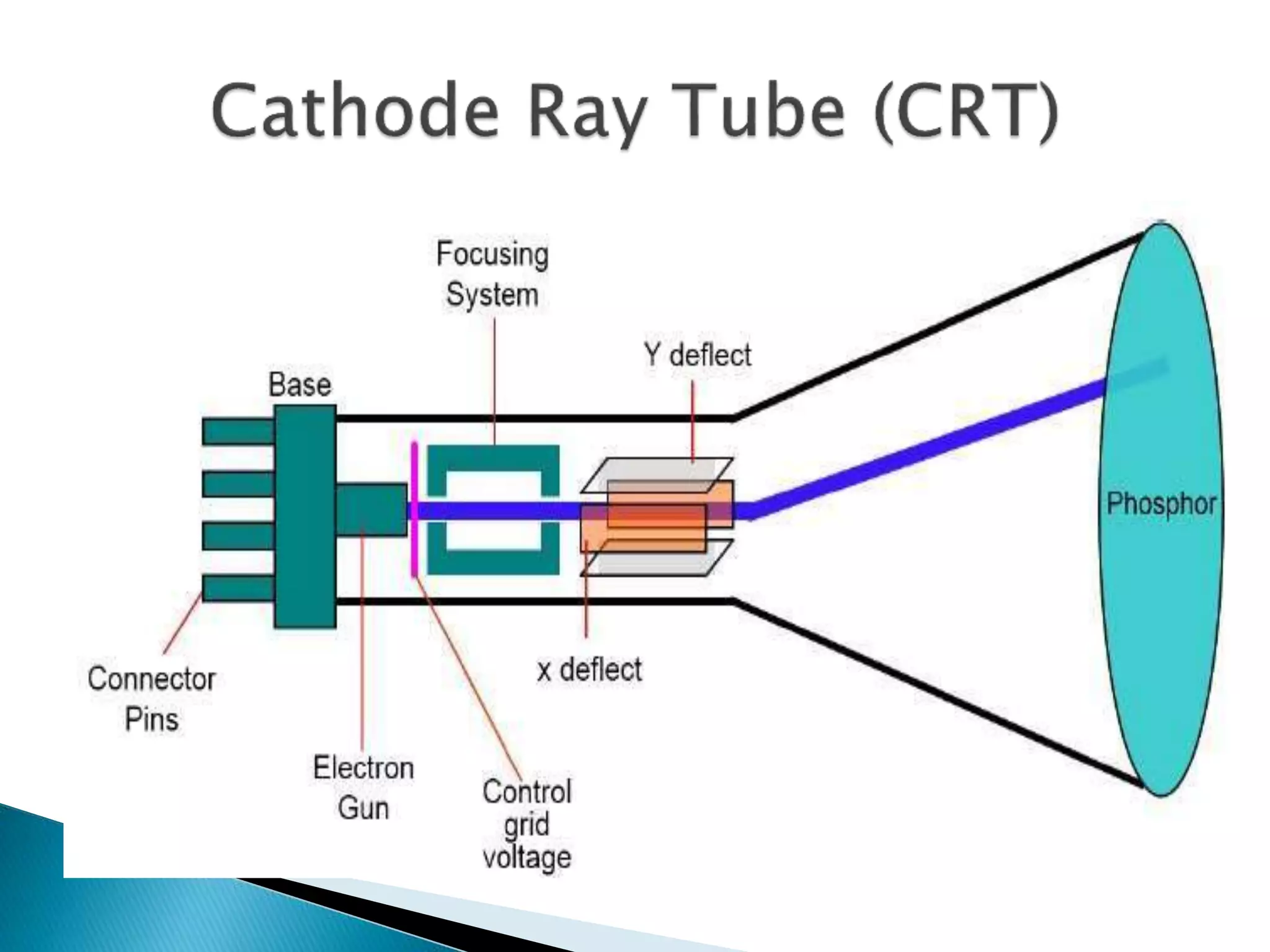
 A CRT is an evacuated glass tube. An electron
gun at the rear of the tube produces a beam of
electrons which is directed towards the front of
the tube (screen).
 The inner side of the screen is coated with
phosphor substance which gives off light when it
is stroked by electrons.
 The beam is positioned on the screen by a
deflection system of the cathode-ray-tube
consists of two pairs of parallel plates, referred
to as the vertical and horizontal deflection
plates.
 The intensity of the beam is controlled by
the intensity signal on the control grid.
 The voltage applied to vertical plates controls the vertical
deflection of the electron beam and voltage applied to the
horizontal deflection plates controls the horizontal deflection of
the electron beam.
 There are two techniques used for producing images on the CRT
screen: Vector scan / random scan and Raster scan.
 When the phosphor is hit by the electron beam it absorbs energy
and jumps to a higher quantum-energy level. As it returns to its
normal level it emits visible light i.e. it phosphoresces. In the
phosphors used in graphics devices the persistence of the
phosphorescence is typically 10-60 microseconds.
 Before the human visual system can see a transient image it
must be continually redrawn (refreshed) at a rate higher than the
critical fusion frequency of the human visual system. To allow
the human visual system to see a continuously refreshed image
without flicker the refresh rate has to be at least 60 frames/sec.
 Raster: A rectangular array of points or dot.
 An image is subdivided into a sequence of (usually
horizontal) strips known as "scan lines“ which can be further
divided into discrete pixels for processing in a computer
system.
A raster image is a collection of dots called pixels
RASTER IMAGE
 In a raster scan system, the electron beam is swept
across the screen, one row at a time from top to bottom.
 As the electron beam moves across each row, the beam
intensity is turned on and off to create a pattern of
illuminated spots.
 The return to the left of the screen, after refreshing each
scan line is called Horizontal retrace.
 At the end of each frame the electron beam returns to
the top left corner of the screen to begin the next frame
is called Vertical retrace:
• Picture definition is stored in a memory area called the
refresh buffer or frame buffer.
• Refresh buffer or frame buffer is memory area that
holds the set of intensity values for all the screen
points.
• Stored intensity values then retrieved from refresh
buffer and “painted” on the screen one row (scan line)
at a time.
Object as set of discrete points across each
scan line
 The quality of a raster image is determined by the total
number pixels (resolution), and the amount of
information in each pixel (color depth)
 A black-and-white system: each screen point is either on
or off, so only one bit per pixel is needed to control the
intensity of screen positions. Such type of frame buffer
is called Bit map
 High quality raster graphics system have 24 bits per
pixel in the frame buffer (a full color system or a true
color system)
 Refreshing on raster scan displays is carried out at the
rate of 60 to 80 frame per second.
 On some raster systems (TV), each frame is displayed in two
passes using an interlaced refresh procedure.
 Interlacing is primarily used for slower refresh rates.
 An effective technique to avoid Flicker.(Flicker occurs on
CRTs when they are driven at a low refresh rate, allowing
the brightness to drop for time intervals sufficiently long to be
noticed by a human eye)
 Suited for realistic display of screens
 Home television computer printers create their
images basically by raster scanning. Laser
printers use a spinning polygonal mirror (or an
optical equivalent) to scan across the
photosensitive drum, and paper movement
provides the other scan axis
 Common raster image formats include BMP (Windows
Bitmap), JPEG (Joint Photographics Expert Group),
GIF (Graphics Interchange Format) , PNG (Portable
Network Graphic), PSD (Adobe PhotoShop)
• To increase the size of a raster image the pixels
defining the image are be increased in either
number or size. Spreading the pixels over a larger
area causes the image to lose detail and clarity.
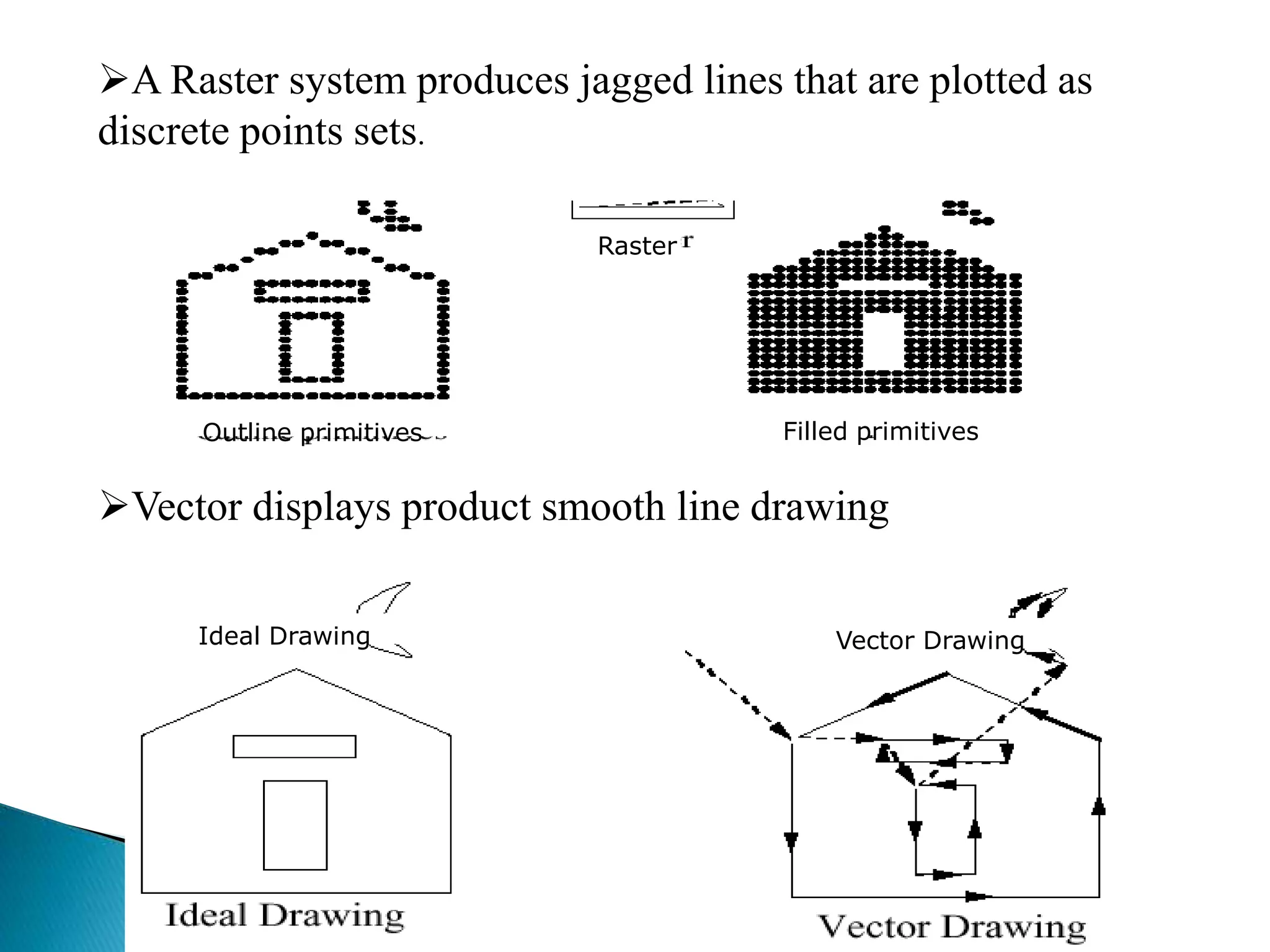
• Produces jagged lines that are plotted as discrete
points
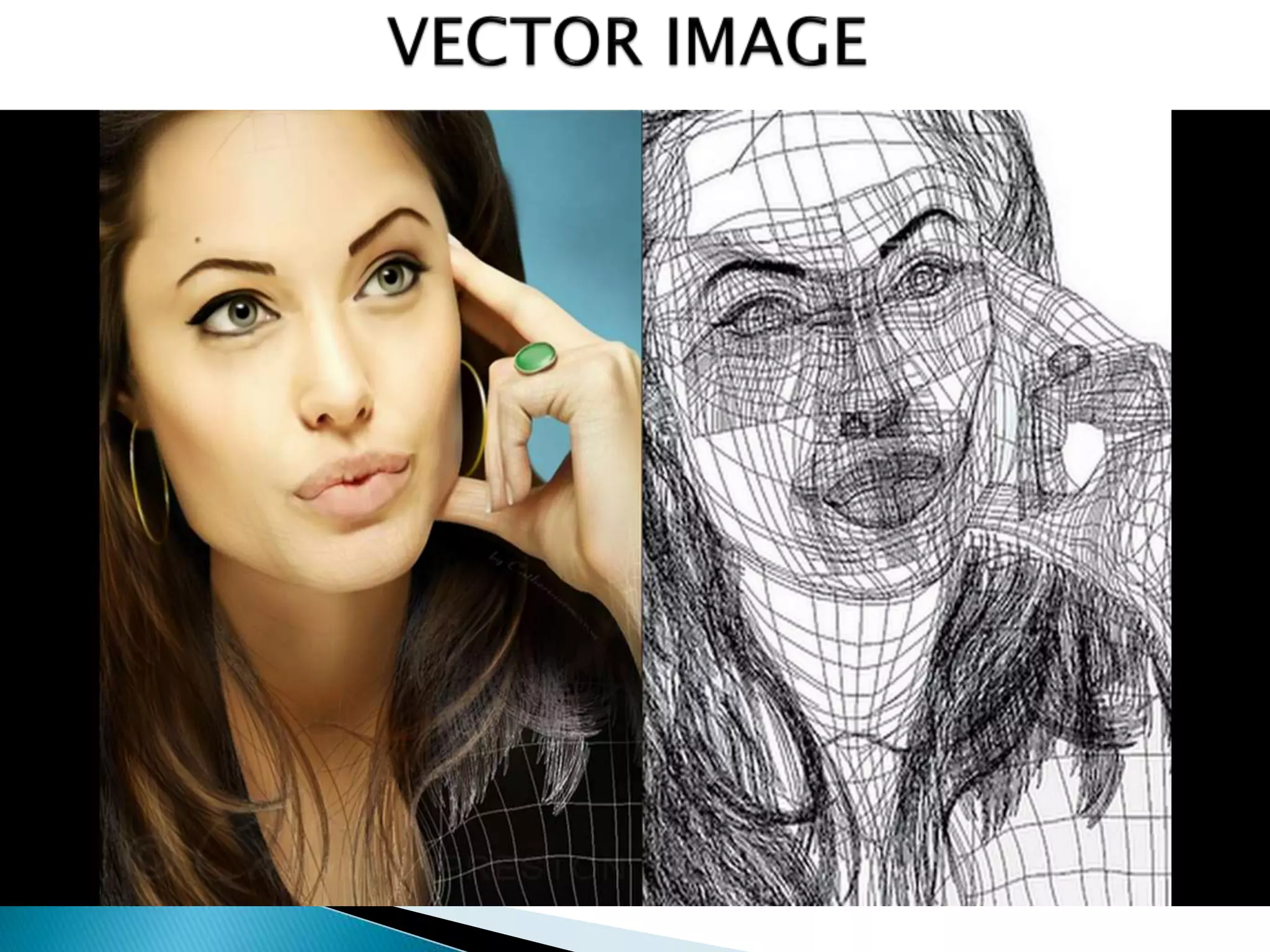
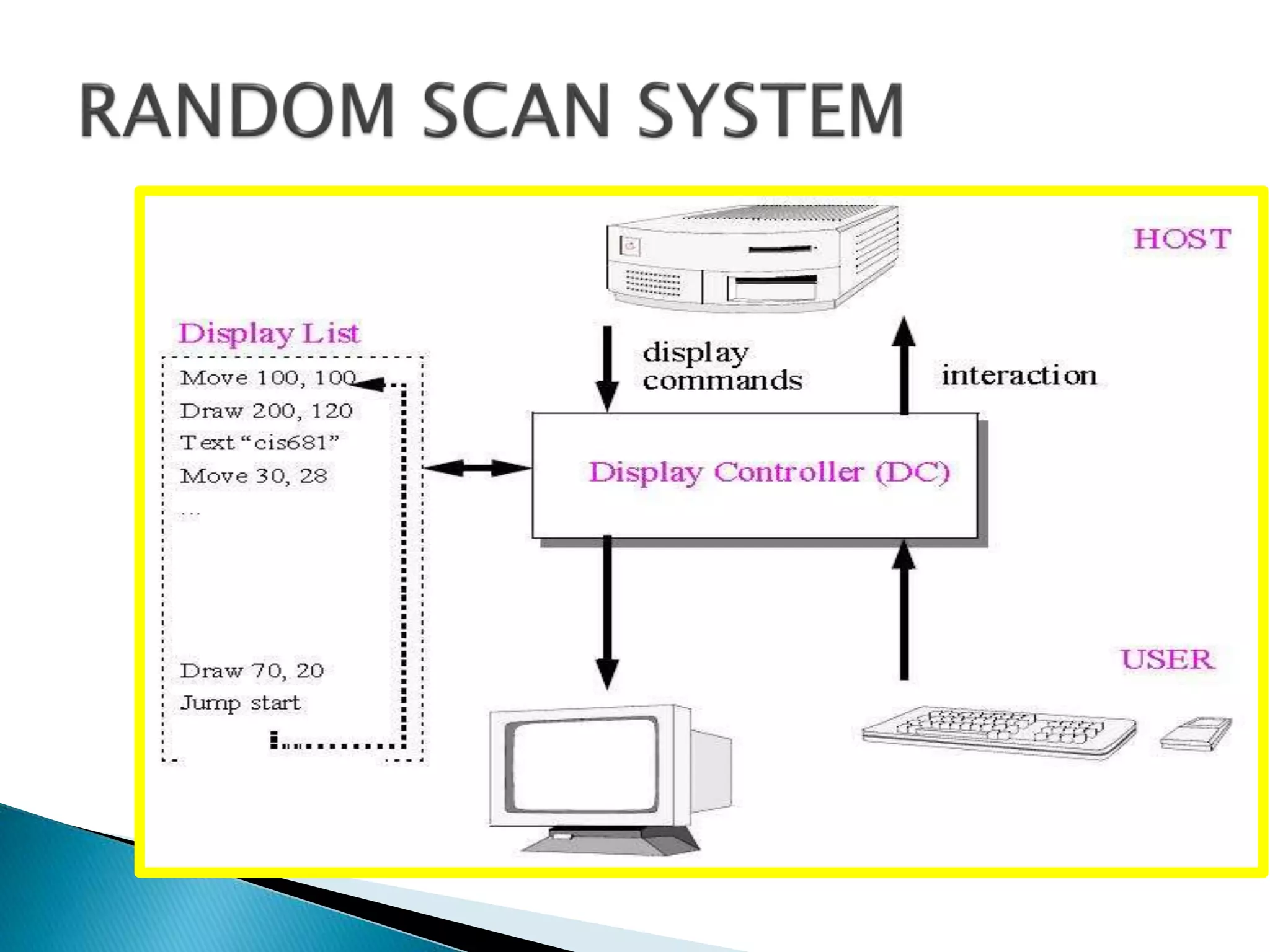
 Random scan display is the use of geometrical
primitives such as points, lines, curves, and polygons,
which are all based upon mathematical equation
 When operated as a random-scan display
unit, a CRT has the electron beam directed
only to the parts of the screen where a
picture is to be drawn.
 Random-scan monitors draw a picture one
line at a time and for this reason are also
referred to as vector displays (or stroke-
writing or calligraphic displays).
 Refresh rate depends on the number of lines to be
displayed.
 Picture definition is now stored as a line-drawing
commands an area of memory referred to as refresh
display file (display list).
 To display a picture, the system cycle through the set
of commands in the display file, drawing each
component line in turn.
 Random scan displays are designed to draw all the
component lines of a picture 30 to 60 times each
second
Ideal Drawing Vector Drawing
Raster
Outline primitives Filled primitives
A Raster system produces jagged lines that are plotted as
discrete points sets.
Vector displays product smooth line drawing
 Random scan displays are designed for line-
drawing applications and can not display
realistic shaded scenes
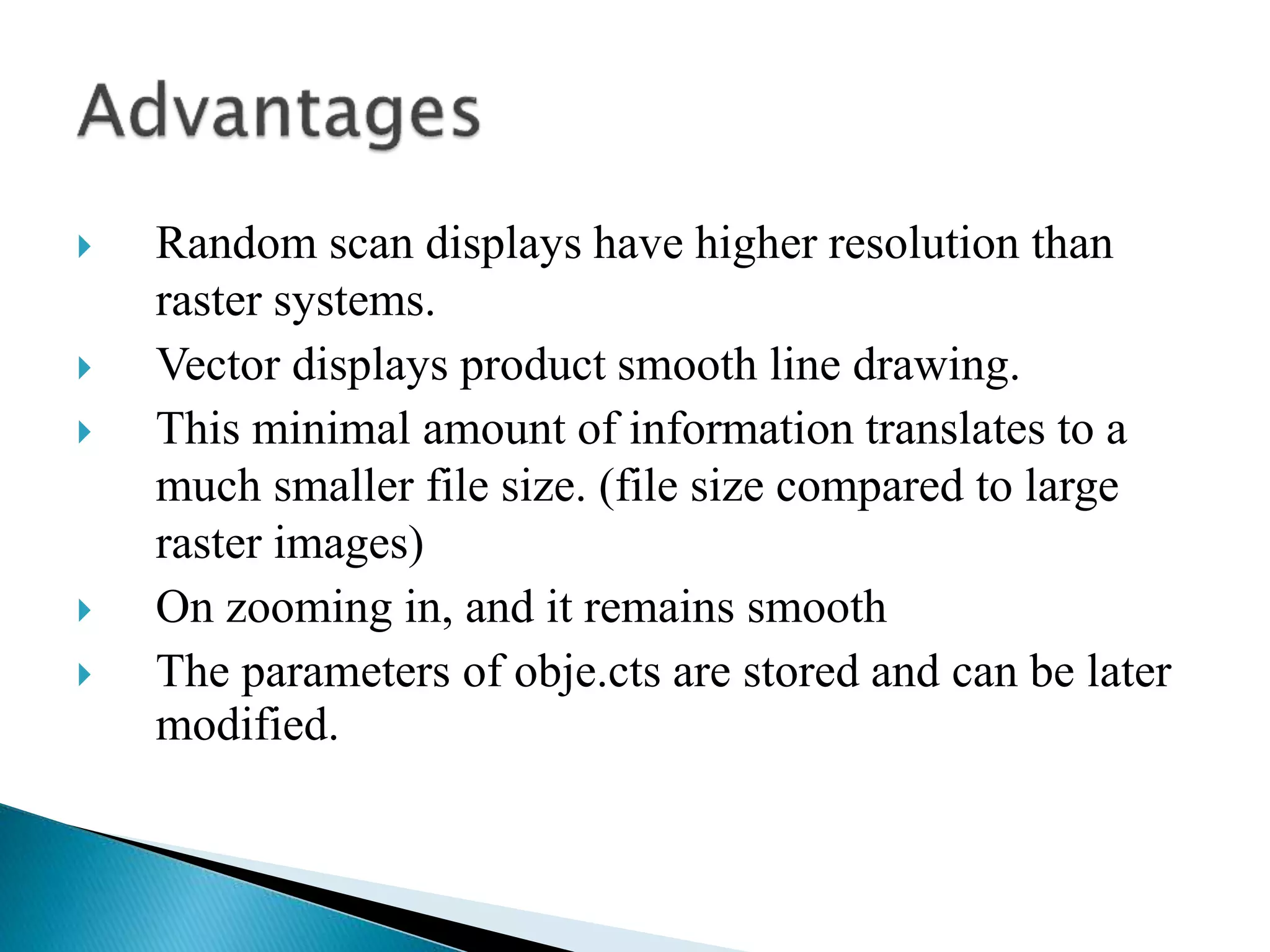
 Random scan displays have higher resolution than
raster systems.
 Vector displays product smooth line drawing.
 This minimal amount of information translates to a
much smaller file size. (file size compared to large
raster images)
 On zooming in, and it remains smooth
 The parameters of obje.cts are stored and can be later
modified.
 In addition to the central processing unit (CPU), a special
processor, called the video controller or display controller, is
used to control the operation of the display device.
 A fixed area of the system memory is reserved for the frame
buffer, and the video controller is given direct access to the
frame buffer memory.
 Operation performed:
1. Refreshing operation
2. Transformation (Areas of the screen can be enlarged,
reduces, or moved during the refresh cycles)
 Frame buffer location, and the corresponding screen
positions, are referenced in Cartesian coordinates
 Scan lines are then labeled from ymax at the top of the
screen to 0 at the bottom. Along each scan line, screen
pixel positions are labeled from 0 to xmax
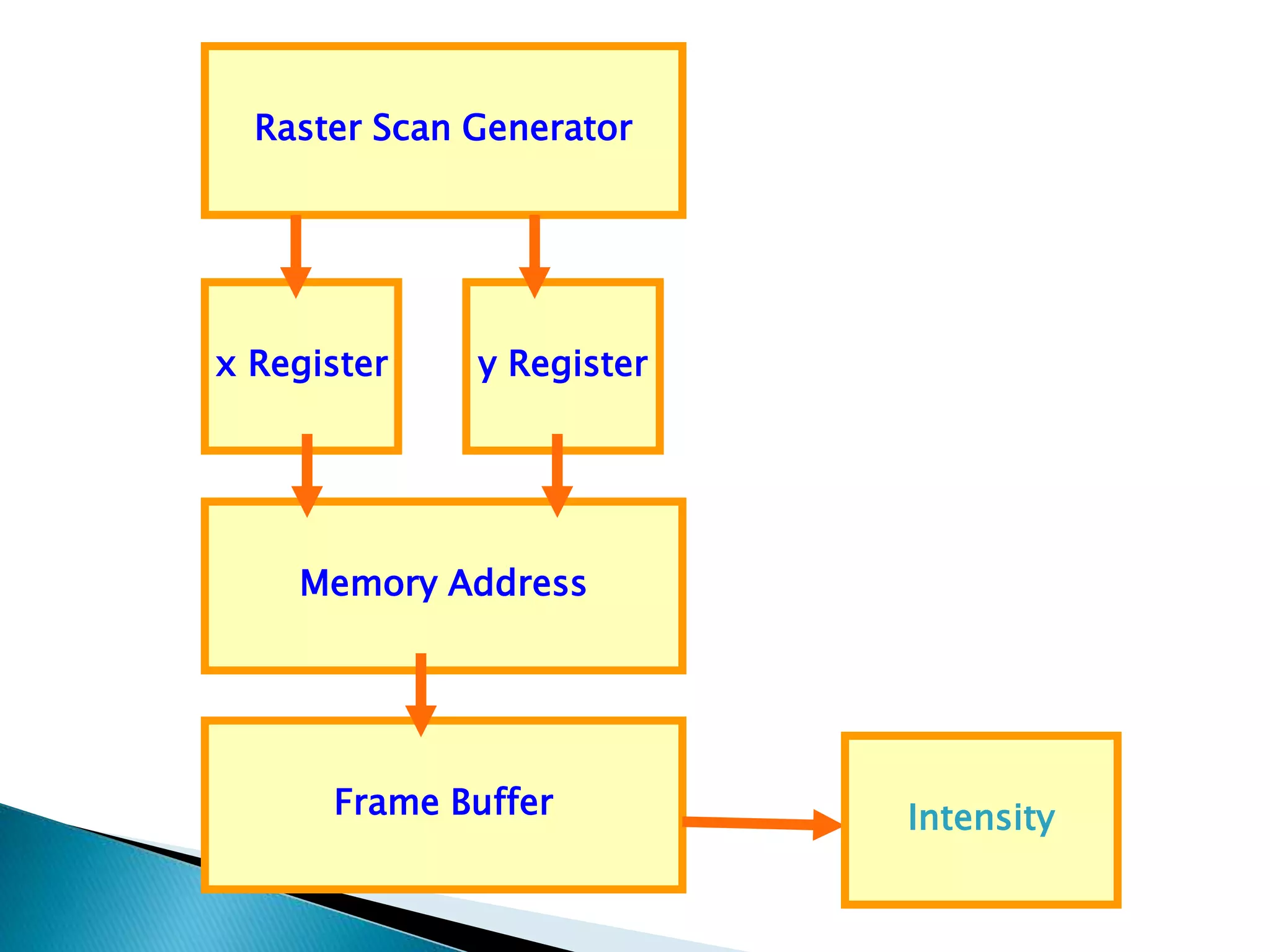
 Two registers are used to store the coordinates of the
screen pixels.
x
y Line Scan
y
max
x max
Raster Scan Generator
x Register y Register
Memory Address
Frame Buffer Intensity
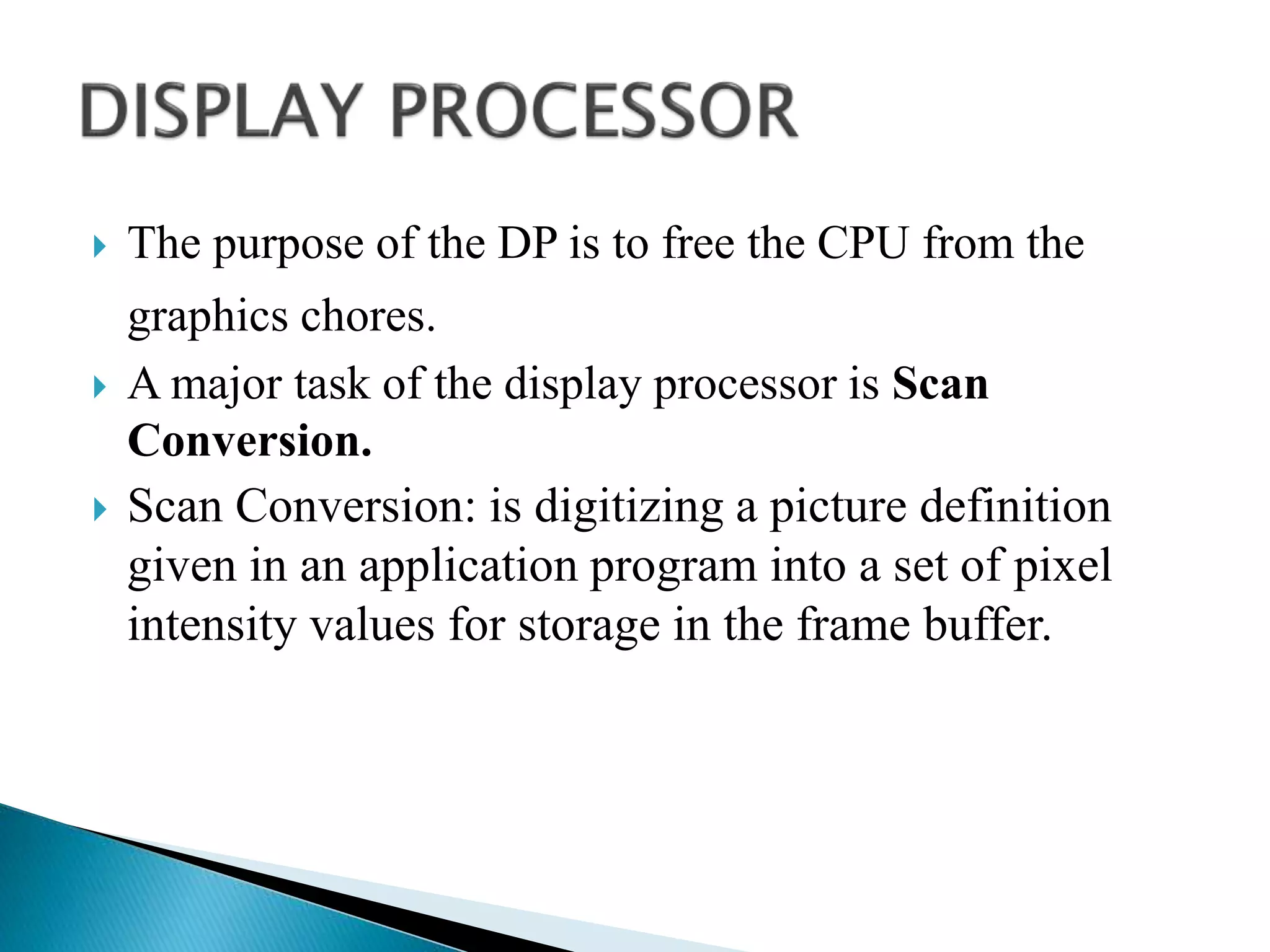
 The purpose of the DP is to free the CPU from the
graphics chores.
 A major task of the display processor is Scan
Conversion.
 Scan Conversion: is digitizing a picture definition
given in an application program into a set of pixel
intensity values for storage in the frame buffer.
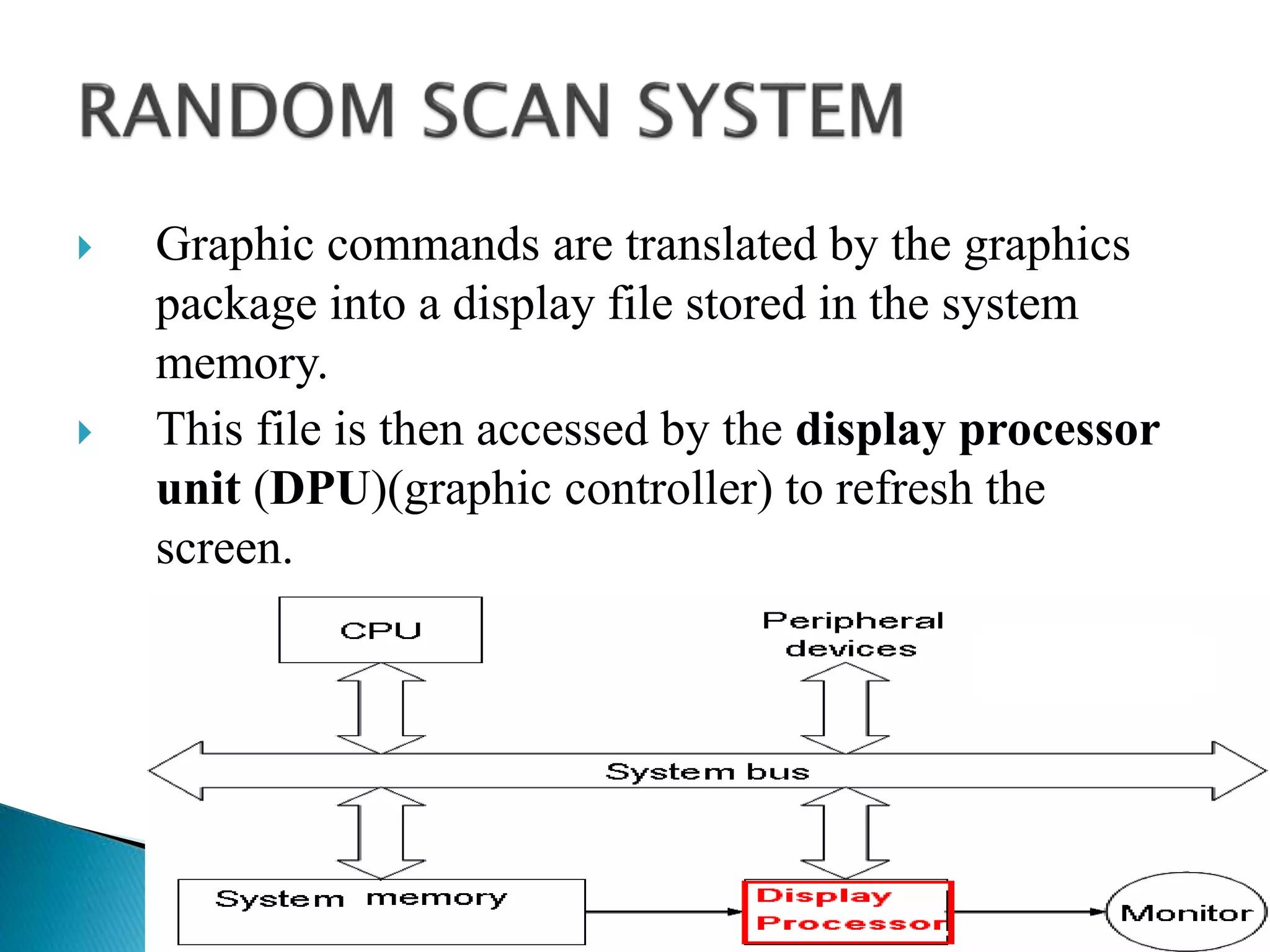
 Graphic commands are translated by the graphics
package into a display file stored in the system
memory.
 This file is then accessed by the display processor
unit (DPU)(graphic controller) to refresh the
screen.
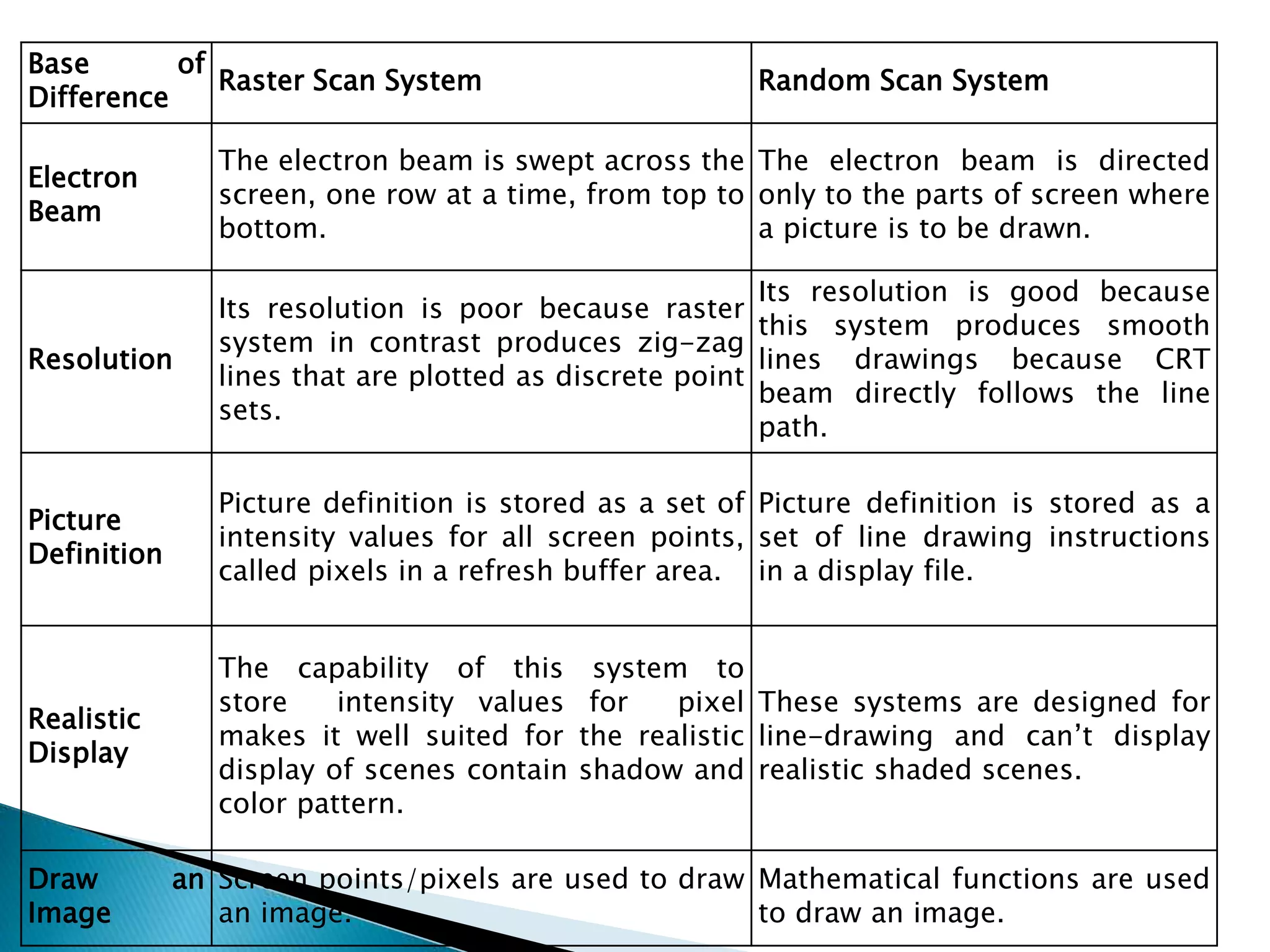
Base of
Difference
Raster Scan System Random Scan System
Electron
Beam
The electron beam is swept across the
screen, one row at a time, from top to
bottom.
The electron beam is directed
only to the parts of screen where
a picture is to be drawn.
Resolution
Its resolution is poor because raster
system in contrast produces zig-zag
lines that are plotted as discrete point
sets.
Its resolution is good because
this system produces smooth
lines drawings because CRT
beam directly follows the line
path.
Picture
Definition
Picture definition is stored as a set of
intensity values for all screen points,
called pixels in a refresh buffer area.
Picture definition is stored as a
set of line drawing instructions
in a display file.
Realistic
Display
The capability of this system to
store intensity values for pixel
makes it well suited for the realistic
display of scenes contain shadow and
color pattern.
These systems are designed for
line-drawing and can’t display
realistic shaded scenes.
Draw an
Image
Screen points/pixels are used to draw
an image.
Mathematical functions are used
to draw an image.

Display technology

  • 1.
  • 4.
     A CRTis an evacuated glass tube. An electron gun at the rear of the tube produces a beam of electrons which is directed towards the front of the tube (screen).  The inner side of the screen is coated with phosphor substance which gives off light when it is stroked by electrons.  The beam is positioned on the screen by a deflection system of the cathode-ray-tube consists of two pairs of parallel plates, referred to as the vertical and horizontal deflection plates.  The intensity of the beam is controlled by the intensity signal on the control grid.
  • 5.
     The voltageapplied to vertical plates controls the vertical deflection of the electron beam and voltage applied to the horizontal deflection plates controls the horizontal deflection of the electron beam.  There are two techniques used for producing images on the CRT screen: Vector scan / random scan and Raster scan.  When the phosphor is hit by the electron beam it absorbs energy and jumps to a higher quantum-energy level. As it returns to its normal level it emits visible light i.e. it phosphoresces. In the phosphors used in graphics devices the persistence of the phosphorescence is typically 10-60 microseconds.  Before the human visual system can see a transient image it must be continually redrawn (refreshed) at a rate higher than the critical fusion frequency of the human visual system. To allow the human visual system to see a continuously refreshed image without flicker the refresh rate has to be at least 60 frames/sec.
  • 6.
     Raster: Arectangular array of points or dot.  An image is subdivided into a sequence of (usually horizontal) strips known as "scan lines“ which can be further divided into discrete pixels for processing in a computer system. A raster image is a collection of dots called pixels
  • 7.
  • 8.
     In araster scan system, the electron beam is swept across the screen, one row at a time from top to bottom.  As the electron beam moves across each row, the beam intensity is turned on and off to create a pattern of illuminated spots.  The return to the left of the screen, after refreshing each scan line is called Horizontal retrace.  At the end of each frame the electron beam returns to the top left corner of the screen to begin the next frame is called Vertical retrace:
  • 10.
    • Picture definitionis stored in a memory area called the refresh buffer or frame buffer. • Refresh buffer or frame buffer is memory area that holds the set of intensity values for all the screen points. • Stored intensity values then retrieved from refresh buffer and “painted” on the screen one row (scan line) at a time.
  • 11.
    Object as setof discrete points across each scan line
  • 12.
     The qualityof a raster image is determined by the total number pixels (resolution), and the amount of information in each pixel (color depth)  A black-and-white system: each screen point is either on or off, so only one bit per pixel is needed to control the intensity of screen positions. Such type of frame buffer is called Bit map  High quality raster graphics system have 24 bits per pixel in the frame buffer (a full color system or a true color system)  Refreshing on raster scan displays is carried out at the rate of 60 to 80 frame per second.
  • 13.
     On someraster systems (TV), each frame is displayed in two passes using an interlaced refresh procedure.  Interlacing is primarily used for slower refresh rates.  An effective technique to avoid Flicker.(Flicker occurs on CRTs when they are driven at a low refresh rate, allowing the brightness to drop for time intervals sufficiently long to be noticed by a human eye)
  • 16.
     Suited forrealistic display of screens  Home television computer printers create their images basically by raster scanning. Laser printers use a spinning polygonal mirror (or an optical equivalent) to scan across the photosensitive drum, and paper movement provides the other scan axis  Common raster image formats include BMP (Windows Bitmap), JPEG (Joint Photographics Expert Group), GIF (Graphics Interchange Format) , PNG (Portable Network Graphic), PSD (Adobe PhotoShop)
  • 17.
    • To increasethe size of a raster image the pixels defining the image are be increased in either number or size. Spreading the pixels over a larger area causes the image to lose detail and clarity. • Produces jagged lines that are plotted as discrete points
  • 18.
     Random scandisplay is the use of geometrical primitives such as points, lines, curves, and polygons, which are all based upon mathematical equation
  • 20.
     When operatedas a random-scan display unit, a CRT has the electron beam directed only to the parts of the screen where a picture is to be drawn.  Random-scan monitors draw a picture one line at a time and for this reason are also referred to as vector displays (or stroke- writing or calligraphic displays).
  • 22.
     Refresh ratedepends on the number of lines to be displayed.  Picture definition is now stored as a line-drawing commands an area of memory referred to as refresh display file (display list).  To display a picture, the system cycle through the set of commands in the display file, drawing each component line in turn.  Random scan displays are designed to draw all the component lines of a picture 30 to 60 times each second
  • 23.
    Ideal Drawing VectorDrawing Raster Outline primitives Filled primitives A Raster system produces jagged lines that are plotted as discrete points sets. Vector displays product smooth line drawing
  • 24.
     Random scandisplays are designed for line- drawing applications and can not display realistic shaded scenes
  • 25.
     Random scandisplays have higher resolution than raster systems.  Vector displays product smooth line drawing.  This minimal amount of information translates to a much smaller file size. (file size compared to large raster images)  On zooming in, and it remains smooth  The parameters of obje.cts are stored and can be later modified.
  • 26.
     In additionto the central processing unit (CPU), a special processor, called the video controller or display controller, is used to control the operation of the display device.  A fixed area of the system memory is reserved for the frame buffer, and the video controller is given direct access to the frame buffer memory.  Operation performed: 1. Refreshing operation 2. Transformation (Areas of the screen can be enlarged, reduces, or moved during the refresh cycles)
  • 28.
     Frame bufferlocation, and the corresponding screen positions, are referenced in Cartesian coordinates  Scan lines are then labeled from ymax at the top of the screen to 0 at the bottom. Along each scan line, screen pixel positions are labeled from 0 to xmax  Two registers are used to store the coordinates of the screen pixels. x y Line Scan y max x max
  • 29.
    Raster Scan Generator xRegister y Register Memory Address Frame Buffer Intensity
  • 30.
     The purposeof the DP is to free the CPU from the graphics chores.  A major task of the display processor is Scan Conversion.  Scan Conversion: is digitizing a picture definition given in an application program into a set of pixel intensity values for storage in the frame buffer.
  • 32.
     Graphic commandsare translated by the graphics package into a display file stored in the system memory.  This file is then accessed by the display processor unit (DPU)(graphic controller) to refresh the screen.
  • 34.
    Base of Difference Raster ScanSystem Random Scan System Electron Beam The electron beam is swept across the screen, one row at a time, from top to bottom. The electron beam is directed only to the parts of screen where a picture is to be drawn. Resolution Its resolution is poor because raster system in contrast produces zig-zag lines that are plotted as discrete point sets. Its resolution is good because this system produces smooth lines drawings because CRT beam directly follows the line path. Picture Definition Picture definition is stored as a set of intensity values for all screen points, called pixels in a refresh buffer area. Picture definition is stored as a set of line drawing instructions in a display file. Realistic Display The capability of this system to store intensity values for pixel makes it well suited for the realistic display of scenes contain shadow and color pattern. These systems are designed for line-drawing and can’t display realistic shaded scenes. Draw an Image Screen points/pixels are used to draw an image. Mathematical functions are used to draw an image.

Editor's Notes

  • #14  Flicker occurs on CRTs when they are driven at a low refresh rate, allowing the brightness to drop for time intervals sufficiently long to be noticed by a human eye