Raster Scan
Displays
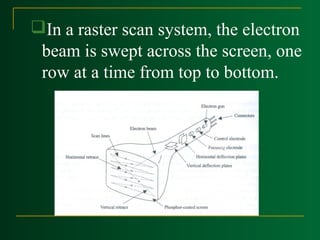
In a raster scan system, the electron
beam is swept across the screen, one
row at a time from top to bottom.






As the electron beam moves across each
row, the beam intensity is turned on and
off to create a pattern of illuminated
spots.
Picture definition is stored in a memory
area called the refresh buffer or frame
buffer.
Refresh buffer or frame buffer: This
memory area holds the set of intensity
values for all the screen points.
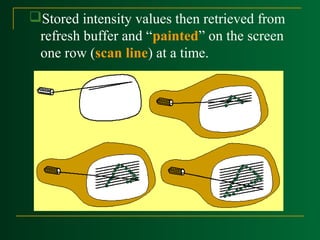
Stored intensity values then retrieved from
refresh buffer and “painted” on the screen
one row (scan line) at a time.
Intensity range for pixel positions depends on
the capability of the raster system.
A black-and-white system: each screen point
is either on or off, so only one bit per pixel is
needed to control the intensity of screen
positions.
On a black-and-white system with one bit per
pixel, the frame buffer is called bitmap.
For system with multiple bits per pixel, the
frame buffer is called pixmap.
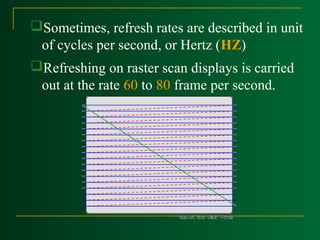
Sometimes, refresh rates are described in unit
of cycles per second, or Hertz (HZ)
Refreshing on raster scan displays is carried
out at the rate 60 to 80 frame per second.
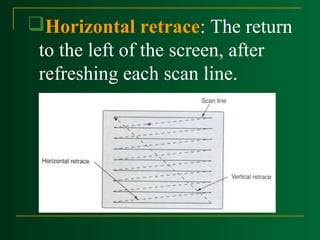
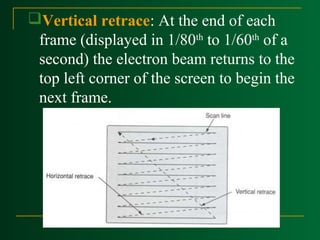
Horizontal retrace: The return
to the left of the screen, after
refreshing each scan line.
Vertical retrace: At the end of each
frame (displayed in 1/80th to 1/60th of a
second) the electron beam returns to the
top left corner of the screen to begin the
next frame.
Interlacing




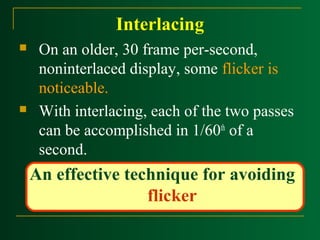
On an older, 30 frame per-second,
noninterlaced display, some flicker is
noticeable.
With interlacing, each of the two passes
can be accomplished in 1/60th of a
second.

An effective technique for avoiding
flicker
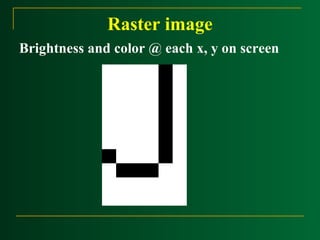
Raster image


The quality of a raster image
is determined by the total
number pixels (resolution),
and the amount of information
in each pixel (color depth)


Raster image
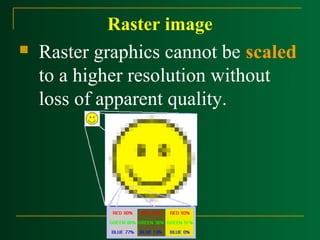
Raster graphics cannot be scaled
to a higher resolution without
loss of apparent quality.
Raster image
Brightness and color @ each x, y on screen
Random Scan
Displays




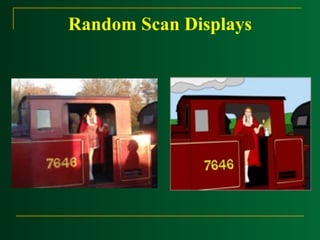
Random Scan Displays
Random scan display is the use of
geometrical primitives such as
points, lines, curves, and polygons,
which are all based upon
mathematical equation.
Raster Scan is the representation of
images as a collection of pixels
(dots)
Random Scan Displays




In a random scan display, a CRT has the
electron beam directed only to the parts
of the screen where a picture is to be
drawn.
Random scan monitors draw a picture
one line at a time (Vector display,
Stroke –writing or calligraphic
displays).




Random Scan Displays
Refresh rate depends on the
number of lines to be displayed.

Picture definition is now stored
as a line-drawing commands an
area of memory referred to as
refresh display file (display
list).
Random Scan Displays


To display a picture, the
system cycle through the set of
commands in the display file,
drawing each component line
in turn.
Random Scan Displays


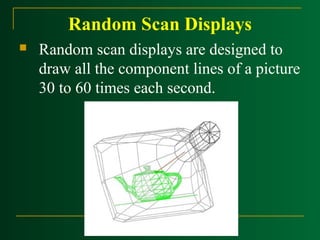
Random scan displays are designed to
draw all the component lines of a picture
30 to 60 times each second.
Random Scan Displays
Color CRT
Monitors
Color CRT Monitors


A CRT monitor displays color
pictures by using a
combination of phosphors that
emit different

color lights.
Methods
1. Beam Penetration
2. Shadow Mask
Beam Penetration
Method
Beam Penetration Method


Two layers of phosphor (red and green)
are coated onto the inside of the CRT
screen.



The display color depends on haw far the
electron beam penetrates into the
phosphor layers.
Beam Penetration Method
The speed of the electrons, and the screen
color at any point, is controlled by the beam
acceleration voltage.
The beam penetration method:
 Used with random scan monitors
 Only four colors are possible (red, green,
orange, and yellow).
 Quality of pictures is not as good as with
other methods.

Shadow Mask
Method
Shadow Mask Method
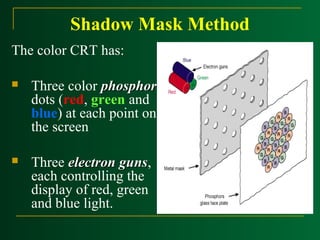
The color CRT has:


Three color phosphor
dots (red, green and
blue) at each point on
the screen



Three electron guns,
guns
each controlling the
display of red, green
and blue light.


We obtain color variations by varying the
intensity levels of the three electron beam.

Advantages:


Used in raster scan system (including color
TV)



Designed as RGB monitors.



High quality raster graphics system have 24
bits per pixel in the frame buffer (a full color
system or a true color system)
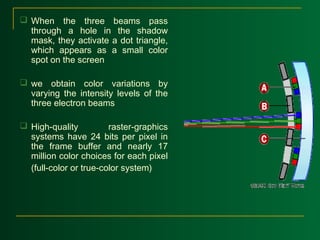
 When the three beams pass
through a hole in the shadow
mask, they activate a dot triangle,
which appears as a small color
spot on the screen
 we obtain color variations by
varying the intensity levels of the
three electron beams
 High-quality
raster-graphics
systems have 24 bits per pixel in
the frame buffer and nearly 17
million color choices for each pixel
(full-color or true-color system)
Direct-View Storage Tubes(DVST)
It stores the picture information inside
the CRT instead of refreshing the
screen.
Two electron guns
 Primary gun – stores the picture
pattern
 Flood gun – maintains the picture
display
Advantage and Disadvantage
Adv - No refreshing & Flickering
Disadv - Do not display color and the
selected parts of a picture cannot be erased
Erasing and redrawing take several
seconds for complex pictures

Raster Scan and Raster Scan Displays

  • 1.
  • 2.
    In a rasterscan system, the electron beam is swept across the screen, one row at a time from top to bottom.
  • 3.
       As the electronbeam moves across each row, the beam intensity is turned on and off to create a pattern of illuminated spots. Picture definition is stored in a memory area called the refresh buffer or frame buffer. Refresh buffer or frame buffer: This memory area holds the set of intensity values for all the screen points.
  • 4.
    Stored intensity valuesthen retrieved from refresh buffer and “painted” on the screen one row (scan line) at a time.
  • 5.
    Intensity range forpixel positions depends on the capability of the raster system. A black-and-white system: each screen point is either on or off, so only one bit per pixel is needed to control the intensity of screen positions. On a black-and-white system with one bit per pixel, the frame buffer is called bitmap. For system with multiple bits per pixel, the frame buffer is called pixmap.
  • 6.
    Sometimes, refresh ratesare described in unit of cycles per second, or Hertz (HZ) Refreshing on raster scan displays is carried out at the rate 60 to 80 frame per second.
  • 7.
    Horizontal retrace: Thereturn to the left of the screen, after refreshing each scan line.
  • 8.
    Vertical retrace: Atthe end of each frame (displayed in 1/80th to 1/60th of a second) the electron beam returns to the top left corner of the screen to begin the next frame.
  • 9.
    Interlacing   On an older,30 frame per-second, noninterlaced display, some flicker is noticeable. With interlacing, each of the two passes can be accomplished in 1/60th of a second. An effective technique for avoiding flicker
  • 10.
    Raster image  The qualityof a raster image is determined by the total number pixels (resolution), and the amount of information in each pixel (color depth)
  • 11.
     Raster image Raster graphicscannot be scaled to a higher resolution without loss of apparent quality.
  • 12.
    Raster image Brightness andcolor @ each x, y on screen
  • 13.
  • 14.
      Random Scan Displays Randomscan display is the use of geometrical primitives such as points, lines, curves, and polygons, which are all based upon mathematical equation. Raster Scan is the representation of images as a collection of pixels (dots)
  • 15.
    Random Scan Displays   Ina random scan display, a CRT has the electron beam directed only to the parts of the screen where a picture is to be drawn. Random scan monitors draw a picture one line at a time (Vector display, Stroke –writing or calligraphic displays).
  • 16.
      Random Scan Displays Refreshrate depends on the number of lines to be displayed. Picture definition is now stored as a line-drawing commands an area of memory referred to as refresh display file (display list).
  • 17.
    Random Scan Displays  Todisplay a picture, the system cycle through the set of commands in the display file, drawing each component line in turn.
  • 18.
    Random Scan Displays  Randomscan displays are designed to draw all the component lines of a picture 30 to 60 times each second.
  • 19.
  • 20.
  • 21.
    Color CRT Monitors  ACRT monitor displays color pictures by using a combination of phosphors that emit different color lights.
  • 22.
  • 23.
  • 24.
    Beam Penetration Method  Twolayers of phosphor (red and green) are coated onto the inside of the CRT screen.  The display color depends on haw far the electron beam penetrates into the phosphor layers.
  • 25.
    Beam Penetration Method Thespeed of the electrons, and the screen color at any point, is controlled by the beam acceleration voltage. The beam penetration method:  Used with random scan monitors  Only four colors are possible (red, green, orange, and yellow).  Quality of pictures is not as good as with other methods. 
  • 26.
  • 27.
    Shadow Mask Method Thecolor CRT has:  Three color phosphor dots (red, green and blue) at each point on the screen  Three electron guns, guns each controlling the display of red, green and blue light.
  • 28.
     We obtain colorvariations by varying the intensity levels of the three electron beam. Advantages:  Used in raster scan system (including color TV)  Designed as RGB monitors.  High quality raster graphics system have 24 bits per pixel in the frame buffer (a full color system or a true color system)
  • 29.
     When thethree beams pass through a hole in the shadow mask, they activate a dot triangle, which appears as a small color spot on the screen  we obtain color variations by varying the intensity levels of the three electron beams  High-quality raster-graphics systems have 24 bits per pixel in the frame buffer and nearly 17 million color choices for each pixel (full-color or true-color system)
  • 30.
  • 31.
    It stores thepicture information inside the CRT instead of refreshing the screen. Two electron guns  Primary gun – stores the picture pattern  Flood gun – maintains the picture display
  • 32.
    Advantage and Disadvantage Adv- No refreshing & Flickering Disadv - Do not display color and the selected parts of a picture cannot be erased Erasing and redrawing take several seconds for complex pictures