Matricides  MATRICES  BY: Brendan, Gloria, Essence, Darrius   3 rd  Period  May/20/2008
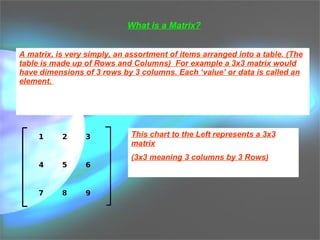
What is a Matrix? A matrix, is very simply, an assortment of items arranged into a table. (The table is made up of Rows and Columns)  For example a 3x3 matrix would have dimensions of 3 rows by 3 columns. Each ‘value’ or data is called an element.  This chart to the Left represents a 3x3 matrix (3x3 meaning 3 columns by 3 Rows)
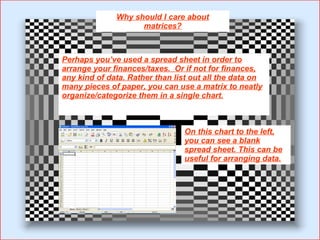
Why should I care about matrices? Perhaps you’ve used a spread sheet in order to arrange your finances/taxes.  Or if not for finances, any kind of data. Rather than list out all the data on many pieces of paper, you can use a matrix to neatly organize/categorize them in a single chart. On this chart to the left, you can see a blank spread sheet. This can be useful for arranging data.
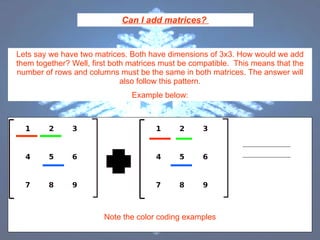
Can I add matrices?  Lets say we have two matrices. Both have dimensions of 3x3. How would we add them together? Well, first both matrices must be compatible.  This means that the number of rows and columns must be the same in both matrices. The answer will also follow this pattern. Example below: Note the color coding examples
4  6 10  12 14  16  18 Is the resulting Matrix. Note how the Dimensions stay as 3x3 Now how did I do that? Simply By adding straight across the matrices.  1+1=2 which becomes the 1 st  slot 2+2=4 which is the 2 nd  slot, and so on. On the previous page, note how I Color coded the numbers that add together
If I can add, then I must be able to subtract! Subtracting can also be done in the same fashion as adding. However instead of adding, you subtract, Straight across, as in the previous example. (Obviously we subtract the elements, because we are doing a subtraction problem) Example can be provided on board, if requested
Then that means… I can multiply matrices too! Yes… however, this is one condition!  In order to multiply two matrices together, the number of columns in the first matrix, must contain the same number of elements as the rows of the second matrix. So. 2x2 matrix multiplied by a 2x3 matrix These can be multiplied together, because the first matrix contains 2 columns, and the second matrix contains 2 rows. The resulting matrix, will have the dimensions of the “Outside numbers, highlighted in blue” So the resulting matrix will have dimensions of 2x3 (Example provided on board)
Determinant How does one do a determinant problem? This is real easy stuff. Simply grab a calculator, and make a matrix (what ever dimensions) Then type 2 nd , math, scroll over to MATH and pick Det ( “ Det(‘ should appear on your screen, simply put the matrix you made into the brackets and close it off with a bracket. Det([A])  Is what should be on your screen.
Inverses! All you need to know regarding inverses, is that To find the inverse, the equation is as follows. A x A^-1=I In order to do this on the calculator Make a matrix, select the matrix, then hit the X^-1 button You should have something that looks like this [a]^-1
Identity Matrix 0  0 0  1  0 0  0  1 This is an Identity matrix 3x3
Example #1 E=[ 7 0]   F=[5  -1]   [3 -1]  [7  6]   [-3 4]  [-2  0] E+F=_______ Answer: [12 -1] [10 5] [-10  8]
Example #2 2F-3E 2[5 -1]  -  3[7  0] [7  6]  [3  -1]  [-2  0]  [-3  4]  Answer: [-11  -2] [5  15] [5  12]
Example #3 -5G -5[4  2] [6  1] Answer: [-20  10] [-30  -51]
Example #4 3F 3[5  -1] [7  6] [-2  0] Answer: [15  -3] [21  18] [-6  0]
Example #5 2(E +F) 2([7  0]  +  [5  -1]) [3  -1]  [7  6] [-3  4]  [-2  0] Answer:[24  -21] [20  10] [-10  8]
Example #6 GH [4  -2]  * [-1  4] [6  1]  [6  2]  Answer:  [8  4] [36  2]

Discrete_Matrices

  • 1.
    Matricides MATRICES BY: Brendan, Gloria, Essence, Darrius 3 rd Period May/20/2008
  • 2.
    What is aMatrix? A matrix, is very simply, an assortment of items arranged into a table. (The table is made up of Rows and Columns) For example a 3x3 matrix would have dimensions of 3 rows by 3 columns. Each ‘value’ or data is called an element. This chart to the Left represents a 3x3 matrix (3x3 meaning 3 columns by 3 Rows)
  • 3.
    Why should Icare about matrices? Perhaps you’ve used a spread sheet in order to arrange your finances/taxes. Or if not for finances, any kind of data. Rather than list out all the data on many pieces of paper, you can use a matrix to neatly organize/categorize them in a single chart. On this chart to the left, you can see a blank spread sheet. This can be useful for arranging data.
  • 4.
    Can I addmatrices? Lets say we have two matrices. Both have dimensions of 3x3. How would we add them together? Well, first both matrices must be compatible. This means that the number of rows and columns must be the same in both matrices. The answer will also follow this pattern. Example below: Note the color coding examples
  • 5.
    4 610 12 14 16 18 Is the resulting Matrix. Note how the Dimensions stay as 3x3 Now how did I do that? Simply By adding straight across the matrices. 1+1=2 which becomes the 1 st slot 2+2=4 which is the 2 nd slot, and so on. On the previous page, note how I Color coded the numbers that add together
  • 6.
    If I canadd, then I must be able to subtract! Subtracting can also be done in the same fashion as adding. However instead of adding, you subtract, Straight across, as in the previous example. (Obviously we subtract the elements, because we are doing a subtraction problem) Example can be provided on board, if requested
  • 7.
    Then that means…I can multiply matrices too! Yes… however, this is one condition! In order to multiply two matrices together, the number of columns in the first matrix, must contain the same number of elements as the rows of the second matrix. So. 2x2 matrix multiplied by a 2x3 matrix These can be multiplied together, because the first matrix contains 2 columns, and the second matrix contains 2 rows. The resulting matrix, will have the dimensions of the “Outside numbers, highlighted in blue” So the resulting matrix will have dimensions of 2x3 (Example provided on board)
  • 8.
    Determinant How doesone do a determinant problem? This is real easy stuff. Simply grab a calculator, and make a matrix (what ever dimensions) Then type 2 nd , math, scroll over to MATH and pick Det ( “ Det(‘ should appear on your screen, simply put the matrix you made into the brackets and close it off with a bracket. Det([A]) Is what should be on your screen.
  • 9.
    Inverses! All youneed to know regarding inverses, is that To find the inverse, the equation is as follows. A x A^-1=I In order to do this on the calculator Make a matrix, select the matrix, then hit the X^-1 button You should have something that looks like this [a]^-1
  • 10.
    Identity Matrix 0 0 0 1 0 0 0 1 This is an Identity matrix 3x3
  • 11.
    Example #1 E=[7 0] F=[5 -1] [3 -1] [7 6] [-3 4] [-2 0] E+F=_______ Answer: [12 -1] [10 5] [-10 8]
  • 12.
    Example #2 2F-3E2[5 -1] - 3[7 0] [7 6] [3 -1] [-2 0] [-3 4] Answer: [-11 -2] [5 15] [5 12]
  • 13.
    Example #3 -5G-5[4 2] [6 1] Answer: [-20 10] [-30 -51]
  • 14.
    Example #4 3F3[5 -1] [7 6] [-2 0] Answer: [15 -3] [21 18] [-6 0]
  • 15.
    Example #5 2(E+F) 2([7 0] + [5 -1]) [3 -1] [7 6] [-3 4] [-2 0] Answer:[24 -21] [20 10] [-10 8]
  • 16.
    Example #6 GH[4 -2] * [-1 4] [6 1] [6 2] Answer: [8 4] [36 2]