Chapter 5:

System Software:
Operating Systems
and Utility Programs
Learning Objectives
1. Understand the difference between system software and
application software.
2. Explain the different functions of an operating system and
discuss some ways that operating systems enhance
processing efficiency.
3. List several ways in which operating systems differ from one
another.
4. Name today’s most widely used operating systems for
personal computers and servers.

Understanding Computers: Today and Tomorrow, 14th Edition

2
2
Learning Objectives
5. State several devices other than personal computers and
servers that require an operating system and list one possible
operating system for each type of device.
6. Discuss the role of utility programs and outline several tasks
these programs perform.
7. Describe what the operating systems of the future might be
like.

Understanding Computers: Today and Tomorrow, 14th Edition

3
Overview
• This chapter covers:
– Differences between system software and application
software
– Functions of and general differences between operating
systems
– Specific operating systems most widely used today
– Functions of and various types of utility programs
– A look at future of operating systems

Understanding Computers: Today and Tomorrow, 14th Edition

4
4
System Software vs. Application
Software
• System Software
– The operating system and utility programs that control a
computer system and allow you to use your computer
• Enables the boot process, launches applications,
transfers files, controls hardware configuration,
manages files on the hard drive, and protects from
unauthorized use
• Application Software
– Programs that allow a user to perform specific tasks on a
computer
• Word processing, playing games, preparing taxes,
browsing the Web, listening to music, etc.
Understanding Computers: Today and Tomorrow, 14th Edition

5
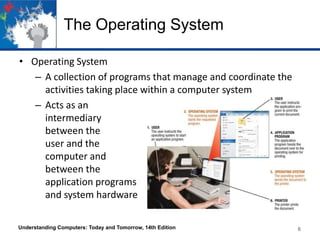
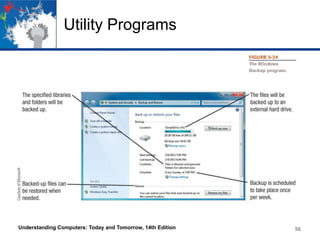
The Operating System
• Operating System
– A collection of programs that manage and coordinate the
activities taking place within a computer system
– Acts as an
intermediary
between the
user and the
computer and
between the
application programs
and system hardware
Understanding Computers: Today and Tomorrow, 14th Edition

6
The Operating System
• Functions of an Operating System
– Interfacing with Users (typically via a GUI)
– Booting the Computer
• Loads essential part of operating system (kernel) into
memory
• Reads opening batch of instructions
• Determines hardware connected to computer
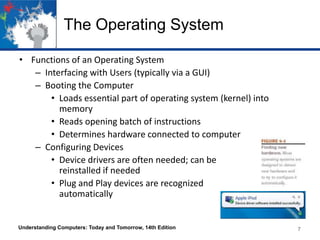
– Configuring Devices
• Device drivers are often needed; can be
reinstalled if needed
• Plug and Play devices are recognized
automatically

Understanding Computers: Today and Tomorrow, 14th Edition

7
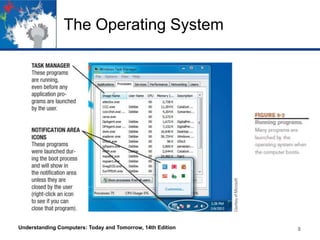
The Operating System

Understanding Computers: Today and Tomorrow, 14th Edition

8
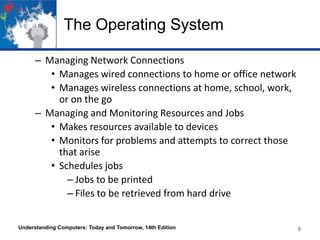
The Operating System
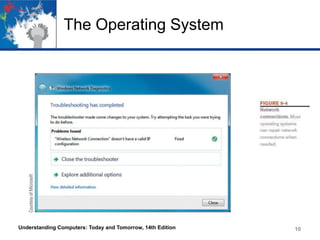
– Managing Network Connections
• Manages wired connections to home or office network
• Manages wireless connections at home, school, work,
or on the go
– Managing and Monitoring Resources and Jobs
• Makes resources available to devices
• Monitors for problems and attempts to correct those
that arise
• Schedules jobs
– Jobs to be printed
– Files to be retrieved from hard drive
Understanding Computers: Today and Tomorrow, 14th Edition

9
The Operating System

Understanding Computers: Today and Tomorrow, 14th Edition

10
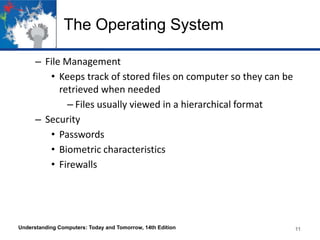
The Operating System
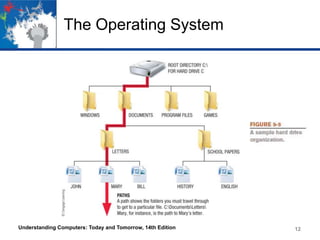
– File Management
• Keeps track of stored files on computer so they can be
retrieved when needed
– Files usually viewed in a hierarchical format
– Security
• Passwords
• Biometric characteristics
• Firewalls

Understanding Computers: Today and Tomorrow, 14th Edition

11
The Operating System

Understanding Computers: Today and Tomorrow, 14th Edition

12
The Operating System
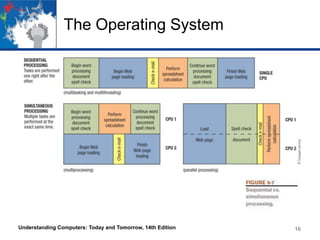
• Processing Techniques for Increased Efficiency
– Multitasking
• The ability of an operating system to have more than
one program (task) open at one time
– CPU rotates between tasks
– Switching is done quickly
– Appears as though all programs executing at the
same time

Understanding Computers: Today and Tomorrow, 14th Edition

13
The Operating System
– Multithreading
• The ability to rotate between multiple threads so that
processing is completed faster and more efficiently
• Thread
– Sequence of instructions within a program that is
independent of other thread
– Multiprocessing and Parallel Processing
• Multiple processors (or multiple cores) are used in one
computer system to perform work more efficiently
• Tasks are performed sequentially

Understanding Computers: Today and Tomorrow, 14th Edition

14
The Operating System
• Multiprocessing
– Each CPU (or core) typically works on a different job
– Used with personal computers with multi-core
processors
• Parallel Processing
– CPUs or cores typically works together to complete
one job more quickly
– Used with servers and mainframes
– In either case, tasks are performed simultaneously

Understanding Computers: Today and Tomorrow, 14th Edition

15
The Operating System

Understanding Computers: Today and Tomorrow, 14th Edition

16
The Operating System
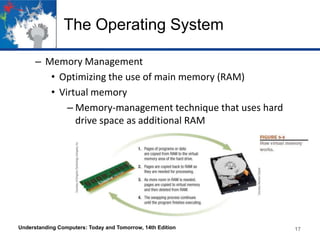
– Memory Management
• Optimizing the use of main memory (RAM)
• Virtual memory
– Memory-management technique that uses hard
drive space as additional RAM

Understanding Computers: Today and Tomorrow, 14th Edition

17
The Operating System
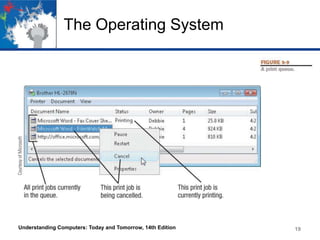
– Buffering and Spooling
• Used with printers and other peripheral devices
• Buffer
– Area in RAM or on the hard drive designated to
hold input and output on their way in or out of the
system
• Spooling
– Placing items in a buffer so they can be retrieved by
the appropriate device when needed

Understanding Computers: Today and Tomorrow, 14th Edition

18
The Operating System

Understanding Computers: Today and Tomorrow, 14th Edition

19
The Operating System
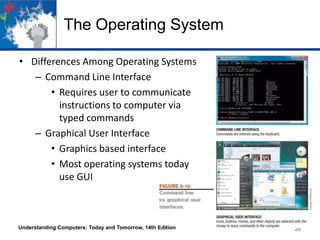
• Differences Among Operating Systems
– Command Line Interface
• Requires user to communicate
instructions to computer via
typed commands
– Graphical User Interface
• Graphics based interface
• Most operating systems today
use GUI

Understanding Computers: Today and Tomorrow, 14th Edition

20
Quick Quiz
1. Which of the following processing techniques allows a
computer to work with more than one program at a time?
a. Parallel processing
b. Virtual memory
c. Multitasking
2. True or False: Most operating systems today use a command
line interface.
3. _____________ is the task included with operating systems
that allows to you keep track of the files stored on a PC.
Answers:
1) c; 2) False; 3) File management
Understanding Computers: Today and Tomorrow, 14th Edition

21
The Operating System
– Types of Operating Systems
• Personal (Desktop) Operating Systems
– Designed to be installed on a single computer
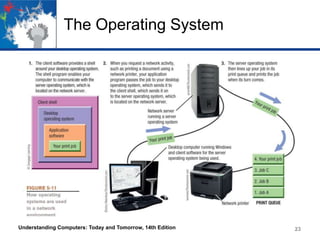
• Server (Network) Operating Systems
– Designed to be installed on a network server
– Client computers still use a personal operating
system
– Server operating system controls access to network
resources
• Many operating systems come in both versions
• Mobile and embedded operating systems also exist
Understanding Computers: Today and Tomorrow, 14th Edition

22
The Operating System

Understanding Computers: Today and Tomorrow, 14th Edition

23
The Operating System
– The Types of Processors Supported
• Desktop, mobile, server processors
• 32-bit or 64-bit CPUs
– Support for Virtualization and Other Technologies
• New types of buses
• Virtualization
• Power-consumption concerns
• Touch and gesture input
• Web-based software

Understanding Computers: Today and Tomorrow, 14th Edition

24
Operating Systems for Personal
Computers and Servers
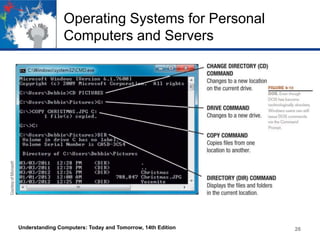
• DOS (Disk Operating System)
– DOS traditionally used a command-line interface
– Dominant operating system in the 1980s and early 1990s
– PC-DOS
• Created originally for IBM microcomputers
– MS-DOS
• Used with IBM-compatible computers
– Can enter DOS commands in Windows

Understanding Computers: Today and Tomorrow, 14th Edition

25
Operating Systems for Personal
Computers and Servers

Understanding Computers: Today and Tomorrow, 14th Edition

26
Operating Systems for Personal
Computers and Servers
• Windows
– The predominant personal operating system developed by
Microsoft Corporation
– Windows 1.0 through Windows XP
• Windows 1.0 released in 1985
– Windows 1.0 through Windows 3.x were operating
environments for DOS
– Graphical shell wrapped around DOS
– Designed to make using DOS easier

Understanding Computers: Today and Tomorrow, 14th Edition

27
Operating Systems for Personal
Computers and Servers
– Windows 95, Windows 98, and Windows ME
• Designed for personal computers
– Windows NT (New Technology)
• First 32-bit version of Windows designed for high-end
workstations and servers
• Replaced by Windows 2000
– Windows XP
• Replaced Windows
• Support for new hardware, networking and the
internet, multimedia, and pen input were included
• Microsoft will provide support until 2014
Understanding Computers: Today and Tomorrow, 14th Edition

28
Operating Systems for Personal
Computers and Servers
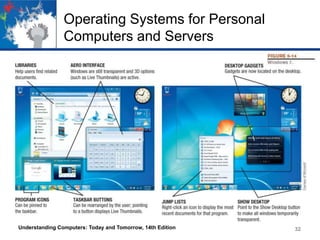
– Windows Vista
• Replaced Windows 2000
• Was current version until the release of Windows 7
• Uses an Aero interface
– Transparent windows
– Dynamic elements such as Live Thumbnails of task
bar buttons and a Flip 3d feature
• Additional features
– Sidebar, Instant Search
– Built-in security
– Much improved networking, collaboration, and
synchronization tools
Understanding Computers: Today and Tomorrow, 14th Edition

29
Operating Systems for Personal
Computers and Servers
• Hardware requirements for Vista have increased over
earlier versions of Windows
– Windows 7
• Newest version of Windows released Oct. 2009
– 32-bit and 64-bit versions in four editions
– Home Premium (primary version for home users)
– Professional (primary version for businesses)
– Starts up and responds faster than Vista

Understanding Computers: Today and Tomorrow, 14th Edition

30
Operating Systems for Personal
Computers and Servers
• Will run well on netbooks and mobile tablets
• Additional Features
– Device Stage
– Libraries
– HomeGroup for improved home networking
– Support for touch, voice, and pen output
– Improved accessory features
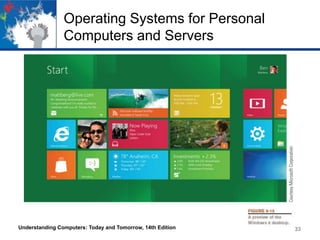
– Windows 8
• Currently under development
• Expected to be released sometime in 2012
Understanding Computers: Today and Tomorrow, 14th Edition

31
Operating Systems for Personal
Computers and Servers

Understanding Computers: Today and Tomorrow, 14th Edition

32
Operating Systems for Personal
Computers and Servers

Understanding Computers: Today and Tomorrow, 14th Edition

33
Operating Systems for Personal
Computers and Servers
– Windows Server and Windows Home Server
• Windows Server is a server version of Windows
– Windows Server 2008 is the most recent version
– Includes Internet Information Services 7.0
» Powerful Web platform for Web applications
and Web services
– Other features
» Built-in virtualization technologies
» New security tools and enhancements
» Streamlined configuration and management
tools
Understanding Computers: Today and Tomorrow, 14th Edition

34
Operating Systems for Personal
Computers and Servers
– Windows Home Server
• Preinstalled on home server devices
• Provides services for a home network
• Can back up all devices in the home automatically
• Mac OS
– Proprietary operating system for computers made by
Apple Corporation
– Based on the UNIX operating system; originally set the
standard for graphical user interfaces
– Mac OS X Family
• Mac OS X Snow Leopard
Understanding Computers: Today and Tomorrow, 14th Edition

35
Operating Systems for Personal
Computers and Servers
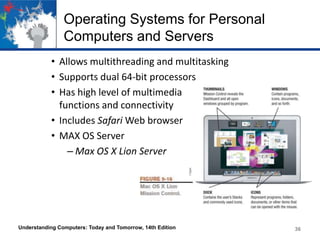
• Allows multithreading and multitasking
• Supports dual 64-bit processors
• Has high level of multimedia
functions and connectivity
• Includes Safari Web browser
• MAX OS Server
– Max OS X Lion Server

Understanding Computers: Today and Tomorrow, 14th Edition

36
Operating Systems for Personal
Computers and Servers
• UNIX
– Operating system developed in the late 1960s for
midrange servers
– Multiuser, multitasking operating system
– More expensive, requires a higher level of technical
knowledge; tends to be harder to install, maintain, and
upgrade
– “UNIX” initially referred to the original UNIX operating
system, now refers to a group of similar operating systems
based on UNIX
– Single UNIX Specification
• A standardized UNIX environment
Understanding Computers: Today and Tomorrow, 14th Edition

37
Operating Systems for Personal
Computers and Servers
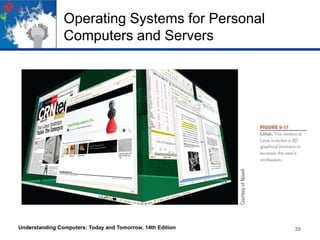
• Linux
– Developed by Linus Torvalds in 1991—resembles UNIX but
was developed independently
– Is increasingly being used with personal computers,
servers, mainframes, and supercomputers
– Is open-source software; has been collaboratively modified
by volunteer programmers all over the world
– Originally used a command line interface, most recent
versions use a GUI
– Strong support from mainstream companies, such as Sun,
IBM, HP, and Novell
– Much less expensive than Windows or Mac OS
Understanding Computers: Today and Tomorrow, 14th Edition

38
Operating Systems for Personal
Computers and Servers

Understanding Computers: Today and Tomorrow, 14th Edition

39
Quick Quiz
1. Which of the following is the most recent personal version of
Windows?
a. Windows 7
b. Windows Leopard
c. Windows XP
2. True or False: Linux is an open source operating system
available for free via the Internet.
3. The operating system most commonly used on Apple personal
computers is ______________________.
Answers:
1) a; 2) True; 3) Mac OS
Understanding Computers: Today and Tomorrow, 14th Edition

40
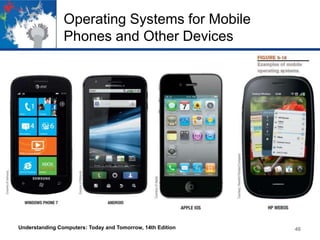
Operating Systems for Mobile
Phones and Other Devices
• Mobile and Embedded Versions of Windows
– Windows Phone 7
• Newest version of Windows designed for mobile
phones
• Designed primarily for touch input
• Has new tilt-based Smart screen interface
– Tiles contain real-time information and can be
customized by user
• Contains apps such as mobile versions of Internet
Explorer and Microsoft Word, Excel, and PowerPoint
Understanding Computers: Today and Tomorrow, 14th Edition

41
Operating Systems for Mobile
Phones and Other Devices
– Windows Embedded
• Family of operating systems designed primarily for
consumer and industrial devices that are not personal
computers
– Cash registers, digital photo frames, GPS devices,
ATM machines, medical devices, and robots
– Android
• Linux-based operating system created with current
mobile device capabilities in mind
– Can create applications that take full advantage of
all the features a mobile device has to offer
Understanding Computers: Today and Tomorrow, 14th Edition

42
Operating Systems for Mobile
Phones and Other Devices
• Open program platform
– Hardware manufactures must adhere to certain
specifications
• Has a customizable Home screen and a standard set of
apps
• Supports multitasking, NFC mobile payment
transactions, Internet phone calls, and a variety of
sensors
• Can select, copy, and paste text
• Also used with Google TV hardware and will be used
with Sony’s upcoming PlayStation Play Phone
Understanding Computers: Today and Tomorrow, 14th Edition

43
Operating Systems for Mobile
Phones and Other Devices
– iOS
• Designed for Apple Mobile phones and mobile devices
– Current version is iOS 5
– Supports multitasking
– Includes Safari Web browser and apps for email,
messaging, music, search, and video calling via
FaceTime

Understanding Computers: Today and Tomorrow, 14th Edition

44
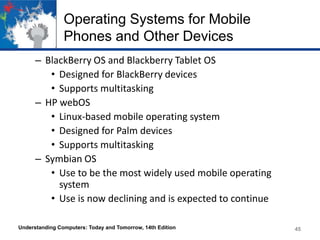
Operating Systems for Mobile
Phones and Other Devices
– BlackBerry OS and Blackberry Tablet OS
• Designed for BlackBerry devices
• Supports multitasking
– HP webOS
• Linux-based mobile operating system
• Designed for Palm devices
• Supports multitasking
– Symbian OS
• Use to be the most widely used mobile operating
system
• Use is now declining and is expected to continue
Understanding Computers: Today and Tomorrow, 14th Edition

45
Operating Systems for Mobile
Phones and Other Devices

Understanding Computers: Today and Tomorrow, 14th Edition

46
Operating Systems for Larger
Computers
• Larger computers sometimes use operating systems designed
solely for that type of system
• IBM’s z/OS is designed for IBM mainframes
• Windows, UNIX, and Linux are also used with servers,
mainframes, and supercomputers
• Often a group of Linux computers are linked together to form
a Linux supercomputing cluster
• Larger computers may also use a customized operating system
based on a conventional operating system

Understanding Computers: Today and Tomorrow, 14th Edition

47
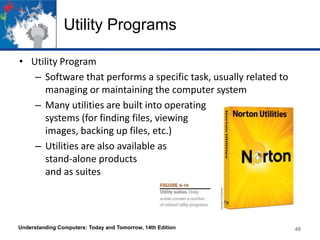
Utility Programs
• Utility Program
– Software that performs a specific task, usually related to
managing or maintaining the computer system
– Many utilities are built into operating
systems (for finding files, viewing
images, backing up files, etc.)
– Utilities are also available as
stand-alone products
and as suites

Understanding Computers: Today and Tomorrow, 14th Edition

48
Utility Programs
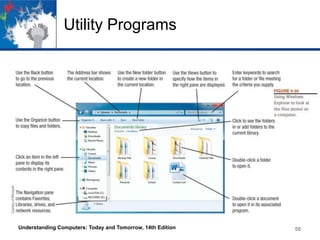
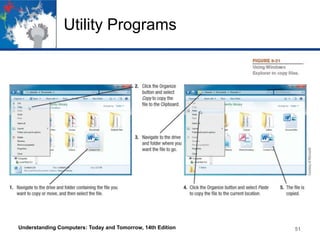
• File Management Programs
– Enable the user to perform file management tasks, such
as:
• Looking at the contents of a storage medium
• Copying, moving, and renaming files and folders
• Deleting files and folders
• File management program in Windows is Windows
Explorer

Understanding Computers: Today and Tomorrow, 14th Edition

49
Utility Programs

Understanding Computers: Today and Tomorrow, 14th Edition

50
Utility Programs

Understanding Computers: Today and Tomorrow, 14th Edition

51
Utility Programs
– Search Tools
• Designed to search for documents and other files on
the user’s hard drive
• Are often integrated into file management programs
• Third-party search tools are also available
– Diagnostic and Disk Management Programs
• Diagnostic programs evaluate your system and make
recommendations for fixing any errors found
• Disk management programs diagnose and repair
problems related to your hard drive

Understanding Computers: Today and Tomorrow, 14th Edition

52
Utility Programs
– Uninstall and Cleanup Utilities
• Uninstall utilities remove programs from your hard
drive without leaving bits and pieces behind

• Important to properly uninstall programs, not just
delete them
• Clean up utilities delete temporary files
– Recycle Bin
– Temporary Internet files
– Temporary installation files

Understanding Computers: Today and Tomorrow, 14th Edition

53
Utility Programs
– File compression programs reduce the size of files so they
take up less storage space on a storage medium or can be
transmitted faster over the Internet
• Both zip and unzip files
• WinZip (Windows users) and Stuffit (Mac users)
– Backup and Recovery Utilities
• Make the backup and restoration process easier
• Creating a backup means making a duplicate copy of
data and/or other computer content
– Can use a recordable or rewritable CD or DVD disc,
a USB flash drive, or an external hard drive
• Good backup procedures are critical for businesses
Understanding Computers: Today and Tomorrow, 14th Edition

54
Utility Programs
• Individuals should back up important documents,
e-mail, photos, home video, etc.
• Back up your entire computer once all programs have
been installed, so your system can be restored to that
configuration.
• Can do the backup manually or use backup utility
programs (stand alone or those built into operating
systems)

Understanding Computers: Today and Tomorrow, 14th Edition

55
Utility Programs

Understanding Computers: Today and Tomorrow, 14th Edition

56
Utility Programs
– Antivirus, Antispyware, Firewalls, and Other Security
Programs
• Security Concerns
– Viruses, spyware, identity theft, phishing schemes
• Security programs protect computers and users and it is
essential that all computer users protect themselves
and their computers
– Antivirus programs
– Antispyware programs
– Firewalls
– Many are included in Windows and other operating
systems
Understanding Computers: Today and Tomorrow, 14th Edition

57
The Future of Operating Systems
• Will continue to become more user-friendly
• Will eventually be driven primarily by a voice interface, touch,
and/or gesture interface
• Likely to continue to become more stable and self-healing
• Will likely continue to include security and other technological
improvements as they become available
• Will almost certainly include improvements in the areas of
synchronizing and coordinating data and activities among a
persons various computing and communicating devices
• May be used primarily to access software available through
the Internet or other networks
Understanding Computers: Today and Tomorrow, 14th Edition

58
Quick Quiz
1. Which of the following is the type of utility program used to make a
file smaller for transfer over the Internet?
a. Uninstall program
b. Antivirus program
c. File compression program
2. True or False: A file management program can be used to see the
files located on a storage medium.
3. A(n) ______________________ is a duplicate copy of one or more
files that can be used if there is a problem with the original files.
Answers:
1) c; 2) True; 3) backup

Understanding Computers: Today and Tomorrow, 14th Edition

59
Summary
•
•
•
•
•
•
•

System Software vs. Application Software
The Operating System
Operating Systems for Personal Computers and Servers
Operating Systems for Mobile Phones and Other Devices
Operating Systems for Larger Computers
Utility Programs
The Future of Operating Systems

Understanding Computers: Today and Tomorrow, 14th Edition

60

Uc14 chap05

  • 1.
    Chapter 5: System Software: OperatingSystems and Utility Programs
  • 2.
    Learning Objectives 1. Understandthe difference between system software and application software. 2. Explain the different functions of an operating system and discuss some ways that operating systems enhance processing efficiency. 3. List several ways in which operating systems differ from one another. 4. Name today’s most widely used operating systems for personal computers and servers. Understanding Computers: Today and Tomorrow, 14th Edition 2 2
  • 3.
    Learning Objectives 5. Stateseveral devices other than personal computers and servers that require an operating system and list one possible operating system for each type of device. 6. Discuss the role of utility programs and outline several tasks these programs perform. 7. Describe what the operating systems of the future might be like. Understanding Computers: Today and Tomorrow, 14th Edition 3
  • 4.
    Overview • This chaptercovers: – Differences between system software and application software – Functions of and general differences between operating systems – Specific operating systems most widely used today – Functions of and various types of utility programs – A look at future of operating systems Understanding Computers: Today and Tomorrow, 14th Edition 4 4
  • 5.
    System Software vs.Application Software • System Software – The operating system and utility programs that control a computer system and allow you to use your computer • Enables the boot process, launches applications, transfers files, controls hardware configuration, manages files on the hard drive, and protects from unauthorized use • Application Software – Programs that allow a user to perform specific tasks on a computer • Word processing, playing games, preparing taxes, browsing the Web, listening to music, etc. Understanding Computers: Today and Tomorrow, 14th Edition 5
  • 6.
    The Operating System •Operating System – A collection of programs that manage and coordinate the activities taking place within a computer system – Acts as an intermediary between the user and the computer and between the application programs and system hardware Understanding Computers: Today and Tomorrow, 14th Edition 6
  • 7.
    The Operating System •Functions of an Operating System – Interfacing with Users (typically via a GUI) – Booting the Computer • Loads essential part of operating system (kernel) into memory • Reads opening batch of instructions • Determines hardware connected to computer – Configuring Devices • Device drivers are often needed; can be reinstalled if needed • Plug and Play devices are recognized automatically Understanding Computers: Today and Tomorrow, 14th Edition 7
  • 8.
    The Operating System UnderstandingComputers: Today and Tomorrow, 14th Edition 8
  • 9.
    The Operating System –Managing Network Connections • Manages wired connections to home or office network • Manages wireless connections at home, school, work, or on the go – Managing and Monitoring Resources and Jobs • Makes resources available to devices • Monitors for problems and attempts to correct those that arise • Schedules jobs – Jobs to be printed – Files to be retrieved from hard drive Understanding Computers: Today and Tomorrow, 14th Edition 9
  • 10.
    The Operating System UnderstandingComputers: Today and Tomorrow, 14th Edition 10
  • 11.
    The Operating System –File Management • Keeps track of stored files on computer so they can be retrieved when needed – Files usually viewed in a hierarchical format – Security • Passwords • Biometric characteristics • Firewalls Understanding Computers: Today and Tomorrow, 14th Edition 11
  • 12.
    The Operating System UnderstandingComputers: Today and Tomorrow, 14th Edition 12
  • 13.
    The Operating System •Processing Techniques for Increased Efficiency – Multitasking • The ability of an operating system to have more than one program (task) open at one time – CPU rotates between tasks – Switching is done quickly – Appears as though all programs executing at the same time Understanding Computers: Today and Tomorrow, 14th Edition 13
  • 14.
    The Operating System –Multithreading • The ability to rotate between multiple threads so that processing is completed faster and more efficiently • Thread – Sequence of instructions within a program that is independent of other thread – Multiprocessing and Parallel Processing • Multiple processors (or multiple cores) are used in one computer system to perform work more efficiently • Tasks are performed sequentially Understanding Computers: Today and Tomorrow, 14th Edition 14
  • 15.
    The Operating System •Multiprocessing – Each CPU (or core) typically works on a different job – Used with personal computers with multi-core processors • Parallel Processing – CPUs or cores typically works together to complete one job more quickly – Used with servers and mainframes – In either case, tasks are performed simultaneously Understanding Computers: Today and Tomorrow, 14th Edition 15
  • 16.
    The Operating System UnderstandingComputers: Today and Tomorrow, 14th Edition 16
  • 17.
    The Operating System –Memory Management • Optimizing the use of main memory (RAM) • Virtual memory – Memory-management technique that uses hard drive space as additional RAM Understanding Computers: Today and Tomorrow, 14th Edition 17
  • 18.
    The Operating System –Buffering and Spooling • Used with printers and other peripheral devices • Buffer – Area in RAM or on the hard drive designated to hold input and output on their way in or out of the system • Spooling – Placing items in a buffer so they can be retrieved by the appropriate device when needed Understanding Computers: Today and Tomorrow, 14th Edition 18
  • 19.
    The Operating System UnderstandingComputers: Today and Tomorrow, 14th Edition 19
  • 20.
    The Operating System •Differences Among Operating Systems – Command Line Interface • Requires user to communicate instructions to computer via typed commands – Graphical User Interface • Graphics based interface • Most operating systems today use GUI Understanding Computers: Today and Tomorrow, 14th Edition 20
  • 21.
    Quick Quiz 1. Whichof the following processing techniques allows a computer to work with more than one program at a time? a. Parallel processing b. Virtual memory c. Multitasking 2. True or False: Most operating systems today use a command line interface. 3. _____________ is the task included with operating systems that allows to you keep track of the files stored on a PC. Answers: 1) c; 2) False; 3) File management Understanding Computers: Today and Tomorrow, 14th Edition 21
  • 22.
    The Operating System –Types of Operating Systems • Personal (Desktop) Operating Systems – Designed to be installed on a single computer • Server (Network) Operating Systems – Designed to be installed on a network server – Client computers still use a personal operating system – Server operating system controls access to network resources • Many operating systems come in both versions • Mobile and embedded operating systems also exist Understanding Computers: Today and Tomorrow, 14th Edition 22
  • 23.
    The Operating System UnderstandingComputers: Today and Tomorrow, 14th Edition 23
  • 24.
    The Operating System –The Types of Processors Supported • Desktop, mobile, server processors • 32-bit or 64-bit CPUs – Support for Virtualization and Other Technologies • New types of buses • Virtualization • Power-consumption concerns • Touch and gesture input • Web-based software Understanding Computers: Today and Tomorrow, 14th Edition 24
  • 25.
    Operating Systems forPersonal Computers and Servers • DOS (Disk Operating System) – DOS traditionally used a command-line interface – Dominant operating system in the 1980s and early 1990s – PC-DOS • Created originally for IBM microcomputers – MS-DOS • Used with IBM-compatible computers – Can enter DOS commands in Windows Understanding Computers: Today and Tomorrow, 14th Edition 25
  • 26.
    Operating Systems forPersonal Computers and Servers Understanding Computers: Today and Tomorrow, 14th Edition 26
  • 27.
    Operating Systems forPersonal Computers and Servers • Windows – The predominant personal operating system developed by Microsoft Corporation – Windows 1.0 through Windows XP • Windows 1.0 released in 1985 – Windows 1.0 through Windows 3.x were operating environments for DOS – Graphical shell wrapped around DOS – Designed to make using DOS easier Understanding Computers: Today and Tomorrow, 14th Edition 27
  • 28.
    Operating Systems forPersonal Computers and Servers – Windows 95, Windows 98, and Windows ME • Designed for personal computers – Windows NT (New Technology) • First 32-bit version of Windows designed for high-end workstations and servers • Replaced by Windows 2000 – Windows XP • Replaced Windows • Support for new hardware, networking and the internet, multimedia, and pen input were included • Microsoft will provide support until 2014 Understanding Computers: Today and Tomorrow, 14th Edition 28
  • 29.
    Operating Systems forPersonal Computers and Servers – Windows Vista • Replaced Windows 2000 • Was current version until the release of Windows 7 • Uses an Aero interface – Transparent windows – Dynamic elements such as Live Thumbnails of task bar buttons and a Flip 3d feature • Additional features – Sidebar, Instant Search – Built-in security – Much improved networking, collaboration, and synchronization tools Understanding Computers: Today and Tomorrow, 14th Edition 29
  • 30.
    Operating Systems forPersonal Computers and Servers • Hardware requirements for Vista have increased over earlier versions of Windows – Windows 7 • Newest version of Windows released Oct. 2009 – 32-bit and 64-bit versions in four editions – Home Premium (primary version for home users) – Professional (primary version for businesses) – Starts up and responds faster than Vista Understanding Computers: Today and Tomorrow, 14th Edition 30
  • 31.
    Operating Systems forPersonal Computers and Servers • Will run well on netbooks and mobile tablets • Additional Features – Device Stage – Libraries – HomeGroup for improved home networking – Support for touch, voice, and pen output – Improved accessory features – Windows 8 • Currently under development • Expected to be released sometime in 2012 Understanding Computers: Today and Tomorrow, 14th Edition 31
  • 32.
    Operating Systems forPersonal Computers and Servers Understanding Computers: Today and Tomorrow, 14th Edition 32
  • 33.
    Operating Systems forPersonal Computers and Servers Understanding Computers: Today and Tomorrow, 14th Edition 33
  • 34.
    Operating Systems forPersonal Computers and Servers – Windows Server and Windows Home Server • Windows Server is a server version of Windows – Windows Server 2008 is the most recent version – Includes Internet Information Services 7.0 » Powerful Web platform for Web applications and Web services – Other features » Built-in virtualization technologies » New security tools and enhancements » Streamlined configuration and management tools Understanding Computers: Today and Tomorrow, 14th Edition 34
  • 35.
    Operating Systems forPersonal Computers and Servers – Windows Home Server • Preinstalled on home server devices • Provides services for a home network • Can back up all devices in the home automatically • Mac OS – Proprietary operating system for computers made by Apple Corporation – Based on the UNIX operating system; originally set the standard for graphical user interfaces – Mac OS X Family • Mac OS X Snow Leopard Understanding Computers: Today and Tomorrow, 14th Edition 35
  • 36.
    Operating Systems forPersonal Computers and Servers • Allows multithreading and multitasking • Supports dual 64-bit processors • Has high level of multimedia functions and connectivity • Includes Safari Web browser • MAX OS Server – Max OS X Lion Server Understanding Computers: Today and Tomorrow, 14th Edition 36
  • 37.
    Operating Systems forPersonal Computers and Servers • UNIX – Operating system developed in the late 1960s for midrange servers – Multiuser, multitasking operating system – More expensive, requires a higher level of technical knowledge; tends to be harder to install, maintain, and upgrade – “UNIX” initially referred to the original UNIX operating system, now refers to a group of similar operating systems based on UNIX – Single UNIX Specification • A standardized UNIX environment Understanding Computers: Today and Tomorrow, 14th Edition 37
  • 38.
    Operating Systems forPersonal Computers and Servers • Linux – Developed by Linus Torvalds in 1991—resembles UNIX but was developed independently – Is increasingly being used with personal computers, servers, mainframes, and supercomputers – Is open-source software; has been collaboratively modified by volunteer programmers all over the world – Originally used a command line interface, most recent versions use a GUI – Strong support from mainstream companies, such as Sun, IBM, HP, and Novell – Much less expensive than Windows or Mac OS Understanding Computers: Today and Tomorrow, 14th Edition 38
  • 39.
    Operating Systems forPersonal Computers and Servers Understanding Computers: Today and Tomorrow, 14th Edition 39
  • 40.
    Quick Quiz 1. Whichof the following is the most recent personal version of Windows? a. Windows 7 b. Windows Leopard c. Windows XP 2. True or False: Linux is an open source operating system available for free via the Internet. 3. The operating system most commonly used on Apple personal computers is ______________________. Answers: 1) a; 2) True; 3) Mac OS Understanding Computers: Today and Tomorrow, 14th Edition 40
  • 41.
    Operating Systems forMobile Phones and Other Devices • Mobile and Embedded Versions of Windows – Windows Phone 7 • Newest version of Windows designed for mobile phones • Designed primarily for touch input • Has new tilt-based Smart screen interface – Tiles contain real-time information and can be customized by user • Contains apps such as mobile versions of Internet Explorer and Microsoft Word, Excel, and PowerPoint Understanding Computers: Today and Tomorrow, 14th Edition 41
  • 42.
    Operating Systems forMobile Phones and Other Devices – Windows Embedded • Family of operating systems designed primarily for consumer and industrial devices that are not personal computers – Cash registers, digital photo frames, GPS devices, ATM machines, medical devices, and robots – Android • Linux-based operating system created with current mobile device capabilities in mind – Can create applications that take full advantage of all the features a mobile device has to offer Understanding Computers: Today and Tomorrow, 14th Edition 42
  • 43.
    Operating Systems forMobile Phones and Other Devices • Open program platform – Hardware manufactures must adhere to certain specifications • Has a customizable Home screen and a standard set of apps • Supports multitasking, NFC mobile payment transactions, Internet phone calls, and a variety of sensors • Can select, copy, and paste text • Also used with Google TV hardware and will be used with Sony’s upcoming PlayStation Play Phone Understanding Computers: Today and Tomorrow, 14th Edition 43
  • 44.
    Operating Systems forMobile Phones and Other Devices – iOS • Designed for Apple Mobile phones and mobile devices – Current version is iOS 5 – Supports multitasking – Includes Safari Web browser and apps for email, messaging, music, search, and video calling via FaceTime Understanding Computers: Today and Tomorrow, 14th Edition 44
  • 45.
    Operating Systems forMobile Phones and Other Devices – BlackBerry OS and Blackberry Tablet OS • Designed for BlackBerry devices • Supports multitasking – HP webOS • Linux-based mobile operating system • Designed for Palm devices • Supports multitasking – Symbian OS • Use to be the most widely used mobile operating system • Use is now declining and is expected to continue Understanding Computers: Today and Tomorrow, 14th Edition 45
  • 46.
    Operating Systems forMobile Phones and Other Devices Understanding Computers: Today and Tomorrow, 14th Edition 46
  • 47.
    Operating Systems forLarger Computers • Larger computers sometimes use operating systems designed solely for that type of system • IBM’s z/OS is designed for IBM mainframes • Windows, UNIX, and Linux are also used with servers, mainframes, and supercomputers • Often a group of Linux computers are linked together to form a Linux supercomputing cluster • Larger computers may also use a customized operating system based on a conventional operating system Understanding Computers: Today and Tomorrow, 14th Edition 47
  • 48.
    Utility Programs • UtilityProgram – Software that performs a specific task, usually related to managing or maintaining the computer system – Many utilities are built into operating systems (for finding files, viewing images, backing up files, etc.) – Utilities are also available as stand-alone products and as suites Understanding Computers: Today and Tomorrow, 14th Edition 48
  • 49.
    Utility Programs • FileManagement Programs – Enable the user to perform file management tasks, such as: • Looking at the contents of a storage medium • Copying, moving, and renaming files and folders • Deleting files and folders • File management program in Windows is Windows Explorer Understanding Computers: Today and Tomorrow, 14th Edition 49
  • 50.
    Utility Programs Understanding Computers:Today and Tomorrow, 14th Edition 50
  • 51.
    Utility Programs Understanding Computers:Today and Tomorrow, 14th Edition 51
  • 52.
    Utility Programs – SearchTools • Designed to search for documents and other files on the user’s hard drive • Are often integrated into file management programs • Third-party search tools are also available – Diagnostic and Disk Management Programs • Diagnostic programs evaluate your system and make recommendations for fixing any errors found • Disk management programs diagnose and repair problems related to your hard drive Understanding Computers: Today and Tomorrow, 14th Edition 52
  • 53.
    Utility Programs – Uninstalland Cleanup Utilities • Uninstall utilities remove programs from your hard drive without leaving bits and pieces behind • Important to properly uninstall programs, not just delete them • Clean up utilities delete temporary files – Recycle Bin – Temporary Internet files – Temporary installation files Understanding Computers: Today and Tomorrow, 14th Edition 53
  • 54.
    Utility Programs – Filecompression programs reduce the size of files so they take up less storage space on a storage medium or can be transmitted faster over the Internet • Both zip and unzip files • WinZip (Windows users) and Stuffit (Mac users) – Backup and Recovery Utilities • Make the backup and restoration process easier • Creating a backup means making a duplicate copy of data and/or other computer content – Can use a recordable or rewritable CD or DVD disc, a USB flash drive, or an external hard drive • Good backup procedures are critical for businesses Understanding Computers: Today and Tomorrow, 14th Edition 54
  • 55.
    Utility Programs • Individualsshould back up important documents, e-mail, photos, home video, etc. • Back up your entire computer once all programs have been installed, so your system can be restored to that configuration. • Can do the backup manually or use backup utility programs (stand alone or those built into operating systems) Understanding Computers: Today and Tomorrow, 14th Edition 55
  • 56.
    Utility Programs Understanding Computers:Today and Tomorrow, 14th Edition 56
  • 57.
    Utility Programs – Antivirus,Antispyware, Firewalls, and Other Security Programs • Security Concerns – Viruses, spyware, identity theft, phishing schemes • Security programs protect computers and users and it is essential that all computer users protect themselves and their computers – Antivirus programs – Antispyware programs – Firewalls – Many are included in Windows and other operating systems Understanding Computers: Today and Tomorrow, 14th Edition 57
  • 58.
    The Future ofOperating Systems • Will continue to become more user-friendly • Will eventually be driven primarily by a voice interface, touch, and/or gesture interface • Likely to continue to become more stable and self-healing • Will likely continue to include security and other technological improvements as they become available • Will almost certainly include improvements in the areas of synchronizing and coordinating data and activities among a persons various computing and communicating devices • May be used primarily to access software available through the Internet or other networks Understanding Computers: Today and Tomorrow, 14th Edition 58
  • 59.
    Quick Quiz 1. Whichof the following is the type of utility program used to make a file smaller for transfer over the Internet? a. Uninstall program b. Antivirus program c. File compression program 2. True or False: A file management program can be used to see the files located on a storage medium. 3. A(n) ______________________ is a duplicate copy of one or more files that can be used if there is a problem with the original files. Answers: 1) c; 2) True; 3) backup Understanding Computers: Today and Tomorrow, 14th Edition 59
  • 60.
    Summary • • • • • • • System Software vs.Application Software The Operating System Operating Systems for Personal Computers and Servers Operating Systems for Mobile Phones and Other Devices Operating Systems for Larger Computers Utility Programs The Future of Operating Systems Understanding Computers: Today and Tomorrow, 14th Edition 60