DIGITAL ELECTRONICS
DIGITAL ELECTRONICS
Dr.M.MANIKANDAN
Dr.M.MANIKANDAN
Associate Professor
Associate Professor
Department of Electronics and
Engg.
Engg.
MIT- Campus
MIT- Campus
Anna University
Anna University
PART-1
PART-1
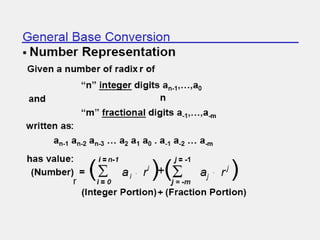
NUMBER SYSTEMS
NUMBER SYSTEMS
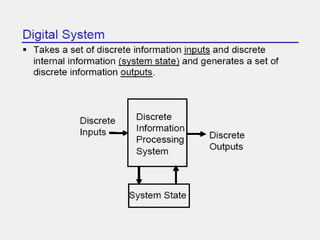
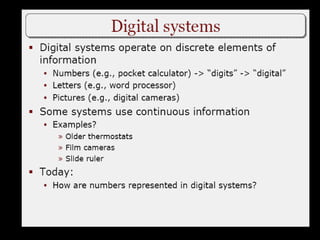
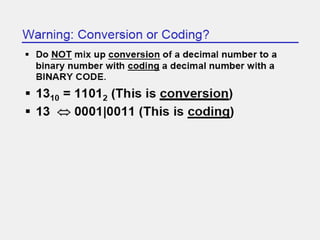
Digital Computer Systems
• Digital systems consider
Digital systems consider discrete
discrete amounts of data.
amounts of data.
• Examples
Examples
26 letters in the alphabet
10 decimal digits
10 decimal digits
• Larger quantities can be built from discrete values:
Larger quantities can be built from discrete values:
Words made of letters
Numbers made of decimal digits (e.g. 239875.32)
• Computers operate on
Computers operate on binary
binary values (0 and 1)
values (0 and 1)
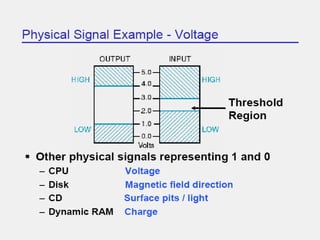
• Easy to represent binary values electrically
Easy to represent binary values electrically
Voltages and currents.
Can be implemented using circuits
Create the building blocks of modern computers
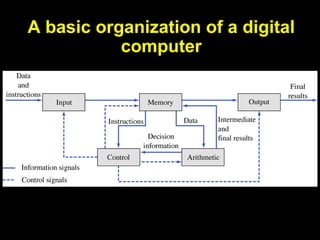
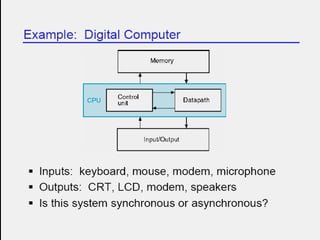
A basic organization of a digital
computer
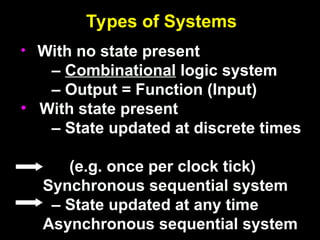
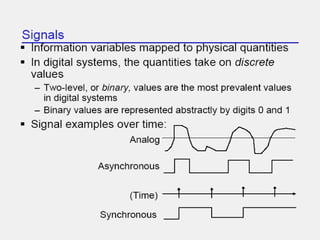
Types of Systems
• With no state present
– Combinational logic system
– Output = Function (Input)
• With state present
– State updated at discrete times
(e.g. once per clock tick)
Synchronous sequential system
– State updated at any time
Asynchronous sequential system
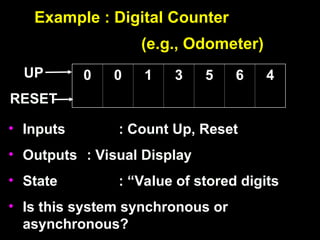
Example : Digital Counter
(e.g., Odometer)
• Inputs : Count Up, Reset
• Outputs : Visual Display
• State : “Value of stored digits
• Is this system synchronous or
asynchronous?
0
0 0
0 1
1 3
3 5
5 6
6 4
4
UP
RESET
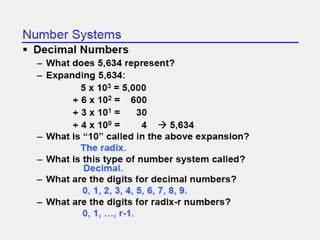
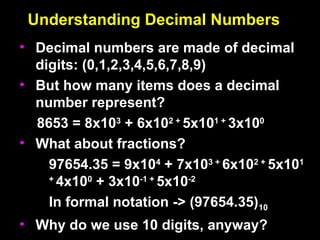
Understanding Decimal Numbers
• Decimal numbers are made of decimal
Decimal numbers are made of decimal
digits: (0,1,2,3,4,5,6,7,8,9)
• But how many items does a decimal
But how many items does a decimal
number represent?
number represent?
8653 = 8x10
8653 = 8x10³
3
+ 6x10
+ 6x10² +
2 +
5x10
5x101 +
1 +
3x10
3x100
0
• What about fractions?
What about fractions?
97654.35 = 9x10
97654.35 = 9x10⁴
4
+ 7x10
+ 7x10³ +
3 +
6x10
6x10² +
2 +
5x10
5x101
1
+
+
4x10
4x100
0
+ 3x10
+ 3x10⁻¹ +
-1 +
5x10
5x10⁻²
-2
In formal notation -> (97654.35)
In formal notation -> (97654.35)10
10
• Why do we use 10 digits, anyway?
Why do we use 10 digits, anyway?
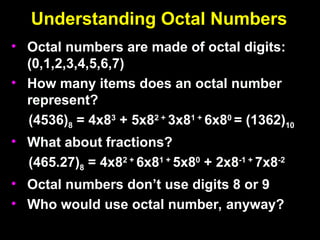
Understanding Octal Numbers
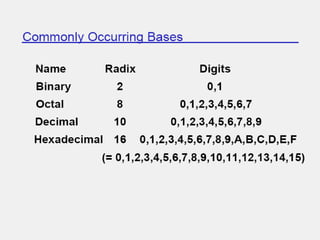
• Octal numbers are made of octal digits:
Octal numbers are made of octal digits:
(0,1,2,3,4,5,6,7)
(0,1,2,3,4,5,6,7)
• How many items does an octal number
How many items does an octal number
represent?
represent?
(4536)
(4536)8
8 = 4x8
= 4x83
3
+ 5x8
+ 5x82 +
2 +
3x8
3x81 +
1 +
6x8
6x80
0
= (1362)
= (1362)10
10
• What about fractions?
What about fractions?
(465.27)
(465.27)8
8 = 4x8
= 4x82 +
2 +
6x8
6x81 +
1 +
5x8
5x80
0
+ 2x8
+ 2x8-1 +
-1 +
7x8
7x8-2
-2
• Octal numbers don’t use digits 8 or 9
Octal numbers don’t use digits 8 or 9
• Who would use octal number, anyway?
Who would use octal number, anyway?
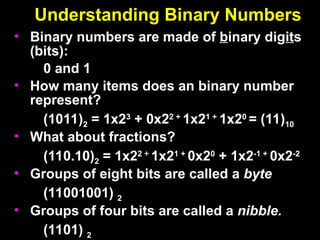
Understanding Binary Numbers
• Binary numbers are made of
Binary numbers are made of b
binary dig
inary digit
its
s
(bits):
(bits):
0 and 1
0 and 1
• How many items does an binary number
How many items does an binary number
represent?
represent?
(1011)
(1011)2
2 = 1x2
= 1x23
3
+ 0x2
+ 0x22 +
2 +
1x2
1x21 +
1 +
1x2
1x20
0
= (11)
= (11)10
10
• What about fractions?
What about fractions?
(110.10)
(110.10)2
2 = 1x2
= 1x22 +
2 +
1x2
1x21 +
1 +
0x2
0x20
0
+ 1x2
+ 1x2-1 +
-1 +
0x2
0x2-2
-2
• Groups of eight bits are called a
Groups of eight bits are called a byte
byte
(11001001)
(11001001) 2
2
• Groups of four bits are called a
Groups of four bits are called a nibble.
nibble.
(1101)
(1101) 2
2
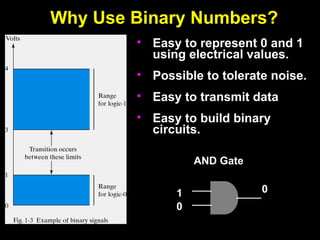
Why Use Binary Numbers?
• Easy to represent 0 and 1
using electrical values.
• Possible to tolerate noise.
• Easy to transmit data
• Easy to build binary
circuits.
AND Gate
1
0
0
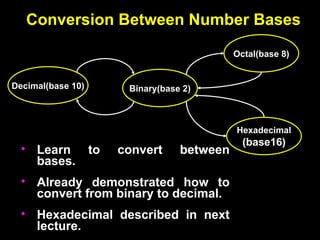
Conversion Between Number Bases
Decimal(base 10)
Octal(base 8)
Binary(base 2)
Hexadecimal
(base16)
• Learn to convert between
bases.
• Already demonstrated how to
convert from binary to decimal.
• Hexadecimal described in next
lecture.
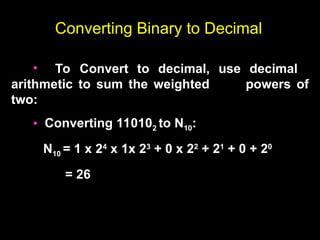
Converting Binary to Decimal
• To Convert to decimal, use decimal
arithmetic to sum the weighted powers of
two:
• Converting 110102 to N10:
N10 = 1 x 24
x 1x 23
+ 0 x 22
+ 21
+ 0 + 20
= 26
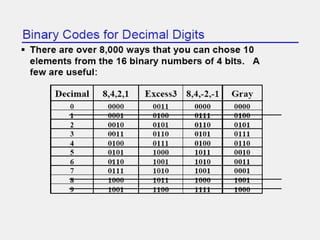
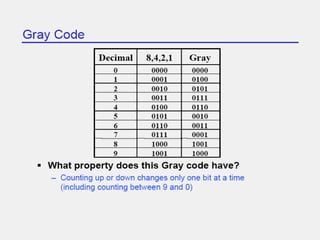
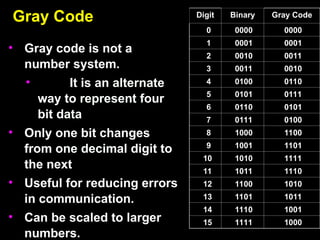
Gray Code
Gray Code
• Gray code is not a
Gray code is not a
number system.
number system.
• It is an alternate
It is an alternate
way to represent four
bit data
bit data
• Only one bit changes
Only one bit changes
from one decimal digit to
the next
the next
• Useful for reducing errors
Useful for reducing errors
in communication.
in communication.
• Can be scaled to larger
Can be scaled to larger
numbers.
numbers.
Digit
Digit Binary
Binary Gray Code
Gray Code
0
0 0000
0000 0000
0000
1
1 0001
0001 0001
0001
2
2 0010
0010 0011
0011
3
3 0011
0011 0010
0010
4
4 0100
0100 0110
0110
5
5 0101
0101 0111
0111
6
6 0110
0110 0101
0101
7
7 0111
0111 0100
0100
8
8 1000
1000 1100
1100
9
9 1001
1001 1101
1101
10
10 1010
1010 1111
1111
11
11 1011
1011 1110
1110
12
12 1100
1100 1010
1010
13
13 1101
1101 1011
1011
14
14 1110
1110 1001
1001
15
15 1111
1111 1000
1000
Binary Arithmetic
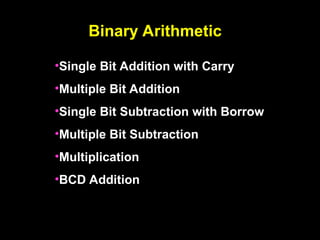
•Single Bit Addition with Carry
•Multiple Bit Addition
•Single Bit Subtraction with Borrow
•Multiple Bit Subtraction
•Multiplication
•BCD Addition
Binary Addition
Binary Addition
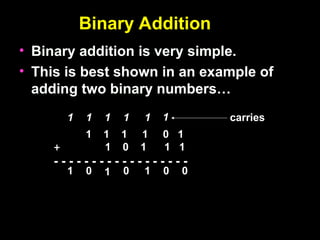
• Binary addition is very simple.
Binary addition is very simple.
• This is best shown in an example of
This is best shown in an example of
adding two binary numbers…
1 1 1 1 0 1
+ 1 0 1 1 1
- - - - - - - - - - - - - - - - - -
0
1
0
1
1
1
1
1
1
1 1 0
0
carries
Binary Subtraction
Binary Subtraction
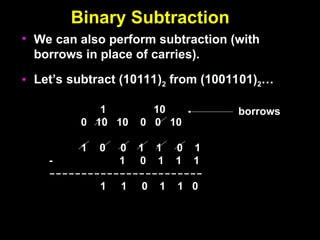
• We can also perform subtraction (with
borrows in place of carries).
• Let’s subtract (10111)2 from (1001101)2…
1 10
0 10 10 0 0 10
1 0 0 1 1 0 1
- 1 0 1 1 1
------------------------
1 1 0 1 1 0
borrows
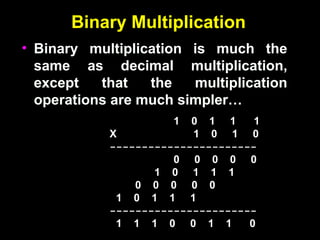
Binary Multiplication
• Binary multiplication is much the
Binary multiplication is much the
same as decimal multiplication,
except that the multiplication
operations are much simpler…
1 0 1 1 1
X 1 0 1 0
-----------------------
0 0 0 0 0
1 0 1 1 1
0 0 0 0 0
1 0 1 1 1
-----------------------
1 1 1 0 0 1 1 0
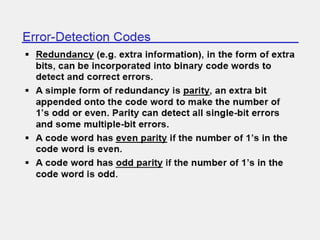
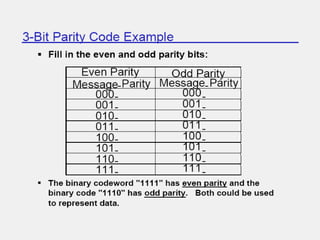
Parity Codes
Parity Codes
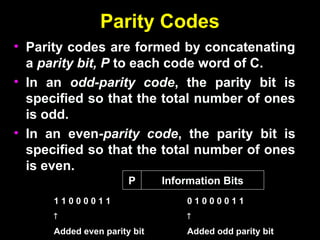
• Parity codes are formed by concatenating
Parity codes are formed by concatenating
a
a parity bit, P
parity bit, P to each code word of C.
to each code word of C.
• In an
In an odd-parity code
odd-parity code, the parity bit is
, the parity bit is
specified so that the total number of ones
is odd.
is odd.
• In an even
In an even-parity code
-parity code, the parity bit is
, the parity bit is
specified so that the total number of ones
is even.
is even.
Information Bits
P
1 1 0 0 0 0 1 1

Added even parity bit
0 1 0 0 0 0 1 1

Added odd parity bit
Parity Code Example
Parity Code Example
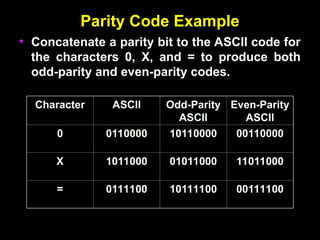
• Concatenate a parity bit to the ASCII code for
Concatenate a parity bit to the ASCII code for
the characters 0, X, and = to produce both
odd-parity and even-parity codes.
Character
Character ASCII
ASCII Odd-Parity
Odd-Parity
ASCII
ASCII
Even-Parity
Even-Parity
ASCII
ASCII
0
0 0110000
0110000 10110000
10110000 00110000
00110000
X
X 1011000
1011000 01011000
01011000 11011000
11011000
=
= 0111100
0111100 10111100
10111100 00111100
00111100
ASCII Code
ASCII Code
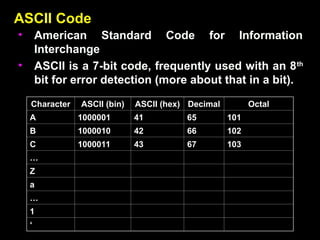
• American Standard Code for Information
American Standard Code for Information
Interchange
Interchange
• ASCII is a 7-bit code, frequently used with an 8
ASCII is a 7-bit code, frequently used with an 8th
th
bit for error detection (more about that in a bit).
Character
Character ASCII (bin)
ASCII (bin) ASCII (hex)
ASCII (hex) Decimal
Decimal Octal
Octal
A
A 1000001
1000001 41
41 65
65 101
101
B
B 1000010
1000010 42
42 66
66 102
102
C
C 1000011
1000011 43
43 67
67 103
103
…
…
Z
Z
a
a
…
…
1
1
‘
‘
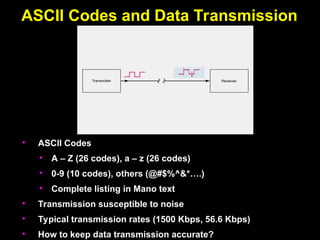
ASCII Codes and Data Transmission
• ASCII Codes
• A – Z (26 codes), a – z (26 codes)
• 0-9 (10 codes), others (@#$%^&*….)
• Complete listing in Mano text
• Transmission susceptible to noise
• Typical transmission rates (1500 Kbps, 56.6 Kbps)
• How to keep data transmission accurate?
Overview
Overview
• Hexadecimal numbers
Hexadecimal numbers
• Related to binary and octal numbers
Related to binary and octal numbers
• Conversion between hexadecimal, octal
Conversion between hexadecimal, octal
and binary
and binary
• Value ranges of numbers
Value ranges of numbers
• Representing positive and negative
Representing positive and negative
numbers
numbers
• Creating the complement of a number
Creating the complement of a number
• Make a positive number negative (and
Make a positive number negative (and
vice versa)
vice versa)
• Why binary?
Why binary?
Understanding Binary Numbers
• Binary numbers are made of
Binary numbers are made of b
binary dig
inary digit
its
s
(bits):
(bits):
0 and 1
0 and 1
• How many items does an binary number
How many items does an binary number
represent?
represent?
(1011)
(1011)2
2 = 1x2
= 1x23
3
+ 0x2
+ 0x22 +
2 +
1x2
1x21 +
1 +
1x2
1x20
0
= (11)
= (11)10
10
• What about fractions?
What about fractions?
(110.10)
(110.10)2
2 = 1x2
= 1x22 +
2 +
1x2
1x21 +
1 +
0x2
0x20
0
+ 1x2
+ 1x2-1 +
-1 +
0x2
0x2-2
-2
• Groups of eight bits are called a
Groups of eight bits are called a byte
byte
(11001001)
(11001001) 2
2
• Groups of four bits are called a
Groups of four bits are called a nibble.
nibble.
(1101)
Understanding Hexadecimal Numbers
• Hexadecimal numbers are made of
Hexadecimal numbers are made of 16
16 digits:
digits:
(0,1,2,3,4,5,6,7,8,9,A, B, C, D, E, F)
• How many items does an hex number represent?
How many items does an hex number represent?
(3A9F)
(3A9F)16
16 = 3x16
= 3x163
3
+ 10x16
+ 10x162 +
2 +
9x16
9x161 +
1 +
15x16
15x160
0
= 14999
= 1499910
10
• What about fractions?
What about fractions?
(2D3.5)
(2D3.5)16
16 = 2x16
= 2x162 +
2 +
13x16
13x161 +
1 +
3x16
3x160
0
+ 5x16
+ 5x16-1
-1
=
=
723.3125
723.312510
10
• Note that
Note that each
each hexadecimal digit can be represented
hexadecimal digit can be represented
with four bits.
with four bits.
(1110)
(1110) 2
2 = (E)
= (E)16
16
• Groups of four bits are called a
Groups of four bits are called a nibble.
nibble.
(1110)
(1110) 2
2
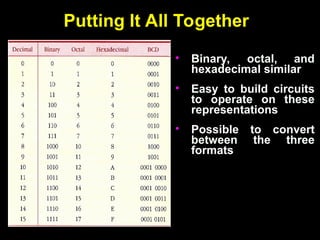
Putting It All Together
• Binary, octal, and
hexadecimal similar
• Easy to build circuits
to operate on these
representations
• Possible to convert
between the three
formats
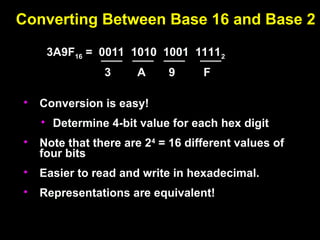
Converting Between Base 16 and Base 2
• Conversion is easy!
• Determine 4-bit value for each hex digit
• Note that there are 24
= 16 different values of
four bits
• Easier to read and write in hexadecimal.
• Representations are equivalent!
3A9F16 = 0011 1010 1001 11112
3 A 9 F
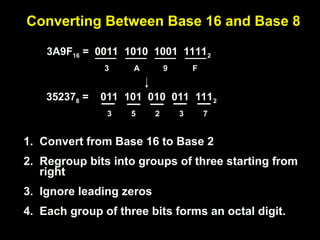
Converting Between Base 16 and Base 8
1. Convert from Base 16 to Base 2
2. Regroup bits into groups of three starting from
right
3. Ignore leading zeros
4. Each group of three bits forms an octal digit.
3A9F16 = 0011 1010 1001 11112
3 A 9 F
352378 = 011 101 010 011 1112
5 2 3 7
3
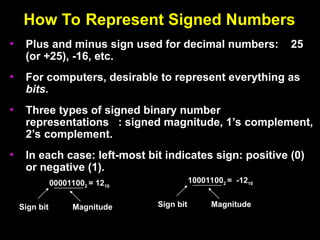
How To Represent Signed Numbers
• Plus and minus sign used for decimal numbers: 25
(or +25), -16, etc.
• For computers, desirable to represent everything as
bits.
.
• Three types of signed binary number
representations : signed magnitude, 1’s complement,
2’s complement.
• In each case: left-most bit indicates sign: positive (0)
or negative (1).
000011002 = 1210
Sign bit Magnitude
100011002 = -1210
Sign bit Magnitude
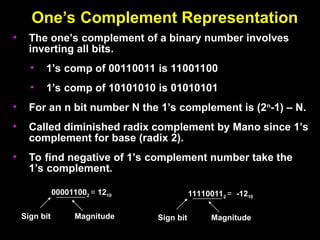
One’s Complement Representation
• The one’s complement of a binary number involves
inverting all bits.
• 1’s comp of 00110011 is 11001100
• 1’s comp of 10101010 is 01010101
• For an n bit number N the 1’s complement is (2n
-1) – N.
• Called diminished radix complement by Mano since 1’s
complement for base (radix 2).
• To find negative of 1’s complement number take the
1’s complement.
000011002 = 1210
Sign bit Magnitude
111100112 = -1210
Sign bit Magnitude
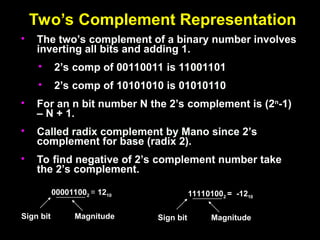
Two’s Complement Representation
• The two’s complement of a binary number involves
inverting all bits and adding 1.
• 2’s comp of 00110011 is 11001101
• 2’s comp of 10101010 is 01010110
• For an n bit number N the 2’s complement is (2n
-1)
– N + 1.
• Called radix complement by Mano since 2’s
complement for base (radix 2).
• To find negative of 2’s complement number take
the 2’s complement.
000011002 = 1210
Sign bit Magnitude
111101002 = -1210
Sign bit Magnitude
Two’s Complement Shortcuts
• Algorithm 1 – Simply complement each bit and then
Algorithm 1 – Simply complement each bit and then
add 1 to the result.
Finding the 2’s complement of (01100101)
Finding the 2’s complement of (01100101)2
2 and of its
and of its
2’s complement…
2’s complement…
N = 01100101
N = 01100101 [N] =
[N] = 10011011
10011011
10011010
10011010 01100100
01100100
+ 1
+ 1 +
+ 1
1
---------------
--------------- ---------------
---------------
10011011
10011011 01100101
01100101
• Algorithm 2 – Starting with the least significant bit,
Algorithm 2 – Starting with the least significant bit,
copy all of the bits up to and including the first 1 bit
and then complementing the remaining bits.
N
N = 0 1 1 0 0 1 0 1
= 0 1 1 0 0 1 0 1
[N]
[N] = 1 0 0 1 1 0 1 1
= 1 0 0 1 1 0 1 1
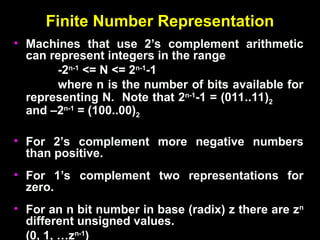
Finite Number Representation
• Machines that use 2’s complement arithmetic
Machines that use 2’s complement arithmetic
can represent integers in the range
-2
-2n-1
n-1
<= N <= 2
<= N <= 2n-1
n-1
-1
-1
where n is the number of bits available for
representing N. Note that 2
representing N. Note that 2n-1
n-1
-1 = (011..11)
-1 = (011..11)2
2
and –2
and –2n-1
n-1
= (100..00)
= (100..00)2
2
• For 2’s complement more negative numbers
For 2’s complement more negative numbers
than positive.
than positive.
• For 1’s complement two representations for
For 1’s complement two representations for
zero.
zero.
• For an n bit number in base (radix) z there are z
For an n bit number in base (radix) z there are zn
n
different unsigned values.
(0, 1, …z
(0, 1, …zn-1
n-1
)
)
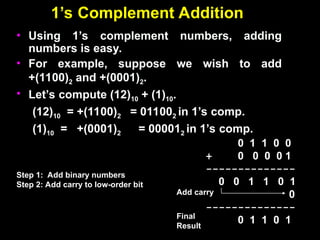
1’s Complement Addition
• Using 1’s complement numbers, adding
Using 1’s complement numbers, adding
numbers is easy.
numbers is easy.
• For example, suppose we wish to add
For example, suppose we wish to add
+(1100)
+(1100)2
2 and +(0001)
and +(0001)2
2.
.
• Let’s compute (12)
Let’s compute (12)10
10 + (1)
+ (1)10
10.
.
(12)
(12)10
10 = +(1100)
= +(1100)2
2 = 01100
= 011002
2 in 1’s comp.
in 1’s comp.
(1)
(1)10
10 = +(0001)
= +(0001)2
2 = 00001
= 000012
2 in 1’s comp.
in 1’s comp.
0 1 1 0 0
+ 0 0 0 0 1
--------------
0 0 1 1 0 1
0
--------------
0 1 1 0 1
Add carry
Final
Result
Step 1: Add binary numbers
Step 2: Add carry to low-order bit
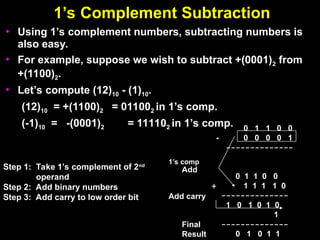
1’s Complement Subtraction
• Using 1’s complement numbers, subtracting numbers is
Using 1’s complement numbers, subtracting numbers is
also easy.
also easy.
• For example, suppose we wish to subtract +(0001)
For example, suppose we wish to subtract +(0001)2
2 from
from
+(1100)
+(1100)2
2.
.
• Let’s compute (12)
Let’s compute (12)10
10 - (1)
- (1)10
10.
.
(12)
(12)10
10 = +(1100)
= +(1100)2
2 = 01100
= 011002
2 in 1’s comp.
in 1’s comp.
(-1)
(-1)10
10 = -(0001)
= -(0001)2
2 = 11110
= 111102
2 in 1’s comp.
in 1’s comp.
Step 1: Take 1’s complement of 2nd
operand
Step 2: Add binary numbers
Step 3: Add carry to low order bit Add carry
Final
Result
1’s comp
Add
0 1 1 0 0
- 0 0 0 0 1
--------------
0 1 1 0 0
+ 1 1 1 1 0
--------------
1 0 1 0 1 0
1
--------------
0 1 0 1 1
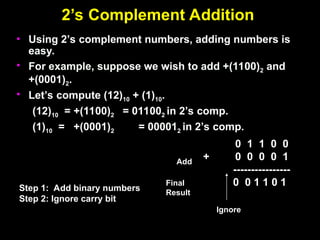
2’s Complement Addition
• Using 2’s complement numbers, adding numbers is
Using 2’s complement numbers, adding numbers is
easy.
easy.
• For example, suppose we wish to add +(1100)
For example, suppose we wish to add +(1100)2
2 and
and
+(0001)
+(0001)2
2.
.
• Let’s compute (12)
Let’s compute (12)10
10 + (1)
+ (1)10
10.
.
(12)
(12)10
10 = +(1100)
= +(1100)2
2 = 01100
= 011002
2 in 2’s comp.
in 2’s comp.
(1)
(1)10
10 = +(0001)
= +(0001)2
2 = 00001
= 000012
2 in 2’s comp.
in 2’s comp.
0 1 1 0 0
+ 0 0 0 0 1
----------------
0 0 1 1 0 1
Final
Result
Step 1: Add binary numbers
Step 2: Ignore carry bit
Add
Ignore
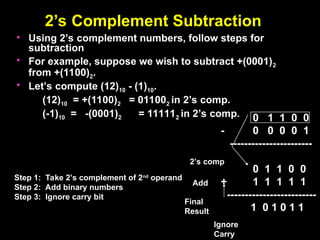
2’s Complement Subtraction
• Using 2’s complement numbers, follow steps for
Using 2’s complement numbers, follow steps for
subtraction
subtraction
• For example, suppose we wish to subtract +(0001)
For example, suppose we wish to subtract +(0001)2
2
from +(1100)
from +(1100)2
2.
.
• Let’s compute (12)
Let’s compute (12)10
10 - (1)
- (1)10
10.
.
(12)
(12)10
10 = +(1100)
= +(1100)2
2 = 01100
= 011002
2 in 2’s comp.
in 2’s comp.
(-1)
(-1)10
10 = -(0001)
= -(0001)2
2 = 11111
= 111112
2 in 2’s comp.
in 2’s comp. 0 1 1 0 0
- 0 0 0 0 1
-----------------------
0 1 1 0 0
+ 1 1 1 1 1
-------------------------
1 0 1 0 1 1
Final
Result
Step 1: Take 2’s complement of 2nd
operand
Step 2: Add binary numbers
Step 3: Ignore carry bit
2’s comp
Add
Ignore
Carry
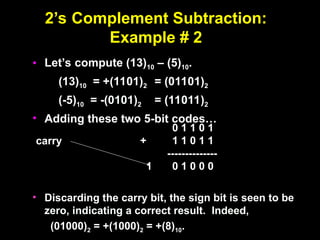
2’s Complement Subtraction:
Example # 2
Example # 2
• Let’s compute (13)
Let’s compute (13)10
10 – (5)
– (5)10
10.
.
(13)
(13)10
10 = +(1101)
= +(1101)2
2 = (01101)
= (01101)2
2
(-5)
(-5)10
10 = -(0101)
= -(0101)2
2 = (11011)
= (11011)2
2
• Adding these two 5-bit codes…
Adding these two 5-bit codes…
• Discarding the carry bit, the sign bit is seen to be
Discarding the carry bit, the sign bit is seen to be
zero, indicating a correct result. Indeed,
(01000)
(01000)2
2 = +(1000)
= +(1000)2
2 = +(8)
= +(8)10
10.
.
0 1 1 0 1
+ 1 1 0 1 1
--------------
1 0 1 0 0 0
carry
2’s Complement Subtraction:
Example #3
Example #3
• Let’s compute (5)
Let’s compute (5)10
10 – (12)
– (12)10
10.
.
(-12)
(-12)10
10 = -(1100)
= -(1100)2
2 = (10100)
= (10100)2
2
(5)
(5)10
10 = +(0101)
= +(0101)2
2 = (00101)
= (00101)2
2
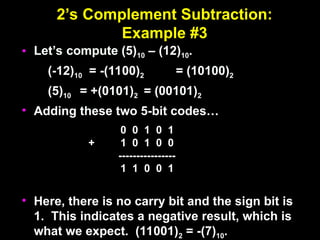
• Adding these two 5-bit codes…
Adding these two 5-bit codes…
• Here, there is no carry bit and the sign bit is
Here, there is no carry bit and the sign bit is
1. This indicates a negative result, which is
what we expect. (11001)
what we expect. (11001)2
2 = -(7)
= -(7)10
10.
.
0 0 1 0 1
+ 1 0 1 0 0
----------------
1 1 0 0 1
digital___electronics___EXPLAINATION.ppt

digital___electronics___EXPLAINATION.ppt

  • 1.
    DIGITAL ELECTRONICS DIGITAL ELECTRONICS Dr.M.MANIKANDAN Dr.M.MANIKANDAN AssociateProfessor Associate Professor Department of Electronics and Department of Electronics and Engg. Engg. MIT- Campus MIT- Campus Anna University Anna University
  • 2.
  • 5.
    Digital Computer Systems DigitalComputer Systems • Digital systems consider Digital systems consider discrete discrete amounts of data. amounts of data. • Examples Examples 26 letters in the alphabet 26 letters in the alphabet 10 decimal digits 10 decimal digits • Larger quantities can be built from discrete values: Larger quantities can be built from discrete values: Words made of letters Words made of letters Numbers made of decimal digits (e.g. 239875.32) Numbers made of decimal digits (e.g. 239875.32) • Computers operate on Computers operate on binary binary values (0 and 1) values (0 and 1) • Easy to represent binary values electrically Easy to represent binary values electrically Voltages and currents. Voltages and currents. Can be implemented using circuits Can be implemented using circuits Create the building blocks of modern computers Create the building blocks of modern computers
  • 6.
    A basic organizationof a digital computer
  • 7.
    Types of Systems •With no state present – Combinational logic system – Output = Function (Input) • With state present – State updated at discrete times (e.g. once per clock tick) Synchronous sequential system – State updated at any time Asynchronous sequential system
  • 8.
    Example : DigitalCounter (e.g., Odometer) • Inputs : Count Up, Reset • Outputs : Visual Display • State : “Value of stored digits • Is this system synchronous or asynchronous? 0 0 0 0 1 1 3 3 5 5 6 6 4 4 UP RESET
  • 13.
    Understanding Decimal Numbers UnderstandingDecimal Numbers • Decimal numbers are made of decimal Decimal numbers are made of decimal digits: (0,1,2,3,4,5,6,7,8,9) digits: (0,1,2,3,4,5,6,7,8,9) • But how many items does a decimal But how many items does a decimal number represent? number represent? 8653 = 8x10 8653 = 8x10³ 3 + 6x10 + 6x10² + 2 + 5x10 5x101 + 1 + 3x10 3x100 0 • What about fractions? What about fractions? 97654.35 = 9x10 97654.35 = 9x10⁴ 4 + 7x10 + 7x10³ + 3 + 6x10 6x10² + 2 + 5x10 5x101 1 + + 4x10 4x100 0 + 3x10 + 3x10⁻¹ + -1 + 5x10 5x10⁻² -2 In formal notation -> (97654.35) In formal notation -> (97654.35)10 10 • Why do we use 10 digits, anyway? Why do we use 10 digits, anyway?
  • 14.
    Understanding Octal Numbers UnderstandingOctal Numbers • Octal numbers are made of octal digits: Octal numbers are made of octal digits: (0,1,2,3,4,5,6,7) (0,1,2,3,4,5,6,7) • How many items does an octal number How many items does an octal number represent? represent? (4536) (4536)8 8 = 4x8 = 4x83 3 + 5x8 + 5x82 + 2 + 3x8 3x81 + 1 + 6x8 6x80 0 = (1362) = (1362)10 10 • What about fractions? What about fractions? (465.27) (465.27)8 8 = 4x8 = 4x82 + 2 + 6x8 6x81 + 1 + 5x8 5x80 0 + 2x8 + 2x8-1 + -1 + 7x8 7x8-2 -2 • Octal numbers don’t use digits 8 or 9 Octal numbers don’t use digits 8 or 9 • Who would use octal number, anyway? Who would use octal number, anyway?
  • 15.
    Understanding Binary Numbers UnderstandingBinary Numbers • Binary numbers are made of Binary numbers are made of b binary dig inary digit its s (bits): (bits): 0 and 1 0 and 1 • How many items does an binary number How many items does an binary number represent? represent? (1011) (1011)2 2 = 1x2 = 1x23 3 + 0x2 + 0x22 + 2 + 1x2 1x21 + 1 + 1x2 1x20 0 = (11) = (11)10 10 • What about fractions? What about fractions? (110.10) (110.10)2 2 = 1x2 = 1x22 + 2 + 1x2 1x21 + 1 + 0x2 0x20 0 + 1x2 + 1x2-1 + -1 + 0x2 0x2-2 -2 • Groups of eight bits are called a Groups of eight bits are called a byte byte (11001001) (11001001) 2 2 • Groups of four bits are called a Groups of four bits are called a nibble. nibble. (1101) (1101) 2 2
  • 16.
    Why Use BinaryNumbers? Why Use Binary Numbers? • Easy to represent 0 and 1 using electrical values. • Possible to tolerate noise. • Easy to transmit data • Easy to build binary circuits. AND Gate 1 0 0
  • 17.
    Conversion Between NumberBases Conversion Between Number Bases Decimal(base 10) Octal(base 8) Binary(base 2) Hexadecimal (base16) • Learn to convert between bases. • Already demonstrated how to convert from binary to decimal. • Hexadecimal described in next lecture.
  • 20.
    Converting Binary toDecimal • To Convert to decimal, use decimal arithmetic to sum the weighted powers of two: • Converting 110102 to N10: N10 = 1 x 24 x 1x 23 + 0 x 22 + 21 + 0 + 20 = 26
  • 33.
    Gray Code Gray Code •Gray code is not a Gray code is not a number system. number system. • It is an alternate It is an alternate way to represent four way to represent four bit data bit data • Only one bit changes Only one bit changes from one decimal digit to from one decimal digit to the next the next • Useful for reducing errors Useful for reducing errors in communication. in communication. • Can be scaled to larger Can be scaled to larger numbers. numbers. Digit Digit Binary Binary Gray Code Gray Code 0 0 0000 0000 0000 0000 1 1 0001 0001 0001 0001 2 2 0010 0010 0011 0011 3 3 0011 0011 0010 0010 4 4 0100 0100 0110 0110 5 5 0101 0101 0111 0111 6 6 0110 0110 0101 0101 7 7 0111 0111 0100 0100 8 8 1000 1000 1100 1100 9 9 1001 1001 1101 1101 10 10 1010 1010 1111 1111 11 11 1011 1011 1110 1110 12 12 1100 1100 1010 1010 13 13 1101 1101 1011 1011 14 14 1110 1110 1001 1001 15 15 1111 1111 1000 1000
  • 35.
    Binary Arithmetic •Single BitAddition with Carry •Multiple Bit Addition •Single Bit Subtraction with Borrow •Multiple Bit Subtraction •Multiplication •BCD Addition
  • 36.
    Binary Addition Binary Addition •Binary addition is very simple. Binary addition is very simple. • This is best shown in an example of This is best shown in an example of adding two binary numbers… adding two binary numbers… 1 1 1 1 0 1 + 1 0 1 1 1 - - - - - - - - - - - - - - - - - - 0 1 0 1 1 1 1 1 1 1 1 0 0 carries
  • 37.
    Binary Subtraction Binary Subtraction •We can also perform subtraction (with borrows in place of carries). • Let’s subtract (10111)2 from (1001101)2… 1 10 0 10 10 0 0 10 1 0 0 1 1 0 1 - 1 0 1 1 1 ------------------------ 1 1 0 1 1 0 borrows
  • 38.
    Binary Multiplication Binary Multiplication •Binary multiplication is much the Binary multiplication is much the same as decimal multiplication, same as decimal multiplication, except that the multiplication except that the multiplication operations are much simpler… operations are much simpler… 1 0 1 1 1 X 1 0 1 0 ----------------------- 0 0 0 0 0 1 0 1 1 1 0 0 0 0 0 1 0 1 1 1 ----------------------- 1 1 1 0 0 1 1 0
  • 41.
    Parity Codes Parity Codes •Parity codes are formed by concatenating Parity codes are formed by concatenating a a parity bit, P parity bit, P to each code word of C. to each code word of C. • In an In an odd-parity code odd-parity code, the parity bit is , the parity bit is specified so that the total number of ones specified so that the total number of ones is odd. is odd. • In an even In an even-parity code -parity code, the parity bit is , the parity bit is specified so that the total number of ones specified so that the total number of ones is even. is even. Information Bits P 1 1 0 0 0 0 1 1  Added even parity bit 0 1 0 0 0 0 1 1  Added odd parity bit
  • 42.
    Parity Code Example ParityCode Example • Concatenate a parity bit to the ASCII code for Concatenate a parity bit to the ASCII code for the characters 0, X, and = to produce both the characters 0, X, and = to produce both odd-parity and even-parity codes. odd-parity and even-parity codes. Character Character ASCII ASCII Odd-Parity Odd-Parity ASCII ASCII Even-Parity Even-Parity ASCII ASCII 0 0 0110000 0110000 10110000 10110000 00110000 00110000 X X 1011000 1011000 01011000 01011000 11011000 11011000 = = 0111100 0111100 10111100 10111100 00111100 00111100
  • 43.
    ASCII Code ASCII Code •American Standard Code for Information American Standard Code for Information Interchange Interchange • ASCII is a 7-bit code, frequently used with an 8 ASCII is a 7-bit code, frequently used with an 8th th bit for error detection (more about that in a bit). bit for error detection (more about that in a bit). Character Character ASCII (bin) ASCII (bin) ASCII (hex) ASCII (hex) Decimal Decimal Octal Octal A A 1000001 1000001 41 41 65 65 101 101 B B 1000010 1000010 42 42 66 66 102 102 C C 1000011 1000011 43 43 67 67 103 103 … … Z Z a a … … 1 1 ‘ ‘
  • 45.
    ASCII Codes andData Transmission ASCII Codes and Data Transmission • ASCII Codes • A – Z (26 codes), a – z (26 codes) • 0-9 (10 codes), others (@#$%^&*….) • Complete listing in Mano text • Transmission susceptible to noise • Typical transmission rates (1500 Kbps, 56.6 Kbps) • How to keep data transmission accurate?
  • 46.
    Overview Overview • Hexadecimal numbers Hexadecimalnumbers • Related to binary and octal numbers Related to binary and octal numbers • Conversion between hexadecimal, octal Conversion between hexadecimal, octal and binary and binary • Value ranges of numbers Value ranges of numbers • Representing positive and negative Representing positive and negative numbers numbers • Creating the complement of a number Creating the complement of a number • Make a positive number negative (and Make a positive number negative (and vice versa) vice versa) • Why binary? Why binary?
  • 47.
    Understanding Binary Numbers UnderstandingBinary Numbers • Binary numbers are made of Binary numbers are made of b binary dig inary digit its s (bits): (bits): 0 and 1 0 and 1 • How many items does an binary number How many items does an binary number represent? represent? (1011) (1011)2 2 = 1x2 = 1x23 3 + 0x2 + 0x22 + 2 + 1x2 1x21 + 1 + 1x2 1x20 0 = (11) = (11)10 10 • What about fractions? What about fractions? (110.10) (110.10)2 2 = 1x2 = 1x22 + 2 + 1x2 1x21 + 1 + 0x2 0x20 0 + 1x2 + 1x2-1 + -1 + 0x2 0x2-2 -2 • Groups of eight bits are called a Groups of eight bits are called a byte byte (11001001) (11001001) 2 2 • Groups of four bits are called a Groups of four bits are called a nibble. nibble. (1101)
  • 48.
    Understanding Hexadecimal Numbers UnderstandingHexadecimal Numbers • Hexadecimal numbers are made of Hexadecimal numbers are made of 16 16 digits: digits: (0,1,2,3,4,5,6,7,8,9,A, B, C, D, E, F) (0,1,2,3,4,5,6,7,8,9,A, B, C, D, E, F) • How many items does an hex number represent? How many items does an hex number represent? (3A9F) (3A9F)16 16 = 3x16 = 3x163 3 + 10x16 + 10x162 + 2 + 9x16 9x161 + 1 + 15x16 15x160 0 = 14999 = 1499910 10 • What about fractions? What about fractions? (2D3.5) (2D3.5)16 16 = 2x16 = 2x162 + 2 + 13x16 13x161 + 1 + 3x16 3x160 0 + 5x16 + 5x16-1 -1 = = 723.3125 723.312510 10 • Note that Note that each each hexadecimal digit can be represented hexadecimal digit can be represented with four bits. with four bits. (1110) (1110) 2 2 = (E) = (E)16 16 • Groups of four bits are called a Groups of four bits are called a nibble. nibble. (1110) (1110) 2 2
  • 49.
    Putting It AllTogether Putting It All Together • Binary, octal, and hexadecimal similar • Easy to build circuits to operate on these representations • Possible to convert between the three formats
  • 50.
    Converting Between Base16 and Base 2 Converting Between Base 16 and Base 2 • Conversion is easy! • Determine 4-bit value for each hex digit • Note that there are 24 = 16 different values of four bits • Easier to read and write in hexadecimal. • Representations are equivalent! 3A9F16 = 0011 1010 1001 11112 3 A 9 F
  • 51.
    Converting Between Base16 and Base 8 Converting Between Base 16 and Base 8 1. Convert from Base 16 to Base 2 2. Regroup bits into groups of three starting from right 3. Ignore leading zeros 4. Each group of three bits forms an octal digit. 3A9F16 = 0011 1010 1001 11112 3 A 9 F 352378 = 011 101 010 011 1112 5 2 3 7 3
  • 52.
    How To RepresentSigned Numbers How To Represent Signed Numbers • Plus and minus sign used for decimal numbers: 25 (or +25), -16, etc. • For computers, desirable to represent everything as bits. . • Three types of signed binary number representations : signed magnitude, 1’s complement, 2’s complement. • In each case: left-most bit indicates sign: positive (0) or negative (1). 000011002 = 1210 Sign bit Magnitude 100011002 = -1210 Sign bit Magnitude
  • 53.
    One’s Complement Representation One’sComplement Representation • The one’s complement of a binary number involves inverting all bits. • 1’s comp of 00110011 is 11001100 • 1’s comp of 10101010 is 01010101 • For an n bit number N the 1’s complement is (2n -1) – N. • Called diminished radix complement by Mano since 1’s complement for base (radix 2). • To find negative of 1’s complement number take the 1’s complement. 000011002 = 1210 Sign bit Magnitude 111100112 = -1210 Sign bit Magnitude
  • 54.
    Two’s Complement Representation Two’sComplement Representation • The two’s complement of a binary number involves inverting all bits and adding 1. • 2’s comp of 00110011 is 11001101 • 2’s comp of 10101010 is 01010110 • For an n bit number N the 2’s complement is (2n -1) – N + 1. • Called radix complement by Mano since 2’s complement for base (radix 2). • To find negative of 2’s complement number take the 2’s complement. 000011002 = 1210 Sign bit Magnitude 111101002 = -1210 Sign bit Magnitude
  • 55.
    Two’s Complement Shortcuts Two’sComplement Shortcuts • Algorithm 1 – Simply complement each bit and then Algorithm 1 – Simply complement each bit and then add 1 to the result. add 1 to the result. Finding the 2’s complement of (01100101) Finding the 2’s complement of (01100101)2 2 and of its and of its 2’s complement… 2’s complement… N = 01100101 N = 01100101 [N] = [N] = 10011011 10011011 10011010 10011010 01100100 01100100 + 1 + 1 + + 1 1 --------------- --------------- --------------- --------------- 10011011 10011011 01100101 01100101 • Algorithm 2 – Starting with the least significant bit, Algorithm 2 – Starting with the least significant bit, copy all of the bits up to and including the first 1 bit copy all of the bits up to and including the first 1 bit and then complementing the remaining bits. and then complementing the remaining bits. N N = 0 1 1 0 0 1 0 1 = 0 1 1 0 0 1 0 1 [N] [N] = 1 0 0 1 1 0 1 1 = 1 0 0 1 1 0 1 1
  • 56.
    Finite Number Representation FiniteNumber Representation • Machines that use 2’s complement arithmetic Machines that use 2’s complement arithmetic can represent integers in the range can represent integers in the range -2 -2n-1 n-1 <= N <= 2 <= N <= 2n-1 n-1 -1 -1 where n is the number of bits available for where n is the number of bits available for representing N. Note that 2 representing N. Note that 2n-1 n-1 -1 = (011..11) -1 = (011..11)2 2 and –2 and –2n-1 n-1 = (100..00) = (100..00)2 2 • For 2’s complement more negative numbers For 2’s complement more negative numbers than positive. than positive. • For 1’s complement two representations for For 1’s complement two representations for zero. zero. • For an n bit number in base (radix) z there are z For an n bit number in base (radix) z there are zn n different unsigned values. different unsigned values. (0, 1, …z (0, 1, …zn-1 n-1 ) )
  • 57.
    1’s Complement Addition 1’sComplement Addition • Using 1’s complement numbers, adding Using 1’s complement numbers, adding numbers is easy. numbers is easy. • For example, suppose we wish to add For example, suppose we wish to add +(1100) +(1100)2 2 and +(0001) and +(0001)2 2. . • Let’s compute (12) Let’s compute (12)10 10 + (1) + (1)10 10. . (12) (12)10 10 = +(1100) = +(1100)2 2 = 01100 = 011002 2 in 1’s comp. in 1’s comp. (1) (1)10 10 = +(0001) = +(0001)2 2 = 00001 = 000012 2 in 1’s comp. in 1’s comp. 0 1 1 0 0 + 0 0 0 0 1 -------------- 0 0 1 1 0 1 0 -------------- 0 1 1 0 1 Add carry Final Result Step 1: Add binary numbers Step 2: Add carry to low-order bit
  • 58.
    1’s Complement Subtraction 1’sComplement Subtraction • Using 1’s complement numbers, subtracting numbers is Using 1’s complement numbers, subtracting numbers is also easy. also easy. • For example, suppose we wish to subtract +(0001) For example, suppose we wish to subtract +(0001)2 2 from from +(1100) +(1100)2 2. . • Let’s compute (12) Let’s compute (12)10 10 - (1) - (1)10 10. . (12) (12)10 10 = +(1100) = +(1100)2 2 = 01100 = 011002 2 in 1’s comp. in 1’s comp. (-1) (-1)10 10 = -(0001) = -(0001)2 2 = 11110 = 111102 2 in 1’s comp. in 1’s comp. Step 1: Take 1’s complement of 2nd operand Step 2: Add binary numbers Step 3: Add carry to low order bit Add carry Final Result 1’s comp Add 0 1 1 0 0 - 0 0 0 0 1 -------------- 0 1 1 0 0 + 1 1 1 1 0 -------------- 1 0 1 0 1 0 1 -------------- 0 1 0 1 1
  • 59.
    2’s Complement Addition 2’sComplement Addition • Using 2’s complement numbers, adding numbers is Using 2’s complement numbers, adding numbers is easy. easy. • For example, suppose we wish to add +(1100) For example, suppose we wish to add +(1100)2 2 and and +(0001) +(0001)2 2. . • Let’s compute (12) Let’s compute (12)10 10 + (1) + (1)10 10. . (12) (12)10 10 = +(1100) = +(1100)2 2 = 01100 = 011002 2 in 2’s comp. in 2’s comp. (1) (1)10 10 = +(0001) = +(0001)2 2 = 00001 = 000012 2 in 2’s comp. in 2’s comp. 0 1 1 0 0 + 0 0 0 0 1 ---------------- 0 0 1 1 0 1 Final Result Step 1: Add binary numbers Step 2: Ignore carry bit Add Ignore
  • 60.
    2’s Complement Subtraction 2’sComplement Subtraction • Using 2’s complement numbers, follow steps for Using 2’s complement numbers, follow steps for subtraction subtraction • For example, suppose we wish to subtract +(0001) For example, suppose we wish to subtract +(0001)2 2 from +(1100) from +(1100)2 2. . • Let’s compute (12) Let’s compute (12)10 10 - (1) - (1)10 10. . (12) (12)10 10 = +(1100) = +(1100)2 2 = 01100 = 011002 2 in 2’s comp. in 2’s comp. (-1) (-1)10 10 = -(0001) = -(0001)2 2 = 11111 = 111112 2 in 2’s comp. in 2’s comp. 0 1 1 0 0 - 0 0 0 0 1 ----------------------- 0 1 1 0 0 + 1 1 1 1 1 ------------------------- 1 0 1 0 1 1 Final Result Step 1: Take 2’s complement of 2nd operand Step 2: Add binary numbers Step 3: Ignore carry bit 2’s comp Add Ignore Carry
  • 61.
    2’s Complement Subtraction: 2’sComplement Subtraction: Example # 2 Example # 2 • Let’s compute (13) Let’s compute (13)10 10 – (5) – (5)10 10. . (13) (13)10 10 = +(1101) = +(1101)2 2 = (01101) = (01101)2 2 (-5) (-5)10 10 = -(0101) = -(0101)2 2 = (11011) = (11011)2 2 • Adding these two 5-bit codes… Adding these two 5-bit codes… • Discarding the carry bit, the sign bit is seen to be Discarding the carry bit, the sign bit is seen to be zero, indicating a correct result. Indeed, zero, indicating a correct result. Indeed, (01000) (01000)2 2 = +(1000) = +(1000)2 2 = +(8) = +(8)10 10. . 0 1 1 0 1 + 1 1 0 1 1 -------------- 1 0 1 0 0 0 carry
  • 62.
    2’s Complement Subtraction: 2’sComplement Subtraction: Example #3 Example #3 • Let’s compute (5) Let’s compute (5)10 10 – (12) – (12)10 10. . (-12) (-12)10 10 = -(1100) = -(1100)2 2 = (10100) = (10100)2 2 (5) (5)10 10 = +(0101) = +(0101)2 2 = (00101) = (00101)2 2 • Adding these two 5-bit codes… Adding these two 5-bit codes… • Here, there is no carry bit and the sign bit is Here, there is no carry bit and the sign bit is 1. This indicates a negative result, which is 1. This indicates a negative result, which is what we expect. (11001) what we expect. (11001)2 2 = -(7) = -(7)10 10. . 0 0 1 0 1 + 1 0 1 0 0 ---------------- 1 1 0 0 1