1
Chapter 1
Data representation in a computer
Introduction
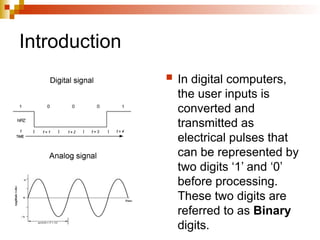
 In digital computers,
the user inputs is
converted and
transmitted as
electrical pulses that
can be represented by
two digits ‘1’ and ‘0’
before processing.
These two digits are
referred to as Binary
digits.
Sending data via a telephone line
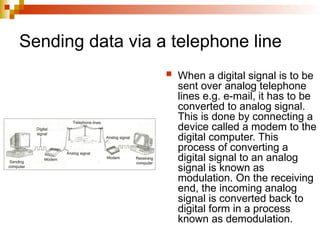
 When a digital signal is to be
sent over analog telephone
lines e.g. e-mail, it has to be
converted to analog signal.
This is done by connecting a
device called a modem to the
digital computer. This
process of converting a
digital signal to an analog
signal is known as
modulation. On the receiving
end, the incoming analog
signal is converted back to
digital form in a process
known as demodulation.
Concepts of data representation in digital computers
 Data and instructions cannot be entered
and processed directly into computers
using human language. Any type of data
entered must first be converted into
machine-readable form. (Binary form).
Computer together with it’s peripheral
devices handle data in it’s electronic
circuits, magnetic media and in optical
devices.
Data representation in electronic circuits
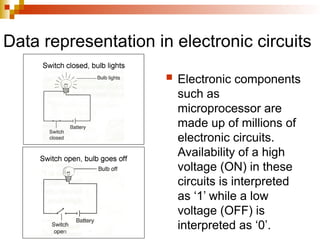
 Electronic components
such as
microprocessor are
made up of millions of
electronic circuits.
Availability of a high
voltage (ON) in these
circuits is interpreted
as ‘1’ while a low
voltage (OFF) is
interpreted as ‘0’.
Data representation on magnetic media
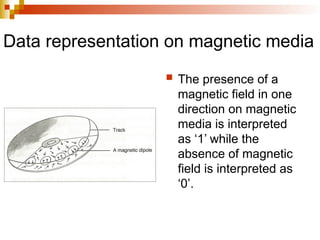
 The presence of a
magnetic field in one
direction on magnetic
media is interpreted
as ‘1’ while the
absence of magnetic
field is interpreted as
‘0’.
Data representation on optical media
In optical devices, the presence of light is interpreted as ‘1’
while its absence is interpreted as ‘0’.
 BITS – this is a binary digit, which can either be 0 or
1. it’s the basic unit of data or information in digital
computers.
 BYTE – a group of 8 bits. It is the basic unit of
measuring memory size in computers.
 NIBBLE – it is a half a byte or a group of 4 bits.
 WORD – its consists of one or more bytes and is the
largest amount of memory that the computer can
handle.
 WORD LENGTH – is the number of bits in each
word of computer.
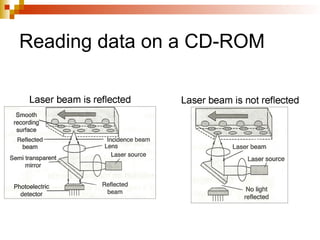
Reading data on a CD-ROM
Types of data representation
 Number System
 Base conversion
 Negative Numbers
 Binary Addition
Types of number systems
 Decimal Number System
 Binary Number System
 Octal Notion
 Hexadecimal Number System
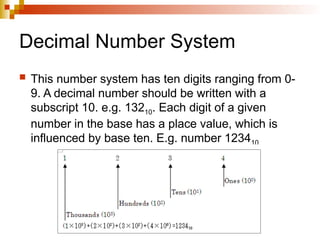
Decimal Number System
 This number system has ten digits ranging from 0-
9. A decimal number should be written with a
subscript 10. e.g. 13210. Each digit of a given
number in the base has a place value, which is
influenced by base ten. E.g. number 123410
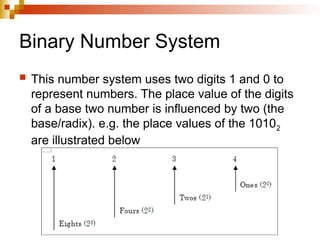
Binary Number System
 This number system uses two digits 1 and 0 to
represent numbers. The place value of the digits
of a base two number is influenced by two (the
base/radix). e.g. the place values of the 10102
are illustrated below
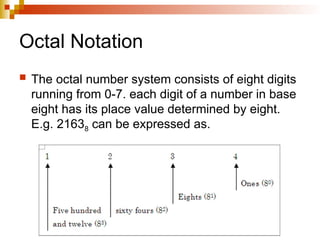
Octal Notation
 The octal number system consists of eight digits
running from 0-7. each digit of a number in base
eight has its place value determined by eight.
E.g. 21638 can be expressed as.
Hexadecimal Number System
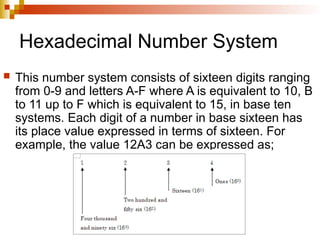
 This number system consists of sixteen digits ranging
from 0-9 and letters A-F where A is equivalent to 10, B
to 11 up to F which is equivalent to 15, in base ten
systems. Each digit of a number in base sixteen has
its place value expressed in terms of sixteen. For
example, the value 12A3 can be expressed as;
Base conversion
 Decimal to Binary
 Binary to Decimal Number
 Decimal to Octal
 From Octal to Decimal
 Converting Octal to Binary
 From Decimal to Hexadecimal
 Hexadecimal to Decimal
 Hexadecimal to Binary
Decimal to Binary 1
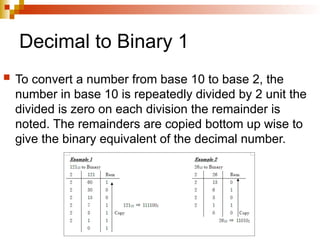
 To convert a number from base 10 to base 2, the
number in base 10 is repeatedly divided by 2 unit the
divided is zero on each division the remainder is
noted. The remainders are copied bottom up wise to
give the binary equivalent of the decimal number.
Decimal to Binary 2
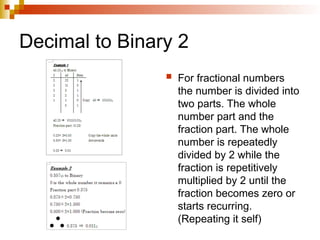
 For fractional numbers
the number is divided into
two parts. The whole
number part and the
fraction part. The whole
number is repeatedly
divided by 2 while the
fraction is repetitively
multiplied by 2 until the
fraction becomes zero or
starts recurring.
(Repeating it self)
Binary to Decimal Number 1
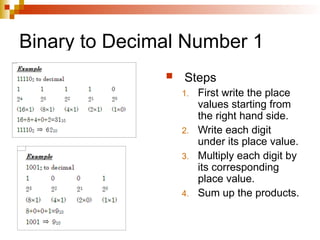
 Steps
1. First write the place
values starting from
the right hand side.
2. Write each digit
under its place value.
3. Multiply each digit by
its corresponding
place value.
4. Sum up the products.
Binary to Decimal Number 2
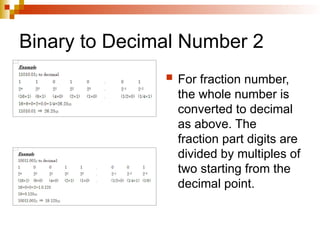
 For fraction number,
the whole number is
converted to decimal
as above. The
fraction part digits are
divided by multiples of
two starting from the
decimal point.
Decimal to octal 1
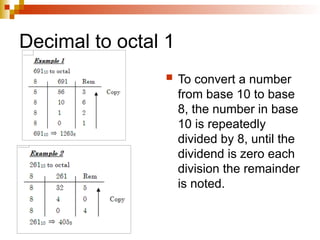
 To convert a number
from base 10 to base
8, the number in base
10 is repeatedly
divided by 8, until the
dividend is zero each
division the remainder
is noted.
Decimal to octal 2
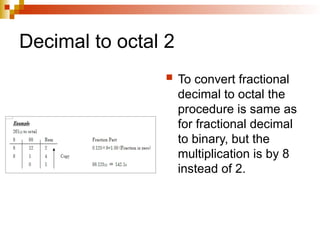
 To convert fractional
decimal to octal the
procedure is same as
for fractional decimal
to binary, but the
multiplication is by 8
instead of 2.
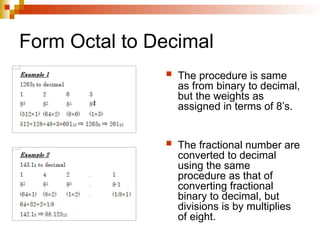
Form Octal to Decimal
 The procedure is same
as from binary to decimal,
but the weights as
assigned in terms of 8’s.
 The fractional number are
converted to decimal
using the same
procedure as that of
converting fractional
binary to decimal, but
divisions is by multiplies
of eight.
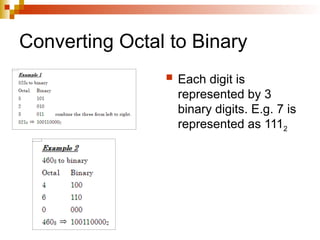
Converting Octal to Binary
 Each digit is
represented by 3
binary digits. E.g. 7 is
represented as 1112
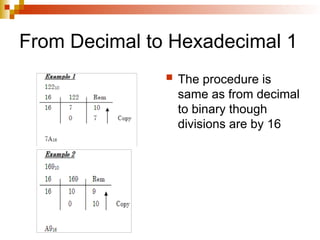
From Decimal to Hexadecimal 1
 The procedure is
same as from decimal
to binary though
divisions are by 16
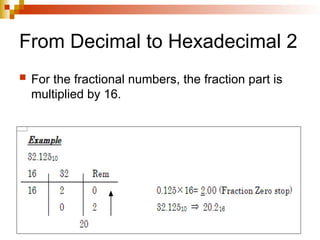
From Decimal to Hexadecimal 2
 For the fractional numbers, the fraction part is
multiplied by 16.
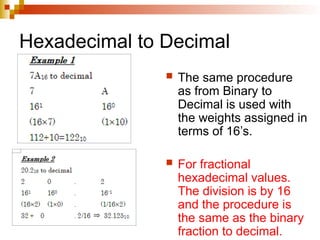
Hexadecimal to Decimal
 The same procedure
as from Binary to
Decimal is used with
the weights assigned in
terms of 16’s.
 For fractional
hexadecimal values.
The division is by 16
and the procedure is
the same as the binary
fraction to decimal.
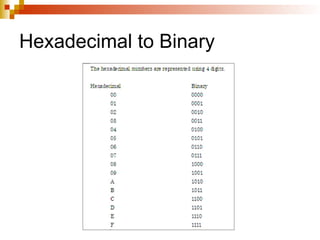
Hexadecimal to Binary
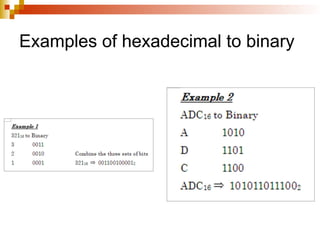
Examples of hexadecimal to binary
Negative numbers
 Both positive and negative numbers can
be represented in the computer memory
during processing. various methods are
used to represent negative numbers in
the computer. These methods are:
i. One’s compliment
ii. Two’s compliment
The negative numbers are used to carry
out subtraction in the computer
arithmetic operations.
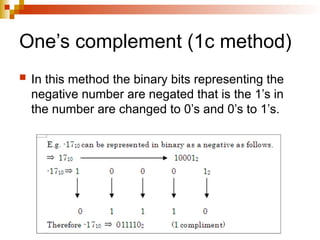
One’s complement (1c method)
 In this method the binary bits representing the
negative number are negated that is the 1’s in
the number are changed to 0’s and 0’s to 1’s.
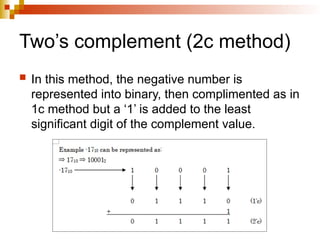
Two’s complement (2c method)
 In this method, the negative number is
represented into binary, then complimented as in
1c method but a ‘1’ is added to the least
significant digit of the complement value.
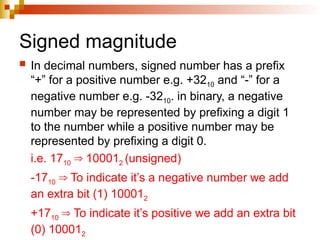
Signed magnitude
 In decimal numbers, signed number has a prefix
“+” for a positive number e.g. +3210 and “-” for a
negative number e.g. -3210. in binary, a negative
number may be represented by prefixing a digit 1
to the number while a positive number may be
represented by prefixing a digit 0.
i.e. 1710 10001
⇒ 2 (unsigned)
-1710 To indicate it’s a negative number we add
⇒
an extra bit (1) 100012
+1710 To indicate it’s positive we add an extra bit
⇒
(0) 100012
Advantages of two’s compliment
 There are no two ways of representing a
zero as in one’s compliment and signed
magnitude.
 Effective addition and subtraction can be
done even with numbers that are
represented with a sign bit.
Binary arithmetics
 Binary addition
 Binary subtraction
 Binary multiplication
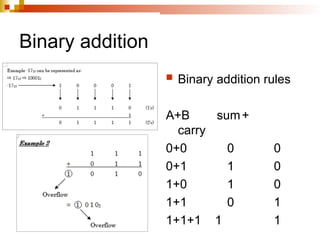
Binary addition
 Binary addition rules
A+B sum+
carry
0+0 0 0
0+1 1 0
1+0 1 0
1+1 0 1
1+1+1 1 1
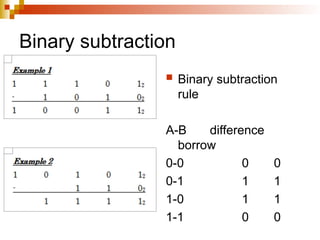
Binary subtraction
 Binary subtraction
rule
A-B difference
borrow
0-0 0 0
0-1 1 1
1-0 1 1
1-1 0 0
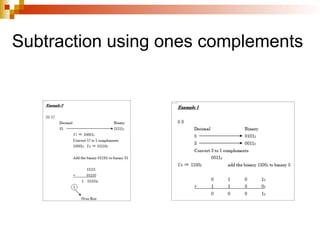
Subtraction using ones complements
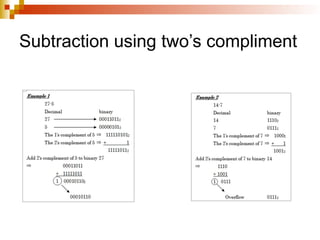
Subtraction using two’s compliment
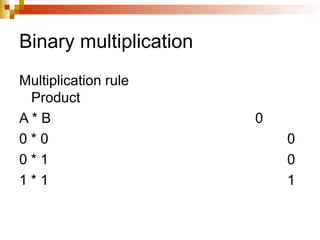
Binary multiplication
Multiplication rule
Product
A * B 0
0 * 0 0
0 * 1 0
1 * 1 1
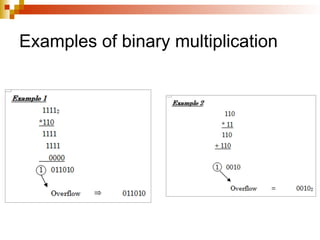
Examples of binary multiplication
Symbolic representation using coding system
 Binary Coded Decimal (BCD)
 Extended BCD code / standard BCD code
 Extended Binary Coded Decimal
Interchange Code (EBCDIC)
 American Standard Code for Information
Interchange (ASCII)
Binary Coded Decimal (BCD)
 BCD is a 4 bit code used to represent
numeric data only. For example, a number
like 3 can be represented using binary
coded decimal as 00112. BCD is mostly
used in simple electronics devices like
calculators etc.
Extended BCD code / standard BCD code
 This standard binary coded decimal is an
enhanced format of binary coded decimal
(BDC) it’s a 7-bit representation scheme
which can represent non numeric
characters. This allows 64 characters to
be represented. For example letter A is
represented as 1100012 using standard
BCD code.
Extended Binary Coded Decimal Interchange Code (EBCDIC)
 EBCDIC is an 8-bit character coding
scheme used primarily in IBM computers.
A total of 256 (28
) characters can be coded
using this scheme. For example letter A is
represented as 110000012 in EBCDIC
code.
American Standard Code for Information Interchange (ASCII)
 ASCII is a 7-bit code, which means that
only 128 characters can be represented.
There is an 8th
bit to this coding scheme
which can provide for 256 characters. The
8th
bit coding scheme is referred to as an
9-bit ASCII for example letter A is
represented as
10000012 in ASCII code
Review questions 1
1. Differentiate between analog and digital data.
2. Define the following terms:
a. Amplitude
b. Frequency
c. Periodic time
3. Explain the role of a modem in communication.
4. State the reasons for use of binary in digital technology.
5. Using illustration, explain how data is represented:
a. In electronic circuits
b. On magnetic media
c. On CD-ROM
6. Distinguish between:
a. A byte and a nibble
b. Word and word length
Answer of review questions 1-1
1. Analog data is a type of data that is continuous in nature
while digital data is in discrete form.
2. a). Amplitude is the maximum.
b). Frequency is the number of cycles per second.
c). Periodic time is the time taken by a signal to complete
a cycle.
3. A modem converts (modulates) data to be transmitted
over the telephone line from digital signal to analog form.
At the receiving end, the modem attached to the
receiving computer converts (demodulates) the analog
signal to original digital form.
4. Devices designed using binary logic are simple, more
reliable and consume less energy.
Answer of review questions 1-2
5. a). In electronic circuits – availability of high voltage ‘on’ is
interpreted as a ‘1’ while low voltage ‘off’ is interpreted as a
‘0’.
b). On magnetic media, arrangement of magnetic dipoles of
iron oxide in one direction is interpreted as ‘1s” while those
that face in the opposite direction are interpreted as ‘0s’.
c). On the shiny surface of the CD are pits and lands. When a
laser beam falls on the shinny surface, it is reflected and
interpreted as a ‘1’. On the other hand, when the laser beam
takes on the pit or bump, there is no reflection and this is
interpreted as a ‘0’ bit.
6. a). A byte is made up of seven or eight bits while a nibble is
made up of four bits i.e. it is half of a byte.
b). A word consists of two or more bytes while a word length
is used as a measure of the number of bits in each word.
Review questions 2
 Convert the following base two numbers
into denary (base 10) numbers.
a. 01012
b. 11112
c. 101011011102
d. 101111112
e. 10110112
f. 1110001112
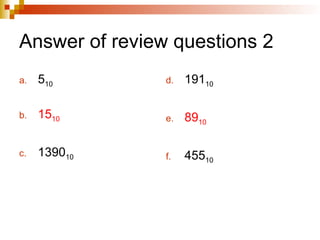
Answer of review questions 2
a. 510
b. 1510
c. 139010
d. 19110
e. 8910
f. 45510
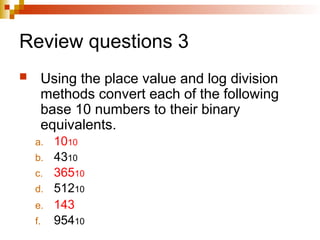
Review questions 3
 Using the place value and log division
methods convert each of the following
base 10 numbers to their binary
equivalents.
a. 1010
b. 4310
c. 36510
d. 51210
e. 143
f. 95410
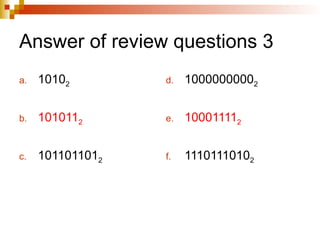
Answer of review questions 3
a. 10102
b. 1010112
c. 1011011012
d. 10000000002
e. 100011112
f. 11101110102
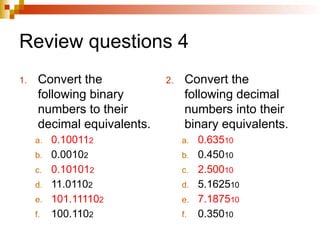
Review questions 4
1. Convert the
following binary
numbers to their
decimal equivalents.
a. 0.100112
b. 0.00102
c. 0.101012
d. 11.01102
e. 101.111102
f. 100.1102
2. Convert the
following decimal
numbers into their
binary equivalents.
a. 0.63510
b. 0.45010
c. 2.50010
d. 5.162510
e. 7.187510
f. 0.35010
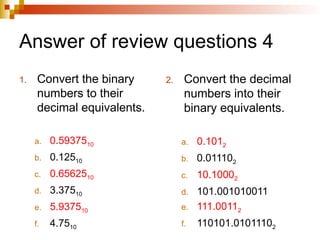
Answer of review questions 4
1. Convert the binary
numbers to their
decimal equivalents.
a. 0.5937510
b. 0.12510
c. 0.6562510
d. 3.37510
e. 5.937510
f. 4.7510
2. Convert the decimal
numbers into their
binary equivalents.
a. 0.1012
b. 0.011102
c. 10.10002
d. 101.001010011
e. 111.00112
f. 110101.01011102
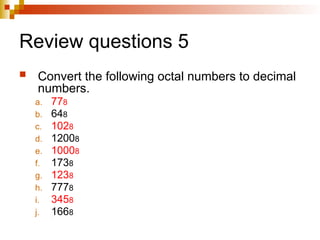
Review questions 5
 Convert the following octal numbers to decimal
numbers.
a. 778
b. 648
c. 1028
d. 12008
e. 10008
f. 1738
g. 1238
h. 7778
i. 3458
j. 1668
k. 3458
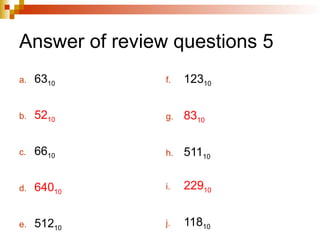
Answer of review questions 5
a. 6310
b. 5210
c. 6610
d. 64010
e. 51210
f. 12310
g. 8310
h. 51110
i. 22910
j. 11810
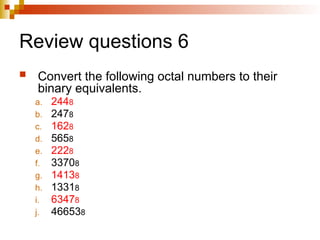
Review questions 6
 Convert the following octal numbers to their
binary equivalents.
a. 2448
b. 2478
c. 1628
d. 5658
e. 2228
f. 33708
g. 14138
h. 13318
i. 63478
j. 466538
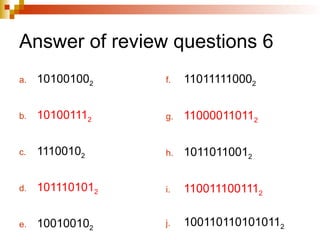
Answer of review questions 6
a. 101001002
b. 101001112
c. 11100102
d. 1011101012
e. 100100102
f. 110111110002
g. 110000110112
h. 10110110012
i. 1100111001112
j. 1001101101010112
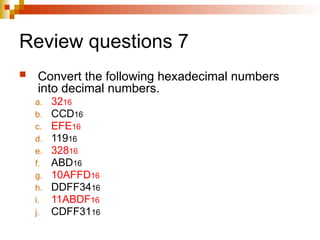
Review questions 7
 Convert the following hexadecimal numbers
into decimal numbers.
a. 3216
b. CCD16
c. EFE16
d. 11916
e. 32816
f. ABD16
g. 10AFFD16
h. DDFF3416
i. 11ABDF16
j. CDFF3116
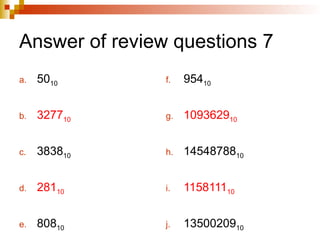
Answer of review questions 7
a. 5010
b. 327710
c. 383810
d. 28110
e. 80810
f. 95410
g. 109362910
h. 1454878810
i. 115811110
j. 1350020910
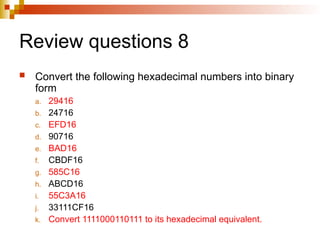
Review questions 8
 Convert the following hexadecimal numbers into binary
form
a. 29416
b. 24716
c. EFD16
d. 90716
e. BAD16
f. CBDF16
g. 585C16
h. ABCD16
i. 55C3A16
j. 33111CF16
k. Convert 1111000110111 to its hexadecimal equivalent.
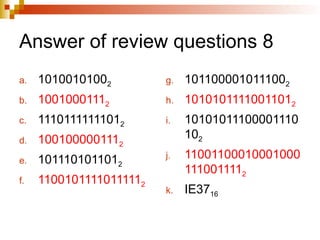
Answer of review questions 8
a. 10100101002
b. 10010001112
c. 11101111111012
d. 1001000001112
e. 1011101011012
f. 11001011110111112
g. 1011000010111002
h. 10101011110011012
i. 10101011100001110
102
j. 11001100010001000
1110011112
k. IE3716
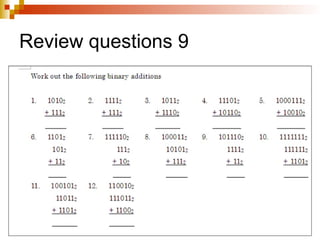
Review questions 9
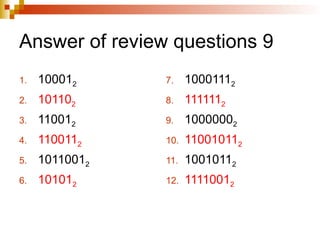
Answer of review questions 9
1. 100012
2. 101102
3. 110012
4. 1100112
5. 10110012
6. 101012
7. 10001112
8. 1111112
9. 10000002
10. 110010112
11. 10010112
12. 11110012
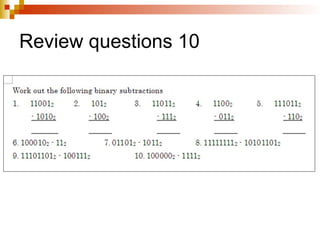
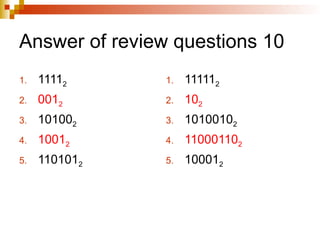
Review questions 10
Answer of review questions 10
1. 11112
2. 0012
3. 101002
4. 10012
5. 1101012
1. 111112
2. 102
3. 10100102
4. 110001102
5. 100012
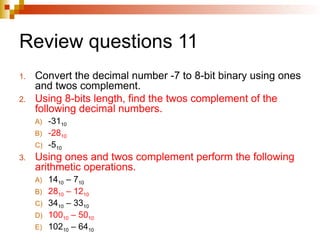
Review questions 11
1. Convert the decimal number -7 to 8-bit binary using ones
and twos complement.
2. Using 8-bits length, find the twos complement of the
following decimal numbers.
A) -3110
B) -2810
C) -510
3. Using ones and twos complement perform the following
arithmetic operations.
A) 1410 – 710
B) 2810 – 1210
C) 3410 – 3310
D) 10010 – 5010
E) 10210 – 6410
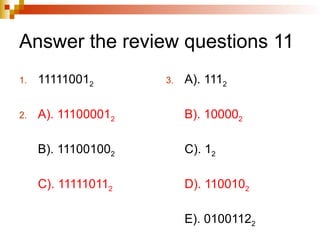
Answer the review questions 11
1. 111110012
2. A). 111000012
B). 111001002
C). 111110112
3. A). 1112
B). 100002
C). 12
D). 1100102
E). 01001122
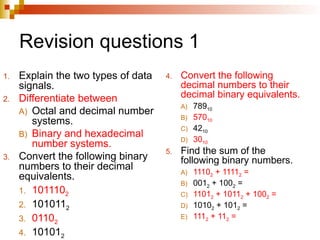
Revision questions 1
1. Explain the two types of data
signals.
2. Differentiate between
A) Octal and decimal number
systems.
B) Binary and hexadecimal
number systems.
3. Convert the following binary
numbers to their decimal
equivalents.
1. 1011102
2. 1010112
3. 01102
4. 101012
4. Convert the following
decimal numbers to their
decimal binary equivalents.
A) 78910
B) 57010
C) 4210
D) 3010
5. Find the sum of the
following binary numbers.
A) 11102 + 11112 =
B) 0012 + 1002 =
C) 11012 + 10112 + 1002 =
D) 10102 + 1012 =
E) 1112 + 112 =
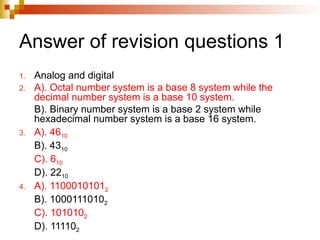
Answer of revision questions 1
1. Analog and digital
2. A). Octal number system is a base 8 system while the
decimal number system is a base 10 system.
B). Binary number system is a base 2 system while
hexadecimal number system is a base 16 system.
3. A). 4610
B). 4310
C). 610
D). 2210
4. A). 11000101012
B). 10001110102
C). 1010102
D). 111102
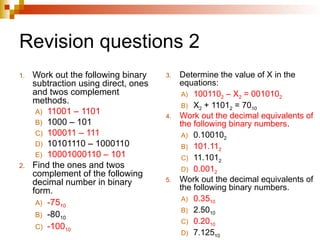
Revision questions 2
1. Work out the following binary
subtraction using direct, ones
and twos complement
methods.
A) 11001 – 1101
B) 1000 – 101
C) 100011 – 111
D) 10101110 – 1000110
E) 10001000110 – 101
2. Find the ones and twos
complement of the following
decimal number in binary
form.
A) -7510
B) -8010
C) -10010
3. Determine the value of X in the
equations:
A) 1001102 – X2 = 0010102
B) X2 + 11012 = 7010
4. Work out the decimal equivalents of
the following binary numbers.
A) 0.100102
B) 101.112
C) 11.1012
D) 0.0012
5. Work out the decimal equivalents of
the following binary numbers.
A) 0.3510
B) 2.5010
C) 0.2010
D) 7.12510
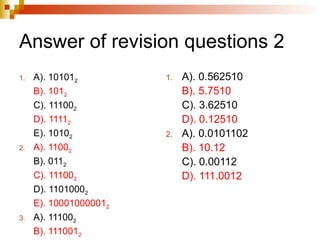
Answer of revision questions 2
1. A). 101012
B). 1012
C). 111002
D). 11112
E). 10102
2. A). 11002
B). 0112
C). 111002
D). 11010002
E). 100010000012
3. A). 111002
B). 1110012
1. A). 0.562510
B). 5.7510
C). 3.62510
D). 0.12510
2. A). 0.0101102
B). 10.12
C). 0.00112
D). 111.0012
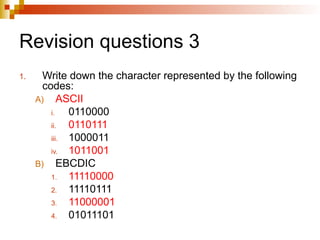
Revision questions 3
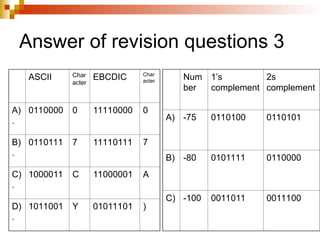
1. Write down the character represented by the following
codes:
A) ASCII
i. 0110000
ii. 0110111
iii. 1000011
iv. 1011001
B) EBCDIC
1. 11110000
2. 11110111
3. 11000001
4. 01011101
Answer of revision questions 3
ASCII Char
acter
EBCDIC Char
acter
A)
.
0110000 0 11110000 0
B)
.
0110111 7 11110111 7
C)
.
1000011 C 11000001 A
D)
.
1011001 Y 01011101 )
Num
ber
1’s
complement
2s
complement
A) -75 0110100 0110101
B) -80 0101111 0110000
C) -100 0011011 0011100
Chapter 1 data representation in a computer.ppt

  • 1.
  • 2.
    Introduction  In digitalcomputers, the user inputs is converted and transmitted as electrical pulses that can be represented by two digits ‘1’ and ‘0’ before processing. These two digits are referred to as Binary digits.
  • 3.
    Sending data viaa telephone line  When a digital signal is to be sent over analog telephone lines e.g. e-mail, it has to be converted to analog signal. This is done by connecting a device called a modem to the digital computer. This process of converting a digital signal to an analog signal is known as modulation. On the receiving end, the incoming analog signal is converted back to digital form in a process known as demodulation.
  • 4.
    Concepts of datarepresentation in digital computers  Data and instructions cannot be entered and processed directly into computers using human language. Any type of data entered must first be converted into machine-readable form. (Binary form). Computer together with it’s peripheral devices handle data in it’s electronic circuits, magnetic media and in optical devices.
  • 5.
    Data representation inelectronic circuits  Electronic components such as microprocessor are made up of millions of electronic circuits. Availability of a high voltage (ON) in these circuits is interpreted as ‘1’ while a low voltage (OFF) is interpreted as ‘0’.
  • 6.
    Data representation onmagnetic media  The presence of a magnetic field in one direction on magnetic media is interpreted as ‘1’ while the absence of magnetic field is interpreted as ‘0’.
  • 7.
    Data representation onoptical media In optical devices, the presence of light is interpreted as ‘1’ while its absence is interpreted as ‘0’.  BITS – this is a binary digit, which can either be 0 or 1. it’s the basic unit of data or information in digital computers.  BYTE – a group of 8 bits. It is the basic unit of measuring memory size in computers.  NIBBLE – it is a half a byte or a group of 4 bits.  WORD – its consists of one or more bytes and is the largest amount of memory that the computer can handle.  WORD LENGTH – is the number of bits in each word of computer.
  • 8.
  • 9.
    Types of datarepresentation  Number System  Base conversion  Negative Numbers  Binary Addition
  • 10.
    Types of numbersystems  Decimal Number System  Binary Number System  Octal Notion  Hexadecimal Number System
  • 11.
    Decimal Number System This number system has ten digits ranging from 0- 9. A decimal number should be written with a subscript 10. e.g. 13210. Each digit of a given number in the base has a place value, which is influenced by base ten. E.g. number 123410
  • 12.
    Binary Number System This number system uses two digits 1 and 0 to represent numbers. The place value of the digits of a base two number is influenced by two (the base/radix). e.g. the place values of the 10102 are illustrated below
  • 13.
    Octal Notation  Theoctal number system consists of eight digits running from 0-7. each digit of a number in base eight has its place value determined by eight. E.g. 21638 can be expressed as.
  • 14.
    Hexadecimal Number System This number system consists of sixteen digits ranging from 0-9 and letters A-F where A is equivalent to 10, B to 11 up to F which is equivalent to 15, in base ten systems. Each digit of a number in base sixteen has its place value expressed in terms of sixteen. For example, the value 12A3 can be expressed as;
  • 15.
    Base conversion  Decimalto Binary  Binary to Decimal Number  Decimal to Octal  From Octal to Decimal  Converting Octal to Binary  From Decimal to Hexadecimal  Hexadecimal to Decimal  Hexadecimal to Binary
  • 16.
    Decimal to Binary1  To convert a number from base 10 to base 2, the number in base 10 is repeatedly divided by 2 unit the divided is zero on each division the remainder is noted. The remainders are copied bottom up wise to give the binary equivalent of the decimal number.
  • 17.
    Decimal to Binary2  For fractional numbers the number is divided into two parts. The whole number part and the fraction part. The whole number is repeatedly divided by 2 while the fraction is repetitively multiplied by 2 until the fraction becomes zero or starts recurring. (Repeating it self)
  • 18.
    Binary to DecimalNumber 1  Steps 1. First write the place values starting from the right hand side. 2. Write each digit under its place value. 3. Multiply each digit by its corresponding place value. 4. Sum up the products.
  • 19.
    Binary to DecimalNumber 2  For fraction number, the whole number is converted to decimal as above. The fraction part digits are divided by multiples of two starting from the decimal point.
  • 20.
    Decimal to octal1  To convert a number from base 10 to base 8, the number in base 10 is repeatedly divided by 8, until the dividend is zero each division the remainder is noted.
  • 21.
    Decimal to octal2  To convert fractional decimal to octal the procedure is same as for fractional decimal to binary, but the multiplication is by 8 instead of 2.
  • 22.
    Form Octal toDecimal  The procedure is same as from binary to decimal, but the weights as assigned in terms of 8’s.  The fractional number are converted to decimal using the same procedure as that of converting fractional binary to decimal, but divisions is by multiplies of eight.
  • 23.
    Converting Octal toBinary  Each digit is represented by 3 binary digits. E.g. 7 is represented as 1112
  • 24.
    From Decimal toHexadecimal 1  The procedure is same as from decimal to binary though divisions are by 16
  • 25.
    From Decimal toHexadecimal 2  For the fractional numbers, the fraction part is multiplied by 16.
  • 26.
    Hexadecimal to Decimal The same procedure as from Binary to Decimal is used with the weights assigned in terms of 16’s.  For fractional hexadecimal values. The division is by 16 and the procedure is the same as the binary fraction to decimal.
  • 27.
  • 28.
  • 29.
    Negative numbers  Bothpositive and negative numbers can be represented in the computer memory during processing. various methods are used to represent negative numbers in the computer. These methods are: i. One’s compliment ii. Two’s compliment The negative numbers are used to carry out subtraction in the computer arithmetic operations.
  • 30.
    One’s complement (1cmethod)  In this method the binary bits representing the negative number are negated that is the 1’s in the number are changed to 0’s and 0’s to 1’s.
  • 31.
    Two’s complement (2cmethod)  In this method, the negative number is represented into binary, then complimented as in 1c method but a ‘1’ is added to the least significant digit of the complement value.
  • 32.
    Signed magnitude  Indecimal numbers, signed number has a prefix “+” for a positive number e.g. +3210 and “-” for a negative number e.g. -3210. in binary, a negative number may be represented by prefixing a digit 1 to the number while a positive number may be represented by prefixing a digit 0. i.e. 1710 10001 ⇒ 2 (unsigned) -1710 To indicate it’s a negative number we add ⇒ an extra bit (1) 100012 +1710 To indicate it’s positive we add an extra bit ⇒ (0) 100012
  • 33.
    Advantages of two’scompliment  There are no two ways of representing a zero as in one’s compliment and signed magnitude.  Effective addition and subtraction can be done even with numbers that are represented with a sign bit.
  • 34.
    Binary arithmetics  Binaryaddition  Binary subtraction  Binary multiplication
  • 35.
    Binary addition  Binaryaddition rules A+B sum+ carry 0+0 0 0 0+1 1 0 1+0 1 0 1+1 0 1 1+1+1 1 1
  • 36.
    Binary subtraction  Binarysubtraction rule A-B difference borrow 0-0 0 0 0-1 1 1 1-0 1 1 1-1 0 0
  • 37.
  • 38.
  • 39.
  • 40.
    Examples of binarymultiplication
  • 41.
    Symbolic representation usingcoding system  Binary Coded Decimal (BCD)  Extended BCD code / standard BCD code  Extended Binary Coded Decimal Interchange Code (EBCDIC)  American Standard Code for Information Interchange (ASCII)
  • 42.
    Binary Coded Decimal(BCD)  BCD is a 4 bit code used to represent numeric data only. For example, a number like 3 can be represented using binary coded decimal as 00112. BCD is mostly used in simple electronics devices like calculators etc.
  • 43.
    Extended BCD code/ standard BCD code  This standard binary coded decimal is an enhanced format of binary coded decimal (BDC) it’s a 7-bit representation scheme which can represent non numeric characters. This allows 64 characters to be represented. For example letter A is represented as 1100012 using standard BCD code.
  • 44.
    Extended Binary CodedDecimal Interchange Code (EBCDIC)  EBCDIC is an 8-bit character coding scheme used primarily in IBM computers. A total of 256 (28 ) characters can be coded using this scheme. For example letter A is represented as 110000012 in EBCDIC code.
  • 45.
    American Standard Codefor Information Interchange (ASCII)  ASCII is a 7-bit code, which means that only 128 characters can be represented. There is an 8th bit to this coding scheme which can provide for 256 characters. The 8th bit coding scheme is referred to as an 9-bit ASCII for example letter A is represented as 10000012 in ASCII code
  • 46.
    Review questions 1 1.Differentiate between analog and digital data. 2. Define the following terms: a. Amplitude b. Frequency c. Periodic time 3. Explain the role of a modem in communication. 4. State the reasons for use of binary in digital technology. 5. Using illustration, explain how data is represented: a. In electronic circuits b. On magnetic media c. On CD-ROM 6. Distinguish between: a. A byte and a nibble b. Word and word length
  • 47.
    Answer of reviewquestions 1-1 1. Analog data is a type of data that is continuous in nature while digital data is in discrete form. 2. a). Amplitude is the maximum. b). Frequency is the number of cycles per second. c). Periodic time is the time taken by a signal to complete a cycle. 3. A modem converts (modulates) data to be transmitted over the telephone line from digital signal to analog form. At the receiving end, the modem attached to the receiving computer converts (demodulates) the analog signal to original digital form. 4. Devices designed using binary logic are simple, more reliable and consume less energy.
  • 48.
    Answer of reviewquestions 1-2 5. a). In electronic circuits – availability of high voltage ‘on’ is interpreted as a ‘1’ while low voltage ‘off’ is interpreted as a ‘0’. b). On magnetic media, arrangement of magnetic dipoles of iron oxide in one direction is interpreted as ‘1s” while those that face in the opposite direction are interpreted as ‘0s’. c). On the shiny surface of the CD are pits and lands. When a laser beam falls on the shinny surface, it is reflected and interpreted as a ‘1’. On the other hand, when the laser beam takes on the pit or bump, there is no reflection and this is interpreted as a ‘0’ bit. 6. a). A byte is made up of seven or eight bits while a nibble is made up of four bits i.e. it is half of a byte. b). A word consists of two or more bytes while a word length is used as a measure of the number of bits in each word.
  • 49.
    Review questions 2 Convert the following base two numbers into denary (base 10) numbers. a. 01012 b. 11112 c. 101011011102 d. 101111112 e. 10110112 f. 1110001112
  • 50.
    Answer of reviewquestions 2 a. 510 b. 1510 c. 139010 d. 19110 e. 8910 f. 45510
  • 51.
    Review questions 3 Using the place value and log division methods convert each of the following base 10 numbers to their binary equivalents. a. 1010 b. 4310 c. 36510 d. 51210 e. 143 f. 95410
  • 52.
    Answer of reviewquestions 3 a. 10102 b. 1010112 c. 1011011012 d. 10000000002 e. 100011112 f. 11101110102
  • 53.
    Review questions 4 1.Convert the following binary numbers to their decimal equivalents. a. 0.100112 b. 0.00102 c. 0.101012 d. 11.01102 e. 101.111102 f. 100.1102 2. Convert the following decimal numbers into their binary equivalents. a. 0.63510 b. 0.45010 c. 2.50010 d. 5.162510 e. 7.187510 f. 0.35010
  • 54.
    Answer of reviewquestions 4 1. Convert the binary numbers to their decimal equivalents. a. 0.5937510 b. 0.12510 c. 0.6562510 d. 3.37510 e. 5.937510 f. 4.7510 2. Convert the decimal numbers into their binary equivalents. a. 0.1012 b. 0.011102 c. 10.10002 d. 101.001010011 e. 111.00112 f. 110101.01011102
  • 55.
    Review questions 5 Convert the following octal numbers to decimal numbers. a. 778 b. 648 c. 1028 d. 12008 e. 10008 f. 1738 g. 1238 h. 7778 i. 3458 j. 1668 k. 3458
  • 56.
    Answer of reviewquestions 5 a. 6310 b. 5210 c. 6610 d. 64010 e. 51210 f. 12310 g. 8310 h. 51110 i. 22910 j. 11810
  • 57.
    Review questions 6 Convert the following octal numbers to their binary equivalents. a. 2448 b. 2478 c. 1628 d. 5658 e. 2228 f. 33708 g. 14138 h. 13318 i. 63478 j. 466538
  • 58.
    Answer of reviewquestions 6 a. 101001002 b. 101001112 c. 11100102 d. 1011101012 e. 100100102 f. 110111110002 g. 110000110112 h. 10110110012 i. 1100111001112 j. 1001101101010112
  • 59.
    Review questions 7 Convert the following hexadecimal numbers into decimal numbers. a. 3216 b. CCD16 c. EFE16 d. 11916 e. 32816 f. ABD16 g. 10AFFD16 h. DDFF3416 i. 11ABDF16 j. CDFF3116
  • 60.
    Answer of reviewquestions 7 a. 5010 b. 327710 c. 383810 d. 28110 e. 80810 f. 95410 g. 109362910 h. 1454878810 i. 115811110 j. 1350020910
  • 61.
    Review questions 8 Convert the following hexadecimal numbers into binary form a. 29416 b. 24716 c. EFD16 d. 90716 e. BAD16 f. CBDF16 g. 585C16 h. ABCD16 i. 55C3A16 j. 33111CF16 k. Convert 1111000110111 to its hexadecimal equivalent.
  • 62.
    Answer of reviewquestions 8 a. 10100101002 b. 10010001112 c. 11101111111012 d. 1001000001112 e. 1011101011012 f. 11001011110111112 g. 1011000010111002 h. 10101011110011012 i. 10101011100001110 102 j. 11001100010001000 1110011112 k. IE3716
  • 63.
  • 64.
    Answer of reviewquestions 9 1. 100012 2. 101102 3. 110012 4. 1100112 5. 10110012 6. 101012 7. 10001112 8. 1111112 9. 10000002 10. 110010112 11. 10010112 12. 11110012
  • 65.
  • 66.
    Answer of reviewquestions 10 1. 11112 2. 0012 3. 101002 4. 10012 5. 1101012 1. 111112 2. 102 3. 10100102 4. 110001102 5. 100012
  • 67.
    Review questions 11 1.Convert the decimal number -7 to 8-bit binary using ones and twos complement. 2. Using 8-bits length, find the twos complement of the following decimal numbers. A) -3110 B) -2810 C) -510 3. Using ones and twos complement perform the following arithmetic operations. A) 1410 – 710 B) 2810 – 1210 C) 3410 – 3310 D) 10010 – 5010 E) 10210 – 6410
  • 68.
    Answer the reviewquestions 11 1. 111110012 2. A). 111000012 B). 111001002 C). 111110112 3. A). 1112 B). 100002 C). 12 D). 1100102 E). 01001122
  • 69.
    Revision questions 1 1.Explain the two types of data signals. 2. Differentiate between A) Octal and decimal number systems. B) Binary and hexadecimal number systems. 3. Convert the following binary numbers to their decimal equivalents. 1. 1011102 2. 1010112 3. 01102 4. 101012 4. Convert the following decimal numbers to their decimal binary equivalents. A) 78910 B) 57010 C) 4210 D) 3010 5. Find the sum of the following binary numbers. A) 11102 + 11112 = B) 0012 + 1002 = C) 11012 + 10112 + 1002 = D) 10102 + 1012 = E) 1112 + 112 =
  • 70.
    Answer of revisionquestions 1 1. Analog and digital 2. A). Octal number system is a base 8 system while the decimal number system is a base 10 system. B). Binary number system is a base 2 system while hexadecimal number system is a base 16 system. 3. A). 4610 B). 4310 C). 610 D). 2210 4. A). 11000101012 B). 10001110102 C). 1010102 D). 111102
  • 71.
    Revision questions 2 1.Work out the following binary subtraction using direct, ones and twos complement methods. A) 11001 – 1101 B) 1000 – 101 C) 100011 – 111 D) 10101110 – 1000110 E) 10001000110 – 101 2. Find the ones and twos complement of the following decimal number in binary form. A) -7510 B) -8010 C) -10010 3. Determine the value of X in the equations: A) 1001102 – X2 = 0010102 B) X2 + 11012 = 7010 4. Work out the decimal equivalents of the following binary numbers. A) 0.100102 B) 101.112 C) 11.1012 D) 0.0012 5. Work out the decimal equivalents of the following binary numbers. A) 0.3510 B) 2.5010 C) 0.2010 D) 7.12510
  • 72.
    Answer of revisionquestions 2 1. A). 101012 B). 1012 C). 111002 D). 11112 E). 10102 2. A). 11002 B). 0112 C). 111002 D). 11010002 E). 100010000012 3. A). 111002 B). 1110012 1. A). 0.562510 B). 5.7510 C). 3.62510 D). 0.12510 2. A). 0.0101102 B). 10.12 C). 0.00112 D). 111.0012
  • 73.
    Revision questions 3 1.Write down the character represented by the following codes: A) ASCII i. 0110000 ii. 0110111 iii. 1000011 iv. 1011001 B) EBCDIC 1. 11110000 2. 11110111 3. 11000001 4. 01011101
  • 74.
    Answer of revisionquestions 3 ASCII Char acter EBCDIC Char acter A) . 0110000 0 11110000 0 B) . 0110111 7 11110111 7 C) . 1000011 C 11000001 A D) . 1011001 Y 01011101 ) Num ber 1’s complement 2s complement A) -75 0110100 0110101 B) -80 0101111 0110000 C) -100 0011011 0011100