LUDĚK KNITTL,
UNIVERSITY OF SHEFFIELD
T EAC H I N G S L AVO N I C L A N G UAG ES WO R K S H O P
U C L , LO N D O N
3 0 J U N E 2 0 1 5
( H T T P : / / W W W. S L I D ES H A R E . N ET/ LU D K K N I T T L / D I G I TA L -
T EC H N O LO G I ES - L K N I T T LU C L J U N E 2 0 1 5 )
Digital technologies in language
learning and teaching
“It is no longer defensible, if it ever was, to ignore the
involvement of new technology in the reshaping of
educational practices, expectations, assumptions and
relationships. Technology is not going to go away. Nor is
its use an unsolved problem.”
Ellis and Goodyear (2010:11)
 What are “teaching/learning technologies”?
 Everything to do with creating, sharing and using digital
content via electronic devices for the purpose of learning
and teaching
 What is your experience of using technologies for
learning (and/or teaching)?
Today’s talk
 The “digital natives” debate
 A model of effective e-learning
 The SAMR model – enhancing technology integration
 Technologies as a pedagogical tool
 Available technologies and their integration in teaching
practice
The “Digital Natives” debate
 The generation born after 1980 find it easier to interact
with digital technologies; they learn, create and even
socialise differently (Prensky, 2001)
 The older generation – “digital immigrants” – will never
be so “fluent” in the use of technologies
Is there evidence of “digital nativness”?
 A complex issue affected by factors such as
 Access to technologies
 Socio-economic background
 Perceived usefulness
 The discipline
(e.g. Facer & Furlong, 2001)
 Differences in the quantity rather than the quality of use
in different groups (e.g. engineering vs. social work -
Margaryan et al., 2011)
Student preferences
 Online media used for looking up content and
communication rather than for creating (i.e. wikies or
blogs for learning)
 No adoption of different learning styles by the younger
generation
 Satisfaction with traditional methods of teaching
 Attitude towards learning influenced by the teaching style
of the lecturer
 Face-to-face interaction with teachers
(Margaryan et al., 2011; Oblinger & Oblinger, 2005; Hargittai,
2010)
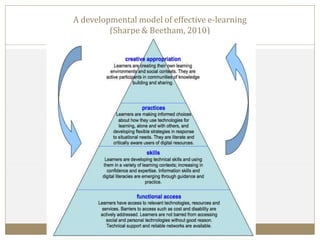
A developmental model of effective e-learning
(Sharpe & Beetham, 2010)
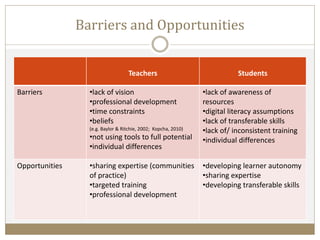
Barriers and Opportunities
Teachers Students
Barriers •lack of vision
•professional development
•time constraints
•beliefs
(e.g. Baylor & Ritchie, 2002; Kopcha, 2010)
•not using tools to full potential
•individual differences
•lack of awareness of
resources
•digital literacy assumptions
•lack of transferable skills
•lack of/ inconsistent training
•individual differences
Opportunities •sharing expertise (communities
of practice)
•targeted training
•professional development
•developing learner autonomy
•sharing expertise
•developing transferable skills
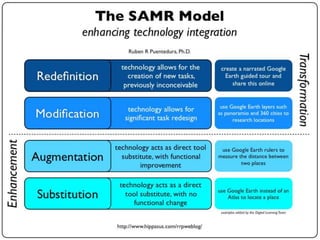
The SAMR Model
Technology and learning objectives (I)
 Application of teaching theory
 Earlier – focus on learning outcomes
 Current – learner-centred
 Outcomes-based design has been criticised as students
 invent strategies
 focus on completing tasks
 neglect developing skills and values
Technology and learning objectives (II)
 Outcome-based design
 Linear progression through materials which does not support
individual approaches
 Can only be used where clear learning outcomes are in place
 Relatively easy to set up
 Learner-focused design
 Learners choose their own path and pace (e.g. creating portfolios,
writing wikis)
 Self-monitoring of progress
 Demanding from designer’s/tutor’s point of view
 Greater need for providing support and feedback
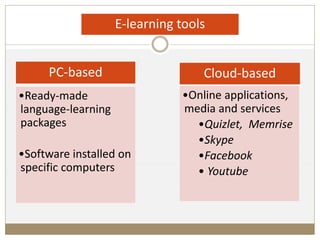
PC-based
•Ready-made
language-learning
packages
•Software installed on
specific computers
Cloud-based
•Online applications,
media and services
•Quizlet, Memrise
•Skype
•Facebook
• Youtube
E-learning tools
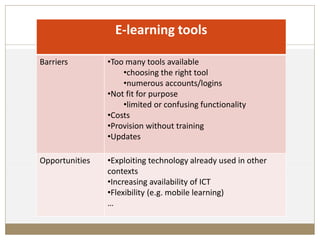
E-learning tools
Barriers •Too many tools available
•choosing the right tool
•numerous accounts/logins
•Not fit for purpose
•limited or confusing functionality
•Costs
•Provision without training
•Updates
Opportunities •Exploiting technology already used in other
contexts
•Increasing availability of ICT
•Flexibility (e.g. mobile learning)
…
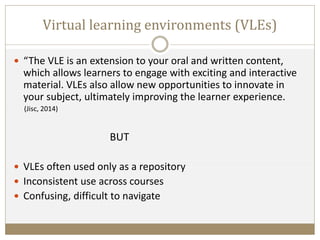
Virtual learning environments (VLEs)
 “The VLE is an extension to your oral and written content,
which allows learners to engage with exciting and interactive
material. VLEs also allow new opportunities to innovate in
your subject, ultimately improving the learner experience.
(Jisc, 2014)
BUT
 VLEs often used only as a repository
 Inconsistent use across courses
 Confusing, difficult to navigate
A successful solution?
 VLEs work best when set up as a well-organised hub
containing some materials but also links to other resources.
 “You can't use [the VLE] on its own. You teach students that
there are links to exercises, grammars etc. and you point them
to it.” (Teacher)
 “It works for [one language] because everything is there and
you can find everything. It's ok to link to something else
because it's well organised.” (Student)
Electronic tools favoured by language students
 Online dictionaries
 Web-based translators
 Youtube
(Steel & Levy, 2013)
 Social networks
 Online communication tools
Disadvantages
•Less control over
contents
•Can be unreliable
•Less accessible to
beginner students
Advantages
•Quantity and variety
•Real-life language
•Supporting learner
autonomy
Using tools other than VLEs
 “Sometimes we get links to things for Dutch and there is the
Dutch grammar website [not hosted by the university] but that
never works.” (Student)
 “Our Russian textbooks have extensive websites but they are
mostly traditional static resources. There are some interactive
exercises.” (Teacher)
Using tools other than VLEs
 “I use Quizlet. I find it really useful, especially the phone
application, because when you get it wrong, it forces you to
repeat it until you get it right…”
 “I use radio and television. That's one of the main things I
do. I use other things but any software becomes a bit boring
after a time so I try different things.”
 “I have BBC Russia in my Facebook feed. You get headlines
and even if you don‘t read it all you get some words. I saw
lots of people liking it so I did the same.”
 “I've done it consciously - added foreign news feed on my
Facebook, and I've set my homepage on a Czech
newspaper.”
(All quotes by students)
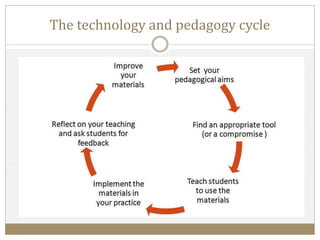
The technology and pedagogy cycle
Examples of using technologies in teaching practice
 Reading in Czech
(Sheffield VLE-based course)
 Varieties of Czech (Moodle-based course)
www.czechandpolish.co.uk/czech/
 Beginners’ Czech Exercises
www.czech.group.shef.ac.uk/beginners/
Examples of tools available online
 Vocabulary learning
 Quizlet
http://quizlet.com/
 Memrise
http://www.memrise.com/
 Interactive exercises
 Hot Potatoes
http://hotpot.uvic.ca/
Further reading
 Bates, A. W. (2015) Teaching in a Digital Age
Available from http://www.tonybates.ca/teaching-in-a-digital-age/
 Beetham, H and Sharpe, R. (eds.) (2007) Rethinking Pedagogy for a Digital Age.
London: Routlage
 Horton, W. (2006) E-Learning by Design. San Francisco: Pfeiffer.
 Mason, R. and Rennie, F. (2008) E-Learning and Social Networking Handbook:
Resources for Higher Education. Oxon: Routlage
 Mayer, R.E. (2009) Media Learning (2nd ed.). New York: Cambridge University
Press.
 Pacansky-Brock, M. (2013) Best Practices for Teaching with Emerging
Technologies. London: Routlage
References
 Baylor, A.L. and Ritchie, D. (2002) What factors facilitate teacher skill, teacher morale,
and perceived student learning in technology-using classrooms? Computers &
Education, 39(2) 395–414.
 Beetham, H and Sharpe, R. (eds.) (2007) Rethinking Pedagogy for a Digital Age.
London: Routlage
 Ellis, R.A. & Goodyear, P. (2010) Students’ Experiences of E-Learning in Higher
Education: The Ecology of Sustainable Innovation. London:Routlage.
 Facer, K. & Furlong, R. (2001) Beyond the myth of the ‘Cyberkid’: young people at the
margins ofthe I nformation revolution, Journal of Youth Studies, 4(4), 451–469.
 Guri-Rosenblit, S. (2005). Eight paradoxes in the implementation process of eLearning
in higher education. Higher Education Policy, 18, 1, 5–29.
 Hargittai, E. (2010). Digital Na(t)ives? Variation in internet skills and uses among
members of the “Net Generation”. Sociological Inquiry, 80(1), 92–113.
References
 Jisc (2014) Use of VLEs with Digital Media. [Online] Available from:
http://www.jiscdigitalmedia.ac.uk/guide/introduction-to-the-use-of-vles-with-digital-media
 Knittl, L. (2014) Technologies in language learning and teaching: barriers and opportunities,
MEd dissertation, University of Sheffield, unpublished.
 Kopcha, T.J. (2012) Teachers’ perceptions of the barriers to technology integration and
practices with technology under situated professional development. Computers and
Education, 59(1109-1121).
 Njenga, J.K. and Fourie, L.C.H. (2010) The myths about e-learning in higher education.
British Journal of Educational Technology, 41(2), 199-212.
 Margaryan, A., Littlejohn, A. & Vojt, G. (2011) Are digital natives a myth or reality?
University studets’ use of digital technologies. Computers & Education, 56, 429-440.
 Oblinger, D., & Oblinger, J. (2005). Is it age or IT: first steps towards understanding the net
generation. In D. Oblinger, & J. Oblinger (Eds.), Educating the Net Generation (pp. 2.1–2.20).
Boulder, CO: EDUCAUSE, Online: http://www.educause.edu/research-and-
publications/books/educating-net-generation
References
 Prensky, M. (2001). Digital natives, digital immigrants. On the Horizon, 9
(5), 1–6. Available online at:
http://www.marcprensky.com/writing/Prensky%20-
%20Digital%20Natives,%20Digital%20Immigrants%20-%20Part1.pdf
 Puentedura, R.R. (2014) Learning, Technology, and the SAMR Model:
Goals, Processes, and Practice [Online] Available from:
http://www.hippasus.com/rrpweblog/archives/2014/06/29/LearningTech
nologySAMRModel.pdf
 Sharpe, R. and Benfield, G. (2014) Reflections on ‘The student experience
of e-learning in higher education: a review of the literature’. Brookes
eJournal of Learning and Teaching, 6(1).
 Steel, C.H. and Levy, M. (2013) Language students and their technologies:
Charting the evolution 2006–2011. ReCALL, 25(3), 306-320.

Digital technologies in language learning and teaching

  • 1.
    LUDĚK KNITTL, UNIVERSITY OFSHEFFIELD T EAC H I N G S L AVO N I C L A N G UAG ES WO R K S H O P U C L , LO N D O N 3 0 J U N E 2 0 1 5 ( H T T P : / / W W W. S L I D ES H A R E . N ET/ LU D K K N I T T L / D I G I TA L - T EC H N O LO G I ES - L K N I T T LU C L J U N E 2 0 1 5 ) Digital technologies in language learning and teaching
  • 2.
    “It is nolonger defensible, if it ever was, to ignore the involvement of new technology in the reshaping of educational practices, expectations, assumptions and relationships. Technology is not going to go away. Nor is its use an unsolved problem.” Ellis and Goodyear (2010:11)
  • 3.
     What are“teaching/learning technologies”?  Everything to do with creating, sharing and using digital content via electronic devices for the purpose of learning and teaching  What is your experience of using technologies for learning (and/or teaching)?
  • 4.
    Today’s talk  The“digital natives” debate  A model of effective e-learning  The SAMR model – enhancing technology integration  Technologies as a pedagogical tool  Available technologies and their integration in teaching practice
  • 5.
    The “Digital Natives”debate  The generation born after 1980 find it easier to interact with digital technologies; they learn, create and even socialise differently (Prensky, 2001)  The older generation – “digital immigrants” – will never be so “fluent” in the use of technologies
  • 6.
    Is there evidenceof “digital nativness”?  A complex issue affected by factors such as  Access to technologies  Socio-economic background  Perceived usefulness  The discipline (e.g. Facer & Furlong, 2001)  Differences in the quantity rather than the quality of use in different groups (e.g. engineering vs. social work - Margaryan et al., 2011)
  • 7.
    Student preferences  Onlinemedia used for looking up content and communication rather than for creating (i.e. wikies or blogs for learning)  No adoption of different learning styles by the younger generation  Satisfaction with traditional methods of teaching  Attitude towards learning influenced by the teaching style of the lecturer  Face-to-face interaction with teachers (Margaryan et al., 2011; Oblinger & Oblinger, 2005; Hargittai, 2010)
  • 8.
    A developmental modelof effective e-learning (Sharpe & Beetham, 2010)
  • 9.
    Barriers and Opportunities TeachersStudents Barriers •lack of vision •professional development •time constraints •beliefs (e.g. Baylor & Ritchie, 2002; Kopcha, 2010) •not using tools to full potential •individual differences •lack of awareness of resources •digital literacy assumptions •lack of transferable skills •lack of/ inconsistent training •individual differences Opportunities •sharing expertise (communities of practice) •targeted training •professional development •developing learner autonomy •sharing expertise •developing transferable skills
  • 10.
  • 11.
    Technology and learningobjectives (I)  Application of teaching theory  Earlier – focus on learning outcomes  Current – learner-centred  Outcomes-based design has been criticised as students  invent strategies  focus on completing tasks  neglect developing skills and values
  • 12.
    Technology and learningobjectives (II)  Outcome-based design  Linear progression through materials which does not support individual approaches  Can only be used where clear learning outcomes are in place  Relatively easy to set up  Learner-focused design  Learners choose their own path and pace (e.g. creating portfolios, writing wikis)  Self-monitoring of progress  Demanding from designer’s/tutor’s point of view  Greater need for providing support and feedback
  • 13.
    PC-based •Ready-made language-learning packages •Software installed on specificcomputers Cloud-based •Online applications, media and services •Quizlet, Memrise •Skype •Facebook • Youtube E-learning tools
  • 14.
    E-learning tools Barriers •Toomany tools available •choosing the right tool •numerous accounts/logins •Not fit for purpose •limited or confusing functionality •Costs •Provision without training •Updates Opportunities •Exploiting technology already used in other contexts •Increasing availability of ICT •Flexibility (e.g. mobile learning) …
  • 15.
    Virtual learning environments(VLEs)  “The VLE is an extension to your oral and written content, which allows learners to engage with exciting and interactive material. VLEs also allow new opportunities to innovate in your subject, ultimately improving the learner experience. (Jisc, 2014) BUT  VLEs often used only as a repository  Inconsistent use across courses  Confusing, difficult to navigate
  • 16.
    A successful solution? VLEs work best when set up as a well-organised hub containing some materials but also links to other resources.  “You can't use [the VLE] on its own. You teach students that there are links to exercises, grammars etc. and you point them to it.” (Teacher)  “It works for [one language] because everything is there and you can find everything. It's ok to link to something else because it's well organised.” (Student)
  • 17.
    Electronic tools favouredby language students  Online dictionaries  Web-based translators  Youtube (Steel & Levy, 2013)  Social networks  Online communication tools
  • 18.
    Disadvantages •Less control over contents •Canbe unreliable •Less accessible to beginner students Advantages •Quantity and variety •Real-life language •Supporting learner autonomy Using tools other than VLEs  “Sometimes we get links to things for Dutch and there is the Dutch grammar website [not hosted by the university] but that never works.” (Student)  “Our Russian textbooks have extensive websites but they are mostly traditional static resources. There are some interactive exercises.” (Teacher)
  • 19.
    Using tools otherthan VLEs  “I use Quizlet. I find it really useful, especially the phone application, because when you get it wrong, it forces you to repeat it until you get it right…”  “I use radio and television. That's one of the main things I do. I use other things but any software becomes a bit boring after a time so I try different things.”  “I have BBC Russia in my Facebook feed. You get headlines and even if you don‘t read it all you get some words. I saw lots of people liking it so I did the same.”  “I've done it consciously - added foreign news feed on my Facebook, and I've set my homepage on a Czech newspaper.” (All quotes by students)
  • 20.
    The technology andpedagogy cycle
  • 21.
    Examples of usingtechnologies in teaching practice  Reading in Czech (Sheffield VLE-based course)  Varieties of Czech (Moodle-based course) www.czechandpolish.co.uk/czech/  Beginners’ Czech Exercises www.czech.group.shef.ac.uk/beginners/
  • 22.
    Examples of toolsavailable online  Vocabulary learning  Quizlet http://quizlet.com/  Memrise http://www.memrise.com/  Interactive exercises  Hot Potatoes http://hotpot.uvic.ca/
  • 23.
    Further reading  Bates,A. W. (2015) Teaching in a Digital Age Available from http://www.tonybates.ca/teaching-in-a-digital-age/  Beetham, H and Sharpe, R. (eds.) (2007) Rethinking Pedagogy for a Digital Age. London: Routlage  Horton, W. (2006) E-Learning by Design. San Francisco: Pfeiffer.  Mason, R. and Rennie, F. (2008) E-Learning and Social Networking Handbook: Resources for Higher Education. Oxon: Routlage  Mayer, R.E. (2009) Media Learning (2nd ed.). New York: Cambridge University Press.  Pacansky-Brock, M. (2013) Best Practices for Teaching with Emerging Technologies. London: Routlage
  • 24.
    References  Baylor, A.L.and Ritchie, D. (2002) What factors facilitate teacher skill, teacher morale, and perceived student learning in technology-using classrooms? Computers & Education, 39(2) 395–414.  Beetham, H and Sharpe, R. (eds.) (2007) Rethinking Pedagogy for a Digital Age. London: Routlage  Ellis, R.A. & Goodyear, P. (2010) Students’ Experiences of E-Learning in Higher Education: The Ecology of Sustainable Innovation. London:Routlage.  Facer, K. & Furlong, R. (2001) Beyond the myth of the ‘Cyberkid’: young people at the margins ofthe I nformation revolution, Journal of Youth Studies, 4(4), 451–469.  Guri-Rosenblit, S. (2005). Eight paradoxes in the implementation process of eLearning in higher education. Higher Education Policy, 18, 1, 5–29.  Hargittai, E. (2010). Digital Na(t)ives? Variation in internet skills and uses among members of the “Net Generation”. Sociological Inquiry, 80(1), 92–113.
  • 25.
    References  Jisc (2014)Use of VLEs with Digital Media. [Online] Available from: http://www.jiscdigitalmedia.ac.uk/guide/introduction-to-the-use-of-vles-with-digital-media  Knittl, L. (2014) Technologies in language learning and teaching: barriers and opportunities, MEd dissertation, University of Sheffield, unpublished.  Kopcha, T.J. (2012) Teachers’ perceptions of the barriers to technology integration and practices with technology under situated professional development. Computers and Education, 59(1109-1121).  Njenga, J.K. and Fourie, L.C.H. (2010) The myths about e-learning in higher education. British Journal of Educational Technology, 41(2), 199-212.  Margaryan, A., Littlejohn, A. & Vojt, G. (2011) Are digital natives a myth or reality? University studets’ use of digital technologies. Computers & Education, 56, 429-440.  Oblinger, D., & Oblinger, J. (2005). Is it age or IT: first steps towards understanding the net generation. In D. Oblinger, & J. Oblinger (Eds.), Educating the Net Generation (pp. 2.1–2.20). Boulder, CO: EDUCAUSE, Online: http://www.educause.edu/research-and- publications/books/educating-net-generation
  • 26.
    References  Prensky, M.(2001). Digital natives, digital immigrants. On the Horizon, 9 (5), 1–6. Available online at: http://www.marcprensky.com/writing/Prensky%20- %20Digital%20Natives,%20Digital%20Immigrants%20-%20Part1.pdf  Puentedura, R.R. (2014) Learning, Technology, and the SAMR Model: Goals, Processes, and Practice [Online] Available from: http://www.hippasus.com/rrpweblog/archives/2014/06/29/LearningTech nologySAMRModel.pdf  Sharpe, R. and Benfield, G. (2014) Reflections on ‘The student experience of e-learning in higher education: a review of the literature’. Brookes eJournal of Learning and Teaching, 6(1).  Steel, C.H. and Levy, M. (2013) Language students and their technologies: Charting the evolution 2006–2011. ReCALL, 25(3), 306-320.

Editor's Notes

  • #3 This quote suggests that when it comes to using technologies in (higher) education, it is not something stable or fully developed into a state that we can take it and use it. It also suggests that we can’t deny the influence of technologies on what we as (language) teachers do in our practice. And additionally, what it means for me is in order to use technologies efficiently and effectively, we need to be able to see the bigger picture and see the technologies in the broader context of not only pedagogy but also the relationships we and our students and institutions have with technologies. Whatever the discourse at the level of our universities might be about how well technologies are used, I don’t believe (and have evidence for it) that we are doing that well when it comes to the application of technologies in learning and teaching. At the same time, I believe that if integrated well, technologies can be of great help to us and to students. What I‘m trying to say is not all doom and gloom, I just want to make it clear that there is work to be done, and that’s the kind of work you might be faced with when you start teaching (or continue)
  • #4 What does technology meant to you? Quick discussion 2. I’ll use a very broad definition here: … . This can be anything for simple delivery of content from digitally available documents, podcasts, videos, and even reading newspapers, to using interactive exercises online to practise … and all the way to talking to people online. 3. Quick discussion about experience 4. We’ll get to a couple of examples but because by the time you end up teaching there will probably be lots of new technologies, I thought it’d be more useful to look at some basic principles that should guide the use of technologies. To start with, I’d like to quickly mention the digital native debate and some incorrect assumptions about what young people today and can’t do 5. Then I’ll introduce a model which can help us see where we as teachers, our students and institutions are and to make decisions about the use of technologies, and I’ll talk a little about what barriers and opportunities there are in this regard 6. I’ll introduce another model that opens possibilities for more effective learning 7. Then I’ll look at technologies in the pedagogical context 8. And towards the end I’ll talk about what is available to us and what issues we might come across a I will present some examples of how I have more and, in some cases, less successfully implemented elements of e-learning in my teaching.
  • #6 Some of these points are also the subject of an ongoing discussion in the literature regarding the so called “digital natives”. This is meant to be the generation of young people who were born after 1980, and some researches argue that this generation not only finds it easier to interact with digital technology because it has been always present in their lives, but that due to this interaction young people learn, create or socialise differently (e.g. Prensky, 2001).
  • #7 As it turns out, these assumptions have not been supported by empirical evidence (Hargittai, 2010) and the issue is more complex. There are many factors that influence how people relate to and use digital technology. Some social factors, for example, include access to and familiarity with computer technology, including the perceived usefulness and relevance to everyday life, socio-economic background or family culture, as has been shown by Facer & Furlong’s (2001) survey of 855 children and young people aged 9 to 14, of whom many used technology much less than presumed. Bennett at al. (2008) reviewed several studies on the topic and concluded that while technology is more an integral part of the lives of the young people today, there is no evidence suggesting that they learn profoundly differently than the previous generations. They also warn against a panic that would lead educators and governments to implement far-reaching educational reforms before a deeper understanding is reached of what the actual impact of technology entails. Narrowing the scope to Higher Education, the situation can be illustrated by a study by Margaryan et al. (2011) which looked at the use of digital technology by staff and students at two UK universities. They used a mixed – qualitative and quantitative – design for the study, and looked at two disciplines, engineering and social work. One of the aims was to see whether there are differences between the “digital natives” and the “digital immigrants” (the older generation). As it could be expected, the Engineering students used more tools compared to both the Social Work students and the “digital immigrants” (both students and staff). However, the differences were in the quantity of use rather than the quality. Because more digital tools were part of the Engineering programmes, the students had to learn to use them. On the other hand, the Social Work students were required to use fewer digital tools, or in some cases none at all, for their courses.
  • #8 General preferences – we’ll get to specific ones for language students later Additionally, all students preferred to use online media for communication and for looking up content rather than for creating it (i.e. using wikis or blogs to learn). The results also showed no adoption of different learning styles by the younger generation, if fact, the students were happy if traditional methods of teaching were used and, regardless of the subject discipline or age, their attitude to learning was influenced by the teaching style of their lecturer. This is in keeping with findings presented by Oblinger & Oblinger (2005) who state that students appreciate the convenience of access to syllabi, lecture notes or assessment submission online and do not mind a moderate amount of IT in class, but they also want face-to-face interaction. Although published in 2011, Margaryan et al.’s data were collected in 2007 and therefore their conclusions should be considered in that context. The study points out, for instance, low use of social media or handheld computers by students, which has changed considerably since then with huge increase in popularity of Facebook or Twitter, or the spread of more affordable tablet computers and smart phones. However, the trends such as students preferring the use of traditional methods of teaching or using technology in the limited context of a certain course, have been reported in the literature that uses data collected later (e.g. Hargittai, 2010) and seem to hold.
  • #9 (Start at 10 mins in) So why do we need to know this? Mainly because we should be able to understand what our students do and can do, and we should know this about ourselves as well. One way to frame this is using a model such as this one. In broad terms, embedding technologies in teaching practice involves not only the technology itself, but has to be understood as a process of developing numerous conditions and skills (Beetham & Sharpe, 2010). The model is based on research of learners’ experiences, and as such it captures the development from the learner’s point of view, but it also provides a useful framework for both teachers and institutions to understand their role in removing barriers and opening opportunities to achieving effectiveness in e-learning. Access – hopefully something that is becoming less of a problem (wifi presence everywhere etc.). One of the challenges for teachers can be that our students own mobile technology that enables them to do many things we aren’t even aware off and therefore don’t exploit… With access, learners can develop skills. The model suggests that those skills include, but also go beyond, basic ICT skills, such as word processing, and include context-specific ones, i.e. programmes, applications or learning environments specific to the institution where they study. The level of practices corresponds to the development of learner autonomy – a concept very important in studying languages – where students make choices about technologies depending on their learning needs, and staff do the same... When learners’ learning strategies are fully appropriated with the tools provided, they can become creative in finding new ways of using those or even developing tools themselves to meet their needs in a more relevant and effective way. The arrows (only appearing in some of the publications of the model) are a very important addition, one which, in my view, is relevant above all for teachers. Pedagogical practices often take time to change and, one of the major barriers in technology integration is resistance against change. The model helps teachers realise that general developments in digital technologies may require them to learn new skills and perhaps rethink practices. This, of course, applies not only to technologies but pedagogical practice in general. Further uses of the model as suggested by the authors include the model as a hierarchy of needs, proposing that only if the needs at the lower levels are met, the higher-level goals can be achieved, or as an account of individual differences between learners, and others.
  • #10  When reflecting on their own use of technologies, most teachers tended to identify external factors as barriers, including insufficient or inadequate training provided by the university or lack of time to engage with technologies. However, when they were assessing technology use by other teachers, and in some cases students, they also identified internal factors, such as lack of skills or anxiety about technologies. It is likely that there are both external and internal barriers but considering, for example, the reluctance to attend university-wide training, it is likely there is an underlying fear of or unwillingness to change. Students Students’ general basic skills with technologies seem unproblematic; they use technologies frequently for everyday tasks. However, the literature shows they are not always confident with their skills regarding new technologies linked to their studies (Hardy et al., 2009); this is the case for the cohort surveyed as well. The development of students’ digital literacies is essential and the university should play an active role. Students adopt the teaching styles of their teachers and how their teachers use technologies in their courses (Margaryan et al., 2011, Oblinger and Oblinger, 2004). Some of the students in my study were content with being able to access materials on MOLE and did not see the need to go much beyond MOLE, but most students supplement their use of course-related technology with different media outside the classroom.
  • #11 10 min The developmental model we looked at earlier has a broad application but its main focus is on the user (which could mean the learner or the teacher) – this is important because without the user “on board” the technologies are no good. However, if we want to explore the technologies themselves and the depth of their application, the explanative power of the model is limited. The SAMR model can help teachers to analyse and understand their use of technologies, evaluate it and also provide scope for transformation of the use to enhance their teaching practices. The model consists of two major levels of change. The first is enhancement in which a non-digital tool is either substituted for a digital one but without any significant change in what this tool allows - typical of this would be a repository of handouts or lecture notes in a virtual learning environment – or it is augmented, for example, the repository is made searchable, hence the original function is improved. At the higher – transformation – level, the task for learners is redesigned to take a greater advantage of the technology. Modification in language learning this could mean, for example, the use of online vocabulary learning programmes that take into account previous learning and during practice automatically present the learner with words they had not previously mastered with a higher frequency than those they had. A programme functioning at the highest – redefinition - level might, for example, automatically create computer games with vocabulary, thus transforming the task completely using functionality that would not be possible without computer. The opportunity to use technology to enable diverse approaches to learning and teaching that would not be possible to achieve with the traditional textbook methods has been found to be important for students (e.g. Li, 2007). Activity to take place at any level… whatever is appropriate for the learning/education: Don’t just do new things for the sake of it. Don’t be afraid of changing your practice
  • #12 Used at whatever level, technologies and how they are applied should always be clearly linked with our pedagogical aims. Technology can be a hindrance or it can be a great help – but it’s not the technology itself, it’s how it is used that matters. Oblinger & Oblinger (2005) put it this way: “if you ask [young learners] what technology they use, you will get a blank stare. They don’t think in terms of technology; they think in terms of the activity that technology enables.” (p. 10). In that sense we have to understand that technology is a tool that we can use to achieve our aims in teaching. The application of teaching theory has in recent decades led to a strong focus on learning outcomes. Designers have used educational taxonomies (e.g. Biggs & Tang, 2011) to specify learning outcomes that are usually expressed in the form “students will be able to [verb] (e.g. describe, understand) [qualification] (e.g. the reasons for…, the influences on…) ”. Outcome-based designs have been criticised because they can lead to learners inventing strategies and concentrating only on tasks that will lead to assessment outcomes (Hussey & Smith, 2003) and neglecting learners’ development of skills and values. However, careful formulation of learning outcomes does not have to be limiting and can allow for different learners to demonstrate their learning in a variety of ways (Beetham, 2007).
  • #13 This relates to the application of teaching technology in that some of it only enables a linear progression through materials or tasks and does not support individual approaches to learning, and thus can only be used effectively where clear learning outcomes are in place. (i.e. I want students to practise the difference between nationality as a noun and an adjective … http://czech.group.shef.ac.uk/beginners/menu/lesson05.htm - first I ask them to do multiple choice and then gap-filling) Newer versions of online/electronic tools that enable learners to create, for example, e-portfolios, collaborate on writing wikis or choose the pace and path through learning materials are more flexible, allow for more loosely defined learning outcomes and monitoring of the learners’ own progress. The disadvantage of using such tools is that they are more demanding from the designer’s/tutor’s point of view and these forms of e-learning are also more difficult to implement as they are not as popular with the students. For those reasons there is a greater need for providing support and feedback. So, as mentioned before, how and what you choose to do depends what your goals are.
  • #14 So what tools do we have at our disposal? (This is only for illustration – I’m not attempting to define or categorise according to technical specifications) There is an huge array of programmes, applications and services that can be considered e-learning tools for languages. They can be arranged on a spectrum from ready-made language packages (which we wouldn’t necessarily use) and software on, for example, language lab computers which we might use in class or as self-practice with or without teacher input and observation…. to Cloud-based services, e.g. vocabulary-learning tools like Quizlet or Memrise or services that are not primarily language-learning tools but can serve that purpose very well. And then there is everything in between – there are programmes that we can use to set up exercises (such as the Hot Potatoes) and those can then be accessed by students online etc.
  • #15 Technology by itself is neither good nor bad; what is important is what we can or can’t do with it. So even though I might have entitled this e-learning tools I am in actual fact talking about how the users apply them in teaching or learning. As noted before, it is not sufficient for tools to be provided, the institutions need to have effective infrastructures and systems that include staff activities designed to encourage their use and support of effective engagement (Marshall, 2009). Importantly, such infrastructures need to be responsive and adaptive because instructional technology develops rapidly (Laurillard, 2002; Ellis and Goodyear, 2010). (When it comes to students (and we’ll get there later), the general pattern appeared to be that the students wanted to use the tools they used regularly and were familiar with in their everyday lives. Kennedy et al. (2008).) A general solution to some of the issues is the provision of a university-wide Virtual learning environment…
  • #16 Being a comprehensive set of tools that include both teaching and communication, and the fact that VLEs are supported by the HE institutions (Jyothi et al., 2012) should make them the logical choice for a teacher. Evidence from research into VLEs shows that they are indeed widely used by both university staff and students. It’s easy to control! Kregor et al. (2012), for example, present data from an Australian university showing that 82% of staff use the university-supported system… Similar results reporting levels of student use at 80% or more were also shown by James et al. (2010) or Kannedy et al. (2008). BUT An analysis of open-ended questions in Kregor et al. (2012), however, shows that things are not that simple. The summary of the purpose of VLEs on the Jisc website (Jisc, 2014) highlights the very common practice of using VLEs as repositories, which leads to disappointment and underuse because they were not designed for this purpose. Despite evidence in the literature of some good examples of communication tools in VLEs enhancing or even transforming teaching, these are exceptions rather than a rule (Jyothi, 2012) and experience shows that unless required by the course, the use for sharing or spontaneous activities such as blogging or engaging in virtual discussions in VLEs is low (Hardy et al., 2009).
  • #17 This is based on my study of the use and perception of LTT at the School of Languages and Cultures in Sheffield Other widely used functions are the option of uploading assessment and marking online to avoid printing or to check for plagiarism (Turnitin), and announcements which students also receive as an email and they also get archived and are therefore accessible at any time. MOLE seems to perform best for both teachers and students when it is set up as a well-organised hub which contains some materials and also links to other resources. A teacher said: You can't use MOLE on its own. You teach students that there are links to exercises, grammars etc. and you point them to it. And it is similar for students: It works for [one language] because everything is there and you can find everything. It's ok to link to something else because it's well organised.
  • #18 17 mins (two more slides) A recent study by Steel & Levy (2013) surveyed 590 UK language students about their use of a list of digital tools in and outside class, and about their perception of usefulness of those tools for learning. While not directly comparable with Kennedy et al.’s report from 2008, the results reveal a significant growth in the use of social networking sites, with almost 60% of the students being active users. Firstly, like my study, it focuses on language students. The data show that the top tools used are online dictionaries and web-based translators, which are used both in and outside the classroom and are highly rated as beneficial, and are closely followed by YouTube. The authors highlight the fact that subject specific tools are the most popular, but many other tools not originally developed for language learning, such as YouTube and computer games, are frequently used because they offer great opportunities to cater for individual learning styles and interests. Secondly, the study confirms some of the previously noted trends. Students make their own choices of technologies outside class and they use them more out of class than in. (Level of Practices on the first model). This indicates not only high level of access but also competence and capability in using the available technologies for specific tasks. The authors conclude that this is an indication of autonomy and independence of the surveyed cohort. Individual technologies or tools change rapidly and while it is interesting to see the shifts from one to another, it is only in combination with an understanding of how and why they are used that trends can be revealed and teachers and universities helped to plan and develop resources.
  • #19 18 Both the survey data and the interviews with students show that while they rely on what is provided for them via the university VLE MOLE and other channels (e.g. email), many students are active users of other resources. Because this is mostly unsolicited, it brings its own problems. Some students are cautious about, for example, using online grammars because they are aware of potential errors. Some websites and platforms are also technically unreliable: Sometimes we get links … (student quote) Other resources are not an improvement in pedagogical sense because, for example, they lack interactivity: [Our language] textbooks have… (teacher quote)
  • #20 The two types of online resources that were most widely used by the surveyed students are dictionaries and vocabulary learning tools (e.g. Quizlet, Memrise). (Vocab) The issue of reliability came up for online vocabulary learning as well. Some students were concerned about using vocabulary lists created by others on sites such as Memrise and Quizlet because they could never be sure that there were error-free. Still, most responses about these tools were positive. Students get involved and create their own lists. Some get to find out about the platforms via their courses and then go on making their own lists, and some even collaborate with their tutors and ask them to check their lists for errors. Those who own smartphones are taking advantage of the available apps as well. (Media 2x)Another large area of interest for teaching and learning languages is foreign media. The teachers put links to different media such as online newspapers, TV programmes or Youtube videos on MOLE or send them to students via email. Both parties understand that it is difficult to match the level of difficulty to the level of knowledge but the contact with natural language outweighs the disadvantages. (Facebook) There is a fine line between using social media for study-related activities, which students choose to do outside class, and actually incorporating them into a course…. We can discuss this some other time.
  • #21 Here I go back to what has already been said. Ideally, we would have a perfect pedagogical plan and the technology would enable us to carry it out. However, sometimes we need to compromise because the technology (time, resources, expertise) will not allow us to do everything we want. As I mentioned throughout, there are disadvantages and issues with all these materials but there are no perfect language books either. I have been asking students for feedback to be able to improve all of these materials. This has been very important because we sometimes think we know how students will respond to our materials (online or not) but the actual response may be different. Additionally, each group will respond slightly differently but we can gage how materials work quite easily after one or two uses.   One lesson I have learned is that we cannot leave students to discover how to use the materials by themselves assuming that they are computer savvy and therefore perfectly capable to do so. More than once I have made an assumption about students’ knowledge or engagement with digital media that were wrong. It is important to take into account what technologies students use and also how they use them to be able to tap into their motivations. Not all students are confident or have competence to use new software straight away, so material design and the use of digital technologies should enable them to bridge the gap between the familiar and the new, or their existing skills and the ICT literacy required for our particular teaching/learning situation (Attwell, 2005).   Or as Wylie and Shih (2009) put it: “Without adequate user training, these technologies are at best inefficient and potentially ineffective. Since this can be users’ first exposure to the software, it is also important to include both procedural training to familiarize users with the interface and motivational elements to encourage [them] to continue using the system.”    
  • #22 In an ideal world we would have a team consisting of a graphic designer, an educational specialist, and a usability or marketing expert who would collaborate on our project. This is rarely the case, and mostly we have to manage with limited resources and our own expertise with perhaps some support from an IT specialist or a learning technologist. While I cannot explain the whole process and the technical issues in this limited space, I will examples of my online materials to illustrate some of the thinking and decision processes that have been behind their design, and I will also talk a little about the application of those materials in teaching and how they have (or haven’t) worked.
  • #24 Finally, I would like to encourage everyone to try and design online materials for teaching. I found it to be a steep learning curve but if nothing else, I have learned a lot not only about teaching and learning but also about the technology itself, its limitations on the one hand and huge capabilities on the other. I have also learned that using technology for teaching does not save time for teaching preparation, which some people may think, and that it can go wrong time to time, but the advantages outweigh the drawbacks. Additionally, it is not always necessary to know all the theory about how we learn and how this should be applied to teaching design. Often the design of materials (whether electronic or not) is based on shared expertise, or ‘theory-in-use’. Good, experienced teachers will be able to apply good principles to any form of teaching and it is useful to talk to them and learn from the experience of others as well as one’s own.
  • #29 As mentioned before, technology has been seen by some as a threat. It can be a threat to traditional ways of teaching, to learning through engaging with printed books and to undertaking well-designed classroom activities that we have been used to. However, as with any other resource, digital technology has a potential to improve teaching and learning without having to compromise their quality. Especially if we are teaching in a blended fashion and see our students face-to-face, we can get feedback on how materials we have designed and provided students with work. We can reflect and learn from this, and redesign our materials accordingly, just like we would redesign our traditional teaching. There are threats which may seem beyond our immediate control, such as copying a pasting by students from dubious online sources, excessive use of not always reliable sources such as Wikipedia etc. In languages, one of the threats we have seen is Google translate. But does this need to be a threat? We can make it an opportunity to implement in our pedagogical approach. Let us look at an example. Some of our students will become translators and will be required to work with technology. Translation has more parts to it – if used well, it can be an important learning tool, and we can use it to get students to understand the structure of the language and its idioms etc. This is particularly useful in teaching Slavonic languages to English speakers where the structure of a sentence works differently and will have an impact on meaning. However, if our focus is on helping students to be conscious of issues facing translators, we have to be aware that translation cannot remain only an intellectual activity. Our approach needs to allow for an introduction of how translation is done outside the classroom. So how can we combine the pedagogical needs and tackle potential issues that might arise with an “improper” use of technology? We could worry about plagiarism and check our students’ translations with different kinds of software. Or we could make sure their translation assessment is invigilated without access to the internet or other translation tools. Or we could turn things around and find a creative way of how to use the existing technology as it has been done by a colleague of mine in his Russian to English translation module. He “pre-translates” the Russian texts by using Google translate, presents the students with the original text and the (usually partly confusing and erroneous) translation, and asks them to produce their own translation using those two. The translations and issues that come up during the translation are then discussed in class. This way the students not only learn the skill of translation but they become keenly aware that even though technology can help them to some extent, it can also bring about unexpected problems. One of the lessons to learn from this is that while it is difficult to avoid the use and sometimes misuse of technology, we should find ways to incorporate it in designing our teaching to serve a pedagogical purpose.  
  • #30 Despite much of the contemporary educational theory promoting learner-centred teaching, the fast development of technologies and their attractiveness have in some cases caused a shift in the paradigm, and teaching technology design has focused on the capabilities of the technology rather than the learner (Mayer, 2009). This has led to many designers focusing on incorporating cutting-edge technology, such as social media or mobile learning, without considering how people actually learn, and thus becoming technology-centred in their approach (Clark & Mayer, 2011). We should be aware that human cognition is limited in how it can process and learn information and while it is beyond the scope of this paper to discuss the issue in detail, I would suggest that our pedagogical aims and the learners’ abilities should be in the centre of any design, and the use of technology needs to be adapted accordingly. So in order to apply technology in a genuinely effective way, we first need to understand the nature of learning (Mayes, 1995).
  • #31 It is useful but not always easy to imagine oneself as a student using the materials we are designing. Here I would like to mention one of the frameworks that can help us to get into that mindset. There is a large amount of useful information on digital technology for education and research provided by JISC (www.jisc.ac.uk). Morville's user experience honeycomb is one of the resources that in a structured way helps us think about the students and their needs as a user when designing teaching materials. The diagram looks beyond just usability, which focuses on how product design enables the ease of use to achieve one’s goals quickly and without errors, by incorporating an emotional dimension, such as the joy from or the meaning of the product for the user. If a teaching material (or any other product) is successful it comprises the elements of desirability, usefulness, usability, findability, credibility and accessibility, all of which contribute to it making it valuable for the user (JISC, 2013).