Digital photography
    AUG. 27, 2010 | JMC31
Choosing a digital camera

What will you do with your images?
What size prints do you want to make?
How much money do you want to spend?
How “big” of a camera do you want?
What to look for when buying
 Resolution (?MP)
 Image stabilization
 Zoom (optical /digital); wide angle
 Video (HD, 720p, 1080i)
 Storage (compact flash, SD card, etc.)
 LCD screen size
Know your resolution

1MP - low quality, good for screen-based images
2MP - mid-quality for computer and small prints (4x6)
3MP - good quality for color prints (8x10)
4MP - very good quality (11x14 prints)
5+MP - excellent quality (cropping photos)
Pixels and megapixels

Pixel = Picture (pix) elements (els)
Mega = million
Megapixel (MP) = million pixels
A pixel is a very small light-sensitive area
More pixels = better quality = more money
What resolution to use

Shoot at the highest resolution you will need, and consider
if you will be cropping.
More realistically: if you’ve got the memory, shoot at the
highest resolution you can. You can always make images
smaller, but never bigger.
Resolution and megapixels


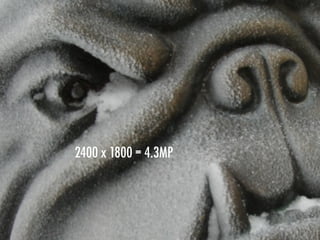
   2400 xx1800 = .3MP
   1600 x1200 = 1.9MP
    640 480 4.3MP
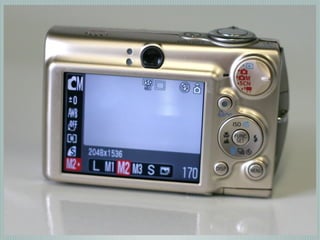
3072x2304 or L
2048x1536 or M2
1600x1200 or M3
640x480 or S
Pixels and printing

Web site: 450x350 pixels (.25-.50 MP)
4x6 print: 1200x1800 pixels (1.5-2.5 MP)
8x10 print: 2000x2500 pixels (4-5 MP)
12x16 print: 2400x3200 pixels (6+ MP)
Flash
Generally works from a distance of 1 to 12 feet
Default — Auto Flash
Red-eye reduction
Forced flash
Night flash mode
No flash
Forced flash
Reducing red eye
Reducing red-eye
Get the flash away from the lens
Bounce the flash off the ceiling
Turn on room lights (lets pupils contract)
Use red-eye reduction flash
Have subject look slightly away from camera
Move camera closer
Don’t use flash
Zoom

Optical = good
Digital = bad
Try to find a camera with at least 4x optical zoom
(and ignore digital zoom)
Macro mode
Allows you to shoot very close
Camera won’t normally focus that close
Memory/storage
Internal — very limited usage
Removable — Compact Flash, Memory Stick, Smart Media,
Secure Digital (SD), MiniSD, MicroSD, MultiMedia Card
Review

Resolution - shoot at high or low?
Flash - do you ever need in daylight?
Close-up - what is this mode called?
Storage - what’s an example of external memory?
Photography
Literally means “writing with light”
Light is the most important thing when taking photos
Three ways to control light

Aperture: how much light gets in
Shutter speed: how long light is let in
ISO: sensitivity of image device
Aperture
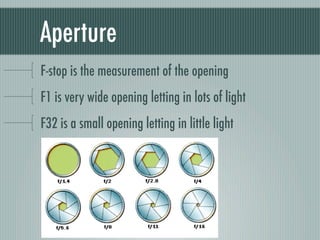
F-stop is the measurement of the opening
F1 is very wide opening letting in lots of light
F32 is a small opening letting in little light
Aperture
Your camera likely has F3.5-F8
A full F-stop change either doubles or halves the amount of
light coming into the camera
Involved in depth of field, which we will cover shortly
f 6.3
f 4.0
f 2.8
f 1.8
Shutter speed
Determines how long light comes in
1/15th of a second would be a long exposure letting
lots of light into the camera
1/2000 would be a short exposure, letting in very little light
Slow shutter speeds allow blurring of the subject
Fast shutter speeds stop the action
ISO
The sensitivity of light of a photosensitive surface
Film is measured in ISO, and most digital cameras
have this adjustment
Low ISO indicates low sensitivity to light, but generally
higher resolution with less “noise” or “grain”
A 100 ISO setting is twice as sensitive to light as a 50 ISO
100 ISO
200 ISO
400 ISO
800 ISO
1600 ISO
Depth of field

How much of the photo is in focus
Controlled by...
Aperture
Subject’s distance from the camera
Focal length
DOF: Aperture
The more wide open the aperture, the less the depth of field
F11 aperture
F2.8 aperture
DOF: Distance from camera

The closer the subject, the less depth of field
The farther away, the more depth of field
Focal length

The greater the focal length (zoomed or telephoto),
the less the depth of field
Therefore, for the greatest depth of field you would need a
wide angle lens, with a closed aperture, and a subject at a
good distance
Using this information
Or, using it on YOUR camera
Auto mode


When you want to take a snapshot without worrying about
the mechanics of photography, leave the camera on Auto.
This mode sets all exposure levels automatically, and it
usually locks you out of making any minor adjustments
manually.
Program mode


Like auto mode on steroids, this mode automatically sets
aperture size and shutter speed for a perfect exposure — but
it also lets you tweak settings, giving you more creative
control. You can change white balance and exposure
compensation, for instance, and even nudge shutter speed
up or down a bit.
Aperture value


When you set the size of the aperture, and your camera
automatically provides the right shutter speed to deliver the
correct exposure. Rely on this mode to blur the background
or to keep the entire image in sharp focus (depth of field).
Time value


Shutter mode: This setting is your best option for taking
action photography. Shutter priority allows you to freeze the
scene or artistically blur the photo. All the while, the camera
keeps the exposure matched to the aperture.
Manual mode


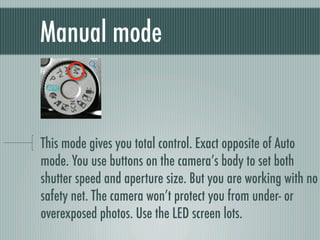
This mode gives you total control. Exact opposite of Auto
mode. You use buttons on the camera’s body to set both
shutter speed and aperture size. But you are working with no
safety net. The camera won’t protect you from under- or
overexposed photos. Use the LED screen lots.
Landscape mode


Your camera picks the best aperture and shutter settings for
the greatest depth of field when taking photos of landscapes
and other outdoor photos.
Macro mode

To focus on extremely close subjects — within a few inches of
the lens — choose the tulip. You can take life-size photos of
insects, flowers and other small subjects in this mode. But the
focus range (depth of field) is very narrow.
Snow and sand


Brightly colored or glaring backgrounds can trick the camera
into underexposing the subject. This mode overexposes the
scene to gain details that would otherwise be lost.
Action


The action (or sports) mode sets the camera to the highest
possible shutter speed, increasing your odds of getting a
clear shot of people in motion.
Night


This mode lets you capture nighttime scenes by combining a
flash, which freezes people in the foreground, with a slow
shutter speed, which allows lights from buildings, cars and
other elements to show in the background.
< Flash


Night mode >
Portrait


This mode lets you capture portraits of people (or animals)
with lower depth of field so that the background should have
a soft focus.
File formats


JPG (JPEG)
RAW
RAW file format

Uncompressed
Not all manipulation programs support (Photoshop does)
On more expensive cameras
JPEG file format

Compressed
Almost all programs support
On all cameras
Lossy compression (so some data is lost)

Digital Photography 2010

  • 1.
    Digital photography AUG. 27, 2010 | JMC31
  • 3.
    Choosing a digitalcamera What will you do with your images? What size prints do you want to make? How much money do you want to spend? How “big” of a camera do you want?
  • 13.
    What to lookfor when buying Resolution (?MP) Image stabilization Zoom (optical /digital); wide angle Video (HD, 720p, 1080i) Storage (compact flash, SD card, etc.) LCD screen size
  • 14.
    Know your resolution 1MP- low quality, good for screen-based images 2MP - mid-quality for computer and small prints (4x6) 3MP - good quality for color prints (8x10) 4MP - very good quality (11x14 prints) 5+MP - excellent quality (cropping photos)
  • 15.
    Pixels and megapixels Pixel= Picture (pix) elements (els) Mega = million Megapixel (MP) = million pixels A pixel is a very small light-sensitive area More pixels = better quality = more money
  • 18.
    What resolution touse Shoot at the highest resolution you will need, and consider if you will be cropping. More realistically: if you’ve got the memory, shoot at the highest resolution you can. You can always make images smaller, but never bigger.
  • 19.
    Resolution and megapixels 2400 xx1800 = .3MP 1600 x1200 = 1.9MP 640 480 4.3MP
  • 20.
  • 21.
  • 22.
  • 23.
  • 24.
    Pixels and printing Website: 450x350 pixels (.25-.50 MP) 4x6 print: 1200x1800 pixels (1.5-2.5 MP) 8x10 print: 2000x2500 pixels (4-5 MP) 12x16 print: 2400x3200 pixels (6+ MP)
  • 25.
    Flash Generally works froma distance of 1 to 12 feet Default — Auto Flash Red-eye reduction Forced flash Night flash mode No flash
  • 26.
  • 27.
  • 28.
    Reducing red-eye Get theflash away from the lens Bounce the flash off the ceiling Turn on room lights (lets pupils contract) Use red-eye reduction flash Have subject look slightly away from camera Move camera closer Don’t use flash
  • 29.
    Zoom Optical = good Digital= bad Try to find a camera with at least 4x optical zoom (and ignore digital zoom)
  • 30.
    Macro mode Allows youto shoot very close Camera won’t normally focus that close
  • 31.
    Memory/storage Internal — verylimited usage Removable — Compact Flash, Memory Stick, Smart Media, Secure Digital (SD), MiniSD, MicroSD, MultiMedia Card
  • 32.
    Review Resolution - shootat high or low? Flash - do you ever need in daylight? Close-up - what is this mode called? Storage - what’s an example of external memory?
  • 33.
    Photography Literally means “writingwith light” Light is the most important thing when taking photos
  • 36.
    Three ways tocontrol light Aperture: how much light gets in Shutter speed: how long light is let in ISO: sensitivity of image device
  • 37.
    Aperture F-stop is themeasurement of the opening F1 is very wide opening letting in lots of light F32 is a small opening letting in little light
  • 38.
    Aperture Your camera likelyhas F3.5-F8 A full F-stop change either doubles or halves the amount of light coming into the camera Involved in depth of field, which we will cover shortly
  • 39.
  • 40.
  • 41.
  • 42.
  • 43.
    Shutter speed Determines howlong light comes in 1/15th of a second would be a long exposure letting lots of light into the camera 1/2000 would be a short exposure, letting in very little light Slow shutter speeds allow blurring of the subject Fast shutter speeds stop the action
  • 45.
    ISO The sensitivity oflight of a photosensitive surface Film is measured in ISO, and most digital cameras have this adjustment Low ISO indicates low sensitivity to light, but generally higher resolution with less “noise” or “grain” A 100 ISO setting is twice as sensitive to light as a 50 ISO
  • 46.
  • 47.
  • 48.
  • 49.
  • 50.
  • 51.
    Depth of field Howmuch of the photo is in focus Controlled by... Aperture Subject’s distance from the camera Focal length
  • 52.
    DOF: Aperture The morewide open the aperture, the less the depth of field
  • 53.
  • 54.
  • 55.
    DOF: Distance fromcamera The closer the subject, the less depth of field The farther away, the more depth of field
  • 58.
    Focal length The greaterthe focal length (zoomed or telephoto), the less the depth of field Therefore, for the greatest depth of field you would need a wide angle lens, with a closed aperture, and a subject at a good distance
  • 59.
    Using this information Or,using it on YOUR camera
  • 60.
    Auto mode When youwant to take a snapshot without worrying about the mechanics of photography, leave the camera on Auto. This mode sets all exposure levels automatically, and it usually locks you out of making any minor adjustments manually.
  • 61.
    Program mode Like automode on steroids, this mode automatically sets aperture size and shutter speed for a perfect exposure — but it also lets you tweak settings, giving you more creative control. You can change white balance and exposure compensation, for instance, and even nudge shutter speed up or down a bit.
  • 62.
    Aperture value When youset the size of the aperture, and your camera automatically provides the right shutter speed to deliver the correct exposure. Rely on this mode to blur the background or to keep the entire image in sharp focus (depth of field).
  • 63.
    Time value Shutter mode:This setting is your best option for taking action photography. Shutter priority allows you to freeze the scene or artistically blur the photo. All the while, the camera keeps the exposure matched to the aperture.
  • 64.
    Manual mode This modegives you total control. Exact opposite of Auto mode. You use buttons on the camera’s body to set both shutter speed and aperture size. But you are working with no safety net. The camera won’t protect you from under- or overexposed photos. Use the LED screen lots.
  • 65.
    Landscape mode Your camerapicks the best aperture and shutter settings for the greatest depth of field when taking photos of landscapes and other outdoor photos.
  • 66.
    Macro mode To focuson extremely close subjects — within a few inches of the lens — choose the tulip. You can take life-size photos of insects, flowers and other small subjects in this mode. But the focus range (depth of field) is very narrow.
  • 67.
    Snow and sand Brightlycolored or glaring backgrounds can trick the camera into underexposing the subject. This mode overexposes the scene to gain details that would otherwise be lost.
  • 68.
    Action The action (orsports) mode sets the camera to the highest possible shutter speed, increasing your odds of getting a clear shot of people in motion.
  • 69.
    Night This mode letsyou capture nighttime scenes by combining a flash, which freezes people in the foreground, with a slow shutter speed, which allows lights from buildings, cars and other elements to show in the background.
  • 70.
  • 71.
    Portrait This mode letsyou capture portraits of people (or animals) with lower depth of field so that the background should have a soft focus.
  • 72.
  • 73.
    RAW file format Uncompressed Notall manipulation programs support (Photoshop does) On more expensive cameras
  • 75.
    JPEG file format Compressed Almostall programs support On all cameras Lossy compression (so some data is lost)