Diagnose SEO Issues with Live Search Webmaster Tools Nathan Buggia Lead Program Manager Andy Woods Development Lead
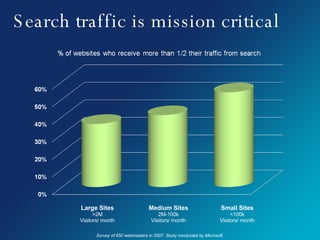
Search traffic is mission critical Large Sites >2M Visitors/ month Medium Sites 2M-100k Visitors/ month Small Sites <100k Visitors/ month Survey of 650 webmasters in 2007. Study conducted by Microsoft.
Session flow: How search works Our troubleshooting process Case study Webmaster Center demo Questions & answers
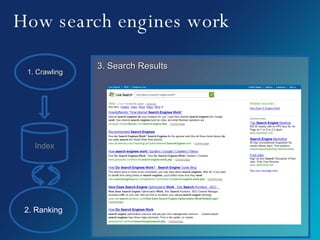
How search engines work 1. Crawling 2. Ranking Index 3. Search Results
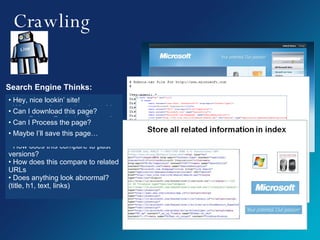
Crawling Search Engine Thinks: Hey, nice lookin’ site! When was the last time I got this page? When was the last time the page updated? Can I download this page? Robots Exclusion Protocol Network/ Server Error Can I Process the page? What is the page about? What are all the links? How does this compare to past versions? How does this compare to related URLs Does anything look abnormal? (title, h1, text, links) Maybe I’ll save this page…
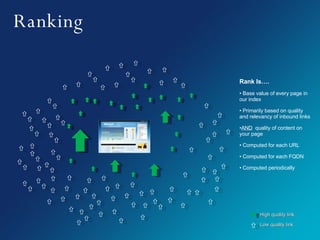
Ranking Rank Is…. Base value of every page in our index Primarily based on quality and relevancy of inbound links AND   quality of content on your page  Computed for each URL Computed for each FQDN Computed periodically High quality link Low quality link
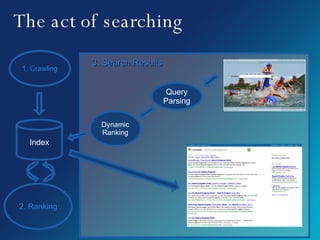
The act of searching 1. Crawling 2. Ranking Index Query Parsing Dynamic Ranking 3. Search Results
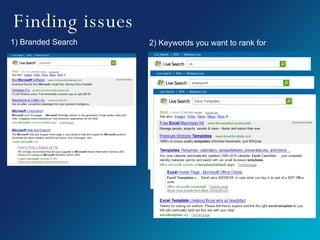
Finding issues 1) Branded Search 2) Keywords you want to rank for
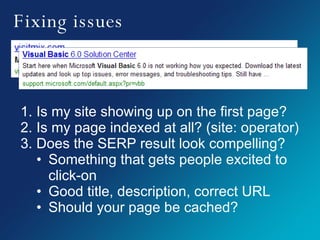
Fixing issues Is my site showing up on the first page? Is my page indexed at all? (site: operator) Does the SERP result look compelling? Something that gets people excited to click-on Good title, description, correct URL Should your page be cached?
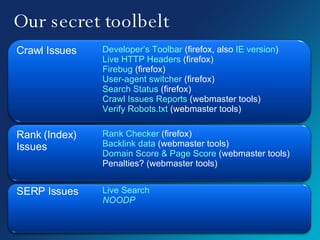
Our secret toolbelt Crawl Issues Developer’s Toolbar  (firefox, also  IE version ) Live HTTP Headers  (firefox) Firebug  (firefox) User-agent switcher  (firefox) Search Status  (firefox) Crawl Issues Reports  (webmaster tools) Verify Robots.txt  (webmaster tools) Rank (Index) Issues Rank Checker  (firefox) Backlink data  (webmaster tools) Domain Score & Page Score  (webmaster tools) Penalties? (webmaster tools) SERP Issues Live Search NOODP
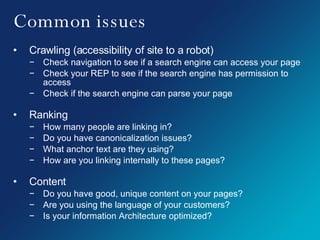
Common issues Crawling (accessibility of site to a robot) Check navigation to see if a search engine can access your page Check your REP to see if the search engine has permission to access Check if the search engine can parse your page Ranking How many people are linking in? Do you have canonicalization issues? What anchor text are they using? How are you linking internally to these pages? Content Do you have good, unique content on your pages? Are you using the language of your customers? Is your information Architecture optimized?
 
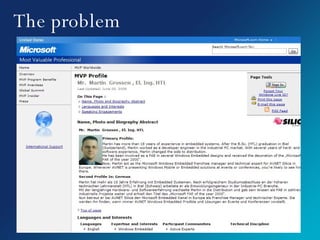
The problem
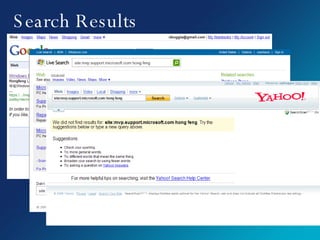
Search Results
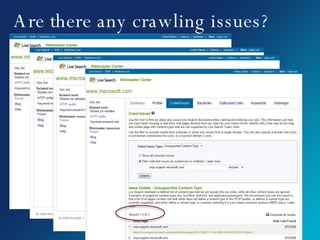
Are there any crawling issues?
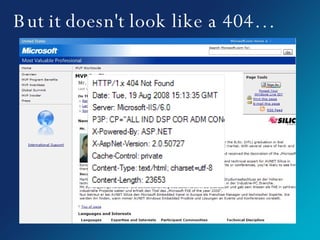
But it doesn't look like a 404…
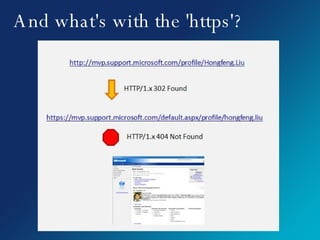
And what's with the 'https'?
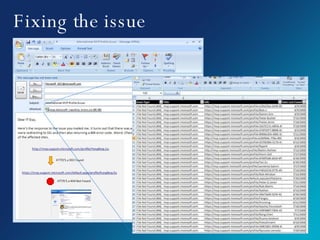
Fixing the issue
 
What's next? More troubleshooting tools Content management Statistics about your customers Publisher cues to improve crawling, indexing, display of your content Give your feedback here: http://forums.microsoft.com/webmaster
© 2008 Microsoft Corporation. All rights reserved. Microsoft, Windows, Windows Vista and other product names are or may be registered trademarks and/or trademarks in the U.S. and/or other countries. The information herein is for informational purposes only and represents the current view of Microsoft Corporation as of the date of this presentation.  Because Microsoft must respond to changing market conditions, it should not be interpreted to be a commitment on the part of Microsoft, and Microsoft cannot guarantee the accuracy of any information provided after the date of this presentation.  MICROSOFT MAKES NO WARRANTIES, EXPRESS, IMPLIED OR STATUTORY, AS TO THE INFORMATION IN THIS PRESENTATION. http://webmaster.live.com

Diagnose SEO Issues with Live Search Webmaster Tools

  • 1.
    Diagnose SEO Issueswith Live Search Webmaster Tools Nathan Buggia Lead Program Manager Andy Woods Development Lead
  • 2.
    Search traffic ismission critical Large Sites >2M Visitors/ month Medium Sites 2M-100k Visitors/ month Small Sites <100k Visitors/ month Survey of 650 webmasters in 2007. Study conducted by Microsoft.
  • 3.
    Session flow: Howsearch works Our troubleshooting process Case study Webmaster Center demo Questions & answers
  • 4.
    How search engineswork 1. Crawling 2. Ranking Index 3. Search Results
  • 5.
    Crawling Search EngineThinks: Hey, nice lookin’ site! When was the last time I got this page? When was the last time the page updated? Can I download this page? Robots Exclusion Protocol Network/ Server Error Can I Process the page? What is the page about? What are all the links? How does this compare to past versions? How does this compare to related URLs Does anything look abnormal? (title, h1, text, links) Maybe I’ll save this page…
  • 6.
    Ranking Rank Is….Base value of every page in our index Primarily based on quality and relevancy of inbound links AND quality of content on your page Computed for each URL Computed for each FQDN Computed periodically High quality link Low quality link
  • 7.
    The act ofsearching 1. Crawling 2. Ranking Index Query Parsing Dynamic Ranking 3. Search Results
  • 8.
    Finding issues 1)Branded Search 2) Keywords you want to rank for
  • 9.
    Fixing issues Ismy site showing up on the first page? Is my page indexed at all? (site: operator) Does the SERP result look compelling? Something that gets people excited to click-on Good title, description, correct URL Should your page be cached?
  • 10.
    Our secret toolbeltCrawl Issues Developer’s Toolbar (firefox, also IE version ) Live HTTP Headers (firefox) Firebug (firefox) User-agent switcher (firefox) Search Status (firefox) Crawl Issues Reports (webmaster tools) Verify Robots.txt (webmaster tools) Rank (Index) Issues Rank Checker (firefox) Backlink data (webmaster tools) Domain Score & Page Score (webmaster tools) Penalties? (webmaster tools) SERP Issues Live Search NOODP
  • 11.
    Common issues Crawling(accessibility of site to a robot) Check navigation to see if a search engine can access your page Check your REP to see if the search engine has permission to access Check if the search engine can parse your page Ranking How many people are linking in? Do you have canonicalization issues? What anchor text are they using? How are you linking internally to these pages? Content Do you have good, unique content on your pages? Are you using the language of your customers? Is your information Architecture optimized?
  • 12.
  • 13.
  • 14.
  • 15.
    Are there anycrawling issues?
  • 16.
    But it doesn'tlook like a 404…
  • 17.
    And what's withthe 'https'?
  • 18.
  • 19.
  • 20.
    What's next? Moretroubleshooting tools Content management Statistics about your customers Publisher cues to improve crawling, indexing, display of your content Give your feedback here: http://forums.microsoft.com/webmaster
  • 21.
    © 2008 MicrosoftCorporation. All rights reserved. Microsoft, Windows, Windows Vista and other product names are or may be registered trademarks and/or trademarks in the U.S. and/or other countries. The information herein is for informational purposes only and represents the current view of Microsoft Corporation as of the date of this presentation. Because Microsoft must respond to changing market conditions, it should not be interpreted to be a commitment on the part of Microsoft, and Microsoft cannot guarantee the accuracy of any information provided after the date of this presentation. MICROSOFT MAKES NO WARRANTIES, EXPRESS, IMPLIED OR STATUTORY, AS TO THE INFORMATION IN THIS PRESENTATION. http://webmaster.live.com

Editor's Notes

  • #2 Hey, good afternoon. I’m nathan buggia, and I’m hear today with my team to share our secret internal methods of Diagnosing SEO issues, and also to show you how the live Search webmaster tools can help you improve your natural listings in all search engines. While I’m from microsoft and