Google Site Clinic Uli Lutz, Adel Saoud,  Google Search Quality Team February 2010
Agenda Google Search  Google Webmaster Tools Information sources for webmasters
Anatomy of Google search results Paid search AdWords advertising program.  Paid listings .  Natural search Ranking  determined algorithmically . Unpaid, unbiased listings.
Our goals Support for all webmasters Provide the same tools for all sites, large or small 100M+ sites on the web; we need something that scales Better search results The most objective and relevant search results Better information -> better web sites Better web sites in our index -> better search results for users Better understanding of web sites -> better ability to handle them
Crawling and Indexing Crawling:   Create a copy of all the visited pages for later processing by a search engine that will index the downloaded pages to provide fast searches. Google’s web crawler has the username  googlebot Indexing: Google determines the content of each page (e.g. PR, keywords) and stores static information about those pages in an index. Serving: Process of returning search results that are relevant and match the user query
So…what does the Googlebot read on a website? Text in HTML Files such as .doc, .xls, .pdf Incoming and outgoing links Name of a link („Anchor text“)‏ Meta tags (title, description)‏ Googlebot understands less about: Non text- files like movies, images Flash (only to a certain extent)‏ Java Script (and AJAX)‏
Examples of what Google sees on a site Non text- files like movies, images … Alt text should be brief, but accurate Image is not displayed for some reason but at least the alt text is
Webmaster Tools front to back Explore it all and come back often!
Solving problems with Webmaster Tools One of my sitelinks is outdated! Oh no! I didn't mean for that page to be in Google! I redid my site and now my traffic dropped! My images aren't showing up in search - why? My site's a .com but it's targeted to people in  Ireland! My previous SEO did spammy stuff;  how do I get my site back in Google? My competitors are doing spammy things.  What can I do about it?
Dashboard Crawl errors Links to your site Queries your site ranks for
Tip #1: Content analysis Title tags, alt attributes and descriptions:  Make them descriptive and accurate
Content analysis Sitelinks Title Description
Content analysis - Sitelinks Manage your site links
Tip #2: Identify crawl errors “ Make sure search bots can crawl your site”
Crawl errors Error details List of URLs Error categories
Tip #3:  Give information that users are looking for “ Users type words to find your pages:  Make sure that your site  includes those words within ”
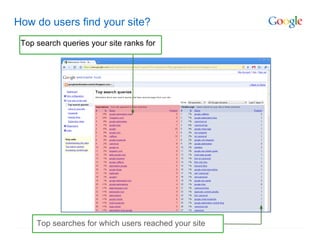
How do users find your site?  Top search queries your site ranks for Top searches for which users reached your site
Tip #4: Set a geographic target Tell Google the location of your web site: Improve geographic targeting
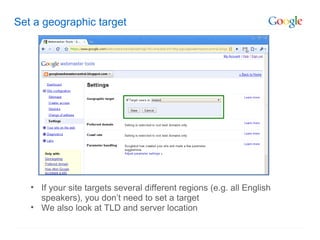
Set a geographic target If your site targets several different regions (e.g. all English speakers), you don’t need to set a target We also look at TLD and server location
Get the information you need Make the most of Google resources
Webmaster Central www.google.ie/webmasters
Webmaster Guidelines
Official Webmaster blog
Help Center
Feel free to use " Ringsend " in the subject to raise our attention  Google Help Forum
www.google.ie/webmasters Explore it! Thank you!

SEO Temelleri

  • 1.
    Google Site ClinicUli Lutz, Adel Saoud, Google Search Quality Team February 2010
  • 2.
    Agenda Google Search Google Webmaster Tools Information sources for webmasters
  • 3.
    Anatomy of Googlesearch results Paid search AdWords advertising program. Paid listings . Natural search Ranking determined algorithmically . Unpaid, unbiased listings.
  • 4.
    Our goals Supportfor all webmasters Provide the same tools for all sites, large or small 100M+ sites on the web; we need something that scales Better search results The most objective and relevant search results Better information -> better web sites Better web sites in our index -> better search results for users Better understanding of web sites -> better ability to handle them
  • 5.
    Crawling and IndexingCrawling: Create a copy of all the visited pages for later processing by a search engine that will index the downloaded pages to provide fast searches. Google’s web crawler has the username googlebot Indexing: Google determines the content of each page (e.g. PR, keywords) and stores static information about those pages in an index. Serving: Process of returning search results that are relevant and match the user query
  • 6.
    So…what does theGooglebot read on a website? Text in HTML Files such as .doc, .xls, .pdf Incoming and outgoing links Name of a link („Anchor text“)‏ Meta tags (title, description)‏ Googlebot understands less about: Non text- files like movies, images Flash (only to a certain extent)‏ Java Script (and AJAX)‏
  • 7.
    Examples of whatGoogle sees on a site Non text- files like movies, images … Alt text should be brief, but accurate Image is not displayed for some reason but at least the alt text is
  • 8.
    Webmaster Tools frontto back Explore it all and come back often!
  • 9.
    Solving problems withWebmaster Tools One of my sitelinks is outdated! Oh no! I didn't mean for that page to be in Google! I redid my site and now my traffic dropped! My images aren't showing up in search - why? My site's a .com but it's targeted to people in Ireland! My previous SEO did spammy stuff; how do I get my site back in Google? My competitors are doing spammy things. What can I do about it?
  • 10.
    Dashboard Crawl errorsLinks to your site Queries your site ranks for
  • 11.
    Tip #1: Contentanalysis Title tags, alt attributes and descriptions: Make them descriptive and accurate
  • 12.
    Content analysis SitelinksTitle Description
  • 13.
    Content analysis -Sitelinks Manage your site links
  • 14.
    Tip #2: Identifycrawl errors “ Make sure search bots can crawl your site”
  • 15.
    Crawl errors Errordetails List of URLs Error categories
  • 16.
    Tip #3: Give information that users are looking for “ Users type words to find your pages: Make sure that your site includes those words within ”
  • 17.
    How do usersfind your site? Top search queries your site ranks for Top searches for which users reached your site
  • 18.
    Tip #4: Seta geographic target Tell Google the location of your web site: Improve geographic targeting
  • 19.
    Set a geographictarget If your site targets several different regions (e.g. all English speakers), you don’t need to set a target We also look at TLD and server location
  • 20.
    Get the informationyou need Make the most of Google resources
  • 21.
  • 22.
  • 23.
  • 24.
  • 25.
    Feel free touse " Ringsend " in the subject to raise our attention Google Help Forum
  • 26.