Automating Container Deployments on Virtualization with Ansible:
OpenShift on Red Hat Virtualization
Laurent Domb, Principal Cloud Solutions Architect
Red Hat Virtualization + Ansible2
About Me
Laurent Domb
Principal Cloud Solutions Architect
laurent@redhat.com
RHCA VI, AWS CSA
http://blog.domb.net
Red Hat Virtualization + Ansible3
AGENDA
OVERVIEW OF RED HAT VIRTUALIZATION
WHY OPENSHIFT CONTAINER PLATFORM ON RHV
DEPLOY OPENSHIFT CONTAINER PLATFORM ON RHV
DEPLOY CONTAINERS ON OPENSHIFT WITH ANSIBLE PLAYBOOK
BUNDLE
WRAP UP / Q&A
Red Hat Virtualization + Ansible4
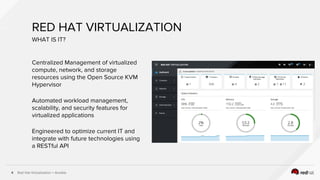
RED HAT VIRTUALIZATION
Centralized Management of virtualized
compute, network, and storage
resources using the Open Source KVM
Hypervisor
Automated workload management,
scalability, and security features for
virtualized applications
Engineered to optimize current IT and
integrate with future technologies using
a RESTful API
WHAT IS IT?
Red Hat Virtualization + Ansible5
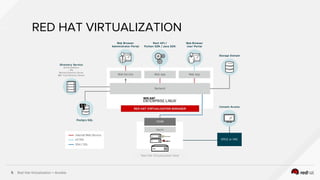
RED HAT VIRTUALIZATION
Red Hat Virtualization Host
Red Hat Virtualization + Ansible6
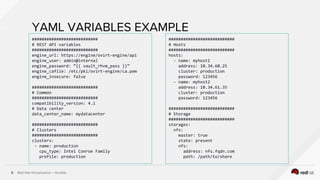
YAML VARIABLES EXAMPLE
###########################
# REST API variables
###########################
engine_url: https://engine/ovirt-engine/api
engine_user: admin@internal
engine_password: “{{ vault_rhvm_pass }}”
engine_cafile: /etc/pki/ovirt-engine/ca.pem
engine_insecure: false
###########################
# Common
###########################
compatibility_version: 4.1
# Data center
data_center_name: mydatacenter
###########################
# Clusters
###########################
clusters:
- name: production
cpu_type: Intel Conroe Family
profile: production
###########################
# Hosts
###########################
hosts:
- name: myhost1
address: 10.34.60.25
cluster: production
password: 123456
- name: myhost2
address: 10.34.61.35
cluster: production
password: 123456
###########################
# Storage
###########################
storages:
nfs:
master: true
state: present
nfs:
address: nfs.fqdn.com
path: /path/to/share
Red Hat Virtualization + Ansible
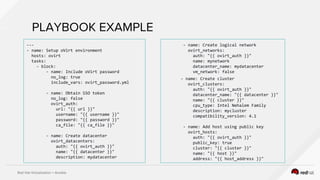
PLAYBOOK EXAMPLE
---
- name: Setup oVirt environment
hosts: ovirt
tasks:
- block:
- name: Include oVirt password
no_log: true
include_vars: ovirt_password.yml
- name: Obtain SSO token
no_log: false
ovirt_auth:
url: "{{ url }}"
username: "{{ username }}"
password: "{{ password }}"
ca_file: "{{ ca_file }}"
- name: Create datacenter
ovirt_datacenters:
auth: "{{ ovirt_auth }}"
name: "{{ datacenter }}"
description: mydatacenter
- name: Create logical network
ovirt_networks:
auth: "{{ ovirt_auth }}"
name: mynetwork
datacenter_name: mydatacenter
vm_network: false
- name: Create cluster
ovirt_clusters:
auth: "{{ ovirt_auth }}"
datacenter_name: "{{ datacenter }}"
name: "{{ cluster }}"
cpu_type: Intel Nehalem Family
description: mycluster
compatibility_version: 4.1
- name: Add host using public key
ovirt_hosts:
auth: "{{ ovirt_auth }}"
public_key: true
cluster: "{{ cluster }}"
name: "{{ host }}"
address: "{{ host_address }}"
Red Hat Virtualization + Ansible
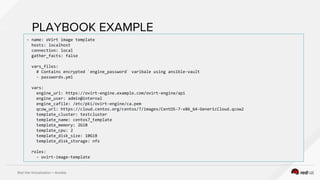
PLAYBOOK EXAMPLE
- name: oVirt image template
hosts: localhost
connection: local
gather_facts: false
vars_files:
# Contains encrypted `engine_password` varibale using ansible-vault
- passwords.yml
vars:
engine_url: https://ovirt-engine.example.com/ovirt-engine/api
engine_user: admin@internal
engine_cafile: /etc/pki/ovirt-engine/ca.pem
qcow_url: https://cloud.centos.org/centos/7/images/CentOS-7-x86_64-GenericCloud.qcow2
template_cluster: testcluster
template_name: centos7_template
template_memory: 2GiB
template_cpu: 2
template_disk_size: 10GiB
template_disk_storage: nfs
roles:
- ovirt-image-template
Red Hat Virtualization + Ansible9
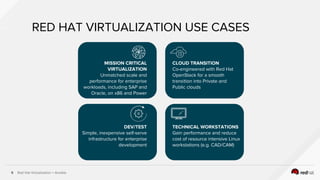
RED HAT VIRTUALIZATION USE CASES
CLOUD TRANSITION
Co-engineered with Red Hat
OpenStack for a smooth
transition into Private and
Public clouds
MISSION CRITICAL
VIRTUALIZATION
Unmatched scale and
performance for enterprise
workloads, including SAP and
Oracle, on x86 and Power
DEV/TEST
Simple, inexpensive self-serve
infrastructure for enterprise
development
TECHNICAL WORKSTATIONS
Gain performance and reduce
cost of resource intensive Linux
workstations (e.g. CAD/CAM)
Red Hat Virtualization + Ansible10
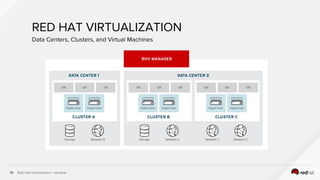
RED HAT VIRTUALIZATION
Data Centers, Clusters, and Virtual Machines
WHY OPENSHIFT ON RHV
Red Hat Virtualization + Ansible12
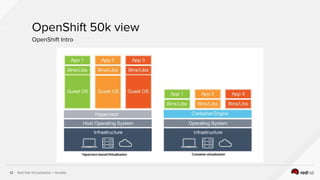
OpenShift 50k view
OpenShift Intro
Red Hat Virtualization + Ansible13
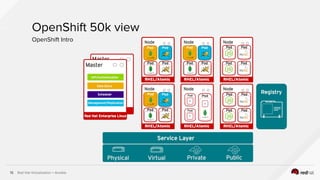
OpenShift 50k view
OpenShift Intro
Red Hat Virtualization + Ansible14
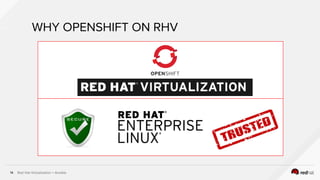
WHY OPENSHIFT ON RHV
Red Hat Virtualization + Ansible15
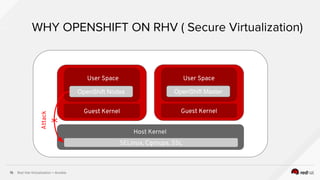
WHY OPENSHIFT ON RHV ( Secure Virtualization)
SELinux, Cgroups, SSL
Host Kernel
Guest Kernel
OpenShift Nodes
Guest Kernel
OpenShift Master
User Space
Attack
User Space
X
Red Hat Virtualization + Ansible16
[root@cloud-sb12 ~]# ps -efZ | grep qemu
system_u:system_r:svirt_t:s0:c557,c698 qemu 7292 1 45 2017 ? 22-05:44:06
/usr/libexec/qemu-kvm -name guest=osenode1,d ……….
system_u:system_r:svirt_t:s0:c160,c719 qemu 12561 1 33 2017 ? 22-21:47:15 /usr/libexec/qemu-kvm
-name guest=cfme58ui1 ……...
[root@cloud-sb12 ~]# ls -lZ /var/lib/libvirt/qemu/
drwxr-x---. qemu qemu system_u:object_r:svirt_image_t:s0:c160,c719 domain-2-cfme58ui1
drwxr-x---. qemu qemu system_u:object_r:svirt_image_t:s0:c557,c698 domain-5-osenode1
Secure Virtualization Part 1
“Multi tenancy for virtual machines”
Red Hat Virtualization + Ansible17
[root@cloud-sb12 ~]# lsof -Z -p 7292
COMMAND PID SECURITY-CONTEXT USER FD TYPE DEVICE SIZE/OFF NODE NAME
qemu-kvm 7292 system_u:system_r:svirt_t:s0:c557,c698 qemu txt REG 253,0 8925936
100742721 /usr/libexec/qemu-kvm
qemu-kvm 7292 system_u:system_r:svirt_t:s0:c557,c698 qemu mem REG 253,0 57888
68343867 /usr/lib64/sasl2/libdigestmd5.so.3.0.0
qemu-kvm 7292 system_u:system_r:svirt_t:s0:c557,c698 qemu mem REG 253,0 24168
68343864 /usr/lib64/sasl2/libcrammd5.so.3.0.0
Secure Virtualization Part 2
“Multi tenancy for virtual machines”
Red Hat Virtualization + Ansible18
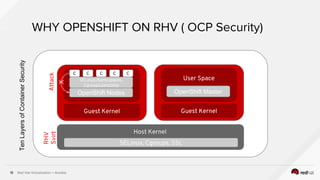
WHY OPENSHIFT ON RHV ( OCP Security)
SELinux, Cgroups, SSL
Host Kernel
Guest Kernel
OpenShift Nodes
Guest Kernel
OpenShift Master
User Space
Attack
SELinux,Namespaces,
Cgroups,seccomp
C C C C C
X
TenLayersofContainerSecurity
RHV
Svirt
Red Hat Virtualization + Ansible19
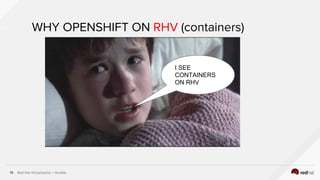
WHY OPENSHIFT ON RHV (containers)
I SEE
CONTAINERS
ON RHV
Red Hat Virtualization + Ansible20
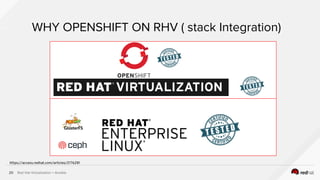
WHY OPENSHIFT ON RHV ( stack Integration)
https://access.redhat.com/articles/2176281
Red Hat Virtualization + Ansible21
WHY OPENSHIFT ON RHV ( Support)
One throat to choke
FULLY AUTOMATED DEPLOY OF OCP
ON RHV
Red Hat Virtualization + Ansible23
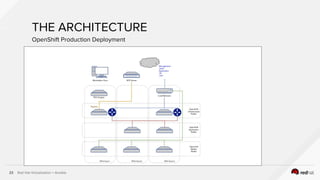
THE ARCHITECTURE
OpenShift Production Deployment
Red Hat Virtualization + Ansible24
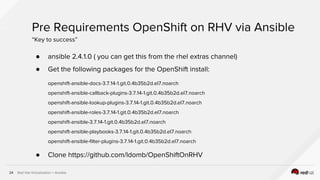
● ansible 2.4.1.0 ( you can get this from the rhel extras channel)
● Get the following packages for the OpenShift install:
openshift-ansible-docs-3.7.14-1.git.0.4b35b2d.el7.noarch
openshift-ansible-callback-plugins-3.7.14-1.git.0.4b35b2d.el7.noarch
openshift-ansible-lookup-plugins-3.7.14-1.git.0.4b35b2d.el7.noarch
openshift-ansible-roles-3.7.14-1.git.0.4b35b2d.el7.noarch
openshift-ansible-3.7.14-1.git.0.4b35b2d.el7.noarch
openshift-ansible-playbooks-3.7.14-1.git.0.4b35b2d.el7.noarch
openshift-ansible-filter-plugins-3.7.14-1.git.0.4b35b2d.el7.noarch
● Clone https://github.com/ldomb/OpenShiftOnRHV
Pre Requirements OpenShift on RHV via Ansible
“Key to success”
Red Hat Virtualization + Ansible25
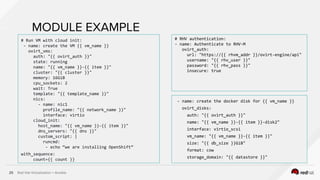
MODULE EXAMPLE
# Run VM with cloud init:
- name: create the VM {{ vm_name }}
ovirt_vms:
auth: "{{ ovirt_auth }}"
state: running
name: "{{ vm_name }}-{{ item }}"
cluster: "{{ cluster }}"
memory: 16GiB
cpu_sockets: 2
wait: True
template: "{{ template_name }}"
nics:
- name: nic1
profile_name: "{{ network_name }}"
interface: virtio
cloud_init:
host_name: "{{ vm_name }}-{{ item }}"
dns_servers: "{{ dns }}"
custom_script: |
runcmd:
- echo “we are installing OpenShift”
with_sequence:
count={{ count }}
# RHV authentication:
- name: Authenticate to RHV-M
ovirt_auth:
url: "https://{{ rhvm_addr }}/ovirt-engine/api"
username: "{{ rhv_user }}"
password: "{{ rhv_pass }}"
insecure: true
- name: create the docker disk for {{ vm_name }}
ovirt_disks:
auth: "{{ ovirt_auth }}"
name: "{{ vm_name }}-{{ item }}-disk2"
interface: virtio_scsi
vm_name: "{{ vm_name }}-{{ item }}"
size: "{{ db_size }}GiB"
format: cow
storage_domain: "{{ datastore }}"
Red Hat Virtualization + Ansible26
# Create an OSEv3 group that contains the masters and nodes groups
[OSEv3:children]
masters
nodes
# Set variables common for all OSEv3 hosts
[OSEv3:vars]
# SSH user, this user should allow ssh based auth without requiring a password
ansible_ssh_user=root
deployment_type=openshift-enterprise
# host group for masters
[masters]
master.example.com
# host group for nodes, includes region info
[nodes]
master.example.com openshift_node_labels="{'region': 'infra', 'zone': 'default'}"
node1.example.com openshift_node_labels="{'region': 'primary', 'zone': 'east'}"
node2.example.com openshift_node_labels="{'region': 'primary', 'zone': 'west'}"
Building the ansible inventory dynamically
“/etc/ansible/hosts”
Red Hat Virtualization + Ansible27
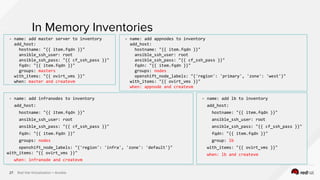
In Memory Inventories
- name: add appnodes to inventory
add_host:
hostname: "{{ item.fqdn }}"
ansible_ssh_user: root
ansible_ssh_pass: "{{ cf_ssh_pass }}"
fqdn: "{{ item.fqdn }}"
groups: nodes
openshift_node_labels: "{'region': 'primary', 'zone': 'west'}"
with_items: "{{ ovirt_vms }}"
when: appnode and createvm
- name: add lb to inventory
add_host:
hostname: "{{ item.fqdn }}"
ansible_ssh_user: root
ansible_ssh_pass: "{{ cf_ssh_pass }}"
fqdn: "{{ item.fqdn }}"
group: lb
with_items: "{{ ovirt_vms }}"
when: lb and createvm
- name: add master server to inventory
add_host:
hostname: "{{ item.fqdn }}"
ansible_ssh_user: root
ansible_ssh_pass: "{{ cf_ssh_pass }}"
fqdn: "{{ item.fqdn }}"
groups: masters
with_items: "{{ ovirt_vms }}"
when: master and createvm
- name: add infranodes to inventory
add_host:
hostname: "{{ item.fqdn }}"
ansible_ssh_user: root
ansible_ssh_pass: "{{ cf_ssh_pass }}"
fqdn: "{{ item.fqdn }}"
groups: nodes
openshift_node_labels: "{'region': 'infra', 'zone': 'default'}"
with_items: "{{ ovirt_vms }}"
when: infranode and createvm
Red Hat Virtualization + Ansible28
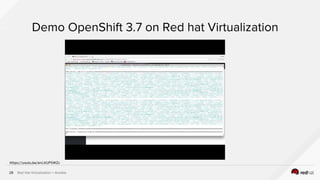
Demo OpenShift 3.7 on Red hat Virtualization
https://youtu.be/enIJtUP5WZc
DEPLOY CONTAINERS ON OPENSHIFT
WITH ANSIBLE PLAYBOOK BUNDLE
Red Hat Virtualization + Ansible30
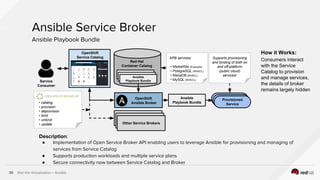
Ansible Service Broker
Ansible Playbook Bundle
Provisioned
Service
Ansible
Playbook BundleService
Consumer
OpenShift
Ansible Broker
Red Hat
Container Catalog
Service Broker
Service Broker
Other Service Brokers
Ansible
Playbook Bundle• catalog
• provision
• deprovision
• bind
• unbind
• update
OpenShift
Service Catalog APB services:
• MediaWiki (Example)
• PostgreSQL (RHSCL)
• MariaDB (RHSCL)
• MySQL (RHSCL)
Supports provisioning
and binding of both on
and off-platform
(public cloud)
services!
How it Works:
Consumers interact
with the Service
Catalog to provision
and manage services,
the details of broker
remains largely hidden
Description:
● Implementation of Open Service Broker API enabling users to leverage Ansible for provisioning and managing of
services from Service Catalog
● Supports production workloads and multiple service plans
● Secure connectivity now between Service Catalog and Broker
Red Hat Virtualization + Ansible31
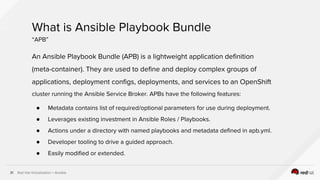
An Ansible Playbook Bundle (APB) is a lightweight application definition
(meta-container). They are used to define and deploy complex groups of
applications, deployment configs, deployments, and services to an OpenShift
cluster running the Ansible Service Broker. APBs have the following features:
● Metadata contains list of required/optional parameters for use during deployment.
● Leverages existing investment in Ansible Roles / Playbooks.
● Actions under a directory with named playbooks and metadata defined in apb.yml.
● Developer tooling to drive a guided approach.
● Easily modified or extended.
What is Ansible Playbook Bundle
“APB”
Red Hat Virtualization + Ansible32
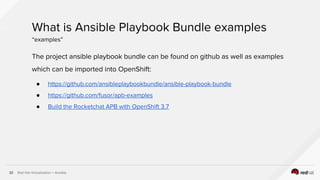
The project ansible playbook bundle can be found on github as well as examples
which can be imported into OpenShift:
● https://github.com/ansibleplaybookbundle/ansible-playbook-bundle
● https://github.com/fusor/apb-examples
● Build the Rocketchat APB with OpenShift 3.7
What is Ansible Playbook Bundle examples
“examples”
Red Hat Virtualization + Ansible33
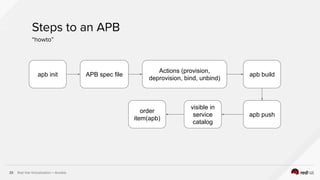
Steps to an APB
“howto”
apb init APB spec file
Actions (provision,
deprovision, bind, unbind)
apb build
apb push
visible in
service
catalog
order
item(apb)
Red Hat Virtualization + Ansible34
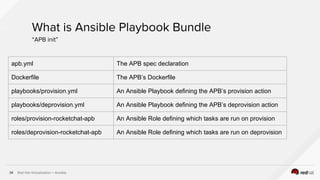
What is Ansible Playbook Bundle
“APB init”
apb.yml The APB spec declaration
Dockerfile The APB’s Dockerfile
playbooks/provision.yml An Ansible Playbook defining the APB’s provision action
playbooks/deprovision.yml An Ansible Playbook defining the APB’s deprovision action
roles/provision-rocketchat-apb An Ansible Role defining which tasks are run on provision
roles/deprovision-rocketchat-apb An Ansible Role defining which tasks are run on deprovision
Red Hat Virtualization + Ansible35
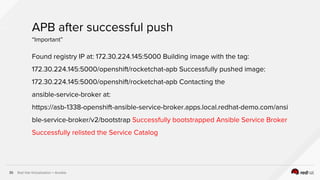
APB after successful push
“Important”
Found registry IP at: 172.30.224.145:5000 Building image with the tag:
172.30.224.145:5000/openshift/rocketchat-apb Successfully pushed image:
172.30.224.145:5000/openshift/rocketchat-apb Contacting the
ansible-service-broker at:
https://asb-1338-openshift-ansible-service-broker.apps.local.redhat-demo.com/ansi
ble-service-broker/v2/bootstrap Successfully bootstrapped Ansible Service Broker
Successfully relisted the Service Catalog
Red Hat Virtualization + Ansible36
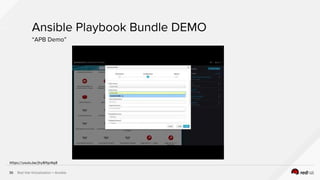
Ansible Playbook Bundle DEMO
“APB Demo”
https://youtu.be/jhy8lfgxNg8
Red Hat Virtualization + Ansible37
Presentation Recap
“Key Takeaways”
● Red Hat Virtualization is secure, fast, tested, reliable and transparent. The core RHV
Infrastructure (RHVM, DC, Clusters, Networking…) can be fully automated with ansible.
● Through the tight integration with OpenShift, Red Hat Virtualization allows you to see
the containers running on the application, infrastructure and master nodes
● The OpenShift Container Platform can be deployed on RHV via a single button push
through the tight integration of ansible and RHV
● New in OpenShift 3.7 Ansible Playbook Bundles can be used to build container
applications and consume them through the Ansible Service Broker in the OpenShift
service catalog
WRAP UP
Red Hat Virtualization + Ansible39
ADDITIONAL INFORMATION
Have you used Ansible already? Try Tower for free:
● ansible.com/tower-trial
Would you like to learn Ansible? It’s easy to get started:
● ansible.com/get-started
Want to learn more?
● ansible.com/whitepapers
Red Hat Virtualization evaluation:
● https://access.redhat.com/products/red-hat-virtualization/evaluation
Blogs:
● RHEL Blog
○ http://rhelblog.redhat.com
● Captain KVM
○ http://CaptainKVM.com
Product page:
● http://www.redhat.com/rhv
Documents:
● https://access.redhat.com/documentation/en/red-hat-virtualization
Complete documentation (upstream) for oVirt Ansible modules
● http://docs.ansible.com/ansible/list_of_cloud_modules.html#ovirt
Code base and documentation (upstream) oVirt Ansible roles
● https://github.com/oVirt/ovirt-ansible
THANK YOU
plus.google.com/+RedHat
linkedin.com/company/red-hat
youtube.com/user/RedHatVideos
facebook.com/redhatinc
twitter.com/RedHatNews

Automating Container Deployments on Virtualization with Ansible: OpenShift on Red Hat Virtualization

  • 1.
    Automating Container Deploymentson Virtualization with Ansible: OpenShift on Red Hat Virtualization Laurent Domb, Principal Cloud Solutions Architect
  • 2.
    Red Hat Virtualization+ Ansible2 About Me Laurent Domb Principal Cloud Solutions Architect laurent@redhat.com RHCA VI, AWS CSA http://blog.domb.net
  • 3.
    Red Hat Virtualization+ Ansible3 AGENDA OVERVIEW OF RED HAT VIRTUALIZATION WHY OPENSHIFT CONTAINER PLATFORM ON RHV DEPLOY OPENSHIFT CONTAINER PLATFORM ON RHV DEPLOY CONTAINERS ON OPENSHIFT WITH ANSIBLE PLAYBOOK BUNDLE WRAP UP / Q&A
  • 4.
    Red Hat Virtualization+ Ansible4 RED HAT VIRTUALIZATION Centralized Management of virtualized compute, network, and storage resources using the Open Source KVM Hypervisor Automated workload management, scalability, and security features for virtualized applications Engineered to optimize current IT and integrate with future technologies using a RESTful API WHAT IS IT?
  • 5.
    Red Hat Virtualization+ Ansible5 RED HAT VIRTUALIZATION Red Hat Virtualization Host
  • 6.
    Red Hat Virtualization+ Ansible6 YAML VARIABLES EXAMPLE ########################### # REST API variables ########################### engine_url: https://engine/ovirt-engine/api engine_user: admin@internal engine_password: “{{ vault_rhvm_pass }}” engine_cafile: /etc/pki/ovirt-engine/ca.pem engine_insecure: false ########################### # Common ########################### compatibility_version: 4.1 # Data center data_center_name: mydatacenter ########################### # Clusters ########################### clusters: - name: production cpu_type: Intel Conroe Family profile: production ########################### # Hosts ########################### hosts: - name: myhost1 address: 10.34.60.25 cluster: production password: 123456 - name: myhost2 address: 10.34.61.35 cluster: production password: 123456 ########################### # Storage ########################### storages: nfs: master: true state: present nfs: address: nfs.fqdn.com path: /path/to/share
  • 7.
    Red Hat Virtualization+ Ansible PLAYBOOK EXAMPLE --- - name: Setup oVirt environment hosts: ovirt tasks: - block: - name: Include oVirt password no_log: true include_vars: ovirt_password.yml - name: Obtain SSO token no_log: false ovirt_auth: url: "{{ url }}" username: "{{ username }}" password: "{{ password }}" ca_file: "{{ ca_file }}" - name: Create datacenter ovirt_datacenters: auth: "{{ ovirt_auth }}" name: "{{ datacenter }}" description: mydatacenter - name: Create logical network ovirt_networks: auth: "{{ ovirt_auth }}" name: mynetwork datacenter_name: mydatacenter vm_network: false - name: Create cluster ovirt_clusters: auth: "{{ ovirt_auth }}" datacenter_name: "{{ datacenter }}" name: "{{ cluster }}" cpu_type: Intel Nehalem Family description: mycluster compatibility_version: 4.1 - name: Add host using public key ovirt_hosts: auth: "{{ ovirt_auth }}" public_key: true cluster: "{{ cluster }}" name: "{{ host }}" address: "{{ host_address }}"
  • 8.
    Red Hat Virtualization+ Ansible PLAYBOOK EXAMPLE - name: oVirt image template hosts: localhost connection: local gather_facts: false vars_files: # Contains encrypted `engine_password` varibale using ansible-vault - passwords.yml vars: engine_url: https://ovirt-engine.example.com/ovirt-engine/api engine_user: admin@internal engine_cafile: /etc/pki/ovirt-engine/ca.pem qcow_url: https://cloud.centos.org/centos/7/images/CentOS-7-x86_64-GenericCloud.qcow2 template_cluster: testcluster template_name: centos7_template template_memory: 2GiB template_cpu: 2 template_disk_size: 10GiB template_disk_storage: nfs roles: - ovirt-image-template
  • 9.
    Red Hat Virtualization+ Ansible9 RED HAT VIRTUALIZATION USE CASES CLOUD TRANSITION Co-engineered with Red Hat OpenStack for a smooth transition into Private and Public clouds MISSION CRITICAL VIRTUALIZATION Unmatched scale and performance for enterprise workloads, including SAP and Oracle, on x86 and Power DEV/TEST Simple, inexpensive self-serve infrastructure for enterprise development TECHNICAL WORKSTATIONS Gain performance and reduce cost of resource intensive Linux workstations (e.g. CAD/CAM)
  • 10.
    Red Hat Virtualization+ Ansible10 RED HAT VIRTUALIZATION Data Centers, Clusters, and Virtual Machines
  • 11.
  • 12.
    Red Hat Virtualization+ Ansible12 OpenShift 50k view OpenShift Intro
  • 13.
    Red Hat Virtualization+ Ansible13 OpenShift 50k view OpenShift Intro
  • 14.
    Red Hat Virtualization+ Ansible14 WHY OPENSHIFT ON RHV
  • 15.
    Red Hat Virtualization+ Ansible15 WHY OPENSHIFT ON RHV ( Secure Virtualization) SELinux, Cgroups, SSL Host Kernel Guest Kernel OpenShift Nodes Guest Kernel OpenShift Master User Space Attack User Space X
  • 16.
    Red Hat Virtualization+ Ansible16 [root@cloud-sb12 ~]# ps -efZ | grep qemu system_u:system_r:svirt_t:s0:c557,c698 qemu 7292 1 45 2017 ? 22-05:44:06 /usr/libexec/qemu-kvm -name guest=osenode1,d ………. system_u:system_r:svirt_t:s0:c160,c719 qemu 12561 1 33 2017 ? 22-21:47:15 /usr/libexec/qemu-kvm -name guest=cfme58ui1 ……... [root@cloud-sb12 ~]# ls -lZ /var/lib/libvirt/qemu/ drwxr-x---. qemu qemu system_u:object_r:svirt_image_t:s0:c160,c719 domain-2-cfme58ui1 drwxr-x---. qemu qemu system_u:object_r:svirt_image_t:s0:c557,c698 domain-5-osenode1 Secure Virtualization Part 1 “Multi tenancy for virtual machines”
  • 17.
    Red Hat Virtualization+ Ansible17 [root@cloud-sb12 ~]# lsof -Z -p 7292 COMMAND PID SECURITY-CONTEXT USER FD TYPE DEVICE SIZE/OFF NODE NAME qemu-kvm 7292 system_u:system_r:svirt_t:s0:c557,c698 qemu txt REG 253,0 8925936 100742721 /usr/libexec/qemu-kvm qemu-kvm 7292 system_u:system_r:svirt_t:s0:c557,c698 qemu mem REG 253,0 57888 68343867 /usr/lib64/sasl2/libdigestmd5.so.3.0.0 qemu-kvm 7292 system_u:system_r:svirt_t:s0:c557,c698 qemu mem REG 253,0 24168 68343864 /usr/lib64/sasl2/libcrammd5.so.3.0.0 Secure Virtualization Part 2 “Multi tenancy for virtual machines”
  • 18.
    Red Hat Virtualization+ Ansible18 WHY OPENSHIFT ON RHV ( OCP Security) SELinux, Cgroups, SSL Host Kernel Guest Kernel OpenShift Nodes Guest Kernel OpenShift Master User Space Attack SELinux,Namespaces, Cgroups,seccomp C C C C C X TenLayersofContainerSecurity RHV Svirt
  • 19.
    Red Hat Virtualization+ Ansible19 WHY OPENSHIFT ON RHV (containers) I SEE CONTAINERS ON RHV
  • 20.
    Red Hat Virtualization+ Ansible20 WHY OPENSHIFT ON RHV ( stack Integration) https://access.redhat.com/articles/2176281
  • 21.
    Red Hat Virtualization+ Ansible21 WHY OPENSHIFT ON RHV ( Support) One throat to choke
  • 22.
  • 23.
    Red Hat Virtualization+ Ansible23 THE ARCHITECTURE OpenShift Production Deployment
  • 24.
    Red Hat Virtualization+ Ansible24 ● ansible 2.4.1.0 ( you can get this from the rhel extras channel) ● Get the following packages for the OpenShift install: openshift-ansible-docs-3.7.14-1.git.0.4b35b2d.el7.noarch openshift-ansible-callback-plugins-3.7.14-1.git.0.4b35b2d.el7.noarch openshift-ansible-lookup-plugins-3.7.14-1.git.0.4b35b2d.el7.noarch openshift-ansible-roles-3.7.14-1.git.0.4b35b2d.el7.noarch openshift-ansible-3.7.14-1.git.0.4b35b2d.el7.noarch openshift-ansible-playbooks-3.7.14-1.git.0.4b35b2d.el7.noarch openshift-ansible-filter-plugins-3.7.14-1.git.0.4b35b2d.el7.noarch ● Clone https://github.com/ldomb/OpenShiftOnRHV Pre Requirements OpenShift on RHV via Ansible “Key to success”
  • 25.
    Red Hat Virtualization+ Ansible25 MODULE EXAMPLE # Run VM with cloud init: - name: create the VM {{ vm_name }} ovirt_vms: auth: "{{ ovirt_auth }}" state: running name: "{{ vm_name }}-{{ item }}" cluster: "{{ cluster }}" memory: 16GiB cpu_sockets: 2 wait: True template: "{{ template_name }}" nics: - name: nic1 profile_name: "{{ network_name }}" interface: virtio cloud_init: host_name: "{{ vm_name }}-{{ item }}" dns_servers: "{{ dns }}" custom_script: | runcmd: - echo “we are installing OpenShift” with_sequence: count={{ count }} # RHV authentication: - name: Authenticate to RHV-M ovirt_auth: url: "https://{{ rhvm_addr }}/ovirt-engine/api" username: "{{ rhv_user }}" password: "{{ rhv_pass }}" insecure: true - name: create the docker disk for {{ vm_name }} ovirt_disks: auth: "{{ ovirt_auth }}" name: "{{ vm_name }}-{{ item }}-disk2" interface: virtio_scsi vm_name: "{{ vm_name }}-{{ item }}" size: "{{ db_size }}GiB" format: cow storage_domain: "{{ datastore }}"
  • 26.
    Red Hat Virtualization+ Ansible26 # Create an OSEv3 group that contains the masters and nodes groups [OSEv3:children] masters nodes # Set variables common for all OSEv3 hosts [OSEv3:vars] # SSH user, this user should allow ssh based auth without requiring a password ansible_ssh_user=root deployment_type=openshift-enterprise # host group for masters [masters] master.example.com # host group for nodes, includes region info [nodes] master.example.com openshift_node_labels="{'region': 'infra', 'zone': 'default'}" node1.example.com openshift_node_labels="{'region': 'primary', 'zone': 'east'}" node2.example.com openshift_node_labels="{'region': 'primary', 'zone': 'west'}" Building the ansible inventory dynamically “/etc/ansible/hosts”
  • 27.
    Red Hat Virtualization+ Ansible27 In Memory Inventories - name: add appnodes to inventory add_host: hostname: "{{ item.fqdn }}" ansible_ssh_user: root ansible_ssh_pass: "{{ cf_ssh_pass }}" fqdn: "{{ item.fqdn }}" groups: nodes openshift_node_labels: "{'region': 'primary', 'zone': 'west'}" with_items: "{{ ovirt_vms }}" when: appnode and createvm - name: add lb to inventory add_host: hostname: "{{ item.fqdn }}" ansible_ssh_user: root ansible_ssh_pass: "{{ cf_ssh_pass }}" fqdn: "{{ item.fqdn }}" group: lb with_items: "{{ ovirt_vms }}" when: lb and createvm - name: add master server to inventory add_host: hostname: "{{ item.fqdn }}" ansible_ssh_user: root ansible_ssh_pass: "{{ cf_ssh_pass }}" fqdn: "{{ item.fqdn }}" groups: masters with_items: "{{ ovirt_vms }}" when: master and createvm - name: add infranodes to inventory add_host: hostname: "{{ item.fqdn }}" ansible_ssh_user: root ansible_ssh_pass: "{{ cf_ssh_pass }}" fqdn: "{{ item.fqdn }}" groups: nodes openshift_node_labels: "{'region': 'infra', 'zone': 'default'}" with_items: "{{ ovirt_vms }}" when: infranode and createvm
  • 28.
    Red Hat Virtualization+ Ansible28 Demo OpenShift 3.7 on Red hat Virtualization https://youtu.be/enIJtUP5WZc
  • 29.
    DEPLOY CONTAINERS ONOPENSHIFT WITH ANSIBLE PLAYBOOK BUNDLE
  • 30.
    Red Hat Virtualization+ Ansible30 Ansible Service Broker Ansible Playbook Bundle Provisioned Service Ansible Playbook BundleService Consumer OpenShift Ansible Broker Red Hat Container Catalog Service Broker Service Broker Other Service Brokers Ansible Playbook Bundle• catalog • provision • deprovision • bind • unbind • update OpenShift Service Catalog APB services: • MediaWiki (Example) • PostgreSQL (RHSCL) • MariaDB (RHSCL) • MySQL (RHSCL) Supports provisioning and binding of both on and off-platform (public cloud) services! How it Works: Consumers interact with the Service Catalog to provision and manage services, the details of broker remains largely hidden Description: ● Implementation of Open Service Broker API enabling users to leverage Ansible for provisioning and managing of services from Service Catalog ● Supports production workloads and multiple service plans ● Secure connectivity now between Service Catalog and Broker
  • 31.
    Red Hat Virtualization+ Ansible31 An Ansible Playbook Bundle (APB) is a lightweight application definition (meta-container). They are used to define and deploy complex groups of applications, deployment configs, deployments, and services to an OpenShift cluster running the Ansible Service Broker. APBs have the following features: ● Metadata contains list of required/optional parameters for use during deployment. ● Leverages existing investment in Ansible Roles / Playbooks. ● Actions under a directory with named playbooks and metadata defined in apb.yml. ● Developer tooling to drive a guided approach. ● Easily modified or extended. What is Ansible Playbook Bundle “APB”
  • 32.
    Red Hat Virtualization+ Ansible32 The project ansible playbook bundle can be found on github as well as examples which can be imported into OpenShift: ● https://github.com/ansibleplaybookbundle/ansible-playbook-bundle ● https://github.com/fusor/apb-examples ● Build the Rocketchat APB with OpenShift 3.7 What is Ansible Playbook Bundle examples “examples”
  • 33.
    Red Hat Virtualization+ Ansible33 Steps to an APB “howto” apb init APB spec file Actions (provision, deprovision, bind, unbind) apb build apb push visible in service catalog order item(apb)
  • 34.
    Red Hat Virtualization+ Ansible34 What is Ansible Playbook Bundle “APB init” apb.yml The APB spec declaration Dockerfile The APB’s Dockerfile playbooks/provision.yml An Ansible Playbook defining the APB’s provision action playbooks/deprovision.yml An Ansible Playbook defining the APB’s deprovision action roles/provision-rocketchat-apb An Ansible Role defining which tasks are run on provision roles/deprovision-rocketchat-apb An Ansible Role defining which tasks are run on deprovision
  • 35.
    Red Hat Virtualization+ Ansible35 APB after successful push “Important” Found registry IP at: 172.30.224.145:5000 Building image with the tag: 172.30.224.145:5000/openshift/rocketchat-apb Successfully pushed image: 172.30.224.145:5000/openshift/rocketchat-apb Contacting the ansible-service-broker at: https://asb-1338-openshift-ansible-service-broker.apps.local.redhat-demo.com/ansi ble-service-broker/v2/bootstrap Successfully bootstrapped Ansible Service Broker Successfully relisted the Service Catalog
  • 36.
    Red Hat Virtualization+ Ansible36 Ansible Playbook Bundle DEMO “APB Demo” https://youtu.be/jhy8lfgxNg8
  • 37.
    Red Hat Virtualization+ Ansible37 Presentation Recap “Key Takeaways” ● Red Hat Virtualization is secure, fast, tested, reliable and transparent. The core RHV Infrastructure (RHVM, DC, Clusters, Networking…) can be fully automated with ansible. ● Through the tight integration with OpenShift, Red Hat Virtualization allows you to see the containers running on the application, infrastructure and master nodes ● The OpenShift Container Platform can be deployed on RHV via a single button push through the tight integration of ansible and RHV ● New in OpenShift 3.7 Ansible Playbook Bundles can be used to build container applications and consume them through the Ansible Service Broker in the OpenShift service catalog
  • 38.
  • 39.
    Red Hat Virtualization+ Ansible39 ADDITIONAL INFORMATION Have you used Ansible already? Try Tower for free: ● ansible.com/tower-trial Would you like to learn Ansible? It’s easy to get started: ● ansible.com/get-started Want to learn more? ● ansible.com/whitepapers Red Hat Virtualization evaluation: ● https://access.redhat.com/products/red-hat-virtualization/evaluation Blogs: ● RHEL Blog ○ http://rhelblog.redhat.com ● Captain KVM ○ http://CaptainKVM.com Product page: ● http://www.redhat.com/rhv Documents: ● https://access.redhat.com/documentation/en/red-hat-virtualization Complete documentation (upstream) for oVirt Ansible modules ● http://docs.ansible.com/ansible/list_of_cloud_modules.html#ovirt Code base and documentation (upstream) oVirt Ansible roles ● https://github.com/oVirt/ovirt-ansible
  • 40.