DESIGN & TYPE TERMS
EXPLAINED
JO LOWES
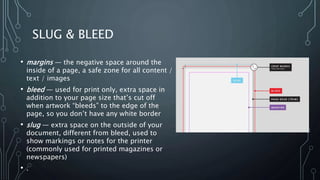
SLUG & BLEED
• margins — the negative space around the
inside of a page, a safe zone for all content /
text / images
• bleed — used for print only, extra space in
addition to your page size that’s cut off
when artwork “bleeds” to the edge of the
page, so you don’t have any white border
• slug — extra space on the outside of your
document, different from bleed, used to
show markings or notes for the printer
(commonly used for printed magazines or
newspapers)
• .
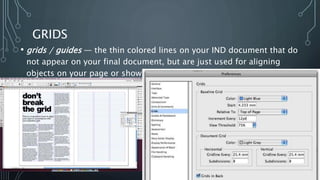
GRIDS
• grids / guides — the thin colored lines on your IND document that do
not appear on your final document, but are just used for aligning
objects on your page or showing where the margins are placed
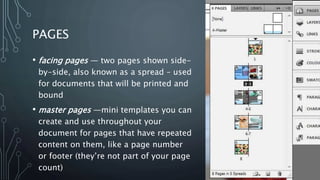
PAGES
• facing pages — two pages shown side-
by-side, also known as a spread – used
for documents that will be printed and
bound
• master pages —mini templates you can
create and use throughout your
document for pages that have repeated
content on them, like a page number
or footer (they’re not part of your page
count)
TYPE SET UP
• character / paragraph styles
— a pre-set of settings and
formatting that can be
applied to a word, a line of
text, or an entire paragraph
in one click
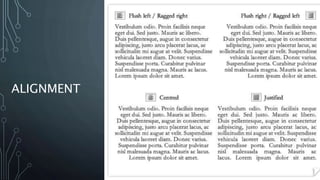
• justification — alignment of
either one or both edges of
your text to either left,
right, center, left justify,
right justify, center justify,
or full justify
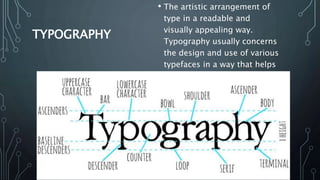
TYPOGRAPHY
• The artistic arrangement of
type in a readable and
visually appealing way.
Typography usually concerns
the design and use of various
typefaces in a way that helps
to better visually
communicate ideas.
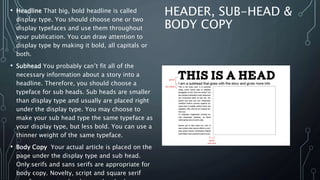
HEADER, SUB-HEAD &
BODY COPY
• Headline That big, bold headline is called
display type. You should choose one or two
display typefaces and use them throughout
your publication. You can draw attention to
display type by making it bold, all capitals or
both.
• Subhead You probably can’t fit all of the
necessary information about a story into a
headline. Therefore, you should choose a
typeface for sub heads. Sub heads are smaller
than display type and usually are placed right
under the display type. You may choose to
make your sub head type the same typeface as
your display type, but less bold. You can use a
thinner weight of the same typeface.
• Body Copy Your actual article is placed on the
page under the display type and sub head.
Only serifs and sans serifs are appropriate for
body copy. Novelty, script and square serif
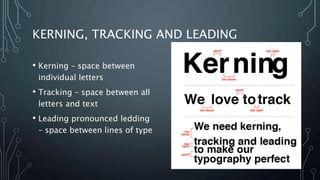
KERNING, TRACKING AND LEADING
• Kerning – space between
individual letters
• Tracking – space between all
letters and text
• Leading pronounced ledding
– space between lines of type
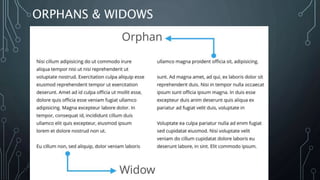
ORPHANS & WIDOWS
ALIGNMENT
PULL QUOTE
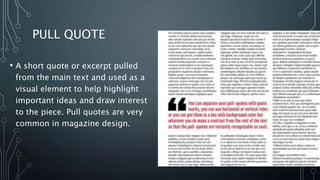
• A short quote or excerpt pulled
from the main text and used as a
visual element to help highlight
important ideas and draw interest
to the piece. Pull quotes are very
common in magazine design.
SERIF
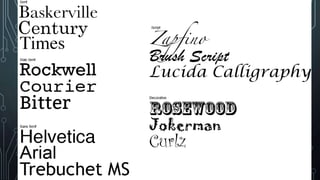
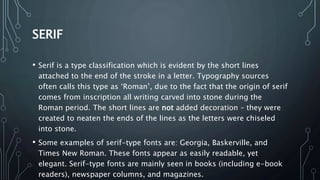
• Serif is a type classification which is evident by the short lines
attached to the end of the stroke in a letter. Typography sources
often calls this type as ‘Roman’, due to the fact that the origin of serif
comes from inscription all writing carved into stone during the
Roman period. The short lines are not added decoration – they were
created to neaten the ends of the lines as the letters were chiseled
into stone.
• Some examples of serif-type fonts are: Georgia, Baskerville, and
Times New Roman. These fonts appear as easily readable, yet
elegant. Serif-type fonts are mainly seen in books (including e-book
readers), newspaper columns, and magazines.
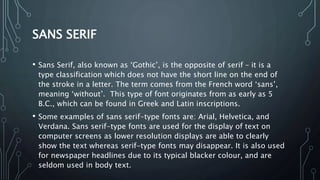
SANS SERIF
• Sans Serif, also known as ‘Gothic’, is the opposite of serif – it is a
type classification which does not have the short line on the end of
the stroke in a letter. The term comes from the French word ‘sans’,
meaning ‘without’. This type of font originates from as early as 5
B.C., which can be found in Greek and Latin inscriptions.
• Some examples of sans serif-type fonts are: Arial, Helvetica, and
Verdana. Sans serif-type fonts are used for the display of text on
computer screens as lower resolution displays are able to clearly
show the text whereas serif-type fonts may disappear. It is also used
for newspaper headlines due to its typical blacker colour, and are
seldom used in body text.
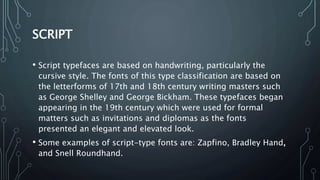
SCRIPT
• Script typefaces are based on handwriting, particularly the
cursive style. The fonts of this type classification are based on
the letterforms of 17th and 18th century writing masters such
as George Shelley and George Bickham. These typefaces began
appearing in the 19th century which were used for formal
matters such as invitations and diplomas as the fonts
presented an elegant and elevated look.
• Some examples of script-type fonts are: Zapfino, Bradley Hand,
and Snell Roundhand.
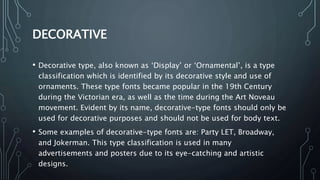
DECORATIVE
• Decorative type, also known as ‘Display’ or ‘Ornamental’, is a type
classification which is identified by its decorative style and use of
ornaments. These type fonts became popular in the 19th Century
during the Victorian era, as well as the time during the Art Noveau
movement. Evident by its name, decorative-type fonts should only be
used for decorative purposes and should not be used for body text.
• Some examples of decorative-type fonts are: Party LET, Broadway,
and Jokerman. This type classification is used in many
advertisements and posters due to its eye-catching and artistic
designs.
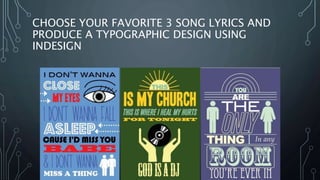
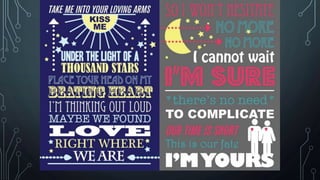
CHOOSE YOUR FAVORITE 3 SONG LYRICS AND
PRODUCE A TYPOGRAPHIC DESIGN USING
INDESIGN
Design and  type terms explained

Design and type terms explained

  • 1.
    DESIGN & TYPETERMS EXPLAINED JO LOWES
  • 2.
    SLUG & BLEED •margins — the negative space around the inside of a page, a safe zone for all content / text / images • bleed — used for print only, extra space in addition to your page size that’s cut off when artwork “bleeds” to the edge of the page, so you don’t have any white border • slug — extra space on the outside of your document, different from bleed, used to show markings or notes for the printer (commonly used for printed magazines or newspapers) • .
  • 3.
    GRIDS • grids /guides — the thin colored lines on your IND document that do not appear on your final document, but are just used for aligning objects on your page or showing where the margins are placed
  • 4.
    PAGES • facing pages— two pages shown side- by-side, also known as a spread – used for documents that will be printed and bound • master pages —mini templates you can create and use throughout your document for pages that have repeated content on them, like a page number or footer (they’re not part of your page count)
  • 5.
    TYPE SET UP •character / paragraph styles — a pre-set of settings and formatting that can be applied to a word, a line of text, or an entire paragraph in one click • justification — alignment of either one or both edges of your text to either left, right, center, left justify, right justify, center justify, or full justify
  • 6.
    TYPOGRAPHY • The artisticarrangement of type in a readable and visually appealing way. Typography usually concerns the design and use of various typefaces in a way that helps to better visually communicate ideas.
  • 7.
    HEADER, SUB-HEAD & BODYCOPY • Headline That big, bold headline is called display type. You should choose one or two display typefaces and use them throughout your publication. You can draw attention to display type by making it bold, all capitals or both. • Subhead You probably can’t fit all of the necessary information about a story into a headline. Therefore, you should choose a typeface for sub heads. Sub heads are smaller than display type and usually are placed right under the display type. You may choose to make your sub head type the same typeface as your display type, but less bold. You can use a thinner weight of the same typeface. • Body Copy Your actual article is placed on the page under the display type and sub head. Only serifs and sans serifs are appropriate for body copy. Novelty, script and square serif
  • 8.
    KERNING, TRACKING ANDLEADING • Kerning – space between individual letters • Tracking – space between all letters and text • Leading pronounced ledding – space between lines of type
  • 9.
  • 10.
  • 11.
    PULL QUOTE • Ashort quote or excerpt pulled from the main text and used as a visual element to help highlight important ideas and draw interest to the piece. Pull quotes are very common in magazine design.
  • 13.
    SERIF • Serif isa type classification which is evident by the short lines attached to the end of the stroke in a letter. Typography sources often calls this type as ‘Roman’, due to the fact that the origin of serif comes from inscription all writing carved into stone during the Roman period. The short lines are not added decoration – they were created to neaten the ends of the lines as the letters were chiseled into stone. • Some examples of serif-type fonts are: Georgia, Baskerville, and Times New Roman. These fonts appear as easily readable, yet elegant. Serif-type fonts are mainly seen in books (including e-book readers), newspaper columns, and magazines.
  • 14.
    SANS SERIF • SansSerif, also known as ‘Gothic’, is the opposite of serif – it is a type classification which does not have the short line on the end of the stroke in a letter. The term comes from the French word ‘sans’, meaning ‘without’. This type of font originates from as early as 5 B.C., which can be found in Greek and Latin inscriptions. • Some examples of sans serif-type fonts are: Arial, Helvetica, and Verdana. Sans serif-type fonts are used for the display of text on computer screens as lower resolution displays are able to clearly show the text whereas serif-type fonts may disappear. It is also used for newspaper headlines due to its typical blacker colour, and are seldom used in body text.
  • 15.
    SCRIPT • Script typefacesare based on handwriting, particularly the cursive style. The fonts of this type classification are based on the letterforms of 17th and 18th century writing masters such as George Shelley and George Bickham. These typefaces began appearing in the 19th century which were used for formal matters such as invitations and diplomas as the fonts presented an elegant and elevated look. • Some examples of script-type fonts are: Zapfino, Bradley Hand, and Snell Roundhand.
  • 16.
    DECORATIVE • Decorative type,also known as ‘Display’ or ‘Ornamental’, is a type classification which is identified by its decorative style and use of ornaments. These type fonts became popular in the 19th Century during the Victorian era, as well as the time during the Art Noveau movement. Evident by its name, decorative-type fonts should only be used for decorative purposes and should not be used for body text. • Some examples of decorative-type fonts are: Party LET, Broadway, and Jokerman. This type classification is used in many advertisements and posters due to its eye-catching and artistic designs.
  • 17.
    CHOOSE YOUR FAVORITE3 SONG LYRICS AND PRODUCE A TYPOGRAPHIC DESIGN USING INDESIGN